

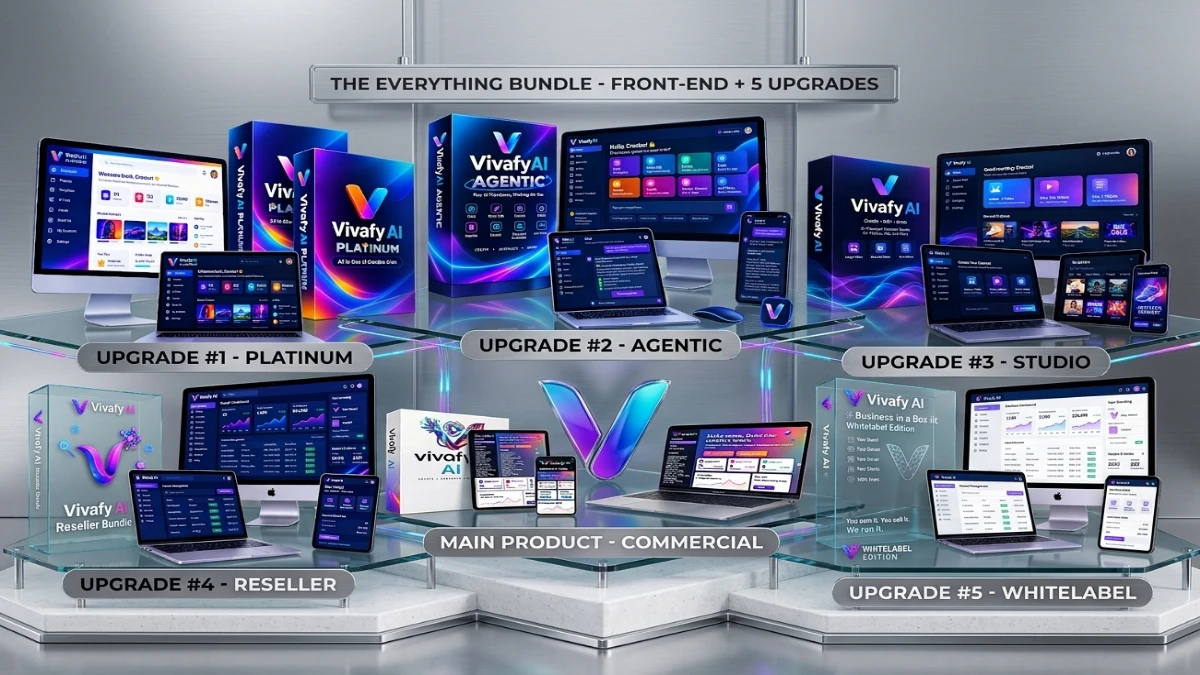
Vivafy AI Everything Bundle combines 13+ AI creative tools with five upgrades for generating images, videos, comics, book covers, landing pages, and ad campaigns. The code VIVAFY50 offers $50 off, and a 30-day money-back guarantee is advertised. However, pricing, credit usage, underlying AI models, and output quality remain unverified. It may suit freelancers, agencies, and self-publishers, but buyers should confirm checkout terms and test the platform before committing.
If you’ve spent any time around AI creative tools, you know the routine. One subscription for images, another for video, a third for copywriting, and a fourth for landing pages. Before you’ve finished a single client project, you’re paying for four logins.
Vivafy AI pitches itself as the fix: one dashboard for images, videos, comics, books, landing pages and ad campaigns. The “Everything Bundle” goes further and puts the main platform plus five upgrades into a single checkout, with the code VIVAFY50 taking $50 off.
I went through the bundle offer page line by line, compared it with what similar tools deliver, and picked out the claims worth questioning. This review covers what you get, what’s unproven, and who should and shouldn’t buy.
Transparency note: This review is based on the vendor’s official bundle page. I haven’t run a full hands-on test of the platform, and I won’t invent test results. I’ll say clearly where a claim comes from the sales page and where I’m giving my own judgment.
Quick Verdict
Vivafy AI Everything Bundle is an all-in-one AI creative platform with 13+ tools, covering image and video generation, comics, book covers, landing pages and AI-built ad campaigns. The bundle adds five upgrades: Platinum credits, an Agentic chat director, a video editor, a reseller license and a whitelabel edition.
Best for: freelancers, small agencies, KDP self-publishers and e-commerce sellers who want to replace several subscriptions with one.
Not ideal for: anyone who needs broadcast-quality video, strict brand control, or a proven track record before spending money.
My impression: The feature list is ambitious and the bundle structure is genuinely convenient. The page leaves out key details, though: pricing on the page itself, the creator’s name, which AI models run underneath, and how credits work. Until you’ve confirmed those, treat it as a promising but unverified buy. The 30-day guarantee lowers the risk considerably.
Product Overview
| Detail | Information |
|---|---|
| Product Name | Vivafy AI Everything Bundle |
| Category | AI creative and marketing platform (SaaS) |
| Creator | Not named on the sales page |
| Launch Date | Not stated (the page footer shows © 2026) |
| Price | Not shown on the page; discount code VIVAFY50 takes $50 off |
| Refund Policy | 30-day money-back guarantee |
| Retailer | JVZoo |
| Website | Official Vivafy AI bundle page |
| Best For | Freelancers, agencies, KDP publishers, e-commerce sellers |
| Overall Rating | 3.5/5 (provisional, based on the offer rather than long-term use) |
What Is Vivafy AI?
Vivafy AI is a web-based creative suite built around a simple idea: you shouldn’t need a separate tool for every type of content. You type a prompt, upload a reference image or paste a product link, and the platform produces the asset.
The page lists these categories:
- Visuals: text-to-image, chat-to-image and AI infographics
- Video: image-to-video, text-to-video and an AI avatar presenter
- Publishing: book cover generator, coloring book generator, one-click comics and a story generator
- Marketing: landing page builder, marketing copywriter and Agentic AI Ads
- Support tools: Prompt Studio and an Agentic AI assistant
The problem it targets is real. Anyone producing content for clients or for their own brand knows the pain of exporting from one tool, reformatting, and importing into another. Vivafy’s argument is that one platform with shared context keeps everything consistent, from the visuals to the copy.
The Everything Bundle vs. the Front-End
You can buy the base product (Vivafy AI Commercial) alone. The bundle includes the front-end plus all five upgrades that are normally offered one at a time during the checkout funnel. If you plan to buy most of them anyway, the bundle saves you from clicking through upsell pages. If you only need the basics, the front-end alone may be enough.
Main Features
Image-to-Video and Text-to-Video
You can upload a still image, describe the motion and get a short video. Or you can describe a full scene and get a clip with transitions and narration.
Practical example: An e-commerce seller uploads a product photo and asks for a slow zoom with soft lighting, producing a short social ad without touching an editing program.
AI video quality varies a lot between tools. The sales page uses the word “cinematic,” but marketing language isn’t evidence. Check sample outputs against the footage you actually need before you rely on it.
Text-to-Image and Chat-to-Image
Text-to-image is standard. Chat-to-image is more useful in practice, because you generate a picture and then refine it with follow-up messages (“make the background darker,” “change the outfit”). That feels more natural than rewriting a prompt from scratch.
AI Infographics
You enter a keyword, store link or product description. The tool researches, structures the content, adds charts and icons, and exports a finished infographic as PNG, JPG or PDF.
This is one of the more interesting features for content marketers. It’s also the one where I’d verify accuracy, because AI-gathered stats still need a human fact-check before publishing.
Book Cover, Coloring Book and Comic Generators
These target self-publishers. The page says covers are optimized for Amazon KDP, and the comic generator promises consistent characters across panels. Character consistency is one of the hardest problems in AI illustration, so I’d test that claim with a multi-page comic before building a business on it.
AI Avatar Presenter
You describe a video and an AI presenter delivers it, so you need no camera or studio. It suits explainers, course intros and sales videos. Avatar tools of this kind work best for short, informational content and can feel stiff in longer or emotional pieces.
Landing Page Builder and Marketing Copywriter
Enter a product idea and the builder generates headlines, body copy, sections, calls to action and images for a responsive page. The copywriter produces platform-specific ad copy for Facebook, Instagram, Google, TikTok and email.
Agentic AI Ads
You paste a product URL, and the AI analyzes the product, builds a strategy, writes copy, generates visuals and produces ad variations. If it works as described, this is the headline feature for anyone running paid traffic. It’s also the one I’d test hardest, since “autonomous campaign builder” is an easy promise to make and a hard one to deliver.
The Five Upgrades Included in the Bundle
| Upgrade | What the page says it adds | Who benefits |
|---|---|---|
| Platinum | 30,000 welcome credits, premium model access, extended commercial rights, priority processing, template library | Heavy users who don’t want to ration credits |
| Agentic | Plain-English “AI director,” in-chat editing, brand memory, batch creation | People producing lots of on-brand content |
| Studio Edition | Multi-track editor, videos up to 5 minutes, separate tracks for video, music, voiceover and text, type-to-voice, overlays, one-click resize | Video-focused creators |
| Reseller License | Unlimited reseller licenses, your own price and checkout, client portal, hosting and support handled by the vendor | Agency owners and software resellers |
| Whitelabel | Full rebrand with your logo and domain, managed server, updates and 24/7 support, keep 100% of sales | People who want to run it as their own SaaS |
The first three upgrades make the tool more useful for your own work. The last two are business-model upgrades for people who want to resell the software itself. That distinction matters, because many buyers will never use the Reseller or Whitelabel license.
Benefits: What You Actually Gain
Features are only useful if they change something. Based on what the platform claims, here’s where the value could show up:
- Fewer subscriptions. If Vivafy replaces even two or three paid tools, the bundle can pay for itself.
- Faster delivery. Producing images, copy, video and a landing page in one place cuts the export-and-reformat loop that eats hours.
- Consistent branding. Shared context across assets means your ads, pages and videos look like they belong together.
- Commercial rights. The page states you can use and sell what you create and keep 100% of the revenue. Read the actual license terms before building client work on it.
- Lower barrier for beginners. Typing a sentence or pasting a link is far easier than learning design software.
My Experience
This is the section where I have to be straight with you. Most review sites would write a detailed “I tested this for 30 days” narrative here. I haven’t run Vivafy AI through that kind of test, so I won’t pretend I have.
What I did do was go through the bundle page carefully, check each claim against what comparable platforms typically deliver, and note what’s missing. Here’s my read:
What looks promising
- The workflow is described as three steps (input, autopilot, export), which suggests a clean, beginner-friendly interface.
- Pasting a product link and getting a full ad campaign is a practical use case that saves real time if the output is decent.
- The bundle structure removes the usual upsell maze, so the buying experience should be simpler.
What I’d want to test before trusting it
- Generation speed: The page claims minutes, but never gives a benchmark.
- Output quality: Are the videos usable as client work, or just good for social posts?
- Character consistency: Does a comic keep the same face across ten pages?
- Credit consumption: How fast do the 30,000 Platinum credits drain on video?
- Reliability: Do long renders fail, and does support respond?
If you buy and test it during the 30-day window, run each of those checks in the first few days. That way you can still get a refund if the quality doesn’t hold up.
Ease of Use
Learning curve: The page emphasizes that no design or technical skills are required and that you don’t need prompt engineering. That’s plausible for the basic tools. The Studio Edition’s multi-track timeline will naturally take more time to learn, as any video editor does.
Interface: Everything lives in one dashboard, according to the vendor. That’s a real advantage over juggling tabs, assuming the dashboard is well organized.
Documentation: The page doesn’t mention tutorials, a knowledge base or training videos. Check what support material exists before buying, particularly if you’re new to AI tools.
Beginner friendliness: Good on paper. The Prompt Studio and Agentic chat approach should help newcomers, because you can describe what you want in plain English.
Performance
I can’t give you honest speed or stability numbers, and I’d be suspicious of any review that gives them without showing its testing method. What I can tell you is what to measure:
- Render time for a 30-second video clip
- Image quality at the resolution you need for print or ads
- Failure rate on complex prompts
- Credit cost per video and per image batch
- Server stability during peak hours
The vendor says Platinum includes “priority processing,” which implies the standard tier may queue during busy times. That’s worth knowing if you work to client deadlines.
Pricing
The page I reviewed doesn’t show the bundle price. It confirms only that the code VIVAFY50 takes $50 off the bundle at checkout. Because JVZoo sells the product, the live price appears at checkout, and launch prices often change after the launch window.
What to check at checkout:
- The final price after applying VIVAFY50
- Whether there are recurring fees, for example for credits, hosting or the Whitelabel server
- What happens when your credits run out
- Whether the commercial license covers client work and resale
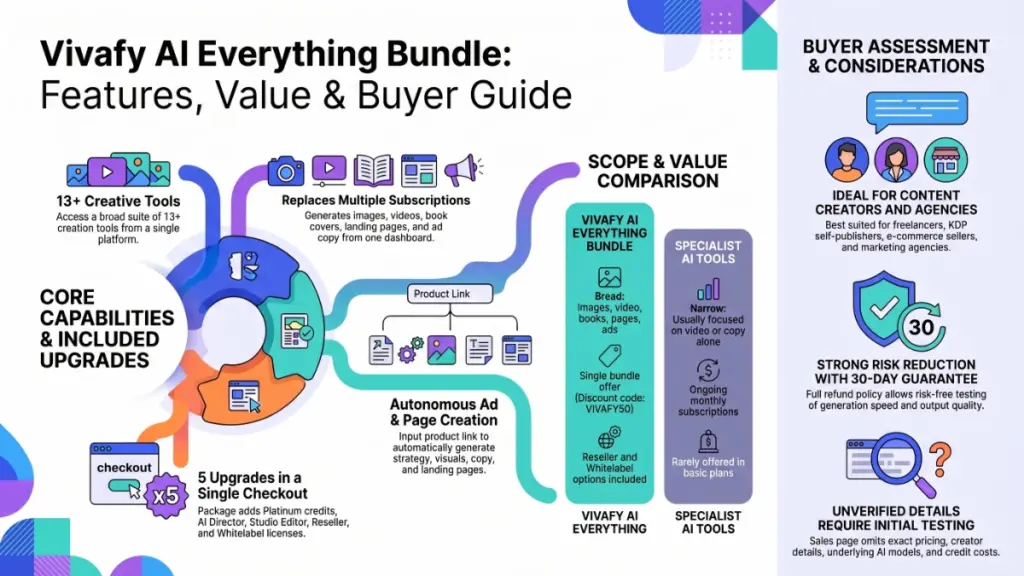
The page claims “no hidden fees” in its FAQ, but I’d confirm the credit and renewal terms in writing before paying.
Value for money: The bundle makes sense if you’d buy at least the front-end plus two or three upgrades. It makes little sense if you only want an image generator, since you’d pay for Reseller and Whitelabel rights you may never use.
Pros
- Wide toolset in one place. More than 13 tools covering images, video, books, comics, copy and landing pages.
- Bundle convenience. The front-end and all five upgrades arrive in one checkout.
- Commercial rights. The vendor states you can sell your creations and keep 100%.
- Practical automation. Agentic AI Ads and the landing page builder target real revenue tasks.
- Publishing focus. KDP covers, coloring books and comics serve a niche that general AI tools often ignore.
- 30-day money-back guarantee. It reduces the financial risk of testing the claims yourself.
- Reseller and Whitelabel paths. These give you a way to build a software business if you want one.
Cons
- No price on the page. You have to reach checkout to see what you’re paying.
- Anonymous creator. The page doesn’t name the people behind the product, which makes it harder to judge their track record.
- Unnamed AI models. The page doesn’t say which models power the generation, so quality is hard to predict.
- Credit system unclear. Only the Platinum credit allowance (30,000) is stated, with no clear explanation of what each task costs.
- Self-assessed comparison. The competitor table is the vendor’s own, and the page admits third-party features may change.
- Unverified social proof. The testimonials carry names and job titles but no links, photos or verifiable details. The 78% video statistic has no cited source.
- Income language. The “multiple income streams” section is paired with a disclaimer saying results aren’t guaranteed. Treat any income potential as a possibility, not a promise.
- Two upgrades won’t suit everyone. Reseller and Whitelabel only matter if you plan to sell the software.
Comparison With Competitors
The vendor’s table compares Vivafy against HeyGen, TopView.AI, Artist.AI and InVideo AI. Its main claim is that only Vivafy includes landing page creation, and that the others lack some of the story and visual content features.
| Factor | Vivafy AI | Specialist tools (e.g., HeyGen, InVideo AI) |
|---|---|---|
| Scope | Broad: images, video, books, comics, pages, ads | Narrower, usually focused on video |
| Depth | Unproven; breadth may mean shallower tools | Often deeper in their specialty |
| Pricing model | Bundle offer with one-time purchase options (confirm at checkout) | Typically monthly subscriptions |
| Resale rights | Reseller and Whitelabel included in the bundle | Rarely offered |
| Track record | Newer, unproven | Established user bases and reviews |
My take: The trade-off is the familiar one between a generalist suite and specialist tools. A dedicated video platform will usually go deeper on video. Vivafy’s appeal is convenience and cost. Whether the quality is good enough depends on your standards, and you’ll only know by testing.
Who Should Buy It?
- Freelancers and small agencies who want one tool to cover ads, visuals and landing pages for clients
- KDP self-publishers making covers, coloring books and illustrated books
- E-commerce sellers who need constant fresh ad creatives and product videos
- Content marketers producing infographics and social content in volume
- Aspiring SaaS resellers who want to sell software under their own brand without building it
Who Should Skip It?
- Anyone who needs top-tier video. Dedicated video tools may serve you better.
- Buyers who only need one feature, such as images or avatars
- People who want proof before paying. If you need long-term user reviews, wait.
- Anyone expecting guaranteed income. The page itself disclaims that.
- Strict-brand teams that need precise control over every pixel
Frequently Asked Questions
What is the Vivafy AI Everything Bundle?
It’s a single-checkout package containing Vivafy AI Commercial plus five upgrades: Platinum, Agentic, Studio Edition, Reseller License and Whitelabel.
How much does it cost?
The page doesn’t display a price. It does show the code VIVAFY50 for $50 off. Check the live checkout for the current figure.
Does Vivafy AI have a money-back guarantee?
Yes. The vendor offers a 30-day money-back guarantee. Read the refund terms at checkout.
Do I need design or technical skills?
The vendor says no. You describe what you want or paste a link, and the AI handles the rest. Video editing in the Studio Edition will take some practice.
Can I sell what I create?
The page says yes, with full commercial rights and no royalties. Read the license terms before delivering client work.
Will exports have watermarks?
The page says white-label exports have no watermarks.
Is the Reseller License the same as the Whitelabel edition?
No. Reseller lets you sell Vivafy AI under your name with the vendor hosting the platform. Whitelabel rebrands it with your logo and domain on your own managed server.
Can I make money with Vivafy AI?
It’s possible through client services, ad creatives or content retainers, but the vendor states there’s no income guarantee. Results depend on your effort, market and offer.
Is the bundle better than buying only the front-end?
It depends on how many upgrades you’d use. If you’d want most of them anyway, the bundle is simpler and likely cheaper. If not, start with the front-end.
🎁 Free Gift Waiting for You!
Before you leave, there’s a free gift waiting for you.
As a thank-you for reading, you can claim my Ultimate All-In-One Digital Marketing Package completely FREE.
🎉 What’s Inside Your Ultimate All-In-One Package
01. 50 AI Digital Product Ideas
A curated collection of highly profitable AI-powered digital product ideas designed for quick implementation and strong profit potential.
02. Digital Sales Mastery
Discover the proven framework behind high-converting sales funnels, persuasive copywriting, and sustainable online revenue growth.
03. Mastering Email List
Advanced strategies for building an engaged email audience, increasing open rates, improving click-through rates, and generating automated income.
04. The Ultimate Faceless Playbook
A complete blueprint for building a profitable online brand and growing on social media without ever showing your face.
🎁 BONUS: Premium Canva Marketing Vault
A premium library of high-converting Canva templates to help you create professional marketing assets, generate more organic traffic, and boost conversions.
💥 Total Package Value: $197
✅ Yours Today: FREE
Claim your complimentary bundle and get instant access to premium resources that can help you create, market, and grow your online business more effectively.
Final Verdict
Is the $50 discount worth grabbing? It depends on who you are.
If you run client work, publish on KDP, or produce ad creatives regularly, the bundle’s breadth could replace several subscriptions, and the 30-day guarantee gives you room to find out. The Agentic Ads and landing page tools are the features I’d test first, because they tie most directly to revenue.
If you’re a casual user or want one specialty tool, the bundle is more than you need. Start with the front-end, or look at a dedicated platform.
Would I recommend it? Conditionally. I’d recommend it to someone willing to test it hard in the first week and request a refund if quality, credits or support disappoint. I wouldn’t recommend it to someone expecting the sales page’s claims to hold without checking them.
Before you buy, do this:
- Confirm the final price after the VIVAFY50 code.
- Look up the credit rules and renewal terms.
- Test video quality, comic consistency and ad output in the first few days.
- Keep the refund deadline in your calendar.