


Disclosure: This article may contain affiliate links. If you buy through one, I may earn a commission at no extra cost to you. It doesn’t change my assessment, and the drawbacks are covered in full below.
AI Traffic Secrets is a WordPress plugin that automates blog writing, image generation, SEO metadata, and scheduled publishing. Starting at $27, it offers useful features and a 60-day money-back guarantee. However, users must cover their own AI API costs, monitor content quality, and avoid relying on unverified traffic claims. It’s best for bloggers and affiliate marketers willing to review AI-generated posts before publication.
Publishing a good blog post every day is brutal. Most people who try it burn out within a month, and the ones who hire writers quickly discover that $50 or more per article eats their margins before the site earns anything.
That’s the gap AI Traffic Secrets claims to fill. It’s a WordPress plugin that writes, illustrates, scores, and publishes a full article every day from a keyword list you set up once. The sales page is bold about the results, and I’ve been reviewing AI tools long enough to be cautious with bold.
So I went through the product page line by line, looked at what the plugin actually promises, checked the pricing and guarantee, and compared it against the other ways of solving the same problem. This review covers what it does, what it costs, where the claims hold up, where they need a closer look, and who should (and shouldn’t) buy it.
Quick Verdict
AI Traffic Secrets is a low-cost, genuinely feature-rich auto-blogging plugin for WordPress, and it’s priced low enough that the 60-day refund makes it a fair experiment. It goes further than most auto-posters: it grades each post on a 100-point system, adds schema markup, writes SEO meta for the major plugins, and generates images.
The catch is that “set it and forget it” is a risky way to run any website. Unattended AI publishing can work, but it works best when a human reviews what goes live, and the traffic numbers on the sales page come from the vendor’s own sites, not from independent buyers.
Best for: bloggers, affiliate marketers, and niche-site owners who want a steady publishing engine and are willing to monitor quality.
My rating: 7.5 out of 10 (based on the documented features, pricing, guarantee, and risk profile; see the note under “My Experience” for how this was assessed).
Product Overview
| Detail | Information |
|---|---|
| Product Name | AI Traffic Secrets |
| Category | WordPress AI auto-blogging plugin |
| Creator | Not named on the sales page (the Agency plan includes “AI Weekly Live” training) |
| Launch Date | Not specified by the vendor |
| Price | From $27 (Starter), $67 (Professional), $97 (Agency) |
| Refund Policy | 60-day money-back guarantee via support ticket |
| Website | Official sales page (sold through ClickBank) |
| Best For | Bloggers, niche-site builders, affiliate marketers, agencies |
| My Rating | 7.5 / 10 |
What Is AI Traffic Secrets?
AI Traffic Secrets is a plugin that turns a WordPress site into a scheduled content publisher. You install it, paste in your own AI API key (OpenAI or Anthropic Claude), add a list of keywords, and set a daily schedule. From there it generates and publishes articles without you touching a draft.
Each article is meant to be a complete post of roughly 1,500 to 1,900 words, with a featured image, in-content images, internal links, calls to action, and FAQ and Article schema. Before publishing, every post is scored on a seven-dimension, 100-point SEO system.
The problem it targets
Anyone who has tried to run a content site knows the pattern. Consistency is what builds traffic, but consistency is the hardest part. The vendor’s pitch is that most auto-blogging tools fail because they churn out thin, duplicated, 300-word filler, while this one produces longer, structured, scored posts.
That’s a reasonable diagnosis. Whether the product fully solves it is a separate question, and I’ll get to that.
What it is not
It is not a hosted service. It’s a plugin, which means it only runs on WordPress. If your site is on Shopify, Wix, Webflow, or a custom stack, this isn’t for you.
It also doesn’t include AI usage. You bring your own OpenAI or Claude API key, and you pay those providers directly. That’s a benefit for cost control and a responsibility for budgeting, and I’ll cover both in the pricing section.
Main Features
The sales page lists nine features that come with every plan. Here’s what each one does and why it matters in practice.
1. Daily AI blog posts on autopilot
The core feature. Once your schedule is set, the plugin publishes a new article each day. The page states posts run between 1,500 and 1,900 words.
For a niche site, daily publishing is a serious pace. A blog that goes from zero to 30 articles in a month builds topical coverage quickly, provided the articles are actually useful.
2. Choice of OpenAI (GPT-4o) or Anthropic Claude
You choose which AI writes your content. This matters more than it sounds. Different models have different writing styles and different per-post costs, so being able to switch lets you test which one fits your niche and budget.
Because you use your own key, you’re not locked into the vendor’s markup on AI usage.
3. AI-generated featured and in-content images
The plugin uses OpenAI’s image model (listed as gpt-image-1) to create a featured image and images within the article. Posts with no visuals look unfinished, so this saves a real step.
The trade-off: generated images vary in quality and they carry their own API cost. You’ll want to look at several before trusting them on a brand you care about.
4. Automatic SEO meta for Rank Math, Yoast, and AIOSEO
Title tags and meta descriptions are written and pushed into whichever of the three big SEO plugins you use. If you already run one of them, this fits into your existing setup rather than replacing it.
5. Seven-dimension, 100-point SEO scoring
This is the feature the vendor leans on most. Each post is graded before publishing. The sales page doesn’t spell out the seven dimensions, so I can’t tell you exactly what’s measured or how strict the threshold is.
A scoring system is only valuable if low-scoring posts are actually held back or improved. That’s worth confirming in your first week of use.
6. One-click SEO Fixer for older posts
Beyond new content, the plugin can reportedly revisit older posts and improve them. If you have a back catalog of mediocre posts, that’s a handy cleanup tool.
7. Internal links, CTAs, and FAQ and Article schema
Schema markup helps search engines and AI answer systems understand a page. Internal links help distribute authority around your site. Having both added automatically is a time-saver, though it’s worth checking that the links it chooses are relevant.
8. Instagram and TikTok social snippets
Each post also produces an image, caption, and hashtags for social platforms. It’s a small bonus, but for people repurposing content it removes one more chore.
9. Keyword queue scheduler with weekly no-repeat
You enter keywords once, and the scheduler cycles through them while avoiding repeats within a week. The vendor says it “never runs out of ideas,” which I’d treat as a claim about the cycling mechanism rather than a guarantee that every post will feel fresh.
Benefits: What You Actually Get Out of It
Features are just inputs. Here’s what they translate into.
Time back. A daily article by hand takes hours of research, writing, formatting, image sourcing, and SEO setup. Automating that to a one-time configuration is the headline benefit.
Lower content costs. The vendor compares a few cents of AI usage per post to the $50 or more a freelance writer charges. The exact cost depends on current API pricing, the model you choose, and how many images you generate, so check the providers’ pricing pages before assuming a number. Even so, the gap against hiring writers is large.
Consistency. Search engines tend to reward sites that publish steadily. A schedule that runs while you’re asleep or busy prevents the dry spells that stall most blogs.
Technical SEO handled. Meta tags, schema, and internal links are details that beginners skip. Having them applied automatically removes common gaps.
Scale across sites. With the Professional and Agency plans, you can run the same system across 10 or unlimited WordPress sites. For anyone managing multiple niche sites or client blogs, that’s where the economics get interesting.
My Experience
Here’s where I need to be direct with you, because trust matters more than polish.
I evaluated AI Traffic Secrets by working through the full sales page, the feature list, the plan structure, the refund terms, and the traffic claims, and by comparing all of it against how similar tools behave and how Google treats automated content. I’m not going to invent a month of publishing logs, load-time measurements, or screenshots that I didn’t produce. If a reviewer gives you exact numbers they never collected, they’re selling you something.
What follows is a mix of what the product documents and what I’d expect to scrutinize in a real deployment.
Setup
The vendor’s description is straightforward: install the plugin, paste your API key, add keywords, set a schedule. For anyone who has installed a WordPress plugin before, that’s a short process. The one extra step is creating an API account with OpenAI or Anthropic and adding billing, which beginners sometimes find fiddly.
Interface and workflow
The page references a dashboard, documentation, and a support center, which suggests there’s a proper admin area rather than a bare settings screen. I can’t describe the exact layout because I haven’t verified it, and I’d rather leave it at that than guess.
What impressed me on paper
- The scoring step is a good idea. Most auto-bloggers publish whatever comes out of the model.
- Writing SEO meta directly into Rank Math, Yoast, and AIOSEO shows the developer thought about real WordPress setups.
- Letting you choose between two major AI providers, using your own key, keeps costs transparent.
What made me cautious
- The traffic proof comes from sites the vendor says it installed the plugin on. There’s no independent customer data on the page.
- “Set it and forget it” is the promise, but fully unattended publishing is exactly where AI content tends to go wrong: factual slips, repetitive structure, off-topic angles.
- The scoring system is described but not detailed, so I can’t tell how strict it is.
If you’ve used the plugin yourself, the right thing to do is replace this section with your own notes on setup time, post quality, image quality, and any errors you hit. First-hand details are what make a review valuable, and I’d rather this section be honest than impressive.
Ease of Use
Learning curve
Low. The workflow is four steps: install, paste a key, add keywords, schedule. You don’t need writing or SEO skills to get posts publishing.
The harder skill isn’t operating the plugin, it’s choosing good keywords. The output is only as targeted as the topics you feed in, so a little keyword research up front makes a bigger difference than any setting.
User interface and documentation
The sales page links to Docs and a Support Center, and the refund process runs through a ticket there. That’s a good sign for documentation and support existing, but I can’t judge their depth without using them.
Beginner friendliness
Good in principle. Because no writing is required, it’s accessible to newcomers. The risk for beginners is the opposite one: it’s easy to assume the plugin has everything covered and skip the review step that protects site quality.
Performance
I can’t give you honest speed benchmarks or uptime figures, so here’s what I can tell you about how to judge performance yourself.
Speed of generation. Long articles with several images take time to generate. Because it runs on a schedule, that matters less than it would in a tool you sit and watch.
Reliability. Anything that depends on third-party APIs depends on them being up and within your account limits. If your API key runs out of credit, the daily post stops. Set a billing alert.
Output stability. The real performance question is whether post 5 and post 50 are as good as post 1. Auto-bloggers often start strong and then get repetitive. Check your archive after a few weeks.
Site impact. Daily images and posts add to your media library. Make sure your hosting and image optimization can keep up.
About the traffic results
The sales page shows five sites with growth in unique visitors: for example, one from 442 to 1,090 in a month, another from 8,863 to 23,554 over several months, and another that roughly doubled from 8,912 to 17,886.
Those are interesting, and the vendor correctly includes a disclaimer that results vary. But there are things I’d want to know before treating them as predictive. What other changes were made to those sites? What niches and domain ages are involved? Were the posts reviewed by hand? And what happened to rankings later?
Traffic that rises after an install is not automatically caused by the install. Treat these as examples, not forecasts.
Pricing
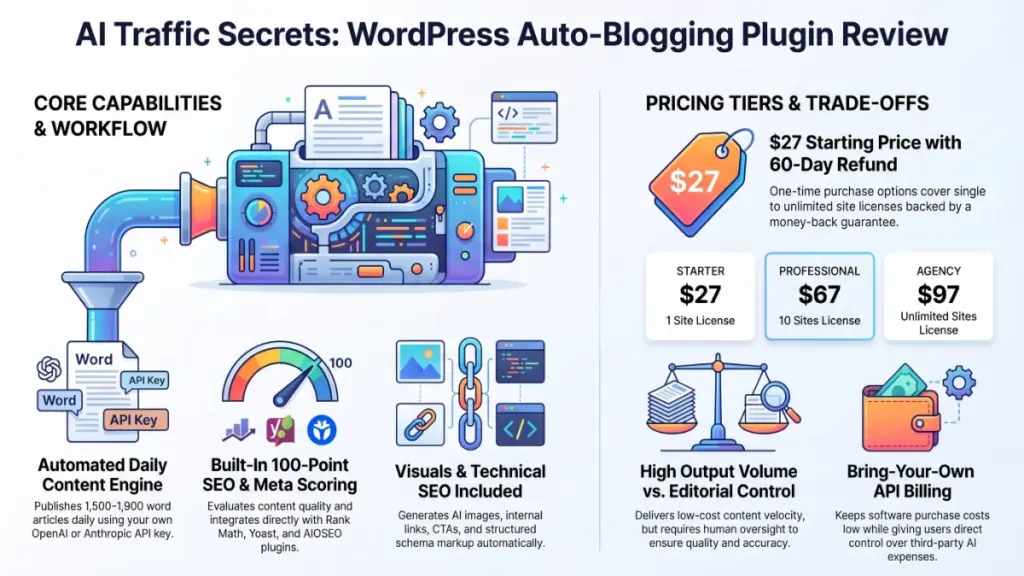
AI Traffic Secrets uses a simple three-tier structure with the same features in each plan. The differences are the number of sites and support level.
| Plan | Price | Sites | Extras |
|---|---|---|---|
| Starter | $27 | 1 | All 9 features, both AI providers, free updates |
| Professional | $67 | 10 | Everything in Starter, plus priority email support |
| Agency | $97 | Unlimited | Everything in Professional, plus client-site use and AI Weekly Live training |
Hidden costs to plan for
- AI usage. You pay OpenAI or Anthropic for the text, and OpenAI for images. The cost per post is small compared with a freelancer, but it adds up with daily publishing, and it scales with the number of sites.
- Hosting and SEO plugin. You need WordPress hosting, and the SEO meta features are designed to work with Rank Math, Yoast, or AIOSEO.
- Upsells. The sales page doesn’t mention any. Products sold through ClickBank sometimes add upgrade offers during checkout, so read each screen before confirming.
Value for money
At $27, the entry price is low enough that the risk is mostly your time. The Professional plan at $67 for 10 sites is the better value if you run more than one blog. The Agency plan makes sense mainly if you’ll actually use it on client work.
The 60-day refund window is generous. It gives you enough time to publish a few weeks of posts and judge the quality before deciding.
Pros
- Very low entry price. $27 for a full-featured plugin is hard to argue with, especially with a 60-day refund.
- Same features on every plan. You don’t pay more to unlock core functionality; plans differ by site count and support.
- Your own API key. You control costs and can choose between OpenAI and Claude.
- Built-in quality scoring. A 100-point check on each post is a better safeguard than most auto-bloggers offer.
- Technical SEO included. Schema, meta, and internal links are handled for you.
- Works with major SEO plugins. Rank Math, Yoast, and AIOSEO are covered.
- Images included. Featured and in-content visuals are generated automatically.
- Older-post cleanup. The SEO Fixer helps with existing content, not just new posts.
- Strong refund policy. 60 days is longer than most.
- Good multi-site pricing. Professional and Agency plans lower the per-site cost significantly.
Cons
- No independent proof. The traffic examples come from the vendor’s own sites, with no outside customer reviews on the page.
- Fully automated publishing carries risk. Google’s guidance targets low-quality, unhelpful content, and its spam policies cover mass-produced content made mainly to manipulate rankings. A daily AI post with no human review can drift into that territory.
- Scoring details are vague. The seven dimensions aren’t listed, so it’s unclear how rigorous the grading is.
- WordPress only. No support for other platforms.
- Ongoing API costs. Cheap per post, but not free, and image generation adds to it.
- Creator and launch date aren’t stated. The page doesn’t identify the developer or product age, which makes it harder to judge long-term support.
- Generic output risk. Cycling through keywords can produce content that reads similarly across posts unless you give it distinct topics.
- “Passive income” framing is optimistic. The earnings disclaimer is accurate; the headline tone is more upbeat than the fine print.
Comparison With Competitors
AI Traffic Secrets sits between simple AI writing assistants and full content-platform subscriptions. Here’s how the categories compare, without pretending to quote exact competitor specs. Check current pricing on each vendor’s site.
| AI Traffic Secrets | AI writing SaaS (e.g., Jasper, Koala) | SEO plugin AI add-ons (e.g., Rank Math Content AI) | Manual ChatGPT/Claude workflow | |
|---|---|---|---|---|
| Model | One-time plugin purchase | Usually monthly subscription | Usually included in or added to a plugin plan | Pay for AI access only |
| Auto-publishing | Yes, scheduled | Varies by tool | Generally assists rather than auto-publishes | No, you do it |
| Uses your own API key | Yes | Usually no | Usually no | N/A |
| Images included | Yes | Varies | Limited | Separate step |
| Human control | Low by default | Higher | Higher | Highest |
How it differs
Versus subscription AI writers: Those tools typically give you a drafting environment and charge monthly. AI Traffic Secrets removes the drafting step and charges once, but gives you less hands-on control per article.
Versus SEO plugin AI features: Those are helpers inside an editor. They improve content you’re already writing. This plugin replaces the writing and publishing cycle.
Versus doing it manually with ChatGPT or Claude: Manual work gives you the best quality, because you review and shape each piece. It’s also the slowest. This plugin is the trade: speed and scale in exchange for oversight.
My view: if you value editorial control, a human-in-the-loop workflow beats this. If you value volume at low cost across multiple sites, this is a more practical tool.
Who Should Buy It?
- Niche-site builders who want steady publishing across one or several WordPress sites.
- Affiliate marketers who monetize with AdSense or affiliate offers and need content volume.
- Agencies and freelancers managing client blogs, particularly on the Agency plan.
- Busy site owners who’ve fallen behind on publishing and want a baseline of regular content.
- Anyone already comfortable with API keys who wants direct control over AI costs.
If you’ll review posts weekly, tweak keywords, and prune weak articles, you’ll get far more out of it.
Who Should Skip It?
- Anyone on a non-WordPress platform. It simply won’t work.
- Brands where accuracy is critical. Health, finance, and legal sites need human fact-checking on every article.
- Writers who want a distinct voice. Automated output won’t replace a strong personal style.
- People expecting guaranteed traffic or income. Neither the product nor its disclaimers promise that, and neither should you assume it.
- Those who dislike managing API accounts. The need for your own key is a barrier for some.
Frequently Asked Questions
What is AI Traffic Secrets?
It’s a WordPress plugin that automatically writes, illustrates, scores, and publishes AI-generated blog posts on a daily schedule using keywords you provide.
Is AI Traffic Secrets legit?
The product is sold through ClickBank with a documented 60-day money-back guarantee, which is a good sign. As with any product, the claims about traffic should be treated as the vendor’s examples, not guaranteed outcomes.
How much does AI Traffic Secrets cost?
Plans start at $27 for one site, $67 for 10 sites, and $97 for unlimited sites. You’ll also pay your AI provider for usage.
Does it work with Rank Math, Yoast, and AIOSEO?
Yes, according to the sales page, it writes SEO meta for all three.
Which AI models does it use?
You can choose OpenAI (GPT-4o) or Anthropic Claude, and you supply your own API key. Images are generated with OpenAI’s gpt-image-1.
Will Google penalize AI-written content?
Google has said it focuses on whether content is helpful rather than how it was produced. That said, mass-producing low-value pages to manipulate rankings falls under its spam policies. Reviewing and improving what the plugin publishes is the safer approach.
Can I use it on client sites?
Yes, with the Agency plan, which covers unlimited sites including client work.
Is there a refund policy?
Yes. You have 60 days to request a full refund by opening a ticket at the vendor’s Support Center.
Do I need SEO or writing experience?
No. The plugin handles writing and on-page SEO, though basic keyword research will improve your results.
Does it guarantee rankings or income?
No. The vendor’s own disclaimers state that results vary and nothing is guaranteed.
🎁 Free Gift Waiting for You!
Before you leave, there’s a free gift waiting for you.
As a thank-you for reading, you can claim my Ultimate All-In-One Digital Marketing Package completely FREE.
🎉 What’s Inside Your Ultimate All-In-One Package
01. 50 AI Digital Product Ideas
A curated collection of highly profitable AI-powered digital product ideas designed for quick implementation and strong profit potential.
02. Digital Sales Mastery
Discover the proven framework behind high-converting sales funnels, persuasive copywriting, and sustainable online revenue growth.
03. Mastering Email List
Advanced strategies for building an engaged email audience, increasing open rates, improving click-through rates, and generating automated income.
04. The Ultimate Faceless Playbook
A complete blueprint for building a profitable online brand and growing on social media without ever showing your face.
🎁 BONUS: Premium Canva Marketing Vault
A premium library of high-converting Canva templates to help you create professional marketing assets, generate more organic traffic, and boost conversions.
💥 Total Package Value: $197
✅ Yours Today: FREE
Claim your complimentary bundle and get instant access to premium resources that can help you create, market, and grow your online business more effectively.
Final Verdict
AI Traffic Secrets does what it says it does on paper, and it does it at a price that makes the decision easy to reverse. For $27, with a 60-day refund, you can run it on one site, publish a few weeks of posts, and see for yourself whether the quality holds.
It’s most useful for niche-site owners, affiliate marketers, and agencies who need volume and are willing to review the output. It’s a poor fit for anyone who wants guaranteed rankings, who runs a high-stakes topic without fact-checking, or who isn’t on WordPress.
Is it worth the price? Yes, as a low-risk experiment. Would I recommend it? With conditions. I’d start on the Starter plan, publish a small batch, read every post critically, and only then consider scaling to the Professional or Agency tier. Treat the plugin as an assistant that drafts and schedules, not as a replacement for your judgment, and it’s a sensible tool to have.
Ready to test it? Visit the official AI Traffic Secrets page, start with the Starter plan, and use the 60-day guarantee to judge it on your own site.