

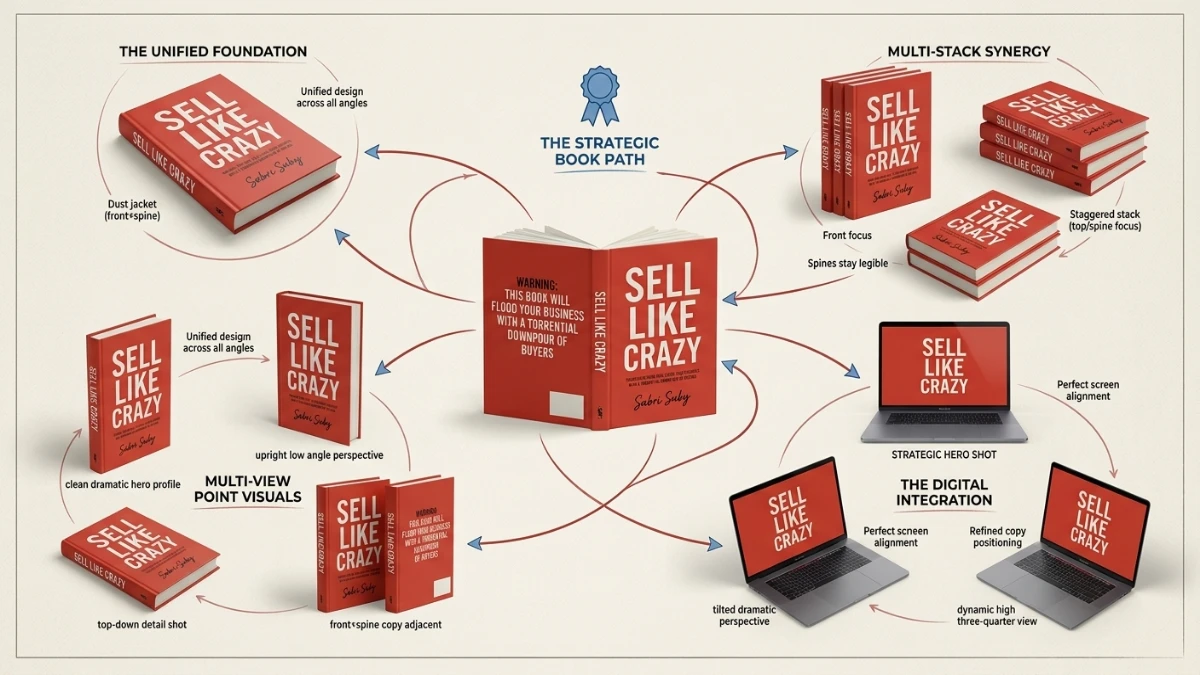
ClickDesigns promises to turn flat artwork into realistic 3D product mockups with one-click wrapping, adjustable angles, lighting, and a large template library. It could help digital product creators, affiliate marketers, and freelancers produce professional visuals faster. However, pricing, refund terms, commercial licensing, and output quality remain unverified. This pre-launch review recommends watching the free live demo before deciding whether the software is worth buying.
Pre-launch review, published 13 October 2026. I have not had hands-on access to the software yet, so this article is based on the official webclass page and my experience evaluating mockup tools. I will update it once I can test the product.
If you sell anything online, you already know the frustration. You spend weeks building a book, a course, a supplement, or a piece of software, and then you present it to the world as a flat rectangle on a sales page.
Buyers can’t pick up a product on the internet. They judge it by the picture in front of them, and a flat picture rarely makes anything look valuable.
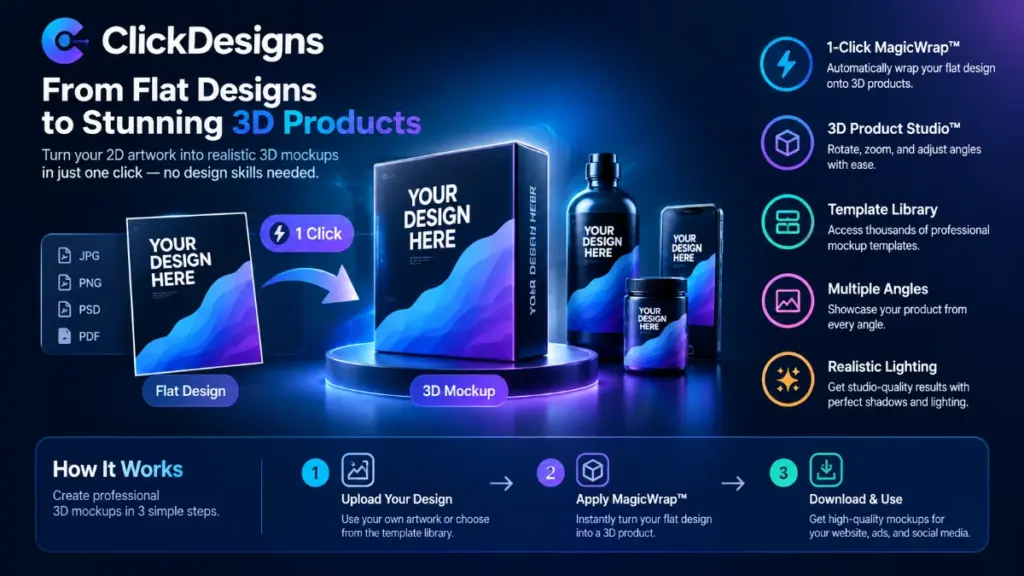
That’s the problem ClickDesigns says it solves. The pitch is simple: upload a flat design, press one button, and get a realistic 3D product from any angle, with no design skills, no prompts, and no freelancers.
It’s a bold claim, and I’ve seen plenty of bold claims in this category. So I went through everything the creators have published, and I’ll tell you what looks promising, what’s unproven, and what I want to verify before recommending it.
Quick Verdict
ClickDesigns is a 3D product mockup system aimed at marketers, info-product sellers, and freelancers who need professional-looking product visuals without learning Photoshop or Blender.
Best for: Digital product creators, affiliate marketers, and anyone who wants to offer mockup design as a service.
My first impression: The concept is strong and the problem is real. The features described, including a one-click wrap of flat artwork onto 3D products, an angle and lighting studio, and a large template library, are exactly what this audience needs.
The catch: Right now I can only judge the promise, not the performance. The price, refund terms, and plan details haven’t been published on the page I reviewed. Treat this as a “promising, verify before you buy” product until the pricing and real output quality are visible.
Product Overview
| Detail | Information |
|---|---|
| Product Name | ClickDesigns |
| Category | 3D product mockup and design software |
| Creator | Not stated on the webclass page |
| Launch Date | Free live webclass on Tuesday 13 October 2026, 10:00 AM New York time (billed as “launch day, live”) |
| Price | Not disclosed yet |
| Refund Policy | Not disclosed yet |
| Website | Official site (link not supplied) |
| Best For | Marketers, info-product sellers, affiliates, freelance designers |
| Rating | Pending hands-on testing |
What Is ClickDesigns?
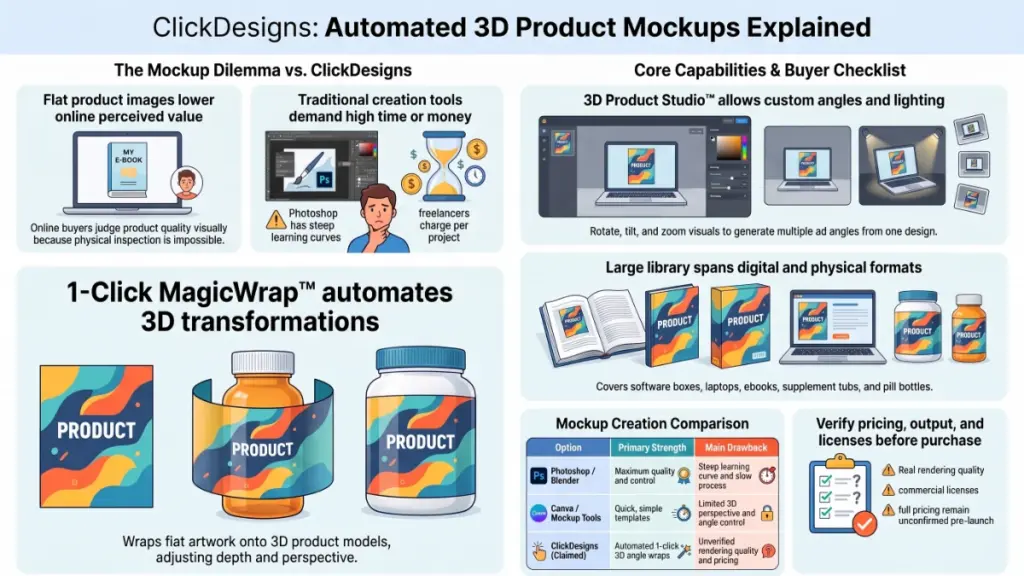
ClickDesigns is a design system built around one idea: take a flat image, such as a book cover, a box front, or a bottle label, and wrap it onto a realistic three-dimensional product automatically.
The page calls this 1-Click MagicWrap™. Instead of manually fitting artwork to a 3D model, adjusting perspective, and fiddling with shadows, the software handles shape, depth, and perspective for you.
Once the product is wrapped, you move into what the creators call the 3D Product Studio™. This is where you rotate the product, tilt it, zoom in, and choose the angle that looks best.
The Problem It Targets
The sales material describes three ways people currently solve the “flat design” problem, and all of them cost something:
- Design software such as Photoshop, Canva, or Blender, which takes time to learn and time to use for every new angle
- AI image generators, which can mangle logos and text and often need many attempts
- Freelancers, who can produce great work but charge per campaign and add waiting time
ClickDesigns positions itself as a fourth route: design once, then generate unlimited angles and placements from that single design.
I’ll be careful here. The page quotes rough dollar figures for each of those routes. Those numbers are the vendor’s own estimates, and I can’t verify them. They’re useful for understanding the pitch, but don’t treat them as a benchmark.
Main Features
Here’s what the webclass page says the tool does, along with my thoughts on why each piece matters.
1. 1-Click MagicWrap™
This is the headline feature. You bring a flat design and the software wraps it onto a 3D product model, handling shape, depth, and perspective.
Why it matters: The slowest part of traditional mockup work is fitting artwork to a curved or angled surface. If this works as described, it removes the step that causes most beginners to give up.
What I’d test: Text edges, logos near fold lines, and how the wrap behaves on curved surfaces like bottles and tubs. Those are the places where cheap mockups usually fall apart.
2. The 3D Product Studio™
Once your product is wrapped, you can spin it, tilt it, and zoom in. The page also mentions lighting, shadows, and finish adjustments “in a click.”
Why it matters: A cover viewed straight on looks like a screenshot. The same cover at a slight angle, with a soft shadow, looks like something you could pick up. Angle and lighting do much of the persuasive work in product images.
3. One Design, Many Placements
The page promises new layouts, scenes, and angles generated from the design you already have, with no redesigning.
Why it matters: If you run ads, you need variations. Testing five visuals of the same product is normal. Being able to produce them from a single source file saves a lot of repetitive work.
4. A Large Template Library
The page mentions “1000s of templates,” including:
- Book covers
- Software boxes
- Laptops and phones
- Pill bottles
- Supplement tubs
- Gummy bottles
- Droppers
I couldn’t see the actual library, so I can’t comment on quality, variety within each category, or how often new templates are added. That’s one of the first things I want to check.
5. Multi-Channel Output
The page says visuals are ready for sales pages, social posts, emails, and ads. I’d confirm the export formats and resolution options, since that determines whether the output is usable for print, high-resolution ads, or only for web.
6. A “Sell It As A Service” Angle
The page suggests you can create premium mockups for other marketers and product owners, using a Customize → Automate → Profit workflow.
This is an interesting angle for freelancers. Mockup design is a genuine service that people pay for. But the page doesn’t mention commercial-use terms, so I’d read the license carefully before charging clients for output.
Benefits: What Could Change for You
Features are only useful when they change outcomes. Here’s how I see the potential benefits for different users.
For info-product creators: A course, ebook, or software package is invisible. A 3D box or book gives it a physical presence, which can make a price feel more justified.
For affiliate marketers: Strong visuals on a review page or email can lift attention. If you promote digital products, a good-looking product image helps your recommendation feel more credible.
For supplement and physical-product sellers: Pill bottles, tubs, and droppers are listed in the templates. That suggests the tool can help you create concept visuals before you invest in photography.
For freelancers: The speed claim matters most here. If mockups that normally take hours can really be produced in minutes, you could take on more clients or lower your delivery time.
For everyone: Time saved. Even if the output is only “good enough” and not perfect, avoiding a Blender learning curve is a real benefit for non-designers.
What I Saw on the Sales Page and What I’m Watching For
Note: I’m using this section in place of a hands-on “My Experience” section. I haven’t tested ClickDesigns, so I won’t describe setup, speed, or output quality as though I had.
I spent time going through the webclass page carefully, and a few things stood out.
What Impressed Me
The page focuses on a real buyer behavior: people judge a product before they read the copy. That’s true, and it’s the strongest part of the argument.
I also liked that the “before and after” framing shows the same sales page with and without the 3D visuals. It’s the right way to demonstrate a visual tool, and the webclass is described as a live demo rather than only a video.
What Made Me Cautious
1. The social proof is unverified. The page shows “34,114+ users in 135 countries,” a “4.8/5 from 6,898 reviews,” and “$28M+ saved in design fees.” I can’t confirm any of these figures, and the page doesn’t link to where the reviews are hosted. Until I see the source, I treat them as marketing claims.
2. Logos of well-known names appear near testimonials. The page lists names and titles of several people from known companies. It doesn’t include their quotes in the text I reviewed, and it doesn’t say they’ve endorsed the product. I wouldn’t read that as a recommendation.
3. The page is a registration page, not a product page. It collects a name and email for the webclass. Pricing, refund terms, and license details were not visible. That’s common for launch events, but it means any “is it worth it?” conclusion has to wait.
4. A disclaimer says the product is independently operated. That’s standard, but it’s worth noting that the tool isn’t affiliated with the platforms it mentions.
The Checklist I’ll Use When I Get Access
When I can test it properly, here’s what I’ll look at:
- Setup time: How long from sign-up to the first finished mockup?
- Wrap quality: Do text and logos stay sharp and correctly aligned?
- Curved surfaces: Are bottles and tubs convincing, or do they look pasted on?
- Export options: Resolution, file types, and transparent backgrounds
- Template quality: Are the templates varied, or are many of them near duplicates?
- Speed: Does the “minutes, not days” claim hold on a normal laptop?
- Commercial license: Can I legally use and resell the output?
I’ll add the results to this article once I’ve done it.
Ease of Use
Based on the page, ClickDesigns is designed for complete beginners. The promise is “no design skills, no freelancers, no prompts, nothing to install,” which suggests a browser-based tool.
Learning curve: Likely gentle if the one-click wrap works as shown. The Studio’s rotate, tilt, and zoom controls are familiar to anyone who has used a basic 3D viewer.
Interface: The page shows a 3D studio with angle thumbnails and a tools sidebar. That’s a sensible layout, but a screenshot isn’t the same as working in it.
Documentation and support: The footer lists a support link, but I can’t tell yet whether there are tutorials, templates guides, or a knowledge base. For a tool aimed at beginners, good tutorials matter a lot.
Beginner friendliness: On paper, high. In practice, it depends on how forgiving the wrap is when your artwork isn’t perfectly sized.
Performance
I can’t honestly rate speed, stability, or reliability yet. Those only show up in real use, and I’d rather leave this section short than guess.
What I can say is what to look for. A cloud-based 3D tool lives or dies on rendering speed and consistency. If each angle takes a minute to generate, the “endless variations” promise gets tiring fast. If it’s near-instant, it becomes genuinely useful.
I’ll report real numbers after testing.
ClickDesigns Pricing
The price is not disclosed on the page I reviewed.
The page doesn’t list a cost, plan tiers, or a refund policy. The only price mentioned is that the webclass itself is free and requires no credit card.
Here’s what I’d want to know before paying:
- Is it a one-time payment or a subscription?
- Are there upsells, such as extra template packs, commercial licenses, or agency rights?
- Is there a refund window, and what are the conditions?
- Are there export or usage limits?
A common pattern with launches like this is a front-end offer with optional upgrades. I can’t say that applies here, so I won’t claim it. When pricing is public, I’ll add a full breakdown and a value-for-money verdict.
Pros
- Solves a real problem. Flat product images do hurt perceived value, and this tool targets that directly.
- No design skills needed. The promise of one-click wrapping lowers the entry barrier for non-designers.
- Multiple angles from one design. Useful for ad testing and for filling a content calendar.
- Wide template variety on paper. Books, boxes, devices, bottles, tubs, and droppers cover many common product types.
- Service potential. Freelancers could package mockups as a paid offer.
- Free live demo. You can watch it work before spending anything, which is a good sign of confidence.
Cons
- No published price or refund terms. You can’t judge value yet.
- Unverified social proof. User counts, ratings, and savings figures lack visible sources.
- No hands-on evidence yet. Output quality, speed, and reliability are unproven.
- Creator isn’t named on the page. Knowing who built a tool helps with trust and support expectations.
- License terms unknown. This matters a lot if you plan to sell mockups to clients.
- “Photo-realistic” is a high bar. Real photography is hard to match, and 3D mockups can look slightly artificial if lighting is off.
Comparison With Competitors
I can’t compare specific features or prices without having used ClickDesigns, but I can show where it fits among the alternatives.
| Option | Best at | Typical drawback |
|---|---|---|
| ClickDesigns | One-click 3D wraps and angle changes (as described) | Unproven; pricing unknown |
| Canva | General graphics, templates, quick social posts | Limited true 3D control |
| Online mockup generators | Fast, simple mockups from ready-made scenes | Often fixed angles and scenes |
| Photoshop | Maximum control and quality | Steep learning curve and time |
| Blender | Fully custom 3D work | Very steep learning curve |
| AI image generators | Creative scenes and concepts | Text and logos can come out distorted |
| Freelancers | Custom, polished work | Cost and turnaround time |
The honest takeaway: ClickDesigns is trying to sit between simple mockup generators and full 3D software. If it delivers real angle control with a one-click wrap, that’s a useful middle ground. If it only offers a handful of preset views, it will feel closer to the simpler tools.
Who Should Buy It?
ClickDesigns could be a good fit if you are:
- An info-product seller who needs better covers and box shots
- An affiliate marketer building review pages, emails, and ads
- A supplement or physical-product brand that wants concept visuals fast
- A freelancer or agency looking to add a mockup service
- A non-designer who has avoided design tools because of the learning curve
Who Should Skip It?
You may want to look elsewhere if:
- You need studio-grade photography for print packaging or retail
- You already work comfortably in Photoshop or Blender and want full control
- You only need occasional basic graphics, where a free tool may be enough
- You aren’t comfortable buying software before pricing and refund terms are visible
Frequently Asked Questions
What is ClickDesigns?
ClickDesigns is a 3D product mockup system that turns flat designs into realistic three-dimensional products using a one-click wrap, then lets you adjust angle, lighting, and placement.
Is ClickDesigns free?
The live webclass is free and requires no credit card. The software’s price hasn’t been published on the page I reviewed, so I can’t say whether the tool itself is free, paid, or subscription-based.
When is the ClickDesigns webclass?
The page lists a free live session on Tuesday 13 October 2026 at 10:00 AM New York time, described as launch day.
Do I need design skills to use it?
The creators say no. The tool is described as working without design skills, prompts, freelancers, or installation. I’ll confirm how true that is once I’ve tested it.
What kinds of products can I mock up?
The page lists book covers, software boxes, laptops, phones, pill bottles, supplement tubs, gummy bottles, and droppers.
Can I sell mockups to clients?
The page promotes this as an opportunity, but it doesn’t spell out commercial license terms. Read the license before taking client work.
Is ClickDesigns better than Canva or Photoshop?
They do different jobs. Canva is great for quick general graphics, and Photoshop gives deep control. ClickDesigns aims to make realistic 3D product visuals fast. Whether it beats them for your needs depends on output quality I haven’t tested.
Are the user numbers and ratings real?
The page claims over 34,000 users and a 4.8 rating from 6,898 reviews, but I couldn’t verify them from the page. I’d look for independent reviews before relying on those figures.
Is there a refund policy?
Not on the page I reviewed. Check for one before you pay, and keep a note of the window.
🎁 Free Gift Waiting for You!
Before you leave, there’s a free gift waiting for you.
As a thank-you for reading, you can claim my Ultimate All-In-One Digital Marketing Package completely FREE.
🎉 What’s Inside Your Ultimate All-In-One Package
01. 50 AI Digital Product Ideas
A curated collection of highly profitable AI-powered digital product ideas designed for quick implementation and strong profit potential.
02. Digital Sales Mastery
Discover the proven framework behind high-converting sales funnels, persuasive copywriting, and sustainable online revenue growth.
03. Mastering Email List
Advanced strategies for building an engaged email audience, increasing open rates, improving click-through rates, and generating automated income.
04. The Ultimate Faceless Playbook
A complete blueprint for building a profitable online brand and growing on social media without ever showing your face.
🎁 BONUS: Premium Canva Marketing Vault
A premium library of high-converting Canva templates to help you create professional marketing assets, generate more organic traffic, and boost conversions.
💥 Total Package Value: $197
✅ Yours Today: FREE
Claim your complimentary bundle and get instant access to premium resources that can help you create, market, and grow your online business more effectively.
Final Verdict
ClickDesigns goes after a problem I take seriously: flat, forgettable product images cost sellers sales. The idea of wrapping a design onto a 3D product in one click, then choosing the best angle, is the right feature set for marketers and product creators.
What I can’t tell you yet is whether it delivers. The price, refund policy, creator details, and license terms aren’t public on the page I reviewed, and I haven’t seen the tool’s real output. The user counts and ratings on the page are claims I couldn’t verify.
Who will benefit most: Info-product sellers, affiliates, and freelancers who want fast, decent-looking 3D visuals without learning complex software.
Is it worth the price? I can’t answer that until the price is published.
Would I recommend it? I’d recommend attending the free webclass. It costs nothing, and it’s the best way to see the wrap and the studio in action. Watch for the price, the refund terms, and the commercial license before you decide.
I’ll update this review with hands-on results, real pricing, and a final rating once I’ve tested ClickDesigns properly.
Disclosure: This article is a pre-launch review based on publicly available webclass information. No hands-on testing has been done at the time of writing.