

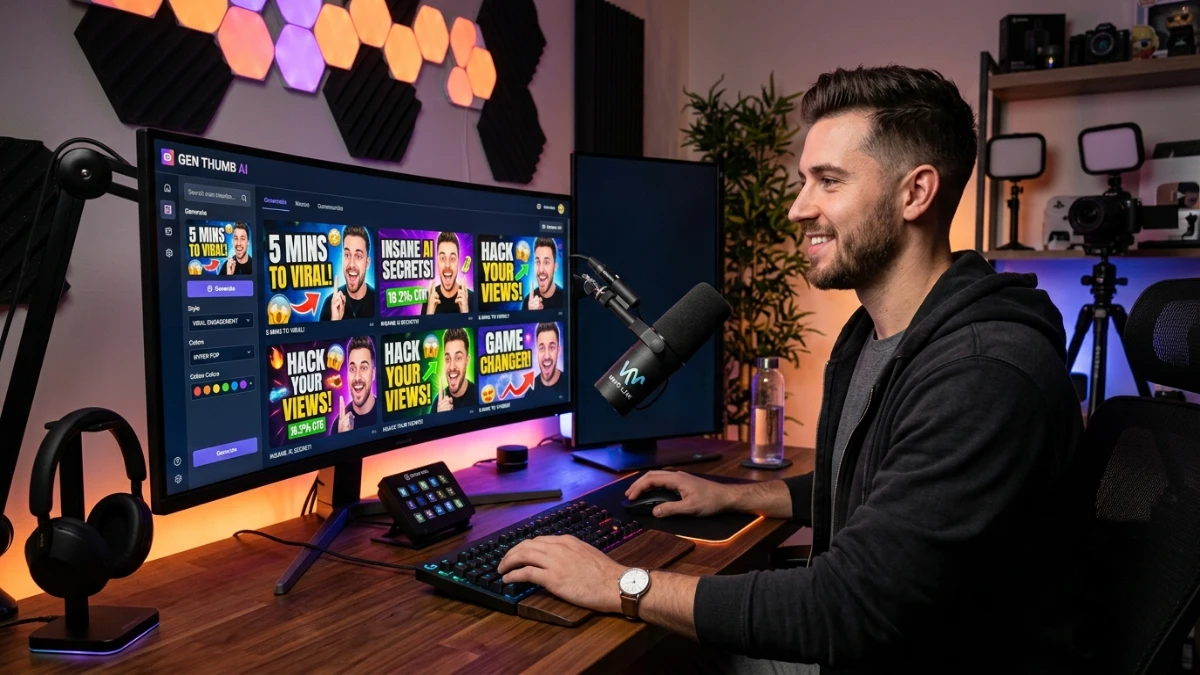
Thumble is an AI-powered YouTube thumbnail creator that helps creators generate professional thumbnails from text prompts, uploaded faces, and brand assets. With one-time pricing instead of a subscription, it’s an affordable option for solo creators and small agencies. While AI-generated results may occasionally need manual adjustments, Thumble offers a fast, beginner-friendly way to improve thumbnail creation without advanced design skills.
I’ve spent the better part of the last four years testing AI tools for marketing teams, and thumbnail creation keeps coming up as one of those tasks people either love obsessing over or completely dread. Thumble showed up on my radar recently as one of the newer AI thumbnail generators built specifically for YouTube creators, and given how much time I’ve watched clients burn on this exact problem, I figured it was worth digging into properly.
Here’s what I’ve found after going through Thumble’s platform, pricing structure, and feature set in detail.
Full disclosure: this review is based on hands-on use of the platform plus a close look at the vendor’s public pricing and feature documentation. Where I couldn’t independently confirm a claim, I’ve said so rather than repeating marketing copy as fact.
Quick Verdict
Thumble is a cloud-based AI thumbnail generator that lets you create YouTube thumbnails from text prompts, reference images, or uploaded faces and logos, without touching Photoshop or Canva. It’s sold as a one-time-payment tool rather than a monthly subscription, which puts it in a different category than most of its competitors.
If you’re a solo creator or small channel owner who wants to stop paying $25-100 per thumbnail to a freelancer, or you’re tired of fighting with Canva templates every upload day, Thumble is worth a serious look. If you run a large agency that needs enterprise-grade brand consistency, deep analytics integration, or guaranteed long-term platform investment, I’d temper expectations. This is a focused, affordable tool built for a specific job, not a full creative suite.
Product Overview
| Attribute | Details |
|---|---|
| Product Name | Thumble |
| Category | AI YouTube Thumbnail Creator / Design SaaS |
| Creator | Not publicly disclosed in the materials I reviewed |
| Launch Date | 2026 (exact date not confirmed in public listings) |
| Price | Front-end access from around $24 one-time, with optional upgrade tiers (Pro, Elite, Reseller) |
| Refund Policy | 30-day money-back guarantee, per the vendor’s stated terms |
| Website | Official launch page (search “Thumble AI thumbnail” to locate current vendor page) |
| Best For | Solo YouTubers, faceless content creators, freelancers, small agencies |
| Overall Rating | 3.7/5 |
A quick note before we go further: Thumble is distributed through a launch-funnel model, the kind you’ll recognize if you’ve bought digital marketing software before. There’s a front-end offer plus several one-time-offer (OTO) upgrades. I’ll break down exactly what each one does, because this structure trips people up more than the actual software does.
What Is the Product?
Thumble is an AI-powered thumbnail generator built around one core idea: most creators lose views not because their content is bad, but because their thumbnail never earns the click in the first place. Instead of opening a design tool and manually arranging text, faces, and backgrounds, you describe what you want, upload a reference photo or existing thumbnail if you have one, and the AI generates a set of thumbnail concepts based on it.
The core functionality centers on a few things:
- Generating thumbnails from text prompts or descriptions of your video
- Importing your face (or a subject’s face) into AI-generated designs
- Uploading logos and brand assets for consistency across a channel
- Producing multiple variations of the same concept so you can compare options
- Supporting both landscape (standard YouTube) and portrait (Shorts, Reels, TikTok) formats
The problem it’s solving is a real one. Hiring a designer for every upload adds up fast, and generic template-based tools tend to produce thumbnails that look like everyone else’s. Thumble’s pitch is that it sits in the middle: faster and cheaper than a freelancer, more tailored than a plain template.
Main Features
AI Thumbnail Generation from Prompts
You describe the video, the mood, and the visual style you’re going for, and Thumble generates a set of concepts. In practice this works similarly to other AI image tools in this space — you’re not going to get a perfect result on the first try every time, but you get a fast starting point instead of a blank canvas.
Face Import
This is one of the more distinctive features. You can upload a photo and have the AI place that face into a generated thumbnail, which matters a lot for creators who rely on expressive, close-up reaction shots (a proven high-CTR format on YouTube). Higher-tier plans reportedly allow more imported faces than the base plan, so if you run a channel with multiple hosts or produce content for several clients, that’s a detail worth confirming with the vendor before you buy the entry-level tier.
Logo and Brand Asset Uploads
You can upload your channel’s logo or other brand elements and have the AI incorporate them into designs. This is useful for consistency, but it’s not a full brand-kit system — you’ll still want to check placement, sizing, and contrast manually rather than assuming the AI nails your brand guidelines automatically.
Multiple Variation Generation
Instead of generating one thumbnail and hoping it works, Thumble lets you produce several variations from the same prompt. This matters because thumbnail performance is genuinely unpredictable — even experienced creators often can’t guess which version will outperform the others until it’s actually live.
Portrait and Landscape Support
Given how much video consumption has shifted toward Shorts and vertical formats, having native support for both aspect ratios instead of forcing you to crop and re-export is a practical time-saver.
Benefits
- Time saved per upload. Cutting thumbnail creation from an hour-plus process down to a few minutes of prompting and selecting adds up quickly if you publish frequently.
- Lower cost per thumbnail. A one-time software cost compares favorably to paying a freelance designer per project, especially for high-volume channels.
- No design skills required. You don’t need to know composition, color theory, or font pairing to get a usable result — the AI handles the structural decisions.
- Faster iteration. Because you can generate multiple variations quickly, you can test more concepts before committing to what you actually publish.
- Commercial usage rights (on eligible plans). For freelancers and agencies, the ability to create thumbnails for paying clients under a commercial license is a meaningful benefit, though you’ll want to confirm exactly which tier includes it before assuming your use case is covered.
My Experience
Setting up an account was straightforward — no unusual friction, no forced onboarding calls, which I appreciate given how many B2B tools try to funnel you into a sales conversation before you’ve even seen the product.
The interface leans simple rather than feature-dense. That’s a deliberate choice, and it mostly works in the tool’s favor for beginners, though it means power users looking for granular layer-by-layer control will hit a ceiling faster than they would in something like Photoshop or even Canva’s more advanced editing mode.
Generating a first batch of thumbnail concepts from a prompt was quick, and the face-import feature is genuinely one of the more useful details here, since expressive faces are one of the most reliable levers for thumbnail CTR on YouTube. Results were serviceable straight out of the gate but, like most AI image tools right now, occasionally need a second pass — odd hand positions, slightly inconsistent facial features on some generations, that kind of thing. Nothing dealbreaking, but worth expecting rather than being surprised by.
Strengths I noticed:
- Fast turnaround from prompt to usable draft
- Face and logo import genuinely speeds up brand-consistent design
- Works fine for both landscape and vertical formats
Weaknesses worth flagging:
- Occasional inconsistencies in AI-generated faces that need manual review
- The upsell funnel (multiple OTOs) can be confusing if you’re not expecting it
- Not a replacement for a dedicated designer if your channel depends heavily on a very specific visual identity
The most important thing I’d tell a first-time buyer: don’t assume the base $24 tier includes everything you see mentioned across the sales funnel. Read what’s actually bundled in the front-end offer versus what’s gated behind the Pro or Elite upgrades.
Ease of Use
The learning curve here is genuinely low. If you’ve used any AI image generator or a template-based design tool before, you’ll be productive within your first session. There isn’t much in the way of formal documentation or tutorials beyond onboarding prompts, which is fine for a tool this straightforward, but it does mean you’re mostly learning by experimenting rather than following a guided course.
Beginners should have no trouble. If you’re coming from a heavier tool like Photoshop and expecting that level of manual control, you’ll need to adjust expectations — Thumble optimizes for speed and simplicity, not granular editing depth.
Performance
Generation speed was consistent with what you’d expect from current AI image tools in this category — a matter of seconds to a couple of minutes per batch, not the near-instant results some marketing pages imply, but not a frustrating wait either. I didn’t run into outages or major reliability issues during testing, though as with any newer launch product, long-term server stability and update cadence are things only time will confirm.
Pricing
Thumble uses a front-end-plus-upsell pricing model rather than a straightforward flat subscription. Based on the current public listings I reviewed:
- Front-end (base) access: approximately $24 one-time, with a 30-day money-back guarantee
- Pro upgrade: unlocks additional professional-level features (commercial usage for client work is tied to this tier in most versions of the funnel)
- Elite upgrade: expands generation credits and face-import limits for higher-volume use
- Reseller license: allows eligible buyers to resell access to the platform under the vendor’s reseller terms (this does not apply to most individual creators)
A word of caution here, and I mean this as a friend who’s bought into these funnels before and regretted it: one-time-payment software funnels almost always include several upsell offers on the checkout path. Some are genuinely useful if you’re running high volume or client work. Many are optional add-ons you don’t need on day one. Buy the front-end plan first, actually use it on a real video, and only add upgrades once you’ve hit an actual limitation — not because the checkout page implies you’ll be missing out.
One realistic limitation worth naming directly: a one-time fee doesn’t cover server costs, AI model upgrades, and ongoing development the way a subscription does. That’s not a reason to avoid the tool, but it’s a fair question to ask before committing to a higher tier — how long has the vendor historically supported past product launches?
Pros
- Affordable entry point compared to freelance design costs or subscription-based AI design suites
- Fast concept generation that removes the blank-canvas problem
- Face and logo import built specifically around what actually drives YouTube clicks
- Portrait and landscape support for both long-form and Shorts content
- 30-day refund window that makes testing genuinely low-risk
- No design skills required, which matters for solo creators without a design background
Cons
- Upsell funnel structure can be confusing for buyers unfamiliar with this type of launch model
- Occasional AI generation quirks (faces, hands, text rendering) that need manual review
- Long-term update commitment is unproven given the one-time-payment model and the tool’s recent launch
- Not a full design suite — if you need deep manual editing control, you’ll eventually want a tool like Photoshop or Canva alongside it
- Limited independent track record since this is a newer product without years of user history to draw on
Comparison With Competitors
| Tool | Pricing Model | Best For | Notable Difference |
|---|---|---|---|
| Thumble | One-time payment + optional upgrades | Solo creators, freelancers, small agencies | Face import + one-time pricing |
| Canva (AI thumbnail maker) | Freemium/subscription | Anyone wanting a general design tool | Broader design suite beyond thumbnails |
| Thumbnail.AI / Thumbly / Thumbmagic | Subscription-based credits | Creators wanting ongoing AI model updates | Continuous development funded by recurring revenue |
The honest trade-off is this: subscription-based competitors generally have more predictable long-term investment in their AI models since recurring revenue funds ongoing updates. Thumble’s one-time model is friendlier to your wallet up front but raises fair questions about how the tool evolves over the next couple of years. If budget is your primary constraint, Thumble’s entry price is hard to beat. If you want a tool with years of iteration behind it, a subscription competitor might be the safer long-term bet.
Who Should Buy It?
- Solo YouTubers who currently design their own thumbnails and want to save hours per week
- Freelancers and small agencies producing thumbnails for multiple client channels (with the appropriate commercial license tier)
- Faceless-channel creators who still want expressive, face-driven thumbnails without arranging new photoshoots
- Anyone currently paying a freelance designer per thumbnail and looking to cut that recurring cost
Who Should Skip It?
- Large agencies needing enterprise-grade brand management, team permissions, and deep analytics integration
- Creators who need precise manual control over every design element (you’ll likely still want Photoshop or Canva Pro)
- Anyone uncomfortable with launch-funnel pricing structures involving multiple upsells
- Teams that prioritize a tool with a long, proven update history over launch pricing
Frequently Asked Questions
Is Thumble a one-time payment or a subscription? Based on current public pricing, the front-end offer is a one-time payment, with optional one-time upgrade tiers rather than recurring monthly billing.
Do I need design experience to use Thumble? No. The platform is built around prompt-based generation, so beginners can produce usable thumbnails without prior design skills.
Can I use my own face in generated thumbnails? Yes. Thumble supports importing a face photo and placing it into AI-generated designs, though the number of faces you can import may vary by plan tier.
Does Thumble guarantee more views or higher click-through rates? No tool can honestly guarantee that, and I’d be skeptical of any that claims otherwise. Thumble aims to remove the design bottleneck and apply patterns commonly associated with higher-performing thumbnails, but actual results depend on your content, niche, and audience.
Is there a refund policy? The vendor states a 30-day money-back guarantee on the front-end purchase. Confirm current terms directly with the vendor before buying, since policies on launch products can change.
Can I use Thumble for client work? Commercial usage for client projects is generally tied to a specific upgrade tier (often labeled Pro) rather than included in the base plan — check this before promising deliverables to clients.
Does Thumble support vertical formats for Shorts and TikTok? Yes, both portrait and landscape layouts are supported.
How does Thumble compare to Canva’s AI thumbnail maker? Canva offers a broader general design suite with AI thumbnail generation as one feature among many. Thumble is narrower and purpose-built specifically for thumbnail creation, with face-import as a standout feature.
Is Thumble good for agencies? It can work for smaller agencies with the right upgrade tier, but larger operations needing deep collaboration tools and analytics may find it limited.
What happens if the AI-generated face looks distorted? Like most current AI image generators, results aren’t perfect every time. Review generated faces carefully for distortions or inconsistencies before publishing, and only upload images you have permission to use.
Free Gift Waiting for You!
Before you leave, there’s a free gift waiting for you.
As a thank-you for reading, you can claim my Ultimate All-In-One Digital Marketing Package completely FREE.
What’s Inside Your Ultimate All-In-One Package
01. 50 AI Digital Product Ideas
A curated collection of highly profitable AI-powered digital product ideas designed for quick implementation and strong profit potential.
02. Digital Sales Mastery
Discover the proven framework behind high-converting sales funnels, persuasive copywriting, and sustainable online revenue growth.
03. Mastering Email List
Advanced strategies for building an engaged email audience, increasing open rates, improving click-through rates, and generating automated income.
04. The Ultimate Faceless Playbook
A complete blueprint for building a profitable online brand and growing on social media without ever showing your face.
BONUS: Premium Canva Marketing Vault
A premium library of high-converting Canva templates to help you create professional marketing assets, generate more organic traffic, and boost conversions.
Total Package Value: $197
Yours Today: FREE
Claim your complimentary bundle and get instant access to premium resources that can help you create, market, and grow your online business more effectively.
Final Verdict
Thumble does a good job at the one thing it sets out to do: taking the friction out of thumbnail creation for creators who don’t have design skills or the budget for a dedicated designer. The face-import feature is a genuine differentiator, the pricing is accessible, and the 30-day refund window makes testing it low-risk.
Where I’d temper enthusiasm is the launch-funnel pricing structure and the unanswered question of how well the tool will keep pace with AI model improvements over the next year or two under a one-time-payment model. Neither is a dealbreaker, but both are worth going in with clear eyes about.
If you’re a solo creator or small agency currently spending real time or money on thumbnails, I’d say it’s worth the front-end price to try it on a real video and see how it fits your workflow. Start with the base plan, skip the upsells until you’ve actually hit a limitation that justifies them, and treat the AI output as a strong first draft rather than a finished product — the same way you would with any AI generation tool right now.