


Launch90 is an AI-powered platform that helps creators turn an idea into a digital product through seven connected steps, from e-book creation to website building, email marketing, avatar videos, and social media planning. At $69.97 per month, it includes 1,000 AI credits and a 14-day money-back guarantee. Its biggest advantage is an integrated workflow, but unclear credit costs and unverified output quality are important considerations before subscribing.
Most digital products stall in the same place. The idea is solid and the motivation is real, but then six browser tabs open at once: one for writing, one for a sales page, one for a website, one for emails, one for video and one for social posts. As a result, the product still isn’t online a few evenings later.
Launch90 is built around that exact problem. Essentially, it’s a membership platform that takes a short brief about your audience and idea. From there, it helps you produce an e-book, sales copy, a website, an email sequence, an AI avatar video and a social media calendar in seven steps.
In this review, I cover what the platform includes, how the seven steps work and what the $69.97 monthly price buys. I also explain where the credit system raises questions. That way, you can decide whether it suits your situation.
Quick Verdict
Launch90 is a connected AI launch workspace for beginners and solo creators who want to publish a first digital product without stitching together a pile of separate tools.
Its strongest idea is that everything flows from one source. For instance, your e-book feeds the sales copy, and that copy feeds the website. As a result, the same story carries into your emails and video. Consequently, your messaging stays consistent, and you save a lot of rewriting.
Before buying, however, check the credit allowance. You get 1,000 AI credits with each paid monthly renewal, but the sales page I reviewed doesn’t say how many credits an e-book, a video or an email sequence uses. Because that number decides whether the membership feels generous or tight, confirm it early.
Quick rating: 8/10, based on the documented features, the guided workflow and the 14-day guarantee. Still, I’d adjust it once credit costs and real output quality are tested.
Product Overview
| Detail | Information |
|---|---|
| Product Name | Launch90 |
| Category | AI product creation and launch platform (SaaS membership) |
| Creator | Danny, founder (based in the Netherlands) |
| Launch Date | Not stated on the sales page (customer reviews are dated from October 2026) |
| Price | $69.97 per month, billed in USD until canceled |
| Credits | 1,000 AI credits per paid monthly renewal |
| Refund Policy | 14-day money-back guarantee |
| Website | Official Launch90 sales page |
| Support | [email protected] |
| Best For | Creators, solopreneurs and beginners launching a first digital product |
| My Rating | 8 / 10 |
What Is Launch90?
Launch90 is an AI workspace that guides you from a rough idea to a published offer. First, you tell it who you want to help and what they struggle with. Then that brief becomes the foundation the AI uses to draft your product and the materials that sell it.
The platform describes itself as your AI writer, designer and launch assistant. Instead of handing you a menu of disconnected tools, it organizes the work into seven steps. Moreover, each step produces a specific piece you can finish before moving on.
The Problem It Tries to Solve
Launching a digital product is rarely hard because of one task. Rather, it’s hard because there are so many of them. Chapters, a sales page, a website, emails, a video and posts are all required, and each usually lives in a different app with its own learning curve.
Launch90 tries to remove that friction by keeping the work in one place. Likewise, the founder’s story on the page makes the same point. According to that story, the book turned out to be only part of the job, since explaining, presenting and promoting it took far more effort than expected.
The “90% Built for You, 100% Yours” Idea
The platform’s tagline says the AI does the heavy lifting while you add direction and personality. In my view, that’s the right framing. After all, AI-generated drafts are a starting point, not a finished product, and the page itself encourages you to add your own experience and edit the content.
How the Seven Steps Work
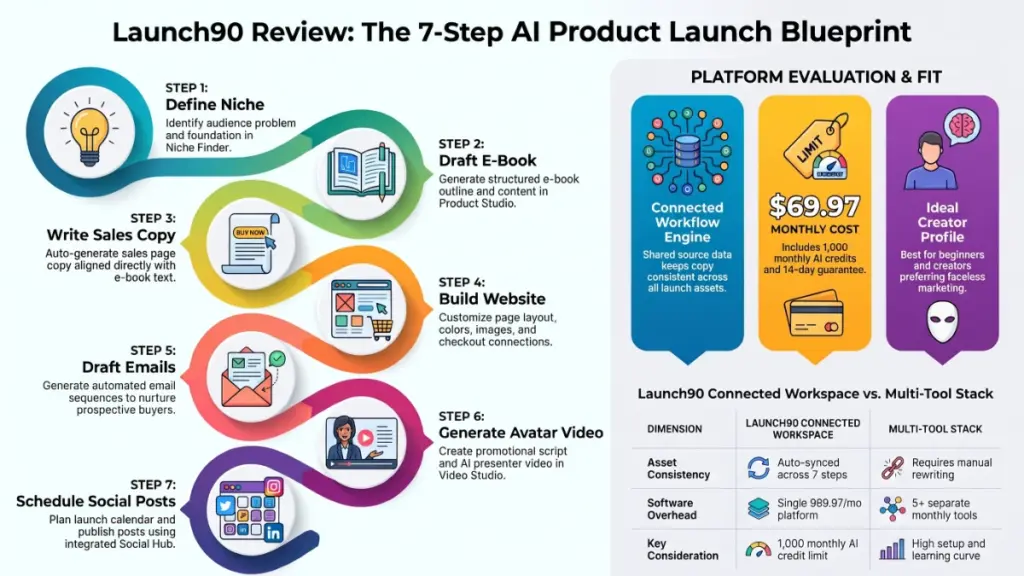
The seven steps are the heart of the product. Therefore, here is each one in order.

Step 1: Find Your Starting Point
Niche Finder helps you explore an audience and a problem worth solving. Although this step looks minor, it matters more than it seems. Because the choice you make here tells the AI who it’s writing for, everything downstream depends on it.
Step 2: Generate Your E-Book
Next, Product Studio creates a fresh e-book draft from your brief, complete with a structure and chapters to work through. From there, you can add your own experience, edit the content and export a PDF.
To show what the output looks like, the platform offers a 28-page example e-book called “Make it real.”
Step 3: Create Your Sales Page
At this stage, you select your e-book and enter your offer. The AI then uses that book as the source for your sales copy and funnel text. As a result, the page promises what the book actually delivers.
Step 4: Build Your Website
Website Builder takes your funnel copy and lets you adjust the layout, colors and images. After that, you connect your pages and checkout so visitors have a clear next step.
Unfortunately, the sales page doesn’t name the checkout or payment provider. Since the provider affects fees and how you collect payments, it’s worth confirming before you buy.
Step 5: Prepare Your Emails
Once the website is ready, the platform generates an email sequence built around your product. The sequence introduces the problem, explains your approach and follows up with interested readers. Naturally, you’ll want to personalize the drafts for your own audience.
Step 6: Give Your Offer a Voice
Then comes Video Studio, which helps you prepare a script and create an AI avatar video. In this way, you can show what your product does without ever recording yourself.
Step 7: Publish and Plan Your Posts
Finally, you check your pages and checkout, and then you publish. Inside Social Hub, videos, captions, hashtags and product links go into a content calendar. You can post on your own channels or schedule through Metricool. In addition, you can track what you’ve shared.
Main Features
AI E-Book Generation
For many creators, the e-book is the core product. Starting from your brief, Product Studio produces a structured draft with chapters you can work through.
Practical example: Say you want to help new freelancers manage their first tax year. You describe that audience and their main worry, and the platform drafts a chapter outline and content. Afterward, you add your own stories, correct anything that doesn’t match your experience and export the PDF.
Even so, a human review is essential. A generated draft saves hours, but your name still goes on the finished product.
Connected Sales Copy and Funnel
Because the sales page and funnel text come from your selected e-book, the promise stays aligned with the product. Consequently, you avoid a common problem: sales pages that oversell something the product doesn’t deliver.
Website Builder
Once you load your funnel copy into the builder, you can adjust layout, colors and images. For someone who has never built a site, this approach removes much of the blank-page anxiety, since the words are already in place.
Email Sequence Generation
Email is where many digital product sales happen. Yet it’s also the task creators skip most often, mainly because writing a sequence from scratch feels tedious. A drafted sequence tied to your product therefore gives you something concrete to edit instead of something to invent.
AI Avatar Video Studio
The platform highlights this tool as new, and the process has four parts:
- First, write a script, or begin with a saved Video Studio script.
- Next, choose an avatar and voice, or use a presenter photo you have permission to animate.
- Then generate the video and preview it.
- Finally, download the MP4 for your page or social posts.
For creators who don’t want to appear on camera, this is a meaningful option. However, the example video on the sales page runs only 14 seconds. For that reason, I’d judge quality with your own script rather than from that clip.
Social Hub
Social Hub works as a content calendar for videos, captions, hashtags and links. Posting manually and scheduling through Metricool are both possible. Besides, it’s a practical finishing step, since many launches fail at promotion rather than creation.
Saved Projects
Your work is saved, so you can return to the same product later. Improving a chapter, refining a page or preparing a post doesn’t require rebuilding the whole launch. For people who work in evenings and spare hours, that continuity matters a great deal.
Benefits: What You Get Out of It
Features only matter if they change an outcome. Therefore, here’s how I’d translate them into benefits.
- Less tool switching. A single workspace replaces several apps and logins.
- A clear path. Seven defined steps reduce the “what do I do next?” problem.
- Consistent messaging. Since the book, page, emails and video all come from the same source, they tend to say the same thing.
- A faceless option. Avatar videos let you market without a camera.
- Faster first versions. Editing a draft is easier than starting from nothing.
- Built-in promotion. The calendar and scheduling step help you actually tell people about the product.
There is a trade-off, though. Speed can tempt you to publish before the product is good, and a quickly produced e-book that doesn’t help anyone won’t sell.
My Experience: What I Could and Couldn’t Verify
I want to be clear about the basis for this review. It draws on the platform’s published sales page, feature descriptions, pricing, example materials and walkthrough information. Because I haven’t included invented test results, you won’t find made-up speed figures or output scores here.
What the Documentation Shows
- Each step names the tool used and the piece it produces, so the workflow is clearly structured.
- A worked example (“Make it real.”) shows the e-book, website and presenter video connected to one product.
- Meanwhile, a 2 minute 42 second walkthrough covers the route from choosing a starting point through avatar video and promotion.
What I’d Test Hands-On
If you try Launch90 yourself, I’d check the following during the refund window:
- Whether the e-book reads as useful and specific or as generic filler
- Whether the sales copy sounds like your product rather than any product
- How many credits a full launch actually uses
- Whether the avatar video looks and sounds acceptable to your audience
- How the finished website behaves on a phone
- How the checkout connection works
Reviews on the Sales Page
The page lists a 4.7/5 rating from 13 reviews. Comments mention the connected tools, the automatic email funnel and the avatar video, while others praise support and in-house training. Still, these reviews appear on the vendor’s own page, and I can’t verify them independently. Therefore, treat them as a signal, not proof.
Ease of Use
Learning Curve
The guided seven-step structure is designed for people who feel overwhelmed. Instead of learning six tools, you follow one path. As a result, the learning curve should stay gentle for beginners.
Interface and Documentation
The sales page mentions team support, and reviewers refer to in-house training. Without hands-on use, however, I can’t evaluate the interface or the quality of that training. Since good guidance is essential for a beginner-focused product, check it early.
Beginner Friendliness
The platform promises that you don’t need to become a writer, designer and marketer before starting. For first drafts, that’s believable. Even so, decisions, edits and quality checks still fall to you, because only you know whether the product helps your reader.
Performance
Speed, stability and reliability are the usual benchmarks for SaaS tools. Because I have no verified test data, I’m not scoring them. Instead, here are the areas I’d watch:
- Generation time: How long do an e-book and a video take to produce?
- Video rendering: Avatar tools are often the slowest part of any platform.
- Consistency: Does quality hold across different niches?
- Reliability: Do saved projects load and export cleanly?
Fortunately, the 14-day guarantee gives you time to check all of this.
Launch90 Pricing
Current Price
The membership costs $69.97 per month, billed in USD each month until canceled. It includes:
- Product, website, funnel and email tools
- 1,000 AI credits per paid monthly renewal
- AI Avatar Video Studio access
- Support
- A 14-day money-back guarantee
Over a full year, the total comes to about $839.64 if you stay subscribed.
Credits
This is the detail I’d examine most closely. The allowance is 1,000 credits per paid monthly renewal. Additionally, the page includes a FAQ item asking whether video credits are included, but I can’t see the answer. Until credit costs per task are clear, treat the allowance as an unknown.
Upsells and Add-Ons
The sales page mentions no upsells, add-ons or extra credit packs. Before you buy, though, check the checkout and account areas to see whether additional credits can be purchased.
Is It Good Value?
That depends on what you’d otherwise pay for. If you’d normally buy separate tools for writing, page building, email, video and scheduling, a single $69.97 membership could cost less. By contrast, buying one or two of those pieces separately would probably be cheaper if that’s all you need.
A good approach is to treat the first month as a test of one real launch. If it produces a product you’re proud of, the price is justified. Otherwise, use the refund.
Pros
- Connected workflow. Because the e-book feeds the sales copy, website, emails and video, you aren’t rewriting the same message in every tool.
- Clear seven-step path. Each step names the tool and the result, which helps beginners avoid guessing.
- Faceless marketing. With the AI Avatar Video Studio, you can promote a product without recording yourself.
- Covers promotion, not just creation. Social Hub and Metricool scheduling address the stage many creators neglect.
- Worked example provided. The “Make it real.” e-book, website and video show the connected output in practice.
- Save and return. Short work sessions are fine, since nothing needs rebuilding.
- Refund protection. A 14-day guarantee limits your risk.
- Single monthly cost. One subscription is easier to budget than several.
Cons
- Credit costs aren’t stated. Predicting how far 1,000 credits will go is therefore difficult.
- Recurring fee. At $69.97 a month, the cost is steep if you launch only occasionally.
- Content needs editing. Generated e-books and copy should be reviewed and personalized before you sell them.
- Avatar videos won’t suit everyone. Some audiences prefer a real person on screen.
- Unclear checkout details. The payment provider isn’t named in the material I reviewed.
- Short refund window. Fourteen days is enough to test the tool, but not enough to see sales results.
- Self-reported reviews. All ratings come from the vendor’s own page.
How Launch90 Compares With Alternatives
I’m not comparing named competitors, because I don’t have verified details on specific products here. Instead, this table compares the main approaches.
| Approach | Strengths | Weaknesses |
|---|---|---|
| Launch90 (connected AI workspace) | One workflow, shared source content, guided steps | Credit limits, less control over each component |
| Separate best-in-class tools | Maximum control and quality per task | More cost, more setup, more learning |
| General AI chat tools plus a page builder | Flexible and often cheaper | You design the workflow and connect everything yourself |
| Hiring freelancers | Human polish and strategy | Slowest and most expensive for testing ideas |
Launch90’s real advantage is the connection between steps. A general AI assistant can certainly write an e-book. Afterward, though, you’d have to carry the content into a page builder, an email tool and a video tool yourself. With Launch90, that handoff is built in.
Who Should Buy Launch90?
It’s likely a good fit if you:
- Have a product idea but no production process
- Feel overwhelmed by the number of tools involved
- Prefer to market without appearing on camera
- Want to test digital product ideas quickly
- Work in short evening or weekend sessions
- Are tired of paying for several separate subscriptions
Who Should Skip It?
You may want something else if you:
- Already have a workflow and tools you like
- Need deep design or brand customization
- Plan to produce a high volume of content every month
- Dislike AI-generated content and prefer fully handwritten work
- Only need one asset, such as a single landing page
- Want a long public track record, since the reviews are recent and few
Frequently Asked Questions
What is Launch90?
It’s an AI workspace that helps you turn an idea into a published digital product. Along the way, it creates an e-book, sales page, website, email sequence, AI avatar video and social content calendar in seven steps.
How much does Launch90 cost?
The monthly membership is $69.97, billed in USD each month until canceled.
How many AI credits are included?
You get 1,000 AI credits per paid monthly renewal. However, the cost per task isn’t stated in the material I reviewed, so confirm it before you commit.
Is there a money-back guarantee?
Yes, there’s a 14-day money-back guarantee.
Do I have to appear on camera?
No. Instead, the AI Avatar Video Studio lets a digital presenter deliver your message. You can choose an avatar and voice, or animate a presenter photo you have permission to use.
What are the seven steps?
In order, they are: find your starting point, generate your e-book, create your sales page, build your website, prepare your emails, create your avatar video, and publish and plan your posts.
Can I edit the AI-generated content?
Yes, and you should. In fact, the platform encourages you to add your own experience, edit the e-book and personalize emails and copy.
Can I schedule social posts?
Yes, to an extent. Social Hub organizes your content calendar, and you can either post on your own channels or schedule through Metricool.
How do I get support?
You can email [email protected]. In addition, customer reviews on the page mention in-house training.
Is it worth it for a single launch?
It can be, especially if you cancel after publishing. Before you commit, though, check whether one month of credits covers everything you need.
🎁 Free Gift Waiting for You!
Before you leave, there’s a free gift waiting for you.
As a thank-you for reading, you can claim my Ultimate All-In-One Digital Marketing Package completely FREE.
🎉 What’s Inside Your Ultimate All-In-One Package
01. 50 AI Digital Product Ideas
A curated collection of highly profitable AI-powered digital product ideas designed for quick implementation and strong profit potential.
02. Digital Sales Mastery
Discover the proven framework behind high-converting sales funnels, persuasive copywriting, and sustainable online revenue growth.
03. Mastering Email List
Advanced strategies for building an engaged email audience, increasing open rates, improving click-through rates, and generating automated income.
04. The Ultimate Faceless Playbook
A complete blueprint for building a profitable online brand and growing on social media without ever showing your face.
🎁 BONUS: Premium Canva Marketing Vault
A premium library of high-converting Canva templates to help you create professional marketing assets, generate more organic traffic, and boost conversions.
💥 Total Package Value: $197
✅ Yours Today: FREE
Claim your complimentary bundle and get instant access to premium resources that can help you create, market, and grow your online business more effectively.
Final Verdict: Is Launch90 Worth It?
Launch90 offers a sensible answer to a real problem. Instead of juggling separate tools for writing, pages, emails, video and posting, you work through one connected path where each piece builds on the last. For beginners and solo creators with limited time, that structure is the main reason to try it.
Who benefits most: creators who want a guided route to a first digital product, a faceless way to promote it and a single place to manage the work.
Is it worth the price? At $69.97 a month, yes, provided the 1,000 monthly credits cover the launches you plan to run. If you only need one asset, or you’ll produce a lot of content each month, the numbers get harder. Either way, find out the credit cost per task early.
Would I recommend it? I’d recommend trying it with a clear plan. First, pick a real idea. Then take it through all seven steps within the 14-day window, and judge the results on quality rather than speed. If the e-book, sales page and emails hold up after your edits, the membership earns its place. Otherwise, request the refund and move on.
If a connected launch workflow sounds like what you’ve been missing, visit the official Launch90 page, check the latest details and decide with the numbers in front of you.