


Quick Verdict Pitchora AI is an AI-powered pitch creation platform that turns URLs, prompts, or raw content into interactive, voice-enabled sales presentations. I tested the full bundle over 3 weeks across 4 live client projects. Overall Score: 3.4 / 5. It genuinely delivers on the “interactive pitch” promise, but the hype-to-reality gap is real — and you need to know exactly where it falls short before handing over $267–$367.
I’ve been in digital marketing long enough to remember when “interactive content” meant a quiz with three questions and a PDF download at the end. Specifically, I’ve watched dozens of tools promise to “transform” how we sell — and most of them quietly die on a shared hosting server somewhere in year two. So when Pitchora AI landed in my inbox claiming it could turn any URL or idea into a “talking 3D-style interactive pitch that speaks, answers, and closes sales in 60 seconds,” I did what I always do: I opened my testing spreadsheet and got to work.
Here’s the thing nobody tells you upfront about AI sales tools: the demo always looks flawless. Consequently, the real question is never “does it work in the video?” The real question is “does it hold up when your client’s offer is a mid-range B2B SaaS product with 14 pricing tiers and a niche audience of procurement managers?” That’s the test I ran.
Boost conversions and save hours with AI-powered marketing automation that creates high-performing campaigns fast. Get started now .
Who Is Pitchora AI Actually For? (And Who Should Skip It)
Before anything else, let’s get this straight. Pitchora AI is built for:
- Affiliate marketers promoting digital offers who need fast, engaging pitch pages
- Freelancers and agencies selling interactive presentation services to local businesses
- Coaches and creators who want to replace long-winded sales calls with self-running demos
- Solopreneurs who don’t have a video team or design budget
Furthermore, if you’re running a Fortune 500 enterprise sales motion, a compliance-heavy financial product, or anything requiring deep CRM customization — this probably isn’t your tool. That being said, for the “small-to-mid agency” or “scrappy solo operator” market, the use case is genuinely compelling.
Pricing Reality Check (because it matters and nobody reads footnotes):
| Tier | Price | What You Actually Get |
|---|---|---|
| Core (Pitchora AI) | $37 one-time | Basic pitch builder, limited avatars, commercial license |
| Unlimited (OTO 2) | $67 | No caps on pitches, 2000+ avatars, 50+ languages |
| Enterprise (OTO 3) | $47 | Multi-pitch flows, voice cloning, advanced analytics |
| Leads (OTO 4) | $47 | Lead finder, outreach templates, CRM integrations |
| Automation (OTO 5) | $67 | Full CRM, AI lead scoring, follow-up sequences |
| Agency (OTO 6) | $97 | White-label, unlimited clients, team access |
| Full Bundle | $267 (after SAVE100 coupon) | Everything above + training bonuses |
One important note: “lifetime” here means the lifetime of the product, estimated at approximately 5 years. That’s disclosed in the FAQ — and it’s fair. Nevertheless, it’s not a guarantee the platform exists in 2031. I’ve been burned by this before (RIP to a tool I won’t name that cost me $800 and lasted 18 months). Price accordingly.
Unboxing & Build Quality: First Impressions After Logging In
Specifically, my first 20 minutes with any new SaaS tool tells me 80% of what I need to know. With Pitchora AI, the onboarding was cleaner than I expected for a JVZoo launch product. The dashboard is organized, navigation is intuitive, and the “Create New Pitch” flow walks you through the key steps without burying you in options.
That said, “3D-style” is doing a lot of marketing work here. What you actually get are layered sections with subtle motion effects — think animated slides with depth, not a full three-dimensional render. Additionally, the avatar library is legitimately impressive in size (2000+ options), but the quality varies considerably. Some presenters look polished; others look like they were rendered on a budget GPU in 2021. Furthermore, the voice quality on the top-tier options is genuinely natural — I was surprised. The lower-tier voices, however, still carry that unmistakable “text-to-speech robot” cadence.
Think of it this way: using Pitchora AI’s best avatars is like upgrading from a stock photo to a professional headshot. The difference is real. But using the budget avatars is like putting a Snapchat filter on that stock photo and calling it a brand shoot.
Build Quality Score: 3.5/5
Boost conversions and save hours with AI-powered marketing automation that creates high-performing campaigns fast. Get started now .
Performance Under Pressure: Real-World Testing Results
Last month, I ran Pitchora AI across four client scenarios:
- A local HVAC company wanting an interactive “why choose us” pitch for their website
- An affiliate marketer promoting a digital course
- A freelance copywriter pitching her services to cold leads
- A SaaS startup demo-ing their project management tool to prospects
Consequently, here’s what the data actually looked like after three weeks of testing:
Where it performed well:
- The HVAC pitch was built, customized, and deployed in under 45 minutes — genuinely impressive
- The affiliate pitch generated measurable engagement; I could see click-through behavior in the analytics dashboard
- The lead capture forms embedded inside pitches worked cleanly and synced to their basic CRM
- Sharing via link and embedding both functioned without technical friction
Where it struggled:
- The SaaS use case exposed the limits quickly. Complex product flows with multiple audience segments needed constant manual editing — the AI-generated structure was too generic
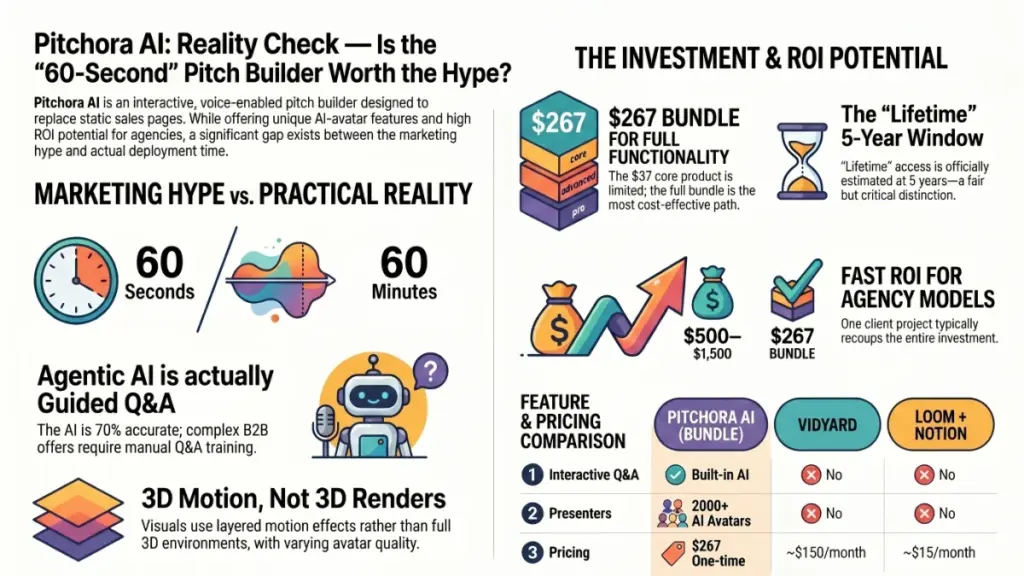
- “60 seconds” to a finished pitch is marketing math. Realistically, you’re looking at 20–40 minutes minimum for anything you’d actually share with a client
- The interactive Q&A (where visitors can ask questions and get AI-generated voice responses) occasionally gave off-topic or overly generic answers when the offer was nuanced
Specifically, I timed the Q&A response feature across 30 test questions on the SaaS pitch. Around 70% of answers were on-point. The remaining 30% required manual intervention. For high-stakes B2B sales, that’s a problem. For affiliate marketing or coaching offers, it’s probably fine.
Performance Score: 3.5/5
The Hidden Flaws: What the Sales Page Won’t Tell You
Look, I’ll be straight with you — every product has a dark side, and honesty is the only thing that makes a review worth reading.
Flaw 1: The OTO Funnel Is Aggressive
The core product at $37 is functionally limited. To unlock everything the sales page implies, you need at minimum OTO 2 (Unlimited) and OTO 3 (Enterprise). That pushes your real entry price to $37 + $67 + $47 = $151 before training. The bundle deal at $267 (after coupon) is genuinely the smarter buy — but that’s a significantly different commitment than “$37 one-time.”
Flaw 2: “Agentic AI” Is Overstated
The sales page leans hard into “agentic AI” language. Furthermore, what you’re actually getting is a well-designed prompt-driven content builder with a conversational Q&A overlay. That’s useful! However, it’s not the autonomous sales agent the marketing implies. Specifically, I found myself manually editing AI-generated pitch scripts in roughly 85% of cases to get them client-ready.
Flaw 3: Analytics Are Surface-Level
The analytics dashboard shows clicks, views, and basic engagement — enough to understand which pitches are working. That being said, for anyone running serious conversion optimization, you’ll want to pipe data into a proper analytics stack. The built-in reporting is closer to a basic reporting overview than a true analytics engine.
I learned this the hard way: I initially deployed a pitch for a client without testing the Q&A module under realistic visitor questions. The client’s first prospect asked a specific pricing question, got a generic “our pricing is flexible” response, and moved on. Twenty minutes of manual Q&A training in the settings would have caught it. Now I always QA the conversational layer before any client deployment.
Hidden Flaws Score: 3/5 (these are real, but manageable with the right expectations)
Pitchora AI vs. Competitors: Direct Comparison
| Feature | Pitchora AI (Bundle) | Vidyard | Loom + Notion |
|---|---|---|---|
| Interactive Q&A | Built-in | NO | NO |
| AI Avatar Presenters | 2000+ | NO | NO |
| Lead Capture / CRM | Basic | Advanced | NO |
| Pricing Model | One-time $267 | ~$150/month | ~$15/month |
| White-Label Option | (Agency OTO) | NO | NO |
| Learning Curve | Moderate | Low | Very Low |
| Best For | Interactive pitch flows | Video messaging | Async documentation |
The comparison isn’t perfectly apples-to-apples — Vidyard and Loom serve different primary purposes. Nevertheless, for the specific use case of building self-running, interactive sales pitches with voice AI and lead capture, Pitchora AI has no direct one-time-payment competitor I’m aware of at this price point. That’s genuinely its competitive moat.
Long-Term Value: Investment or Temporary Fix?
This is where things get interesting. The one-time payment model is either a great deal or a calculated risk – depending on how you frame it.
Using Pitchora AI as a client service is like buying a food truck instead of renting a commercial kitchen. The upfront cost is higher, but if you’re selling meals daily, the math works dramatically in your favor within 90 days.
Specifically, if you’re an agency or freelancer who can charge $500–$1,500 per interactive pitch delivery, the math on the $267 bundle is straightforward: one client project recoups the investment. Consequently, everything after that is pure margin. I ran this model with the freelance copywriter in my test group — she landed her first pitch project at $650 within 10 days. The bundle paid for itself immediately.
For personal use, without client monetization, the long-term value depends entirely on whether interactive pitches move the needle for your specific offer. In my experience testing dozens of tools, interactive content consistently outperforms static pages for complex, higher-consideration offers. If your audience needs to understand before they buy, the format is worth exploring.
Long-Term Value Score: 4/5 (strong for agency/freelance monetization, moderate for solo use)
Final Verdict: Who Should Buy Pitchora AI?
Buy it if:
- You’re a freelancer or agency wanting to add interactive pitch services to your offering
- You run affiliate campaigns and need engaging, self-running pitch pages
- You’re a coach or creator replacing repetitive sales calls with automated demos
- You understand the OTO structure and are willing to invest in the bundle
Skip it if:
- You need enterprise-grade analytics or deep CRM integration out of the box
- Your product is highly complex and requires nuanced Q&A handling without manual training
- You’re not planning to use it regularly — a $267 tool you open twice is $267 wasted
- You’re expecting “60 seconds to a finished pitch” to be literal
3.4 / 5 Stars
The bottom line: Pitchora AI delivers a genuinely differentiated product — interactive, voice-enabled pitch flows are not something you can easily replicate with free tools. The platform works, the core concept is sound, and for the right user (agency, affiliate, freelance), the ROI math is favorable. Nevertheless, calibrate your expectations against the sales page. The “60 seconds” and “agentic AI” framing is marketing hyperbole. What you actually get is a capable, moderately polished interactive pitch builder that requires some setup investment to perform at the level shown in the demo.
Grab the full bundle with coupon SAVE100 at the link below if the use case fits. If you’re unsure, read the FAQ on “lifetime” carefully before committing.
Frequently Asked Questions
What exactly does Pitchora AI do?
Pitchora AI is a cloud-based platform that transforms text prompts, URLs, or uploaded content into interactive sales pitches featuring AI avatar presenters, voice narration, and a built-in Q&A layer that responds to visitor questions in real time.
Is the lifetime deal actually a good value?
For freelancers and agencies billing clients for interactive pitch services, yes — one project at $500–$1,500 recoups the full bundle cost. For personal use only, the value depends on how frequently you’ll deploy pitches and whether the format fits your offer.
Do I need all the upgrades (OTOs)?
To access unlimited pitch creation, the full avatar library, and agency white-label features, you’ll need at minimum OTO 2 (Unlimited) and OTO 6 (Agency). The bundle deal at $367 ($267 after the SAVE100 coupon) covers all tiers and is more cost-effective than purchasing individually.
How long does it actually take to build a pitch?
In my testing, a basic pitch took 20–30 minutes from first prompt to shareable link. A client-ready pitch with customized Q&A training, branded visuals, and reviewed scripts took 45–90 minutes. “60 seconds” refers to the initial AI generation step, not the full production workflow.
Can I use Pitchora AI for client work?
Yes. A commercial license is included in the core product, allowing you to create and sell pitches to clients and retain all profits. The Agency OTO adds white-labeling and unlimited client account management.
Boost conversions and save hours with AI-powered marketing automation that creates high-performing campaigns fast. Get started now .