

Lead & Significance
Microsoft is reshaping Copilot into a broader AI work platform combining Office, Code, and Autopilot agents in one app. The move could simplify daily workflows, but much of the functionality is still rolling out and lacks independent testing. Usage-based pricing for advanced agent features also creates new budgeting and governance considerations for businesses.
Satya Nadella dropped a big claim on September 25. Copilot isn’t a chatbot anymore, he says. It’s “a new OS for work that spans every model, every form factor, and every task.” That’s a bold pitch. I’ve learned to be skeptical of bold pitches from any vendor, Microsoft included.
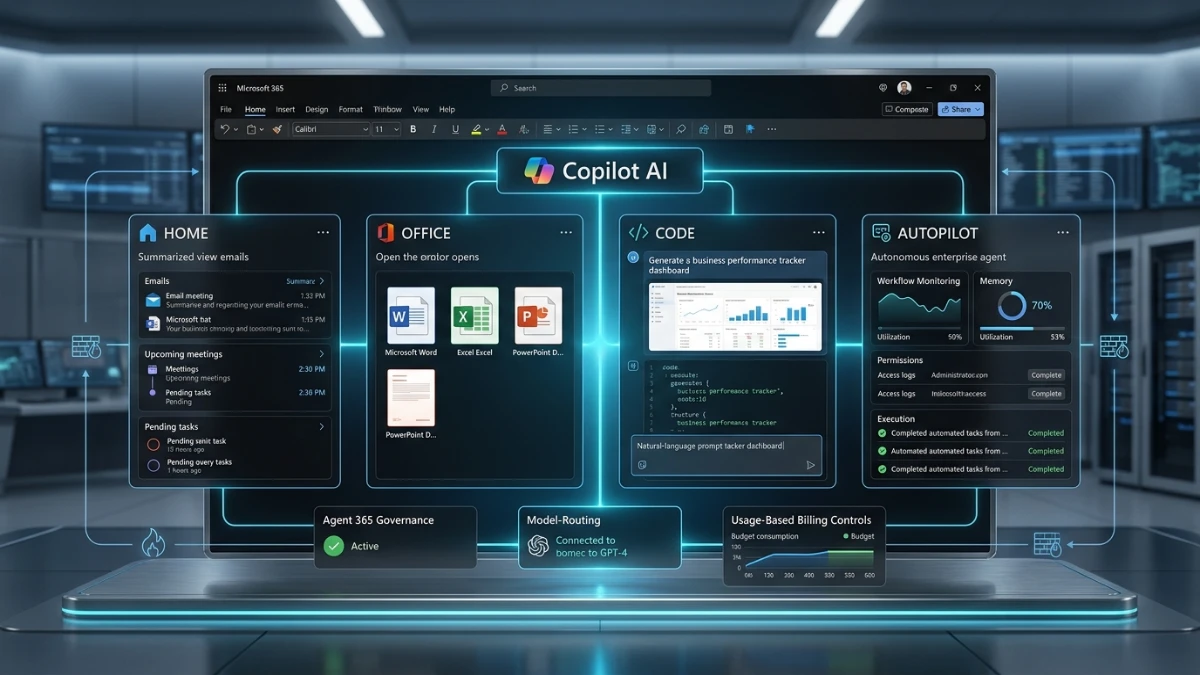
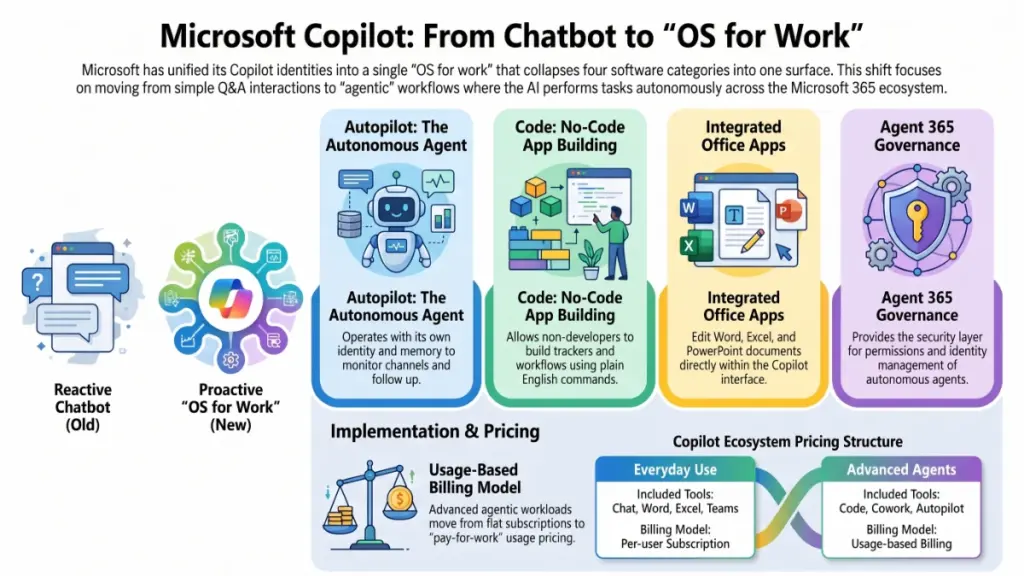
Here’s what actually shipped. Microsoft merged its Microsoft 365 Copilot and consumer Copilot identities into one app. Then it bolted on four major pieces: Home, Office apps (Word, Excel, PowerPoint), Code, and Autopilot. I’ve been testing AI tools since the GPT-3 beta days. I’ll tell you straight: most “unifications” like this are marketing dressing on the same old features. This one isn’t quite that. Microsoft is trying to collapse four separate categories of software into a single surface. If it works, it changes how a lot of my clients think about their daily toolstack.
The timing matters too. This landed the same day Microsoft merged the Copilot brand identities. It also came just days after Nadella told investors, on the July 29 earnings call, that the pieces would come together “this quarter.” September 30 was the deadline. They hit it, technically. But most of what got announced is still rolling out in stages over the next several weeks.
Strategic Context & Why It Matters
I’ve spent the last four years helping businesses figure out where AI tools actually save time. This announcement matters because it targets the gap between “chatbot that answers questions” and “agent that does the work.”
A more proactive Home screen
Home now surfaces a “Today” view. It shows relevant emails, meetings, Teams threads, and tasks, without you asking. That’s the kind of proactive behavior I’ve wanted from Copilot since launch. It’s also the same territory Google and Anthropic are racing toward with their own agent products.
Office apps move inside Copilot
Office apps living inside Copilot, rather than the other way around, is the bigger shift for my marketing clients. Documents edited inside Copilot sync back to the normal desktop apps. So a content team drafting a campaign brief in Copilot doesn’t create a parallel file a colleague can’t touch. In my experience testing dozens of these integrations, that sync layer is usually where things break. I’d want to see it under real multi-editor load before recommending it to a client with a distributed content team.
Code, for non-developers
Code is aimed at non-developers, and that’s the part marketers should watch. Describe a tracker, dashboard, or campaign workflow in plain English. Copilot builds a small app for it. I’ve watched clients waste hours forcing a simple approval tracker into Excel’s constraints. If Code genuinely lowers that bar, it’s a real productivity win, not just a demo trick.
Autopilot, the agent colleague
Autopilot is the agent piece. Give it a name, a role, and a goal. It monitors channels, follows up on conversations, and picks work back up days later. This grew out of Scout, which Microsoft showed at Build. It also borrows ideas from OpenClaw, the open-source personal agent that went viral earlier this year. Autopilot runs inside a company’s Microsoft 365 tenant with its own identity and memory, governed through Agent 365. For any agency handling client data, that governance layer is the difference between “interesting demo” and “something legal will actually approve.”
Deep-Dive Technical Specifications
Microsoft is deliberately vague on the underlying architecture here. I’ll be honest: the public materials don’t give us model-level specs the way a typical AI lab launch would. Here’s what we do know.
Code runs on the same technology powering GitHub Copilot. It executes inside a sandbox environment. Companies can host the apps it builds inside their own tenant, through what Microsoft calls Copilot Managed Runtime, rather than on shared public infrastructure. Microsoft IQ supplies business context to these generated apps. Plugins connect them to relevant company data sources. That’s the part I’d test first if I were evaluating this for a client: how well it pulls in real CRM or analytics data, versus just producing a nice-looking shell.
Autopilot operates with its own identity, memory, computer, and workspace inside the tenant, according to Microsoft. It can appear inside Teams, Outlook, channels, and documents. It gets tagged and permissioned like a human colleague, not a bot account bolted onto the side. Frontier models are part of the mix too. Microsoft names OpenAI’s Astra and Anthropic’s Claude Fable as options for the heavier agentic workloads, alongside its own model routing for everyday tasks.
The routing model is worth flagging as a claim to watch, not a confirmed feature yet. Microsoft says Copilot will eventually route requests between Chat, Cowork, and Code automatically. You won’t have to pick a mode yourself. If that works reliably, it removes real friction for less technical users. But “eventually” is doing a lot of work in that sentence. I’ve been burned before by roadmap promises that quietly slip a year or two.
Performance, Benchmarks & Evidence
I have to be upfront here: there’s no independent benchmark data yet. Most of this hasn’t shipped to real users. Code expands within Frontier at the end of the month. Autopilot enters private preview at the end of September. Office inside Copilot rolls out to consumers and Frontier customers “in the coming weeks.” None of that is available for real hands-on testing yet.
We do have one prior data point: Copilot scaffolding a native WinUI app in roughly 30 minutes, reported earlier. That’s a single demo, not a benchmark. Demos are exactly where vendors put their best foot forward. I’d treat any specific time or accuracy claim from this launch the way I treat every vendor’s launch-day numbers: interesting, unverified, and worth revisiting in three months.
The one signal I trust here is reception. Nadella’s post crossed a million views. It didn’t get the kind of public backlash that hit Microsoft’s “agentic OS” pitch for Windows about a year ago. That pitch was so poorly received that Windows chief Pavan Davuluri reportedly locked replies on his own post. That’s not a performance metric. But it tells you something about how this messaging is landing differently than last time.
Pricing, Licensing & Availability
Copilot now bills two different ways. This is the part that actually affects budgeting conversations with clients.
Everyday use stays on a normal per-user subscription. That covers Chat and Copilot inside Word, Excel, PowerPoint, Outlook, and Teams. Model selection is handled automatically behind the scenes. The heavier agentic workloads, Cowork, Code, and Autopilot, run on usage-based billing instead. So does access to frontier models like Astra and Claude Fable.
That usage-based tier is off by default. Admins control spending limits through Microsoft’s FinOps tooling. In plain terms, Microsoft is moving toward a “pay for the work the agent actually does” model. Nadella previewed this on the July earnings call. I’ve got mixed feelings about it. Usage-based pricing can be fairer for teams with light, sporadic agent needs. It can also turn into a surprise invoice for a team that skips setting spending caps before turning Autopilot loose on a busy week. Get your admin comfortable with those FinOps controls before anyone starts using Autopilot for real work.
Get More Reviews Like This
If you want the honest, hands-on breakdowns when Code and Autopilot roll out to testable accounts, drop your email below. No fake bonus packs. No inflated “value” numbers. Just the real notes from testing this on actual client projects.
[Email signup: “Get my next Copilot testing notes before I publish them”]
Industry Implications & Competitive Analysis
Here’s the reality: Microsoft isn’t leading this shift. It’s catching up.
The competition already moved here
OpenAI’s Codex already supports long-running coding work through its Agents API. Anthropic added Cowork and Claude Code, with Claude working directly across Word, Excel, PowerPoint, and other business files, the same territory Microsoft just entered. Google has pushed Gemini toward computer use and background agents. It’s betting on that direction with its new Googlebook laptops, which, interestingly, also feature Microsoft Copilot preinstalled.
What that says about Microsoft’s position
That last detail says something about where the leverage sits right now. Microsoft was early to the AI assistant race, arguably the earliest of the major players. But it took the brunt of the backlash when the “agentic OS” framing landed badly a year ago. One user’s comment on the announcement captured something I’ve noticed across a dozen client rollouts: “You’ll be first to adopt every new technology but scaling it always proves a problem.” That’s been true of Microsoft’s AI push more than once.
For my clients weighing platforms, the practical question isn’t “which company has the best model.” It’s “which platform’s agent features actually integrate with the tools my team already lives in all day.” Microsoft’s advantage is that Word, Excel, Outlook, and Teams are already the daily surface for most businesses. If Copilot’s agent layer works as described, that built-in distribution matters more than any benchmark score.
Limitations, Caveats & Skepticism
I’ll be straight with you: a lot of this is still a promise, not a product. Code, Autopilot, and full Office-in-Copilot access are rolling out in pieces over the coming weeks. None of it is available yet for the kind of stress-testing I’d normally do before recommending a tool. The automatic routing between Chat, Cowork, and Code, arguably the most convenience-improving feature described, is explicitly framed as something coming “eventually.”
There’s also no confirmed roadmap connecting this to Windows itself. Notably, Nadella didn’t mention Windows 11 once. There’s no Windows 11 UI anywhere in the Copilot materials. If you’re picturing this turning into “Windows 12 with an AI shell,” pump the brakes. The closest thing to that idea, the leaked Project Aion concept from 2024, isn’t part of this announcement at all.
Governance is the other open question for any agency or enterprise client. Autopilot running with its own identity, memory, and permissions sounds well-controlled on paper, through Agent 365. But whether that governance holds up once dozens of autonomous agents run across a real organization is a different question. That’s exactly the kind of thing that looks clean in a keynote and gets messy in production. I’ve seen that pattern before with less ambitious tools.
Future Outlook & Conclusion
Watch three dates over the next few weeks. Code expands within Frontier at the end of this month. Autopilot enters private preview at the same time. The broader Office-in-Copilot rollout follows shortly after. None of the headline claims here, the seamless mode-routing, the tenant-hosted apps, the “colleague-like” Autopilot, are things I can vouch for yet.
What I can tell you is this: Microsoft is finally chasing the “beyond chatbot” direction that OpenAI, Anthropic, and Google have pushed for two years. Whether Copilot earns the “OS for work” label depends on whether these pieces hold together outside a keynote demo. I’ll test this the moment it’s available on a real account. I’ll tell you exactly what breaks.