

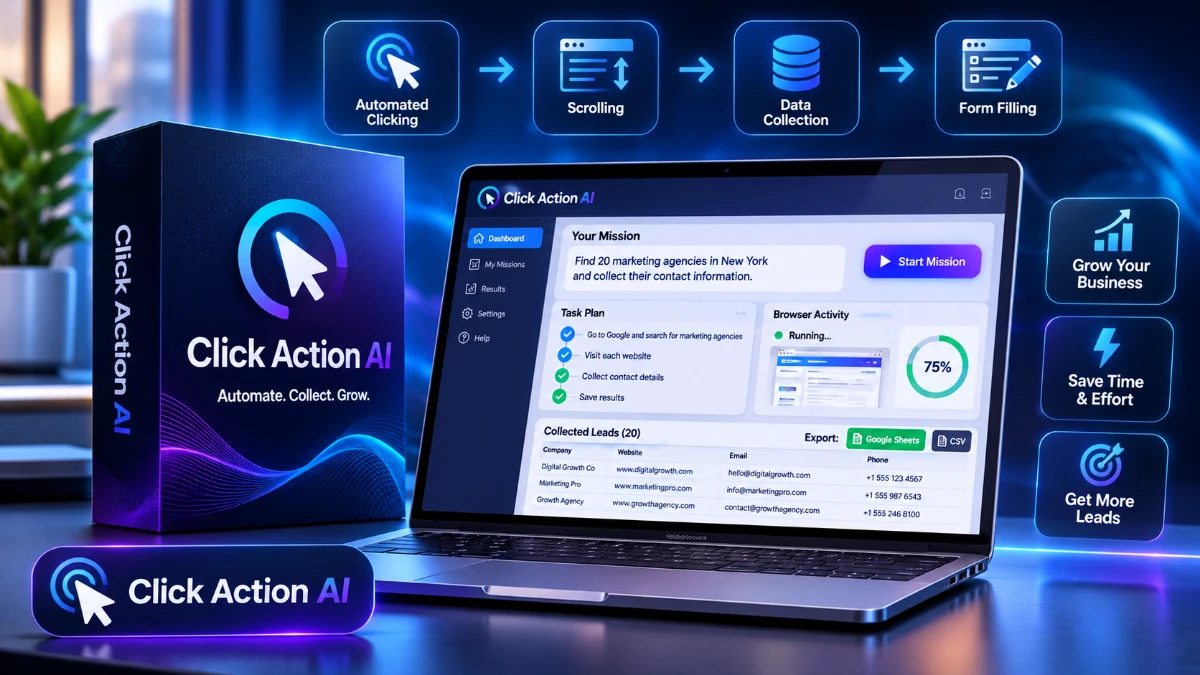
Click Action AI is an AI web worker designed to automate browser tasks, collect business leads, compare prices, and organize data in spreadsheets. Its plain-English commands and pause-and-resume feature look promising, but hands-on performance remains unverified. The software’s price and refund policy are also undisclosed. The free training offers a chance to inspect a live demo before deciding whether the tool is worth considering.
Affiliate disclosure: This article contains affiliate links. If you register or buy through them, I may earn a commission at no extra cost to you. It doesn’t change my opinion of the product, and I’ve listed the weak spots below.
Ask most AI chatbots to pull 50 local dentists with emails into a spreadsheet, and you get a polite list of steps: open Google Maps, visit each site, copy the email, repeat. That’s homework, not help.
Click Action AI is built around a different idea. You type one sentence, and it opens a real browser, clicks, types, scrolls, collects the data and hands back a finished file. The pitch is that it does the clicking, so you don’t have to.
Discover smarter ways to automate repetitive web tasks and save time.
That’s a big promise, and I’ve seen plenty of AI tools fall short of this kind of promise. So in this review I’ll go through what Click Action AI claims to do, what’s actually documented, what isn’t, and who it might suit. You can see the official free training page here.
Quick Verdict
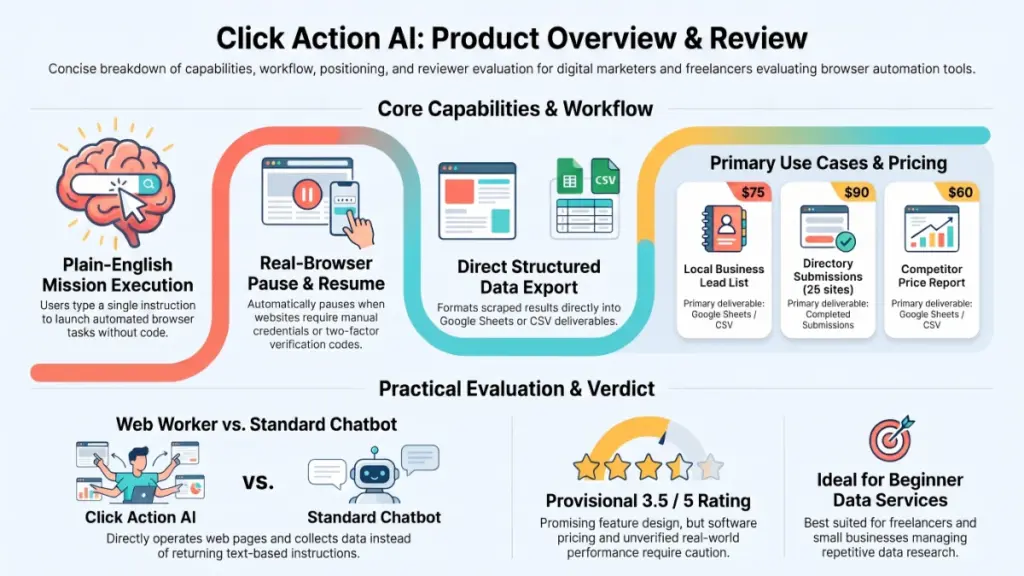
Click Action AI is an AI “web worker” that runs missions in a real browser and exports results to Google Sheets or CSV. It’s aimed at beginners who want a service to sell, such as lead lists, price reports, directory submissions and CRM data entry, and at small business owners who are tired of repetitive data work.
The concept is solid, and the pause-and-take-over feature is a thoughtful touch. My concern is what the page leaves out: the software’s price, refund terms and any upsells aren’t shown, and the income-style framing around Fiverr and Upwork needs a healthy dose of realism.
My provisional rating: 3.5 out of 5. That score rests on the creator’s demos and sales material, not on my own hands-on testing. I’ll explain exactly what that means in the experience section.
Product Overview
| Detail | Information |
|---|---|
| Product name | Click Action AI |
| Category | AI web worker / browser automation for data tasks |
| Creator | Yogesh Agarwal (ProWebVentures), listed as a JVZoo High Performance Leader |
| Launch date | Free live training on Tuesday, November 10, 2026 at 10 AM EST; software launch date not stated on the page |
| Price | Not shown on the page I reviewed; the training itself is free |
| Refund policy | Not shown on the page I reviewed |
| Website | app.clickactionai.com (the app address shown in the page’s demo) |
| Best for | Beginners, side-hustlers, freelancers and small business owners with repetitive browser work |
| Overall rating | 3.5 / 5 (provisional, based on the creator’s materials) |
What Is Click Action AI?
Click Action AI describes itself as an AI web worker. Instead of answering questions in a chat window, it opens a real browser session, follows a plan, and carries out tasks on actual websites. You describe the job in plain English, press Start, and watch it work.
The finished output lands in Google Sheets or a CSV file, so you can use it yourself or hand it to a client.
What problem does it solve?
A lot of online work is not hard, just tedious. Finding contact details for 50 businesses, comparing competitor prices, or typing 100 contacts into a CRM takes hours because every step is manual. The creator’s own page estimates four to six hours for a single 50-lead list done by hand. I can’t verify that figure, but it matches what I’d expect for careful manual research.
Standard chatbots can’t help much here because they can’t operate a website. Click Action AI is designed to close that gap.
Who is it for?
The page speaks to complete beginners looking for a service to sell, busy people short on time, and business owners who want leads, price checks and data entry handled in the background. It says no coding is needed.
Main Features
1. One-sentence missions
You type something like “Find 50 dentists in Austin, TX with email and phone. Put them in a Google Sheet.” There’s no prompt engineering and no workflow builder. For beginners, this is the biggest selling point, since the barrier to a first attempt is very low.
2. A visible step-by-step plan
Before touching a website, the AI breaks the job into steps, such as searching Maps, opening each site, grabbing the email and filling the sheet. Seeing the plan matters because you can tell early if the AI misunderstood the request.
3. A real browser, not a chatbot
The tool opens pages, clicks links, scrolls and types into forms. That’s what separates it from a text-only assistant, and it’s what makes tasks like directory submissions possible at all.
4. Pause and take over
This is the feature I find most practical. When a site asks for a login or a verification code, the mission pauses and waits. You type the code, hit Resume, and the AI continues. Passwords and payments staying in your hands is the right design choice for a tool that browses on your behalf.
Discover smarter ways to automate repetitive web tasks and save time.
5. Self-correcting paths
If a page has no contact section, the page says the AI tries something else, such as footer links, instead of stopping. Anyone who has run a scraper that breaks on one odd layout will appreciate the idea. How well it works across messy real-world sites is exactly what I’d want to check in the live demo.
6. Exports to Google Sheets and CSV
Results come back as a clean file. For client work, that’s the deliverable.
7. Scheduled daily checks
The feature list also mentions daily scheduled checks, which could suit price monitoring or review tracking. The page doesn’t explain how scheduling works, so treat this as something to confirm.
Jobs the tool is positioned for
The page lists these use cases, along with the suggested starting prices shown inside the app:
| Job type | Suggested price in app |
|---|---|
| Local business lead list | $75 |
| Directory submissions (25 sites) | $90 |
| Real estate listing sheet | $70 |
| Influencer outreach list | $65 |
| Competitor price report | $60 |
| CRM data entry (100 contacts) | $55 |
The page states plainly that these are starting suggestions, not a promise of sales. I’ll come back to that in the pricing and verdict sections.
Benefits: What You Actually Get Out of It
Features only matter if they change your week. Here’s how I’d translate the feature list into outcomes.
- Time back on repetitive work. If a mission really does replace several hours of copying and pasting, the gain is obvious. Even if it only handles 70 to 80 percent of a task cleanly, a quick review pass is still faster than starting from scratch.
- A lower barrier to offering a service. Lead lists, price reports and data entry are easy to explain to a buyer. You don’t need a portfolio of design or coding work to describe them.
- Less tool juggling. The mission, plan, browser and export all live in one place, which beats stitching together a scraper, a spreadsheet and a chatbot.
- Control where it counts. Pause-and-resume keeps logins, codes and payments with you, so you aren’t handing over credentials.
- Scalability for small operations. If missions run reliably, one person could take on several small jobs a day instead of one.
The word “if” appears a lot in that list on purpose. These are the outcomes the product is designed for, not results I’ve measured.
My Experience: What I Could and Couldn’t Verify
I want to be straightforward here, because this is where many reviews quietly invent things. At the time of writing, the creator’s free live training hasn’t happened yet (it’s scheduled for Tuesday, November 10), and I haven’t run a real mission in the app myself. So I’m not going to describe setup times, success rates or failed runs I didn’t see.
What I did do is go through the full sales page and the preview of the app interface line by line. Here’s what stood out.
What the interface preview shows
The mock-up shows a clean layout: a mission box at the top, a plan panel beside it, and a status bar. One detail I liked is the “Paused: This Site Sent A Code” state, which shows the AI stopping and waiting instead of guessing. That’s honest design, and it suggests the creator thought about real-world friction like two-factor prompts.
The comparison it makes with chatbots
The page contrasts a chatbot’s answer (a seven-step to-do list) with a finished sheet of dentists and emails. The framing is fair as far as it goes, since general chatbots typically can’t operate a browser. But it also sets up a straw man, because dedicated scraping and automation tools have existed for years. Click Action AI’s real competition isn’t ChatGPT-style chat; it’s those tools, which I cover below.
Where I’d stay cautious
- The page says demos are screen recordings of real missions, but the animated preview and the browser illustration are labeled as illustrations with example business names.
- The fine print says earnings and results aren’t typical and that no income or client is guaranteed. I’d take that at face value.
- Pricing for the software itself isn’t displayed, so I can’t judge value yet.
What I’d test first if I had access
- Run the dentist-lead mission and manually check 10 of the 50 emails and phone numbers for accuracy.
- Try a site with a login or captcha and see how smoothly pause and resume works.
- Run a messy task, such as a directory with unusual forms, to see how the self-correction behaves.
- Time a full mission against doing the same work by hand.
If you attend the live training, these are good things to watch for. I’m happy to update this review with real results once I’ve seen the tool run.
Discover smarter ways to automate repetitive web tasks and save time.
Ease of Use
On paper, Click Action AI is about as simple as software gets: type a sentence, press Start. The page says no coding or tech skills are needed, and the interface preview supports that.
Learning curve
The tool itself should take minutes to understand. The real learning curve is writing a good mission. Vague commands produce vague results, and the page acknowledges this by promising a “one-line command formula” in the training and a bonus pack of 300 ready-to-run commands plus 40 “rescue rewrites” for missions that stall. That tells me the creator knows wording matters.
Interface
From the preview, the layout is uncluttered: mission, plan, live status, export. I can’t speak to speed or polish without using it.
Documentation and support
The page lists email support and mentions a live Q&A, but it doesn’t describe a help center, video library or written guides. I’d check what’s included after purchase before relying on it.
Beginner friendliness
Very good in concept. The bigger beginner hurdle isn’t the software; it’s finding buyers, pricing work and delivering consistently. That’s business skill, and no tool removes it.
Performance
I can’t give you speed or stability numbers, and I won’t make any up. What I can do is tell you what to look for, because browser-based AI tools tend to fail in predictable ways.
| Area | What to check | Why it matters |
|---|---|---|
| Speed | Minutes per 50-lead mission | Determines how many jobs you can realistically take |
| Accuracy | Share of emails and phones that are correct | Wrong data means unhappy clients |
| Reliability | Missions that finish without a restart | Stalls eat the time you were trying to save |
| Site compatibility | Behavior on sites with logins, captchas or pop-ups | Real sites are messier than demos |
| Output quality | Clean columns, no duplicates | A raw export rarely looks client-ready |
One point in the creator’s favor: the page admits that some sites will ask for logins or codes and that missions can hit pages with no contact info. Tools that acknowledge friction up front tend to be more trustworthy than ones that show only flawless runs.
One point of caution: automated browsing can conflict with the terms of service of some websites, and sites can block automated traffic. Anyone using a tool like this for client work should check the rules of the sites they collect data from, and handle personal contact data responsibly under the privacy laws that apply to them.
Click Action AI Pricing: What Does It Cost?
The only price I can confirm is the one for the training: it’s free. The page I reviewed is a registration page for a live webinar on Tuesday, November 10 at 10 AM EST, lasting up to two hours with live Q&A. It doesn’t show the cost of the software, any monthly or yearly plan, upsells, or a money-back policy.
That’s common for webinar-led launches, where the offer is revealed during the session. But it means I can’t tell you whether Click Action AI is good value yet.
What to ask before buying
- What is the total cost today, and is it one-time or recurring?
- Are there usage limits, such as a cap on missions, pages or exports?
- Which features sit behind upsells or higher tiers?
- What is the refund policy, and how long is the window?
- Are the 300 mission commands and other training assets included in the paid product or only in the bonus pack?
The 7 live-attendee bonuses
The page says people who attend live receive seven bonuses, advertised as worth $1,109 in total, with no replay planned. Here’s what they are:
| Bonus | What it is | Stated value |
|---|---|---|
| 1 | 300 one-line mission commands | $197 |
| 2 | 100 profitable lead-list niches | $147 |
| 3 | 50 gig listings ready to post | $197 |
| 4 | 75 first-client outreach messages | $147 |
| 5 | 25 client-ready deliverable layouts | $127 |
| 6 | 40 mission rescue rewrites | $97 |
| 7 | 30-day first-client sprint | $197 |
I’d treat those dollar values with some skepticism. Stated “worth” figures on bonus bundles are marketing numbers, not market prices. That said, the content itself looks genuinely useful for a beginner, especially the command vault and the outreach messages, since they shorten the path from tool to first delivered job.
Is it worth the money?
I can’t answer that until the price is on the table. As a rule of thumb, I’d compare it against the value of the time saved. If a lead list takes you five hours by hand and a mission cuts that to well under an hour, even a modest tool price can pay for itself quickly, provided missions run reliably and you have a way to find buyers.
The free training costs nothing but a couple of hours, so it’s a low-risk way to see the tool work and hear the real price before deciding. Save your free seat here.
Discover smarter ways to automate repetitive web tasks and save time.
Pros
- Real browser actions. It clicks, types, scrolls and fills forms, which is what chatbots can’t do. That opens up tasks like directory submissions and CRM entry.
- Plain-English commands. No workflow builder or technical setup, so a beginner can try a first mission quickly.
- Pause and take over. Logins, codes and payments stay with you. It’s a sensible safety and trust feature.
- Visible plan. Seeing the steps before and during a run helps you catch mistakes early.
- Usable output. Google Sheets and CSV are formats clients already understand.
- Realistic use cases. Lead lists, price reports, listing sheets and data entry are services businesses do buy.
- Transparent disclaimers. The page states that earnings aren’t typical, that suggested prices aren’t a promise of sales, and that preview visuals are illustrations.
- Useful live-attendee bonuses. Ready-made commands, outreach messages and a 30-day plan address the “what do I do next” problem.
Cons
- No software price or refund policy shown. You can’t judge value until the offer is revealed, and I’d want the refund terms in writing.
- Unverified performance. Speed, accuracy and reliability on real, messy websites are unproven in the material I’ve seen.
- Heavy side-hustle framing. The Fiverr and Upwork angle is appealing, but those marketplaces are crowded and low-priced for simple data jobs. The suggested prices of $55 to $90 are starting points, not income.
- Possible site restrictions. Some websites block automated browsing or prohibit it in their terms. A tool can’t fix that.
- Data quality still needs checking. AI-collected emails and phone numbers should be spot-checked before you deliver them to a client.
- No replay. The bonuses and the demo are live-only, which adds pressure to decide on the spot. I’d rather decide calmly.
- Missing detail on scheduling, limits and support. The page mentions daily scheduled checks but explains little about how they work or what limits apply.
Click Action AI vs. Competitors
The market for browser automation and AI agents is busy, and features and pricing change quickly. The comparison below is based on how these tools are generally positioned, not on a head-to-head test, and I’ve left out prices on purpose. Check each vendor’s current page before deciding.
| Approach | How it works | Best for | Main trade-off |
|---|---|---|---|
| Click Action AI | Plain-English missions run in a real browser; export to Sheets or CSV | Beginners wanting a simple, task-focused tool | Unproven in my hands; price and limits not shown |
| Browse AI | Point-and-click “robots” trained to extract and monitor web data | Recurring data extraction and change monitoring | Setup per site takes more effort than a one-sentence command |
| Bardeen | Browser-based automation and playbooks across apps | Workflow automation between web apps | More of a workflow tool than a general web worker |
| Octoparse and similar scrapers | Visual scraping with templates and scheduling | Large-scale structured scraping | Steeper learning curve for beginners |
| General AI agents with browsing (for example, OpenAI’s agent features) | Chat-driven agents that can browse and act | Occasional research and varied tasks | Not built around lead-list and data-entry deliverables; plan limits apply |
| A virtual assistant | A person does the work | Judgment-heavy or messy tasks | Paid by the hour, and you still check the output |
How I’d think about the differences
Versus scraper tools: Established scrapers are often more mature and better suited to high-volume, repeatable extraction. Click Action AI trades some of that depth for simplicity. If you’re technical or need scale, a dedicated scraper may serve you better. If you want to describe a job in a sentence and see what happens, Click Action AI’s approach is easier to start with.
Versus general AI agents: Big-name agents are flexible, but they aren’t packaged around specific sellable jobs, and you’d need to craft your own prompts and deliverable formats. Click Action AI’s bonuses (commands, niches, gig listings) are designed to close that gap.
Versus hiring a VA: A good human assistant handles ambiguity better. A tool wins on speed and cost for repetitive, well-defined jobs, but you still need to check the output.
The honest takeaway is that Click Action AI’s advantage is packaging and simplicity, not necessarily raw capability. Whether the capability holds up is the part I’d test.
Who Should Buy Click Action AI?
It could be a good fit if you:
- Want to start a small data-services side business and need a tool that handles the browser work.
- Already freelance in virtual assistance, lead generation or local SEO and want to speed up repetitive tasks.
- Run a small business and spend hours on lead research, price checks or CRM data entry.
- Prefer simple tools over technical scrapers and are comfortable reviewing output before using it.
- Like the idea of a done-for-you starter kit of commands, outreach messages and a 30-day plan.
Who Should Skip It?
You may be better off elsewhere if you:
- Need large-scale, high-volume scraping with fine-grained control, where a mature dedicated scraper is the safer choice.
- Expect guaranteed income. Nothing on the page promises it, and the fine print says so.
- Aren’t willing to find clients. Software can do the clicking, but it can’t do the selling.
- Work with strict compliance requirements around personal data and aren’t sure how automated collection fits.
- Dislike buying under time pressure. If a live-only offer makes you uneasy, wait and compare options first.
Frequently Asked Questions
What is Click Action AI?
It’s an AI web worker that opens a real browser, follows a step-by-step plan and completes tasks such as lead lists, price reports, directory submissions and data entry, then exports the results to Google Sheets or CSV.
Who created Click Action AI?
The page credits Yogesh Agarwal, founder of ProWebVentures, who is listed as a JVZoo High Performance Leader and builds software for online marketers and small businesses.
Is Click Action AI free?
The live training is free. The page doesn’t show the price of the software itself, so you’ll need to see the offer during or after the training.
When is the free training?
Tuesday, November 10, 2026 at 10 AM EST, lasting up to two hours with live Q&A. Convert the time to your own time zone, because the page shows only Eastern time.
Will there be a replay?
The page says no replay is planned, and that the seven bonuses go only to people who attend live.
Do I need technical skills or coding?
According to the page, no. You describe the job in plain English. In practice, you’ll still need to write clear commands and check the results.
Can I really make money selling these services?
Some people do sell lead lists, research and data-entry gigs, but the page explicitly says results aren’t typical and nothing is guaranteed. The suggested prices of $55 to $90 are starting points, and competition on freelance marketplaces is real. Treat any income as something you’d need to earn through outreach and quality delivery.
Is it safe to let an AI log in to sites for me?
The tool is designed to pause when a site asks for a login or code so you can enter it yourself. That’s a good safeguard, but I’d still avoid using sensitive personal or financial accounts, and I’d review how the product stores any session data.
How does it differ from ChatGPT or other chatbots?
Chatbots mainly answer in text. Click Action AI is built to operate websites in a real browser and return a finished file. General AI agents with browsing exist too, but this one is packaged around specific sellable tasks.
Scorecard Summary
These scores are provisional. They reflect the creator’s materials, not hands-on testing.
| Category | Score (out of 5) | Note |
|---|---|---|
| Concept and idea | 4.5 | Real browser actions with a plain-English interface |
| Ease of use | 4.0 | Looks simple; wording good missions takes practice |
| Features | 4.0 | Pause and take over is a standout |
| Performance | Not rated | No hands-on results yet |
| Pricing clarity | 2.5 | Software price and refund terms not shown |
| Transparency | 3.5 | Clear disclaimers, but key offer details withheld |
| Overall | 3.5 | Promising, pending real-world proof |
🎁 Free Gift Waiting for You!
Before you leave, there’s a free gift waiting for you.
As a thank-you for reading, you can claim my Ultimate All-In-One Digital Marketing Package completely FREE.
🎉 What’s Inside Your Ultimate All-In-One Package
01. 50 AI Digital Product Ideas
A curated collection of highly profitable AI-powered digital product ideas designed for quick implementation and strong profit potential.
02. Digital Sales Mastery
Discover the proven framework behind high-converting sales funnels, persuasive copywriting, and sustainable online revenue growth.
03. Mastering Email List
Advanced strategies for building an engaged email audience, increasing open rates, improving click-through rates, and generating automated income.
04. The Ultimate Faceless Playbook
A complete blueprint for building a profitable online brand and growing on social media without ever showing your face.
🎁 BONUS: Premium Canva Marketing Vault
A premium library of high-converting Canva templates to help you create professional marketing assets, generate more organic traffic, and boost conversions.
💥 Total Package Value: $197
✅ Yours Today: FREE
Claim your complimentary bundle and get instant access to premium resources that can help you create, market, and grow your online business more effectively.
Final Verdict: Is Click Action AI Worth It?
Click Action AI targets a real frustration: AI that explains work but won’t do it. A tool that opens a browser, collects data and delivers a spreadsheet is genuinely useful if it performs as shown, and the pause-and-take-over design suggests the creator has thought about how websites behave in practice.
But a good idea isn’t a proven product. I haven’t seen it run on real, messy sites, and the page withholds the software’s price and refund terms. Until those are on the table, I can’t tell you it’s worth the money.
Who will benefit most: beginners and small business owners with repetitive lead, research or data-entry work, who are willing to review the output and do their own selling.
Would I recommend it? I’d recommend attending the free training, with conditions. Watch a live mission closely, note the price and refund policy, check a sample of the output for accuracy, and only then decide. If the live demo holds up and the price is fair for the time it saves, it could earn its place. If the demo leans on perfect sites or the refund terms are vague, I’d walk away.
I’ll update this review with hands-on results as soon as I’ve run the tool. In the meantime, you can reserve your free seat for the November 10 training and judge it for yourself.
Discover smarter ways to automate repetitive web tasks and save time.