

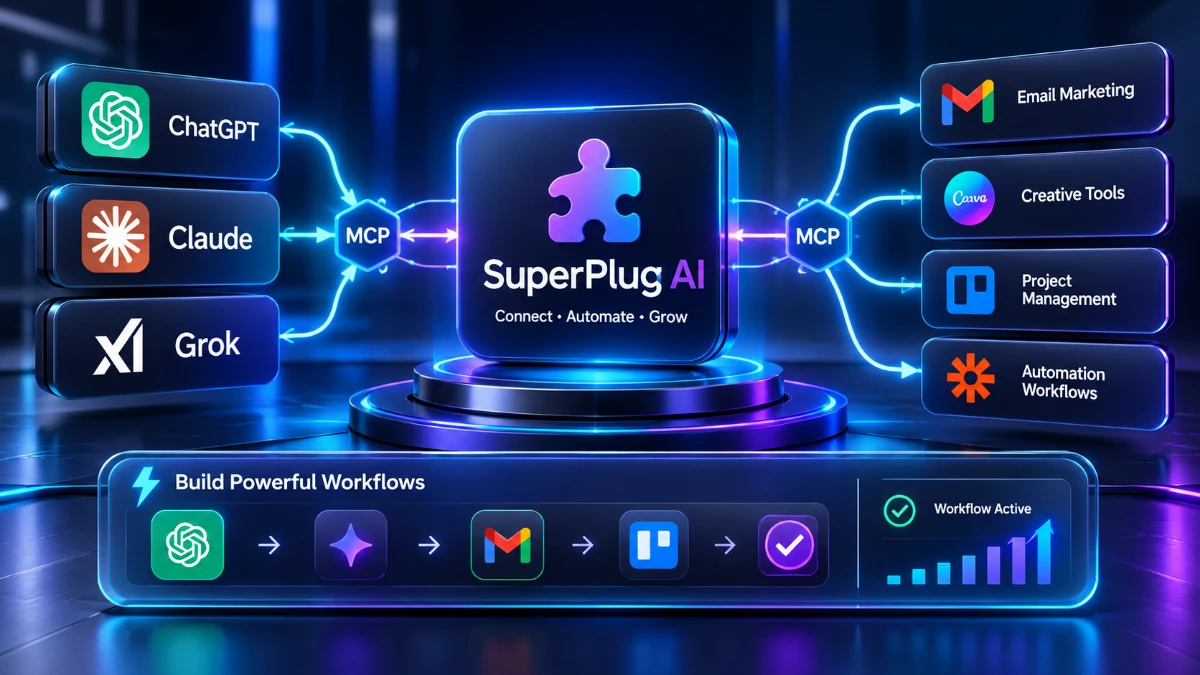
SuperPlug AI aims to connect ChatGPT, Claude, and Grok with creative tools, email platforms, and productivity apps through MCP-based workflows. It could help freelancers and small agencies reduce repetitive tasks, but the product remains untested, with pricing and refund terms still unknown. The free premiere may be worth attending, but buyers should wait for a real demonstration, transparent costs, and independent user feedback before purchasing.
Pre-launch review. Last updated: November 2, 2026. SuperPlug AI has not been released yet. Everything below is based on the official premiere page, not on hands-on use. I’ll tell you exactly where that matters.
Most AI chat tools are good at talking and bad at finishing. You ask for a campaign, you get a nice draft, and then you spend the next hour copying it into your email platform, your project board and your calendar.
SuperPlug AIsays it fixes that gap. The pitch: plug it into ChatGPT, Claude or Grok, connect your business apps, and let the AI do the work inside one conversation instead of handing you text to paste around.
I’ve reviewed AI and automation tools for over nine years, and I’ve learned to be suspicious of any launch that promises “finished work from a single sentence.” So I read the page closely, mapped every claim, and separated what’s concrete from what’s still marketing. This review is that breakdown, plus what I’d test first the day it goes live.
Quick Verdict
SuperPlug AI is an interesting idea with almost no verified evidence behind it so far.
The concept is sound. Connecting AI assistants to real software through MCP (Model Context Protocol) is a genuine, growing approach, and the list of connected apps on the page is broad. If it works as described, it could save freelancers and small agencies a lot of copy-paste time.
But there’s no price, no refund terms, no demo footage I can evaluate, and no independent user feedback. The page is a webinar registration, not a product page.
- Best for: freelancers, solo marketers and small agencies who already use ChatGPT or Claude daily and are tired of moving output between apps.
- My current stance: worth watching, and worth attending the free premiere if the topic fits you. I would not buy anything before seeing the price, the refund policy and a real, unedited demo.
- Rating: pending hands-on testing.
Affiliate disclosure: I have not been given an affiliate link for this review, so none is included. If one is added later, I’ll disclose it here.
Product Overview
| Detail | Information |
|---|---|
| Product Name | SuperPlug AI |
| Category | AI connector / MCP-based creative and workflow engine |
| Creators | Pankaj Malav (co-founder) and Deepanker Rajora (co-founder and chief engineer) |
| Launch Date | Live premiere on November 3, 2026 (2:00 PM ET) and November 4, 2026 (10:00 AM ET). Public sale date not announced |
| Price | Not announced. The page mentions a “best launch deal” for live attendees |
| Refund Policy | A refund policy link exists, but the terms aren’t shown on the page |
| Website | Premiere registration page (no standard product site seen) |
| Works With | ChatGPT, Claude, Grok |
| Best For | Freelancers, marketers, small agencies, content creators |
| Rating | Pending hands-on testing |
The page also states that JVZoo is the retailer, which tells me the sale will likely run through that marketplace. That’s useful to know because JVZoo has its own refund handling, though I’d confirm the specifics before purchase.
What Is SuperPlug AI?
SuperPlug AI is a layer that sits between your AI assistant and the apps you use for work. Instead of the AI only writing text in a chat window, it can reach into connected services to make things and send them where they need to go.
The page describes a three-step idea: your AI thinks, SuperPlug creates, and your apps deliver.
The problem it’s trying to solve
Anyone who uses ChatGPT or Claude for client work knows the routine. You get a good proposal draft, then you reformat it, paste it into a document, create the cover image elsewhere, write the email in another tool and schedule the call in a third.
Each hand-off is small. Together they eat hours.
How it claims to work
SuperPlug AI runs on MCP, the open standard that lets AI assistants connect to outside software. The page notes that this standard is backed by major AI companies. That part is broadly accurate: MCP has become a widely adopted way to give AI tools access to external apps.
The product’s “SuperCharge Engine” is described as connecting creative production tools and guided workflows to your AI. In plain terms, you connect your accounts once, then ask your AI to do work that touches those accounts.
What it is not
It isn’t a new AI model. It doesn’t replace ChatGPT, Claude or Grok. You still need one of those, and the page doesn’t clearly say which plan level is required (one of its own FAQ items asks this, but the answer isn’t visible). It also isn’t a no-effort income machine, and the page’s own disclaimer says there’s no guarantee of income or success.
Main Features
Here is what the page actually lists, with my read on each.
1. Works inside ChatGPT, Claude and Grok
You stay in the assistant you already know. The page shows the three as “linked,” and says you can even start a job from the mobile app and find it finished later at your desk.
Why it matters: no new interface to learn. What I can’t confirm: whether all three behave equally well, since each assistant handles connectors differently.
2. Creative tool connections
The page lists these services:
- Runware: fast, low-cost image generation from many models
- fal.ai: a large catalog of image, video and audio models
- ElevenLabs: voiceovers, cloned voices and sound effects
- HeyGen: talking-avatar videos and video translation
- Replicate: specialist models like background removal and upscaling
- OpenRouter: access to many text models
- Stability AI: Stable Diffusion images
One thing to flag: these are third-party services. Based on how such integrations typically work, you would likely need your own accounts and may pay those providers separately. The page doesn’t clarify this, and it’s the biggest cost question I’d want answered.
3. Email marketing connections
This is the longest list on the page: GetResponse, Mailchimp, Brevo, ActiveCampaign, MailerLite, Kit (ConvertKit), Sendy, Moosend, SendFox and AWeber.
The described actions include adding contacts, sending or scheduling broadcasts, and viewing scheduled, sent and draft emails. For anyone running newsletters for clients, that coverage is wider than I expected.
4. Productivity, chat and meeting tools
- Notion, Airtable, Trello: save briefs, log leads and content calendars, turn approvals into cards
- Slack and Discord: post “ready” and “needs approval” messages
- Calendly and Zoom: share booking links and create client meetings
The Google Meet and Google Sheets badges appear elsewhere on the page, though they aren’t described in the same detail.
5. Automation bridges
Zapier, Make, Pabbly Connect and generic webhooks are listed. The page says Zapier alone reaches 7,000+ apps. This is where SuperPlug could stretch well past its named integrations, but it also means some workflows will depend on a second tool you might have to pay for.
6. Guided workflows
The page mentions guided workflows that use your photos, products and brand. It shows examples like a client proposal, a restaurant website built from a brand kit, a rental promo pack and a website “that comes alive.” I couldn’t verify the quality of any of them, because the page shows labels, not outputs I can inspect.
7. The Thumbnail Creator app
Every live attendee gets this free. It’s described as pick a template, upload an image, add text, and make a thumbnail. It’s a simple utility, but it’s the only thing the page promises with certainty.
Benefits: What You’d Gain If It Works as Described
Features are only useful when they change your week. Here’s how I’d translate the claims into outcomes:
- Less app-hopping. One conversation replaces several tabs. For client work, that could mean faster turnaround.
- Fewer manual hand-offs. Drafts go straight into email platforms, Notion or Trello instead of sitting in a chat log.
- A wider service menu. The page suggests offering websites, promo videos and monthly content to local businesses. That’s plausible as a business model, though the income figure it quotes is the vendor’s claim, not something I’ve verified.
- Mobile starts. Kicking off a job from your phone is useful if the result really is waiting for you later.
- An early look at MCP. Even if you never buy this, learning how connected AI works is a worthwhile skill right now.
A caution on the money claim. The page says agencies charge local businesses “$800 to $1,200 a month” for this kind of work. Some do, but earning that depends on finding clients, delivering quality and handling revisions. The tool alone doesn’t create any of that.
What I Can and Can’t Verify So Far
Normally this is the section where I describe setup, interface and speed from actual use. I can’t do that here, and I won’t invent it.
What I could check
- The premiere dates and times are clearly stated, with two sessions.
- The two named founders and their listed prior products (Cinemastudio, ClipsField AI, VideoClawBot, AppsfieldAI, HookedAI and MagicDesigners) are mentioned on the page.
- The integration list is long and specific, which is a better sign than vague “connects to everything” language.
- The legal footer states that results aren’t guaranteed and that JVZoo is the retailer.
What I couldn’t check
- Whether the product actually works as shown
- Setup time and difficulty
- Output quality from the creative tools
- Reliability across ChatGPT, Claude and Grok
- Final pricing, upsells and refund terms
- Any independent user reports
A note on the “invite-only” framing
The page says only 100 seats exist and that you were “hand-picked.” I treat that language with caution. Limited-seat messaging is a very common launch tactic, and a registration page that anyone can reach isn’t really private. Attending is free, so there’s no harm, but don’t let scarcity pressure you into a purchase decision.
What I would test first on launch day
- Connection setup. How long does it take to link one AI and two apps, and does it need technical steps?
- One end-to-end job. For example: write a short email, create a matching image, and schedule the broadcast in a connected platform.
- Failure handling. What happens when an API key is wrong or a service times out?
- Cost per job. Add up what the third-party services charge for a typical workflow.
- Consistency. Run the same request in ChatGPT and Claude and compare results.
I’ll update this article with real findings once I’ve run those tests.
Ease of Use
I can only speak to what’s claimed. The page says no technical skills are required: you tell your AI what you need and it guides the next step.
My honest expectation, based on similar connector tools, is that the learning curve will sit in the setup, not the daily use. Connecting accounts, generating API keys for services like ElevenLabs or fal.ai, and authorizing apps is where beginners usually stumble. Once connected, asking in plain language is easy by design.
Documentation is another unknown. I didn’t find help articles or tutorials, only a Support link in the footer. For a product that touches this many services, good documentation is not optional.
Beginner friendliness: unverified. I’d call it promising on paper and untested in practice.
Performance
Speed, stability and reliability are the three things I judge hardest, and none can be assessed before release.
There are some structural points worth thinking about, though:
- Speed will depend on third parties. Video and voice generation are slow on any platform. Expect waiting.
- Reliability is a chain. Your AI assistant, SuperPlug, and each connected app all have to work at once. More links mean more places to fail.
- Platform changes matter. AI assistants update their connector rules often. A tool built on top of them has to keep pace.
I’m not saying SuperPlug will struggle. I’m saying these are the right questions, and the page doesn’t answer them.
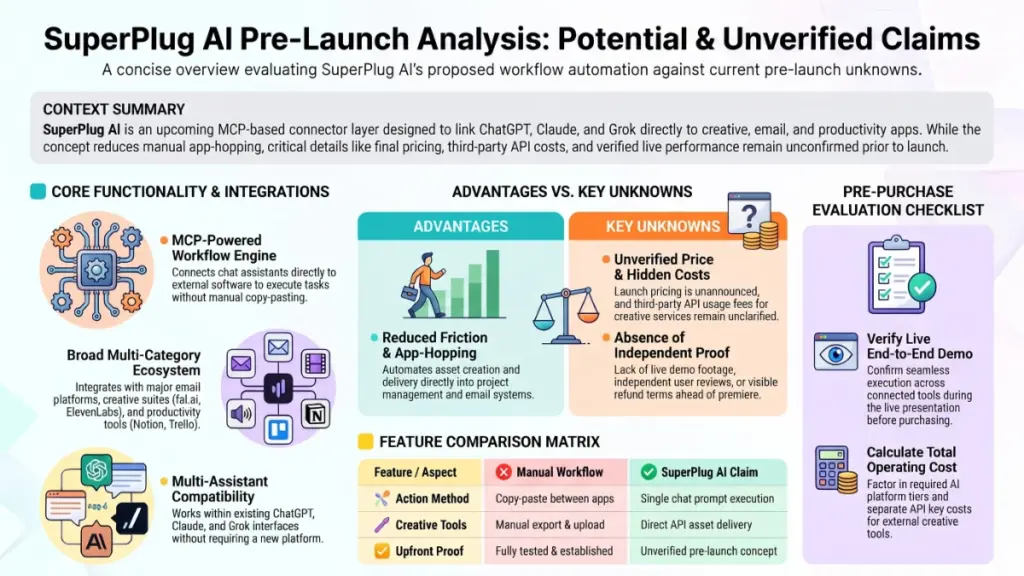
Pricing
Current pricing: not announced.
The page offers no price, no payment plan and no list of tiers. It only says founding members get “the best deal of the entire launch” and that there will be premiere-only bonuses.
What to watch for when the price appears
- Front-end price vs. upsells. JVZoo launches commonly include optional upgrades. Check what’s essential and what’s extra before checkout.
- Third-party costs. You’ll likely pay separately for the AI assistant plan and for services like image, voice and video generation.
- One-time vs. recurring. Make sure you know whether it’s a single payment or a subscription.
- Refund terms. Read the actual policy before paying, not just the link text.
Value for money
I can’t call the value good or bad without a number. A simple test I use: add up what you’d spend on this plus the connected services, and compare it with the hours you’d realistically save each month.
Pros
- Broad integration list. Email, productivity, meetings, creative tools and automation bridges are all covered, which suggests real engineering effort.
- Works with assistants you already use. No need to switch from ChatGPT, Claude or Grok.
- Built on MCP. It follows an open standard that major AI companies support, instead of a closed system.
- Free premiere. You can watch the demo and judge for yourself at no cost.
- Free Thumbnail Creator for live attendees. A small, concrete freebie with no purchase required, according to the page.
- Experienced-looking founders. They list several earlier products, so this isn’t their first launch.
- Clear disclaimer on income. The footer honestly says results aren’t guaranteed.
Cons
- No price, no refund details. The biggest gap. You can’t evaluate a purchase without them.
- Nothing independently verified. No reviews, no unedited demos, no user feedback yet.
- Likely extra costs. Connected creative services usually have their own fees, and the page doesn’t say how that works.
- Unanswered FAQs. The page lists questions like “Is this a sales pitch?” and “Do I need a paid ChatGPT or Claude account?” but doesn’t show the answers.
- Heavy urgency language. Countdown timers, “100 seats” and “doors close” messaging are pressure tactics.
- Income-style claims. The agency pricing figure is a vendor claim with no supporting evidence on the page.
- Dependence on other platforms. If an AI assistant changes how connectors work, SuperPlug is affected.
- Premiere-first sales model. Prize drawings and bonuses require you to attend live, which pushes people toward a decision in the moment.
Comparison With Competitors
SuperPlug AI isn’t alone in connecting AI to apps. Here’s how the approach compares at a high level. I’m keeping this qualitative because I won’t quote prices I haven’t verified.
| Option | What it is | Where it differs from SuperPlug |
|---|---|---|
| Zapier / Make | General automation platforms with large app libraries | More mature and battle-tested, but built around triggers and workflows, not conversation-led creation |
| Native AI connectors | Built-in app connections offered by the assistants themselves | Often free or bundled with your plan, but usually fewer creative tools and less marketing-specific focus |
| n8n | Flexible, self-hostable workflow builder | Powerful and customizable, but needs more technical comfort |
| Doing it manually | Copy and paste between apps | Free and reliable, but slow |
| SuperPlug AI | MCP layer packaging creative tools and marketing apps for chat assistants | Packaged for non-technical marketers; unproven until it’s released |
My honest take
If you already use Zapier or Make, you’ll want to know what SuperPlug does that your current stack can’t. The most likely answer is convenience: fewer steps and a conversation-first experience. That has real value for some people, but it isn’t magic.
If you’re new to automation, SuperPlug’s packaged approach may be easier than building workflows yourself. Whether it’s worth paying for depends entirely on the price.
Who Should Buy It?
Once pricing is known and the product is proven, I’d expect these people to benefit most:
- Freelancers who already use ChatGPT or Claude for client work and lose time moving output between apps.
- Small agencies running email campaigns, content calendars and proposals for several clients.
- Marketers and creators who want image, voice and video services reachable from one place.
- People exploring MCP who want a ready-made starting point instead of building connections by hand.
- Beginners who dislike building automations and prefer to describe a task in plain language.
Who Should Skip It?
- Anyone expecting guaranteed income. No tool provides that, and the page says so itself.
- People on a tight budget who haven’t seen the total cost, including the third-party services.
- Heavy Zapier or Make users with workflows that already do what they need.
- Buyers who need proof first. If you won’t pay for unreleased software, wait for independent reviews.
- Teams with strict data rules. Connecting client accounts to AI tools raises privacy questions that deserve a careful read of the terms.
- People without a steady use for it. If you only make an occasional email or image, a connector layer is overkill.
Frequently Asked Questions
What is SuperPlug AI?
It’s a connector layer that links ChatGPT, Claude or Grok to creative tools, email platforms and productivity apps, so the AI can create and deliver work instead of only producing text.
Is SuperPlug AI released yet?
Not as of November 2, 2026. The live premiere is scheduled for November 3 and 4, 2026. A public sales date hasn’t been announced on the page.
How much does SuperPlug AI cost?
The price hasn’t been announced. The page mentions a launch deal and bonuses for live attendees but gives no figures.
Is attending the premiere really free?
According to the page, yes. Registration is free and covers both sessions. The Thumbnail Creator app is promised to everyone who attends live, with no purchase required.
Do I need a paid ChatGPT or Claude account?
The page poses this question in its FAQ but doesn’t show the answer. Connector features often depend on your plan level, so check this at the premiere before buying.
Does it work with Claude, ChatGPT and Grok?
All three are listed as supported. I can’t tell you how consistent the experience is across them until the product is out.
Will I need to pay for the connected services separately?
The page doesn’t say. For tools like ElevenLabs, HeyGen or fal.ai, separate accounts and usage fees are the norm, so I’d assume extra costs until told otherwise.
Can I really earn $800 to $1,200 a month with it?
That figure is the vendor’s description of what agencies charge, not a result promised to you. Income depends on finding clients and delivering good work. The page’s own disclaimer says results aren’t guaranteed.
What if I can’t attend live?
The page lists this as a question but shows no answer. Since prizes and the free app require live attendance, expect to miss those if you can’t make it.
Is SuperPlug AI safe to connect to my accounts?
I can’t judge that yet. Before linking anything, read the privacy policy and terms, use accounts you can afford to risk at first, and check what permissions each connection requests.
🎁 Free Gift Waiting for You!
Before you leave, there’s a free gift waiting for you.
As a thank-you for reading, you can claim my Ultimate All-In-One Digital Marketing Package completely FREE.
🎉 What’s Inside Your Ultimate All-In-One Package
01. 50 AI Digital Product Ideas
A curated collection of highly profitable AI-powered digital product ideas designed for quick implementation and strong profit potential.
02. Digital Sales Mastery
Discover the proven framework behind high-converting sales funnels, persuasive copywriting, and sustainable online revenue growth.
03. Mastering Email List
Advanced strategies for building an engaged email audience, increasing open rates, improving click-through rates, and generating automated income.
04. The Ultimate Faceless Playbook
A complete blueprint for building a profitable online brand and growing on social media without ever showing your face.
🎁 BONUS: Premium Canva Marketing Vault
A premium library of high-converting Canva templates to help you create professional marketing assets, generate more organic traffic, and boost conversions.
💥 Total Package Value: $197
✅ Yours Today: FREE
Claim your complimentary bundle and get instant access to premium resources that can help you create, market, and grow your online business more effectively.
Final Verdict
SuperPlug AI is aimed at a real problem. Moving AI output between apps is tedious, and a tool that cuts that down would earn its place. The MCP foundation is credible, and the integration list is more specific than most launches I see.
But a review needs evidence, and right now there isn’t any I can check. No price, no refund terms, no independent testing. Everything good I can say is conditional on the product matching its page.
Would I recommend it today? Not as a purchase. I’d recommend registering for the free premiere if the idea interests you, then watching with a skeptical eye.
What I’d look for at the premiere:
- A live, unedited workflow from request to finished result
- The full price, including upsells
- The exact refund terms
- Whether you need a paid AI plan
- What the connected creative services cost on top
If those answers are solid, SuperPlug AI could be a useful time-saver for freelancers and small agencies. If the demo is polished but vague, or the price is high with the details hidden, wait for real user reports.
I’ll revise this review with hands-on results, a verified price and a proper rating once I’ve tested it. Until then, the safest move is to attend for free, take notes, and decide with the numbers in front of you.