

The Profit Goldeneye 2.0 is a $329 MT4/MT5 indicator that combines nine timeframes, graded trading signals, currency strength readings, and customizable alerts in one dashboard. Its clean interface may simplify market analysis, but its signal logic remains proprietary, performance figures are labeled sample data, and refund terms need clarification. It may suit experienced discretionary traders willing to demo-test it, but it does not guarantee profits.
If you trade forex, gold or indices on MetaTrader, you already know the routine. You open M5, then H1, then H4, then D1, trying to remember whether the bigger trend agrees with the trade you’re about to take. Ten minutes later you’ve got five charts open and no clearer idea of what to do.
The Profit Goldeneye 2.0 promises to fix that by putting nine timeframes, a graded signal and three live meters into a single panel on your chart. It’s sold for both MetaTrader 4 and MetaTrader 5 at a one-time price of $329.
That’s not a small amount for an indicator, so I went through the sales page, the demo screenshots and the feature list line by line. This review covers what the tool does, what it costs, where it looks strong, and where you should be cautious before paying.
A quick note on how I reviewed it: This article is based on the official sales page, its screenshots and its published feature list. I did not run a controlled live-account test, and I won’t pretend to have numbers I don’t have. Where something can’t be verified, I say so plainly.
Quick Verdict
The Profit Goldeneye 2.0 is a multi-timeframe dashboard and signal indicator for MT4 and MT5. Its main idea is simple: show the direction of all nine timeframes (M1 to Monthly) in one row, then grade each signal as EXCELLENT, GOOD or STANDBY so you know which setups deserve attention.
On paper, the interface is clean, the alert system is more complete than most indicators offer, and the “one panel instead of nine charts” idea solves a real annoyance.
The weak spots are just as clear. The “verified performance” section on the sales page is labeled sample data, the refund terms aren’t stated on the page, and the $329 price is steep for something whose signal logic is proprietary and unexplained.
Best for: Discretionary traders who want a faster way to check multi-timeframe alignment and who will test it on a demo account first.
Not ideal for: Anyone expecting a push-button profit system, or anyone who needs a documented, backtested strategy before spending money.
My provisional rating: 3.5 out of 5 (based on documented features; I’d revisit this after hands-on testing and a look at the refund policy).
Product Overview
| Detail | Information |
|---|---|
| Product Name | The Profit Goldeneye 2.0 |
| Category | MT4 / MT5 multi-timeframe indicator and signal dashboard |
| Creator | Element Forex |
| Launch Date | Not stated on the sales page (page shows a 2026 copyright and certificate date) |
| Price | $329 one-time payment |
| Refund Policy | Not stated on the sales page (a separate Refund Policy page is linked; read it before buying) |
| Website | Official Goldeneye 2.0 sales page (sold through JVZoo as retailer) |
| Platforms | MetaTrader 4 and MetaTrader 5 |
| Best For | Scalpers, day traders and swing traders who want a quick multi-timeframe read |
| Overall Rating | 3.5 / 5 (provisional) |
What Is The Profit Goldeneye 2.0?
The Profit Goldeneye 2.0 is a chart overlay for MetaTrader. You drop it on a chart, enter your license key, and a dark-and-gold panel appears on top of your price action.
That panel does five jobs at once:
- Shows the direction of nine timeframes in a single row
- Tells you how many bars each timeframe has held its direction
- Grades the current signal as EXCELLENT, GOOD or STANDBY
- Displays three proprietary meters called SIGHT, FORCE and PULSE
- Fires a pop-up alert with sound when a new signal appears
What problem does it solve?
The honest answer is information overload and missed moves. Most traders lose time and focus switching between timeframes. Others stack so many indicators on a chart that price itself disappears.
Goldeneye 2.0 tries to compress all of that into one readable block. Instead of hunting for confirmation across charts, you glance at the panel and see whether the timeframes agree.
What it is not
It’s an analysis tool, not an automated trading robot. It doesn’t place trades for you. The sales page itself says it doesn’t guarantee profits or future results, and I’d take that statement seriously.
Main Features Explained
The 9-Timeframe Dashboard
This is the centerpiece. A single row shows M1, M5, M15, M30, H1, H4, D1, W1 and MN. Each cell has an arrow (up or down) and a number showing how many bars that timeframe has held its current direction.
Your active chart timeframe glows cyan, so you always know where you are in the ladder.
A practical example: Say you’re looking at a buy on H1. If M15, M30 and H1 all point up, but D1 and W1 point down, you’re trading against the larger tide. The panel makes that disagreement obvious in a second, rather than after you’ve clicked through four charts.
The duration number matters too. A timeframe that flipped three bars ago is a different story from one that has held for twelve.
Eyeball, Pupil and Iris Agreement Bars
Three bars group the timeframes into short-term (Eyeball), mid-term (Pupil) and long-term (Iris). The greener a bar is, the more that group agrees on an upward direction.
It’s a clever shortcut. Instead of reading nine arrows, you can read three bars and get a quick sense of whether short, medium and long-term views are aligned.
Graded Signals: EXCELLENT, GOOD, STANDBY
Most arrow indicators fire constantly and leave you to figure out which signals are worth taking. Goldeneye 2.0 grades each one:
- EXCELLENT: The three meters are fully aligned. This is what the panel is built to find.
- GOOD: A solid setup worth watching.
- STANDBY: No quality setup yet, so wait.
Two lamps on the panel (a big one for EXCELLENT, a smaller one for GOOD) light up in green for buy and red for sell.
The SIGHT, FORCE and PULSE Meters
These are the three proprietary readings that sit behind each signal, each scored from 0 to 100:
- SIGHT points to the direction the market is leaning
- FORCE measures whether a move has real strength
- PULSE reads timing, meaning whether a move is fresh or already tired
The sales page says the best signals fire when all three agree. That’s a sensible design on the surface, because direction, strength and timing are three things traders genuinely care about.
The catch is that the page doesn’t explain the math behind them. That’s common for commercial indicators, but it means you’re trusting the logic without being able to inspect it.
Currency Strength Grid
The panel also shows the eight major currencies (USD, EUR, GBP, CHF, CAD, AUD, JPY, NZD) with a strength reading for the day. Green is strong, red is weak.
The idea is to pair a strong currency against a weak one. If GBP is strongly positive and JPY is deeply negative, GBPJPY becomes the obvious pair to look at. It’s a useful filter for forex traders who don’t want to scan thirty pairs manually.
On-Chart Arrows
Buy and sell arrows are drawn directly on the chart where signals happened. That helps when you scroll back to review what the indicator was doing in past moves.
Pop-Up Alerts With Sound and History
I think this is one of the more practical parts of the package. When a new signal fires, a “Goldeneye Signals” window pops up with:
- The symbol and timeframe
- The grade
- The side (buy or sell)
- The price and time
You can pick your alert sound, test it, adjust the volume, or mute it with one click. Every alert is saved to a scrollable history, and the window sits in your system tray until it’s needed.
If you can’t watch charts all day, this is what makes the tool feel less like a chart decoration and more like a working assistant.
Drag-Anywhere HD Panel
The panel can be dragged anywhere on your chart, and it remembers where you left it. There’s also a live sparkline (a mini price chart) inside the signal card, plus a “LIVE” indicator and an “Alert Armed” badge you can click to turn pop-up alerts on or off.
Works On Any Symbol And Broker
Forex, gold, indices: whatever your MT4 or MT5 broker offers. The sales page shows examples on XAUUSD, GBPUSD, USDCAD, NAS100, AUDUSD, USDJPY, EURUSD, USDCHF and NZDUSD.
Protected License
You get a personal license key that activates the product. The page doesn’t spell out how many computers one key supports, which is something to confirm before buying if you use more than one machine.
Benefits: What You Actually Get Out Of It
Features only matter if they change how you trade. Here’s how I’d translate the list into outcomes.
You save time on top-down analysis. Checking nine timeframes manually can take several minutes per pair. A single row removes most of that.
You’re less likely to fight the bigger trend. Seeing D1, W1 and MN next to your entry timeframe is a built-in reality check.
You can step away from the screen. With alerts armed, you don’t have to stare at charts waiting for a setup.
You get a filter for weak signals. The grading system gives you a reason to skip marginal trades, which is where many traders quietly lose money.
You get a cleaner chart. One panel replaces a stack of oscillators and moving averages for many users.
None of that is a promise of profit. It’s a promise of clarity and convenience, and those are the things the tool seems designed to deliver.
My Experience: What I Could and Couldn’t Evaluate
I want to be straightforward here. Reviews in this space often claim detailed test results that nobody could verify. I’d rather tell you what I actually examined.
What I examined
- The full sales page, including the panel anatomy walkthrough
- Nine demo screenshots across forex, gold and indices (XAUUSD M5, GBPUSD H1, USDCAD H1, NAS100 M5, AUDUSD H1, USDJPY M15, EURUSD H1, USDCHF H1, NZDUSD H1)
- The listed features, pricing, alert system and platform support
What stood out in the interface
The design is a dark panel with gold accents, and the layout is logical. The nine-timeframe row sits at the top, the signal card below it, then the meters, action lamps and currency grid.
One thing I immediately noticed is how much information is packed into a small space without feeling chaotic. That’s hard to do, and the screenshots suggest the creator put real thought into hierarchy.
The ability to move the panel and have it remember its position is a small detail, but it’s the kind that separates polished tools from rushed ones.
What I could not verify
- Real-world signal accuracy. I have no independent win rate, drawdown or pip data to share.
- Setup time. The page claims you can be up and running in under five minutes, but I haven’t timed an install.
- Speed and stability under load. Nothing on the page documents CPU use or behavior with many charts open.
- Repainting behavior. Many traders worry about indicators that change past signals. The page doesn’t address this, so test it yourself.
A note on the screenshots
The screenshots are labeled as taken in MetaTrader 4 “to illustrate the panel and signal types.” Every one of the nine shows an EXCELLENT signal, which is understandable for marketing but isn’t a representative sample of how the tool behaves day to day. A real trading week includes plenty of GOOD and STANDBY readings, and losing trades.
Ease of Use
Learning curve
The concept is easy to grasp. Green means up, red means down, and EXCELLENT beats GOOD beats STANDBY.
Understanding why a signal fires is harder, because SIGHT, FORCE and PULSE are described in general terms only. You can learn to use the readings quickly, but you can’t learn the formulas.
User interface
Based on the screenshots, the interface is crisp and readable. Hover labels and the panel anatomy tour on the sales page suggest each element was designed with a clear purpose.
Documentation and support
The package includes a step-by-step install guide and email support. I haven’t seen the guide itself, so I can’t judge its quality. The sales page also doesn’t state support response times.
Beginner friendliness
A complete beginner can read the panel. But being able to read an indicator and being able to trade profitably are different skills. If you’re new, you’ll still need risk management, position sizing and a plan, and no panel supplies those.
Performance
I can’t give you honest speed or stability benchmarks without running the tool myself, so here’s what the page does and doesn’t tell us.
What’s documented:
- The panel updates “with every tick,” according to the LIVE indicator description
- It runs on both MT4 and MT5
- It works on any symbol your broker offers
What’s missing:
- No resource usage figures
- No documented behavior on very slow or very fast markets
- No independent third-party testing
About the “Verified Performance” section
The sales page has a section titled “Real BUY/SELL Signals. Tracked Across 5 Trading Styles.” It says every signal is logged with entry, exit and pips.
However, the same section is marked “Sample data – live tracking in progress” and carries a disclaimer that the figures are sample data for illustration. So at the time of writing, that section is not proof of real results.
My advice: treat it as a placeholder. Ask the seller for a real, dated, broker-verified track record before you rely on any performance claim.
Pricing
Current price
$329, one-time payment, with no monthly fees. The page calls it a special launch offer, so the price may change later.
What’s included
- 9-timeframe dashboard and graded signals
- SIGHT, FORCE and PULSE meters
- Goldeneye Signals pop-up alert window
- Step-by-step install guide
- Personal license key, delivered instantly
- Free updates to version 2.0
- Email support
- Both MT4 and MT5 versions
Upsells and extras
I didn’t see any listed upsells on the sales page. Since it’s sold through JVZoo, additional offers may appear during checkout, so watch for them.
One detail to notice: free updates are promised for version 2.0 only. A future 3.0 may cost extra, and the page doesn’t say.
Is it good value?
It depends on how you trade.
If you’re a serious discretionary trader who values a clean multi-timeframe view and alerts, a one-time payment can make sense. Many comparable tools charge subscriptions that add up fast.
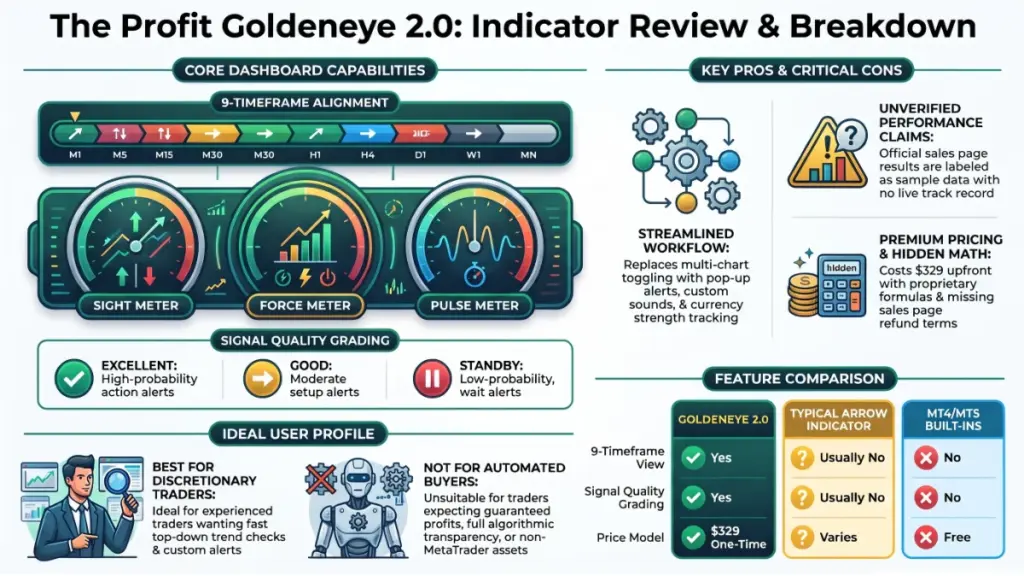
But $329 is a lot to pay for logic you can’t inspect, with performance data that’s still “in progress.” The refund terms matter a great deal here, and I can’t tell you what they are because the page doesn’t say.
Pros
- True nine-timeframe view. M1 through Monthly in one row, with direction and duration, saves real time.
- Graded signals. EXCELLENT, GOOD and STANDBY help you filter instead of reacting to every arrow.
- Three-part confirmation. Requiring SIGHT, FORCE and PULSE to agree is a sensible design for the top-grade signals.
- Strong alert system. Pop-up window, custom sound, volume control, mute, history and tray support go well beyond a basic beep.
- Currency strength grid. Helpful for forex traders choosing which pairs to focus on.
- Clean, movable panel. It remembers its position, which is a small but welcome touch.
- One-time payment. No subscription, plus free updates to 2.0.
- Both MT4 and MT5. Useful if you use different brokers or plan to switch platforms.
- Honest risk language. The page states it doesn’t guarantee profits, which is more than some competitors admit.
Cons
- Performance data is sample only. The “verified” section is clearly marked as illustrative, so there’s no proof of results yet.
- Proprietary, unexplained logic. You can’t see how SIGHT, FORCE or PULSE are calculated.
- Refund terms not shown on the page. For a $329 purchase, this is a real gap.
- Launch date not stated. I couldn’t confirm when 2.0 actually released.
- Cherry-picked screenshots. All nine demos show EXCELLENT signals.
- No repainting information. The page doesn’t say whether past signals can change.
- License terms unclear. It doesn’t specify how many computers or accounts one key covers.
- Self-made comparison. The page’s “10 out of 10” showdown is the seller’s own count of features, not an independent test.
- Updates limited to 2.0. A future version may cost extra.
- Price. $329 is steep for an indicator you can’t fully test before buying.
Comparison With Competitors
I won’t name specific rival products and invent their prices or specs. Instead, here’s how Goldeneye 2.0 compares with the categories of tools traders usually consider.
| Feature | Goldeneye 2.0 | Typical arrow indicator | Basic MA crossover | MT4/MT5 built-ins |
|---|---|---|---|---|
| Buy/sell arrows | Yes | Yes | Yes | No |
| All 9 timeframes in one view | Yes | Usually no | No | No |
| Signal quality grades | Yes | Usually no | No | No |
| Alert window with history | Yes | Usually no | No | No |
| Custom sound and mute | Yes | Sometimes | Sometimes | No |
| Currency strength grid | Yes | Rarely | No | No |
| Source code you can inspect | No | Varies | Often yes | Yes |
| Cost | $329 one-time | Varies | Often free | Free |
Source for the Goldeneye column: the official sales page. The other columns are general category descriptions, not tests of specific products.
Where it wins
Convenience and presentation. If you want multi-timeframe alignment, grading and alerts in one place, it’s more complete than a simple arrow indicator or a moving average crossover.
Where it loses
Cost and transparency. Free built-in indicators and open-source alternatives let you see exactly how the math works. You can also combine a few of them yourself to approximate a multi-timeframe check, though it takes more setup and won’t look as polished.
Compared with building your own system
If you’re comfortable with trading platforms, a few well-chosen indicators plus a multi-timeframe template might cover 70% of what Goldeneye does for free. What you’d be paying for is convenience, design and the alert system.
Who Should Buy It?
Goldeneye 2.0 is a reasonable fit if you:
- Trade discretionary and want a faster top-down read
- Struggle with switching between charts and losing the bigger picture
- Can’t watch the screen all day and want reliable pop-up alerts
- Trade forex majors, gold or indices on MT4 or MT5
- Plan to demo-test it before risking real money
- Prefer a one-time payment over a subscription
- Have confirmed the refund policy and are comfortable with it
Who Should Skip It?
You may want to pass if you:
- Expect a tool that makes money automatically
- Want full transparency into how signals are calculated
- Need independent, verified performance data before buying
- Have a very limited budget (you can build a basic multi-timeframe setup for free)
- Don’t have a risk management plan, since no indicator can replace one
- Want to trade stocks or crypto on platforms other than MetaTrader
- Are new to trading and hoping an indicator will replace learning
Frequently Asked Questions
Is The Profit Goldeneye 2.0 legit?
It’s a real product sold through JVZoo as the retailer, from a seller called Element Forex. Whether it’s profitable is a different question, and the sales page doesn’t prove it. The performance section is labeled sample data.
Does it work on MT4 and MT5?
Yes. The page says both versions are included, with the same panel, grades, meters and alerts.
Does it work with any broker?
The page says it works with any MT4 or MT5 broker and on any symbol the broker offers. As with any indicator, I’d confirm it on a demo account with your own broker first.
How much does it cost?
$329 as a one-time payment, with no monthly fees. The page calls this a launch offer, so the price could change.
Is there a refund policy?
The sales page links to a Refund Policy but doesn’t state the terms. Read it before buying so you know the window and conditions.
Does it guarantee profits?
No. The seller’s own risk disclaimer says it’s an analysis tool and doesn’t guarantee profits or future results.
Can I use it on more than one computer?
The page lists this as a FAQ question but doesn’t show the answer in the text I reviewed. Ask support before purchase if it matters to you.
Do I need trading experience?
You can read the panel without experience, but trading well still requires knowledge of risk management and market behavior. Practice on a demo account first.
Does it repaint?
The sales page doesn’t say. Test this yourself on a demo chart by watching whether past arrows ever move or disappear.
Will it work for scalping and swing trading?
The page positions it for both, since it covers M1 through Monthly. Whether the signals suit your style is something only your own testing can answer.
🎁 Free Gift Waiting for You!
Before you leave, there’s a free gift waiting for you.
As a thank-you for reading, you can claim my Ultimate All-In-One Digital Marketing Package completely FREE.
🎉 What’s Inside Your Ultimate All-In-One Package
01. 50 AI Digital Product Ideas
A curated collection of highly profitable AI-powered digital product ideas designed for quick implementation and strong profit potential.
02. Digital Sales Mastery
Discover the proven framework behind high-converting sales funnels, persuasive copywriting, and sustainable online revenue growth.
03. Mastering Email List
Advanced strategies for building an engaged email audience, increasing open rates, improving click-through rates, and generating automated income.
04. The Ultimate Faceless Playbook
A complete blueprint for building a profitable online brand and growing on social media without ever showing your face.
🎁 BONUS: Premium Canva Marketing Vault
A premium library of high-converting Canva templates to help you create professional marketing assets, generate more organic traffic, and boost conversions.
💥 Total Package Value: $197
✅ Yours Today: FREE
Claim your complimentary bundle and get instant access to premium resources that can help you create, market, and grow your online business more effectively.
Final Verdict
The Profit Goldeneye 2.0 does one thing well: it turns nine timeframes into a single readable panel and adds a grading system and a solid alert window on top. For traders who lose time and focus flipping between charts, that’s a real benefit.
What it hasn’t done yet is prove itself. The performance section is sample data, the logic is hidden, and the refund terms aren’t on the page. Those aren’t small issues at $329.
Who benefits most: Discretionary traders who want faster multi-timeframe analysis and dependable alerts, and who will test on a demo account before committing.
Is it worth the price? Possibly, but only if the refund policy gives you a fair window to test it, and only if you treat it as a decision-support tool rather than a profit machine.
Would I personally recommend it? With conditions. I’d recommend it to a trader who understands risk and wants a cleaner workflow. I wouldn’t recommend it to anyone hoping for guaranteed signals. If you decide to buy, read the refund policy first, run it on a demo account for a few weeks, and check whether the arrows ever repaint.
My provisional rating: 3.5 out of 5.
Risk warning: Trading forex, gold and other margin products carries a high level of risk and may not be suitable for everyone. You could lose some or all of your capital. Nothing in this article is financial advice. Past performance does not guarantee future results, and you should never trade money you can’t afford to lose.