


Work From Anywhere is a $4.99 digital guide by Simon From Scotland that helps beginners explore remote work, freelancing, and AI skills through a 30-day action plan. It includes a directory of 35+ platforms, templates, prompts, and trackers. While it offers an affordable starting point, the guide’s depth and directory freshness remain unverified. It’s best for beginners who want structure, not guaranteed jobs or income.
If you’ve ever typed “how to work online” into a search bar, you know what happens next. You get a dozen conflicting opinions, a pile of job board links, and a vague feeling that everyone else has already figured it out.
That confusion is the problem Work From Anywhere tries to solve. It’s a 36-page digital guide by Simon From Scotland, priced at just $4.99. It promises a realistic 30-day plan for finding remote work, picking up useful AI skills, and tracking what’s working.
I’ve reviewed digital guides and SaaS products for years, and the cheap, beginner-focused ones tend to fall into two camps: honest and modest, or hype dressed up as a roadmap. This one sounds like the first camp. In this review I’ll go through what’s included, who it suits, where it falls short, and whether $4.99 is a fair price.
Discover practical steps, AI skills, and resources to help you get started.
A note on how I reviewed this: My assessment is based on the official sales page, including the description of each section and the preview pages it shows. I haven’t seen the full PDF, so I haven’t tested individual platform links or verified how current the directory is. Where I can’t confirm something, I say so.
Quick Verdict
Work From Anywhere is a low-risk, beginner-friendly starting point for anyone who wants structure rather than hype.
It doesn’t promise jobs, clients or income, and that restraint is the best thing about it. The sales page says outright that results aren’t guaranteed and that you’ll need to tailor applications and improve your skills.
Best for: Complete beginners, career changers and people curious about freelancing who want a clear weekly routine.
Not ideal for: Experienced freelancers, or anyone expecting a shortcut to income.
My impression: At $4.99 with a 7-day refund window, the financial risk is tiny. The real question is whether a 36-page guide gives you enough direction to justify your time, and for the right reader, it probably does.
Product Overview
| Detail | Information |
|---|---|
| Product Name | Work From Anywhere: A Practical Plan for Finding Remote Work, Building AI Skills and Creating Online Income |
| Category | Digital guide / PDF (remote work and AI skills) |
| Creator | Simon From Scotland |
| Launch Date | Not listed on the sales page |
| Price | $4.99 (one-time payment) |
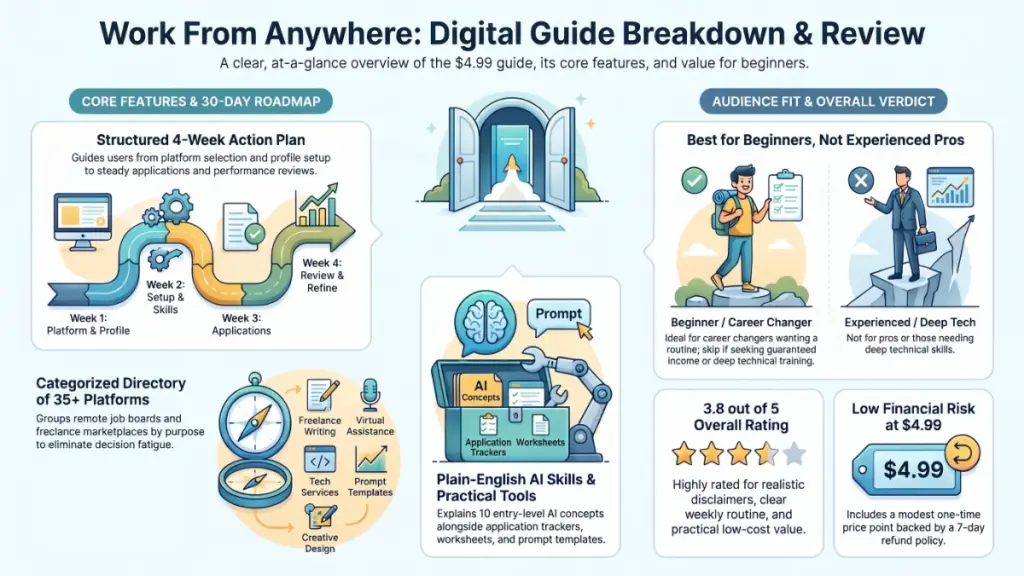
| Refund Policy | 7-day refund; contact the creator within 7 days of purchase |
| Website | Official sales page (checkout and delivery via JVZoo) |
| Format | 36-page digital PDF, readable on computer, tablet or phone |
| Best For | Beginners exploring remote work, freelancing or AI-assisted services |
| Overall Rating | 3.8 / 5 (based on the sales page and described contents) |
What Is Work From Anywhere?
Work From Anywhere is a practical guide, not a software tool or video course. It’s a 36-page PDF that walks you through choosing a route into online work, finding platforms that fit that route, and following a structured 30-day plan.
The creator frames it around a real frustration. One person tells you to freelance, another says to learn AI, and a third hands you a giant list of websites with no idea where to start. The result is too many open tabs and no clear next step.
What problem does it solve?
The guide is built around three decisions:
- Which route suits you? Remote employment, freelancing, AI-assisted services, or a mix.
- Where should you look? A grouped directory of 35+ platforms and resources, sorted by what each is actually good for.
- What do you do each week? A simple 30-day routine that ends with a proper review.
That last point matters more than it sounds. Most beginners don’t fail because they picked the wrong website. They fail because they sign up everywhere, apply to a handful of jobs, hear nothing for a week and quit. A fixed schedule with a review step addresses that directly.
What it is not
The sales page is clear that this is not a get-rich-quick scheme, a push-button income system, or a guarantee of work. It also says it isn’t financial, legal, employment or tax advice. I like that clarity. Plenty of products in this price range bury such disclaimers in the footer, whereas this one puts them in the main pitch.
Main Features
Here’s what the guide includes, according to the sales page, and how each part works in practice.
1. Remote Work Platform Guide
The guide lists 35+ remote job boards, mainstream sites, freelance marketplaces and specialist platforms, grouped by what each is good for.
This is arguably the core of the product. A grouped directory beats a raw list because it answers the question beginners actually have: which of these is right for me? If you’re a writer, you probably don’t need the same platforms as a virtual assistant or a data entry applicant.
Practical example: Say you’re a teacher considering online tutoring or content work. With a grouped directory, you can shortlist two or three relevant platforms in one sitting instead of spending a weekend reading forum threads.
Caveat: Platforms change their fees, eligibility rules and policies often. The sales page itself warns you to verify current terms before paying or sharing personal information. That’s good advice, but it also means some directory entries may age quickly. I haven’t been able to check how recently the list was reviewed.
2. Ten AI Skills Explained
The guide covers ten AI-related skills “in plain English.” Topics mentioned include AI-assisted work, agents, context engineering, RAG (retrieval-augmented generation), evaluation, multimodal tools and security.
Some of these terms sound intimidating, and a plain-language explanation is genuinely useful for beginners. Even a basic grasp of what “RAG” or “evaluation” means helps you follow job descriptions and talk about AI work without bluffing.
Practical example: If you see a freelance listing asking for “prompt engineering and workflow automation,” you’ll at least know what the client is talking about and can judge whether you could offer it.
Caveat: Ten topics in a 36-page guide that also contains directories, worksheets and trackers means each topic gets limited space. Expect orientation, not mastery.
3. A Focused 30-Day Roadmap
The plan runs in four stages:
- Week 1: Choose and prepare. Pick your “two-plus-one” platforms and build a focused profile using the included templates.
- Week 2: Start applying. Send a small, steady number of tailored applications and make your first freelance proposals.
- Week 3: Stay consistent. Keep the same schedule and give your profile an honest review.
- Week 4: Review and refine. Compare response rates, keep what works, and adjust what doesn’t.
I like the “two-plus-one” idea. Limiting yourself to a small number of platforms stops the scattergun approach, which is where many beginners waste their first month.
4. Practical Examples, Prompts and Tools
This part includes stronger prompt examples, structured workflows, directories and quality checks for using AI responsibly. The sales page lists:
- A first-60-minutes plan and a final action checklist
- Profile templates and proposal prompts
- Prompt frameworks and job-hunting prompts
- Application trackers and resource directories
Practical example: An application tracker sounds boring, but it’s what makes the Week 4 review possible. Without a record of where you applied and who replied, you can’t tell what’s working.
Benefits: What Do You Actually Get Out of It?
Features matter less than outcomes, so here’s how I’d translate the above.
- Less decision fatigue. You get a route, a shortlist and a schedule instead of an endless search.
- A realistic first month. The plan is built around steady, modest effort rather than a sprint.
- Better applications. Templates and prompts can help you present yourself more clearly, provided you tailor them.
- A vocabulary for AI work. You’ll understand the terms used in modern remote and freelance listings.
- Evidence to improve. Tracking responses gives you real data about what to change.
- Low-risk entry. For under five dollars, you can test whether this style of guidance works for you.
None of this is a promise of income, and the guide doesn’t pretend otherwise.
My Experience
Here’s how the guide looks from where I sit as a reviewer. I’m describing what the sales page shows and how it measures up against similar guides, not a hands-on test of the full PDF.
First impressions of the structure
The structure is the strongest part. The path from “I’d love to work online” to a weekly routine is logical: choose a route, pick platforms, build a profile, apply steadily, review. Many cheap guides skip the review step entirely, and that’s where most of the learning happens.
The preview pages
The sales page shows real pages from the guide, including the quick-start plan, the 30-day action plan, the worksheets and the application tracker. These previews are a good sign. Plenty of sellers show only mockups or stock covers, whereas showing actual pages gives you a fair idea of the layout and depth before you buy.
From the previews and descriptions, the guide appears to lean on checklists, worksheets and tables rather than long essays. That suits the topic, since people read a guide like this with a notepad beside them, not on a sofa.
What I’d want to verify
If I were buying this myself, these are the things I’d check once the PDF opened:
- How recent the platform directory is, and whether the links work
- Whether each platform entry says who it suits, not just what it is
- How deep the AI explanations go beyond definitions
- Whether the profile and proposal templates feel adaptable or generic
I can’t answer those from the sales page, and I won’t pretend to.
Where it appears strongest
The honesty. The guide states plainly that it’s for people willing to improve their skills and tailor their applications, and it names who it’s not for. That tells me the creator understands the audience.
Where it appears weakest
Space. Thirty-six pages covering platform directories, ten AI topics, templates, a 30-day plan and trackers is a lot to fit. I’d expect the AI section in particular to be introductory.
Ease of Use
Learning curve
Very low. The guide is aimed at beginners, uses plain English, and the sales page stresses that you don’t need technical AI experience. The weekly structure means you always know what comes next.
Format and interface
It’s a PDF, so there’s no login, dashboard or app to learn. You can read it on a computer, tablet or phone. If you want to fill in the worksheets and trackers, a computer or tablet will be more comfortable than a phone.
Documentation and support
The guide is the documentation. The sales page lists a contact link, so you can reach the creator for questions or refunds, though I haven’t tested response times.
Discover practical steps, AI skills, and resources to help you get started.
Beginner friendliness
High. Of everything here, this is what the guide is designed for. The “first 60 minutes” quick start is a thoughtful touch, because the hardest part of any new routine is starting.
Performance
Software reviews usually cover speed and uptime, but a PDF guide is judged differently. Here’s how I’d assess it:
- Delivery speed: The sales page promises instant digital access after purchase through JVZoo. That’s standard for this kind of product.
- Reliability: A PDF doesn’t crash, break or need updates to run. Content accuracy is the real reliability question, since platform rules change.
- Usability: Worksheets, checklists and trackers are practical, provided you actually print or fill them in.
- Real-world performance: This depends entirely on you. The guide itself says no jobs, clients or earnings are guaranteed, and I agree with that. It gives you a process, and results come from the effort you put into it.
Pricing
Current price
$4.99, one-time payment, for a digital PDF.
Upsells and optional upgrades
The sales page doesn’t mention upsells, subscriptions or required paid tools. It does say checkout is handled through JVZoo, and some JVZoo products present additional offers at checkout. I can’t confirm whether that’s the case here, so read each checkout page carefully before paying.
Also worth knowing: the guide may point you to platforms that charge fees or offer paid plans. The sales page says paid tools or subscriptions aren’t required, but I’d treat any third-party platform fee as your own decision.
Refund policy
There’s a 7-day refund window. If the guide isn’t right for you, you contact the creator within 7 days of purchase. The legal footer also notes that EU buyers waive their right of withdrawal on immediate digital delivery, though the voluntary 7-day refund still applies.
Value for money
At $4.99, value is easy to justify if you’d otherwise spend a weekend piecing together the same information from scattered sources. It’s less compelling if you already know where to look and what to do.
Pros
- Honest positioning. No guaranteed income, no “secret website” claims, and clear disclaimers.
- Very low price. At $4.99, the cost of being wrong is small.
- Clear 30-day structure. Four weekly stages with a built-in review step.
- Grouped platform directory. 35+ resources organized by purpose, which saves research time.
- Practical tools. Templates, prompts, worksheets and trackers turn reading into action.
- Beginner-friendly AI explanations. Plain English, with no technical background needed.
- Real preview pages. You can see the actual layout before buying.
- 7-day refund policy. Adds a safety net.
- Clear target audience. The “for you / not for you” lists help you decide quickly.
Cons
- Limited depth by design. Thirty-six pages can’t cover every topic thoroughly, especially the AI skills.
- Directory may date quickly. Platform fees, rules and eligibility change, and I couldn’t verify how current the list is.
- No launch date or update history listed. That makes it harder to judge freshness.
- No guarantees. That’s honest, but it means the guide is only as useful as your follow-through.
- Little visible social proof. The sales page doesn’t show reviews or testimonials, so there’s less independent feedback to go on.
- Not for experienced freelancers. If you already have clients and a routine, much of this will be familiar.
- PDF-only. No video, community or live support is mentioned.
Comparison With Competitors
Work From Anywhere sits in an unusual spot: it’s cheaper and more structured than most alternatives, but also narrower. Here’s how it compares to the common ways people start looking for remote work. I’ve kept this general and not quoted competitor prices, since those change often.
| Option | Typical Cost | Strength | Weakness |
|---|---|---|---|
| Work From Anywhere guide | $4.99 one-time | Structured 30-day plan, grouped directory, templates | Limited depth, static PDF |
| Free blogs and YouTube | Free | Huge variety of advice | Scattered, contradictory, no plan |
| Paid job board memberships | Subscription (varies) | Vetted listings, search tools | Ongoing cost, no coaching |
| Freelance marketplaces directly | Free to join (fees on earnings) | Real clients and jobs | Competitive, no guidance on strategy |
| Full online courses | Often much higher | Depth, video, sometimes community | Higher cost and time commitment |
How I’d read this table
The guide doesn’t compete with paid job boards or full courses. It sits before them. It helps you decide where to spend time and money, which is arguably more valuable at the beginning than another subscription.
Discover practical steps, AI skills, and resources to help you get started.
If you want deep skill training in one area, such as copywriting, web development or video editing, a dedicated course will go further. If you want to figure out which area and which platforms, this guide is closer to what you need.
Who Should Buy It?
Work From Anywhere makes sense if you:
- Are new to online work and don’t know where to begin
- Want to explore genuine remote employment rather than get-rich-quick offers
- Have a skill you could offer as a freelancer but no plan for finding clients
- Are considering a career change and need direction
- Want to use AI as a practical assistant, not a magic button
- Prefer a realistic, self-paced plan with a built-in review
- Want a cheap, low-risk way to test a structured approach
Who Should Skip It?
You may want to pass if you:
- Expect guaranteed jobs, clients or earnings
- Want a push-button income system
- Aren’t willing to improve your skills or tailor applications
- Want AI to replace judgment, fact-checking and effort
- Are an experienced freelancer with a working client pipeline
- Need deep, hands-on training in one specific skill
- Prefer video lessons or a live community over a PDF
Frequently Asked Questions
Is Work From Anywhere a physical book?
No. It’s a digital PDF guide you can read on a computer, tablet or phone after purchase.
Does the guide guarantee remote work or income?
No. The sales page states that no employment, clients, income or business results are promised or guaranteed. It’s a planning and learning resource.
Do I need technical AI experience to use it?
No. The AI skills are explained in plain English, and the guide is written for beginners.
Do I need to join every platform listed?
No, and the guide specifically advises against it. The “two-plus-one” approach is about choosing a small, focused set of platforms.
How much does Work From Anywhere cost?
It costs $4.99 as a one-time payment, according to the sales page. Check the checkout page for the final price, taxes and any additional offers.
What if the guide isn’t right for me?
There’s a 7-day refund policy. Contact the creator within 7 days of purchase and request a refund.
Are paid tools or subscriptions required?
According to the sales page, no. Some platforms mentioned in the guide may have their own fees or paid plans, but that’s a separate decision you’d make.
How long does the 30-day plan take each day?
The sales page doesn’t say how many hours per day it requires. The plan is described as a small, steady routine rather than a full-time commitment, but I’d check the guide for exact time estimates.
Is this guide suitable for people who don’t live in the US or UK?
The sales page doesn’t specify country limits for the guide itself. Platform eligibility, payment methods and legal rules do vary by country, so check each platform’s terms before signing up.
Is Work From Anywhere legitimate?
From what the sales page shows, it’s a modestly priced educational product with clear disclaimers, a refund policy and checkout handled through JVZoo. It doesn’t make income claims. As with any online purchase, read the terms before paying.
🎁 Free Gift Waiting for You!
Before you leave, there’s a free gift waiting for you.
As a thank-you for reading, you can claim my Ultimate All-In-One Digital Marketing Package completely FREE.
🎉 What’s Inside Your Ultimate All-In-One Package
01. 50 AI Digital Product Ideas
A curated collection of highly profitable AI-powered digital product ideas designed for quick implementation and strong profit potential.
02. Digital Sales Mastery
Discover the proven framework behind high-converting sales funnels, persuasive copywriting, and sustainable online revenue growth.
03. Mastering Email List
Advanced strategies for building an engaged email audience, increasing open rates, improving click-through rates, and generating automated income.
04. The Ultimate Faceless Playbook
A complete blueprint for building a profitable online brand and growing on social media without ever showing your face.
🎁 BONUS: Premium Canva Marketing Vault
A premium library of high-converting Canva templates to help you create professional marketing assets, generate more organic traffic, and boost conversions.
💥 Total Package Value: $197
✅ Yours Today: FREE
Claim your complimentary bundle and get instant access to premium resources that can help you create, market, and grow your online business more effectively.
Final Verdict
Work From Anywhere won’t change your life on its own, and it doesn’t claim to. What it does offer is something many beginners lack: a clear order of operations.
For $4.99, you get a grouped platform directory, plain-English explanations of AI skills, templates, trackers and a 30-day plan with a review built in. That’s a fair deal for the right person, particularly someone who’s overwhelmed by options and wants to stop browsing and start applying.
Who will benefit most: Beginners, career changers and first-time freelancers who are willing to put in steady, tailored effort.
Is it worth the price? Yes, for its intended audience. The risk is low, the refund window is 7 days, and even a single useful platform or template could cover the cost in saved time.
Would I recommend it? Yes, with realistic expectations. I’d recommend it as a starting framework, not a complete education. If it helps you pick a direction and stay consistent for a month, it’s done its job. Just verify every platform’s current terms before you pay or share personal details, since those change often.
If you’re ready to turn “I’d love to work online” into an actual plan, check the official sales page for the latest details and decide whether the guide fits your goals.
Discover practical steps, AI skills, and resources to help you get started.