

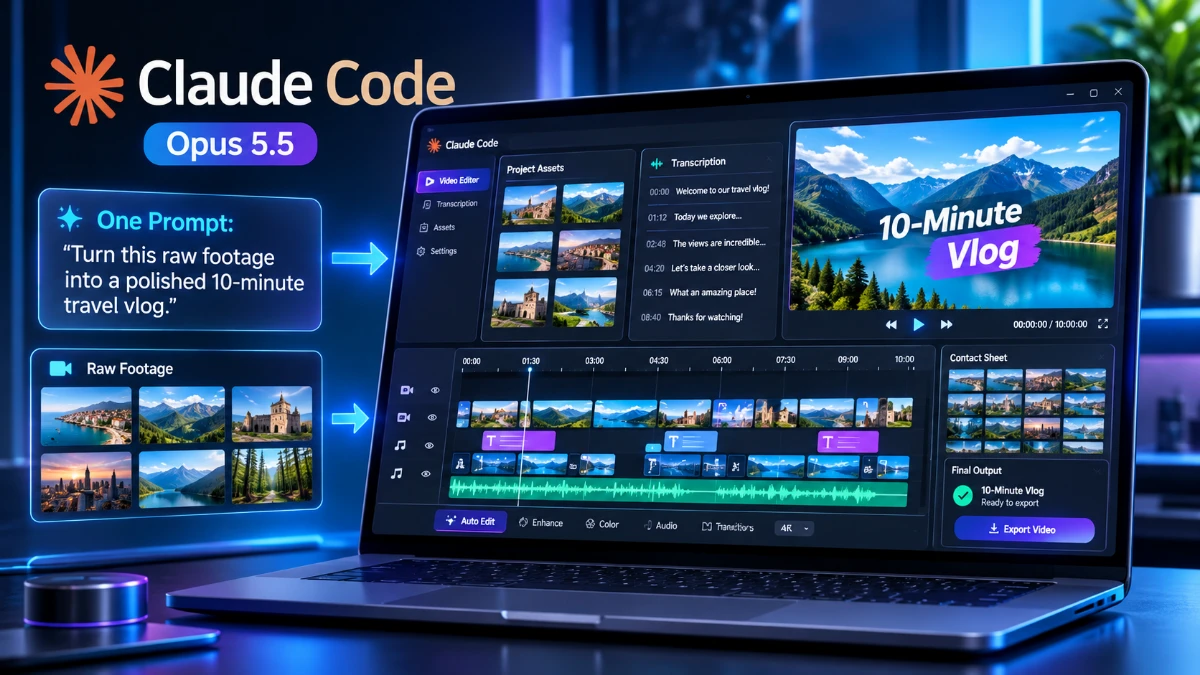
Claude Code with Opus 5.5 reportedly edited an entire vlog from a single prompt, automatically handling transcription, visual analysis, speaker identification, and video assembly. The workflow combines open-source tools with AI-driven planning to reduce manual editing. While the result highlights exciting possibilities for solo creators and marketers, it remains a single, unverified case study without independent benchmarks, cost data, or proof of consistent results.
On 1 November 2026, indie founder Levels published a short post on levels.io. According to the post, Claude Code running Opus 5.5 edited his entire vlog. The post had passed 116,000 views, 1,300 likes, and 100 reposts when I read it.
The setup was simple. First, he copied clips from his DJI camera into a folder. Next, he opened Claude Code inside that folder. Then he asked it to cut the footage into a 10-minute vlog for X and YouTube. Afterward, he made a few small adjustments and published.
Why the Unrequested Steps Matter
The most interesting detail is what he did not ask for. He never requested transcription, face detection, or captions. Claude Code chose those steps on its own. In fact, Levels only learned the details when a follower asked how he made the video.
Look, I’ll be straight with you. Most “AI edited my video” claims describe a tool that trims silence or adds subtitles. This case differs because the agent built its own toolchain from open-source parts. It planned the edit, ran it, and produced a finished cut.
Three Immediate Effects
This shift has three consequences worth tracking:
- Solo creators can bypass the editing bottleneck.
- Agents can chain several small models together without step-by-step instructions.
- A coding tool now works as a general media-production tool.
What This Article Covers
When clients ask me about stories like this, they want two answers. Is it real, and is it repeatable? Therefore, this article separates what the post confirms from what it leaves out. I have not rerun his workflow myself. For that reason, I treat his account as a primary source and flag the gaps along the way.
Strategic Context & Why It Matters
The Real Value: The Vlog Exists
Editing is the slowest step in most creator workflows. Filming takes minutes, but editing takes hours. Levels says plainly that slow, painful editing would stop him from vlogging at all. Hiring an editor, meanwhile, adds management hassle he also wants to avoid.
That framing matters. The value here is not a better edit. Instead, the value is that the vlog exists in the first place.
Who Benefits Most
Several groups stand to gain from this kind of workflow:
- Solo creators lack the budget for editors and the patience for timelines.
- Founders who document their work produce raw footage constantly but rarely publish it.
- Small marketing teams need weekly video output without extra hires.
- Agencies can deliver rough cuts faster and spend human time on polish.
How the Workflow Changes
The old workflow followed a fixed order. You imported clips, scrubbed through them, marked cuts, arranged a timeline, added captions, and exported. Each step demanded your attention.
The new workflow starts with a folder and a sentence. The agent handles discovery, selection, and assembly. After that, the human reviews the result and fixes what feels off.
Here’s the reality. The skill moves from operating software to judging output. Taste becomes the scarce resource, while clicking becomes cheap.
Why a Coding Agent Handled Video
Claude Code works inside a directory. It reads files, writes scripts, runs commands, and checks results. A folder of clips fits that model naturally. Consequently, the agent treats video as data. It extracts transcripts, images, and timestamps, then reasons over them in text.
Here’s the thing nobody tells you about agentic tools. The interface does not need to be a video editor. A terminal and the right libraries are enough, because the agent assembles the editor from parts.
Reading the Source Fairly
Levels has posted many similar claims in recent months. For example, he writes about coding almost entirely through Claude Code on a VPS. He also describes replacing paid SaaS with services he built himself. On other days, however, he has posted sharp complaints about Claude, including its verbosity and guardrails.
So this post comes from a heavy, opinionated user, not a neutral reviewer. That context does not discredit him. Still, it should shape how much weight you give the enthusiasm.
Deep-Dive Technical Specifications
Transcription With mlx-whisper
The post lists the toolchain in unusual detail. Each component solves one narrow problem, and the agent combined them without being told to.
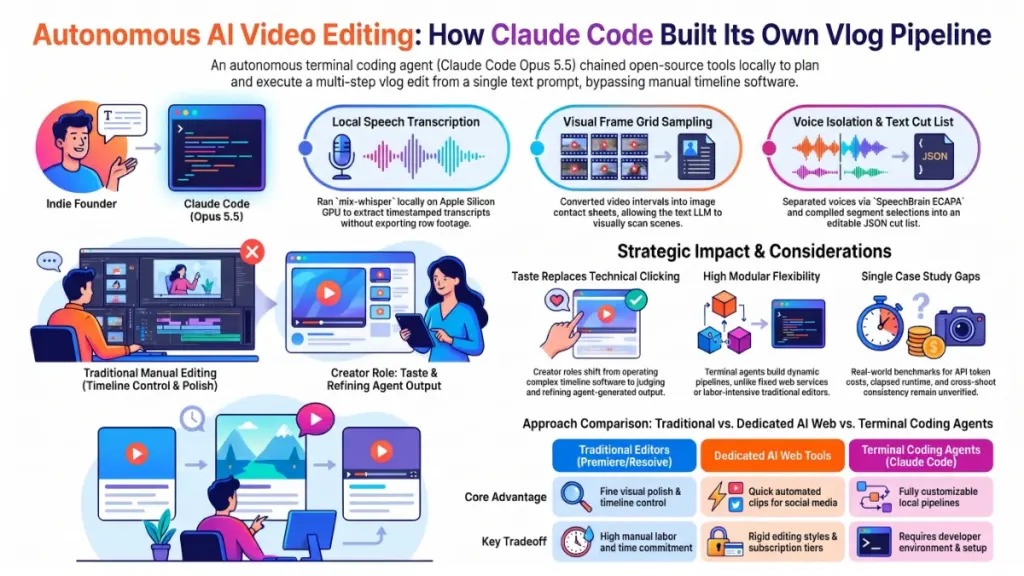
First, the agent transcribed everything Levels said using mlx-whisper. This tool runs Whisper large-v3-turbo on the Mac’s GPU through Apple’s MLX framework. Levels names a MacBook Pro as the machine.
This step matters for two reasons. Transcription runs locally, so raw footage does not leave the laptop at this stage. In addition, the output carries timestamps. Timestamps let the agent cut by sentence instead of guessing.
Visual Understanding Through Contact Sheets
Next, the agent pulled video frames every few seconds. It arranged them into grid images called contact sheets. As a result, Claude could see what appeared in each clip.
This workaround is clever. A model reads images well but cannot watch a video stream directly. Sampling frames into a grid turns motion into a scannable picture, and one image covers many seconds of footage.
The tradeoff is time resolution. Frames sampled every few seconds miss fast action. For talking-head vlog footage, however, that gap is acceptable.
Speaker Identification and Thumbnails
The agent also used SpeechBrain ECAPA, a voice-matching model. It separated Levels’ voice from other people’s voices in the clips. This solves a real editing problem, since vlogs capture bystanders, friends, and street noise. With voice matching, the agent can favor the host’s lines and treat other speakers differently.
After that, it created thumbnails with OpenCV and YuNet’s face detector. Face detection helps the agent pick frames where the subject is visible and centered.
The Edit as a JSON Cut List
The edit itself lives in a JSON file. Each entry names a clip, a start time, and an end time. Claude chose the segments by reading transcripts and studying the frame grids.
This design is smart for a simple reason. A cut list is plain text, so the model can write it, revise it, and explain it. A render step then turns the list into video. Changing the edit means changing a few lines.
Captions With Pillow
Finally, the agent added on-screen captions for X and YouTube during the first minute. It used Pillow, Python’s imaging library, to draw text onto frames directly.
What the Stack Tells Us
Taken together, the stack shows four patterns:
- Modality bridging: The agent converted audio and video into text and images that Claude reads well.
- Local inference: Heavy models ran on the user’s own machine.
- Open-source parts: Every named component is a common, freely available library.
- Text-based planning: The decision layer worked in transcripts and JSON.
What the Post Does Not Specify
Levels does not state the context window he used. He also leaves out parameter counts, the exact prompt history, and the tool that rendered the final video. Likewise, he does not say how long the run took or how many tokens it consumed. These gaps limit how precisely anyone can reproduce the result.
On model identity, Anthropic lists Opus 5.5 under the model string claude-opus-5-5. Beyond that, the post gives no architectural detail. I’m not a data scientist, so I won’t invent specs the source never states.
Performance, Benchmarks & Evidence
No Benchmarks, Only a Case Study
To be completely honest, this post contains no benchmarks. Levels shares no scores, no timing comparisons, and no quality ratings. The evidence is the finished vlog and his description of how it was made.
That does not make the claim weak. It does mean we should call it a case study, not a measurement.
What the Evidence Supports
Several points hold up well:
- The pipeline ran end to end, and he names concrete tools and a concrete output format.
- He says he requested none of the steps, so Claude Code chose them.
- Human cleanup stayed light, since he reports only a few adjustments.
- Audience interest is high, with over 116,000 views and 1,362 likes.
Attention is not proof of quality. Even so, it signals that people find the idea relevant.
What the Evidence Cannot Show
On the other side, the post leaves several questions open. No side-by-side comparison with a human editor exists. Levels gives no before-and-after hours, so we cannot measure time saved. One success also fails to prove repeatability across different footage. Finally, the post never states the API or subscription cost of the run.
How to Read the Claim
Think of it like a restaurant review based on a single visit. The meal may have been excellent, yet you still cannot predict the next one. Levels is a skilled, motivated user with a clean setup on a Mac he controls. That context helps the agent succeed.
In my experience testing dozens of these tools, first-run successes often hide fragile steps. Dependencies break and footage formats vary. A model that picks great cuts from talking-head clips may struggle with action footage, noisy audio, or several speakers.
What a Fair Test Would Measure
A credible evaluation would track five numbers:
- Total elapsed time from folder to publishable file
- Human corrections per minute of output
- Viewer retention compared with manually edited vlogs
- Token and compute cost per finished video
- Failure rate across 20 or more different shoots
Until someone publishes those figures, treat this as a strong anecdote. It is a credible one, because the technical details hold together and the stack uses well-known tools.
Pricing, Licensing & Availability
The Cost Layers
The post does not state what the run cost, and I won’t guess. Several cost layers apply, though, and you can estimate each one yourself.
- Claude Code access: It runs under Anthropic’s plans or through API usage. Check Anthropic’s pricing page for current Opus 5.5 rates, because prices change.
- Compute: Whisper, SpeechBrain, and OpenCV ran locally, which costs electricity and hardware you already own.
- Software licenses: The named libraries are open source. Verify each license before commercial use.
- Your time: Review and adjustments still take minutes to hours.
Availability
Claude Code is available as a command-line tool, a desktop app, and a mobile app. Meanwhile, Opus 5.5 is available through Anthropic’s API under the model string claude-opus-5-5. For current limits, plan tiers, and per-token rates, consult Anthropic’s documentation directly. I’d rather send you there than quote numbers that may have changed.
Hardware and Open-Weight Terms
Levels used a MacBook Pro with Apple’s MLX framework, which targets Apple silicon. Windows and Linux users need different Whisper builds, such as variants that run on NVIDIA GPUs. The agent can adapt to that, but your results will vary.
Opus 5.5 is a hosted Anthropic model, not an open-weight release. You cannot download and self-host it. By contrast, supporting models like Whisper are open and run locally.
Budget Reality
Pricing transparency matters to me, and I hate “contact sales” walls. Here, the economics depend on how much footage you feed the agent and how many iterations you run. Long raw footage means more transcript text and more image tokens. Therefore, track your first few runs and calculate your cost per finished minute before you commit to a weekly schedule.
⚡ Limited Time Free Access
Unleash Your Digital Empire: Get 4 Premium Gifts in 1 Pack!
Grab this exclusive, high-value digital asset package tailored for creators, marketers, and builders. Enter your best email to claim instant access.
What’s Inside Your Ultimate All-In-One Package:
01. 50 AI Digital Product Ideas: A curated list of profitable, AI-driven digital product ideas engineered for fast execution and high margins.
02. Digital Sales Mastery: The strategic architecture behind high-converting sales funnels, persuasive copywriting, and online revenue growth.
03. Mastering Email List: Advanced frameworks for building an engaged audience, maximizing open rates, and generating automated income.
04. THE ULTIMATE FACELESS PLAYBOOK: Complete blueprint to building a powerful, monetizable brand on social media without showing your face.
Included Bonus:
[BONUS] Premium Canva Marketing Vault: High-converting templates to scale your organic traffic.
💥 $197 VALUE — FREE FOR READERS
🛡️ Secure Processing • Your privacy is 100% protected.
Industry Implications & Competitive Analysis
Traditional Editors With AI Features
This post lands in a crowded field. Premiere Pro, Final Cut Pro, and DaVinci Resolve now offer transcript-based editing, silence removal, and auto-captions. They keep you inside a timeline interface, which gives you fine control and a familiar workflow. However, you also keep the manual labor. The AI assists individual steps instead of owning the whole job.
Dedicated AI Video Editors
Several web tools turn long footage into short clips automatically. They wrap the process in a friendly interface and work well for repurposing podcasts and interviews. On the downside, they offer less flexibility. You accept their editing style and their pricing tiers.
The Agent Approach
Claude Code takes a different path. It has no built-in editing interface. Instead, it writes code to inspect your footage, then builds the edit from parts. This gives it flexibility, since the agent can add any library the task needs. The cost is a heavier setup, because you need a working development environment and some comfort with a terminal.
Where Agents Win and Where Editors Win
Agents show clear strengths in four areas:
- Custom pipelines, such as face-based thumbnails and voice filtering
- Local processing, which keeps sensitive footage on your machine during transcription
- Text-based edits that you can inspect, version, and revise
- Plain-language control with no interface to learn
Traditional tools still lead elsewhere. Color grading, transitions, and motion graphics need precise visual control. Timeline editors also behave predictably, and studios rely on their shared project files and review tools. Complex shoots, such as multi-camera setups and action sequences, still need human judgment.
The Bigger Market Signal
Levels’ blog history shows a clear thesis. He argues that software is becoming personal and ephemeral, and he describes building his own replacements for paid services. I’m skeptical of sweeping “software is dead” claims. In addition, he is an unusually technical user, and most marketers will not open a terminal to edit a video.
Even so, the direction is clear. Interfaces matter less when an agent can operate the underlying tools. As a result, vendors of single-purpose editing apps face pressure. Their moat shifts toward distribution, proprietary data, and polish.
What Marketers Should Watch
Three developments deserve attention. Watch whether Anthropic or others package this workflow for non-developers. Also track whether editing platforms expose APIs that agents can drive directly. Finally, observe how social platforms treat heavily automated video in recommendation algorithms.
If you manage a content team, the practical takeaway is simple. Test an agent workflow on low-stakes footage first. Then compare its output with your usual process, and measure time and quality before you change your production schedule.
Limitations, Caveats & Skepticism
Unverified Claims
Here’s where I put my skeptic hat on. The post is impressive, yet it remains a single self-reported account. Levels says he made only a few adjustments, but we cannot measure “a few.” The post also omits the raw footage, the intermediate files, and the full session log. Moreover, no independent party has publicly reproduced the result.
Selection Effects
People post their best results. A failed edit would never go viral, so we see one success from an unknown number of attempts. Levels also writes from deep experience with Claude Code. His prompts and environment likely help more than a beginner’s would.
Technical Risks in Production
Production use brings several risks:
- Pipelines built from many libraries break when versions change.
- Sparse frame sampling can miss important visual moments.
- Speaker identification can mislabel people in noisy audio.
- A model that reads transcripts may cut for information and lose comedic timing or emotional pacing.
- An agent can produce a plausible edit with subtle errors, so you must watch the full output.
Privacy, Rights, and Cost
Footage often includes other people. Voice matching and face detection process sensitive personal data. Therefore, check local rules and consent requirements before you run these tools on footage of bystanders or clients. You should also confirm what data your plan sends to Anthropic when the agent views frames.
Cost adds another uncertainty. Image-heavy workflows consume many tokens, and long shoots could produce a large bill. Because the post gives no spend figure, budget conservatively.
Reliability Over Time
Levels himself posted complaints about Claude’s behavior on other days. Model behavior can shift between versions and sessions. A workflow that works today may need adjustment later. I’ve been burned by tools that changed overnight, so I keep a manual fallback for anything client-facing.
Who Should Wait
If you need broadcast-quality finishing, multi-camera sync, or strict brand compliance, this workflow cannot replace your editor yet. On the other hand, if you vlog casually and value speed over perfection, it may fit you well.
A Reasonable Test Plan
A careful trial takes five steps. Start by running the agent on an old shoot where you already know the best cuts. Next, compare its selections with yours. Then log time, cost, and corrections. After that, repeat the test on two different footage types. Last, decide based on data, not on a viral post.
Future Outlook & Conclusion
Why the Pattern Matters
This post matters less for the vlog and more for the pattern behind it. An agent received a vague goal, picked its tools, wrote scripts, interpreted media, and delivered a finished product. The human only supervised.
What to Watch Next
Several milestones deserve a place on your radar:
- Public reproductions from other creators will show how robust the workflow is.
- Developers will likely wrap the pipeline in easier interfaces.
- Better video understanding could remove the frame-sampling workaround.
- Platform policies on automated content may change.
- Falling token prices would make long-footage editing cheaper.
What Creators Should Do Now
Start small. Pick one low-risk project and let an agent attempt the edit. Review everything and track your numbers. If the results hold, expand gradually.
Here’s my bottom line. If you’re a solo creator who avoids video because editing feels heavy, this approach deserves a trial. Established studios, by contrast, should treat it as a rough-cut accelerator, not a replacement. The 80/20 rule applies: most creators need fast, decent cuts more than perfect ones.
I’ll update my view as more evidence appears. For now, one well-documented case shows what is possible. It does not prove what is typical.