

WP Speedy Links is a lightweight WordPress plugin that automatically converts keywords into affiliate links across your entire site. It’s useful for affiliate marketers managing large content libraries who want quick bulk link insertion without editing individual posts. However, it lacks analytics, click tracking, and advanced features found in competitors like ThirstyAffiliates. Best suited for beginners and large affiliate blogs seeking simplicity over detailed performance insights.
The Quick Verdict
WP Speedy Links does one thing: it automatically converts keywords on your WordPress site into affiliate or promotional links — sitewide, instantly, without touching individual pages. For a content-heavy affiliate site where you’re managing dozens of keyword-link pairs across hundreds of posts, that’s a genuinely useful time-saver.
But before we go further, here’s the honest version of the pitch the sales page won’t give you.
| Best for | Affiliate bloggers with large content archives needing bulk link insertion |
| Skip it if | You have a small site, already use a tool like ThirstyAffiliates or Pretty Links, or need anything beyond basic keyword-to-URL mapping |
| Price | Listed as $49 on the vendor page (older reviews cite $9.95 — pricing appears to have changed; verify before buying) |
| Refund policy | 30-day money-back guarantee via ClickBank |
| My rating | 3.2 / 5 |
What WP Speedy Links Actually Does
Look, I’ll be straight with you: this is not a complex tool, and the sales page dramatically oversells what it does.
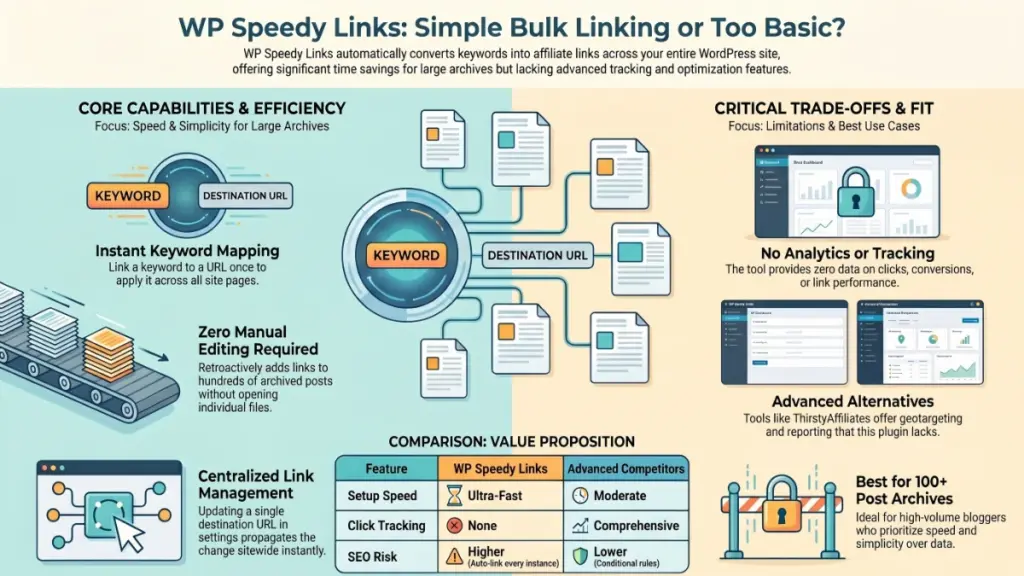
The core mechanic is simple. You install the plugin, go to its settings panel, enter a keyword (say, “email marketing software”), paste in a URL (your affiliate link), save — and from that point on, every time that keyword appears anywhere on your site, it becomes a clickable link pointing to your URL. No page-by-page editing. No bulk find-and-replace in your database. Just set it and it applies everywhere.
That’s it. That’s the product.
The sales page calls this “monetizing your entire WordPress website with the click of a button,” which is technically accurate but makes it sound like there’s something more sophisticated happening under the hood. There isn’t. It’s keyword-to-link mapping at the plugin level — a feature category that’s existed in WordPress for well over a decade.
Features: What You Actually Get
From documented walkthroughs and the vendor’s own demo materials, here’s what the plugin includes:
Unlimited keyword-URL pairs. You’re not capped on how many keywords you can map, which matters if you’re running a large affiliate site across multiple niches or programs (ClickBank, Amazon, JVZoo, your own products — all work the same way).
Sitewide application. This is the real value prop. One keyword entry applies across every published post and page automatically. If you have 500 posts and want to add a new affiliate link to a relevant keyword, you do it once.
Customizable link behavior. You can use redirect URLs or link-shortening services (like TinyURL) instead of raw affiliate links — helpful if you’re worried about direct affiliate links affecting SEO or looking spammy.
Settings you can update anytime. If a campaign ends or a link changes, you update the URL in one place and it propagates everywhere. That’s genuinely useful.
What’s notably absent: no click tracking, no conversion analytics, no link scheduling, no conditional display rules (show this link to US visitors only, for example), no A/B testing. It’s a basic tool with a basic feature set.
First Impressions: Setup and Interface
Based on the available demo documentation, setup follows a standard WordPress plugin workflow — download, upload via the plugin menu, activate, find the WP Speedy Links tab in your dashboard, add your keyword-URL pairs. The interface appears clean and minimal.
Here’s what I’d want to know from real extended use that I can’t tell you from documentation alone: how does it handle keyword conflicts? If you have two keywords that partially overlap, which link fires? Does it link every instance of a keyword or just the first occurrence per post? These are the kinds of edge cases that matter when you’re running a 500-post site, and they’re exactly the questions the sales page doesn’t answer.
I’d want to see real data on page load impact too. Any plugin that runs a keyword-scan on page render has the potential to slow things down, particularly on large posts. The vendor doesn’t address this, which is a gap worth noting.
The Honest Limitations
This is a solved problem. Tools like ThirstyAffiliates, Pretty Links, and AAWP (for Amazon specifically) do everything WP Speedy Links does — and add click tracking, geotargeting, link health monitoring, and reporting dashboards. If you’re serious about affiliate marketing, you’ll likely want those features eventually. The question is whether WP Speedy Links’ simplicity is a feature or a limitation for your use case.
No analytics. You won’t know which keywords are driving clicks, which links are converting, or whether your auto-linking is actually doing anything. For a tool sold on the premise of boosting commissions, the absence of any measurement capability is a real gap.
Pricing transparency is murky. The current vendor sales page shows $49. Earlier reviews from 2019 cite a $9.95 launch price. There appear to be upsells (a developer license at $27–$47, a reseller license at $67–$97, an Ad Rotator add-on). The full cost of the stack isn’t clear upfront — something that genuinely frustrates me about ClickBank-distributed tools. Know what you’re buying before you click the checkout button.
It won’t work for everyone. If you have a small blog (under 50 posts), the time savings over manually adding links is marginal. If you’re in a niche where link spam could hurt your SEO reputation (and Google has gotten quite good at detecting over-linked content), sitewide automatic linking to every keyword instance could actually work against you.
Who Should Buy WP Speedy Links
Good fit:
- Affiliate bloggers with large content archives (100+ posts) who want to retroactively add links without editing individual pages
- Marketers managing multiple affiliate programs who want a simple, centralized place to update link destinations
- Beginners who want the simplest possible entry into WordPress affiliate linking and don’t yet need analytics
Skip it if:
- You already use ThirstyAffiliates, Pretty Links, or a similar tool — you have this functionality plus more
- You need click tracking or conversion data
- You run a small site where manual linking is genuinely fast enough
- You’re in a competitive niche where over-automated linking could raise SEO red flags
A Note on “Reviews” You’ll Find Elsewhere
In my experience testing and evaluating marketing tools, I’ve seen a particular genre of review that this product attracts: 40+ bonus packages stacked onto a $10 purchase, “cons” sections that list “check your internet connection” as the primary weakness, 4.7/5 ratings with no actual criticism. You’ll find exactly that if you search for WP Speedy Links reviews.
I want to be direct: those reviews are affiliate promotion pieces, not honest assessments. The bonuses are typically recycled PLR products with no verifiable value. The ratings are fabricated. The goal is the commission, not your outcome.
The framework I use starts with a simple question: would I be comfortable if the product maker read this? I think John Thornhill would find this review fair. I also think the readers who find it and skip a purchase that wasn’t right for them are better served than the ones who bought through a review promising them 40 mystery bonuses.
Final Verdict
WP Speedy Links is a functional, simple tool that solves a real problem for a specific type of user. It’s not the revolutionary monetization system the sales page implies — it’s a keyword-to-link mapper. For a large-archive affiliate blogger who wants the simplest possible solution and doesn’t need analytics, it’s worth considering at a reasonable price point.
At $49 (current pricing), I’d compare it carefully against ThirstyAffiliates’ free tier before purchasing. At $10 (the original launch price), it’s an easy yes for the right use case.
The 30-day ClickBank refund policy is genuine and easy to exercise — so the risk is low if you want to try it yourself.
FAQ
Does WP Speedy Links work with any affiliate program?
Yes — it accepts any URL, so it works with ClickBank, Amazon Associates, JVZoo, ShareASale, or any other affiliate link you want to use. You’re just mapping a keyword to a destination URL.
Will auto-linking hurt my SEO?
It can, if overused. Linking every instance of a keyword to an affiliate URL can look spammy to search engines. Most SEO practitioners recommend linking the first instance per post only, and ensuring links are relevant to surrounding content. WP Speedy Links’ approach of sitewide auto-linking to every instance carries some risk if you’re not selective about keywords.
Is there a free version?
Not that I’ve found. The base plugin is sold via ClickBank with a 30-day refund guarantee.
How does it compare to ThirstyAffiliates?
ThirstyAffiliates has a free tier with similar keyword auto-linking functionality, plus click tracking, link categorization, and geolocation targeting. For most affiliate marketers, ThirstyAffiliates is the more capable option. WP Speedy Links’ edge, if any, is in its simplicity.
What happens if I want to change a link?
You update the URL in the plugin settings once, and it updates everywhere on your site automatically — that’s one of its genuine strengths.