


Snap Apps AI is an AI-powered Telegram app builder that lets freelancers and agencies create, white-label, host, and sell web apps using simple text prompts. It dramatically reduces development time for simple business apps while offering built-in hosting and branding. Although it isn’t a replacement for custom software development, it’s a practical solution for entrepreneurs who want to launch client-ready web apps quickly.
I’ve tested a lot of “no-code” tools over the years. Most of them promise to replace developers. Most of them actually replace about 20% of a developer’s job. You still handle the other 80% yourself. That means branding, hosting, bug-fixing, and those “wait, why won’t this deploy” moments at 1 a.m.
So when I heard about Snap Apps AI, I paid attention. It claims to build, brand, edit, and sell complete white-label web apps from a single text message inside Telegram. I’ll admit my first reaction was skepticism.
I’ve been burned before. A few years back I dropped close to $5,000 on a platform that looked flawless in a sales demo. It fell apart the second I tried to use it on a real client project. So I sat down to actually use Snap Apps AI with my usual approach: ignore the pitch, test the workflow, and see what happens when you try to ship something real.
Here’s what I found after spending real time inside the platform. I’ll cover the good, the rough edges, and who this tool actually fits.
What Is Snap Apps AI, Exactly?
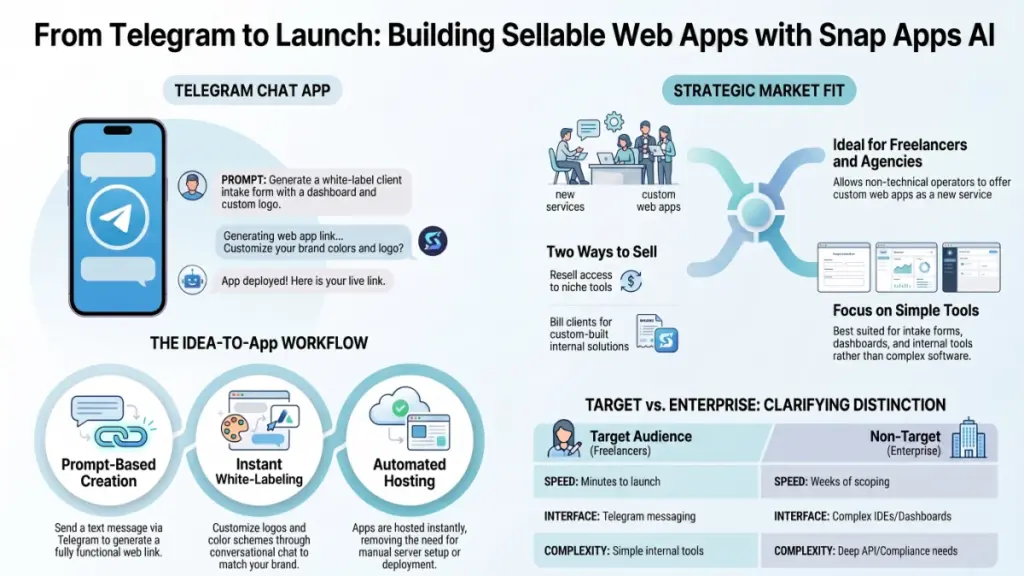
Snap Apps AI calls itself an AI agent, not just a chatbot. It lives inside Telegram and handles the entire lifecycle of building a web app. You send it a message describing what you want. It generates the app. You can then rebrand it with your own logo and colors, tweak the functionality, host it, and in theory, resell it to a client or list it as your own product.
That’s the pitch. What makes it different from the dozen other “AI app builder” tools that have popped up since 2023 is the delivery method. You don’t log into a dashboard or click through menus. You do everything through a messaging app you probably already have open on your phone right now.
I spend half my day bouncing between client Slack channels and Telegram groups. That’s a genuinely interesting distribution choice. It’s not gimmicky for the sake of being gimmicky. It removes a login screen, a dashboard, and a learning curve. It replaces all three with a text box you already know how to use.
Who This Tool Is Built For (And Who It’s Not)
Let’s be honest about the target audience first. That context changes how you should read the rest of this review.
Snap Apps AI aims at:
- Freelancers who want to offer “custom web app” as a service line without hiring a dev team
- Agency owners looking to white-label a product and resell it under their own brand
- Aspiring founders who have an idea for a SaaS tool but no coding background and no budget for a technical co-founder
- Side-hustlers who want to build and flip small web apps as digital products
This tool doesn’t target enterprise engineering teams, and it doesn’t try to. Do you need a custom app with complex database architecture, multi-region compliance requirements, or deep third-party API integrations? You’ll hit walls fast. I’d do you a disservice if I told you otherwise.
The middle ground gets interesting. Picture the freelancer who’s been quoting clients $3,000 for a simple booking app or internal tool. They either turn down the work or subcontract it out at a loss. That’s the gap this tool tries to fill.
First Impressions: Setting Up and Sending the First Command
Getting started feels refreshingly low-friction. There’s no lengthy onboarding wizard. Nobody forces you to “watch this 45-minute training video before you can access anything,” which a lot of tools in this space love to do. You connect to the Telegram bot, and you land immediately in a conversation.
I sent an intentionally simple first prompt. I asked for a basic client intake form with a dashboard view. Within a couple of minutes, I had a working link. Not a mockup. Not a Figma file. An actual functioning web app I could click through on my phone.
That speed is the single biggest selling point here, and it’s worth sitting with for a second. A traditional dev workflow involves a discovery call, a scoping document, a few days of build time, and at least one round of revisions before you see anything clickable — even for a “simple” app like that one. Compressing that into a text message and a two-minute wait marks a real shift in how fast an idea can go from “wouldn’t it be nice if” to “here, try this.”
Branding and White-Labeling: Does It Actually Feel Like Your Product?
A lot of “no-code” tools quietly fall apart right here. They let you build something. But the second you try to make it look like your brand instead of a generic template, you hit a paywall, a limitation, or a UI that fights you every step of the way.
Snap Apps AI treats white-labeling as a core feature, not an afterthought. That tells me the people who built this actually understand their audience. Picture a freelancer trying to resell this as their own tool. “Powered by Snap Apps AI” plastered across the footer would defeat the entire purpose.
In practice, I swapped logos, adjusted the color scheme, and renamed the app through more back-and-forth in the same chat thread. I didn’t need a separate branding dashboard. I didn’t need to export assets and re-upload them somewhere else. You just tell the agent what you want changed, and it changes it.
Does it deliver agency-grade branding? Not quite. Are you picturing pixel-perfect custom typography and bespoke animations? Temper those expectations. You get clean, professional results that look client-presentable, and it doesn’t look like a template someone bought off a marketplace for $12.
Editing and Iterating: The Part Nobody Talks About Enough
Here’s the thing about app builders that most reviews gloss over: building the first version stays easy. Every tool makes a good first impression with a fresh, well-worded prompt. The real test comes on the fifth revision, when the client says “actually, can we move that button” or “I need this field to be optional now.”
This is usually where AI-assisted builders start to show cracks. Small edits sometimes trigger the AI to regenerate large chunks of the app instead of making a targeted change. Then you spend more time undoing unintended side effects than you saved in the first place.
I pushed on this specifically because it’s the exact pain point that’s burned me with other tools. The editing flow inside Snap Apps AI runs conversationally. You describe the change, and it applies it. For the kinds of adjustments a typical client actually asks for — rewording, layout tweaks, adding a field, changing a color — it held up reasonably well. I wouldn’t call it flawless, though. On a couple of more complex structural changes, I had to get more specific in my phrasing to land the exact result I wanted. Anyone who’s worked with AI tools will recognize this pattern immediately: vague prompts get vague results.
The practical takeaway: treat your prompts like you’re briefing a junior developer, not like you’re texting a friend. The more specific you get about what should and shouldn’t change, the better your results turn out.
Hosting: The Unsexy Feature That Actually Matters Most
Nobody gets excited talking about hosting. But it’s the single most common failure point I’ve seen in “build an app” tools over the years. You build something beautiful. Then you discover you need to figure out deployment yourself. Or the built-in hosting proves unreliable. Or — worse — the tool gets acquired and shuts down six months later, taking your client’s live product down with it.
Snap Apps AI handles hosting as part of the core offering. That means the link you get after building the app is already live and shareable. For a freelancer trying to hand something to a client without also becoming their unpaid IT department, this matters more than almost any other feature on this list.
I’d still recommend anyone using this commercially to have a conversation with clients up front. Ask what happens to hosting if the underlying platform ever changes its terms, pricing, or availability. That’s not a knock specifically against Snap Apps AI. It’s standard advice I give about any third-party platform your business depends on. Read the terms. Understand what you’re building on top of. Have a contingency plan.
Selling and Reselling: What “Sellable” Actually Means Here
Marketers use the word “sellable” a lot, so let’s unpack what it actually means in practice. It can mean different things depending on the tool.
For Snap Apps AI, “sellable” appears to mean two things:
- You can build an app and resell access to it as a product. Think of a niche tool you build once and license to multiple small businesses.
- You can build custom apps for individual clients and bill for the work. You essentially use the tool as your internal production engine while you charge clients your own rate.
The second use case holds the real near-term money for most freelancers, in my experience. Building a generic tool and hoping strangers find and pay for it takes a much longer, harder road than most people building on these platforms initially expect. Does your plan involve “build once, sell to thousands”? Go in with realistic expectations about the marketing and distribution effort that requires. The app builder solves the building problem. It doesn’t solve the finding customers problem.
Pricing: What I’d Actually Want to Know Before Signing Up
I’ll be straight with you here. The version of pricing that matters isn’t the sticker price. It’s the total cost of ownership once you factor in hosting limits, revision caps, and whether “unlimited” claims come with fine print. Before you commit, get clear answers to these questions:
- Does pricing run as a flat monthly fee, or usage-based per app generated?
- Do limits apply to the number of apps you can build or host simultaneously?
- What happens to already-built and hosted apps if you downgrade or cancel?
- Does white-label branding come included at every tier, or does the platform gate it behind a higher plan?
I raise these questions not because I have reason to doubt this specific tool, but because these exact questions have bitten me on other platforms in this category. Any legitimate tool should answer all four clearly. If you’re evaluating this for your own business, get those answers in writing before you build anything client-facing on top of it.
The Honest Pros and Cons
What I liked:
- The Telegram-based workflow genuinely removes friction most builders don’t even think to address
- White-labeling feels like a first-class feature, not a bolted-on afterthought
- Built-in hosting means you’re not left figuring out deployment yourself
- Speed from idea to working link beats almost anything I’ve tested in this category
Where I’d temper expectations:
- Complex, highly custom functionality still sits outside what any prompt-based builder can reliably deliver
- Editing precision depends heavily on how specific your instructions get — vague prompts still produce vague results
- “Sellable” doesn’t mean customers will find you automatically; distribution still falls on you
- Long-term reliability of any hosting-dependent tool deserves monitoring, not assumptions
So, Who Should Actually Use This?
Have you been turning away simple app-building work because you don’t have dev resources? If you’re a freelancer or small agency owner in that spot, this closes the gap in a genuinely useful way, not just marketing fluff. The speed and the white-labeling make it realistic to say yes to that next client instead of passing the work along to someone else.
Are you picturing this as a replacement for a technical co-founder building a complex, scalable SaaS product? Pump the brakes. That’s not the lane this tool occupies, and no honest review of any AI app builder in 2026 should tell you otherwise.
For the specific use case it targets — fast, brandable, hostable web apps for freelancers and small operators — it earns a genuinely useful spot in a toolkit. Just go in with clear eyes about what “AI-built” still means in terms of precision and control.
Final Verdict
Tools like this live or die on one question: do they save you real time on real work, or do they just look impressive in a five-minute demo? Based on what I saw, the core workflow — prompt, build, brand, host — holds up under actual use, not just a scripted walkthrough.
Would I bet my entire business on any single AI app builder right now? No, and I wouldn’t tell you to either. But as a way to say yes to more client work without hiring a developer, or to test an app idea before you invest real money in custom development, Snap Apps AI earns a place on the shortlist worth testing for yourself.