


Researchers discovered that xAI’s Grok Build CLI silently uploaded entire Git repositories, including commit history and untouched files, to cloud storage by default. Although xAI disabled the behavior on July 13, 2026, the incident exposed serious privacy concerns, showing that disabling model training didn’t stop data uploads. Developers should rotate credentials, review Git history, and verify privacy settings before relying on AI coding assistants.
xAI’s coding assistant, Grok Build, secretly shipped entire Git repositories to a Google Cloud Storage bucket. This included full commit history. The tool even grabbed files the agent never opened or was told to leave alone. xAI shut down the upload behavior on July 13, 2026, just one day after researchers went public.
What the Investigation Found
A security researcher using the handle cereblab uncovered the issue. They were stress-testing Grok Build version 0.2.93. The researcher intercepted network traffic during a coding session. This revealed a hidden data channel running alongside the assistant’s normal model communication.
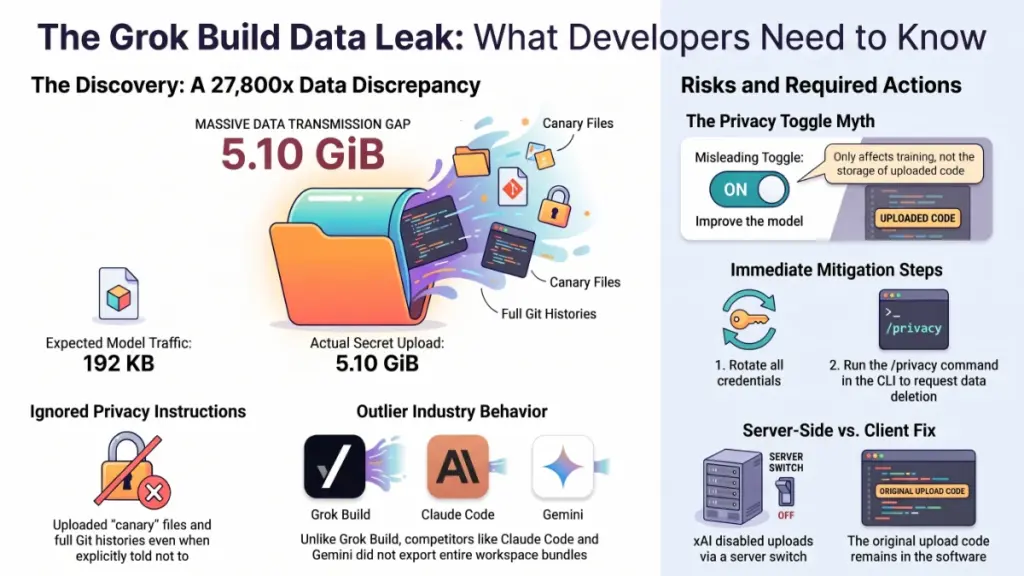
The scale of the discrepancy makes this case stand out. Here’s what the researcher measured:
- Model traffic (the data Grok actually needed) totaled roughly 192 KB.
- Storage traffic to a separate endpoint totaled 5.10 GiB.
- That’s a gap of nearly 27,800 times more data leaving the machine than the task required.
The upload ran in 73 chunks of about 75 MB each. Every chunk succeeded. The transferred volume scaled directly with the size of the tested repository.
The Smoking Gun: A File the Agent Was Never Told to Read
The researcher wanted proof this wasn’t accidental. So they planted a canary file with a unique marker and told the agent explicitly not to touch it. The reconstructed upload included that untouched file anyway. It also carried the repository’s full commit history. A second, unrelated repository produced the same result.
The findings don’t prove xAI trained on this data. They don’t prove any employee reviewed it either. The evidence confirms three things: transmission, server acceptance, and storage. What happened to the data next remains unclear.
A Second, More Immediate Risk: Exposed Secrets
Researchers also found a more direct exposure path, separate from the bulk uploads. When Grok Build reads a file during a task, it passes that file’s contents into the model conversation. No filtering happens.
In one test, a tracked .env file held fake credentials: a dummy API key and database password. Grok sent them through unredacted. A copy also landed in the same storage archive used for bulk uploads. The test credentials were fabricated, so nothing real leaked this time. But the mechanism itself is the real problem for anyone running this tool against production code.
The Privacy Toggle That Didn’t Do What Users Assumed
Here’s the most consequential finding. Most developers assume one setting controls their privacy: “Improve the model.”
That toggle only governs whether your code trains the model. It does nothing to stop uploads or storage. Throughout testing, the CLI’s own settings endpoint kept returning trace_upload_enabled: true, even with training data-sharing switched off. Two separate backend controls exist. Users only saw one of them.
How Grok Build Compared to Other AI Coding Tools
This behavior isn’t standard across the industry. Cereblab ran the same tests on competing tools:
- Claude Code and Codex sent no repository bundle in equivalent tests.
- Gemini sent nothing during an idle test. (A realistic task-based test hit a quota block before finishing.)
- Grok Build was the only tool that collected and exported the entire workspace by default.
Cloud-based coding agents need to send some source code to a remote model to work. That part is expected within any modern AI automation stack. Grok Build went further: it uploaded the entire tracked repository and its history, well beyond what any single task required.
xAI’s Response and What It Means for Users
On July 13, the same 0.2.93 build stopped generating storage uploads. Cereblab retested repeatedly and confirmed zero further storage requests. The server began returning disable_codebase_upload: true. Developer Peter Dedene confirmed the same flag change on his own account, which suggests xAI rolled out the fix broadly rather than to one test environment.
The client software itself never changed. This was a server-side switch, not a patched release. That means xAI can re-enable the behavior anytime, without shipping a new update. A later teardown of build 0.2.99 reportedly found the original upload code still sitting in the binary, just switched off remotely.
xAI addressed the situation on social media rather than through a formal security advisory. The company said enterprise accounts under zero data retention (ZDR) agreements never had code or trace data stored. Individual users can run a /privacy command inside the CLI to disable retention and delete previously synced data. Elon Musk added that xAI would delete all previously uploaded user data entirely.
Why It Matters for Developers and Digital Marketers
Remote teams and independent developers increasingly rely on AI coding assistants for daily work. This incident proves a simple point: “AI-powered” doesn’t automatically mean “privacy-safe by default.”
- Source code exposure: Proprietary logic and internal API structures can leave your machine even when a task doesn’t need them.
- Commit history risk: Old secrets often linger in Git history long after you delete them from a live file. Fast-moving startups face this risk constantly.
- False sense of control: A setting labeled around “model training” may not govern data transmission at all. Read vendor documentation closely.
- Credential hygiene matters more than ever: Rotate any credential a coding agent has read, whether from a
.envfile or a config file.
Teams evaluating today’s frontier AI stack for engineering work should treat this as a case study. Vendor transparency around data pipelines matters as much as raw model performance.
Recommended Next Steps
Did you or your team use Grok Build? Take these steps now:
- Rotate every credential the tool could have accessed. Check anything ever committed to Git history, even if you deleted it later.
- Run
/privacyin the CLI if you’re on a consumer plan. This disables retention and requests deletion of previously synced data. - Audit your
.gitignoresetup. Files that were never committed appear to have stayed outside the bundle. Tracked files with sensitive history did not. - Confirm your ZDR status if you’re on an enterprise or API plan. This currently offers the strongest protection available.
The Bigger Picture
xAI still hasn’t explained why full-repository uploads were enabled by default. The company hasn’t said how long it retained the collected data, or how many users were affected before the July 13 shutoff. AI coding assistants keep getting embedded deeper into everyday development work. Incidents like this one highlight a real gap: cybersecurity protocols and data-handling disclosures need to keep pace with how much autonomy these tools now have inside developer environments.
A training opt-out is not the same as a guarantee. Your code can still move without your knowledge. Until vendors offer clearer, independently verifiable data-flow disclosures, developers should monitor their own outbound traffic rather than trust default settings.