

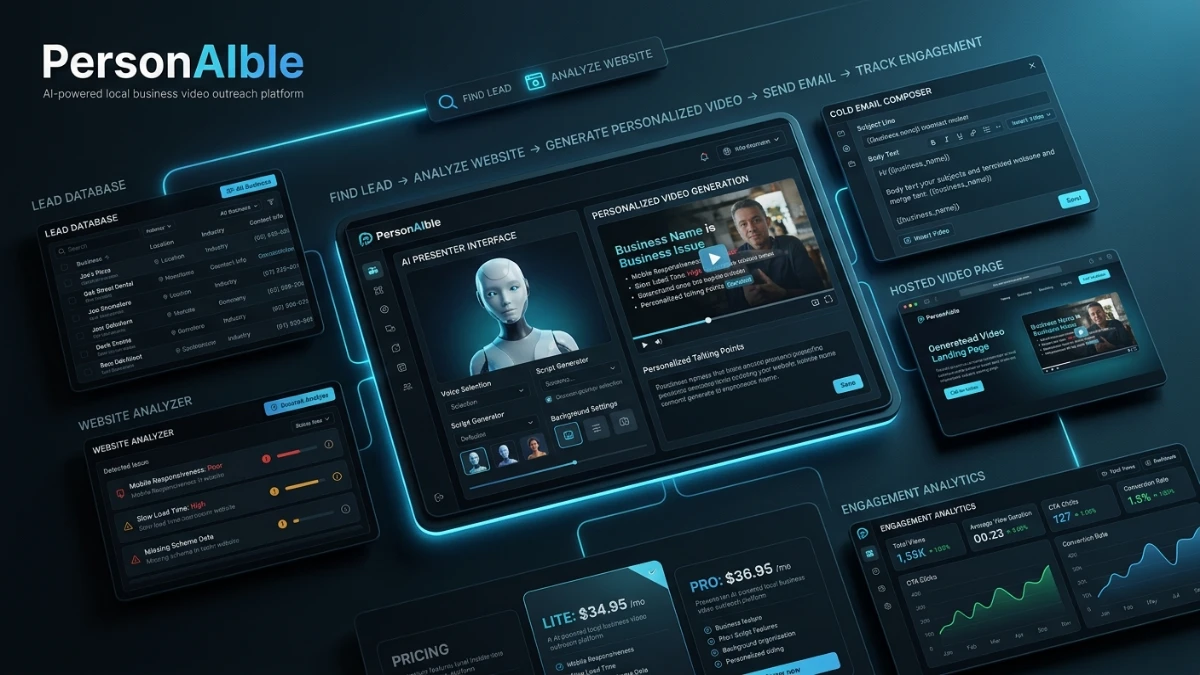
PersonAIble combines local-business lead sourcing, personalized AI video creation, cold-email writing, hosted video pages, and tracking into one outreach tool. It can help freelancers and small agencies create targeted pitches without appearing on camera. However, the software does not close clients or perform fulfillment, and its lead-quality and income claims are not independently verified. Lite and Pro are one-time purchases, while the Everything Bundle is an annual subscription.
You’ve probably seen the pitch already: thousands of local businesses with broken websites, a personalized AI video built for each one, and a $300–$500 payment waiting at the end of a copy-paste email. But before you buy anything, it helps to separate what the software actually does from the launch-page theater around it — the countdown timer, the “price goes up every 25 sales” warning, and the stack of bank-transfer screenshots.
This review relies entirely on PersonAIble’s own sales page and public description. It covers how the tool works, what’s included, and what it costs. However, it is not based on hands-on testing, since I have not personally used the software. So wherever the vendor makes a claim about results, reply rates, or income, I’ve flagged it clearly as their claim — not a verified outcome.
Quick Verdict
PersonAIble pairs a scraped local-business lead database with an AI video generator. First, it builds a short, personalized sales video that shows a prospect’s own website on screen. Then an AI presenter pitches a fix for something broken on that site — no SSL, no chatbot, an outdated design, and so on. On top of that, it writes the cold outreach email, hosts the video on a shareable page, and bundles in templates for pricing, proposals, and contracts.
The core idea — personalized video outreach — isn’t new. Companies like Vidyard use it, and Intercom’s sales team has reportedly used it too. What PersonAIble adds is automation on the production side. So the real question isn’t whether the tactic works; it’s whether $36.95 (or $297/year for the bundle) is worth it once you factor in that the tool builds the video, but doesn’t land the client by itself.
Best for: people willing to send 2–5 outreach emails a day, who don’t want to be on camera and don’t want to build video or lead-gen infrastructure from scratch.
Not for: anyone expecting leads or videos alone to generate income without sending anything, or anyone who’s uncomfortable with cold outreach as a channel.
Product Overview
| Product Name | PersonAIble |
| Category | AI video generation + local-business lead database for cold outreach |
| Creator | Joshua Zamora, Zamurai Mastermind Group, Inc. |
| Launch Date | Not stated on the page; currently running as a limited launch special with a tiered, sales-triggered price increase |
| Price | Lite: $34.95 one-time · Pro: $36.95 one-time · Everything Bundle: $297/year (billed annually, discounted from a stated $697) · Optional Unlimited add-on: $47/month |
| Refund Policy | 60-day money-back guarantee, refund requested by email |
| Retailer | JVZoo (third-party retailer/payment processor; this role doesn’t imply their endorsement of the product’s claims) |
| Best For | Freelancers and small agency owners doing local-business outreach who prefer to stay off camera |
| Editorial Assessment | The feature set looks genuinely useful for its niche. That said, the sales page leans heavily on unverified income claims and manufactured urgency, so weigh those separately from the software itself |
What Is PersonAIble?
PersonAIble builds itself around one specific outreach method. Instead of sending a generic cold email, you send a short video: an AI presenter talks directly about a specific business, while a screen recording of that business’s actual website plays in the background. The logic is simple — because the prospect recognizes their own site immediately, the video should get opened and answered far more often than a templated email would.
Three Jobs Rolled Into One Tool
Normally, this kind of campaign requires several separate tools, plus a fair amount of manual research. PersonAIble folds three jobs into one subscription:
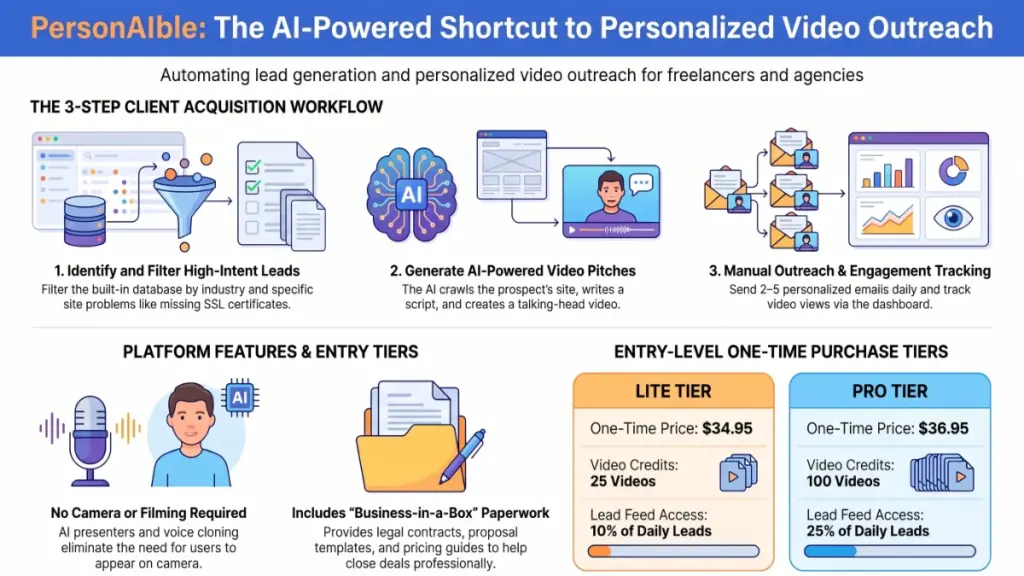
- Finding prospects. A database called Aigency Valet adds, according to the vendor, 2,500–5,000 new local businesses per day. Each one arrives pre-scanned for specific problems, such as a missing SSL certificate, an outdated site, or no chatbot.
- Producing the video. The AI crawls the target’s website, writes a one-to-one script, generates a talking AI presenter, and records a screencast of the site to match the pitch.
- Getting it in front of someone. The app writes the outreach email and subject line, hosts the finished video on a shareable page, and then tracks who watched and who clicked.
In short, the tool targets the two biggest bottlenecks in cold outreach: finding people who genuinely need what you’re selling, and making your message stand out in an inbox that ignores almost everything else.
Main Features
Built-In Lead Database (Aigency Valet)
Your account connects to a live feed that, per the vendor, adds thousands of new local businesses daily. You can filter by state, industry, and specific problem type. Lite-tier accounts get access to 10% of each day’s new leads, while Pro accounts get 25%. Meanwhile, the bundle tier adds an AI Spy add-on, which claims to surface the business owner’s direct phone number and email for roughly 20–30% of businesses — where that information is publicly available, and currently only for US businesses.
AI Script and Video Generation
The AI studies the prospect’s actual website first, then writes a tailored script. You can edit that script, swap in a template, or replace it entirely with your own wording. From there, a catalog of AI presenters (or your own uploaded photo) delivers the pitch, paired with a voice library that includes cloning from a short sample. You can also generate scripts in 20+ languages and four tones: Consultative, Friendly, Professional, or Direct.
Outreach Email Writer
Beyond the video itself, the app writes the accompanying cold email and subject line, referencing the specific issue it found on the prospect’s site. You’re meant to copy this into your existing Gmail account and send it manually. Notably, the vendor recommends 2–5 emails a day rather than bulk sending, partly as a deliverability safeguard.
Hosted Video Pages With Tracking
Each video lives on a shareable, hosted page with your branding (logo and colors as an upgrade option) and a built-in call-to-action button. The dashboard also shows viewer count, watch percentage, and CTA clicks — useful for deciding who’s actually worth a follow-up.
Done-For-You Business Paperwork
Both paid tiers bundle in seven bonus packs: a “foot-in-the-door” playbook, AI fulfillment training (for delivering the services you’re pitching — website fixes, SSL installs, chatbots, social management), a client intake form, proposal templates, contract templates, and a pricing guide. Arguably, this matters as much as the video tool itself, since the video only opens the conversation — you still need to close, price, and deliver the work.
Agency License
Both tiers include commercial rights, so whatever you create with the tool — the videos, the fulfilled services — is yours to sell to clients without an extra licensing fee.
Benefits
- No camera time required. Because the AI presenter and voice cloning handle delivery, you never have to film yourself. That removes a real barrier for people who’d otherwise avoid video outreach entirely.
- Removes the cold-research step. Rather than manually searching for prospects and verifying they have a specific problem, you work from a lead database that’s already filtered by problem type.
- Consolidates several tools into one subscription. A presenter/avatar tool, a filtered local lead feed, video hosting with tracking, and an email writer would typically mean paying for four separate subscriptions. Bundling them is a genuine convenience if you’d otherwise pay for each one individually.
- Includes the paperwork. The proposal, contract, and pricing templates fill a gap most “lead gen” tools skip. Closing and invoicing a client trips up a lot of people — not finding them.
How PersonAIble Works (Based on the Vendor’s Walkthrough)
I haven’t run this software myself, so I can’t speak to real-world speed, output quality, or reliability firsthand. Here’s the workflow as the vendor describes and demonstrates it, so you know exactly what you’re signing up for.
The Five-Step Process
- Pick a lead. Filter the daily feed by state, industry, and problem type, or manually enter a specific business name and website.
- Generate the video. The app crawls the site, writes the script, builds the AI presenter and voice, and records the website screencast. The vendor states this takes four to seven minutes per video, and every video requires your approval before it goes out.
- Send the email. The written outreach email and subject line are ready to paste into your own Gmail account. The vendor recommends sending individually, at a pace of 2–5 a day, rather than in bulk.
- Track and follow up. The dashboard shows who opened and watched the video, so you can prioritize follow-ups with people who actually engaged.
- Close and get paid. Once a prospect responds, the included intake form, proposal, and contract templates are meant to carry the conversation through to payment — via PayPal, Stripe, Zelle, Venmo, Cash App, or a check.
One distinction is worth underlining here: PersonAIble doesn’t do the actual client work — building the website fix, installing the SSL certificate, setting up the chatbot, or managing the social account. Instead, the included “AI Does The Work” training walks you through fulfilling those services separately, largely with other AI tools. In other words, PersonAIble gets you the meeting; it doesn’t hand you the finished product.
Ease of Use
Based on the described workflow, PersonAIble targets non-technical users directly. There’s no code, no video editing, and no hosting setup, and you never need to record anything yourself. The stated onboarding is straightforward too: pick a lead, click generate, copy the email — with video tutorials covering each screen.
That said, keep a few things in mind before you buy:
- You’ll still need to learn and apply the fulfillment side yourself — fixing the website, installing the SSL cert, running the chatbot — even with AI tools recommended to speed things up.
- Since there’s no free trial mentioned, you can’t verify lead database quality (accurate contact info, correctly identified “problems”) before paying — only the refund window offers that check.
- Filtering leads and choosing the right tone and script still requires your judgment, even though AI writes the first draft.
Performance
I can’t independently evaluate video generation speed, output quality, email deliverability, or lead database accuracy, because I haven’t used the product myself. Instead, here’s what’s worth verifying yourself during the refund window if you do buy it:
- Whether the AI-generated pitch reflects real, visible problems on a prospect’s site, rather than a generic template dressed up as personalized.
- Whether the “2,500–5,000 new leads daily” claim translates into leads that are actually relevant to your target market and location.
- Whether Gmail sending at low volume avoids spam flags long-term, as the vendor claims.
- Whether the AI presenter and voice sound natural enough to build trust. Notably, the sales page itself admits these aren’t polished “Hollywood” videos.
Pricing
| Tier | Price | Videos | Lead Feed Access | Notes |
|---|---|---|---|---|
| Lite | $34.95 one-time | 25 videos, no expiry | 10% of daily new leads | Entry-level option |
| Pro (vendor’s recommended default) | $36.95 one-time | 100 videos, no expiry | 25% of daily new leads | Only $2 more than Lite, for 4x the videos and 2.5x the lead access |
| Everything Bundle | $297/year (stated discount from $697), plus a $10 coupon | 100 videos, refreshed monthly | Full lead engine + AI Spy contact lookup | A recurring annual subscription that includes a separate bundled product (Aigency Valet) plus two extra bonuses (SerpSling AI, a done-for-you agency website) |
| Unlimited add-on | $47/month | Unlimited | Unlimited | Optional — not required to use the core product |
Both Lite and Pro include the same seven bonus packs — the playbook, fulfillment training, lead engine access, intake form, proposals, contracts, and pricing guide — stated at a combined $1,279 value. The bundle, however, is structurally different: it’s an annual subscription rather than a one-time purchase, and it adds two more bonus products that Lite and Pro don’t include.
A Few Pricing Details Worth Flagging
- Credit packs (for going beyond your included videos) start at $47, or you can move to the $47/month Unlimited plan instead.
- The bundle explicitly renews annually at whatever price you paid at checkout. Treat that as an ongoing cost, not a one-time fee, even though Lite and Pro are genuinely one-time purchases.
- The sales page runs a live “price rises every 25 sales” mechanic alongside a countdown timer. Take that urgency framing with a grain of salt, since it’s a common launch-funnel tactic rather than proof of fixed, scarce inventory.
Pros
- Combines several separate tools into one purchase. A presenter/avatar generator, a filtered local-business database, hosted video pages with tracking, and an email writer would normally require multiple subscriptions.
- Removes the camera requirement, which clears a genuine barrier for a lot of people who’d otherwise skip video outreach entirely.
- Reasonable entry price for the one-time tiers ($34.95–$36.95), backed by a 60-day refund window so you can test it against real results.
- Covers the business side, not just the tech. Proposal, contract, and pricing templates address the part of “landing clients” that most lead-gen tools ignore.
- Generates scripts in multiple languages, which could help if you’re targeting non-English-speaking local markets.
Cons
- Leans heavily on unverified income claims. The sales page repeatedly shows large payment screenshots, each footnoted with “results are not typical.” That combination should make you skeptical, not reassured.
- Uses fabricated urgency mechanics. The rising price and countdown timer are standard launch-funnel tactics rather than a reflection of genuine limited supply, since the software itself isn’t a finite resource.
- Still requires manual outreach, by design. The tool builds the video and writes the email, but you’re the one sending 2–5 emails a day from your own inbox. This isn’t a “set and forget” system.
- Doesn’t include fulfillment. PersonAIble gets you the conversation; delivering the actual website fix, chatbot, or social management remains separate work, even with training included.
- Offers no stated free trial — only a refund window, so you evaluate lead and video quality after you’ve already paid.
- Bundles a recurring subscription into the mix. The bundle tier is a materially different commitment than the one-time Lite/Pro pricing, and it’s easy to overlook that distinction given how the page frames it as a “discount.”
Comparison With Alternatives
| PersonAIble | Manual video outreach (e.g., Loom) | Hiring an agency for personalized video | Generic AI avatar tools | |
|---|---|---|---|---|
| Upfront cost | $34.95–$36.95 (one-time tiers) | Free–low cost (software only) | $1,000–$3,000 per video (vendor’s stated range) | $29–$89/month |
| Lead sourcing included | Yes, built-in database | No — you find leads yourself | Sometimes, depending on the agency | No |
| Time per video | Minutes (AI-generated) | ~20 minutes or more per prospect, on camera | Days (outsourced) | Minutes, but no lead targeting |
| On-camera requirement | None | Yes, unless you use screen-only recordings | None | None |
| Outreach email writing | Included | Manual | Not typically included | Not included |
| Client paperwork (contracts, proposals) | Included | Not included | Not included | Not included |
The fairest comparison isn’t really “PersonAIble vs. other AI video tools.” It’s “PersonAIble vs. doing personalized video outreach by hand.” After all, the tactic itself isn’t new or exclusive to this software — companies have used personalized video (via tools like Loom) for cold outreach for years. What PersonAIble adds is speed and a way around the on-camera requirement, though that trade-off comes with the “ugliness” the vendor itself admits to: these aren’t polished, cinematic videos.
Who Should Buy It?
- Freelancers or small agency owners who already plan to do local-business outreach and want to skip building video or lead infrastructure themselves.
- People who dislike being on camera but still believe in video as an outreach format.
- Anyone comfortable sending a small, consistent volume of manual outreach daily, since this tool isn’t built for mass blasting.
- People who also have a plan — or are willing to follow the included training — for actually delivering the services they’d be pitching.
Who Should Skip It?
- Anyone expecting passive income from leads or videos alone, without sending consistent outreach.
- Anyone unwilling to skeptically evaluate the lead database and video quality themselves during the refund window, since no free trial exists.
- People who already have an established video outreach workflow that’s working, since the marginal benefit here is mainly speed and lead sourcing.
- Anyone uncomfortable with cold email as a channel at all, regardless of personalization. The legal and deliverability considerations of unsolicited commercial email still apply, no matter how personalized the message is.
Frequently Asked Questions
Is PersonAIble a one-time purchase or a subscription? Both options exist. Lite ($34.95) and Pro ($36.95) are one-time purchases with no monthly video expiry, while the “Everything Bundle” ($297, discounted from a stated $697) renews annually at your checkout price.
Do I need to be on camera? No. The video uses an AI-generated presenter — either from a catalog or your own uploaded photo — plus an AI voice, including voice cloning from a short sample if you’d rather use your own voice without filming.
Where do the leads come from? A database the vendor calls Aigency Valet, which reportedly adds 2,500–5,000 new local businesses daily, pre-scanned for specific issues like missing SSL certificates or outdated websites. I have no independent way to verify this data’s accuracy or freshness.
Is there a free trial? Not that’s mentioned on the sales page. Instead, you get a 60-day money-back guarantee, which effectively functions as your evaluation window after paying.
How many outreach emails should I send per day? The vendor recommends 2–5 per day, sent individually from a standard Gmail account, specifically to avoid the spam and deliverability issues that come with bulk sending.
Does PersonAIble do the client work for me — building websites, fixing SSL, and so on? No. It handles lead sourcing, video creation, and outreach. Delivering the services you pitch is covered separately through the included “AI Does The Work” training, though it still requires effort on your end.
What’s the difference between Lite and Pro? Pro costs just $2 more, yet it includes four times the videos (100 vs. 25) and 2.5 times the daily lead access (25% vs. 10%). Both tiers include the same seven bonus packs.
Is there a refund policy? Yes — a 60-day money-back guarantee. Refunds go through email, with no stated requirement to explain why you’re asking.
Are the income examples on the sales page typical? No. The vendor’s own disclaimer states that results shown aren’t typical and aren’t a guarantee of income, and that the payment examples reflect the experience of the product creator and others. So treat any specific dollar figures on the page as illustrative, not expected outcomes.
What happens if I run out of included videos? You can buy a credit pack starting at $47, or upgrade to the $47/month Unlimited plan. Neither is required, though — your account and existing videos remain usable either way, according to the vendor.
Final Verdict
PersonAIble packages a real, established outreach tactic — personalized video — into a tool that removes two major friction points: finding the right prospects, and being on camera yourself. If the lead data and AI-generated video quality hold up to what’s described, the $34.95–$36.95 one-time tiers offer a low-risk way to test the approach. Of course, you can only really confirm that by trying it and leaning on the refund window if it falls short.
Where To Slow Down
The sales page itself deserves a second look before you commit. The countdown timer, the “price rises every 25 sales” mechanic, and the large payment screenshots — each footnoted with “results are not typical” — follow a familiar high-pressure launch playbook. It’s worth mentally separating that marketing layer from the actual software underneath it, since the tool doing what it claims and the marketing being upfront about expectations are two different questions.
The Bottom Line
If you go in realistic — understanding that this gets you a video and an email, not a client, and that you’ll still need to send consistently and deliver the service once someone says yes — PersonAIble looks like a reasonable entry point into a legitimate outreach channel. But if you’re expecting the software to sell and close for you with minimal effort on your part, the page’s own disclaimers are telling you not to expect that.