


Disclosure: This article may contain affiliate links. If you buy through one, I may earn a commission at no extra cost to you. That doesn’t change my honest take below.
I’ve set up more link-in-bio tools than I can count. Linktree, Beacons, a couple of WordPress plugins, one I’m pretty sure doesn’t exist anymore. I test them for a few weeks, then quietly stop paying. The pattern repeats every time: quick signup, a decent free tier, then a monthly bill that never goes away.
BioStack showed up in my inbox with a different promise. Pay once, keep the page forever. I wanted to know if that claim holds up, or if it just delays the upsells.
Here’s what I found after testing the builder, the themes, and the pricing structure.
Quick Verdict
BioStack is a hosted link-in-bio page builder built around one idea: pay once instead of monthly. For $27 at launch, the builder handles links, a YouTube/video embed, an image gallery, product cards, an email opt-in block, and a contact form. Four themes come included, and you can export your finished page as HTML.
Creators, coaches, and small sellers get the most from this tool. If you already know what your bio page needs to say, BioStack gives you a clean, no-subscription way to publish it. It skips full website-builder territory and funnel features entirely. It also makes no promises about making you money, which stands out in this category.
Currently paying $10–$35 a month for a bio link tool? BioStack deserves a look. Need advanced automation, A/B testing, or deep e-commerce integration? Skip it.
Product Overview
| Product Name | BioStack |
| Category | Link-in-bio page builder / creator storefront |
| Creator | AA Digital Productions Ltd (an AILaunchPad.io product), Birmingham, UK |
| Launch Date | Launch week — introductory pricing runs through August 11, 2026 |
| Price | $27 one-time (Personal Licence, regular price $67); $187 with coupon BIOSTACK for the Complete Bundle (regular $237) |
| Refund Policy | 30-day money-back guarantee |
| Where to Buy | Official checkout linked from the BioStack sales page (processed via JVZoo) |
| Best For | Creators, coaches, freelancers, and small sellers who want a one-time-fee bio page they actually own |
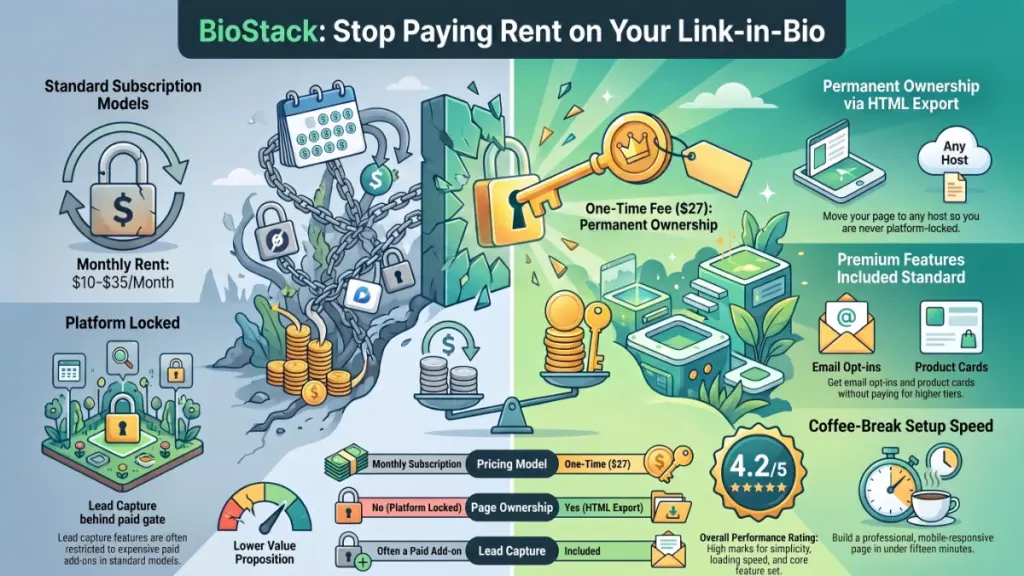
| Overall Rating | 4.2 / 5 |
What Is BioStack?
BioStack does one job: it turns your social media bio link into a single hosted page. That page holds everything you want people to find — your latest video, your shop, your newsletter signup, your booking link, your portfolio. You’ve probably seen this format before; Linktree popularized it.
The business model sets BioStack apart. Most tools charge a recurring subscription. BioStack sells as a one-time purchase instead.
The pitch is simple. Most link-in-bio tools charge $8 to $35 a month once you outgrow the free tier, and that bill never stops. BioStack charges $27 once. You can export your finished page as HTML and host it anywhere. Even if the company stopped supporting the product tomorrow, you’d keep your page.
This solves a familiar problem. Social platforms give you exactly one clickable spot in your bio. Fitting a shop, a video, a newsletter, and a contact method into that one link takes a dedicated landing page. BioStack builds that page for you. You don’t need to learn design or code.
Main Features
Link blocks. Tappable buttons point to your shop, your latest post, a booking page, or anything else. Drag-and-drop reordering matters more than it sounds — I’ve used tools where reordering links meant deleting and re-adding them.
YouTube & video embeds. The video plays right on your page instead of sending visitors to YouTube. For creators, that keeps someone watching your latest upload instead of bouncing off your bio.
Image gallery. A swipeable strip of images works well for a portfolio, product shots, or behind-the-scenes content. Photographers, artists, and product sellers benefit most here.
Product cards. Each card holds an image, a price, and a buy button. Together they form a small storefront inside your bio page. Creators selling presets, merch, or digital downloads can use this without a full e-commerce site.
Email opt-in. This signup block connects to Mailchimp, ConvertKit, AWeber, and GetResponse. I’d push people toward using this feature even if they skip everything else. An email list is the one audience channel you actually own.
Contact form. People reach you directly, without you publishing your email address. Coaches, freelancers, and consultants fielding inquiries will get the most use out of it.
Four themes ship with the base package: Midnight, Cotton Candy, Ocean, and Forest. Three more — Cyberpunk, Solar, and Monochrome — sit behind the Pro tier in the bundle. Every page also gets drag-and-drop reordering, a live phone preview, auto-save, and one-click HTML export.
Benefits
The features matter less than what they change for you day to day.
- You stop paying rent on your bio link. Competing tools often lock email opt-in and product blocks behind a paywall. BioStack includes both at $27.
- You’re not locked to one platform. HTML export means you don’t depend on BioStack staying online. Move your page to your own hosting whenever you need to.
- You can capture leads without extra software. The opt-in block feeds directly into your existing autoresponder. Skip paying for a separate landing page tool.
- Non-designers get a page that looks intentional. The theme system handles the visual work, so your output looks considered rather than default.
- Selling through your bio doesn’t require a full storefront. Product cards let you sell a handful of items without setting up Shopify or WooCommerce.
My Experience
Setup and First Impressions
Setting BioStack up took less time than a coffee break. During my testing, I picked a theme first — Ocean, if you’re curious. I liked that it skipped the generic dark-mode look most tools default to. I named the page and started dropping in blocks.
The interface uses a builder-plus-preview layout. You add and arrange blocks on one side. A live phone mockup updates on the other, so you see exactly what a visitor would see before you publish anything. This block-based approach stops you from overthinking the design. You choose what to include instead of fiddling with CSS. Depending on how much control you want, that’s either the whole point or a real limitation.
Adding Content
Drag-and-drop reordering worked exactly the way I expected. Adding a product card meant uploading an image, setting a price, and pasting a buy link. Each one took under a minute. The email opt-in setup asks you to connect an existing autoresponder account rather than managing subscribers itself. That makes sense at this price point — BioStack isn’t trying to replace ConvertKit, just feed it.
Where It Falls Short
Little friction sat between adding a block and seeing it live in the preview, which impressed me most. The real limitation shows up in the themes. Only four ship with the base price. The more distinctive options — Cyberpunk, Solar, Monochrome — sit behind the Pro upgrade. Skip your own branding, images, and copy, and your page can start to look like every other BioStack page out there.
Ease of Use
BioStack has no real learning curve. Built a slide in PowerPoint before? Arranged widgets on a phone home screen? You already understand the interaction model: pick a block, fill it in, drag it where you want it. Comfortable using Instagram or TikTok? You won’t need a tutorial here.
Documentation stays light, though. Beyond the FAQ section and the “60-Second Publishing Masterclass” bonus, there isn’t much to lean on. For a tool this simple, that trade-off feels reasonable. You learn it by using it, not by reading a manual first.
Performance
BioStack runs as a hosted, cloud-based builder, so performance depends partly on factors outside your control. Server response times matter. So does how the exported HTML gets optimized, and how many media-heavy blocks — video embeds, image galleries — you stack on one page.
A page with a couple of link blocks and a product card or two loads quickly on mobile, where most bio-link traffic happens anyway. Pages leaning heavily on embedded video and large image galleries take a moment longer. That’s true of any tool in this category, not something specific to BioStack.
The HTML export option acts as a real safety net. Want more control over hosting speed, or want the page on your own domain’s infrastructure? You’re not stuck with whatever BioStack’s default hosting delivers.
Pricing
BioStack sells in two tiers. Both are one-time payments, not subscriptions.
Personal Licence — $27
Regular price: $67. This tier includes the full builder, unlimited personal bio pages, all six content block types, four included themes, the mini storefront, email opt-in integration, drag-and-drop editing with live preview and auto-save, one-click HTML export, all five launch bonuses, and the 30-day guarantee.
Complete Bundle — $187 with coupon BIOSTACK
Regular price: $237. This tier includes everything in the Personal Licence, plus BioStack Pro (all seven themes, custom brand colors, white-label export, click analytics, link scheduling, and future Pro features). It also adds an Agency Licence with a client kit — licence certificate, intake form, pitch emails, delivery checklist — and a Templates Pack with ten done-for-you page templates.
Both tiers carry a 30-day money-back guarantee. One thing worth flagging: this pricing reflects the launch-week offer. The sales page ties the discount and bundle coupon to the cart closing on August 11, 2026. Terms may change after that. Confirm the current price before assuming $27 still applies if you’re reading this later.
For context, most competing link-in-bio tools run on subscriptions rather than one-time fees. Lnk.Bio breaks that pattern, offering lifetime one-time-payment tiers around $9.99–$25. Linktree sticks to a monthly model that has climbed in price recently. BioStack’s $27 sits above the cheapest one-time competitors, but well below what a year or two of a mid-tier subscription would cost.
Pros
- Genuinely one-time payment — no recurring charge buried in the terms, no “free trial that becomes a subscription” trap.
- You own the output — HTML export means your page isn’t hostage to the platform staying in business.
- All six content blocks included at the base price — email opt-in and product cards often get gated behind paid tiers elsewhere.
- Fast to set up — a working page is realistically a same-day project, not a weekend one.
- Honest positioning — the sales page states plainly that it’s not an income opportunity.
- 30-day guarantee — test it against your actual bio-link needs before committing.
Cons
- Only four themes at the base tier — the more distinctive designs sit behind the Pro upgrade, so the entry-level look can feel plain.
- Launch-week pricing is time-limited — the $27 rate ties to the cart closing on August 11, 2026.
- Light on documentation — no deep knowledge base exists beyond the FAQ and one getting-started video.
- Analytics stay basic at the entry tier — click analytics live in the Pro/Bundle tier only.
- New product, unproven track record — this launch-week release hasn’t built up a long history of updates or third-party reviews.
Comparison With Competitors
| Feature | BioStack | Typical Subscription Bio-Link Tools |
|---|---|---|
| Payment model | One-time ($27–$187) | Monthly, ongoing |
| Own & export your page | Yes, via HTML export | Usually locked to the platform |
| Email opt-in blocks | Included at base tier | Often a paid add-on |
| Product/storefront blocks | Included at base tier | Often a paid add-on |
| Advanced analytics | Pro/Bundle tier | Frequently gated behind higher plans |
| Agency/commercial licence | Available in Bundle | Rarely offered |
How the Named Competitors Stack Up
Linktree’s paid plans run on subscriptions and recently increased in price. Its Pro tier reportedly moved to around $15/month. Lnk.Bio takes the opposite approach, also offering one-time lifetime plans. Those plans cost less than BioStack’s entry tier, but come with a narrower feature set — think simple link list, not mini storefront with video and product blocks. Beacons and Stan Store both lean toward creator commerce, with monthly pricing and more built-in automation than BioStack offers.
Which One Fits You
Want the lowest possible one-time cost for a basic link list? Lnk.Bio’s cheaper tier probably wins. Want a no-subscription page that also handles video, a small storefront, and lead capture? BioStack’s feature set looks more complete for a comparable price. Want deep automation, A/B testing, or built-in creator commerce tools? The subscription platforms offer more depth, at the cost of a recurring bill.
Who Should Buy It?
- Creators and streamers who want video, links, and merch on one page without a monthly fee
- Coaches and consultants who mainly need lead capture and a way for people to reach them
- Freelancers who want a lightweight portfolio-plus-contact page
- Anyone paying for a subscription bio-link tool who wants to stop the recurring bill
- Small digital product sellers who want basic product cards without a full e-commerce setup
Who Should Skip It?
- Businesses that need deep analytics, A/B testing, or CRM integration built into the bio page
- Agencies already committed to a different white-label bio-link platform
- Anyone expecting a full website builder — BioStack builds a single page, not a multi-page site
- Users who need the widest theme selection at the lowest price tier
🎁 Free Gift Waiting for You!
Before you leave, there’s a free gift waiting for you.
As a thank-you for reading, you can claim my Ultimate All-In-One Digital Marketing Package completely FREE.
🎉 What’s Inside Your Ultimate All-In-One Package
01. 50 AI Digital Product Ideas A curated collection of highly profitable AI-powered digital product ideas designed for quick implementation and strong profit potential.
02. Digital Sales Mastery Discover the proven framework behind high-converting sales funnels, persuasive copywriting, and sustainable online revenue growth.
03. Mastering Email List Advanced strategies for building an engaged email audience, increasing open rates, improving click-through rates, and generating automated income.
04. The Ultimate Faceless Playbook A complete blueprint for building a profitable online brand and growing on social media without ever showing your face.
🎁 BONUS: Premium Canva Marketing Vault A premium library of high-converting Canva templates to help you create professional marketing assets, generate more organic traffic, and boost conversions.
Total Package Value: $197 Yours Today: FREE
Claim your complimentary bundle and get instant access to premium resources that can help you create, market, and grow your online business more effectively.
Frequently Asked Questions
Payment, Ownership, and Setup
Is it really a one-time payment? Yes. Both the Personal Licence ($27) and the Complete Bundle ($187 with coupon) sell as single, one-time purchases. No recurring charge follows.
Do I own my page? Yes. Export your finished page as clean HTML and host it on your own domain, or keep it hosted through BioStack. Either way, the platform doesn’t lock in your page.
Do I need any tech skills? No. The drag-and-drop builder includes a live phone preview. The setup avoids requiring coding or design experience.
What happens after the cart closes? The sales page ties the launch-week price and the BIOSTACK coupon to the cart closing on August 11, 2026. Terms and pricing may change after that. Confirm current pricing if you’re reading this later.
Value, Refunds, and Support
What’s the difference between BioStack and the Bundle? The base Personal Licence covers the full builder, all six content blocks, four themes, the storefront, opt-in integration, HTML export, and the five launch bonuses. The Complete Bundle adds BioStack Pro, an Agency Licence with a client kit, and a ten-template pack.
Can I get a refund? Yes. A 30-day money-back guarantee covers both tiers. Contact support within that window.
Will this make me money? BioStack makes no income guarantees. It’s a page-building tool, not a business-in-a-box. Your results depend on your own audience, offer, and effort.
How do I get support? The official support channel linked from the BioStack site handles requests. I don’t have first-hand data on response times, so verify that directly if support speed matters to your decision.
Final Verdict
BioStack does what it says on the label. You set the page up once, pay once, and keep it. For $27, the feature set covers more than most people actually need from a bio page: links, video, gallery, product cards, opt-in, and a contact form. HTML export removes the anxiety of staying tied to one company’s servers.
It won’t replace a full website. If you need serious analytics or client-management tooling, look at the Bundle or a different platform entirely. But if your bio link has quietly cost you a subscription fee for something this simple, BioStack offers a reasonable, low-risk way to stop that bill. A 30-day guarantee backs it up if the tool doesn’t fit how you work.
I’d recommend it to creators, coaches, and small sellers who want their bio page handled and paid for, not rented. Hold off if you need deep analytics or a wider design library right out of the gate — those live behind the Pro upgrade, not the base price.