

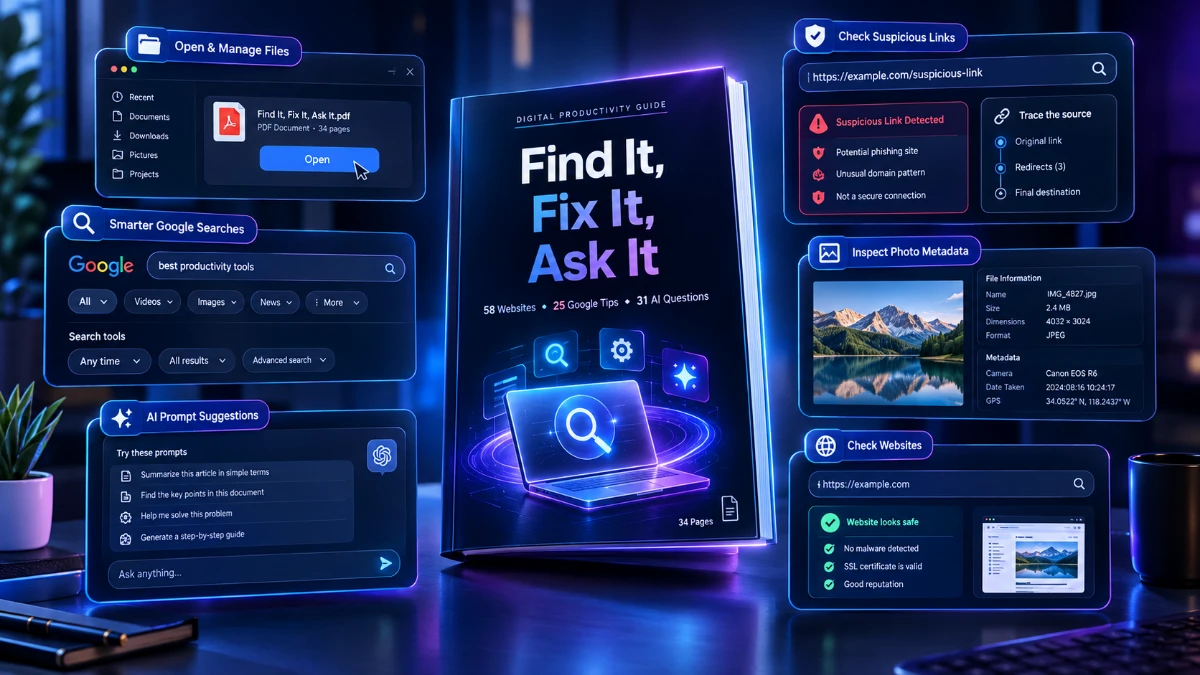
Find It, Fix It, Ask It is a 34-page PDF guide featuring 58 useful websites, 25 Google search tricks, and 31 AI prompts for solving everyday online problems. It offers curated resources, clickable links, and practical safety tips for freelancers, creators, and small-business owners. The guide includes a 7-day money-back guarantee, but its price isn’t confirmed in the reviewed sales page. It’s best for people who value convenience over researching tools themselves.
Most of my working week doesn’t get eaten by big problems. It gets eaten by small ones. A client sends a file that nothing on my machine will open. A shortened link looks suspicious. A Google search keeps ignoring the one word that actually matters.
None of it is difficult, but all of it is slow when you don’t know where to look. That’s the exact gap Find It, Fix It, Ask It says it fills, and it’s why I wanted to take a proper look at it.
⚡ Find the right tools faster · Save time · Get unstuck in minutes
In this review I’ll go through what the guide contains, who it suits, where it falls short, and whether it deserves your money. One note on method: this review is based on a close reading of the official sales page, and I’ve kept my claims to what that page actually shows. Where a detail isn’t published, I say so rather than guess.
Quick Verdict
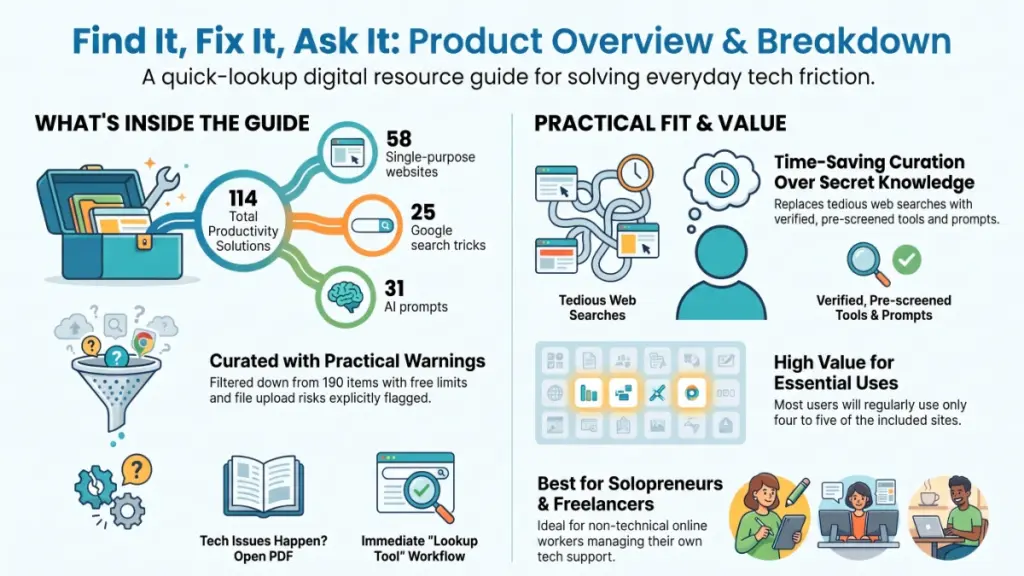
Find It, Fix It, Ask It is a 34-page PDF reference guide from Simon (publishing as “Simon From Scotland”). It collects 58 single-purpose websites, 25 Google search tricks, and 31 questions to ask an AI assistant when you’re stuck.
It is not a make-money course, a software directory, or a system you have to learn. It’s a “keep it open in a tab and use it when something breaks” resource.
Best for: solo online workers, freelancers, small-business owners and creators who act as their own tech support.
My impression: the concept is honest, the scope is realistic, and the sales page avoids the income hype that ruins so many guides in this niche. The trade-off is that a lot of what’s inside is, by design, free information repackaged and filtered. You’re paying for the curation and the saved time, not for secret knowledge.
Rating (based on the sales page and what it promises): 4 out of 5
Product Overview
| Detail | Information |
|---|---|
| Product Name | Find It, Fix It, Ask It |
| Category | Digital reference guide / productivity resource (PDF) |
| Creator | Simon From Scotland (Oban, west coast of Scotland) |
| Launch Date | Not listed on the sales page (contents reviewed October 2026, according to the author) |
| Price | Not shown in the sales page text I reviewed; sold as a one-time payment |
| Format | 34-page PDF with clickable links, instant download |
| Refund Policy | 7-day money-back guarantee (email within 7 days of purchase) |
| Retailer | JVZoo |
| Website | Official sales page (checkout handled via JVZoo) |
| Best For | Freelancers, solopreneurs, online workers and anyone tired of small tech time-wasters |
| Rating | 4/5 |
What Is Find It, Fix It, Ask It?
It’s a practical PDF organised into three parts:
- 58 websites that each do one job well
- 25 Google search tricks that most people never use
- 31 questions to ask AI when you don’t know where to begin
The author’s pitch is simple. Everyone who works online loses chunks of the day to side problems: opening an odd file type, pulling text out of a scanned PDF, checking where a link really goes, or staring at an empty AI chat box with no idea what to type.
The guide doesn’t try to teach you a method. There’s nothing to install and no system to adopt. Each entry tells you what the site is for and gives you one thing worth knowing before you use it, such as whether it uploads your file, what the free limit is, or which country it covers.
That “one thing worth knowing” detail is what caught my attention. Anyone can paste a list of websites into a document. Flagging the catch for each one is the part that takes real effort.
What problem does it solve?
It solves the “I know a tool exists for this, but I can’t remember what it’s called” problem. It also covers the “I didn’t even know there was a tool for this” problem. Both cost time, and both are the kind of thing that adds up across a month.
Main Features
Here’s what the sales page says is inside, and what each piece is actually useful for.
1. A file opener that works in your browser
The guide points to a site that opens more than 800 file types in the browser, and says it never uploads the file. If you work with clients, you know the pain of a file arriving in a format you’ve never seen. A browser-based tool that doesn’t send the file anywhere is useful for both speed and privacy.
2. A way to see the hidden data inside your own photos
Photos can carry metadata, including where they were taken. The guide shows you how to check your own images before you post them. If you share photos from home or from a work location, this is a quietly valuable habit.
3. A two-minute check on your own sales page
The author calls this the one thing to try if you only try one. It shows what your page loads on a visitor’s device and whether your buy button lands where you think it does. Plenty of people who sell online have never looked at this, so it could catch genuine mistakes.
4. Tracing every hop a link makes
If you use shortened or affiliate links, you can see each redirect before the link arrives. This helps with spotting suspicious links and with confirming your own links behave correctly.
5. Four places to find original research
The guide lists four legal, free sources for the original research behind a statistic. That matters if you write guides, blog posts or reports and want to cite a real source instead of repeating a number you saw on social media.
6. A Google setting that searches for exactly what you typed
Anyone who has watched Google quietly drop the one word they needed will appreciate this. The guide also covers five image filters under one menu, including one that finds pictures with no background.
7. Better AI prompts for when you’re stuck
This is the third section. The guide offers a best opening line for an AI chat when you don’t know what you need, plus three sentences to type first so the answers stop being generic. It also covers talking a rough draft into your browser instead of typing, and recording your screen with nothing installed.
8. Everyday finds
There’s a lighter side too: live train and ship tracking, parking prices before you arrive, how long food really keeps, and identifying the song from a TV episode. These aren’t “business” tools, and the author is upfront that part of the guide is about everyday life.
Benefits: What You Actually Get Out of It
Features are only interesting if they change your day. Here’s how I’d frame the outcomes.
- Less searching. A single curated reference beats ten browser tabs of half-useful “best websites” lists.
- Fewer nasty surprises. Because each entry flags the catch (uploads, limits, country coverage), you avoid finding out the hard way.
- Safer habits. Checking link destinations, photo metadata and your own sales page are small acts that prevent bigger problems.
- Better AI results. Most people get mediocre answers because they ask vague questions. Ready-made questions shorten that learning curve.
- A reusable asset. It’s a PDF with clickable links. Open it, solve the problem, close it.
The author is realistic about this too. The sales page says most people end up using four or five of the 58 sites. That’s an honest framing, and the guide’s value is in making those four or five easy to find.
My Experience With the Guide
I want to be straightforward here, because trust matters more than a dramatic story.
My assessment comes from studying the official sales page in detail, rather than from running all 58 websites through my own testing. I haven’t verified every listed site, limit or price, and I won’t pretend I have. The author himself says websites change and some close, and recommends checking a site’s own pages before relying on a limit or price.
What I can tell you is what stood out when I examined how the guide is built and presented.
Structure and approach
The thing I noticed first was restraint. The author describes starting with 190 websites, search tips and AI prompts from popular “useful websites” lists, then cutting hard. Sites that had closed, duplicated prompts and anything already covered in his other guides were removed.
That filtering process is the real product. A raw list is easy to find. A pruned one with corrected web addresses and flagged catches is harder.
The honest tone
One thing I genuinely appreciated: the sales page tells you who the guide is not for. It says it isn’t a way to make money, it isn’t a business-software directory, and it won’t suit you if you want every site to be local, since only four of the 58 are UK services. In my experience, a seller who talks you out of a purchase in the right situations is usually more trustworthy than one who promises everything.
What I couldn’t confirm
- The exact price (not in the sales page text I reviewed)
- A launch date
- Which of the 58 sites are free versus paid beyond the author’s own statement that most are free
- How the PDF looks and reads in practice, since I haven’t seen the inside pages
If you want certainty on any of those, the 7-day guarantee is your safety net.
Ease of Use
Learning curve
There isn’t one. The guide is designed as a lookup tool, not a course. You open it when a problem appears, find the relevant site or tip, and use it.
Interface and format
It’s a PDF, so you can read it on a computer, tablet or phone. Every website name is a clickable link, which saves you typing addresses or hunting through search results.
Documentation and support
Since the product is itself a reference document, “documentation” mostly means how clearly each entry is written. The sales page promises a plain-English approach and a consistent entry format. A support email address is listed on the page if you need help with your purchase.
Beginner friendliness
This is where the guide should shine. The audience is people who aren’t technical but are comfortable online. If you can click a link, you can use it. Experienced users may already know a fair share of the 58 sites, though the author says none overlap with his other named guides.
Performance
Software reviews usually ask about speed and stability. For a PDF, the questions are different:
- Speed to answer: The promise is two minutes instead of forty. That’s a bold claim, and it will depend on whether your specific problem is covered.
- Reliability of links: This is the biggest variable. Links go stale. The author reviewed details in October 2026 and openly warns that sites change. Expect a few to age over time.
- Stability: A PDF doesn’t crash. The “stability” risk is outdated information, not technical failure.
- Practical coverage: With 58 sites, 25 Google tips and 31 AI questions, the coverage is broad but not exhaustive. It won’t solve every problem, and it doesn’t claim to.
Pricing
I can’t give you a verified price because the sales page text I reviewed doesn’t state one. What the page does tell me is:
- It’s a one-time payment with an instant PDF download
- There is a 7-day money-back guarantee
- It’s sold through JVZoo, a common marketplace for digital products
I don’t see any upsells described on the page. That doesn’t mean none exist at checkout, since JVZoo funnels sometimes add offers after purchase, so read each screen carefully before you click.
⚡ Find the right tools faster · Save time · Get unstuck in minutes
Is it good value?
For a niche PDF, the question is simple: will it save you more time than it costs? If you lose even an hour a month to the small problems the guide targets, the maths works out at almost any modest price point. Check the actual price on the checkout page and decide based on that.
Pros
- Honest positioning. It tells you clearly what it is and isn’t. No income promises, no hype.
- Curated, not dumped. Starting from 190 items and cutting down shows real editorial work.
- Catches are flagged. Knowing whether a tool uploads your file or limits free use saves frustration.
- Clickable links. Less friction between reading and doing.
- No software to install, no method to learn. You use it when you need it.
- Mixes work and life. Parking, trains, food storage and music finds make it handy beyond the office.
- No overlap with the author’s other guides. If you own his earlier titles, you aren’t paying twice for the same sites.
- 7-day refund window. A low-risk way to test it.
- Useful safety habits. Photo metadata and link tracing are genuinely worth knowing.
Cons
- Price and launch details aren’t visible on the sales page text. I’d like to see this stated plainly.
- Much of it points to free tools. If you enjoy digging, you could find many of these yourself. You’re paying for the shortcut.
- Links can go stale. It’s the nature of any website list, and the author admits it.
- Not all UK-neutral. Four sites are UK services. Readers elsewhere will skip those.
- Some entries won’t apply to you. Most people will use four or five of the 58, by the author’s own estimate.
- Not a business-growth tool. If you want revenue strategies, this isn’t it.
- I couldn’t verify the interior. I haven’t seen the full pages, so I can’t judge layout or writing quality beyond what the sales page shows.
How It Compares With Alternatives
I can’t compare against named competitors without making things up, so here’s how it stacks up against the realistic alternatives.
| Option | Cost | Curation | Flags the catches? | Best for |
|---|---|---|---|---|
| Find It, Fix It, Ask It | One-time payment | High (cut from 190 items) | Yes, for each entry | People who want a shortcut |
| Free “useful websites” lists | Free | Low, often outdated | Rarely | Casual browsing |
| Asking an AI assistant directly | Free or low | Depends on your prompt | Sometimes | People comfortable with prompting |
| Searching Google each time | Free | None | No | Patient, occasional problems |
| Software directories | Free to paid | Broad, business-focused | Varies | Choosing business software |
The honest takeaway: this guide doesn’t beat the free options on information alone. Its edge is that someone has already done the sorting, verification and warning labels for you.
Who Should Buy It?
This guide makes sense if you:
- Work online on your own and handle your own tech problems
- Like free or low-cost tools that do one thing properly
- Want a reference you can open mid-problem and close two minutes later
- Create content or sales pages and want better link and page checks
- Feel stuck when facing an empty AI chat box
- Value curation over spending hours searching
Who Should Skip It?
You may be better off elsewhere if you:
- Want a money-making method or income system
- Need a directory of business software
- Are already highly technical and know most of these tools
- Want every recommendation to be local to your country
- Prefer to research everything yourself for free
- Expect every link to stay perfect indefinitely
Frequently Asked Questions
What exactly do I get with Find It, Fix It, Ask It?
You get one 34-page PDF with clickable links, covering 58 websites, 25 Google search tricks and 31 questions to ask AI. You can read it on a computer, tablet or phone.
Are the websites in the guide free?
According to the sales page, most are free and many need no account. Where a site charges for the useful part, the guide says so and gives the price the author found when he checked.
Do I need ChatGPT to use the AI section?
No. The 31 questions are ordinary questions that work in ChatGPT, Claude, Gemini or similar assistants, including free versions.
Is it a make-money guide?
No. The author states it saves time and frustration and promises no income.
Will the links still work next year?
Some may not. Websites change and some close. The details were reviewed in October 2026, and the author advises checking a site’s own pages before relying on a limit or a price.
Is there a refund policy?
Yes. There’s a 7-day money-back guarantee. Read it, try a few of the sites, and if it isn’t useful, email the author within 7 days of buying.
Is it worth buying if I own the author’s other guides?
The author states that none of the 58 websites appears in Work From Anywhere, The Website and Tools Vault, The Work Smarter Online Handbook, The Useful Website Rolodex or The AI and Business Toolkit, so you wouldn’t be repeating those sites.
Is it only for UK readers?
No. Four of the 58 sites are UK services and are clearly marked. The rest aren’t tied to the UK, though some services may be available only in certain countries.
How many of the 58 websites will I realistically use?
The author suggests most people end up using four or five. The guide’s job is to make the right ones easy to find.
🎁 Free Gift Waiting for You!
Before you leave, there’s a free gift waiting for you.
As a thank-you for reading, you can claim my Ultimate All-In-One Digital Marketing Package completely FREE.
🎉 What’s Inside Your Ultimate All-In-One Package
01. 50 AI Digital Product Ideas
A curated collection of highly profitable AI-powered digital product ideas designed for quick implementation and strong profit potential.
02. Digital Sales Mastery
Discover the proven framework behind high-converting sales funnels, persuasive copywriting, and sustainable online revenue growth.
03. Mastering Email List
Advanced strategies for building an engaged email audience, increasing open rates, improving click-through rates, and generating automated income.
04. The Ultimate Faceless Playbook
A complete blueprint for building a profitable online brand and growing on social media without ever showing your face.
🎁 BONUS: Premium Canva Marketing Vault
A premium library of high-converting Canva templates to help you create professional marketing assets, generate more organic traffic, and boost conversions.
💥 Total Package Value: $197
✅ Yours Today: FREE
Claim your complimentary bundle and get instant access to premium resources that can help you create, market, and grow your online business more effectively.
Final Verdict
Find It, Fix It, Ask It is a modest product with a clear job, and it’s upfront about it. It won’t change your business, and the author says as much. What it can do is shave time off the small, irritating problems that interrupt real work.
Who benefits most: solo workers, freelancers and creators who handle their own tech issues and would rather open a trusted list than start a fresh search each time.
Is it worth the price? I can’t judge that precisely because the price isn’t stated in the sales page text I reviewed. If it sits at a modest one-time cost, the 7-day guarantee makes it a low-risk experiment, and a single saved afternoon could cover it.
Would I recommend it? Yes, with realistic expectations. I’d recommend it to someone who feels the “forty minutes lost to a stupid problem” pain regularly. I wouldn’t recommend it to someone who wants income strategies, or to someone who enjoys researching every tool themselves.
If you’re curious, the sensible move is to buy, test the sales-page check and a handful of the sites in the first few days, and use the refund window if it doesn’t earn its place.
Disclosure: This review is based on the publicly available sales page. I haven’t independently tested every site listed in the guide, and prices, limits and features may change. Always confirm current details before purchasing.
⚡ Find the right tools faster · Save time · Get unstuck in minutes