

Converstar AI is a budget-friendly website conversion toolkit offering pop-ups, lead capture forms, notification bars, live counters, and feedback widgets for a one-time payment. With plans starting at $27 and a 30-day money-back guarantee, it may suit small businesses and affiliate marketers. However, its AI capabilities and marketing claims remain unverified, so buyers should test its performance before relying on it.
Most websites don’t have a traffic problem. They have a “people showed up and left without doing anything” problem. You can pay for ads, publish more posts, or redesign the homepage, and still watch visitors bounce at the same rate.
Converstar AI tries to fix that gap with one small snippet of code. Paste it into your site, and it starts showing pop-ups, notification bars, email collectors, live counters, and other prompts designed to nudge visitors toward an action.
I spent time going through Converstar’s feature set, tiers, and sales claims line by line. This review covers what it does, what the pricing actually buys you, where the marketing gets ahead of the evidence, and who should (and shouldn’t) pick it up.
Transparency note: This review is based on Converstar’s published sales page and feature descriptions. I have not run it on a live site for this write-up, so I don’t quote my own conversion numbers. Where the vendor makes a claim I couldn’t verify, I say so.
Quick Verdict
Converstar AI is a lifetime-deal conversion toolkit for people who want pop-ups, lead capture, and social proof widgets without paying a monthly subscription. The price is low, the setup sounds simple, and the feature list is broad for a one-time payment.
My concerns are mostly about the sales page, not the product idea. The income stories, the “AI runs everything” language, and several statistics are presented without proof. The real value here is a solid set of on-site engagement widgets at a budget price, not a hands-off money machine.
Best for: solopreneurs, small online stores, freelancers, and affiliate marketers who want an affordable alternative to monthly pop-up tools.
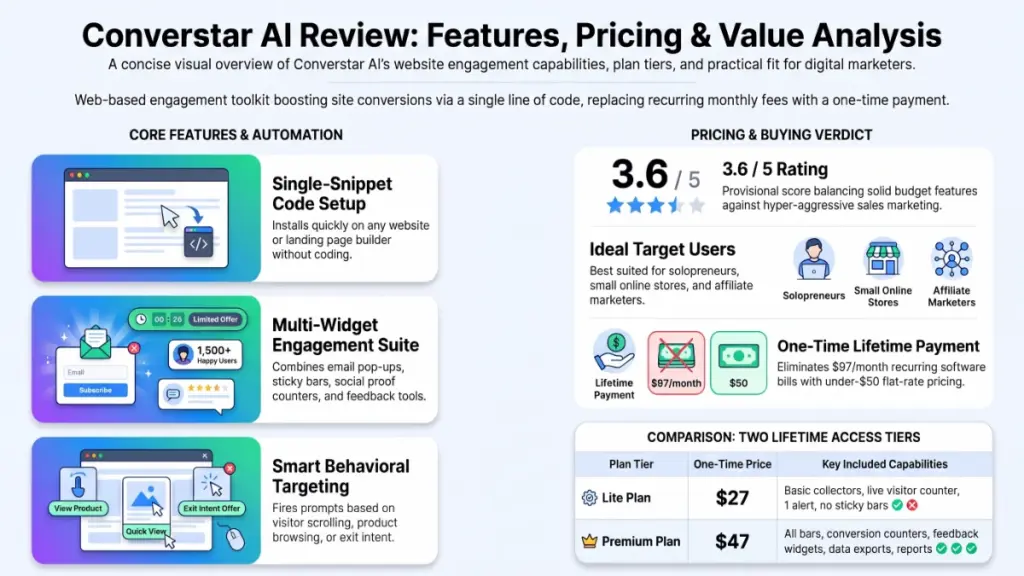
My provisional rating: 3.6 / 5
Product Overview
| Detail | Information |
|---|---|
| Product Name | Converstar AI |
| Category | Website conversion optimization / on-site engagement SaaS |
| Creator | Not clearly named on the sales page (a contact listed in the footer is Laz Ilechukwu, [email protected]) |
| Launch Date | Not stated (page copyright is 2026) |
| Price | Lite $27 one-time (listed at $67); Premium $47 one-time (listed at $97) |
| Refund Policy | 30-day money-back guarantee |
| Website | Official sales page (link not provided) |
| Best For | Small business owners, e-commerce sellers, freelancers, affiliate marketers |
| Overall Rating | 3.6 / 5 (provisional, based on published information) |
What Is Converstar AI?
Converstar AI is a web-based tool that adds interactive campaigns to your website through a single line of code. Those campaigns include pop-ups, top and bottom bars, email capture forms, live visitor counters, feedback widgets, and cookie notices.
The “AI” part, according to the vendor, is the timing and targeting. Instead of firing every pop-up the instant someone lands, the tool is said to choose when to show a message based on visitor behavior, such as scrolling, browsing a product, or moving to leave.
The problem it targets
Visitors who never subscribe, never buy, and never contact you. If your analytics show decent traffic and weak results, the missing piece is usually a prompt at the right moment. A discount offer when someone is about to leave, an email box after they’ve read half an article, or proof that other people are buying can all change what a visitor does next.
Tools like this are not new. What Converstar offers is a bundle of them, with a lifetime price instead of a monthly one.
How the setup works
The vendor describes a three-step flow:
- Create an account and copy one line of code.
- Paste it into your site (the page says it works on any website, sales page, or landing page, wherever it’s hosted).
- Build or enable campaigns from the dashboard.
No coding, design, or writing skills are required, according to the page. That is plausible for the code paste and basic campaigns. Writing good offer copy is still on you.
Main Features
The feature list is long, so I’ve grouped it by purpose.
Lead capture tools
- Email Collectors: Small boxes that ask for an email address, usually in exchange for something like a discount.
- Collector Bars: A slim bar pinned to the top or bottom of the page that stays visible while someone browses.
- Modal Collectors: Full-screen pop-ups, typically used for VIP lists or big offers.
Practical example: A bakery site could use a collector bar that says “Join for weekly specials” and keep it visible on every page, rather than interrupting the visitor with a pop-up.
Urgency and social proof tools
- Live Counters: Real-time messages such as “three people viewed this in the last hour.”
- Conversion Counters / Recent Conversions: Notifications showing recent purchases or sign-ups.
- Informational Bars and Mini Bars: Time-limited offers or low-stock alerts.
Practical example: A store running a weekend sale can show a bar with the deadline at the top of every page, then add a recent-purchase notice on the product pages.
Messaging and promotion tools
- Image Campaigns: Show a product image or promotion to a chosen audience.
- Informational Pop-ups: Short announcements, like a flash sale.
- Button Bars: A strip with a button that links to a sale, a product, or checkout.
- Call to Action Campaigns: Clickable hotspots placed on key pages.
Feedback tools
- Emoji Feedback: One-tap smiley or frown ratings.
- Text Feedback: Open comment boxes.
- Contact Us Channels: A quick way for visitors to reach you.
Feedback widgets are underrated. A simple emoji prompt on a checkout page can show you where people are getting frustrated, without sending a survey.
Growth and operations tools
- Social Shares: Buttons that encourage visitors to share your page.
- Cookie Notifications: A consent banner.
- Notification Handlers: Real-time alerts about visitor activity sent to email, WhatsApp, Slack, or other channels.
- Email Reports and Data Exports: Performance summaries and downloadable data.
Branding Freedom (early buyers)
The first 99 buyers are promised Branding Freedom, which lets you add your own logo and custom domain. The vendor values it at $297. This matters mostly for freelancers and agencies who want to resell the service under their own name. Since the first-99 offer may already be filled when you read this, confirm availability before counting on it.
Benefits: What You Actually Get Out of It
Features only matter if they change outcomes. Here is how I’d connect them to results.
More emails without more traffic. If you already have visitors, collectors and bars are the cheapest way to turn some of them into subscribers. That list is useful long after a campaign ends.
Fewer silent exits. An exit-timed offer or a small announcement gives hesitant visitors a reason to stay or come back.
Stronger trust signals. Visitors are more likely to act when they see others acting. Social proof widgets do this without you writing a single testimonial.
Clearer data about what works. The tracking and reports are meant to show which campaign earned clicks and which got ignored, so you can stop guessing.
Less manual work. You set up campaigns once and they run continuously. That’s the real time saving, not magic AI profit.
A way to earn from other people’s sites. The page pitches Converstar as a service business you can run for local shops, such as installing the widgets and charging a setup fee plus monthly management. That is a legitimate business model, but the dollar amounts quoted on the page are the vendor’s illustration, not guaranteed earnings.
My Experience
Here is where I have to be straightforward. I haven’t installed Converstar on a live site and measured results, so I won’t describe load times or conversion lifts that I didn’t observe. What I can do is walk through what the setup and workflow look like on paper and where I’d focus when testing it.
Setup
The one-line install is the biggest selling point, and it’s a reasonable approach. Snippet-based tools of this type typically work on WordPress, Shopify, Wix, custom HTML, and landing page builders, because they only need a place to paste a script. If you use a site builder that restricts custom code, check that first.
Interface and workflow
From the feature list, the workflow looks campaign-based: pick a type (bar, pop-up, collector, counter), write the message, choose where and when it shows, and publish. I’d want to see how much control you get over targeting and frequency in the dashboard, because that decides whether the tool feels smart or annoying.
What I’d test first
If I were putting this on a real site, I’d check these items in order:
- Page speed: Does the script slow down your pages? Run a before-and-after speed test.
- Mobile behavior: Pop-ups that cover the screen on a phone can hurt search visibility and frustrate visitors.
- Frequency control: Can you stop the same message from showing to the same person repeatedly?
- Data accuracy: Do the live counters and recent conversion notices pull true data from your site?
- Reporting: Are the numbers clear enough to compare one campaign against another?
Strengths and weaknesses I can see
Strengths: broad toolset, low one-time cost, simple install, and a refund window long enough to run a real test.
Weaknesses: the “AI” is described in vague terms, several claimed features aren’t clearly assigned to a plan, and the proof offered on the page is not independently verifiable.
Ease of Use
Learning curve
Low, if the page is accurate. Pasting a line of code and switching on a pop-up is within reach for most site owners. The harder skill is choosing what to say and when. A pop-up with weak copy performs weakly no matter how clever the timing.
User interface
I can’t judge the dashboard design without using it, so I won’t rate it. The vendor describes it as beginner-friendly, and the feature names are plain enough that most people will understand them without a manual.
Documentation and support
The page promises 24/7 support through email, a help center, or WhatsApp. That’s a good range of channels, but “24/7” claims on lifetime-deal products vary widely in practice. Send a pre-sales question and see how fast you get an answer before you buy.
Beginner friendliness
Good in theory. A first-time site owner can get a basic email bar live quickly. Those same beginners are also the people most likely to take the sales page promises at face value, which is why I’ve included realistic expectations below.
Performance
I’m unable to share measured speed or uptime figures, so here is what to evaluate and why it matters.
- Speed: Any third-party script adds weight. A light script is fine. A heavy one can lower your page experience scores.
- Stability: Because Converstar runs from a hosted service, an outage on their end could stop your campaigns. Ask about uptime history.
- Reliability of data: Real-time counters are only persuasive if they are accurate. Check them against your own analytics.
- Overall experience for visitors: Too many pop-ups drive people away. The best results usually come from one or two well-timed prompts, not all twenty tools at once.
Treat any claim of “doubling” results with caution. Gains from this kind of tool depend on your traffic quality, your offer, and your page design.
Pricing
Converstar sells two lifetime plans through JVZoo.
| Lite | Premium | |
|---|---|---|
| Price (one-time) | $27 (listed $67) | $47 (listed $97) |
| Access | Lifetime | Lifetime |
| Core campaigns | Image, information, live counter, email collector, social shares, emoji feedback | Everything in Lite, plus feedback campaigns and call to action |
| Bars | None listed | Information, collector, and button bars |
| Counters | Live counter | Live and conversion counters |
| Notifications | 1 email, 1 active user | Email and active users notifications |
| Reports and exports | Not listed | Email reports and data exports |
| Contact channels | Not listed | Contact Us channels |
| Cookie notices | Yes | Yes |
| Refund | 30 days | 30 days |
The page also says the product is “normally $97/mo” and shows a promo code (ADMIN30) for 30% off. I couldn’t confirm how that code interacts with the already-reduced prices, so check at checkout.
Upsells and fine print
Two things are worth knowing:
- Branding Freedom is offered free to the first 99 buyers. Others may be asked to pay for it or may not get it.
- “Lifetime” has a defined meaning. The footer states that lifetime refers to the life of the product and that the average supported life of a product like this, at this price, is roughly five years. That is honest fine print, and I’d read it as “no monthly fee for as long as the product exists.”
Value for money
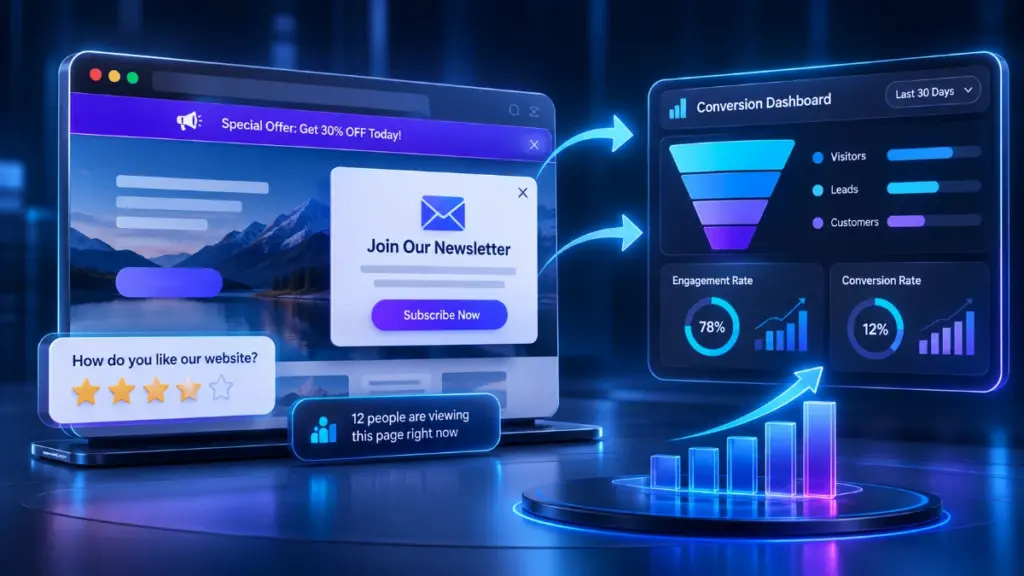
At $47, Premium is easy to justify if you will use the bars, conversion counters, and reports. Lite is thin: one email notification and one active user notification, and no bars. For most people, Premium is the version that makes sense. The comparison to a monthly subscription is where the value shows. Established pop-up platforms typically charge recurring fees, so even a single year of one of those can cost more than this lifetime price. Check current pricing for any tool you compare.
The “normally $97/month” claim is hard to verify, and the countdown timers on the page show identical values in several places, so I treat the urgency as marketing rather than a confirmed deadline.
Pros
- Low one-time cost. No recurring subscription, and both plans fall under $50.
- Broad toolset for the money. Pop-ups, bars, collectors, counters, feedback, and notices in one place.
- Simple installation. A single snippet is easier than integrating several separate plugins.
- Works across site types. Stores, blogs, service sites, and landing pages are all supported according to the vendor.
- Social proof and urgency built in. You don’t need extra apps for live counters or recent-purchase notices.
- Feedback tools included. Emoji and text feedback help you find friction without a separate survey tool.
- Real-time alerts. Notification handlers can send activity updates to the channels you already use.
- 30-day refund window. Long enough for a proper test on a live site.
- Reseller potential. With Branding Freedom, freelancers could offer it as a branded service.
Cons
- Unverifiable results. The success stories and income figures can’t be checked, and the vendor’s own disclaimer says results aren’t indicative of future success.
- Vague “AI.” The page says AI decides timing and messaging, but gives few specifics on how it works.
- Suspicious statistics. The page cites Forbes, Google, TechCrunch, CNN, and others with very specific percentages and no links. Don’t rely on them.
- Unclear plan boundaries. Features like Modal Collectors, Recent Conversions, and the mini bars appear in the feature descriptions but not clearly in either plan’s checklist. Ask support before buying.
- Aggressive sales tactics. Hype language and repeating countdowns make the page harder to trust.
- Compliance responsibility. Fake or exaggerated scarcity (“only 3 left” when that isn’t true) can break consumer protection rules in many places. A simple cookie banner also doesn’t guarantee full privacy law compliance.
- Lite is limited. One email alert and no bars make it hard to recommend.
- Creator transparency. The company behind the product isn’t clearly presented.
- Possible pop-up fatigue. Used heavily, these tools can annoy visitors.
Comparison With Competitors
The sales page compares Converstar to a tool called “PopupPro” and unsurprisingly declares Converstar the winner. I couldn’t verify that competitor or its capabilities, so I’d treat that section as marketing rather than analysis.
A fairer comparison is with established pop-up and lead capture tools such as OptinMonster, Poptin, Privy, and Sleeknote.
| Converstar AI | Typical subscription pop-up tools | |
|---|---|---|
| Pricing model | One-time payment | Monthly or annual subscription |
| Setup | Single code snippet | Snippet or plugin |
| Targeting depth | Described as AI-driven; details unclear | Often detailed rules, A/B testing, segmentation |
| Integrations | Not clearly documented | Usually many email and CRM integrations |
| Track record | New, limited public reviews | Established, with public reviews and case studies |
| Support | Email, help center, WhatsApp | Varies by plan |
| Cost over 2 years | Low and fixed | Can add up |
The honest summary: Converstar wins on price. Established tools usually win on proven integrations, testing features, and long-term track record. If you depend on deep email platform integrations or advanced A/B testing, check that Converstar supports them before buying.
Who Should Buy Converstar AI?
- Solopreneurs and small site owners who want basic lead capture and urgency tools without monthly fees.
- Small e-commerce stores that would benefit from live counters, announcement bars, and recent-purchase notices.
- Freelancers and consultants who want an easy way to collect inquiries from their own site.
- Affiliate marketers who need countdowns and calls to action on review pages.
- Agencies and freelancers who want a low-cost tool to install for clients, especially if Branding Freedom is available.
- Budget-conscious testers who like the idea of a 30-day trial.
Who Should Skip It?
- Anyone expecting automatic income. No snippet replaces a good offer and relevant traffic.
- Sites with almost no traffic. Conversion tools improve what you have; they don’t create visitors.
- Businesses needing deep integrations. If your workflow depends on specific CRM or email platform connections, confirm support first.
- Teams needing strict compliance. If you operate under GDPR or similar rules, use a dedicated consent management platform and review any scarcity messages with a professional.
- Brands that avoid pop-ups. If a clean, quiet site is part of your identity, this isn’t a fit.
- People wary of unverified claims. If the marketing style bothers you, you’ll probably dislike the buying experience too.
Frequently Asked Questions
Do I need technical skills to use Converstar AI?
No coding is required. You copy one line of code into your site and manage campaigns from the dashboard. If you can edit your site’s header or use a custom code field, you can install it.
Will Converstar work on a small website?
It should, since it’s snippet-based. Small sites can still benefit from an email bar or a feedback widget, but results depend on how many visitors you receive.
Can Converstar AI really make money quickly?
It can help turn more visitors into leads or buyers, but the speed and size of any gain depend on your traffic and offer. The vendor states that results aren’t guaranteed, and I’d treat the income stories on the sales page as unverified.
What’s the difference between Lite and Premium?
Premium adds feedback campaigns, calls to action, conversion counters, all three bar types, email and active user notifications, reports, data exports, and contact channels. Lite covers the basics only.
Is Converstar a one-time payment or a subscription?
One-time. Both plans are sold as lifetime access, though the footer defines “lifetime” as the supported life of the product, which the vendor estimates at about five years.
What is the refund policy?
Converstar offers a 30-day money-back guarantee. Use that window to test on a real site, and keep screenshots of your before-and-after analytics in case you need to make your case.
Does it replace a cookie consent tool?
It includes a cookie notification, but a banner alone may not meet every legal requirement. If you handle visitors from regions with strict privacy laws, verify compliance separately.
Can I use it for client work?
The sales page promotes this as a service you can offer to local businesses. Check the terms of service for reseller rules, and confirm whether Branding Freedom is available for custom branding.
Do the live counters and recent purchase alerts use real data?
The vendor says they pull real numbers from your activity. Verify this against your own analytics, and avoid displaying anything that isn’t true.
🎁 Free Gift Waiting for You!
Before you leave, there’s a free gift waiting for you.
As a thank-you for reading, you can claim my Ultimate All-In-One Digital Marketing Package completely FREE.
🎉 What’s Inside Your Ultimate All-In-One Package
01. 50 AI Digital Product Ideas
A curated collection of highly profitable AI-powered digital product ideas designed for quick implementation and strong profit potential.
02. Digital Sales Mastery
Discover the proven framework behind high-converting sales funnels, persuasive copywriting, and sustainable online revenue growth.
03. Mastering Email List
Advanced strategies for building an engaged email audience, increasing open rates, improving click-through rates, and generating automated income.
04. The Ultimate Faceless Playbook
A complete blueprint for building a profitable online brand and growing on social media without ever showing your face.
🎁 BONUS: Premium Canva Marketing Vault
A premium library of high-converting Canva templates to help you create professional marketing assets, generate more organic traffic, and boost conversions.
💥 Total Package Value: $197
✅ Yours Today: FREE
Claim your complimentary bundle and get instant access to premium resources that can help you create, market, and grow your online business more effectively.
Final Verdict
Converstar AI is a reasonable, budget-friendly way to add lead capture and urgency tools to a website without a monthly bill. The feature list is wide, the install sounds simple, and the 30-day refund gives you room to test it properly.
I’d recommend it to small site owners, freelancers, and affiliate marketers who understand that it’s a toolkit, not a profit machine. Go for Premium, because Lite leaves out too much to be worth the saving. Before buying, ask support which plan includes Modal Collectors and Recent Conversions, and confirm any integrations you rely on.
I would not buy it because of the testimonials or the statistics on the sales page. None of those can be verified, and the vendor’s own disclaimer says results aren’t typical. Buy it because you want these specific widgets at this price, install one or two campaigns, and measure the change in your own analytics during the refund window.
Would I personally try it? Yes, on a low-risk site, with a clear baseline and a plan to request a refund if the numbers don’t move. At under $50 with a 30-day guarantee, the downside is small. Just keep your expectations grounded.
Ready to test it? Visit the official Converstar page, compare Lite and Premium against your needs, and start your 30-day trial with a single campaign you can measure.
Disclosure: This article is an independent review based on publicly available product information. If affiliate links are added, purchases through them may earn a commission at no extra cost to you.