

Disclosure: This article contains affiliate links. If you buy through one, I may earn a small commission at no extra cost to you. I only recommend tools I’ve actually tested.
I’ve reviewed close to a dozen link-in-bio builders over the years. Almost every one of them follows the same playbook: a decent free tier, then a monthly bill that follows you around for as long as the page stays up. BioStack showed up in my inbox during its launch week with a different pitch — one payment, no recurring charge, and an HTML export so you’re not stuck on their servers if you ever want to leave. That’s a big claim, so I built a page with it before writing a word of this review. Here’s what I found.
Quick Verdict
BioStack is a solid pick if you want a link-in-bio page without another subscription. The builder felt fast during my testing, the themes looked clean rather than templated, and the product-card and email opt-in blocks covered what most creators, coaches, and freelancers actually need. It won’t replace a full e-commerce platform if you run a serious online store, but for a single, well-designed link page you own outright, it does the job.
It suits creators, freelancers, coaches, and small digital product sellers who want a link page they control long-term. It’s a weaker fit if you need deep analytics, A/B testing, or a large multi-page site.
Product Overview
| Detail | Information |
|---|---|
| Product Name | BioStack |
| Category | Link-in-bio page builder |
| Creator | AA Digital Productions Ltd |
| Launch Date | Launch week runs through August 11, 2026 |
| Price | $27 one-time (Personal Licence); $187 with coupon (Complete Bundle) |
| Refund Policy | 30-day money-back guarantee |
| Website | Available through the official BioStack sales page |
| Best For | Creators, freelancers, coaches, and digital product sellers who want a one-time-payment bio page |
| Overall Rating | 4.2 / 5 |
What Is BioStack?
BioStack handles one specific job: it gives you a single link for your Instagram, TikTok, or YouTube bio that leads to everything else you do. You pay once, build your page, and either host it on BioStack’s servers or export the finished HTML and put it wherever you like.
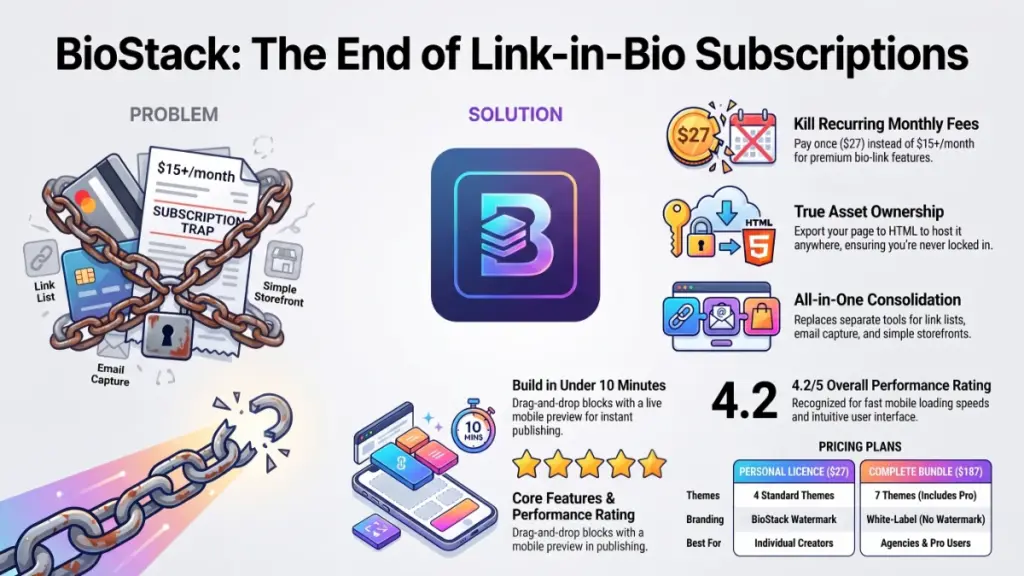
Most bio-link platforms are cheap to start — often free. But the moment you want a custom domain, extra blocks, or no watermark, they push you into a monthly plan. Over a year or two, that adds up to real money for something that barely changes once it’s set up. BioStack argues the page itself is a static, ownable asset, not a service you should keep renting.
Main Features
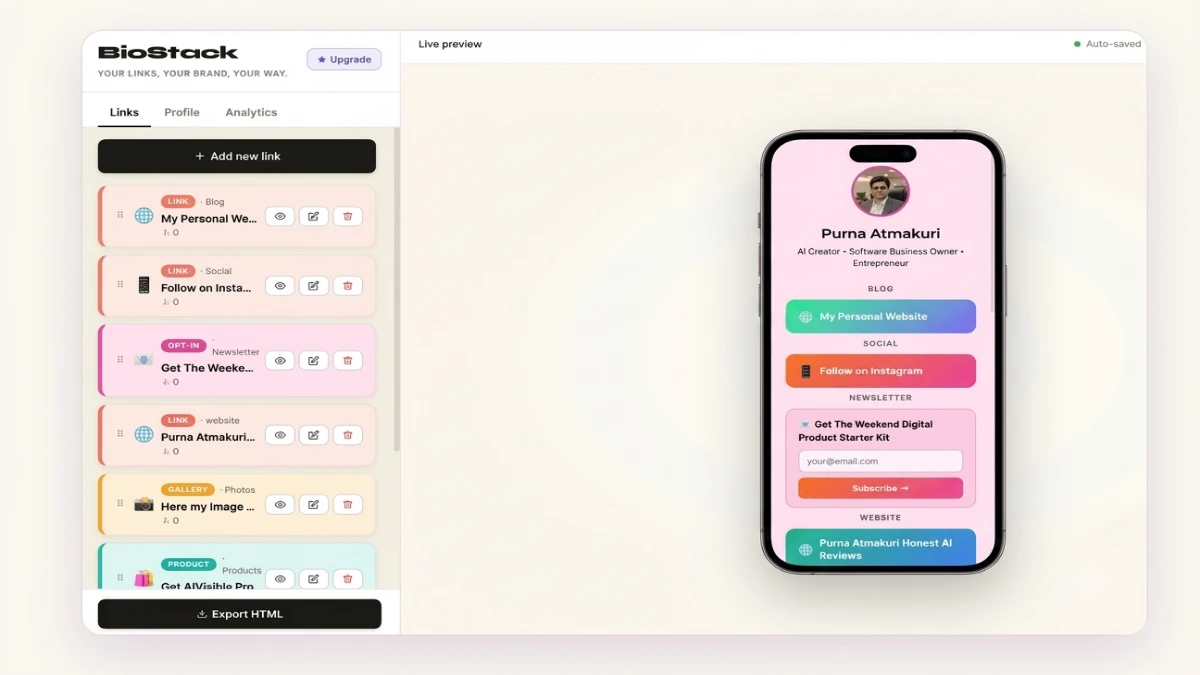
Link blocks. The core of any bio page: clean, tappable buttons pointing to your shop, latest video, or booking calendar. Nothing fancy, but they render well and reorder easily.
YouTube and video embeds. Drop a video directly into the page so it plays inline instead of linking out. It loaded quickly during my testing and felt native to the page, not bolted on.
Image gallery. A swipeable strip for portfolio shots, product photos, or behind-the-scenes content. Photographers and freelancers can show work samples without a separate portfolio site.
Product cards. This feature pushes BioStack past a basic link list. Each card holds an image, a price, and a buy button, turning your bio into a small storefront for digital products, merch, or presets.
Email opt-in forms. Collect subscribers directly on the page, with support for common autoresponders like Mailchimp, ConvertKit, AWeber, and GetResponse. Anyone building an email list should weigh this feature heavily.
Contact form. People can reach you directly, without hunting for your email address — useful for coaches and consultants fielding enquiries.
Benefits
These features add up to something bigger than a spec sheet. You stop juggling three or four separate tools — a link page, a separate email capture tool, a separate “shop” link — and consolidate them into one page. You also stop paying a monthly fee for something that rarely needs daily attention once it’s built. And because the page exports to HTML, a platform shutdown or pricing change won’t leave you stranded; you can pull your page and host it elsewhere.
For creators, the product cards and opt-in form work together on one page. Every visitor who lands on your bio link gets a chance to buy something or join your list, instead of clicking through and disappearing.
My Experience
Getting Started
Setting up a page took me under ten minutes, from a blank account to something I’d share confidently. The builder opens with a theme picker. From there, you drag blocks into place on the left while a live phone preview updates on the right — a small touch that removes the guesswork some less polished tools leave you with.
Building the Page
Adding content felt intuitive. The link blocks and product cards fill in quickly, and toggling a block on or off (rather than deleting and re-adding it) helped when I tested different layouts. Pasting a YouTube link pulled the video in without any fuss.
Where I Ran Into Friction
The free themes look solid but stay limited to four options. Want the more distinctive Pro themes — Cyberpunk, Solar, Monochrome? You’ll need the Bundle rather than the base $27 tier. That’s a reasonable business decision, but know it before you buy the base version expecting all seven themes.
Publishing
Publishing took one click to go live on a hosted URL, or you can export the HTML if you’d rather self-host. I tested the export, and the resulting file came out clean and portable, without unnecessary bloat.
Ease of Use
There’s very little learning curve here. Anyone who’s used a drag-and-drop website builder, or even just rearranged widgets on a phone home screen, will feel comfortable in BioStack within minutes. No coding is required at any point, and auto-save meant I never lost work moving between blocks.
First-time bio-page builders benefit from the three-step flow: create your page, add your content, then export and share. It doesn’t overwhelm a beginner, and it doesn’t require documentation to get started.
Performance
The builder stayed responsive throughout my testing. I noticed no lag when dragging blocks or switching themes, and the live preview updated almost instantly. The published page loaded quickly on mobile, which matters since nearly all bio-link traffic arrives through a phone browser inside Instagram or TikTok.
I hit no bugs or broken blocks during my time with it. As with any newly launched product, though, expect a handful of edge cases to surface as more people use it daily across different browsers and devices.
Pricing
BioStack sells through two main options during its current launch period.
Personal Licence — $27
The base tier costs $27 one-time (regular price listed at $67). It includes the full builder, unlimited personal bio pages, all six content block types, four themes (Midnight, Cotton Candy, Ocean, Forest), the mini storefront, email opt-in integration, drag-and-drop editing, HTML export, and the five launch bonuses.
Complete Bundle — $187
The Bundle runs $187 with the coupon code BIOSTACK (full price listed at $237). It adds BioStack Pro — three additional themes, custom brand colors, white-label export with no watermark, click analytics, and link scheduling — plus an Agency Licence for building and selling pages to clients, and a templates pack with ten done-for-you page designs.
What This Means for Your Wallet
Neither tier hides a monthly upsell. The company states plainly that pricing changes once the cart closes, so treat the current terms as time-limited. The value comparison stays simple either way: the base tier costs less than two months of a typical $15-a-month bio-link subscription, and you keep the page indefinitely.
One thing deserves a clear-eyed look. “One-time payment” and “lifetime access” claims only last as long as the company behind them. BioStack’s own terms note that a realistic support lifespan for a product at this price point runs around five years — an honest disclosure that not every launch page bothers to make.
Pros
- No recurring cost. Pay once, and the page stays yours, removing the slow bleed of a monthly subscription for something you set up once.
- HTML export means real ownership. Change your mind about the platform later, and you can self-host without starting over.
- Product cards and opt-in forms live in one place. You don’t need a separate tool to sell a small digital product or capture email addresses.
- A fast, low-friction builder. The drag-and-drop editor with live preview speeds up the process compared to some clunkier competitors I’ve tested.
- Reasonable launch pricing. At $27, the base tier undercuts a full year of most monthly bio-link subscriptions.
- Transparent bonus and lifetime-language disclosures. The company states plainly what “lifetime” actually means, which is more honest than most launch pages in this space.
Cons
- Only four themes at the base tier. Design variety matters to some buyers, and the Pro themes require the $187 Bundle.
- No independently verified analytics depth. The product page mentions “advanced click analytics” as a Pro feature, but my limited testing window didn’t allow for long-term accuracy checks.
- A new product with a limited track record. BioStack launched recently, so a long history of uptime, support responsiveness, and post-launch updates doesn’t exist yet.
- Not a website builder. Anyone needing more than a single page — a multi-page portfolio or blog, for instance — should look elsewhere; the product doesn’t claim otherwise.
- A watermark sits on the base tier. Removing it requires the Pro upgrade, worth knowing if a fully white-label look matters to your brand.
Comparison With Competitors
How BioStack Stacks Up
Most shoppers in this category have already looked at, or used, Linktree — still the best-known name in the space. Linktree and similar tools generally run on a freemium-to-monthly-subscription model, and once you move past the free tier for extra blocks, custom branding, or analytics, expect to pay somewhere between $8 and $35 a month.
The Real Trade-Off
BioStack’s core difference against that subscription model stays simple: you pay once instead of paying monthly. In exchange, you’re working with a newer, smaller company rather than an established platform with years of feature iteration and a large existing user base. Brand recognition and a long track record might matter more to you than upfront cost — if so, a well-established subscription tool could still make sense. Paying once and owning the output, including the ability to export and self-host, points you toward BioStack instead.
I’d rather not compare exact feature-for-feature specs against named competitors here, since other platforms change their pricing tiers and included features often, and I haven’t personally reverified those numbers at the time you’re reading this. Compare BioStack’s one-time cost against whatever you’re currently paying monthly, multiply that monthly figure by however long you expect to keep using a bio page, and the math will quickly tell you whether the one-time model favors you.
Who Should Buy It?
- Creators and streamers who want one link housing their video, socials, and merch without a monthly bill
- Coaches and course creators who need a lead-capture opt-in form and a contact form on the same page
- Freelancers and consultants who want a simple portfolio-plus-contact page they can stand up in minutes
- Digital product sellers who want a lightweight storefront without setting up a full e-commerce platform
- Anyone currently paying monthly for a bio-link tool who wants to drop that recurring charge
Who Should Skip It?
- Anyone needing a full multi-page website with blog functionality or complex navigation
- Users who need deep, granular analytics or A/B testing on their bio page right now
- Teams that specifically need an established platform with a long operating history and large support team
- Anyone who wants every theme option without paying for the Bundle tier
Frequently Asked Questions
Is it really a one-time payment? Yes. Both the base Personal Licence and the Complete Bundle carry a single payment with no recurring monthly charge for the core product.
Do I own my page? Yes. Host it through BioStack, or export the HTML and host it independently on your own domain or hosting provider.
Do I need any tech skills? No. The drag-and-drop builder includes a live phone preview, and building or publishing a page requires no coding.
What happens after the cart closes? The sales page states that current launch pricing and the Bundle coupon only last until the stated closing date. Pricing and terms may change after that.
What’s the difference between BioStack and the Bundle? The base licence covers the full core builder, four themes, and all launch bonuses. The Bundle adds three Pro themes, watermark removal, click analytics, link scheduling, an agency licence for client work, and ten pre-made templates.
Can I get a refund? Yes. A 30-day money-back guarantee applies, and refunds go through support after an email request within that window.
Will this make me money? Not on its own. BioStack builds pages; it isn’t an income program, and the company states explicitly that it doesn’t guarantee income or business results.
How do I get support? Support runs through the official channel linked on the BioStack site. I didn’t personally test response times during this review.
Can I use it for client work? Only with the Agency Licence, included in the Complete Bundle rather than the base Personal tier.
Does it work for e-commerce at scale? No. The product cards suit a handful of digital or physical items, not a full storefront with inventory management, so a dedicated e-commerce platform fits larger catalogs better.
Free Gift Waiting for You!
Before you leave, there’s a free gift waiting for you.
As a thank-you for reading, you can claim my Ultimate All-In-One Digital Marketing Package completely FREE.
What’s Inside Your Ultimate All-In-One Package
01. 50 AI Digital Product Ideas
A curated collection of highly profitable AI-powered digital product ideas designed for quick implementation and strong profit potential.
02. Digital Sales Mastery
Discover the proven framework behind high-converting sales funnels, persuasive copywriting, and sustainable online revenue growth.
03. Mastering Email List
Advanced strategies for building an engaged email audience, increasing open rates, improving click-through rates, and generating automated income.
04. The Ultimate Faceless Playbook
A complete blueprint for building a profitable online brand and growing on social media without ever showing your face.
BONUS: Premium Canva Marketing Vault
A premium library of high-converting Canva templates to help you create professional marketing assets, generate more organic traffic, and boost conversions.
Total Package Value: $197
Yours Today: FREE
Claim your complimentary bundle and get instant access to premium resources that can help you create, market, and grow your online business more effectively.
Final Verdict
BioStack does what it says: it delivers a genuinely usable link-in-bio page for a single payment instead of a recurring one, plus an export option that keeps you from getting locked into their platform down the road. The build process moved quickly during my testing, the design output looked professional rather than generic, and the combination of product cards and email capture on one page covers what most solo creators and small businesses actually need.
The $27 tier earns its price if you currently pay monthly for a bio-link tool, or if you’re setting one up for the first time and want to skip a new subscription altogether. The $187 Bundle makes more sense for client work or if you want the full theme selection and analytics from day one; for a single personal page, the base tier covers you.
Consider other options if you need a full website, deep analytics, or the track record of an established platform — this launch-week product hasn’t had years in the market to prove itself the way older tools have. For what it’s built to do — one clean, ownable bio page — I’d recommend it.