

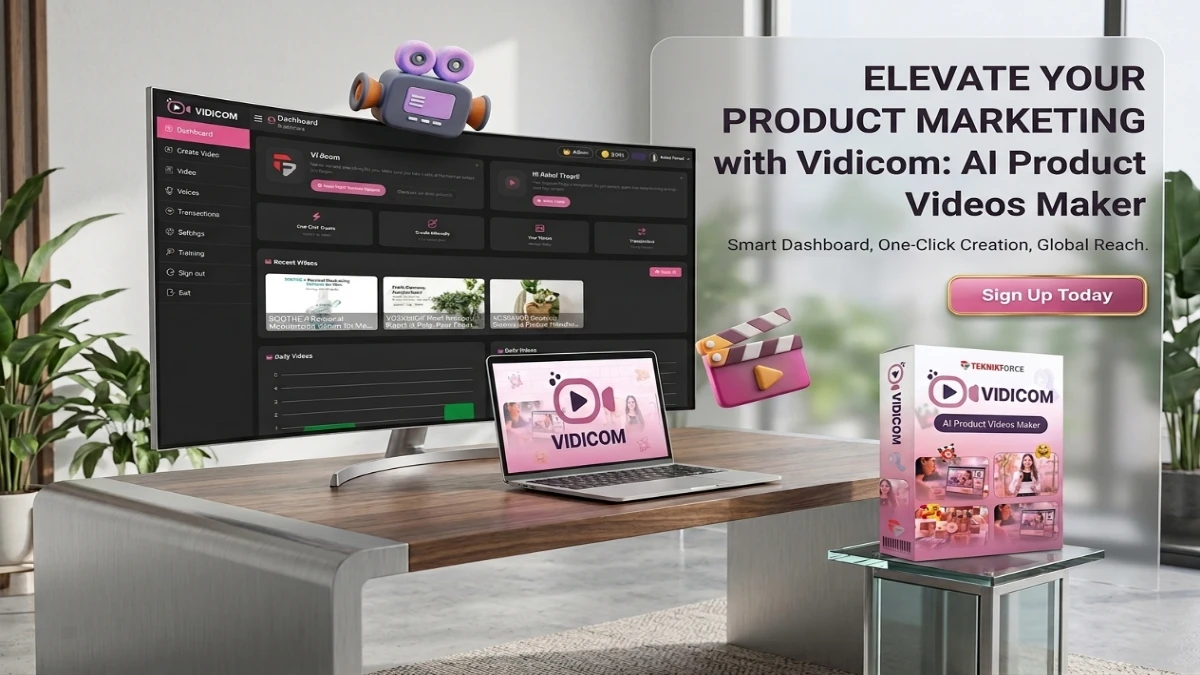
Vidicom is an AI-powered video creation platform that transforms product URLs into engaging promotional videos for eCommerce, affiliate marketing, and SEO. It automates scripting, voiceovers, captions, and multi-format exports, making video production accessible without editing skills. With one-time pricing and cloud-based automation, it’s an affordable solution for Shopify sellers, Amazon merchants, dropshippers, and agencies seeking to scale product marketing efficiently.
Can you generate scroll-stopping product videos in minutes without a camera, script, or editor? Vidicom promises exactly that. This AI-powered platform is turning heads in eCommerce and digital marketing.
Whether you run a Shopify store, list on Amazon, or scale a dropshipping business, video is no longer optional. It drives your conversions, SEO rankings, and social traffic.
However, traditional video production is expensive and time-consuming. Vidicom automates the entire process using AI. It handles everything from product demo clips to YouTube SEO content.
In this comprehensive Vidicom Review 2026, we break down its features, target audience, and true value. Let’s dive in.
Product Overview
What Is Vidicom?
Vidicom is an AI-powered URL-to-video platform. It converts product links, details, and images into promotional videos automatically. It operates as an all-in-one cloud studio.
You do not need to write scripts or film footage. The platform pulls details, benefits, and images from your page. Then, it builds a complete video with narration, captions, and realistic clips.
Who Created Vidicom?
Cyril Gupta and the Teknikforce team created Vidicom. Cyril has a strong reputation for building practical marketing automation tools.
Teknikforce Ventures LLC operates out of Sharjah, UAE. Several of their tools have won “Product of the Day” awards on JVZoo. Currently, they support over 120,000 users and hold high ratings on Trustpilot.
What Problem Does It Solve?
Product listings with video consistently outperform static pages. Yet, most small business owners lack the time or budget to produce video.
Vidicom serves e-commerce sellers, affiliate marketers, and agencies. It eliminates technical complexity. The platform creates multiple content formats from a single product URL.
Pricing Structure
Front End vs. Pro Upgrades
Vidicom uses a one-time payment model on JVZoo. Here is the funnel breakdown:
- Vidicom Elite (Front End — ~$37–$39): This base tier limits you to 10 total campaigns. It lacks a commercial agency license, making it best for individual testing.
- Vidicom Pro (OTO 1 — $67): This upgrade removes limits. It adds 50,000 credits, unlimited campaigns, and a commercial license. It also includes 2 years of free upgrades.
Reseller Rights & Bundles
- Vidicom Reseller (OTO 2 — $197): This option lets you resell Pro accounts and keep 100% of the profits. You receive 70 licenses per purchase.
- All-Inclusive Bundle ($297): This bundle combines the base platform with all upgrades. It offers the most cost-effective path for serious agencies.
💡 Pricing Note: Launch pricing changes quickly. These figures reflect the initial promotional window.
How to Access Vidicom
Vidicom is available exclusively through the JVZoo marketplace. To purchase, visit the official sales page and complete checkout.
You gain instant access to the cloud dashboard without any installations. Furthermore, a 30-day money-back guarantee backs the platform, allowing you to test it risk-free.
Key Features
Feature 1: Link-to-Video Engine
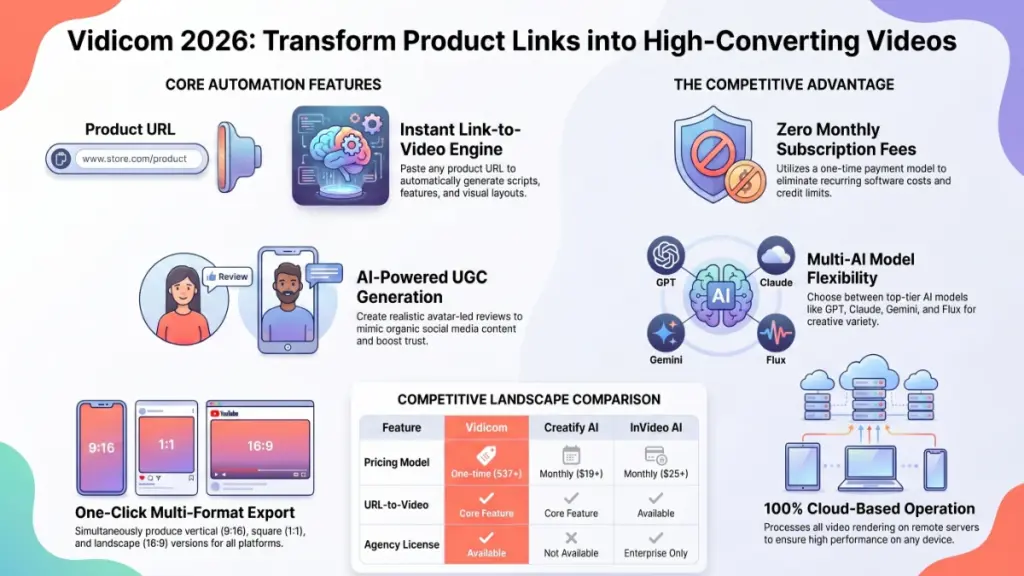
This cornerstone feature sets Vidicom apart from generic AI tools. When you paste a product link, the AI parses the page data. It extracts titles, benefits, features, and images. Then, it formats a marketing script using direct-response frameworks.
Maximizing the URL Scraper
You skip the most time-consuming part of video production. Every video focuses purely on driving conversions. For sellers with large catalogs, this automation scales production dramatically.
However, the tool relies heavily on your source material. Bare product pages will require extra manual adjustments. You will get the best results when your listing already features quality data.
Link-to-Video Example
- Practical Use Case: An Etsy seller wants videos for 40 jewelry products. Instead of hiring a videographer, they paste each URL into Vidicom. The engine builds the videos automatically, saving days of work.
Feature 2: AI UGC Video Generator
Vidicom includes a dedicated generator for user-generated content (UGC). The AI creates realistic clips of people using your product. The avatars match specific accents and cultural contexts naturally.
Visual Style and Conversions
UGC-style content drives high conversion rates on social media. Modern audiences easily spot corporate ads and scroll past them. Vidicom uses layouts and text styles that mimic casual mobile phone recordings.
Nevertheless, the feature uses AI avatars rather than real people. Savvy buyers might notice the difference upon close inspection. Additionally, the base front-end tier enforces strict usage caps on these clips.
UGC Example
- Practical Use Case: A dropshipper wants to run TikTok ads for a portable blender. They generate three different avatar-led reviews. They split-test these variants to find the lowest cost-per-click without hiring actors.
Feature 3: Infinite Creative Variations Engine
With one click, you can generate fresh versions of the same video. The system completely regenerates scripts and arrangements. It keeps the core product details but alters the marketing angles.
Fighting Creative Fatigue
This feature solves creative fatigue for paid traffic campaigns. It also helps YouTube marketers target different keyword angles. Social media managers can build platform-specific variations quickly.
However, the variation engine pulls from the same asset pool. It does not deliver full visual reinvention. Users expecting Hollywood-level diversity between versions will feel disappointed.
Variations Example
- Practical Use Case: An affiliate marketer promotes a supplement. They generate three versions of the video with different opening hooks. They target beginners, parents, and professionals separately to triple their reach.
Feature 4: Multi-Format Output
Vidicom outputs files configured for specific platform dimensions. It creates vertical 9:16 videos for Reels, square 1:1 videos for feeds, and landscape 16:9 videos for YouTube. Cloud servers handle all processing.
Multi-Channel Distribution
Most sellers market on multiple platforms simultaneously. Producing these formats manually requires hours of re-editing. Vidicom removes this friction for small teams.
Still, true platform optimization involves more than aspect ratios. Pacing and caption timing matter. The tool handles dimensions well, but the final output benefits from human review.
Multi-Format Example
- Practical Use Case: A store owner launches a kitchen gadget. They export a landscape version for YouTube, a vertical version for TikTok, and a square version for Facebook ads—all from a single project session.
Feature 5: Custom AI Voices & Music
Vidicom includes built-in tools for multi-language support and AI music. Users select from various voice options to match their target demographic. The system pairs the voice with AI-composed background tracks.
Cutting Production Costs
Voiceover and music represent major hidden production costs. Built-in audio features lower the total cost of ownership. The language support also helps sellers target international markets easily.
Even so, AI voices sometimes lack deep emotional expressiveness. Premium brands might find the audio serviceable but insufficient. The music library will not match dedicated subscription platforms.
Audio Customization Example
- Practical Use Case: A marketer wants to promote software in the US, Spain, and Brazil. They generate the video in English, Spanish, and Portuguese using regional accents without hiring voice talent.
Feature 6: Cloud-Based Inline Video Editor
Vidicom gives you manual control during the creation process. You can rewrite scripts, change captions, swap images, and animate scenes. The inline text editor allows quick corrections before rendering.
Maintaining Editorial Control
Pure automation tools often feel like an unpredictable black box. This editor ensures you never get stuck with bad AI wording. Agencies can easily maintain strict quality standards.
However, the editor prioritizes quick corrections over deep creative editing. It lacks multi-track timelines or color grading. It functions as a refinement layer rather than a full production suite.
Editor Example
- Practical Use Case: An agency produces a video draft for a client. The AI misses one key selling point. The manager opens the inline editor, rewrites the section, and re-renders the file within 30 minutes.
User Experience
1. Learning Curve
The workflow centers on a clear sequence. You paste the URL, fetch details, tweak the plan, select formats, and render. Most users complete their first video without reading any documentation.
Mastering the Output
Beginners can achieve results within 30 to 60 minutes. However, deeper skill develops over time. You must learn how to frame product details to coax the best outputs from the AI.
The Pro tier adds multi-AI model selection. Choosing between GPT, Claude, Gemini, or Flux provides creative flexibility. This option requires a slight learning curve to find the best combinations.
2. Interface Analysis
The user interface feels clean and task-oriented. The layout guides you naturally through the creation steps. This sequential design prevents the paralysis common in complex editing software.
Workflow and Funnel Design
The inline editorial layer remains accessible throughout the process. You can edit individual elements without rebuilding the full project. This transparency provides a great user experience.
One negative area involves the post-purchase sales funnel. Navigating multiple upsell pages can feel overwhelming. This layout belongs to the JVZoo marketplace style rather than the software itself.
3. Onboarding Process
Onboarding requires no software downloads or device checks. You receive credentials via email and log directly into the cloud app. The system focuses entirely on immediate video production.
Reaching the Value Point
The linear setup ensures a quick path to your first finished file. The AI handles the heavy lifting immediately, reinforcing the software’s utility. This design speeds up your time-to-value.
If you need help, the company provides responsive support channels. The 30-day money-back guarantee removes pressure from your initial exploration phase. You can experiment without financial worry.
4. Required Technical Knowledge
Vidicom requires minimal technical knowledge. You only need to know how to copy a URL and download files. The tool requires no coding, plugin setups, or complex prompt engineering.
Performance and Administration
Because processing occurs on remote cloud servers, the app will not slow down your computer. Users on older laptops can operate it smoothly. The technical barrier to entry remains incredibly low.
For agency operators, the Reseller tier provides a point-and-click panel. Creating client accounts requires only an email and password. Teknikforce manages all backend technical operations.
5. Support Options
Teknikforce holds a strong support reputation on Trustpilot. Users describe the team as highly responsive and patient. They provide real assistance rather than automated bot replies.
Available Help Channels
- Live Chat: Connects you to actual staff for real-time troubleshooting.
- Ticket System: Handles complex issues through a structured portal.
- Remote Assistance: Support agents can log in to help resolve technical glitches directly.
- Future Updates: The Pro tier includes 2 years of free upgrades.
Pros and Cons
Pros
- Built for eCommerce: It starts with your existing product page instead of a blank prompt. This saves time and ensures product accuracy.
- One-Time Pricing: The packages eliminate recurring monthly software fees. This removes subscription fatigue for small businesses.
- Multi-Platform Automation: You generate three distinct aspect ratios within a single project workflow.
- Credible Creator: Teknikforce supports over 120,000 users and holds high ratings across independent review sites.
- Built-In UGC: You can generate avatar-led review clips without hiring expensive external influencers.
- Cloud Operation: The software leaves your local system resources completely untouched.
- Excellent Support: The team offers live chat and unique remote assistance options.
Cons
- Restricted Base Tier: The front end limits you to 10 campaigns. This design pushes you toward the Pro upgrade.
- Template Aesthetics: The output uses fixed templates rather than custom cinematic production.
- Scraper Dependencies: Thin product pages with low-quality imagery yield weaker initial video drafts.
- Aggressive Funnel: The post-purchase upsell sequence feels long and disorienting.
- Long-Term Risk: One-time fees can raise sustainability questions regarding ongoing AI server costs.
Comparison with Alternatives
Competitor 1: Creatify AI
Creatify AI converts product URLs into short-form video ads. It targets performance marketers who run active paid campaigns on Meta and TikTok. It includes direct ad-launcher integrations.
While both tools scrape URLs, Creatify focuses strictly on paid social creative. Vidicom covers a wider ecosystem, including SEO and listing videos. Creatify offers more avatars, but its subscription model gets expensive.
Pricing and Credit Friction
Creatify costs $19 to $49 per month. However, its credit system can restrict your output. High-quality videos consume multiple credits, meaning a starter plan might only yield 5 videos monthly.
Vidicom provides a much lower cost of ownership over time. It avoids monthly renewals and expiring credit systems entirely.
Competitor 2: InVideo AI
InVideo AI is an established, general-purpose content platform. It bundles advanced models like Sora 2 and Google Veo 3.1. It also features voice cloning and a massive template library.
InVideo offers superior creative depth. However, it uses a prompt-first workflow rather than an eCommerce scraping setup. It does not optimize automatically for product page links.
Subscription Overhead
InVideo costs $25 to $120 per month. It enforces separate credit pools for footage, minutes, and voice clones. These limits often surprise heavy creators.
Vidicom remains far more affordable for simple product video generation. It focuses tightly on utility over cinematic experimentation.
Head-to-Head Feature Comparison
| Feature | Vidicom | Creatify AI | InVideo AI |
| Pricing Model | One-time ($37–$297) | Monthly ($19–$49/mo) | Monthly ($25–$120/mo) |
| URL-to-Video | ✅ Core feature | ✅ Core feature | ✅ Available |
| Multi-AI Models | ✅ GPT, Claude, Gemini, Flux | ❌ Limited | ✅ Sora 2 + Veo 3.1 |
| SEO Focus | ✅ Strong | ❌ Ad-focused | ⚠️ General purpose |
| Agency License | ✅ Available (OTO 2) | ❌ Not available | ⚠️ Enterprise only |
Conclusion
Final Verdict: Is Vidicom Worth It in 2026?
Vidicom delivers exactly what it promises for its target audience. The Link-to-Video Engine removes the biggest barrier to content production. It saves time, creates multi-format assets, and avoids monthly subscription fees.
The platform earns a clear recommendation for eCommerce store owners, dropshippers, and small agencies. It cannot match the cinematic quality of Sora 2 or the ad integrations of Creatify. However, for high-volume product video creation on a budget, it represents unbeatable value.
Our Rating
- Core Features: ⭐⭐⭐⭐½
- Ease of Use: ⭐⭐⭐⭐⭐
- Value for Money: ⭐⭐⭐⭐⭐
- Output Quality: ⭐⭐⭐½
- Overall Score: ⭐⭐⭐⭐ (4.2 / 5)
Action Plan
- Buy the Pro Tier: The front end is too limited. Combine it with OTO 1 for real utility.
- Test Your Best Page: Run the scraper on a complete listing to see the highest output quality.
- Use the Guarantee: Maximize the 30-day window to test the software across multiple products.
Disclosure: This review contains affiliate links. We may earn a commission at no extra cost to you. Our analysis remains entirely independent.
Are you looking to create videos for a specific eCommerce platform like Shopify or Amazon, or are you focusing on social media ads?