


Look, I’ll be straight with you: for years I treated bot traffic as somebody else’s problem. I’m a marketing guy. I care about conversion rates, content performance, and making sure the AI tools in my stack are actually earning their keep. Bots felt like a “hosting company” issue.
Then a client’s entire product catalog — pricing, descriptions, the works — showed up verbatim on a competitor’s site three days after we published it. That was my crash course in why every marketer, not just sysadmins, needs to understand this stuff. If you’re running content, running an e-commerce catalog, or managing any site that drives revenue, automated traffic is quietly working against you right now.
Here’s the reality: more than half of all background internet traffic is automated. While you’re optimizing headlines and A/B testing CTAs, AI scrapers, vulnerability scanners, and price-comparison crawlers are hammering your server around the clock — stealing your content, feeding your pricing to competitors, and loading down the same database your real customers depend on.
robots.txt Won’t Save You
I used to assume a well-configured robots.txt file was “handling” this. It isn’t. It’s a request, not a rule — Google and Yandex will respect it, but the bots actually trying to hurt you treat it as a helpful map of exactly which folders are worth scraping. I learned this the hard way when a “protected” client directory turned out to be the first place a scraper went, precisely because we’d told it not to.
Real protection means layering defenses across your network stack, not hoping a text file does the job.
What I’ve Learned About Fighting Bots
A few principles I’ve come to trust after watching this play out with actual client sites:
Rate limiting is your baseline, not your whole strategy. Capping requests per IP at the server level stops the lazy, unsophisticated scraping scripts immediately. It won’t stop everything, but it’s the cheapest win you’ll get.
Static rules stop working against anything sophisticated. The bots worth worrying about in 2026 don’t just check IP addresses — good defenses now look at TLS fingerprints, whether JavaScript actually executes, and whether mouse movement looks remotely human.
CAPTCHAs are a last resort, not a first move. Here’s what nobody tells you about slapping a CAPTCHA on everything: you’re punishing real visitors more than you’re stopping bots, and every extra click is a conversion you’re throwing away. Invisible JS challenges that run in the background do the same job without annoying a single human.
Know What You’re Actually Fighting
Before you spend a dollar on defenses, it helps to know what kind of automated traffic is hitting you. In my experience, it breaks down into a few recognizable patterns:
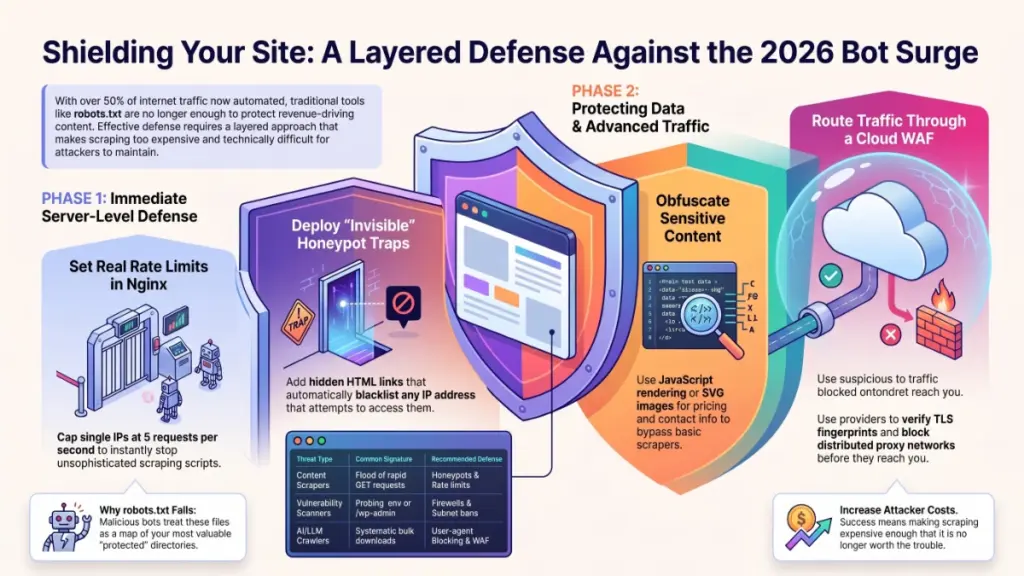
- Content and price scrapers show up as a flood of rapid GET requests hitting your product pages. Honeypot traps and rate limits are your go-to here.
- Vulnerability scanners poke around at files like
.envor/wp-admin, mostly collecting 404s. A firewall paired with Fail2ban and automatic subnet bans handles most of this. - Brute-force login attempts look like a heavy stream of POST requests against your login form. Anti-brute-force protection plus mandatory 2FA is non-negotiable at this point.
- AI/LLM crawlers are the newer headache — massive, systematic downloads of your entire text library. User-agent blocking and a cloud WAF are the practical answer.
Four Steps I’d Actually Recommend
I’m not going to pretend I’m a security engineer — I’m not, and if you’re running anything with real stakes, loop in someone who is. But here’s the sequence that’s worked on the sites I’ve been involved with.
1. Set Real Rate Limits in Nginx
This is the cheapest, fastest win available to you. Inside your http block, add:
limit_req_zone $binary_remote_addr zone=anti_bot:10m rate=5r/s;
That reserves 10MB of memory to track sessions and caps a single IP at 5 requests per second. Then apply it inside your virtual host:
location / {
    limit_req zone=anti_bot burst=10 nodelay;
    proxy_pass http://your_backend;
}
The burst=10 gives real visitors some breathing room — loading a page’s CSS and images at once won’t trip the limit — but anything beyond that gets an instant 503. Took me about ten minutes to set this up the first time, and it’s genuinely one of the highest-ROI changes you can make.
2. Lay a Honeypot Trap
This one’s almost sneaky in a satisfying way. Add a link to your page template that’s invisible to humans but sitting right there in the raw HTML that scrapers read:
<a href="/hidden-trap-secure-link/" style="display:none;" tabIndex="-1" rel="nofollow">User Portal</a>
Then configure your server so any hit on that URL auto-blacklists the IP (via UFW or iptables) for 24 hours. No real visitor will ever click a link they can’t see. A basic parser, on the other hand, will happily follow it straight into the trap and out itself instantly.
3. Stop Handing Over Your Data on a Platter
If scrapers are after phone numbers, emails, or your pricing — and they usually are — don’t just leave that data sitting in plain HTML.
- Render sensitive info dynamically with JavaScript after the page loads. Simple scrapers can’t execute JS, so all they see is an empty container.
- Randomize your CSS class names per session instead of shipping something predictable like
class="product-price". - For contact details specifically, consider rendering them as lightweight SVG images. Looks like normal text to a person; to a scraper, it’s an image that needs heavyweight OCR to even attempt reading.
4. Bring In a WAF
At a certain point, the advanced bots — the ones running distributed proxy networks and faking human behavior — aren’t worth fighting inside your own application code. That’s when I tell clients to stop trying to build a bigger hammer and instead route traffic through a cloud reverse-proxy provider like Cloudflare, StormWall, or Qrator. They check IP reputation against global threat data, verify TLS handshakes (JA3 fingerprinting), and throw invisible JS challenges at anything suspicious before it ever reaches your server.
Quick Answers to the Questions I Get Asked Most
Won’t this accidentally block Google or Yandex? Whitelist their official IP ranges when you configure Fail2ban, and double-check legitimacy with a reverse DNS lookup — a real Googlebot IP will resolve back to a *.googlebot.com domain.
Does spoofing the User-Agent header actually work for bots? Only against the most basic filters. Anything modern cross-checks the claimed User-Agent against actual technical behavior — a bot claiming to be Chrome on Windows while running Linux-specific network buffers gets flagged instantly.
Here’s the Honest Bottom Line
There’s no such thing as 100% protection. If a human can see it on the page, a sufficiently determined bot can eventually scrape it — full stop. What you’re actually doing with rate limiting, honeypots, and DOM obfuscation is making scraping expensive enough that it’s no longer worth it. You’re forcing attackers to burn money on residential proxies and OCR infrastructure until they decide your site isn’t worth the trouble.
One more thing I’ll add from the marketing side of my brain: none of this matters if your underlying infrastructure can’t handle the load of running behavioral analysis, WAF rules, and log parsing in real time. That’s a genuine draw on your disk and CPU. If you’re building out anything client-facing — an online store, a B2B platform, an API — budget for hardware that can actually carry the defensive weight, not just the traffic you expect from real users.
Based on original reporting by Anatolie Cohaniuc, MivoCloud.