

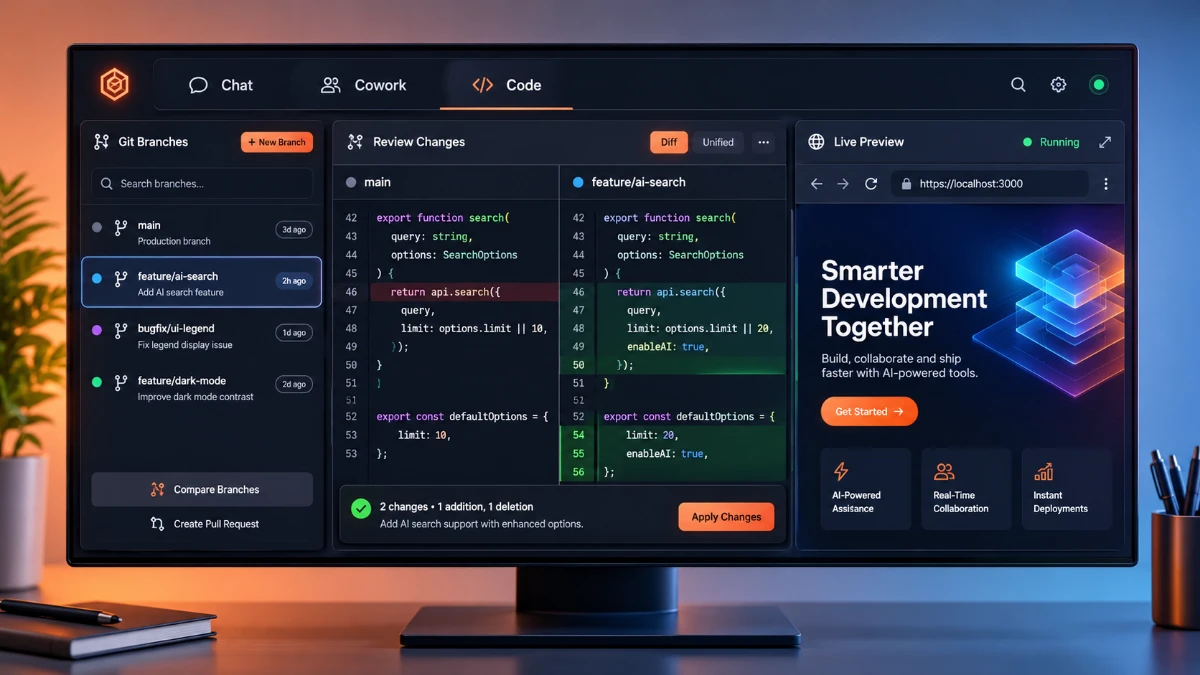
Anthropic now bundles Claude Code inside its redesigned desktop app, eliminating terminal setup so developers and non-engineers can supervise parallel coding agents visually. While it excels at Git-isolated multitasking, app previews, and cross-device workflows, shared session limits and Anthropic vendor lock-in remain drawbacks. As coding tools converge in 2026, the right choice among Claude Code, Cursor, Codex, and Antigravity depends on your pricing tolerance and daily workflow.
Lead and Significance
Anthropic now ships Claude Code inside the Claude desktop app. The app has three tabs. Chat handles conversation, Cowork handles longer agentic work, and Code covers software development. As a result, you no longer need a terminal to run Claude’s coding agent. claude
The biggest change arrived in April 2026. Anthropic redesigned the desktop app to help developers run more tasks at once. Consequently, parallel work now sits at the center of the product. Instead of juggling terminal tabs, you manage several agents from one window. claude
This matters for three reasons.
First, the install barrier dropped. The app bundles Claude Code, so you skip separate Node.js and CLI installs. Therefore, a designer, a product manager, or a junior developer can start a session in minutes. claude
Second, the workflow shifted from chatting to supervising. You describe a task, Claude edits files, and you review the diffs. In other words, the job changed from typing prompts to making judgment calls.
Third, the market converged. By June 2026, Claude Code, Cursor, Codex, and Antigravity had settled on one agentic coding blueprint. Now the fight centers on price, limits, and daily habits rather than basic capability. thenewstack
Here’s the reality. Most developers shouldn’t ask which tool is “best.” Rather, they should ask which tool fits the work they already do. This article covers what the Claude desktop app does, what it costs, where it falls short, and how it compares with its rivals.
One caveat comes first. This analysis rests on public documentation and published reviews. Until you test on your own code, treat every claim about raw model quality as unverified.
Strategic Context and Why It Matters
Terminal-based coding agents won early fans. However, they also scared off a large group of potential users. Many developers simply prefer a graphical interface. Likewise, many teams need non-engineers to review changes. A desktop app serves both groups.
Anthropic’s documentation states the goal plainly. The app gives you Claude Code with a graphical interface, so you can review changes without a terminal. That sentence tells you who the product targets. In short, it targets people who want agent power without command-line friction. claude
Who benefits most
Solo developers and freelancers gain a visual overview of parallel tasks. For example, one agent can fix a bug while another writes tests.
Engineering teams with central tooling get consistent behavior. The desktop app now matches the CLI on plugins, including plugins that an organization manages centrally. Platform teams can therefore roll out one standard setup. claude
Mixed teams can share the work. Product managers and designers open the Code tab, run a session, and read the diff. Meanwhile, engineers still own the merge.
Enterprise IT departments also have a path forward. The desktop app supports standard deployment through MSIX installers on Windows and PKG installers on Mac. Because IT teams already know those packages, rollout stays simple. claude
Which workflows change
The old loop looked like this: prompt, wait, copy, paste, test, repeat. The new loop looks different. You assign a task to an agent, switch to another task, and return later to review.
Three changes stand out.
Review replaces typing. As a result, you spend more time reading diffs and less time writing code. That shifts the core skill from syntax to judgment.
Context also moves with you. When you start a session in the CLI, you can run /desktop to bring it into the app. Furthermore, you can push a local desktop session to the cloud and continue from the web or your phone. One task can follow you across three devices. claudeclaude
Pull request work stays in one place, too. After you open a PR, Claude Code tracks its status, including CI passes and failures. That removes a lot of tab switching. claude
In my experience testing dozens of these tools, the best ones remove steps from your day. They don’t pile on features for their own sake. Accordingly, the Claude desktop app earns its place when you run more than one task at a time. If you only run one task, however, the CLI does the same job with less overhead.
Deep-Dive Technical Specifications
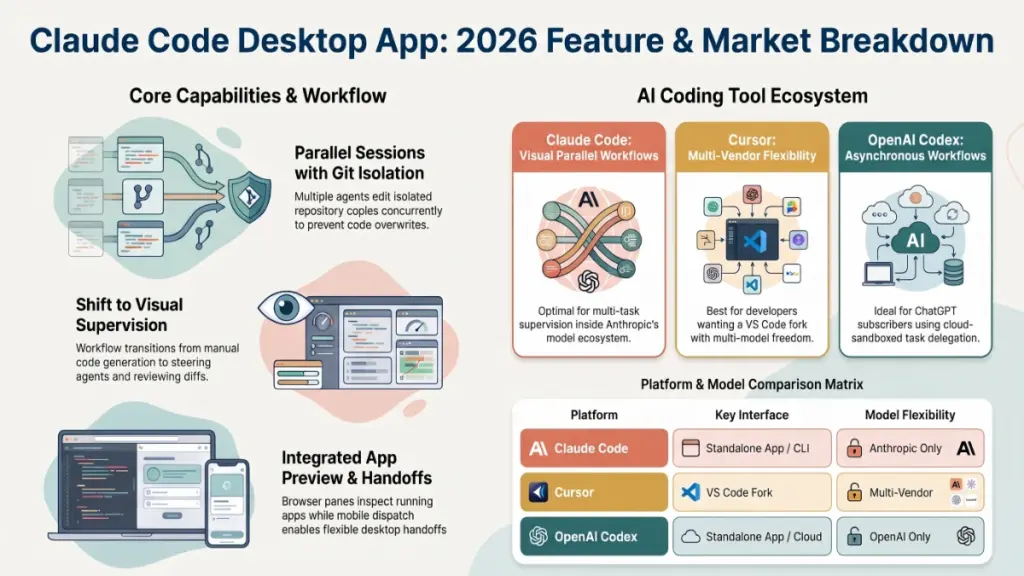
Now let’s look at what the app actually contains. Anthropic’s documentation lists a long set of capabilities. They include parallel sessions with Git isolation, a drag-and-drop pane layout, an integrated terminal, and a file editor. In addition, the list covers side chats, computer use, visual diff review, app previews, PR monitoring, and connectors. claudeclaude
Parallel sessions with Git isolation
This feature is the headline. Each session works in its own isolated copy of your repository. Consequently, two agents can edit the same project without overwriting each other. You merge the results once you approve them.
Isolation solves a real problem. Without it, parallel agents collide. For instance, one agent might rewrite a file while another reads a stale version. Git isolation removes that risk by design.
Pane layout, terminal, and editor
The app uses a drag-and-drop layout. You arrange the chat, the diff, the terminal, and the editor however you like. Because the integrated terminal stays available, you can still run commands in the same window. Developers who love the command line lose nothing here.
App preview
When you run a dev server in the desktop app, your app opens in a Browser pane, where Claude can view it, test endpoints, and inspect logs. This closes a gap that plagued earlier agents. Previously, they wrote code blind. Now they can look at the result and adjust. claude
Moreover, a later update added automatic code review, plus auto-fix and merge for pull requests. Treat auto-merge with care, though. I’ll explain why in the limitations section. claude
Side chats and Dispatch
Side chats let you ask a question without polluting the main task thread. As a result, the agent’s context stays clean. Meanwhile, Dispatch lets you send sessions from your phone. You can kick off a task on the train and review it at your desk. claude
Computer use and connectors
Computer use lets Claude operate parts of your machine beyond the code editor. Connectors, in turn, link the agent to outside services. Both expand what a session can do. At the same time, both widen your risk surface, so review permissions before you enable them.
Platform support
Platform coverage is broad but not perfect.
- macOS: Anthropic offers a full download.
- Windows: You must install Git for Windows before you open the Code tab for the first time. Besides that, a separate ARM64 installer exists for Windows on ARM. claudeclaude
- Linux: You install the app through apt. claude
Context and models
The app runs on Anthropic’s current model lineup, and your plan tier decides how heavily you can use each model. Anthropic’s pricing table shows Opus on Pro and Max, while Fable uses usage credits on Pro and draws on a share of weekly limits on Max. Because model names and access rules shift fast, check the live pricing page before you commit. claude
I’m not a data scientist. Therefore, I can’t give you parameter counts or architecture details, and Anthropic doesn’t publish them for these models. For daily work, behavior matters more. Ask how well the agent plans, how often it needs correction, and how much usage each task burns.
Performance, Benchmarks, and Evidence
Here is an honest problem. Nobody publishes a clean benchmark for desktop app quality. Model benchmarks measure the underlying model, not the interface around it. Consequently, you have to rely on indirect evidence.
What the evidence shows
Independent reviewers describe a converging market. One analysis says the argument over form is mostly over. That suggests the real differences now live in pricing, limits, and workflow fit. thenewstack
Developer habits tell a similar story. Experienced developers often combine tools, using Cursor or Copilot for daily editing, Claude Code for hard problems, and Codex for background batch work. Clearly, few developers treat any single tool as complete. Substack
Reviews of rival apps add context. One review says the Codex desktop app produces code that holds up against both Claude Code and Cursor on real projects. So Claude’s quality edge, if it exists, looks narrow for many tasks. Test it yourself. wetheflywheel
Adoption headlines deserve suspicion. For example, one DEV Community post claimed a single tool took 4% of all GitHub commits. Since I couldn’t verify the underlying data, I won’t repeat that number as fact.
How to test it yourself
Run a simple bake-off. Pick three real tasks from your backlog:
- A bug fix in code you know well.
- A small feature that touches several files.
- A refactor that has a clear test suite.
Next, run each task in each tool. Record four numbers: time to a working result, number of corrections, test pass rate, and usage consumed. Keep notes and screenshots as well. That small spreadsheet beats any marketing chart.
What surprised me most, across years of tool testing, is how much results vary by task type. A tool that shines on greenfield features can stumble on legacy code. In the end, your codebase decides the winner, not a leaderboard.
Usage as a performance metric
Usage limits act as a hidden performance cap. After all, a powerful agent that locks you out by Wednesday delivers less than a modest agent that runs all week.
Pro and Max plans both carry a five-hour session limit and a weekly limit, and Claude and Claude Code share them. Thus a long chat session and a long coding session draw from the same pool. Heavy parallel agents drain that pool quickly, so plan for it. claude
Pricing, Licensing, and Availability
Pricing surprises many developers. Read this section twice.
Individual plans
Claude Code comes bundled with Claude subscriptions instead of being sold alone.
- Free: The plan itself includes no Claude Code access.
- Pro: Sources list Pro at roughly $18 to $20 per month. Anthropic’s plans page shows $18 per month. However, a third-party comparison lists $20 per month. The gap likely reflects annual versus monthly billing. anthropicnxcode
- Max 5x: This tier costs $100 per month. claude
- Max 20x: This tier costs $200 per month. claude
Team and Enterprise
Claude Code runs pay-as-you-go only for Team and Enterprise plans. Therefore, budget for variable costs if you manage a team. A few heavy users can swing the monthly bill. anthropic
Usage limits and recent changes
The limit story has moved a lot this year.
Anthropic ran a promotion from May 13 through August 19, 2026 that raised Claude Code weekly limits by 50% for Pro, Max, and Team. That window has closed on its original schedule. Still, check whether Anthropic extended it before you plan around it. claude
Other reports point to turbulence. An Anthropic manager acknowledged small adjustments such as weekly caps and tighter peak limits, and said current plans weren’t built for today’s usage. In addition, one subscriber sued, alleging that Max plans deliver far less usage than advertised. That lawsuit is an allegation, not a finding. Even so, it shows that limits frustrate real users. the-decoderEngadget
One more detail trips people up. Monthly API credits included with Max plans can’t be used in Claude Code or the Claude apps. Don’t count them toward your coding budget. claude
A second trap hides in your environment. If an ANTHROPIC_API_KEY variable exists on your machine, Claude Code uses it instead of your subscription, and you pay API rates. I’ve watched people burn money this way. Check your setup before you start. claude
Availability
The redesigned app is broadly available. It reached all Claude Code users on Pro, Max, Team, and Enterprise plans, plus API users. Download it from Anthropic’s site, or update and restart if you already have it. claude
Look, I’ll be straight with you. Pricing clarity matters, and Anthropic’s limit rules change often. Therefore, if you plan to run several agents all day, start on a lower tier. Track your usage for two weeks, and upgrade only after you hit walls.
⚡ Limited Time Free Access
Unleash Your Digital Empire: Get 4 Premium Gifts in 1 Pack!
Grab this exclusive, high-value digital asset package tailored for creators, marketers, and builders. Enter your best email to claim instant access.
What’s Inside Your Ultimate All-In-One Package:
01. 50 AI Digital Product Ideas: A curated list of profitable, AI-driven digital product ideas engineered for fast execution and high margins.
02. Digital Sales Mastery: The strategic architecture behind high-converting sales funnels, persuasive copywriting, and online revenue growth.
03. Mastering Email List: Advanced frameworks for building an engaged audience, maximizing open rates, and generating automated income.
04. THE ULTIMATE FACELESS PLAYBOOK: Complete blueprint to building a powerful, monetizable brand on social media without showing your face.
Included Bonus:
[BONUS] Premium Canva Marketing Vault: High-converting templates to scale your organic traffic.
💥 $197 VALUE — FREE FOR READERS
Enter your best email for instant lifetime access:
[Email Input Field] [Claim Free Access Button]
🛡️ Secure Processing • Your privacy is 100% protected.
Industry Implications and Competitive Analysis
Four names dominate the conversation: Claude Code, OpenAI Codex, Cursor, and Google’s Antigravity. Each takes a different route to the same goal.
OpenAI Codex
OpenAI moved early on the desktop front. The company launched a Codex Mac app in early 2026 and called it a command center for agents. Since then, the app has reached Windows and supports parallel agents, worktrees, diff review, skills, and automations. That feature list overlaps heavily with Claude’s. everydev
One difference stands out. The Codex app works only with Codex and doesn’t support other AI agents. Claude’s app, similarly, ties you to Anthropic models. Neither one gives you a choice of vendors. dev
Reviewers also describe an execution split. One review says Codex runs in cloud sandboxes while Claude Code runs locally. That framing simplifies things, since Codex also ships a CLI and an IDE extension. Nevertheless, local execution matters for teams with strict compliance rules, so verify each tool’s current setup. wetheflywheel
Entry-level price is close. One comparison lists Codex, Cursor Pro, and Claude Pro all at about $20 per month. Codex rides on a ChatGPT subscription, so bundling counts for a lot if you already pay OpenAI. nxcode
Cursor
Cursor takes the editor-first path. It is a full IDE built as a VS Code fork. Your extensions, themes, and keybindings carry over, which means almost no migration cost for VS Code loyalists. dev
Cursor has also moved toward agents. It shipped an agent-first interface in Cursor 3. As a result, the old gap between an editor with AI and an agent with an editor keeps shrinking. datacamp
Model choice is Cursor’s biggest advantage. One comparison recommends Cursor if you want one editor that runs models from several vendors. Claude’s app can’t match that. Thus, if you like to swap models by task, Cursor wins on flexibility. dev
Google Antigravity
Google rebuilt its tool this year. Antigravity began as an AI-native IDE on a VS Code fork, then relaunched at Google I/O on May 19, 2026 as a five-surface platform with a standalone desktop app. Because I haven’t tested Antigravity 2.0, I won’t rank it. Still, you shouldn’t ignore it if you live in Google’s ecosystem. thenewstack
Third-party wrappers
Developers also build their own interfaces. For instance, one open-source project wraps the Claude Code CLI in a desktop GUI and lets users plug in other models. Projects like that show real demand for customization. On the other hand, they carry risk. A repository with nine stars won’t get the security review that a first-party app gets, so stick with official software for private code.
Who should pick what
Here’s how I’d frame the choice.
Choose the Claude desktop app if you want a strong agent, enjoy supervising parallel tasks, and already pay for Claude.
Cursor suits you better if you want an editor you stay inside all day, or if you want several model vendors in one place.
Codex makes sense when you already pay for ChatGPT and prefer asynchronous, hand-it-off workflows.
A hybrid setup works best if your budget allows, because each tool covers a different phase of work.
Solo developers on a tight budget should pick one tool and learn it well. By contrast, team leads should pilot two tools for a month and measure outcomes. Above all, don’t let vendor loyalty decide for you.
Limitations, Caveats, and Skepticism
Every tool has weak spots. Here are the ones that matter most for the Claude desktop app.
Usage limits can bite
Limits top the complaint list. Parallel agents burn through them fast. Because Claude and Claude Code share one pool, a morning of heavy coding can leave you without chat access later. Max plans soften the problem but don’t remove it. Moreover, at least one subscriber says Max usage falls far below the advertised level. That claim remains unproven. Even so, track your own numbers. Engadget
Plan and pricing instability
Anthropic changes plan details often. One report described Claude Code briefly disappearing from the Pro column of the pricing table before Anthropic reversed the change. Therefore, if you build a business workflow on a specific plan, expect surprises and keep an exit plan. the-decoder
Vendor lock-in
The app runs Anthropic models only. If Anthropic raises prices or tightens limits, you can’t switch models inside the same app. In this respect, Cursor’s multi-vendor design handles the risk better.
Auto-merge risk
Auto-fix and auto-merge sound great. Unfortunately, they also let a mistake reach your main branch with little human review. My advice is simple. Keep humans in the merge step for anything customer-facing, and reserve automation for low-risk chores like formatting and dependency bumps.
Permissions and computer use
Computer use and connectors extend what the agent can touch. Accordingly, give it only what the task needs and read every permission prompt. Never run broad-access agents on machines that hold production credentials.
Setup friction
Windows users need Git for Windows first, and Linux users rely on apt. Neither step is hard. Nevertheless, both contradict the zero-setup image, so budget a short setup session.
Unverified claims
Be careful with third-party comparison posts. Many use affiliate links, many recycle each other’s claims, and some quote statistics without sources. I learned this the hard way when I wasted real money on a tool that looked great in demos and failed in practice. So run your own test.
What I can’t tell you
I can’t tell you which model writes the best code for your stack. Likewise, I can’t predict next quarter’s limits, and nobody really knows where this market is heading. Finally, I’m working from public documentation and published reviews here, not from a formal lab test of every feature.
Future Outlook and Conclusion
The direction is clear. Every major vendor now ships a desktop app, a CLI, an IDE extension, and a cloud option. Agents run in parallel, and review tools keep improving. Because the interface war is mostly settled, the next fight will center on cost, reliability, and trust.
Watch five things over the coming months:
- Usage limit changes: Anthropic has adjusted limits repeatedly, and any new structure will affect your budget.
- Plan restructuring: An Anthropic manager already signaled that current plans don’t fit current workloads.
- Rival desktop updates: Codex, Cursor, and Antigravity all ship fast, so feature gaps close within weeks.
- Enterprise controls: Managed plugins and deployment tooling will decide big-company adoption.
- Autonomy and safety: Auto-merge and computer use raise the stakes, and better guardrails will separate serious tools from toys.
Bottom line
The Claude desktop app earns a spot on the shortlist for any developer who wants parallel agents and visual review. It lowers the barrier to entry, matches the CLI on plugins, and keeps your sessions portable across desktop, web, and phone.
On the other hand, it doesn’t solve everything. Limits can frustrate heavy users, Anthropic ties you to its own models, and plan details keep shifting.
So here’s my advice. Try the app on a real task this week, and compare it against one rival on the same task. Track time, corrections, and usage. Then choose based on your own numbers.
If you’re a solo builder, start with Pro and watch your limits. If you lead a team, pilot before you standardize. In any case, keep your own hands on the merge button.