

AI Secret Image Codebook from ePlanetJAI is a $7.97 launch-priced PDF guide offering 193 visual prompt shortcuts, plain-English backup instructions, and multi-platform notes across 16 categories. Designed for creators, marketers, and beginners who direct AI image generators, it provides structured visual vocabulary rather than software or guaranteed outputs. Honest framing and low cost stand out, though final-sale terms and a static format remain drawbacks.
If you’ve spent any time with AI image generators, you know the feeling. You can see the picture in your head: a miniature villa glowing in late-day light, or a clean patent-style drawing of a gadget. Then you type a prompt and get something that’s close but wrong. Wrong lighting, wrong style, wrong “feel.”
Most of the time the idea isn’t the problem. The vocabulary is. You don’t know the right words for the visual treatment you want.
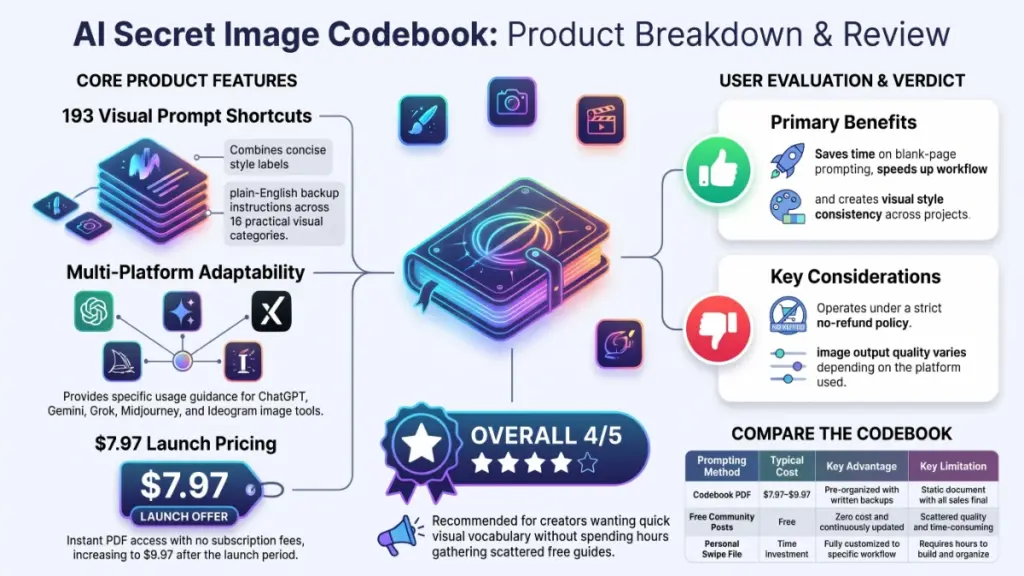
That’s the gap the AI Secret Image Codebook from ePlanetJAI claims to fill. It’s a PDF reference with 193 visual prompt “shortcuts” across 16 categories, each with a plain-English backup instruction. It’s priced at $7.97 during launch.
I’ve reviewed a lot of prompt packs over the years, and most of them are padded lists of vague adjectives. So I went through this one skeptically.
One note on how I’m reviewing it. My assessment is based on the official sales page, the product’s structure, and the claims it makes. I haven’t generated test images from the PDF itself, so I won’t invent results or sample outputs. Where I can only judge from the description, I’ll say so.
Quick Verdict
The AI Secret Image Codebook is a low-priced, organized reference for people who want a better vocabulary for directing image models. It isn’t an image generator, a course, or a magic button.
Best for: Hobbyists, content creators, small business owners, and marketers who already use ChatGPT, Gemini, Grok, Midjourney, or Ideogram and want faster, more consistent visual direction.
Not ideal for: Advanced prompt engineers who already have their own style library, or anyone expecting guaranteed results.
My rating: 4 out of 5, based on the sales page and product structure. The price is hard to argue with, and the honest “this is a starting point” framing is refreshing. The “no refunds” policy and a few unknowns keep it from scoring higher.
👉 Check the current price and launch offer here
Product Overview
| Detail | Information |
|---|---|
| Product Name | AI Secret Image Codebook (AI Image Prompt Codebook) |
| Category | AI image prompt reference / digital download |
| Creator | ePlanetJAI |
| Launch Date | Not publicly stated (launch pricing runs through December 5, 2026) |
| Price | $7.97 launch offer, then $9.97 |
| Format | Instant PDF download |
| Refund Policy | All sales final; no refunds except where required by law |
| Website | Official sales page |
| Checkout | JVZoo |
| Best For | Creators and marketers who want a faster way to direct AI image tools |
| Rating | 4/5 |
What Is the AI Secret Image Codebook?
Put simply, it’s a visual vocabulary guide in PDF form.
You find a “shortcut” such as /goldenhour, /miniature, /blueprint, or /patentdrawing. Each one represents a specific visual treatment: a lighting style, an art style, a camera angle, a material look, or a presentation format. You add your own subject, then use the plain-English instruction to guide your image model.
The key point is that the slash labels are not commands. They’re reference labels. The page says so directly, and I appreciate that. The written instructions are what you actually paste and adapt.
The problem it solves
When you write a basic prompt, you leave a lot to the model’s imagination. Lighting, composition, material, scale, and mood are all open. The model fills in the blanks its own way, and you get generic results.
The Codebook gives you a way to fill those blanks on purpose. Instead of piling on vague words like “beautiful” or “stunning,” you choose a defined direction and build from it.
What it is not
Let’s clear up some misunderstandings before they cost you $7.97:
- It’s not an image generator. You need your own platform.
- It’s not a course with modules or videos.
- It does not guarantee identical results across tools.
- It does not promise income or business success.
The sales page is upfront about all of this, and I respect that. Plenty of products in this space hide their limits in fine print.
Main Features
Here’s what the sales page says you get, and what each piece is actually good for.
1. 193 Visual Prompt Shortcuts
These are concise labels for visual directions. The page gives examples like /ghosted (a transparent or see-through look), /dollhouse (a cutaway architectural view), /longexposure (motion and light streaks), and /thermal (a false-color heat-map look).
Practical example: Say you’re designing a blog graphic about a new gadget. Instead of describing “a technical drawing with thin lines in an old-fashioned style,” you look up /patentdrawing, drop in your product, and you’ve got a clear direction in seconds.
2. 193 Plain-English Backup Instructions
This is the feature I find most valuable. Every shortcut has a written version, because some platforms won’t understand a slash label.
That matters more than it sounds. If a shortcut label gets ignored, you don’t have to guess at a rewrite. The full wording is already there.
3. Five-Platform Compatibility Guidance
The Codebook includes notes for adapting the instructions to ChatGPT, Gemini, Grok, Midjourney, and Ideogram. The page describes the general approach for each, such as natural-language direction for ChatGPT and explicit layout or text needs for Ideogram.
The page also admits that interfaces change and results may differ between tools. That’s the honest way to put it.
4. Best-Use Suggestions
Each direction comes with context about the kinds of image tasks it suits. For example, the /miniature entry is described as useful when you want a subject to feel like a small physical model.
This saves time because you’re not guessing whether a treatment fits your project.
5. Combination Ideas
The page shows pairings like:
/miniature+/goldenhour(a tiny scene in warm late-day light)/blueprint+/annotated(a technical drawing with labeled details)/productphoto+/rim-light(a product image with defined edge lighting)
Combining directions is where a reference like this can really pay off, because you’re building a layered brief instead of a one-note prompt.
6. 16 Organized Categories
The categories are:
- Technical Reveals
- Science & Microscopy
- Product Photography
- Illustration & Art Styles
- Camera & Composition
- Lighting & Atmosphere
- Material & Surface
- Scale & Miniatures
- Diagrams & Data Visuals
- Editorial & Information Design
- Story & Sequence
- Architecture & Interiors
- Urban & Landscape Design
- Nature & Environment
- Interfaces & Digital Products
- Brand & Campaign Graphics
That’s a wide spread. It covers marketing visuals, product shots, architecture, and technical illustration, which suggests the creator thought about real use cases rather than just “cool art styles.”
7. Instant PDF Access
You download the PDF and keep it open while you work. No login, no platform, no dashboard.
Benefits: What You Actually Get Out of It
Features are nice, but outcomes are what matter. Here’s how I’d expect the Codebook to help in practice.
You spend less time on blank-page prompting. Having a browsable list means you start from a direction instead of from nothing.
Your images become more consistent. If you produce visuals regularly, reusing the same defined treatments helps your results look like they belong together. That’s useful for brand work.
You learn the language of visual direction. Even if you stop using the PDF someday, reading through 193 treatments teaches you terms for light, material, scale, and composition. That knowledge sticks.
You get unstuck faster. When a tool ignores part of your prompt, the plain-English backup gives you something concrete to try next.
You can brief other people. Designers, freelancers, and teammates respond well to clear visual vocabulary. A shared reference can make briefs shorter and clearer.
My Experience
Let me be straight about what I can and can’t tell you here.
I’ve tested well over 150 marketing and AI tools, and I’ve been working with AI image and text generators since the early API days. So I know what a useful prompt reference looks like, and I know what a padded one looks like.
What I haven’t done is run this specific PDF through all five platforms and publish a scorecard. I won’t pretend otherwise. What follows is my read of the product’s design, structure, and claims, judged against what I’ve seen work.
What stood out
The structure makes sense. The workflow on the page is simple: browse, personalize, generate and refine. That’s how people actually use references. Nobody reads a prompt book cover to cover. You open it, search, copy, adapt, and move on.
The “backup instruction” idea is smart. Here’s the reality with shorthand labels: they only work if the model knows what they mean. Pairing every label with full wording solves the biggest weakness of slash-style prompt systems.
The honesty is unusual. The page says repeatedly that a shortcut is a starting point and that outputs vary by tool and settings. In a niche where “one secret prompt” claims are everywhere, that restraint made me trust it more.
What I’d want to check
Before I’d call this a “must-have,” I’d want to look at the actual PDF for:
- How detailed the plain-English instructions are (one sentence or a full paragraph?)
- How easy the search and navigation are inside the PDF
- Whether the examples show the same subject across directions
- How specific the platform notes are, or whether they stay generic
I can’t confirm those from a sales page. If you buy it, that’s the first thing I’d check.
Ease of Use
Learning curve
Very low. It’s a reference document. If you can copy and paste, you can use it.
Interface
There’s no software interface. It’s a PDF, which means it works on a laptop, tablet, or phone. The sales page even shows it displayed on a tablet.
Documentation
The product is the documentation. There are no tutorials mentioned, which fits the “quick reference, not another course to finish” positioning.
Beginner friendliness
I think beginners benefit most. If you don’t yet know the difference between “rim light” and “golden hour,” a list with plain-English explanations is a fast education.
One caution: complete beginners may still need to learn how to write a solid subject description. The Codebook helps with style, not with deciding what you want to make.
Performance
This part is tricky because the PDF doesn’t “perform” on its own. The results depend on your image tool, your settings, and your subject.
What I can say:
- Speed: Instant download, and lookup should be quick in a well-organized PDF.
- Stability: A PDF doesn’t crash or need updates, which is a real advantage over subscription tools.
- Reliability: This is where you need realistic expectations. The page itself says outputs vary. A direction that works beautifully in one tool may need rewording in another.
That last point isn’t a flaw in the product. It’s the nature of AI image generation. But it’s why the plain-English backups matter so much.
Pricing
Here’s the current pricing:
| Offer | Price |
|---|---|
| Launch offer (through 11:59 PM, December 5, 2026) | $7.97 |
| Regular price after launch | $9.97 |
Upsells and extras
The sales page doesn’t mention upsells, order bumps, or bonuses. JVZoo products sometimes include them at checkout, so keep an eye out for that during purchase. I can’t confirm either way.
Value for money
I’ll be honest: at under $10, the risk is small. You’d spend more on a sandwich and a coffee.
The real question is whether you’d use it. If you generate images weekly, a $7.97 reference that saves even a few minutes per project pays for itself quickly. If you generate one image a month, it’s a harder sell.
The refund catch
All sales are final. The page states that no refunds are offered, except where required by law. That’s the biggest risk factor, even at this price. Read the page carefully before you buy, and make sure it fits your needs.
👉 See the current launch price on the official page
Pros
- Very low price. At $7.97, the financial risk is minimal.
- Plain-English backups for every shortcut. This solves the main weakness of shorthand prompts.
- Wide category coverage. Sixteen categories span product shots, architecture, diagrams, branding, and more.
- Combination ideas included. Pairing directions is where better results tend to come from.
- Five-platform guidance. Notes for ChatGPT, Gemini, Grok, Midjourney, and Ideogram help you adapt prompts.
- Honest positioning. It doesn’t claim to be magic or promise income.
- No software or subscription. One PDF, no recurring fees.
- Instant access. You can start the same day.
Cons
- No refunds. Even at a low price, final-sale terms are a real consideration.
- Not an image generator. You need your own platform, and some are paid.
- Results aren’t guaranteed. Slash labels aren’t universal commands, so you’ll sometimes need to rewrite and refine.
- Unknowns on the page. The creator’s background and exact launch date aren’t stated, and I couldn’t verify sample pages from the PDF itself.
- Static content. A PDF won’t update itself as image tools change. Platform notes could age.
- Overlap with free resources. Some of these directions can be found through free prompt guides and community posts. You’re paying for organization and convenience.
- No video walkthroughs mentioned. If you learn best by watching, this is a reference, not a course.
Comparison With Competitors
I can’t list exact competitor prices without checking each one, so I’ll compare by category.
| Option | Typical Cost | Strengths | Weaknesses |
|---|---|---|---|
| AI Secret Image Codebook | $7.97–$9.97 | Organized, plain-English backups, multi-platform notes | Static PDF, no refunds |
| Free prompt guides and community posts | Free | No cost, constantly updated | Scattered, inconsistent quality |
| Large paid prompt libraries | Varies | Often huge in volume | Frequently padded; can overwhelm |
| Platform-specific style guides (e.g., Midjourney docs) | Free | Accurate for that tool | Only cover one platform |
| Building your own swipe file | Free (your time) | Perfectly tailored | Takes hours to build and organize |
The honest take
If you enjoy hunting through forums and building your own prompt notes, you can get most of this for free. I’ve done exactly that, and it takes a lot of time.
What the Codebook offers is organization and convenience: 193 directions sorted into categories, each with a written backup. You’re paying a small amount to skip the collection work.
If you’re a power user with a mature personal library, this probably won’t add much. If you’re starting out or want a tidy reference, the math works.
Who Should Buy It?
This is a good fit if you’re:
- A content creator who needs blog, social, or YouTube visuals regularly
- A small business owner making product images or marketing graphics without a designer
- A marketer who wants consistent visual styles across campaigns
- A beginner who doesn’t yet have the vocabulary for lighting, materials, and composition
- A freelancer who needs a quicker way to brief image tools for clients
- Someone who uses multiple image tools and wants one adaptable reference
Who Should Skip It?
Look elsewhere if you:
- Want an image generator. This doesn’t create anything on its own.
- Expect guaranteed, identical results on every platform
- Already have a large, tested prompt library and a good system for it
- Need a video course with step-by-step tutorials
- Are uncomfortable with no-refund purchases, even at a small price
- Rarely generate images. The value drops if you won’t use it.
Frequently Asked Questions
What is the AI Secret Image Codebook?
It’s a PDF reference containing 193 visual prompt shortcuts across 16 categories. Each shortcut comes with plain-English instructions, so you can direct AI image tools more precisely.
Does the AI Secret Image Codebook include an image generator?
No. It doesn’t include any image-generation software. You use it alongside your own tool, such as ChatGPT, Gemini, Grok, Midjourney, or Ideogram.
Do the slash shortcuts work as commands in every platform?
No. The slash labels are reference labels, not universal commands. That’s why the Codebook includes plain-English backup instructions you can paste when a platform doesn’t recognize the label.
Will I get the same results on all five platforms?
Not necessarily. The sales page states that image tools interpret prompts differently and that compatibility notes are guidance, not a guarantee. Expect to refine results in your chosen platform.
How much does the AI Secret Image Codebook cost?
The launch price is $7.97 through 11:59 PM on December 5, 2026. After that, the price is $9.97.
What do I receive after purchase?
You get instant access to a digital PDF containing the 193 shortcuts, plain-English backups, compatibility notes for five platforms, best-use suggestions, combination ideas, and 16 organized categories.
Is there a refund policy?
The sales page states that all sales are final, with no refunds except where required by applicable law. Make sure you’re comfortable with that before purchasing.
Is it good for beginners?
Yes, I think it’s especially helpful for beginners, since it teaches visual vocabulary while giving you ready-to-adapt wording. You’ll still need to supply your own subject ideas.
Does it guarantee income or business success?
No. The page includes an income disclaimer stating that no earnings or results are promised. It’s an educational reference, and your results depend on your own skills and effort.
🎁 Free Gift Waiting for You!
Before you leave, there’s a free gift waiting for you.
As a thank-you for reading, you can claim my Ultimate All-In-One Digital Marketing Package completely FREE.
🎉 What’s Inside Your Ultimate All-In-One Package
01. 50 AI Digital Product Ideas
A curated collection of highly profitable AI-powered digital product ideas designed for quick implementation and strong profit potential.
02. Digital Sales Mastery
Discover the proven framework behind high-converting sales funnels, persuasive copywriting, and sustainable online revenue growth.
03. Mastering Email List
Advanced strategies for building an engaged email audience, increasing open rates, improving click-through rates, and generating automated income.
04. The Ultimate Faceless Playbook
A complete blueprint for building a profitable online brand and growing on social media without ever showing your face.
🎁 BONUS: Premium Canva Marketing Vault
A premium library of high-converting Canva templates to help you create professional marketing assets, generate more organic traffic, and boost conversions.
💥 Total Package Value: $197
✅ Yours Today: FREE
Claim your complimentary bundle and get instant access to premium resources that can help you create, market, and grow your online business more effectively.
Final Verdict
Here’s my honest recommendation.
The AI Secret Image Codebook isn’t going to turn a beginner into a visual director overnight, and it doesn’t pretend to. What it offers is a tidy, affordable way to stop describing images from scratch every time.
Who benefits most: Creators, marketers, and small business owners who generate images regularly and want a faster, more consistent way to direct their tools. The plain-English backups are the feature that earns its keep.
Is it worth the price? At $7.97, yes, if you’ll use it. The financial risk is tiny. The no-refund policy is the only thing that gives me pause, so decide based on whether you’ll genuinely open this PDF during real projects.
Would I personally recommend it? For someone in the target audience, yes. I’d recommend it as a starter reference, with the caveat that I’m judging from the published product details and not from a full hands-on run of the PDF. I’d treat it as a head start, then build my own notes on top of it.
One more thing. The launch price ends on December 5, 2026, after which it rises to $9.97. It’s a small difference, but if you’ve already decided it fits, there’s no reason to wait.
👉 Get the AI Secret Image Codebook at the launch price
Affiliate disclosure: This article contains affiliate links. If you buy through them, I may earn a commission at no extra cost to you. It doesn’t change my opinion, and I’ll tell you where this product falls short.