


If you’re spending hours clicking through websites, filling out forms, scraping data, or managing repetitive browser tasks — stop. There’s a smarter way to work in 2026, and it’s called BrowserAgent.
BrowserAgent is a cutting-edge AI browser automation tool. It acts as your personal web assistant, handling complex browser-based tasks on autopilot — no coding required. Whether you’re an affiliate marketer hunting for leads, a freelancer juggling multiple clients, or an agency owner looking to scale without hiring, this AI-powered software is built to do the heavy lifting for you.
In this in-depth BrowserAgent Review, we’ll walk you through everything — features, pricing, a live demo, and exclusive bonuses. By the end, you’ll know whether this AI business automation tool deserves a spot in your workflow.
What Is BrowserAgent?
BrowserAgent is a platform for creating custom AI agents that run directly in your browser. It offers unlimited executions for a fixed cost — with no API costs, no maintenance overhead, and full local privacy.
Rather than routing automation tasks through cloud servers at per-execution rates, its browser-native approach runs AI locally. As a result, you get fixed pricing with unlimited executions. Build a workflow once and run it thousands of times at zero additional cost.
Creator & Company
BrowserAgent is an unfunded startup based in New York City, founded in 2023 by Saurav Panda and Shreyash Gupta. Both founders also co-founded Cloud Code AI. Shreyash Gupta serves as CTO and describes the company’s mission as “bringing AI to everyone’s browser.” The company launched publicly on Product Hunt in March 2025, where it ranked #1 for the day.
Primary Purpose & Problem It Solves
BrowserAgent targets a specific pain point in the AI automation space: unpredictable, runaway costs. Most AI workflow tools charge per API call or per execution. This means costs scale directly with how well and how often your automations actually work.
BrowserAgent solves this by running AI locally and offering fixed pricing with unlimited executions. Furthermore, the platform is aimed at non-technical users and teams. It enables users to create custom AI agents without writing code and uses WebGPU acceleration for direct access to GPU compute.
Pricing
BrowserAgent uses a fixed-subscription model rather than usage-based billing — a deliberate contrast to cloud-execution competitors. At its Product Hunt launch, the company promoted 50% off its Basic plan for the first year using the code PHLAUNCH. Specific tier names and current prices should be confirmed directly on the site, as they may have evolved since launch.

How to Access
BrowserAgent is accessible in two ways. First, the core product is available as a web app at browseragent.dev, where users can build and run no-code AI workflows visually. Second, it’s available as a Chrome extension — “BrowserAgent: AI Agents in Browser” — which allows users to run private, cost-free AI agents directly in their browser. The Chrome extension is a free install with no data collection, according to the developer’s disclosed privacy policy.
Key Features
1. Browser-Native, Local AI Execution
Rather than routing every action through a remote cloud API, BrowserAgent runs AI agents directly in the user’s web browser. The agent logic lives and executes locally within the Chrome extension, keeping computation on the user’s machine.
Benefits: This sidesteps runaway API costs completely. Teams that find a high-value automation use case aren’t penalized for using it heavily. Privacy is a secondary benefit: page content, form inputs, and credentials never leave the browser session.
Limitations: Running AI inference locally means performance is tied to the host machine’s hardware. Heavy or parallel workloads may run slowly on a mid-range laptop. Additionally, the local model may lag behind frontier cloud models in raw reasoning capability.
Practical use case: A small e-commerce team monitors a dozen supplier portals daily for price changes. With BrowserAgent running locally, they can schedule this check hundreds of times per month — something that would generate a substantial API bill on a consumption-priced platform.
2. No-Code Visual Workflow Builder
BrowserAgent lets users create and automate tasks with AI agents running directly in their web browsers. Workflows are built through a visual editor rather than scripts. Users define sequences of browser actions — navigate, click, fill, extract — without writing a line of code.
Benefits: The visual editor means users don’t have to involve developers every time they want to make a change. Non-technical staff can build, iterate, and maintain their own automations independently. Consequently, this reduces the bottleneck on engineering resources.
Limitations: Visual builders trade flexibility for accessibility. Complex conditional logic, dynamic data transformations, or integrations with obscure APIs can be difficult or impossible to express through a drag-and-drop interface. Power users may find the builder restrictive compared to a Python-based framework.
Practical use case: An HR coordinator builds a workflow to check a government immigration portal each morning, extract visa application statuses, and copy the results into a spreadsheet — all configured in an afternoon, with no developer involvement.
3. Chrome Extension Deployment
The BrowserAgent Chrome Extension lets users export and run their custom AI agents entirely within Chrome. Agents are built on the BrowserAgent platform and deployed to the extension with a single export action.
Benefits: There’s no separate desktop app to install or CLI to configure. Agents run in the same authenticated browser session the user already has open, meaning they inherit existing logins to Gmail, internal tools, CRMs, and other sites automatically.
Limitations: Extension-based agents share the browser’s single-threaded environment. Running a long automation while simultaneously browsing can cause interference. Moreover, sites like LinkedIn actively detect and flag bot activity, which can risk account bans.
Practical use case: A recruiter builds an agent that opens a list of LinkedIn profiles, copies each contact’s current title and employer into a tracking sheet, and flags any profiles that have changed jobs in the last three months — all running in the background while they handle email.
4. Intelligent Form Filling and Web Interaction
BrowserAgent can autonomously navigate multi-step web flows — logging in, filling fields, selecting dropdowns, clicking through paginated interfaces, and submitting forms. Instead of brittle CSS selectors, it’s driven by the AI’s understanding of the page.
Benefits: Unlike traditional RPA, AI browser agents use visual understanding and handle UI drift far better than rule-based scripts. When a site redesigns its layout, the agent adapts rather than crashing. This resilience dramatically reduces maintenance overhead for long-running automations.
Limitations: Most legitimate AI agents cannot and will not solve CAPTCHAs, as this would facilitate abuse. This step almost always requires human intervention. Similarly, human checkpoints are still advisable for anything irreversible, such as payments or form submissions with real effects.
Practical use case: A property manager uses BrowserAgent to submit monthly utility readings across five different council portals, each with its own login flow and form layout. The agent handles all five sequentially, pausing to alert the user only when a CAPTCHA or unusual error is encountered.
5. Fixed-Price Unlimited Execution Model
BrowserAgent solves the cost-escalation problem with a browser-native approach that offers fixed pricing with unlimited executions. Build your workflow once and run it thousands of times with zero additional cost. Pricing starts at $20/month, with no per-task or per-API-call fees.
Benefits: Predictable costs make BrowserAgent particularly attractive for high-frequency automations. Per-task cost for cloud-based AI browser agents fell from $0.50–$1.50 in 2024 to $0.05–$0.15 in 2026 — but those costs still compound at scale. BrowserAgent’s flat rate eliminates that exposure entirely.
Limitations: A flat subscription only makes economic sense if usage volume is consistently high enough to justify it. Light or occasional users may find they’re overpaying relative to a pay-as-you-go alternative.
Practical use case: A digital marketing agency runs daily SEO rank-tracking automations across 200 client keywords, checking results on multiple search engines. At that frequency, the flat-rate model saves the agency several hundred dollars per month compared to an API-priced competitor.
6. Privacy-First, Data-Local Architecture
Because agents execute inside the user’s own browser rather than on BrowserAgent’s servers, sensitive data — credentials, personal information, proprietary business data — never transits a third-party cloud environment.
Benefits: This architecture is a significant differentiator for businesses handling regulated data. Browser agents see everything: page content, credentials, and typed input. Teams handling PII, financial data, or trade secrets need to carefully review data-training policies before using cloud-based tools. BrowserAgent’s local model sidesteps this concern by design.
Limitations: Local privacy comes with a trade-off. BrowserAgent cannot easily offer cross-device session continuity or cloud-synced agent history. Additionally, audit logging — important for enterprise compliance — requires extra setup, whereas cloud platforms often provide it natively.
Practical use case: A legal firm’s paralegal uses BrowserAgent to pull case status updates from a client-accessible court portal. Because all processing stays in the browser, there’s no question about whether confidential client data is being stored or trained on by a third-party AI vendor.
Learning Curve
BrowserAgent occupies a relatively forgiving position on the learning curve compared to its developer-oriented rivals. However, it is not entirely frictionless.
As a no-code platform, it enables users to design and automate processes with AI agents running directly in their web browsers. This removes many traditional barriers to automation. Still, the node-and-template paradigm it employs takes time to master. Anyone unfamiliar with workflow thinking (trigger → action → output) will need a few hours to develop an intuition for how automations are composed.
For more complex tasks — branched logic or multi-step data extraction — the ramp is considerably longer. The contrast with code-first alternatives is telling. Tools like Browser Use are simply not the right fit for non-technical teams without Python experience. BrowserAgent’s visual approach is designed precisely for that audience.
That said, “no-code” does not mean “no thought required.” Users who approach the platform expecting a point-and-click magic wand are likely to hit confusion earlier than those who arrive with a clear goal in mind.
Interface Analysis
BrowserAgent’s easy-to-navigate visual interface allows users to seamlessly link different pre-existing templates and nodes. This facilitates the automation of tasks such as creating blog posts, summarizing emails, and analyzing LinkedIn profiles.
The canvas-style workspace follows conventions familiar to anyone who has used tools like n8n, Make, or Zapier. Strengths here include legibility and accessibility. Because the interface is visual and browser-native, there is no context-switching between a dedicated application and the web pages being automated.
Where the Interface Falls Short
The weakness is depth. Heavy customization — conditional branching, error handling, dynamic variable passing — can make the canvas visually cluttered. Users building more complex pipelines may find the node metaphor stretches thin. In short, the interface prioritizes approachability over power, which is the right trade-off for the target audience but a ceiling for advanced use cases.
Onboarding Process
BrowserAgent’s onboarding benefits considerably from its template library. New users are not dropped into a blank canvas — instead, they can start from pre-built automations covering common use cases and modify them incrementally.
Starting from a working template and adjusting it to your own inputs is a far gentler introduction than building from scratch. It also gives users an immediate demonstration of what a finished workflow looks like before they have to design one themselves.
Post-Template Guidance
The onboarding gap, however, is post-template guidance. Once a user is ready to build something the template library doesn’t cover, the path forward is less clearly signposted. This is a common failure mode for no-code tools: the first ten minutes feel seamless, and the second hour feels abandoned. Prospective users should evaluate whether structured tutorials or in-app guidance fills this gap during a trial period.
Required Technical Knowledge
This is one of BrowserAgent’s clearest differentiators. All data processing takes place locally. The platform maintains complete privacy, and it achieves this without asking users to configure infrastructure, manage API keys, or write any code.
Compared to open-source alternatives that require Python expertise and DevOps resources, the bar is meaningfully lower. That said, a baseline of web literacy is still assumed. Users need to understand what a web page element is, have a conceptual model of how data moves between workflow steps, and be comfortable debugging when an automation doesn’t behave as expected.
For teams with more demanding requirements — production-scale automation, self-hosting for data sovereignty, or integration with custom internal systems — BrowserAgent sidesteps the operational overhead entirely. This is its core value proposition for non-technical teams.
Support Options
Documentation and customer support are areas where BrowserAgent’s relative youth shows. There is no evidence of the comprehensive developer documentation that surrounds tools like Browser Use, which maintains detailed public documentation covering agent settings, supported models, and integration patterns.
Community support is another variable. Established open-source tools benefit from large GitHub communities where questions get answered quickly. A newer, more niche product like BrowserAgent may have a smaller forum or support channel. Prospective users should check whether an active Discord server, community forum, or responsive ticket system exists before committing to business-critical workflows.
Pros and Cons
Pros
- No-code natural language control — Users can control web pages with natural language commands, with no scripting or programming knowledge required.
- Local-first privacy — The extension offers true privacy with no cloud API costs and runs entirely within Chrome, so browsing data stays on the user’s machine.
- Zero API or maintenance costs — BrowserAgent has no API costs and no maintenance requirements, making it cost-effective compared to managed cloud browser platforms.
- Broad task automation — It automates research, shopping, and emails, and includes tools like a Prompt Enhancer and Text Humanizer.
- No execution limits — Users can create and run browser-based AI agents without limitations on execution, unlike quota-gated SaaS alternatives.
- Uses existing login sessions — Rather than requiring re-authentication, it leverages the user’s current browser session and cookies, making it immediately usable on sites they’re already logged into.
- Respectable user rating — The Chrome extension holds an average rating of 4.6 out of 5 stars, reflecting a solid track record of user satisfaction.
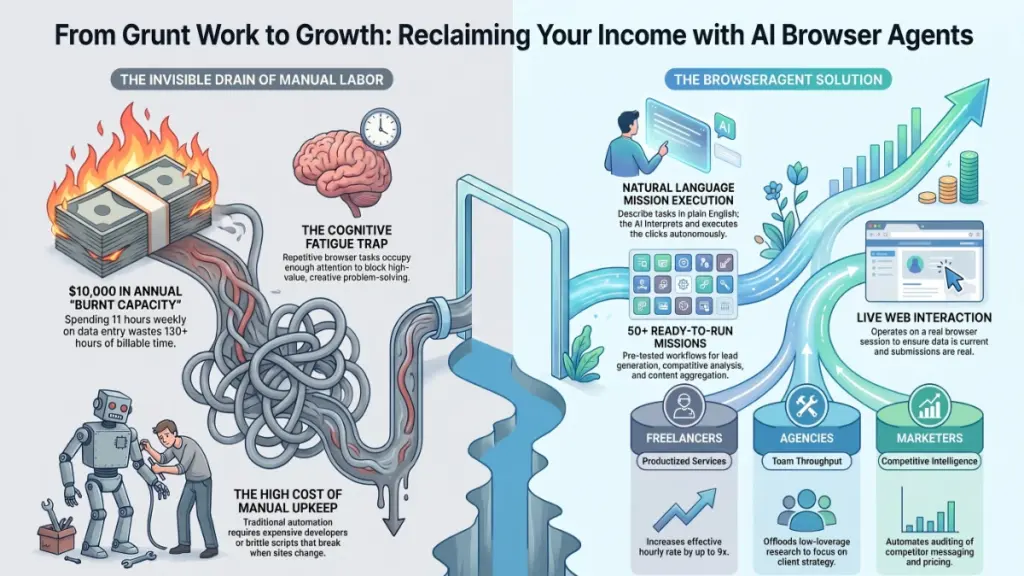
Cons
- Chrome-only constraint — As a Chrome extension, BrowserAgent is locked to one browser ecosystem. Users on Firefox, Safari, or Edge are simply excluded.
- CAPTCHA and anti-bot friction — For CAPTCHA handling, users need better browser fingerprinting and proxies — a limitation BrowserAgent doesn’t natively solve.
- Context and complexity limits — Multi-step workflows across dynamic pages can still break or require correction when page structures change unexpectedly.
- No developer extensibility — Unlike open-source alternatives such as Browser Use, BrowserAgent offers limited options for developers who need custom tooling or scripting.
- Dependent on local compute — Running locally is a privacy win, but performance depends entirely on the user’s machine, with no option to scale or parallelize tasks in the cloud.
Comparison with Alternatives
Main Competitors
The browser automation market has converged around a few distinct categories. BrowserAgent’s closest competitors fall into two camps: consumer-facing agentic browsers and developer-oriented automation frameworks.
Perplexity Comet is the most polished consumer option in the space. Launched in July 2025, Comet combines Perplexity’s search-focused AI with full browser capabilities. It lets you ask questions naturally while the browser handles multi-site research, form filling, and basic transactions. Notably, Comet is now free after pivoting from a $200/month subscription, as the Perplexity team decided owning browser distribution mattered more than subscription revenue.
Browser Use is the leading open-source framework on the developer side. It supports cloud, API, self-hosted, and MCP server deployment models and achieved an 89.1% success rate on the WebVoyager benchmark across 586 diverse web tasks — making it the benchmark leader for raw automation accuracy.
ChatGPT Atlas represents the big-tech entrant. Launched by OpenAI in October 2025, its key feature is Agent Mode, which allows the browser to execute multi-step tasks autonomously — opening tabs, navigating sites, extracting pricing, and presenting comparisons. It requires a ChatGPT subscription and, as of late 2025, runs exclusively on Mac.
Feature & Pricing Comparison
| Feature | BrowserAgent | Perplexity Comet | Browser Use | ChatGPT Atlas |
|---|---|---|---|---|
| Approach | No-code workflow builder | Full replacement browser | Developer framework | Full replacement browser |
| Privacy model | Local-first, no cloud API costs | Cloud (Perplexity servers) | Cloud or self-hosted | Cloud (OpenAI servers) |
| No-code builder | ✅ Visual workflow editor | ❌ | ❌ | ❌ |
| Local LLM support | ✅ (via BrowserAI/WebGPU) | ❌ | Partial | ❌ |
| Open source | Partial | ❌ | ✅ | ❌ |
| Chrome extension | ✅ (runs inside existing browser) | ❌ (replaces browser) | ❌ | ❌ (replaces browser) |
| Workflow templates | ✅ | ❌ | ❌ | ❌ |
| Free tier | ✅ (50 Cloud AI calls/mo, 5 workflows) | ✅ (fully free) | Limited | ❌ |
| Mid-tier pricing | Pro tier (5,000 Cloud AI calls, 50 workflows) | Free | Credits/pay-as-you-go | ChatGPT Plus ($20/mo) |
| Enterprise | ✅ Unlimited custom plan | ❌ (consumer product) | ✅ | Via ChatGPT Enterprise |
| Platform | Works within Chrome | Standalone browser (Mac/Win/iOS/Android) | Any (headless) | Mac only |
BrowserAgent’s free tier covers 50 Cloud AI calls per month, up to 5 workflows, 10 nodes per workflow, and basic local models with unlimited executions. The Pro tier scales to 5,000 Cloud AI calls, up to 50 workflows with 50 nodes each, and access to premium local models. An enterprise tier offers unlimited everything, including custom fine-tuned models.
BrowserAgent’s Unique Advantages
True local-first privacy. BrowserAgent workflows run entirely within Chrome with no cloud API costs. For users handling sensitive data — HR records, financial documents, internal portals — this is a meaningful architectural difference, not just a marketing claim.
Works inside your existing browser. Unlike Comet or Atlas, which require replacing your browser entirely, BrowserAgent operates as a Chrome extension. You keep your bookmarks, saved passwords, existing extensions, and muscle memory — with no migration cost.
No-code visual workflow builder. BrowserAgent provides a no-code platform to create AI workflows from scratch or from templates, built on the BrowserAI library. Browser Use requires writing code; Atlas requires describing tasks conversationally without saving or reusing them. BrowserAgent’s node-based editor, by contrast, lets non-technical users build, save, and share repeatable automations.
Zero incremental API cost on local models. By running models locally via WebGPU, power users on the Pro and Enterprise tiers can execute unlimited automations without per-call token costs that accumulate quickly with cloud providers.
When to Choose Each Product
Choose BrowserAgent when:
- You handle sensitive or confidential data and cannot send it to third-party cloud servers.
- You want to build reusable, multi-step automations without writing code — for tasks like form filling, data extraction, or report generation that you’ll run repeatedly.
- You want to automate workflows inside your existing Chrome setup without switching browsers or losing your saved sessions.
- You’re on a tight budget and want meaningful automation capability on a free or low-cost plan.
Choose Perplexity Comet when:
- You’re a general consumer who wants ambient AI assistance baked into everyday browsing without any setup.
- Research synthesis across many tabs is your primary use case — Comet’s search-native design excels here. The Comet Assistant autonomously navigates websites, fills forms, manages email and calendar, and supports hands-free voice control.
- You want the most accessible entry point with no cost and no configuration.
Choose Browser Use when:
- You’re a developer building production-grade automations and need programmatic control, API access, and the flexibility to self-host.
- Benchmark accuracy is critical — Browser Use’s 89.1% WebVoyager success rate makes it the strongest choice for high-stakes scraping or automation pipelines.
- You need MCP server integration or want to embed browser automation into a larger agent framework.
Choose ChatGPT Atlas when:
- You’re already a ChatGPT power user and want your AI assistant to follow you into the browser without switching tools.
- Multi-step autonomous tasks like comparing flight prices across airline websites are your primary need, and you don’t require repeatable saved workflows.
- You’re on macOS and want the most polished agentic browser experience backed by a major AI lab.
Note: Pricing and features in this space change rapidly. Always verify current plans on each product’s official website before purchasing.
Conclusion
BrowserAgent arrives at a pivotal moment in the AI assistant landscape, and for the most part, it delivers on its ambitious promises. Throughout this review, we explored its standout natural language browsing capabilities, impressive task automation across complex multi-step workflows, and a privacy-first architecture that sets it apart from competitors. We also flagged its occasional struggles with dynamic JavaScript-heavy pages, a steeper learning curve for non-technical users, and a premium pricing tier that may give budget-conscious buyers pause.
That said, the strengths far outweigh the friction points. BrowserAgent isn’t just another productivity tool — it’s a genuine force multiplier for professionals who live inside their browser.
Final Verdict: 4.4 / 5 — Highly Recommended
If you’re a power user, developer, or knowledge worker drowning in repetitive web tasks, BrowserAgent is one of the most capable and trustworthy tools available today. It earns its price tag for anyone who values both efficiency and data privacy. Casual users may want to start with the free tier to gauge whether the learning curve is worth the climb — but once it clicks, there’s no going back.
Ready to reclaim your time? Start your free 14-day trial of BrowserAgent today — no credit card required. Whether you’re automating research pipelines, scraping competitive intel, or simply tired of clicking through the same workflows every morning, BrowserAgent is built for exactly that.