

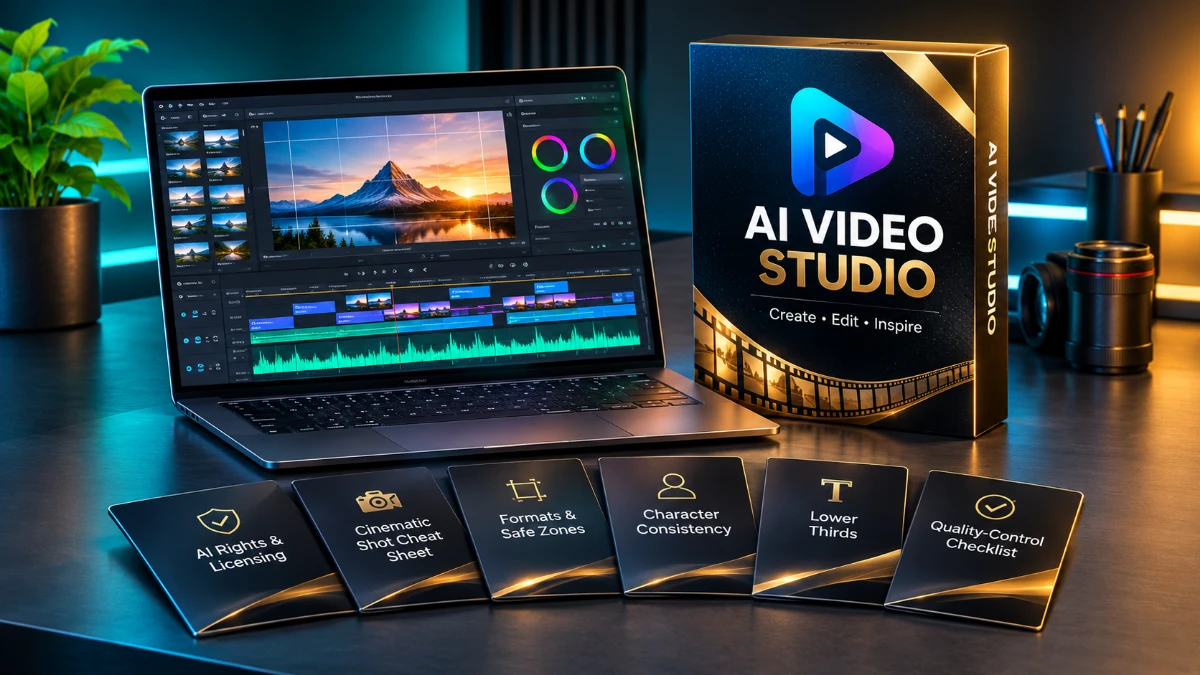
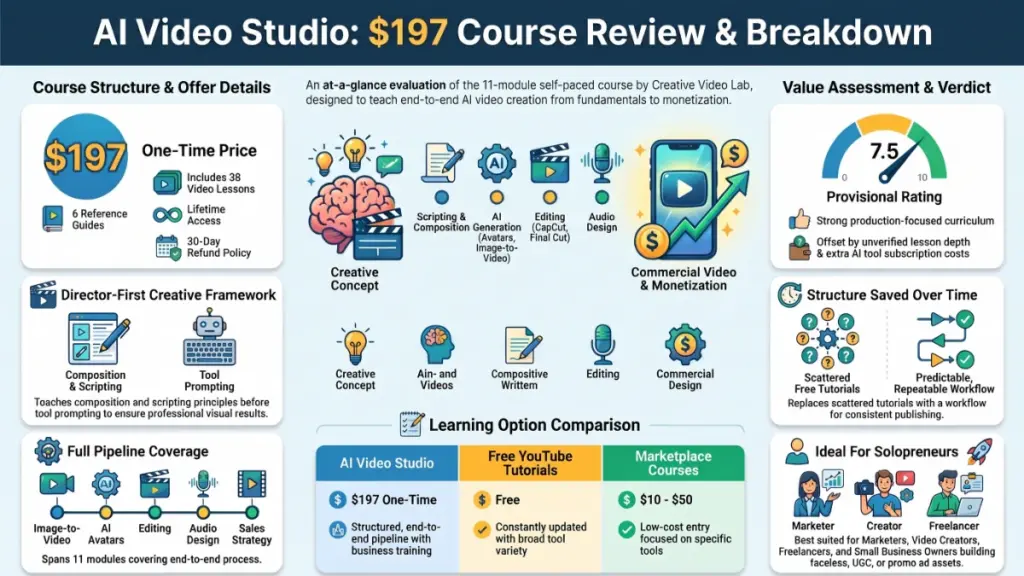
AI Video Studio is a $197, self-paced online course teaching end-to-end AI video creation for ads, UGC, and faceless content. Spanning 38 lessons and six downloadable guides, it prioritizes visual fundamentals and scripting before touching AI tools. While its structured, monetization-focused workflow and 30-day ClickBank refund guarantee are strong, unverified lesson depth, missing update policies, and extra AI software costs keep it at a provisional 7.5/10 rating.
Transparency note: This review rests on the course’s published curriculum, module descriptions, pricing and refund terms. Since I didn’t have access to the full lesson videos, I don’t describe lesson footage, student results or performance numbers. Whenever I give an opinion instead of a fact, I say so.
Short-form video now drives product discovery, but the tools for making it change faster than most tutorials can keep up. A few years ago, a decent ad needed a camera, a location, a presenter and an editor. Today, one person with a laptop can produce a polished clip.
There’s a catch, though. The right workflow sits scattered across dozens of tools, YouTube videos and half-finished threads. AI Video Studio from Creative Video Lab tries to close that gap, because it takes you from idea to finished video using AI for scripts, images, motion, avatars, voice and editing.
So does it deliver enough to justify $197? Let me walk you through what the course covers, who it suits, and where I’d stay cautious.
Quick Verdict
AI Video Studio is a structured, workflow-focused course for people who want to make AI-assisted ads, UGC-style clips, AI avatar videos and faceless content. If you prefer one organized path over scattered tutorials, it works best for you.
The curriculum order impressed me most. First, it teaches visual fundamentals and scripting before it touches any AI tool. Then it finishes with repeatable workflows and ways to sell the skill as a service, which most “just prompt it” courses skip entirely.
Still, several things remain unconfirmed. Lesson depth, update frequency and teaching quality are all unknown, so my rating stays lower than the curriculum alone would suggest.
- Best for: beginners and intermediate creators, freelancers, small business owners and marketers who want video without a crew
- Not ideal for: people who only want a quick tool tutorial, or who expect AI to do everything without creative input
- Provisional rating: 7.5/10 (based on curriculum, structure and terms, so a final rating needs full lesson access)
AI Video Studio Product Overview
| Detail | Information |
|---|---|
| Product Name | AI Video Studio |
| Category | Online course / AI video creation training |
| Creator | Creative Video Lab (course by Diana Ruiz, video director) |
| Launch Date | The sales page doesn’t state it |
| Price | $197 one-time payment |
| Refund Policy | 30-day money-back guarantee through ClickBank |
| Website | ClickBank checkout (official sales page) |
| Format | 38 video lessons, 6 downloadable guides |
| Access | Lifetime, self-paced |
| Best For | Marketers, freelancers, small business owners and creators |
| Overall Rating | 7.5/10 (provisional) |
What Is AI Video Studio?
AI Video Studio is an online course that teaches the full process of making videos with AI help. It covers planning, scripting, image and video generation, character creation, editing, sound design, motion graphics and publishing.
The course rests on a simple idea: AI tools only perform as well as the person directing them. As a result, creative thinking comes first, including composition, shot types, pacing and hooks. Afterward, the lessons show how to apply AI at each stage.
What Problem Does the Course Solve?
Most people who try AI video hit the same wall. They generate a few clips, but the result looks generic. In addition, the character changes face between shots, the voice sounds flat and the edit feels amateur. Because the tools work fine, the real problem is missing direction.
AI Video Studio targets that gap. According to the sales page, you’ll learn to:
- plan a video before you generate anything
- prompt like a director instead of typing random descriptions
- keep a character consistent across scenes
- edit, add sound and finish a video so it looks intentional
- repeat the process so you can publish regularly
Who Teaches the Course?
The sales page credits Diana Ruiz, a video director at Creative Video Lab, with creating the course and every lesson. Meanwhile, it also introduces “Max,” an AI host. Because hiding that would have been easy, I appreciate how openly the page says Max is AI.
Unfortunately, I couldn’t verify Diana’s portfolio from the information available. Before you buy, therefore, check the Creative Video Lab site and look for sample lessons.
Main Features and Curriculum Breakdown
The sales page lists 11 modules, yet the feature list mentions 12. That’s a small inconsistency. Perhaps an intro or bonus module exists that the page doesn’t list, but either way I’d ask the support team.
Here’s how the curriculum unfolds, and what I’d expect from each stage.
Module 1: Learn to See
The first module covers the visual language behind professional-looking video. Although most AI courses skip this part, it may matter most. Framing, lighting and camera angles separate a cinematic clip from a screensaver.
Practical example: If you know the difference between a close-up and a wide shot, you can write sharper prompts. As a result, you describe exactly what you want instead of hoping the model guesses.
Module 2: Idea to Script
This module covers strategy, formats, hooks, structures and writing scripts with AI. For ads and UGC-style content, the first two or three seconds decide everything.
Practical example: Instead of asking AI for “a script about a skincare product,” you’d build the script around a hook, a problem, a demonstration and a call to action.
Module 3: Create the World
Here you choose AI models, learn to prompt like a director, and generate images. Style, color, setting and mood all come together at this stage, so it builds the visual identity of your video.
Module 4: Make It Video
Next, you turn still images into moving scenes. Image-to-video has become a common workflow because a controlled starting image usually gives more predictable results than text-only generation.
Module 5: Create a Character
You learn to build realistic AI avatars that talk and stay consistent. In my view, character consistency is the hardest practical problem in AI video. Since the course backs this module with a dedicated guide, the creator seems to treat it as a real topic.
Module 6: Make the Cut
You edit in CapCut and Final Cut Pro. CapCut offers a free tier and suits short-form work well. Final Cut Pro, on the other hand, costs money and runs only on Mac, so Windows users will need to rely on CapCut or translate the lessons to another editor.
Module 7: Make It Sound Expensive
This module handles voice, music and sound design. Audio quietly multiplies the value of a video. In fact, a mediocre visual with clean voice and good sound often beats a great visual with poor audio.
Module 8: Make It Move
Here you learn motion graphics that explain ideas and guide attention. Think animated text, callouts and simple explainer animations.
Module 9: Crack the Viral Code
This module covers what keeps people watching and how to ride trends. Like any “viral” training, I’d treat it with healthy skepticism. No course can guarantee reach, but retention principles are real and useful.
Module 10: Build Your Machine
You learn a repeatable workflow for publishing consistently. For anyone who makes content for clients or a personal brand, systems matter more than inspiration.
Module 11: The Money Map
Finally, you explore ways to turn these skills into a service. The module targets freelancers and agency-style work, for example making video ads for local businesses.
Downloadable Guides Included
The course includes six guides. They matter more than they sound, because you’ll return to reference material long after you finish the lessons.
- AI rights and licensing: If you plan to sell videos to clients, this one matters. Commercial usage terms vary by tool, so mistakes here can cause real problems.
- Cinematic shot cheat sheet: Use it as a quick reference for camera angles and shot types.
- Formats and safe zones: This guide helps you keep captions and key visuals clear of platform interface elements.
- Character consistency: Reach for it when you need to keep AI characters stable across scenes.
- Lower thirds: You get guidance for on-screen name and title graphics.
- Quality-control checklist: A pre-publish checklist builds a habit more creators should have.
I’d read the licensing guide first. Although people overlook it easily, it matters most for client work.
Benefits: What You Can Actually Gain
Features only matter when they lead to outcomes. Based on the curriculum, here’s what a student could realistically gain.
A Complete Workflow
You learn the sequence from idea to published video. As a result, you stop piecing together unrelated tutorials.
Better Creative Judgment
The visual-language and scripting modules build skills that carry over when tools change. For instance, a strong hook works the same way in every app.
Lower Production Costs
Small businesses can produce ads and UGC-style content in-house. Consequently, they may rely less on agencies or freelancers.
A Possible New Service
The final module points toward offering video creation to clients. Keep in mind, however, that income depends on your effort, your market and your ability to find clients.
Reference Material for Later
The guides stay useful after you finish the lessons. Moreover, lifetime access lets you return whenever you need a refresher.
Even the sales page says results depend on your own work and that it promises no specific income. I take that statement at face value.
My Assessment of the Experience
I haven’t gone through the lesson videos, so I won’t describe a setup process, interface behavior or lesson-by-lesson impressions. Because a fake “testing diary” would mislead you, I’ll evaluate what I can actually see.
What the Structure Tells Me
The course order is logical. It moves from seeing, to planning, to creating, to editing, to sound, to publishing, to monetizing. Since that sequence mirrors real video production, I suspect someone with genuine production background built it.
What the Format Suggests
Thirty-eight lessons across 11 or 12 modules works out to about three or four lessons per module. Modules therefore look focused rather than exhaustive. Total runtime remains unknown, because the page doesn’t state lesson length.
What the AI Host Means
Using “Max” as an AI host is an interesting choice. On one hand, it could make the course feel modern and consistent. On the other, it could feel gimmicky, depending on how the lessons use it. Before I judge, I’d want to watch a preview.
What I’d Check Before Buying
Before you pay, look for answers to these questions:
- Does the course offer a sample lesson or preview?
- Which AI video tools do the lessons use, and do they cost money?
- When did the creator record the lessons?
- Also, does the creator promise updates when tools change?
Ease of Use
Learning Curve
The curriculum assumes you’re starting from the basics. Because the first module teaches visual fundamentals instead of tool menus, beginners should feel welcome. Meanwhile, topics like character consistency and motion graphics give intermediate creators plenty to work on.
Interface and Delivery
Details about the course platform are missing from the page. Courses sold through ClickBank usually run on the creator’s own members area, so quality varies. While the refund window stays open, test the lesson player and the downloads early.
Documentation and Support
The six guides count as supporting documentation, and the page lists a support email. However, there’s no mention of a community, live Q&A or feedback on your work. If you want someone to review your videos, that’s a gap.
Beginner Friendliness
The design suits beginners, with one caveat. You’ll need to budget for the tools themselves, since the course teaches AI models and editing software that may carry subscription costs on top of the $197.
Performance and Reliability
A course doesn’t have speed or uptime the way software does. Instead, I weigh these factors.
Content Longevity
AI video changes fast. Because a course built on principles like shot language, scripting and pacing ages better than one built on a single tool’s buttons, this principles-first curriculum encourages me.
Lifetime Access
Lifetime access helps, but only when the creator updates the content. Outdated lessons aren’t much of a benefit, even if you can open them forever. Since the page doesn’t state an update policy, ask before you buy.
Platform Stability and Teaching Quality
I can’t judge either until I log in and watch sample lessons. In short, the design looks strong, but the execution remains unverified.
AI Video Studio Pricing
| Item | Details |
|---|---|
| Price | $197 one-time |
| Payment type | Single payment, no subscription |
| Access | Lifetime |
| Refund | 30 days, through ClickBank |
| Upsells | None on the sales page |
Is $197 Good Value?
That depends on what you’d otherwise spend. A freelancer or business owner who already pays for video ads could cover the cost with one saved project. For a hobbyist who just wants to experiment, however, $197 plus tool subscriptions is a real commitment.
Hidden Costs to Consider
- AI tools: Image, video and voice platforms often require paid plans, so ask which ones the course relies on.
- Software: CapCut has a free tier, but Final Cut Pro costs money and needs a Mac.
- Checkout offers: Although the sales page mentions no upsells, read every checkout screen carefully.
The Refund Safety Net
The 30-day guarantee through ClickBank lowers your risk. Therefore, use that window to go through several modules, not just the first one.
Pros
- Logical, production-minded curriculum: Because it starts with visual language and scripting, it covers what most AI tutorials skip.
- Full pipeline coverage: Ideas, scripts, images, video, characters, editing, sound, motion graphics and publishing all appear.
- Tool-agnostic approach: Since principles come first, the knowledge should outlast any single platform.
- Useful guides: The licensing guide and quality-control checklist look especially practical.
- Serious character consistency training: It gets both a module and a dedicated guide.
- One-time payment: You pay once, and you keep lifetime access.
- 30-day refund: A guarantee like this reduces your financial risk.
- Honest disclosures: Max’s AI status and the no-guarantee statement both appear openly on the page.
- Business angle: Finally, the last module shows how to turn the skills into a service.
Cons
- Unverified lesson depth: Without a total runtime or sample lesson, I can’t gauge it.
- Module count mismatch: The page lists 11 modules but says 12.
- No community or feedback: Solo learners may get stuck, because nobody reviews their work.
- Separate tool costs: Your $197 doesn’t cover the AI platforms you’ll need.
- Mac-only Final Cut Pro: Windows and Linux users get less from that part.
- No stated update policy: In a field that shifts monthly, this matters.
- Missing background details: Neither the launch date nor Diana Ruiz’s portfolio appears on the page.
- “Viral” framing: No course can promise views.
- Uncertain income potential: Although the Money Map points to opportunities, results vary.
AI Video Studio vs. Other Ways to Learn AI Video
I compare categories here, since I haven’t verified specific competitor features.
| Option | Typical Cost | Strengths | Weaknesses |
|---|---|---|---|
| AI Video Studio | $197 one-time | Structured, end-to-end, includes business angle | Unverified depth, tool costs extra |
| Free YouTube tutorials | Free | Current, huge variety | Scattered, no clear path, uneven quality |
| Marketplace courses (Udemy, Skillshare and similar) | Often lower | Cheap, frequent sales, visible reviews | Often single-tool, uneven quality |
| Tool-maker tutorials and docs | Free | Accurate for that tool | Don’t teach strategy or creative direction |
| Video agencies | Higher per project | No learning needed | Ongoing cost, less control |
My Take
If you’re disciplined and patient, free tutorials can teach you a lot. The reason to pay for a course like this is structure and saved time, because you buy a path, not secret information. However, if you already make decent videos and only want to learn one new tool, this probably isn’t the best use of $197.
Who Should Buy AI Video Studio?
This course looks like a good fit if you are:
- A small business owner who wants video ads in-house
- A freelancer or aspiring agency owner who wants to add video services
- A marketer or affiliate who needs scroll-stopping creatives regularly
- A faceless content creator who builds channels without appearing on camera
- A beginner who wants a guided path instead of trial and error
- A Mac user who wants Final Cut Pro lessons
Who Should Skip It?
You may want to pass if you are:
- Already experienced in video production and only need tool-specific tips
- On a very tight budget, since the tools alone add up
- Looking for instant results, because good video still takes practice
- Expecting guaranteed income, which no honest course can offer
- Someone who needs live coaching, since the page doesn’t mention it
- A Windows-only user who wants to follow the Final Cut Pro lessons directly
Frequently Asked Questions
What is AI Video Studio?
AI Video Studio is a self-paced online course from Creative Video Lab. It teaches you how to create ads, UGC-style videos, AI avatar videos and faceless content, using AI tools for scripting, visuals, voice and editing.
How much does AI Video Studio cost?
You pay $197 once and get lifetime access. Also, the sales page mentions no subscriptions or upsells.
Does AI Video Studio offer a refund?
Yes. ClickBank handles a 30-day money-back guarantee, so if the course doesn’t fit, you can request a refund within that window.
How many lessons does the course include?
You get 38 video lessons and six downloadable guides. Since the page says 12 modules but lists 11, confirm the exact count with support if it matters to you.
Do I need video editing experience?
No. The curriculum starts with visual fundamentals before it covers editing in CapCut and Final Cut Pro. Beginners should be able to follow along, but practice will matter.
Which software does the course use?
Editing happens in CapCut and Final Cut Pro, according to the page. In addition, the course covers choosing AI models for images, video, voice and avatars. Ask which specific AI platforms the lessons use, and check whether they need paid plans.
Can I make money with these skills?
A module covers turning the skills into a service. However, the sales page says results depend on your work and promises no specific income. Treat the course as skill-building, not a guarantee.
Who is the instructor?
Diana Ruiz, a video director at Creative Video Lab, created the course. Max, an AI host, also appears in the lessons.
Does the course cover AI licensing?
Yes, a downloadable guide covers AI rights and licensing. If you plan to work with clients, read it carefully. Then double-check the terms of every tool you use.
How do I contact support?
Email [email protected], which the sales page lists for questions.
🎁 Free Gift Waiting for You!
Before you leave, there’s a free gift waiting for you.
As a thank-you for reading, you can claim my Ultimate All-In-One Digital Marketing Package completely FREE.
🎉 What’s Inside Your Ultimate All-In-One Package
01. 50 AI Digital Product Ideas
A curated collection of highly profitable AI-powered digital product ideas designed for quick implementation and strong profit potential.
02. Digital Sales Mastery
Discover the proven framework behind high-converting sales funnels, persuasive copywriting, and sustainable online revenue growth.
03. Mastering Email List
Advanced strategies for building an engaged email audience, increasing open rates, improving click-through rates, and generating automated income.
04. The Ultimate Faceless Playbook
A complete blueprint for building a profitable online brand and growing on social media without ever showing your face.
🎁 BONUS: Premium Canva Marketing Vault
A premium library of high-converting Canva templates to help you create professional marketing assets, generate more organic traffic, and boost conversions.
💥 Total Package Value: $197
✅ Yours Today: FREE
Claim your complimentary bundle and get instant access to premium resources that can help you create, market, and grow your online business more effectively.
Final Verdict: Is AI Video Studio Worth It?
What I Like Most
AI Video Studio follows the order of a real video project. First, it teaches you to see, plan and direct before you generate anything. Then it carries you through editing, sound, publishing and selling the skill. For beginners and small business owners who want one organized path, that makes it a strong option on paper. Besides, the refund window, lifetime access and honest disclosures all help.
What Holds Me Back
I couldn’t confirm lesson depth, update frequency, teaching style or the instructor’s track record. Because those details decide whether a course is genuinely good or just well packaged, I stay cautious.
Would I Recommend It?
Conditionally, yes. If the structure matches what you need, and you accept that tool subscriptions cost extra, the 30-day guarantee makes it a reasonable risk. Go through the first few modules right away, and check the lesson quality and the licensing guide. Then request a refund if the course doesn’t match your expectations.
Who Benefits Most, and Is It Worth $197?
Freelancers, small business owners and marketers who produce videos regularly will benefit most, so for them $197 can pay for itself. For casual experimentation, however, free resources may be enough to start.
If it sounds like the right fit, check the official offer and refund terms before you decide.
Check the official AI Video Studio offer here
Results depend on your own work and practice. No specific income or business results are promised.
Affiliate disclosure: This article may contain affiliate links. If you buy through one of them, I may earn a commission at no extra cost to you. However, that doesn’t change my assessment, because I list the weak points next to the strong ones.