

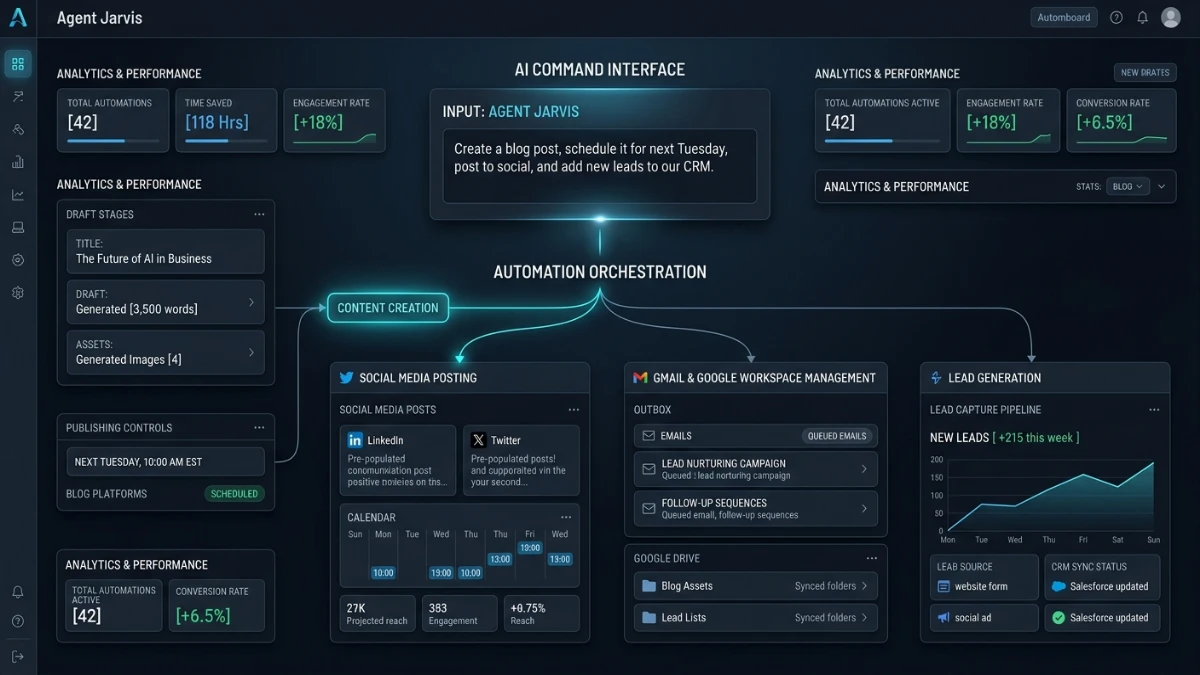
There’s a new product launch making the rounds in the AI marketing space. It’s generating the kind of buzz that’s hard to ignore: Agent Jarvis AI. The pitch is bold. A single AI agent handles content creation, social posting, email management, blog publishing, and lead generation. You trigger all of it from one command.
Before diving in, I want to be upfront about what this article is and isn’t.
Why This Isn’t a Hands-On Review
This isn’t a hands-on review. I haven’t tested Agent Jarvis AI myself, and I won’t pretend otherwise. What follows breaks down what the creators are promising ahead of the August 15 live training. You can use it to decide whether the training is worth your time before you evaluate the product yourself.
If you’ve been burned before by “revolutionary” software that turned out to be a repackaged template with a fancy dashboard, keep that same skepticism here too.
Quick Verdict
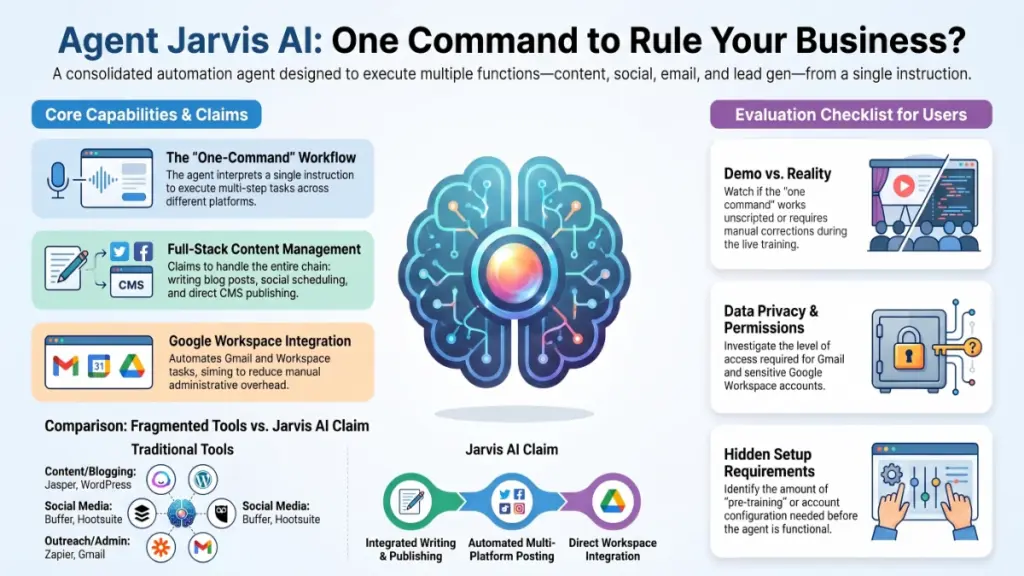
Agent Jarvis AI positions itself as an all-in-one business automation agent. It claims to consolidate several previously separate tasks — content writing, social media scheduling, Gmail and Google Workspace management, blog publishing, and lead generation — into a single command-driven workflow.
The core appeal, at least on paper, is consolidation. Most people currently juggle five or six different tools: a writing assistant, a social scheduler, an email automation platform, a CMS plugin, and a lead-gen tool. Agent Jarvis AI promises to replace that stack with one agent that coordinates everything for you.
That’s a compelling pitch. It’s also one that plenty of AI products have made before with mixed results. Nobody can confirm yet whether Agent Jarvis AI actually “runs your entire business” or whether it simply automates a handful of repetitive tasks. Real users will only discover that once they get their hands on it. This article covers the announced features so you know what to expect walking into the live training.
Best for: People curious about AI business automation who want to see the product demonstrated live before committing.
Not yet known: Actual performance, reliability, output quality, and whether the “one command” workflow holds up outside a curated demo.
Product Overview
| Detail | Information |
|---|---|
| Product Name | Agent Jarvis AI |
| Category | AI Business Automation Agent |
| Core Claim | Single-command AI agent for content, social, email, blogging, and lead generation |
| Launch Event | Live training on August 15 |
| Price | Not disclosed in available materials |
| Refund Policy | Not disclosed in available materials |
| Official Website | Not provided |
| Best For | Solopreneurs, marketers, and small business owners exploring AI automation |
| Overall Rating | Not yet ratable — pending independent testing |
I’d rather tell you plainly when information isn’t public yet than fill in a number that sounds authoritative but isn’t real. That’s especially true for pricing and refund terms. Those two details usually matter most once you actually decide whether to buy.
What Is Agent Jarvis AI?
The Core Idea
The announcement describes Agent Jarvis AI as an AI agent, not just a chatbot or a basic content generator. The system takes one instruction and carries out a multi-step business task across different functions.
The stated purpose is simple: reduce the operational overhead of running an online business. Normally, you’d write a blog post, draft social captions to promote it, then manually follow up with leads by email — three separate steps across three separate tools. Agent Jarvis AI wants to collapse that chain into a single command.
The Problem It Claims to Solve
The product targets a familiar problem: tool fatigue. Most small teams and solo operators stitch together four or five subscriptions just to keep content, outreach, and admin moving. Consolidation tools promise to cut that down. How well they actually deliver varies enormously from product to product.
Main Features (As Announced)
Here’s what the pre-launch materials showcase. I’m describing these as claimed capabilities, since nobody has independently verified any of them yet.
One-Command Workflow
This is the centerpiece of the pitch. You give the agent a single instruction. It interprets that instruction, breaks it into sub-tasks, and executes them across connected tools. This is also the most ambitious claim in the whole product. “One command, many outcomes” is notoriously hard to get right. A little ambiguity in your instruction can cascade into wrong outputs across several downstream tasks if the model misreads your intent.
Content Creation
Jarvis reportedly generates written content — likely blog posts, articles, or marketing copy. The materials don’t detail the exact scope. We don’t know whether it handles long-form versus short-form content, how flexible it is across niches, or how much tone customization it offers.
Social Media Posting
The agent posts content to social platforms as part of its automated workflow, according to the announcement. A few questions remain open: which platforms it supports, whether it includes scheduling and analytics, and how much manual review happens before anything goes live on your accounts.
Gmail and Google Workspace Integration
This claim stands out because email and calendar automation touch sensitive account permissions. If Jarvis genuinely integrates with Gmail and Workspace tools, that raises fair questions about the access level it requires and how it handles your data. Ask about this directly during the live training rather than assuming the answer.
Blog Publishing
The product claims to publish directly to a blog, not just write content for one. That suggests some kind of CMS integration — WordPress being the most common target for tools like this — though the materials don’t specify which platforms it supports.
Lead Generation
The agent also positions itself as a lead-gen tool. The mechanics behind it — scraping, form capture, outreach sequencing, or something else entirely — aren’t detailed in the promotional material available right now.
What the Live Training Promises
The August 15 session frames itself as a demonstration event rather than a straightforward sales page. According to the announcement, attendees can expect:
- Real-world missions — live demonstrations of the agent completing actual tasks, not just slides describing what it can do
- A one-command workflow walkthrough — presumably showing the flagship feature in action
- An AI business blueprint — some kind of framework or strategy guide for structuring a business around the tool
- Prize incentives — the chance to win the software itself, cash prizes, and bonuses reportedly worth over $11,000
That last point deserves a pause. Prize-driven webinars are a long-standing tactic in digital product launches. They boost live attendance and create urgency. That structure isn’t inherently a red flag, but it also tells you nothing about whether the product itself works well. Watch the actual demo closely instead of getting swept up in the giveaway framing.
Ease of Use — What to Watch For
Nobody has hands-on access yet, so here’s what actually matters if you want to gauge real-world usability instead of demo polish:
- Does the “one command” work exactly as shown, or does the presenter correct, re-prompt, or manually adjust the output along the way?
- How much setup happens before that one command can run? Do you need to connect accounts, configure preferences, or train it on your brand voice first?
- Could a non-technical user realistically operate this interface, or does the demo lean heavily on the presenter’s familiarity with the tool?
- Does the presenter acknowledge mistakes and show them, or does everything look suspiciously flawless? A completely error-free live demo sometimes signals heavy pre-recording or cherry-picked examples.
Performance — Open Questions
Speed, stability, and reliability separate a genuinely useful AI agent from an impressive-looking demo. A product description can’t answer any of these, so here’s what remains unknown:
- How does it perform with real, messy business data instead of curated demo inputs?
- What happens when a Google Workspace or Gmail permission fails, or a platform API changes?
- Does content quality hold up across different niches, or does the demo favor a narrow set of topics?
- Does the system include rate limiting, downtime handling, or a queue when the agent orchestrates multiple tasks at once?
These questions separate marketing copy from an actual working tool. A proper hands-on review would need to answer them directly.
Pricing
The available materials don’t disclose pricing yet. Launch-style products like this typically reveal pricing during or immediately after the live training, sometimes with early-bird discounts or bonus tiers tied to attendance. If pricing matters to your decision — and it should — wait to see the actual numbers presented live instead of assuming a figure based on similar products.
Pros (Based on What’s Claimed)
- Consolidation appeal — if it works as described, reducing five tools to one command interface would genuinely save time for solo operators and small teams
- Broad feature scope — content, social, email, publishing, and lead-gen cover a lot of the repetitive work that eats into a business owner’s week
- Live demonstration format — a live training at least lets you watch the product attempt real tasks and ask questions in real time, unlike a static sales page
- Google Workspace integration, if genuine — deeper integration with tools people already use daily beats a standalone app that lives in isolation
Cons (Based on What’s Unknown or Unverified)
- No independent verification yet — every listed capability comes from the product’s own promotional materials, not third-party testing
- “World’s first” is an unverifiable claim — AI business automation agents aren’t new as a category, and similar consolidation tools have launched before with mixed success
- Undisclosed pricing and refund policy — you can’t fully evaluate value for money without this information
- Prize-driven urgency — the $11,000+ in bonuses and prizes is a promotional tactic; don’t let it become the deciding factor in whether the product itself is useful
- Sensitive integrations raise questions — Gmail and Workspace access demands real scrutiny around permissions, data handling, and security before you connect business accounts
Comparison With Similar Tools
Without independent testing, a detailed feature-by-feature comparison would mean guessing at things I don’t actually know. Instead, here’s how to think about where Agent Jarvis AI sits conceptually:
| Category | Established Examples | What to Compare |
|---|---|---|
| AI Content Generation | Jasper, Copy.ai | Output quality, tone control, niche flexibility |
| Social Scheduling | Buffer, Hootsuite | Platform coverage, analytics, approval workflows |
| Email Automation | Zapier + Gmail, ActiveCampaign | Reliability, permission scope, error handling |
| All-in-One Agents | Various emerging “AI employee” tools | Whether consolidation reduces friction or just centralizes points of failure |
The honest question isn’t “is Jarvis better than these individually.” Ask instead: “does doing all of this in one tool actually work better than using specialized tools that each excel at one thing?” That’s the real trade-off with any all-in-one platform, and only real usage can answer it.
Who Should Attend the Live Training?
- Solopreneurs and small business owners currently juggling multiple separate tools for content, social, and email
- Marketers curious about how far “one command” AI agents have actually progressed
- Anyone considering the product who wants to see it demonstrated live before reading a sales page or committing money
- People interested in the AI business blueprint material, even independent of the software itself
Who Should Skip It (For Now)?
- Anyone who already has a reliable, working stack of tools and isn’t looking to switch
- Buyers who feel uncomfortable with prize-driven or urgency-based launch formats
- Businesses with strict data governance requirements who’d want detailed answers on Gmail/Workspace permission scope before even considering a connection
- Anyone who wants to see independent, hands-on reviews before trusting a pre-launch pitch — a reasonable position with any new AI product
Frequently Asked Questions
Is Agent Jarvis AI really the first AI agent to automate an entire business? That’s the marketing claim, but “world’s first” is hard to verify. Similar all-in-one AI automation tools have launched before under different branding. Treat it as a promotional statement rather than a confirmed fact.
What does Agent Jarvis AI actually integrate with? The announcement says it works with Gmail, Google Workspace, social media platforms, and blog publishing systems. The materials don’t detail exact platform support.
How much does Agent Jarvis AI cost? Nobody knows yet. The team hasn’t disclosed pricing ahead of the August 15 live training. Expect them to reveal it during or shortly after the event.
Is the live training just a sales pitch? The training combines a demonstration with real-world task examples and prize giveaways — a common structure for product launches in this space. Expect some sales elements alongside the demo content.
What are the prizes being offered? The announcement mentions the chance to win the software itself, cash prizes, and bonuses collectively worth more than $11,000. The team typically details specific prize structures during the event.
Is Gmail and Workspace access safe to grant? That depends entirely on how the integration works and what permissions it requests — information nobody has published yet. Before you connect any business email or Workspace account to a new tool, review exactly what access it requests and whether you can scope or revoke it easily.
Does it work for any business niche, or does it target a specific type of business? The materials don’t specify. Ask this question directly during the live training.
Is there a free trial, or is it strictly a paid product? Nobody has disclosed this yet. Launch pricing structures vary widely, so this will likely become clear during the training.
🎁 Free Gift Waiting for You!
Before you leave, there’s a free gift waiting for you.
As a thank-you for reading, you can claim my Ultimate All-In-One Digital Marketing Package completely FREE.
🎉 What’s Inside Your Ultimate All-In-One Package
01. 50 AI Digital Product Ideas A curated collection of highly profitable AI-powered digital product ideas designed for quick implementation and strong profit potential.
02. Digital Sales Mastery Discover the proven framework behind high-converting sales funnels, persuasive copywriting, and sustainable online revenue growth.
03. Mastering Email List Advanced strategies for building an engaged email audience, increasing open rates, improving click-through rates, and generating automated income.
04. The Ultimate Faceless Playbook A complete blueprint for building a profitable online brand and growing on social media without ever showing your face.
🎁 BONUS: Premium Canva Marketing Vault A premium library of high-converting Canva templates to help you create professional marketing assets, generate more organic traffic, and boost conversions.
💥 Total Package Value: $197 ✅ Yours Today: FREE
Claim your complimentary bundle and get instant access to premium resources that can help you create, market, and grow your online business more effectively.
Final Verdict
Agent Jarvis AI makes a big promise: one command, an entire business automated. Big promises deserve proportional scrutiny, and right now, all of it comes from the product’s own launch materials rather than independent hands-on use.
Watch the Demo, Not the Sales Copy
That doesn’t mean the product isn’t worth your attention. The concept of consolidating content, social, email, publishing, and lead-gen into a single agent offers real value if the execution holds up. So watch the August 15 live training with a critical eye. Notice whether the demos look like genuine unscripted tasks or tightly rehearsed examples. Ask direct questions about pricing, refund policy, and data permissions. Don’t let the prize giveaway push you into a decision before you’ve seen enough.
If you attend and the product holds up, great — that’s worth revisiting with a proper hands-on breakdown afterward. If it doesn’t, you’ll only lose the time it took to watch a webinar. Either way, go in informed rather than hyped, and let the actual demonstration do the convincing instead of the sales copy.