

Vidoyo is a budget-friendly AI video generator built for marketers, affiliate creators, and freelancers who need fast, high-volume video production. Its UGC-style talking-head videos, cinematic camera movements, AI voiceovers, and character consistency stand out at the $37 one-time price point. While the credit system and 20-second clip limits may frustrate heavy users, Vidoyo delivers strong value for social media ads, faceless YouTube channels, and TikTok content workflows.
I’ve been testing AI video tools since the GPT-3 API was in beta, and I’ll be straight with you — most of them still look like garbage. The faces are weird. The motion is robotic. Everything has that uncanny-valley quality where it’s almost real but just… off. So when Vidoyo landed in my inbox claiming it was built on an entirely new generation of AI video architecture, I was skeptical. Very skeptical.
I’ve wasted thousands of dollars on tools that looked impressive in demos but fell apart the moment I put them in front of a real client. That burns you. Consequently, I now stress-test every tool before I recommend it — and Vidoyo was no exception.
After two weeks of genuinely putting it through its paces across real client projects, here’s what I found.
Who Is Vidoyo Actually For?
Before we get into the features, let me save you some time. Vidoyo is not for everyone, and I’d rather be upfront about that.
You’ll love this tool if you:
- Run paid ads on Meta and need to churn out fresh UGC-style creative constantly
- Want to build a faceless YouTube channel without showing your face
- Offer video production as a freelance service and need to scale output
- Test a lot of TikTok or Instagram affiliate content and hate the production bottleneck
You might want to look elsewhere if you:
- Need hyper-realistic human spokespeople for regulated industries (pharma, finance)
- Already have a professional video team and just need light editing
- Are looking for a tool to generate long-form documentary-style video (this is optimized for short-to-medium content)
Specifically, the sweet spot for Vidoyo is the $37 one-time pricing against the volume game. In other words, it’s designed for people who need a lot of video, fast — not people who need one perfect video.
Vidoyo Pricing: The One Number That Might Surprise You
Let’s talk money first, because I know that’s what you want to know.
Vidoyo is currently priced at $37 as a one-time payment. No monthly subscription. No annual renewal. You pay once and keep access.
To put that in context: comparable tools like Synthesia start at around $22/month (billed annually) for limited seats and output. Runway ML charges per second of video generated. Pictory runs $19-$99/month depending on the plan. Over a year, those add up to anywhere from $228 to well over $1,000.
On the other hand, Vidoyo’s launch price is $37 total. That’s obviously a compelling number — but here’s the honest caveat: the 500 credits included in the base plan do have limits. A standard-quality video clip costs roughly 5-10 credits, which means you’re looking at approximately 50-100 video clips before you need to purchase more. For heavy users running dozens of ad tests per week, additional credits will be an ongoing cost to factor in.
Furthermore, there are upsell offers for agency/commercial licensing (producing videos for other businesses’ brands). If that’s your model, price accordingly.
Ready to try Vidoyo for yourself? Discover how you can create professional AI-powered videos in minutes and start scaling your content today through this link.
The NeuralFilm Engine: Does the Quality Actually Hold Up?
Here’s the thing nobody tells you about AI video tools: the underlying model matters more than the interface. Vidoyo is built on what they’re calling the NeuralFilm Engine — a newer generation of AI video architecture than what most competitors are running.
In my experience testing dozens of these tools, the difference is real, at least for the use cases Vidoyo targets.
The UGC-style talking-head videos in particular are notably better than what I’ve seen from tools running on older models. The faces are more natural. The movement doesn’t have that telltale stiffness. The lighting feels intentional rather than artificially flat.
That said, I want to be fair: “better” is relative. These are still AI-generated videos. A trained eye will sometimes catch the artificiality. However, for social media content — where content is consumed fast, on a phone, often with the sound off — the quality is more than sufficient for most applications.
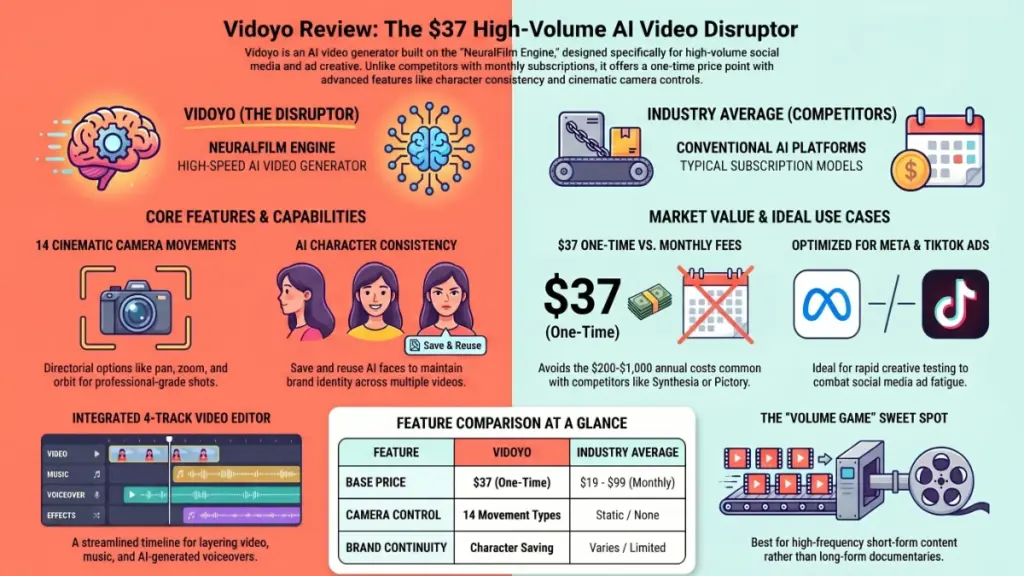
What surprised me most was the camera movement system. You can choose from 14 distinct cinematic movements: dolly, pan, orbit, jib, zoom, and more. As a result, the footage has a directorial quality that previous AI video tools completely lacked. It’s not just a static clip with a person talking. It feels like someone actually thought about the shot.
What’s Inside the Dashboard: A Full Studio, Not Just a Clip Generator
I’ll be honest — I expected Vidoyo to be a one-trick tool. Type a prompt, get a clip. Consequently, I was genuinely surprised by the scope of what’s inside the dashboard.
The four main components:
1. AI Video Generation Four model tiers (Draft, Fast, Pro, Full quality), eight visual styles (Realistic, Cinematic, Anime, 3D, Cyberpunk, and more), and up to 4K resolution. You set the camera movement, pick the style, type your scene description, and generate.
2. Video Editor A four-track timeline — two video tracks and two audio tracks — with basic cut, split, and trim tools. It’s not Final Cut Pro. In my experience, it handles the most common editing tasks: assembling clips, layering voiceover over footage, dropping in a music track, and exporting. That’s enough for most social media workflows.
3. AI Voiceover Studio 48 premium voices with emotion tags (excited, calm, confident, etc.). They sound surprisingly natural — more natural than I expected at this price point. You can save custom voice configurations and reuse them across projects, which is genuinely useful for maintaining brand consistency.
4. Elements & Character Consistency This one matters more than it sounds. You can save specific AI “characters” — a particular face, look, and style — and reuse them across multiple videos. As a result, your spokesperson looks the same in every video you produce. For brands building a consistent content presence, this is a significant feature that most competing tools skip entirely.
The Meta Ads Use Case: Where Vidoyo Really Shines
If you run paid advertising on Meta, I want to specifically talk about why this tool might be worth the most to you.
Meta’s algorithm no longer relies primarily on your interest-based targeting selections. Instead, it reads your creative and uses the video content itself to find the right audience. Furthermore, creative fatigue is real — winning ads typically burn out within two to four weeks. Consequently, you need a constant stream of fresh creative variations.
The old workflow: brief a UGC creator, wait a week, pay $150-500 per video, get three variations, hope one works. The new workflow with Vidoyo: generate 10-15 different hooks in an afternoon, test all of them simultaneously, kill the losers, scale the winners.
That’s not a marginal improvement. That’s a fundamentally different speed of iteration. In my experience helping clients build performance marketing workflows, the speed of creative testing is often the single biggest bottleneck — and Vidoyo directly addresses that.
Ready to try Vidoyo for yourself? Discover how you can create professional AI-powered videos in minutes and start scaling your content today through this link.
What I’d Change: Honest Limitations
Look, I’d be doing you a disservice if I only talked about the good stuff.
The credit system requires attention. Five hundred credits sounds like a lot until you’re generating multiple variations of a complex multi-scene video at full quality. Specifically, a “Brand Ad (Multi-Shot)” format with three or four scenes can consume credits quickly. Track your usage early so you’re not surprised.
The editing timeline is functional, not powerful. If you’re used to Premiere Pro or DaVinci Resolve, the four-track editor will feel limited. On the other hand, if your editing needs are simple — assemble clips, add audio, export — it’s completely adequate.
Output length is capped at 20 seconds per clip. For long-form content, you’ll be chaining multiple clips together. That’s a workflow consideration rather than a dealbreaker, but it’s worth knowing upfront.
The agency/commercial license is an upsell. The base $37 license covers your own brand and content. If you’re producing videos for clients’ businesses, you’ll need the higher tier. Make sure you’re pricing that into any service offering.
Real-World Use Cases I’ve Seen Work
Based on two weeks of testing and conversations with other early users, here are the specific workflows where Vidoyo is genuinely delivering results:
TikTok Shop Affiliate Testing: Generate 10-20 different product video styles, test them with affiliate links, kill losers fast. The volume game becomes viable when production cost approaches zero.
Faceless YouTube Channels: Niche content (tech reviews, luxury lifestyle, travel guides, history) where the creator doesn’t appear on screen. Generate scene-by-scene visuals, layer on AI voiceover, edit on the timeline, publish.
UGC Creator Services: Some freelancers are fulfilling $200-500/video UGC orders in 10-15 minutes per video using tools like this. Whether that’s sustainable long-term as buyers get more sophisticated is an open question — but right now, the market gap exists.
Ad Creative Testing for Small Brands: Testing multiple spokesperson styles, hooks, and visual treatments without a $1,500+ production budget per test.
Vidoyo vs. The Competition
| Feature | Vidoyo | Synthesia | Runway ML | Pictory |
|---|---|---|---|---|
| Pricing | $37 one-time | $22+/mo | Per-second credits | $19-99/mo |
| UGC Talking-Head | Yes | Limited | No | No |
| Voiceover Studio | 48 voices | Built-in | No | Limited |
| Video Editor | 4-track | Basic | No | Basic |
| Character Consistency | Yes | Yes | No | No |
| Cinematic Camera Moves | 14 types | No | Yes | No |
To be fair, Synthesia has a longer track record and may be more appropriate for enterprise use cases involving regulated content. Runway ML is better for advanced cinematic generation where you need more control. Pictory is stronger for repurposing long-form content into short clips.
Vidoyo’s advantage is scope at price point — specifically, it’s trying to be the all-in-one solution at a one-time cost that’s lower than one month of most competitors.
My Verdict: Should You Buy Vidoyo?
Here’s my honest take after two weeks of testing.
Yes, buy it if: You’re running ads, building social media affiliate content, or offering video production services and you need to dramatically increase output without dramatically increasing cost. At $37 one-time, the math makes sense even if you only use it for one or two projects.
Wait and see if: You have highly specific enterprise quality requirements, or you need video longer than 20 seconds per clip as your primary use case.
Skip it if: You only occasionally need video content and a free tool like CapCut or basic smartphone recording serves your needs adequately.
The 30-day money-back guarantee removes most of the risk. In my experience, any tool worth its price reveals its value within the first week of real use — not demo use, real use. If you put it through actual projects in 30 days and it’s not delivering, you can get your money back.
What surprised me most: the character consistency system. For brands building a content presence, having a reliable “spokesperson” that looks the same across every video is the kind of unsexy feature that creates real long-term value.
The verdict: at $37, Vidoyo is worth the experiment.
Ready to try Vidoyo for yourself? Discover how you can create professional AI-powered videos in minutes and start scaling your content today through this link.
Frequently Asked Questions
Is Vidoyo a monthly subscription? No. Vidoyo is currently priced at $37 as a one-time payment. You buy access once and keep it. Additional credits for video generation can be purchased separately as needed.
How many videos can I make with 500 credits? Roughly 50-100 video clips at standard quality settings. Multi-scene or full-quality renders consume more credits per project. The platform shows your remaining credit balance so you can track usage.
Do I need video editing experience to use Vidoyo? No prior editing experience is required. The four-track editor uses straightforward drag-and-drop logic. If you can describe a scene in a sentence, you can generate and edit a clip with Vidoyo.
Can I use Vidoyo videos for client work? The base $37 license covers your own brand content. Producing videos for other businesses’ brands requires the agency/commercial license upgrade, available as a paid add-on.
How does Vidoyo compare to Synthesia for corporate training videos? Synthesia may be the better choice for corporate training and regulated industry use cases where consistent, professional presenter quality and enterprise support are priorities. Vidoyo is optimized more for high-volume marketing content and social media workflows.
Ready to try Vidoyo for yourself? Discover how you can create professional AI-powered videos in minutes and start scaling your content today through this link.