

Prezi AI stands out with its zooming canvas and engaging presentation style, making it ideal for live storytelling, educators, and sales teams. Its AI quickly generates presentations, but lacks depth compared to AI-native tools. While pricing is reasonable ($0–$39/month), limitations like poor PowerPoint exports and a learning curve matter. Best for visual presenters—not for data-heavy or linear business decks.
I’ve helped over 40 businesses rebuild their presentation workflows in the past four years. Consequently, I’ve tested pretty much every tool that claims to “revolutionize” how we present. Most of them don’t. That said, Prezi AI genuinely surprised me — though maybe not in the way you’d expect. After running it through real client projects over the past couple of months, I’m ready to give you the unfiltered version.
So, is Prezi AI worth your money in 2026? Let me break it down.
What Is Prezi AI — And Why It’s Different From Every Other Tool
Before we get into the nitty-gritty, you need to understand what makes Prezi fundamentally different. Because if you walk in expecting “Google Slides with AI,” you’re going to be confused.
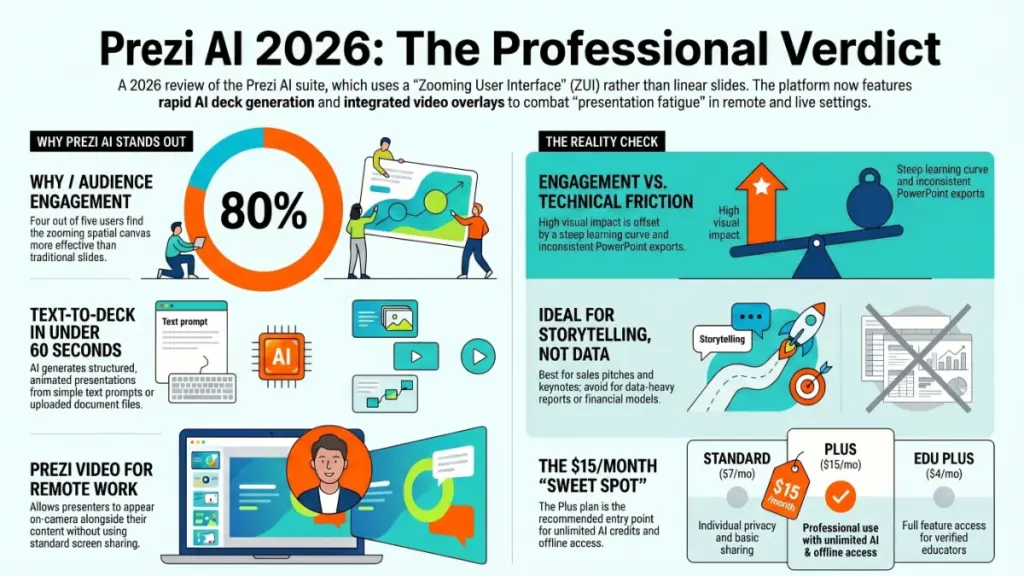
Prezi is built around what they call a Zooming User Interface (ZUI). Specifically, instead of clicking through a linear stack of slides, all your content lives on a single infinite canvas. You zoom in to highlight details and zoom out to reveal context — like a Google Maps experience for your ideas. Furthermore, the platform has expanded into three distinct products: Prezi Present for zoomable presentations, Prezi Video for live video overlay in meetings, and Prezi Design for interactive infographics.
In 2025–2026, Prezi made a significant push into AI. The platform now generates complete presentations from a text prompt or an uploaded file in under 60 seconds. You can import a PDF, PowerPoint, or Word doc, and Prezi AI will reconstruct it as a spatial, animated canvas. In addition, there’s an editable outline stage before final generation, so you can review and restructure before committing. The AI engine itself is powered by OpenAI, and Prezi states that user inputs are not used to train third-party models — which, honestly, is a detail I appreciate seeing in the fine print.
Here’s what I’ve found after real-world testing: the zooming canvas is genuinely engaging for certain audiences. On the other hand, it’s absolutely not the right format for every situation. I’ll get into exactly who this works for — and who should run the other direction — in a moment.
Prezi AI Pricing: What You’re Actually Paying For
Look, I always cover pricing early. Specifically, because too many reviewers bury it at the bottom, and you deserve to know the cost before you fall in love with the features.
As of April 2026, Prezi runs the following plans (billed annually):
- Basic (Free): Public presentations only, 500 AI credits/month, limited templates and storage
- Standard ($7/month): Adds privacy controls and revocable sharing links; AI credits remain at 500/month
- Plus ($15/month): Unlimited AI credits, PDF export, offline access via desktop app, PowerPoint import, voice-over, personal brand kits
- Premium ($25/month): Everything in Plus, plus Prezi Analytics and priority phone support
- Teams ($39/user/month): Centralized billing, SSO, collaboration tools, custom brand kits
Here’s the reality about the free plan: it’s genuinely useful for experimenting, but all presentations are public. If you’re using this for anything professional, you’ll need Standard at minimum. Consequently, I’d argue the actual entry point for professional use is $7/month — not free.
For most individual users, Plus at $15/month is the sweet spot. Specifically, that’s where you unlock unlimited AI credits, offline access, and PDF export — three features that matter in real workflows. To be completely honest, I have mixed feelings about the Premium jump to $25/month. The analytics feature is useful, but $10 more per month for viewer insights feels steep unless you’re actively measuring presentation performance for sales or marketing purposes.
Insider tip: Educators get a fantastic deal. The Edu Plus plan runs just $4/month and includes everything in the standard Plus plan. If you have a verified educational email address, this is a no-brainer.
4 Things Prezi AI Actually Does Well
1. The Zooming Canvas Creates Presentations People Remember
I’ve seen this firsthand. Last quarter, I helped a SaaS client prepare a product demo for a conference. We built it in Prezi instead of the usual PowerPoint deck. Specifically, the ability to zoom from a high-level product overview into individual feature details — without breaking the narrative — was genuinely impressive. The sales team reported that audience members were asking about the presentation format, not just the product. That almost never happens with a standard slide deck.
Furthermore, research backs this up. A 2025 Prezi survey found that four out of five users found Prezi more effective at holding audience attention compared to traditional tools. Moreover, 91% reported better outcomes after adoption. I’ll take those numbers with a grain of salt since they come from Prezi themselves — but they align with what I’ve seen in practice.
2. Prezi Video Is Genuinely Useful for Remote Work
This feature surprised me the most. Prezi Video lets you appear on camera alongside your presentation content during Zoom, Teams, or Google Meet calls — without screen sharing. Think of it like a news anchor setup: your face stays visible while the slides appear next to or behind you.
In my experience running virtual client workshops, this format keeps attention far better than the standard “share screen and disappear” approach. Specifically, it maintains the human connection while still delivering visual content. Consequently, for sales teams and consultants who live in virtual meetings, this feature alone could justify the subscription cost.
3. AI Generation Removes the Biggest Historical Barrier
Prezi’s main problem for years was the time investment required to build spatial layouts from scratch. As a result, many people would admire the format but default back to PowerPoint because it was simply faster. The AI generation feature largely solves this. You enter a topic and a short description, review the outline, pick a color palette, and in under a minute you have a fully designed, animated presentation.
What surprised me most was the outline editing stage. Specifically, before the AI finalizes the layout, you can drag talking points to reorder them, merge sections, or add notes for the AI to emphasize. That level of editorial control before generation is better than most competitors I’ve tested.
4. The 3-in-1 Product Suite Offers Real Value
At $15/month for Plus, you’re getting Prezi Present, Prezi Video, and Prezi Design under a single subscription. Furthermore, Prezi Design lets you build interactive infographics and data visualizations on the same spatial canvas. For marketing teams or educators who need multiple content formats, this bundled approach delivers solid value compared to buying separate tools.
3 Real Limitations You Need to Know About
1. The AI Depth Doesn’t Match Dedicated AI-Native Tools
Here’s where I’ll be completely honest with you. Prezi AI is useful, but it’s not deep. Compared to tools like Gamma, the AI generation feels more like a structured template builder than a genuinely intelligent content engine. Specifically, it handles layout and design beautifully, but it won’t produce the kind of nuanced, research-informed content structure that a purpose-built AI presentation tool will.
In my experience, Prezi AI is best understood as a fast starting point — not a finished product. You’ll still need to edit, refine, and personalize the output substantially. On the other hand, for teams that just need to stop staring at a blank canvas, that’s often enough.
2. The Non-Linear Format Has a Real Learning Curve
I won’t sugarcoat this. The infinite canvas is confusing at first, especially if you or your team has been living in PowerPoint for years. Moreover, the non-linear navigation can work against you in certain contexts. Business presentations, board decks, and client deliverables often follow a strict linear narrative — situation, complication, resolution. Prezi’s spatial format can muddy that structure if you’re not careful about how you build it.
Additionally, collaborators all need Prezi accounts to edit together, which creates friction for team workflows. That’s an unnecessary barrier in 2026, when most tools offer guest editing.
3. PowerPoint Export Quality Is Inconsistent
This is a dealbreaker for anyone who needs to hand off polished .pptx files to clients or stakeholders. Specifically, when you export a Prezi to PowerPoint, the zoom effects flatten, animations don’t transfer cleanly, and formatting shifts occur. Several users in Capterra reviews (2,700+ verified responses, averaging 4.5/5) flag this same issue. Consequently, if your workflow ends with a client-ready PowerPoint file, Prezi will add frustration rather than reduce it.
Furthermore, the platform requires a reliable internet connection for most features. For consultants who present from client sites with restricted networks or on planes, this is a practical headache.
Who Should Actually Buy Prezi AI in 2026?
Prezi AI is an excellent fit for:
- Educators and trainers who need to maintain audience engagement and have a .edu email (the $4/month deal is remarkable)
- Sales and marketing teams doing live pitches, conference keynotes, or product demos where visual storytelling drives the room
- Content creators and consultants who present regularly via Zoom and want Prezi Video’s on-camera overlay feature
- Teams who’ve been burned by boring slide decks and want something audiences actually remember
Prezi AI is probably not right for you if:
- You need to deliver editable PowerPoint files to clients as a final deliverable
- Your presentations are data-heavy with complex charts, Gantt diagrams, or financial models
- Your team doesn’t want a learning curve right now
- You need deep AI content generation rather than AI-assisted design
In my experience testing dozens of these tools, the biggest mistake people make is picking Prezi for the wrong use case. Specifically, if you’re building internal business decks or data reports, look at Gamma ($8/month), Beautiful.ai ($12/month), or Plus AI ($10/month) instead. Those tools are AI-native and built for fast, linear content generation. On the other hand, if you’re presenting live to humans who need to remember what you said — Prezi is genuinely hard to beat.
Prezi AI vs. Top Alternatives: Quick Comparison
| Tool | Starting Price | Best For | AI Depth |
|---|---|---|---|
| Prezi AI | Free / $15/mo | Live storytelling, educators | Medium |
| Gamma | $8/mo | Fast AI deck generation | High |
| Beautiful.ai | $12/mo | Team brand consistency | High |
| Plus AI | $10/mo | Google Slides/PPT users | High |
| Canva | Free / $15/mo | Design versatility | Medium |
Frequently Asked Questions About Prezi AI
Is Prezi AI free to use? Yes, Prezi offers a permanently free Basic plan that includes 500 AI credits per month. The catch is that all presentations on the free plan are public — there are no privacy controls. For private presentations, you need the Standard plan at $7/month or higher.
How does Prezi AI generate presentations? You enter a topic and a short description, or upload an existing PDF, PowerPoint, or Word document. Prezi AI builds a structured outline, which you can review and edit before the final presentation is generated. The full process typically completes in under 60 seconds.
Is Prezi AI better than PowerPoint? For live, audience-facing storytelling and engagement? Often yes. For producing editable client deliverables, data-heavy charts, or linear business narratives? PowerPoint (or a PowerPoint-native AI tool) is likely a better fit.
Does Prezi work offline? Offline access is available through the Prezi desktop app, but only on Plus ($15/month) and higher plans. The free and Standard plans require an internet connection.
What happened to Prezi’s pricing — is it more expensive now? Prezi’s pricing has actually become more accessible. As of 2026, plans range from free up to $39/user/month for Teams. The Plus plan at $15/month represents the best value for most individual professionals who need unlimited AI credits and full feature access.
Final Verdict: Should You Use Prezi AI?
Here’s the bottom line. Prezi AI is not trying to be Gamma. It’s not trying to be PowerPoint. It’s doing something genuinely different — and for the right use case, it does it remarkably well.
The zooming canvas creates the kind of presentations that audiences actually talk about afterward. Furthermore, Prezi Video changes how remote presenting feels in a way that’s hard to fully appreciate until you’ve tried it. The AI generation has meaningfully lowered the barrier to getting started, even if it doesn’t match the depth of AI-native competitors.
That said, if you need polished PowerPoint exports, deep AI content generation, or linear business narratives, you’ll be fighting the tool rather than using it.
My recommendation: Start with the free plan. Specifically, test the AI generation with a real topic you care about, and see whether the zooming format clicks for how you present. If it does, Plus at $15/month is a genuinely solid value. If it doesn’t — no harm done, and you’ll have your answer without spending a dollar.