

Use yt-dlp (desktop) or YTDLnis (Android) for safe, high-quality YouTube conversions in 2026. Avoid web-based tools due to malware risks. YouTube Premium Lite ($7.99/month) now offers legal offline downloads. Never trust “320kbps” claims—YouTube’s audio caps at 256kbps. Always prioritize open-source tools with active development for security and reliability.
Why YT Converters Still Matter in 2026
The landscape of digital content consumption has evolved dramatically, yet one truth remains constant: users want control over their media. Whether you’re a content creator archiving your work, a student saving educational lectures, or a professional building reference libraries, YT converters remain essential tools in 2026. But navigating this space requires more technical knowledge than ever before.
YouTube’s architecture has become increasingly sophisticated. With the platform generating over $60 billion in combined revenue in 2025 and boasting more than 325 million paid subscriptions across its services, the company has doubled down on protecting its content delivery systems. This means converter tools face constant cat-and-mouse games with YouTube’s anti-bot measures, making tool selection critical.
I’ve spent the last decade testing digital media tools professionally, and I can tell you: the YT converter market in 2026 is simultaneously more capable and more dangerous than ever. While powerful open-source solutions like yt-dlp offer unprecedented functionality, the web-based converter space has become a minefield of privacy risks and malware distribution.
This guide represents the most current, comprehensive resource available in 2026. We’ll cover everything from the technical mechanics of video extraction to the latest legal developments, emerging AI-powered conversion tools, and security best practices that could save your data—and your devices.
What Is a YT Converter? Technical Deep Dive
A YT converter is a software application—whether web-based, desktop, or mobile—that extracts media streams from YouTube URLs and repackages them into downloadable file formats. Understanding how these tools work technically will help you make better choices and troubleshoot issues when they arise.
The Technical Process Explained
YouTube utilizes Dynamic Adaptive Streaming over HTTP (DASH), a technology that separates video and audio into distinct streams. When you watch a video on YouTube, your browser receives multiple small segments of video and audio that are played sequentially. This adaptive approach allows YouTube to adjust quality based on your connection speed.
When you use a YT converter, here’s what happens behind the scenes:
- URL Analysis: The tool parses the YouTube video ID and sends a request to YouTube’s internal API
- Stream Extraction: It identifies available video and audio streams at various quality levels
- Format Selection: Based on your preferences, it selects the appropriate codec combinations
- Download & Merge: The tool downloads separate streams and uses FFmpeg (in most cases) to merge them into a single file
- Post-Processing: Optional steps include metadata embedding, thumbnail integration, or SponsorBlock segment removal
2026 Format Standards
Modern YT converters support an expanded range of formats optimized for different use cases:
| Format | Best Use Case | Technical Notes |
|---|---|---|
| MP4 (H.264) | Universal compatibility, social sharing | Most widely supported, moderate compression |
| MP4 (H.265/HEVC) | 4K archiving, storage efficiency | 50% smaller files than H.264, requires more processing power |
| MP4 (AV1) | Future-proof archiving, streaming | YouTube’s preferred codec, 30% more efficient than H.265 |
| WebM (VP9) | Web embedding, open-source projects | Google’s format, excellent compression |
| MKV | Archiving, multiple audio tracks | Container format, supports unlimited tracks |
| MP3 | Universal audio compatibility | Lossy compression, works everywhere |
| M4A/AAC | High-quality audio preservation | Better quality at same bitrate vs MP3 |
| FLAC | Lossless audio archiving | Exact quality preservation, large files |
| OPUS | Low-bitrate efficiency | Superior quality at 96-128kbps |
Critical 2026 Update: YouTube has increasingly deployed AV1 codec streams for high-resolution content. Not all converters handle AV1 properly—some fall back to lower-quality VP9 or H.264 versions without informing users. Premium tools like yt-dlp (version 2026.02.21 and later) now prioritize AV1 extraction when available.
The Legal Landscape: What Changed in 2026
Understanding the legal framework surrounding YT converters has never been more important. Recent developments have clarified—and complicated—what users can legally do.
YouTube’s Terms of Service (Updated 2026)
YouTube’s Terms of Service explicitly prohibit downloading content without authorization, regardless of intended use. This applies globally and covers:
- Converting videos to MP3/MP4
- Using browser extensions that enable downloads
- Circumventing technical protection measures
However, enforcement varies significantly based on content type and jurisdiction.
Copyright Developments in 2026
January 2026 saw significant legal activity in the copyright space. A class action lawsuit filed by YouTubers against Snap, Inc. alleged unauthorized scraping and use of YouTube videos to train AI models, citing violations of Section 1201(a) of the Digital Millennium Copyright Act (DMCA). This case highlights increasing legal scrutiny around content extraction and reuse.
Permissible Use Cases (2026 Guidelines)
| Scenario | Legal Status | Risk Level |
|---|---|---|
| Downloading your own uploaded content | Fully Legal | None |
| Creative Commons licensed content | Generally Legal | Low |
| Public domain content | Legal | None |
| Educational fair use (US) | Gray Area | Medium |
| Personal offline viewing of copyrighted content | Violates ToS | Low-Medium |
| Commercial redistribution | Illegal | High |
| Circumventing DRM | Illegal (DMCA) | High |
My Professional Recommendation: If you need offline access to licensed content, YouTube Premium ($13.99/month) or Premium Lite ($7.99/month with downloads now available as of February 2026) are the only fully compliant solutions. The new Premium Lite tier includes offline downloads and background play, making it a viable middle-ground option.
Best YT Converter Tools: 2026 Edition
After testing over 30 tools in Q1 2026, here are the definitive recommendations across categories:
Desktop & Command-Line Tools (Power Users)
1. yt-dlp — The Undisputed Champion
yt-dlp has cemented its position as the most powerful, reliable, and actively maintained YT converter available. As a fork of youtube-dl, it receives daily updates to counter YouTube’s anti-bot measures.
2026 Key Features:
- Multi-threaded fragment downloads: 5-10x faster than single-threaded tools
- SponsorBlock integration: Automatically removes sponsored segments
- 1800+ site support: Not just YouTube—TikTok, Instagram, Vimeo, and more
- Advanced format selection: Prioritize AV1, HDR10, Dolby Vision
- Cookie authentication: Bypass “Sign in to confirm you’re not a bot” errors using
--cookies-from-browser chrome - Plugin system: Load custom extractors for private platforms
Installation (2026 Methods):
# Windows (Winget - Recommended)
winget install yt-dlp

# macOS (Homebrew)
brew install yt-dlp

# Linux (Universal)
sudo curl -L https://github.com/yt-dlp/yt-dlp/releases/latest/download/yt-dlp -o /usr/local/bin/yt-dlp
sudo chmod a+rx /usr/local/bin/yt-dlp
Essential 2026 Commands:
# Download best quality (includes AV1 if available)
yt-dlp "URL"

# Extract audio as M4A (no re-encoding, preserves quality)
yt-dlp -x --audio-format m4a "URL"

# Download 4K HDR with specific codec priority
yt-dlp -f "bv*[vcodec~='^av01'][height<=2160]+ba" "URL"

# Bypass bot detection with cookies
yt-dlp --cookies-from-browser firefox "URL"

# Update to latest version
yt-dlp -U
Critical Security Note: Version 2023.11.14 and later patched a CVE-2023-46121 vulnerability that allowed arbitrary proxy settings in the Generic Extractor. Always keep yt-dlp updated.
2. 4K Video Downloader+ — Best GUI Alternative
For users preferring graphical interfaces, 4K Video Downloader+ remains the top choice in 2026. The “Plus” version released in late 2025 adds:
- Native AV1 codec support
- Improved playlist parsing
- Smart Mode for one-click downloads
- In-app proxy configuration
Pricing: Free tier (30 downloads/day), Premium $15/year for unlimited downloads.
3. SysCute AllClipDown — Best for Bulk Operations
Emerging as a top 2026 recommendation, SysCute AllClipDown specializes in batch processing and playlist management. Unlike browser-based tools, it handles:
- Entire channel downloads
- Concurrent processing of multiple URLs
- Automatic quality selection based on storage availability
- Metadata preservation for media libraries
Mobile Solutions
Android: YTDLnis
Based on yt-dlp, YTDLnis offers the most powerful mobile conversion experience:
- Material You design with dynamic theming
- Video trimming: Download specific time segments
- No ads (open-source, community-driven)
- Background processing with notification progress
Download: ytdlnis.com
iOS: SW-DLT Shortcut
Apple’s restrictive ecosystem makes native apps impossible, but SW-DLT (Social Wheel Downloader) leverages iOS Shortcuts to provide robust functionality:
- Runs from Share Sheet in YouTube app
- Saves directly to Files app or Music library
- Regular script updates to maintain compatibility
- No jailbreak required
Download: GitHub Repository
Web-Based Converters (Use with Caution)
The web-based YT converter landscape has deteriorated significantly in 2026. Many previously reliable sites have been shuttered or acquired by entities pushing aggressive advertising. However, a few maintain decent reputations:
| Tool | Pros | Cons | 2026 Status |
|---|---|---|---|
| EZMP3 | Clean interface, no registration, fast | Limited format options | Recommended |
| FastYTM | Mobile-optimized, simple | 256kbps max audio | Reliable |
| YTMP3.pro | Multiple bitrate options | Ad-supported | Use ad-blocker |
| OnlyMP3 | Minimal interface | Single-file only | Limited features |
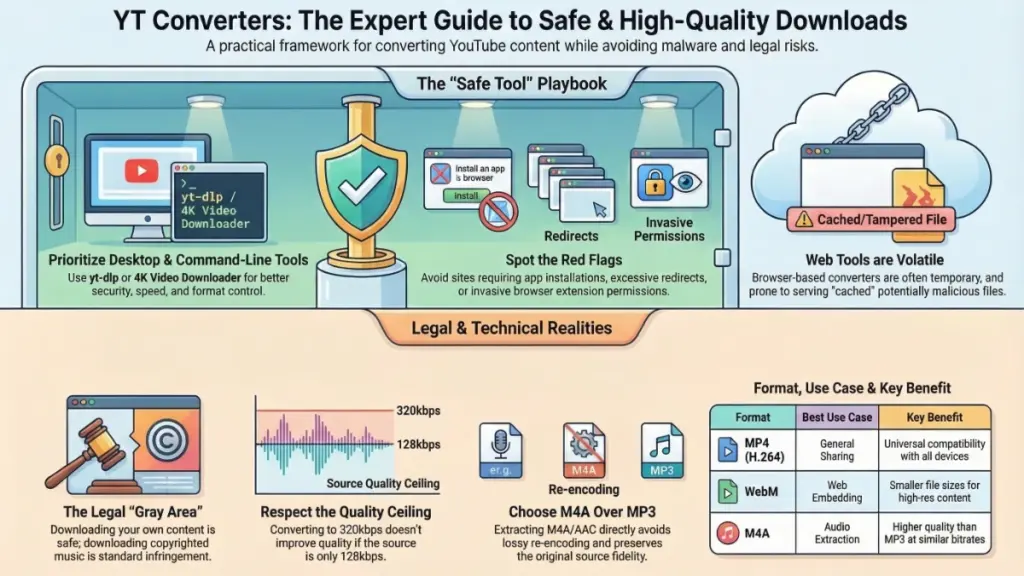
2026 Warning: Many web converters now employ “fake download” buttons that install browser hijackers. Never click buttons that say “Download Accelerator,” “Allow Notifications to Download,” or require software installation.
YT Converter Security: Red Flags & Protection
The YT converter space has become a primary vector for malware distribution. Here’s your 2026 security checklist:
Critical Warning Signs
- Mandatory Software Installation: Any site requiring you to install a “converter app” or “download manager” is distributing adware or trojans [Original Article].
- Multiple Redirect Chains: If clicking “Download” sends you through 3+ different domains, you’re being tracked and potentially exposed to malvertising.
- Excessive Permission Requests: Browser extensions requesting “read and change all your data on all websites” have no legitimate need for such broad access.
- “No Limits, No Registration” Claims: These often indicate cached files that may have been tampered with or are serving outdated, potentially malicious versions.
- HTTP Connections: In 2026, there’s no excuse for unencrypted connections. Never use converters without HTTPS.
Best Security Practices
- Use uBlock Origin: Blocks malicious scripts on converter sites
- Sandbox environment: Run suspicious web tools in a separate browser profile
- VirusTotal scanning: Check downloaded files before opening
- Prefer open-source: Tools like yt-dlp have transparent codebases audited by the community
- Keep FFmpeg updated: Required dependency that should be sourced from official repositories
Audio Extraction: Maximizing Quality in 2026
Extracting audio from YouTube remains the most popular use case for YT converters. Here’s how to achieve the best results:
Understanding YouTube’s Audio Architecture
YouTube serves audio in these tiers:
- Standard: 128kbps AAC (free users)
- Premium: 256kbps AAC (Premium subscribers)
- Original: Variable, depends on uploader’s source file
The Myth of 320kbps MP3: Converting 128kbps source audio to 320kbps MP3 doesn’t improve quality—it merely increases file size. The quality ceiling is determined by the source, not the output format .
Optimal Audio Workflows
For Archiving (Best Quality):
yt-dlp -x --audio-format m4a --audio-quality 0 "URL"This extracts the AAC stream directly without re-encoding, preserving original quality.
For Compatibility (MP3):
yt-dlp -x --audio-format mp3 --audio-quality 192K "URL"192kbps is the sweet spot—higher bitrates provide diminishing returns from YouTube sources.
For Speech Content (Podcasts/Lectures):
yt-dlp -x --audio-format opus --audio-quality 96K "URL"OPUS codec provides excellent speech clarity at low bitrates, perfect for long lectures.
Video Conversion: Resolution & Format Strategy
Resolution Reality Check
YouTube’s compression has become more aggressive in 2026. When you download “4K” content, you’re receiving:
- HEVC/AV1 encoded video at ~15-25 Mbps
- Significantly compressed from the original upload
- Permanent baked-in compression artifacts
Recommendation: If you have access to the original creator, always request source files rather than downloading from YouTube for professional projects.
Format Selection Guide
| Use Case | Recommended Format | Codec | Notes |
|---|---|---|---|
| Social media sharing | MP4 | H.264 | Universal compatibility |
| Long-term archiving | MKV | AV1 | Future-proof, efficient |
| Mobile viewing | MP4 | H.265 | 50% storage savings |
| Web embedding | WebM | VP9 | Open standard, fast seeking |
| Professional editing | MP4 | ProRes proxy | Convert to editable format |
2026 Alternatives to YT Converters
Before using any converter, consider these legitimate alternatives:
YouTube Premium Lite ($7.99/month)
Launched in March 2025 and expanded in February 2026, this tier now includes:
- Ad-free “most” videos (excluding music)
- Offline downloads (new in 2026)
- Background play (new in 2026)
Available in: US, Canada, UK, Germany, Australia, Thailand, Brazil, India, Mexico, and expanding.
YouTube Studio (Creators)
If you uploaded the content, download original files directly from YouTube Studio. No quality loss, no third-party tools needed.
Internet Archive
For public domain and Creative Commons content, archive.org offers legally downloadable alternatives without conversion hassles.
Streaming Services
For music, Spotify and Apple Music offer higher quality (up to 24-bit/192kHz lossless) than YouTube rips, with full legal compliance.
Troubleshooting Common 2026 Issues
“Sign in to confirm you’re not a bot”
Solution: Use cookie authentication:
yt-dlp --cookies-from-browser chrome "URL"Or update yt-dlp to version 2026.02.21 which includes improved signature extraction.
Slow Download Speeds
Solution: Enable concurrent fragment downloads:
yt-dlp -N 8 "URL" # 8 parallel connectionsAV1 Videos Won’t Play
Solution: Install VLC Media Player 4.0+ or update your player’s codec packs. Windows Media Player and older QuickTime versions lack AV1 support.
No Audio in Downloaded 4K Videos
Cause: Tool downloaded video-only stream without merging audio. Solution: Ensure FFmpeg is installed and in PATH, or use:
yt-dlp -f "bestvideo+bestaudio" --merge-output-format mp4 "URL"The Future of YT Converters: AI & Automation
Looking ahead in 2026, several trends are reshaping the conversion landscape:
- AI-Powered Enhancement: Emerging tools use AI to upscale compressed YouTube videos or enhance audio quality beyond source limitations (with mixed results).
- Automated Workflows: Integration with tools like Zapier and Make.com allows automated downloading based on playlist updates or channel posts.
- Cloud-Based Processing: Services offering server-side conversion with API access for developers, though these face increasing legal pressure.
- Decentralized Solutions: IPFS-based distribution methods for content creators to share files without centralized platform dependency.
Conclusion: Smart YT Converter Usage in 2026
The YT converter ecosystem in 2026 offers unprecedented power but requires informed navigation. Your success depends on:
- Choosing the right tool: yt-dlp for power users, 4K Video Downloader for GUI preference, Premium Lite for legal compliance
- Understanding limitations: YouTube’s compression is your quality ceiling
- Prioritizing security: Avoid web-based tools for sensitive content, never install suspicious software
- Respecting legal boundaries: Use Premium for licensed content, converters only for your own uploads or CC-licensed material
Immediate Action Items:
- Creators: Check YouTube Studio for direct downloads before using third-party tools
- Power users: Install yt-dlp and FFmpeg today for the most capable solution
- Casual users: Consider YouTube Premium Lite at $7.99/month for hassle-free offline access
- Security-conscious: Audit your browser extensions and remove any with excessive permissions
The tools are powerful, the risks are real, and the legal landscape continues evolving. Use this guide as your roadmap to navigate YT converters intelligently in 2026 and beyond.