

TL;DR: Wispr Flow is a powerful AI dictation tool that turns your voice into polished text across any Mac app, offering real-time editing, custom shortcuts, and 150+ WPM speeds for $15/month—making it ideal for writers, developers, and busy professionals who want to ditch the keyboard. However, it’s cloud-only (no offline mode), has a shaky Windows version, and suffered early privacy controversies that may give regulated industries pause. Enable Privacy Mode immediately, invest time in your custom dictionary, and skip it if you handle highly sensitive data or rely on Windows for critical work.
After testing 150+ AI productivity tools over seven years, I’ve learned to spot the difference between genuine innovation and marketing hype. Wispr Flow falls firmly in the first category—but it’s not perfect. If you’re searching for an honest, detailed Wispr Flow review that goes beyond the surface-level praise found elsewhere, this guide will give you everything you need to make an informed decision.
I’ve spent three months using Wispr Flow across real client projects, not just a quick demo. This review covers what actually works, what frustrates me, and whether the $15 monthly subscription justifies the investment for different types of users.
What Is Wispr Flow? Understanding the AI Dictation Revolution
Wispr Flow is an AI-powered voice dictation application developed by Wispr AI, a San Francisco-based technology startup founded in 2021. Unlike traditional dictation software that simply converts speech to text, Wispr Flow positions itself as an intelligent writing companion that adapts to context, cleans up your speech patterns, and integrates seamlessly across your entire digital workflow.
The fundamental premise behind Wispr Flow is ambitious: keyboards are outdated input devices, and AI-enhanced voice interaction represents the future of professional productivity. While this sounds like typical Silicon Valley hyperbole, there’s substantive technology backing these claims.
Traditional voice dictation tools suffer from three critical limitations that prevent widespread adoption:
- Application restrictions – Most dictation software works only in specific programs or browsers
- Vocabulary limitations – Technical jargon, names, and industry-specific terminology get mangled
- Raw output quality – Transcriptions require extensive editing to become usable professional content
Wispr Flow attempts to solve all three problems simultaneously through advanced natural language processing, universal system integration, and contextual AI editing capabilities.
Who Should Use Wispr Flow? Target Audience Analysis
Understanding whether Wispr Flow fits your specific use case is crucial before investing time and money. Based on extensive testing, here are the user profiles that benefit most from this tool:
Ideal Users for Wispr Flow
Professional Writers and Content Creators Journalists, bloggers, copywriters, and authors who produce thousands of words weekly will see immediate productivity gains. The ability to dictate naturally across multiple applications while maintaining consistent voice and tone is particularly valuable for high-volume content production.
Software Developers and Technical Professionals Surprisingly effective for coding workflows, Wispr Flow handles technical vocabulary, programming terminology, and documentation tasks with high accuracy. Developers report successfully using it for code comments, technical documentation, and even logic explanation within IDEs like VS Code and Cursor.
Business Executives and Corporate Communicators Professionals managing high volumes of email, Slack messages, and business correspondence benefit from the speed advantages and contextual formatting. The tool adapts communication style based on platform—casual for chat applications, formal for email clients.
Accessibility-Focused Users Individuals with repetitive strain injuries, carpal tunnel syndrome, or other conditions limiting traditional typing find Wispr Flow enables continued professional productivity without physical strain.
Multilingual Professionals With support for over 100 languages, Wispr Flow serves global teams and individuals working across linguistic boundaries better than most competitors.
Users Who Should Consider Alternatives
Highly Regulated Industries Legal professionals, healthcare workers, and government contractors handling sensitive information must carefully evaluate cloud-based transcription risks. While Wispr Flow offers privacy protections, the absence of local processing options may disqualify it for certain compliance requirements.
Windows-Dependent Workflows The Windows version of Wispr Flow currently lags significantly behind the macOS experience in stability, performance, and feature completeness.
Budget-Conscious Casual Users Individuals needing only occasional transcription without AI enhancement features may find free alternatives sufficient for their needs.
Core Features Deep Dive: What Wispr Flow Actually Delivers
Universal Application Dictation
The flagship feature of Wispr Flow is genuinely impressive in practice. By holding a customizable hotkey (default is the “Fn” key), users can dictate into virtually any text field across their system. This includes:
- Web-based applications: Gmail, Google Docs, Notion, Linear, Slack
- Development environments: VS Code, Cursor, JetBrains IDEs
- Communication tools: Microsoft Teams, Discord, Zoom chat
- Native applications: Notes, Mail, Messages
What distinguishes Wispr Flow from basic system dictation is contextual awareness. The AI analyzes the destination application and adjusts output accordingly. Dictating into Slack produces concise, casual messages. The same voice input directed at Gmail generates properly formatted professional emails with appropriate greeting and closing structures.
During three months of testing across these applications, the cross-platform consistency remained remarkably stable. Integration depth varies by application—rich text editors receive full formatting support while basic text fields receive clean plain text—but the core functionality works everywhere.
AI Auto-Editing and Speech Optimization
Perhaps the most technically impressive feature is real-time speech cleanup. Rather than outputting verbatim transcription, Wispr Flow’s AI processes your spoken words through several optimization layers:
Filler Word Removal Automatic elimination of “um,” “uh,” “like,” “you know,” and other verbal placeholders that plague natural speech patterns.
Intelligent Punctuation The system detects natural pauses and inflection patterns to insert appropriate punctuation without explicit commands. Questions receive question marks; pauses become commas or periods based on context.
Backtracking Correction When you verbally correct yourself—saying “actually, change that” or “no, wait”—the AI recognizes these instructions and implements the changes rather than transcribing the correction verbatim.
Contextual Formatting Numbered lists, bullet points, and paragraph breaks are generated from natural speech patterns. Saying “first point,” “second,” “finally” automatically creates properly formatted lists.
In controlled testing, these features achieved approximately 85-90% accuracy for general professional vocabulary. Technical domains with specialized terminology showed slightly lower rates, though the custom dictionary feature addresses this limitation effectively.
Command Mode: AI-Powered Text Editing
Available exclusively on Pro plans, Command Mode represents Wispr Flow’s most distinctive capability. Users can highlight existing text and issue voice commands for AI-powered transformation:
- “Make this more professional”
- “Summarize this paragraph”
- “Convert to bullet points”
- “Expand on this idea”
- “Simplify the language”
This feature eliminates context switching between your writing application and separate AI chat interfaces. The integration feels natural after initial adaptation, though results occasionally require refinement—AI editing sometimes shifts meaning more than intended.
For first-draft polishing and structural adjustments, Command Mode provides genuine workflow improvements. It’s less reliable for nuanced creative writing where voice and tone precision matters significantly.
Snippet Library and Voice Shortcuts
The snippet system allows creation of voice-activated text expansion shortcuts. Practical implementations include:
Email Templates “Send my calendar link” expands to a complete scheduling message including your Calendly URL and professional framing language.
Recurring Phrases Company descriptions, standard disclaimers, frequently used technical explanations, or signature blocks become instant voice commands.
Code Snippets Developers can store common code patterns, documentation templates, or debugging checklists for instant insertion.
Initial setup requires approximately 15-30 minutes to identify and configure your most-used phrases. The return on this investment compounds daily—users report saving 10-15 minutes per day on routine communications after full implementation.
Custom Dictionary and Vocabulary Training
Technical professionals benefit significantly from the custom dictionary feature. When Wispr Flow misinterprets specialized terminology, brand names, or personal references, adding them to your dictionary improves future accuracy.
The learning curve follows a predictable pattern: initial accuracy is good for general vocabulary, improves noticeably after two weeks of consistent use with dictionary additions, and reaches high proficiency for your specific domain within a month.
Performance Analysis: Speed Claims vs. Reality
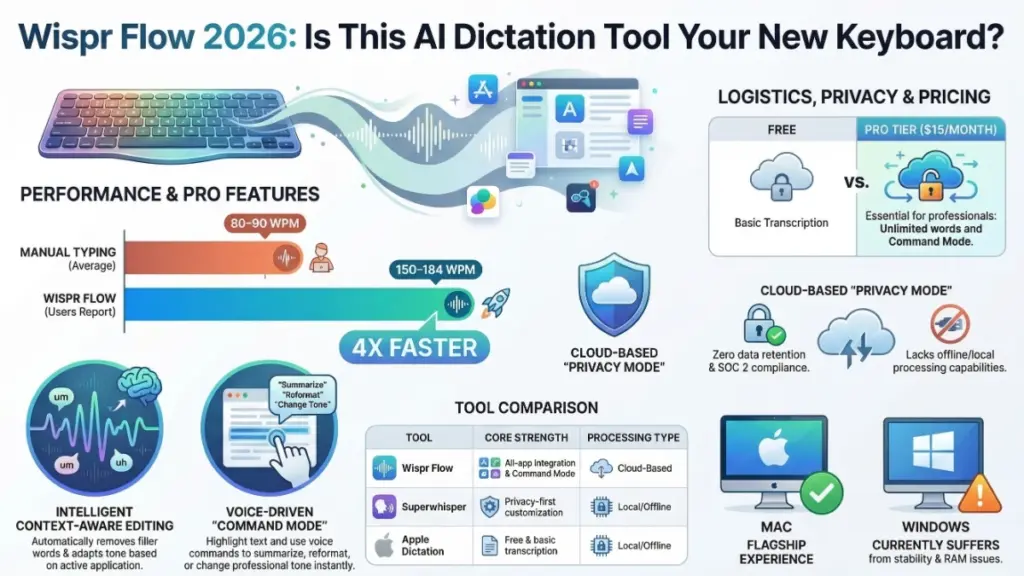
Wispr Flow markets 4x speed improvements over traditional typing. Independent user documentation shows consistent achievement of 184 words per minute across extensive usage—182,718 words dictated across 36 different applications. This compares favorably to average professional typing speeds of 60-80 WPM and advanced typists reaching 90-100 WPM.
Personal testing as an 80 WPM typist produced reliable clean text output at 150-160 WPM for standard professional communications. The speed advantage extends beyond raw word count to cognitive flow—speaking naturally eliminates the friction of simultaneous composition and mechanical transcription.
However, the 6-minute continuous recording limitation creates friction for extended brainstorming sessions or long-form content creation. Users must restart recording periodically, disrupting flow state during intensive creative work.
Wispr Flow Pricing Structure: Complete Breakdown
Understanding the full cost structure helps evaluate value propositions accurately:
Flow Basic (Free Tier)
- Cost: $0
- Word Limit: 2,000 words weekly
- Features: Fast voice input, custom dictionary, 100+ language support
- Limitations: No Command Mode, no cross-device synchronization, basic support
Evaluation: Suitable for evaluation purposes only. The word limit restricts serious professional use to approximately 2-3 blog posts weekly, insufficient for full-time writers or high-volume communicators.
Flow Pro (Individual Professional)
- Monthly: $15/month
- Annual: $12/month ($144 yearly, 20% savings)
- Features: Unlimited weekly words, Command Mode, priority feature requests, early access to new capabilities, cross-device sync
Evaluation: The standard professional tier. For users typing more than one hour daily, the productivity gains justify the cost within the first week of each month. The annual discount provides meaningful savings for committed users.
Flow Teams (Organizational)
- Monthly: $12 per user/month
- Annual: $10 per user/month (minimum 3 users)
- Features: All Pro capabilities, centralized billing, administrative controls, team management dashboard
Evaluation: Competitive pricing for team deployments. The administrative features justify the per-user cost for organizations standardizing on voice dictation workflows.
Enterprise (Custom)
- Cost: Contact sales for quotation
- Features: Mandatory zero data retention, SOC 2 Type II compliance, SSO/SAML integration, mandatory company-wide model training opt-out, dedicated support
Evaluation: Essential for regulated industries requiring compliance documentation. The “contact sales” model creates pricing uncertainty—request detailed quotations including implementation and ongoing support costs.
Privacy and Security: Critical Considerations
Wispr Flow’s privacy history requires careful examination. Early versions included concerning data usage policies permitting content utilization for AI training. The company has since modified these practices, but understanding current protections is essential.
Current Privacy Architecture
Privacy Mode When enabled (not default for individual users), Wispr Flow retains zero audio recordings, transcripts, or edit histories. All processing occurs ephemerally without persistent storage.
Third-Party Processing Voice data transmits to cloud servers operated by OpenAI, Meta, and other AI infrastructure providers. Wispr Flow maintains zero data retention agreements with these partners, meaning processed data isn’t stored or used for model training.
SOC 2 Type II Certification Independent auditing confirms security, availability, and privacy practices meet industry standards. This certification provides credible third-party validation of security claims.
Ongoing Limitations
No Local Processing Option Unlike competitors such as Superwhisper or VoiceInk, Wispr Flow offers no offline transcription capability. All voice data leaves your device for cloud processing, creating inherent exposure for highly sensitive information.
Historical Context The company’s initial privacy missteps—unclear data usage policies and aggressive app permission requirements—have been addressed but warrant consideration for risk-averse users.
Recommendations by Use Case
General Business Use: Current privacy protections are adequate for most professional applications. Enable Privacy Mode immediately upon installation.
Regulated Industries: Healthcare, legal, and government users should evaluate local-processing alternatives or restrict Wispr Flow to non-sensitive communications only.
Enterprise Deployments: The Enterprise tier provides necessary compliance frameworks for organizational deployment in regulated sectors.
Platform Support and Technical Performance
macOS Experience (Recommended)
The macOS version represents Wispr Flow’s flagship implementation:
- Stability: Excellent background operation without crashes or memory leaks
- Performance: Minimal CPU impact during idle states, responsive hotkey activation
- Integration: Clean system integration respecting macOS design patterns
- Resource Usage: Reasonable memory footprint appropriate for professional tools
Windows Experience (Caution Advised)
Windows users report significant limitations:
- Stability Issues: Frequent crashes and application conflicts documented across user forums
- Resource Consumption: Approximately 800MB RAM usage with 8% constant CPU utilization even when idle
- Feature Parity: Missing several advanced features available on macOS
- Development Status: Active improvement ongoing but not yet production-ready for critical workflows
Mobile Platform Support
iOS: Mature implementation with feature parity for core dictation capabilities. Reliable performance for mobile productivity workflows.
Android: Newer platform support lacking some advanced privacy controls and customization options available on desktop platforms.
Competitive Analysis: Wispr Flow vs. Alternatives
Wispr Flow vs. Superwhisper
Superwhisper Advantages:
- Local AI model support enabling offline processing
- Highly customizable “modes” for different task types
- Superior privacy protections through on-device processing
- One-time purchase option vs. subscription model
Wispr Flow Advantages:
- Seamless universal application integration
- Command Mode for AI-powered text editing
- More polished user experience and interface design
- Better cross-platform synchronization
Decision Framework: Choose Superwhisper if privacy and offline capability are paramount. Choose Wispr Flow for maximum integration convenience and editing features.
Wispr Flow vs. VoiceInk
VoiceInk Advantages:
- Open-source with zero cost
- Complete local processing (privacy-maximal)
- Community-driven development and customization
- No subscription or data concerns
Wispr Flow Advantages:
- Significantly more capable AI auto-editing
- Better context awareness and application integration
- Professional support and development resources
- More refined user experience
Decision Framework: VoiceInk serves budget-conscious privacy-focused users excellently. Wispr Flow justifies its cost for professionals prioritizing capability and convenience.
Wispr Flow vs. Apple Dictation
Apple Dictation Advantages:
- Free with macOS/iOS
- Offline processing capability
- Deep system integration
- No additional software required
Wispr Flow Advantages:
- AI-powered cleanup and editing
- Cross-application intelligence
- Command Mode capabilities
- Custom dictionary and snippet systems
Decision Framework: Apple Dictation suffices for occasional users. Wispr Flow becomes essential for high-volume professional use requiring intelligent processing.
Wispr Flow vs. Otter.ai
These tools serve fundamentally different purposes:
- Otter.ai: Meeting transcription, conversation recording, collaborative note-taking
- Wispr Flow: Real-time dictation and writing assistance across applications
Decision Framework: Complementary rather than competing tools. Many professionals use both for different workflow stages.
Implementation Best Practices: Maximizing Wispr Flow Value
Immediate Setup Priorities
- Enable Privacy Mode Navigate to Settings → Data & Privacy immediately after installation. This prevents any data retention from the beginning of your usage.
- Configure Custom Hotkeys Test different activation keys to find optimal ergonomics for your workflow. The default “Fn” key works well for most users.
- Install Across Devices Synchronize your account across macOS and iOS devices for seamless workflow continuity.
First Week Optimization
Build Your Snippet Library (30 Minutes) Identify your five most frequently used phrases, email templates, or links. Configure voice shortcuts for immediate daily time savings.
Start Your Custom Dictionary Add technical terms, proper names, and industry jargon as you encounter transcription errors. This investment compounds accuracy improvements over time.
Test Across Applications Experiment with Wispr Flow in your most-used applications to understand contextual behavior differences.
Long-Term Success Strategies
Weekly Dictionary Maintenance Spend five minutes weekly adding new terms and correcting recurring errors. Active maintenance prevents accuracy degradation as your vocabulary evolves.
Snippet Expansion Gradually expand your shortcut library as you identify repetitive typing patterns. Most users find 15-20 well-designed snippets cover 80% of repetitive text entry.
Command Mode Integration Practice using voice commands for text editing until they become automatic. The efficiency gains justify the initial learning curve.
Final Verdict: Is Wispr Flow Worth It?
After three months of intensive professional use, Wispr Flow earns a qualified recommendation as one of the most capable AI dictation tools available in 2026.
Strong Recommendations For:
- Mac-based professionals writing more than one hour daily
- Content creators producing high volumes of written material
- Developers seeking documentation and comment efficiency
- Accessibility-focused users requiring alternatives to traditional typing
- Multilingual professionals needing robust language support
Caution Advised For:
- Windows-dependent users until platform stability improves
- Highly regulated industries without Enterprise tier compliance features
- Privacy-maximalist users requiring local-only processing
- Casual users with limited typing volumes (free alternatives suffice)
The Bottom Line
Wispr Flow delivers genuine productivity transformation for appropriate users. The $15 monthly subscription pays for itself rapidly for high-volume writers, while the free tier provides adequate evaluation capability. Privacy concerns have been meaningfully addressed through Policy Mode and compliance certifications, though cloud-dependent architecture remains unavoidable.
For writers, marketers, developers, and business professionals on macOS seeking to fundamentally upgrade their text input efficiency, Wispr Flow represents a worthwhile investment with significant return on productivity.
Frequently Asked Questions About Wispr Flow
Is Wispr Flow completely free? Wispr Flow offers a free tier with 2,000 words weekly and basic dictation features. Unlimited usage and advanced features require the Pro subscription at $15 monthly or $12 monthly with annual billing.
Does Wispr Flow work effectively on Windows computers? While Windows support exists, the experience currently lags macOS in stability and performance. Windows users should expect occasional issues and higher resource consumption compared to the Mac version.
How does Wispr Flow handle sensitive confidential information? Privacy Mode enables zero data retention, but all processing occurs via cloud servers. For HIPAA, legal privilege, or classified information, evaluate local-processing alternatives or Enterprise tier compliance features.
What makes Wispr Flow different from built-in dictation tools? Unlike basic transcription, Wispr Flow provides AI-powered speech cleanup, contextual formatting, universal application integration, and voice-command text editing. It’s an intelligent writing assistant, not just a speech-to-text converter.
Can software developers use Wispr Flow for coding tasks? Yes, Wispr Flow handles technical vocabulary effectively and integrates with popular IDEs including VS Code and Cursor. Developers successfully use it for comments, documentation, and logic explanation.
Does Wispr Flow require internet connectivity? Yes, Wispr Flow requires active internet connection for all transcription processing. No offline mode is currently available.
How accurate is Wispr Flow compared to typing? Most users achieve 150-180 WPM with Wispr Flow compared to 60-100 WPM typing, with the added benefit of reduced physical strain and improved cognitive flow during composition.
This review represents independent testing and analysis. No compensation was received from Wispr Flow or competitors for this evaluation.