

TokMax AI is an AI-powered TikTok automation tool designed to simplify faceless video creation, trend research, scripting, scheduling, and analytics. Its $230 Fast Pass bundles five upgrades and bonuses, but missing base-plan details, unverified results, and TikTok platform dependencies warrant caution. It may suit beginners and aspiring agencies, provided they test its features carefully within the 30-day refund window.
If you’ve ever wanted to grow on TikTok but froze at the thought of filming yourself, you already understand why tools like TokMax AI exist. The pitch is simple: no camera, no filming, no editing skills, and an AI content agent that handles ideas, scripts, videos, scheduling, and analytics.
Simple pitches deserve careful reading, though. I went through the full TokMax AI offer, including the Fast Pass bundle, all five upgrades, and the bonuses, to work out what you actually get, what it costs, and who should skip it.
Transparency note: This review is based on a close analysis of the official offer page and its published feature lists. I have not logged hands-on testing hours with this build, so I won’t invent speed benchmarks, screenshots, or results. Where the page doesn’t give a detail, I say so. Where something needs checking during the refund window, I tell you what to check.
Quick Verdict
TokMax AI is an AI-driven TikTok content workflow tool aimed at people who want to run faceless channels or sell content services as an agency. The feature list is broad: trend research, hook and script generation, faceless video formats, bulk scheduling, analytics, and white-label agency tools.
Best for: beginners and side-hustlers who want to build faceless TikTok content, and aspiring agency owners who want a ready-made toolkit.
My impression: The scope is impressive on paper, and the one-time pricing is attractive compared with monthly subscriptions. But the marketing language is heavy, the page offers no income proof (and says so in its own disclaimer), and several features depend on “supported” platform actions. Treat it as a tool that may speed up your workflow, not a shortcut to income.
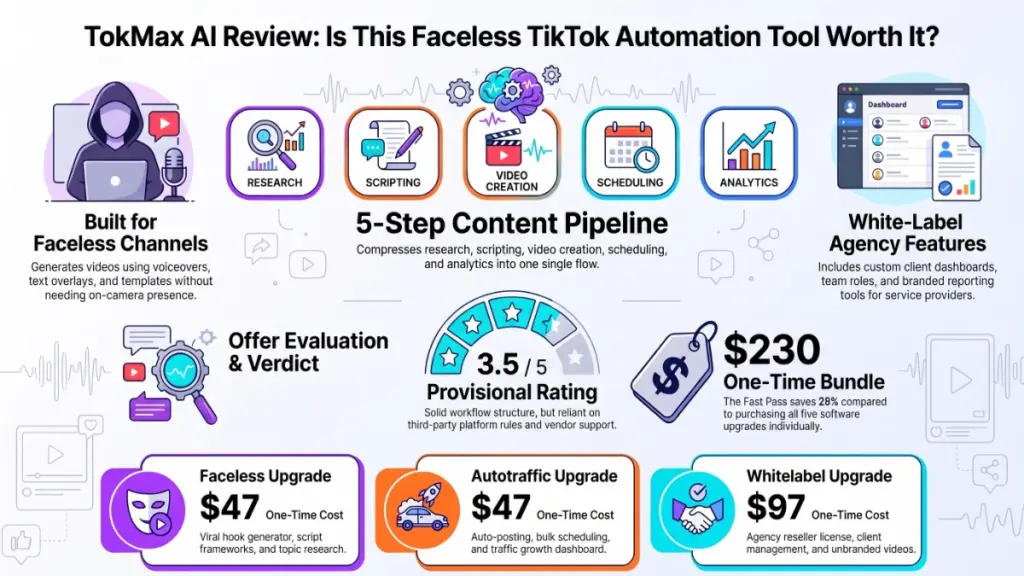
Provisional rating: 3.5 / 5 (based on offer analysis, not extended hands-on use)
Product Overview
| Detail | Information |
|---|---|
| Product Name | TokMax AI (the offer page also shows the name “ClawBooks AI” in places) |
| Category | AI TikTok content creation, automation, and growth software |
| Creator | Not named on the page I reviewed |
| Launch Date | Not stated (page copyright reads 2026) |
| Front-End Price | Not listed on the page I reviewed. Check the official sales page |
| Upgrade Prices | Faceless $47, Power $37, Autotraffic $47, DFY $97, Whitelabel $97 |
| Fast Pass (all upgrades + bonuses) | $230 one-time (listed regular value: $1,139) |
| Refund Policy | 30 days, but you must give a genuine reason (not “no questions asked”) |
| Website | Official sales page not provided |
| Best For | Beginners, faceless creators, and aspiring TikTok content agencies |
| Overall Rating | 3.5 / 5 |
What Is TokMax AI?
TokMax AI is a software platform built around one platform: TikTok. It combines idea research, script writing, video creation, scheduling, and performance tracking in one place, driven by what it calls an AI Content Agent.
The problem it targets is real. Consistent TikTok posting takes a lot of unglamorous work: researching what’s trending, writing hooks, producing videos, writing captions and hashtags, scheduling posts, and checking what worked. Most solo creators burn out somewhere in that chain.
TokMax AI tries to compress that chain into a single workflow: idea → script → video → schedule → analyze. The “faceless” angle means you can publish content without ever appearing on camera, which removes the biggest barrier for many beginners.
Who Is It Built For?
- People who want to build a TikTok presence without showing their face
- Affiliate marketers who want to promote products through short-form video
- Freelancers or agencies who want to offer TikTok content services to clients
- Busy creators who want to cut down production time
How the Offer Is Structured
TokMax AI follows the common software-launch model: a core product plus optional upgrades. The page I reviewed was the one-time offer page, which bundles every upgrade into a single “Fast Pass.”
Here is what each upgrade adds.
Upgrade 1: Faceless ($47)
This is the upgrade built around faceless content creation. According to the page, it includes:
- A faceless channel builder organized around your chosen niche
- Deep trend research for topics, hashtags, and formats
- A niche-to-video pipeline (ideas to scripts to videos)
- Ready-made faceless video formats
- A viral hook generator and an angle generator that turns one topic into several
- A series builder for connected, followable content
- Script frameworks for different video styles
- A niche-specific lead finder
- A content idea vault
For a beginner, the hook generator, angle generator, and script frameworks are the most practical items here. These are the parts of TikTok where blank-page paralysis hits hardest.
Upgrade 2: Power ($37)
This is a capacity upgrade. It adds higher usage limits rather than new ideas:
- Faster video processing
- More scripts, hooks, and CTAs as your volume grows
- Captions, titles, and hashtags
- Expanded AI Content Agent commands
- Higher-capacity trend analysis and scheduling
- More bandwidth and storage
- Premium optimized DFY (done-for-you) videos
- Ongoing updates
The key question for this upgrade is where the base plan’s limits sit. The page doesn’t say, so you’d want to confirm that before deciding whether you’ll hit a ceiling.
Upgrade 3: Autotraffic ($47)
This one focuses on distribution and growth:
- Auto posting and bulk scheduling
- A built-in AI video editor
- A trend-jacking system for sounds and hashtags “where available and supported”
- A traffic dashboard for reach, views, and follower growth
- TikTok data sync
- AI agent-driven traffic campaigns
- Audience growth tools and organic traffic optimization
- Monetization setup resources
- Support for multiple TikTok accounts “where supported”
Pay attention to the repeated phrases “where supported” and “where available.” They signal that some functions depend on what TikTok allows at any given time. That’s normal for any tool built on a third-party platform, but it’s worth knowing.
Upgrade 4: DFY / Done-For-You ($97)
This upgrade has the vendor’s team do setup work for you:
- Hands-free setup of your channel and automation
- A dedicated account manager
- Niche discovery based on competitor research
- Regular DFY trending video uploads
- A video prompt vault
- Affiliate guides for 10 US marketplaces
- Product review scripts and video templates
- 12 ready-to-launch niche kits
- Hook, caption, and CTA templates
- Product research and tracking sheets
- A 30-day content calendar
- Faceless channel setup, AI content agent configuration, posting and engagement setup, and agency setup
This is the most hands-off tier. It will appeal to people who value their time more than the extra $97, but “dedicated account manager” and “regular uploads” are service promises. How good they are depends on the team’s responsiveness, so test support early in your refund window.
Upgrade 5: Whitelabel ($97)
This is the agency license:
- White-label branding and a branded dashboard
- A license to provide the TokMax AI solution to clients
- No TokMax watermark on videos
- Client accounts created in a few clicks
- Team access with roles and workspaces
- A done-for-you agency kit (proposals, contracts, invoices)
- Branded client reporting
If you plan to sell TikTok content services, this is the upgrade that makes the product resellable. If you only want to grow your own channel, you can skip it.
The Bonuses
The Fast Pass includes four bonuses, valued by the vendor at $697:
- Live training: creating and scheduling your first TikTok videos
- TikTok growth and content blueprint: planning a consistent strategy
- Scaling guide: bulk scheduling, calendars, and content organization
- Audience growth and engagement masterclass: using analytics and AI-generated copy
Training bonuses are useful for beginners, but treat the stated dollar value skeptically. Bonus “values” are set by the seller, not the market.
Main Features and What They Mean in Practice
Rather than repeat the upgrade list, here are the features that matter most and the practical outcome of each.
1. Trend Research
Finding what’s trending is the foundation of TikTok growth. TokMax AI says it surfaces trending topics, hashtags, and formats. In practice, a good trend tool saves you an hour of scrolling per day. The thing to verify is how fresh the data is. Trends on TikTok can fade in days, so stale data is useless.
2. Hook and Script Generation
The first two seconds decide whether someone keeps watching. A hook generator and script frameworks give you starting points so you’re editing instead of staring at a blank page. AI hooks tend to sound similar if everyone uses the same prompts, so plan to rewrite them in your own voice.
3. Faceless Video Formats
This is the core selling point. Faceless formats (text-on-screen, voiceover with stock visuals, listicles, product reviews) are proven on TikTok. A tool that packages them into templates lowers the barrier for beginners. The quality of the final videos is the thing to judge for yourself.
4. Scheduling and Bulk Posting
Batching a week of content in one sitting is one of the best productivity habits a creator can build. Bulk scheduling and a content calendar support this directly.
5. Analytics Dashboard
Tracking reach, views, and follower growth in one place helps you double down on what works. Basic analytics are standard in most tools, so the value comes from how clearly the dashboard connects results to specific posts.
6. White-Label Agency Tools
For agency builders, proposals, contracts, invoices, client accounts, and branded reporting reduce the setup work of starting a service business. It’s a real convenience, but landing clients still depends on your sales skills.
Benefits: What You Could Gain
- Time savings. Combining research, scripting, creation, and scheduling in one tool cuts the number of apps you juggle.
- Lower barrier to entry. No camera, no on-screen presence, and no editing experience required.
- Predictable cost. A one-time payment avoids the monthly subscription creep common in this category.
- A path to a service business. The white-label license lets you resell the output as an agency.
- Structure for beginners. Content calendars, niche kits, and training give new creators a plan to follow.
The caveat is that these are potential benefits. The page’s own disclaimer states there is no guarantee of income or success.
My Experience: How I Evaluated TokMax AI
I want to be direct here. Reviews in this niche often describe glowing hands-on experiences that the writer never had. I’m not going to do that.
This section reflects a detailed review of the offer’s published structure, not extended daily use of the software. Here’s what stood out from that analysis.
What impressed me most: The workflow logic is sound. Moving from niche to ideas to scripts to videos to scheduling to analytics mirrors how successful faceless channels actually operate. The product isn’t a random pile of features. It follows a real production process.
One thing I immediately noticed: The language is full of qualifiers like “where supported,” “where available,” and “the agreed setup work.” Those phrases are honest, but they tell you that the experience depends on platform rules and on what the DFY team agrees to do.
A trust flag worth mentioning: The page uses two product names, “TokMax AI” and “ClawBooks AI.” It’s probably a template leftover, but it’s the kind of detail I’d want clarified before paying anyone.
A math check: The five upgrades list at $47 + $37 + $47 + $97 + $97 = $325. Add the claimed $697 in bonuses and you get $1,022, not the $1,139 shown as the “regular” total. The page may be counting something not itemized. Either way, here is how the discount looks in plain terms:
| Comparison | Math | Real discount |
|---|---|---|
| Fast Pass ($230) vs. upgrades alone ($325) | 230 / 325 | About 29% off |
| Fast Pass ($230) vs. claimed regular ($1,139) | 230 / 1,139 | About 80% off |
The headline “81% off” only works if you count the bonuses at the vendor’s own valuation. The true saving on the software itself is closer to 29%. That’s still a fair saving, but it’s very different from the impression the banner creates.
What I Would Test in the First Week
If you buy, use the 30-day window deliberately. Here’s a checklist:
- Generate five scripts in your niche and judge whether they sound usable or generic.
- Create three faceless videos end to end and check the output quality.
- Connect a TikTok account and test scheduling on a single post.
- Open a support ticket with a simple question and note the response time.
- Check whether usage limits on the base plan are reachable in a normal week.
- If you buy DFY, ask exactly what “regular DFY uploads” means in number and frequency.
If a tool fails any of these, request your refund before day 30.
Ease of Use
The page promises “No Camera, No Filming, No Editing Skills, No Tech Setup.” That’s the goal, and the workflow-first design (niche, then ideas, then videos) suggests it’s built with beginners in mind.
- Learning curve: Likely gentle for the core features, steeper for agency setup (client accounts, team roles, branding).
- Interface: I can’t judge the interface from a sales page, so look at the demo footage on the main sales page.
- Documentation and training: The bonuses include live training and blueprints, which helps. Check whether recordings are available for later viewing.
- Beginner friendliness: High in concept. The DFY upgrade reduces setup friction further.
Performance
I can’t give you honest speed or stability numbers without extended testing, so here is what to watch instead.
- Video processing speed: The Power upgrade explicitly promises faster processing, which implies the base plan may be slower under load. Time a few exports.
- Reliability of posting: Auto-posting depends on TikTok’s allowed actions. Test a small batch before scheduling a whole month.
- Account safety: Automation tools and multi-account management can run into platform rules. Review TikTok’s current policies, including its rules on labeling realistic AI-generated content, and avoid spammy posting patterns.
Pricing
Here is the full price picture based on the offer page.
| Item | One-Time Price |
|---|---|
| Front-end (base) product | Not listed on the page I reviewed |
| Faceless | $47 |
| Power | $37 |
| Autotraffic | $47 |
| DFY | $97 |
| Whitelabel | $97 |
| Upgrades total | $325 |
| Fast Action Bonuses (claimed value) | $697 |
| Fast Pass price | $230 |
The page says payment is one-time, with no monthly or yearly fees. It also defines “lifetime” as the lifetime of the product, which it estimates at roughly five years. That’s an unusually candid definition, and it means “lifetime access” does not mean forever.
Which Upgrades Make Sense?
- Beginner growing one channel: Faceless, possibly Power.
- Creator who wants hands-off setup: DFY.
- Anyone wanting automated distribution: Autotraffic.
- Aspiring agency owner: Whitelabel (and likely DFY).
- Someone who wants most of it: The Fast Pass is cheaper than buying the five separately.
Value for Money
At $230 for the full bundle, the price is low compared with monthly-subscription tools that can cost that much in a few months. The value depends entirely on whether the software performs and whether you’ll use the features. If you’d only use two or three upgrades, buying them individually may cost less than the Fast Pass.
Pros
- One-time pricing. No recurring fees on the page, which is rare in AI tools.
- End-to-end workflow. Research, scripting, video creation, scheduling, and analytics are in one platform.
- Genuinely faceless. Built around voiceover, text, and template-based formats.
- Agency-ready. White-label branding, client accounts, and an agency kit are included.
- DFY option. Useful if you don’t want to configure everything yourself.
- 30-day refund window. Gives you time to test properly.
- Training included. Bonuses cover scheduling, strategy, scaling, and engagement.
- Candid about “lifetime.” The product defines it as about five years, which is more honest than most.
Cons
- Front-end details missing. The page doesn’t show the base price, creator, or launch date, which makes comparison harder.
- Inflated discount framing. The “81% off” figure depends on counting bonuses at the vendor’s own value.
- Heavy platform dependency. Many functions are “where supported,” so changes on TikTok’s side could limit features.
- No proof of results. The disclaimer confirms there’s no guarantee of income, and no verified case studies appear.
- Refund isn’t “no questions asked.” You must give a genuine reason.
- Naming inconsistency. The page mixes “TokMax AI” and “ClawBooks AI.”
- Upsell-heavy structure. Capacity and features are split across five upgrades, so the base product may be limited.
- TikTok only. If you want to post on YouTube Shorts and Instagram Reels, you’d need another tool.
Comparison With Competitors
TokMax AI sits between several tool categories, so the fairest comparison is by job.
| Tool Type | Examples | Strength | Compared with TokMax AI |
|---|---|---|---|
| Video editors | CapCut | Strong editing control, widely used | Better for manual quality control, but no integrated research-to-schedule workflow |
| AI video generators | Pictory, InVideo AI | Turn scripts or articles into videos | Similar creation features, usually subscription-based and not TikTok-focused |
| Clipping tools | OpusClip | Repurpose long videos into clips | Better if you already have long-form content |
| Schedulers | Buffer, Later, Metricool | Reliable multi-platform scheduling and analytics | More mature scheduling, but no content creation |
| Agency toolkits | Various white-label platforms | Client management | TokMax AI bundles TikTok-specific content tools with the license |
The honest take: TokMax AI’s main advantage is combining everything in one TikTok-specific flow with a one-time price. Its main disadvantage is that established tools have longer track records and clearer reviews. Pricing for competitors changes often, so check current plans before comparing costs.
Who Should Buy TokMax AI?
TokMax AI makes sense if you:
- Want to start a faceless TikTok channel and need structure
- Are comfortable testing a tool carefully inside a refund window
- Prefer one-time payments over monthly subscriptions
- Plan to offer TikTok content services and want white-label tools
- Value having ready-made templates, niche kits, and a content calendar
- Want a done-for-you setup and are willing to pay for it
Who Should Skip It?
Consider another solution if you:
- Expect guaranteed income or viral results (no tool can promise that)
- Need multi-platform posting beyond TikTok
- Want advanced manual editing control (a dedicated editor is better)
- Are uncomfortable relying on a smaller vendor for support and updates
- Already pay for a scheduler and editor you’re happy with
- Can’t get clear answers about the base plan’s price and limits
Frequently Asked Questions
What is TokMax AI?
TokMax AI is an AI-powered platform for creating, scheduling, and analyzing TikTok content, with a focus on faceless channels and agency use.
Does TokMax AI require me to show my face?
No. The system is built around faceless video formats, using things like voiceover, text, and templates.
Is TokMax AI a one-time payment?
According to the offer page, yes. It states there are no monthly or yearly fees. “Lifetime” is defined as the lifetime of the product, roughly five years.
What is the Fast Pass?
It’s a bundle of all five upgrades (Faceless, Power, Autotraffic, DFY, Whitelabel) plus bonuses, priced at $230 on the page. Bought separately, the upgrades total $325.
Is there a refund policy?
Yes, 30 days. You must provide a genuine reason through the support desk. It is not a no-questions-asked guarantee.
Can I earn money with TokMax AI?
The page itself states there is no guarantee of income or success. Results depend on your niche, consistency, content quality, and TikTok’s algorithm.
Do I need the Whitelabel upgrade?
Only if you want to sell TokMax AI-powered services to clients under your own brand. For personal channels, you can skip it.
Does it work with multiple TikTok accounts?
The Autotraffic upgrade lists multi-account management “where supported,” so confirm the current limits before relying on it.
Is auto-posting safe for my TikTok account?
It depends on how the tool connects to TikTok and how you use it. Read TikTok’s current rules, avoid spammy behavior, and test with one account first.
What happens if TikTok changes its rules?
Features that depend on TikTok integrations could change or stop working. The vendor mentions regular updates, but you should expect some platform risk.
🎁 Free Gift Waiting for You!
Before you leave, there’s a free gift waiting for you.
As a thank-you for reading, you can claim my Ultimate All-In-One Digital Marketing Package completely FREE.
🎉 What’s Inside Your Ultimate All-In-One Package
01. 50 AI Digital Product Ideas
A curated collection of highly profitable AI-powered digital product ideas designed for quick implementation and strong profit potential.
02. Digital Sales Mastery
Discover the proven framework behind high-converting sales funnels, persuasive copywriting, and sustainable online revenue growth.
03. Mastering Email List
Advanced strategies for building an engaged email audience, increasing open rates, improving click-through rates, and generating automated income.
04. The Ultimate Faceless Playbook
A complete blueprint for building a profitable online brand and growing on social media without ever showing your face.
🎁 BONUS: Premium Canva Marketing Vault
A premium library of high-converting Canva templates to help you create professional marketing assets, generate more organic traffic, and boost conversions.
💥 Total Package Value: $197
✅ Yours Today: FREE
Claim your complimentary bundle and get instant access to premium resources that can help you create, market, and grow your online business more effectively.
Final Verdict
So, is TokMax AI worth it?
Based on the offer as published, it’s a reasonable bet for the right person, with some conditions. The workflow is logical, the faceless focus fits what many beginners actually need, and one-time pricing is a genuine point in its favor. The Fast Pass at $230 is also a fairer deal than buying the five upgrades one by one.
What holds me back from a higher rating is the lack of verifiable results, the missing front-end details, the discount framing that leans on bonus valuations, and the dependence on TikTok’s rules. None of these are dealbreakers. They are reasons to test carefully rather than buy on excitement.
Who will benefit most: Beginners who want a structured faceless TikTok workflow, and aspiring agency owners who want a ready toolkit.
Is it worth the price? At one-time pricing with a 30-day refund window, the financial risk is low, provided you use the window to test the real output.
Would I personally recommend it? I’d recommend it as a test-first purchase for faceless creators and agency starters. I would not recommend it to anyone expecting income without consistent work.
Run the first-week checklist above, judge the output by your own standards, and keep the refund option in mind. If the videos, support, and posting all hold up, you’ll have a solid, low-cost toolkit. If not, you’ll know within days.
Disclaimer: This review is for informational purposes. No income is guaranteed, and results vary. Always confirm current pricing, features, and refund terms on the official sales page before purchasing.