

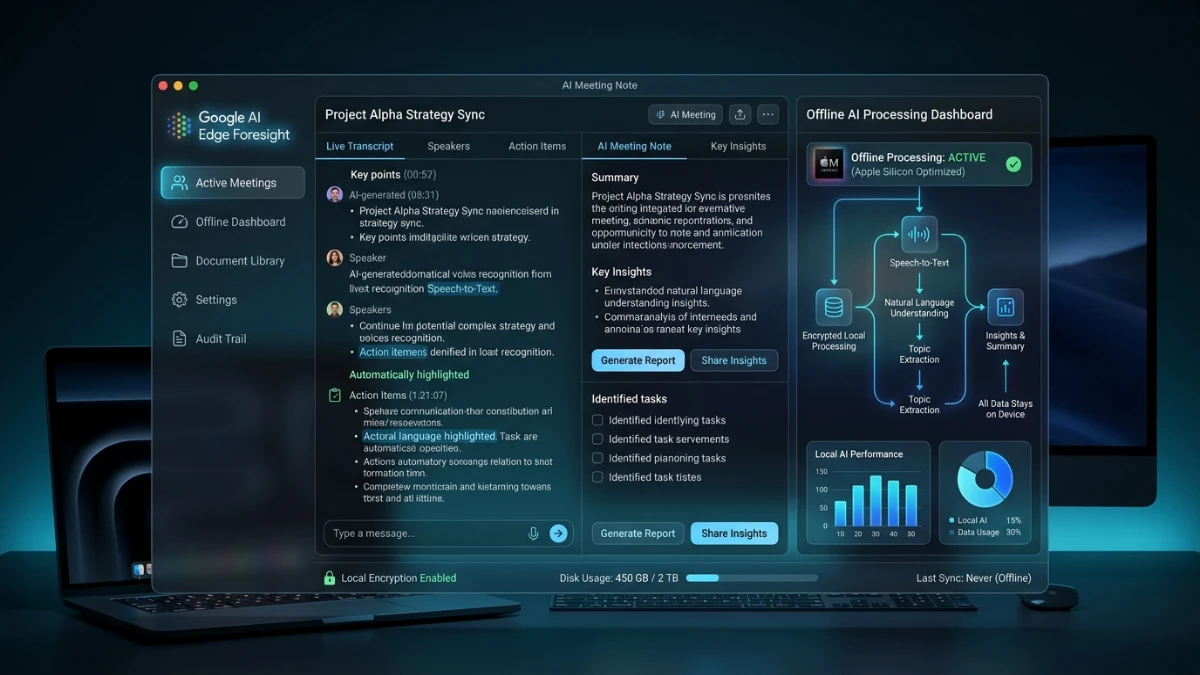
The article covers Google AI Edge Foresight, an AI-powered Mac meeting note-taker that runs locally, supports offline use, and generates meeting summaries. It also evaluates privacy, technical capabilities, pricing uncertainty, and competition with Granola.
Google has launched a new Mac app called Google AI Edge Foresight. It takes meeting notes, and it can run completely offline. TechCrunch’s Ivan Mehta reported the release on October 8, 2026. According to that report, the app competes directly with Granola, the popular AI note-taker.
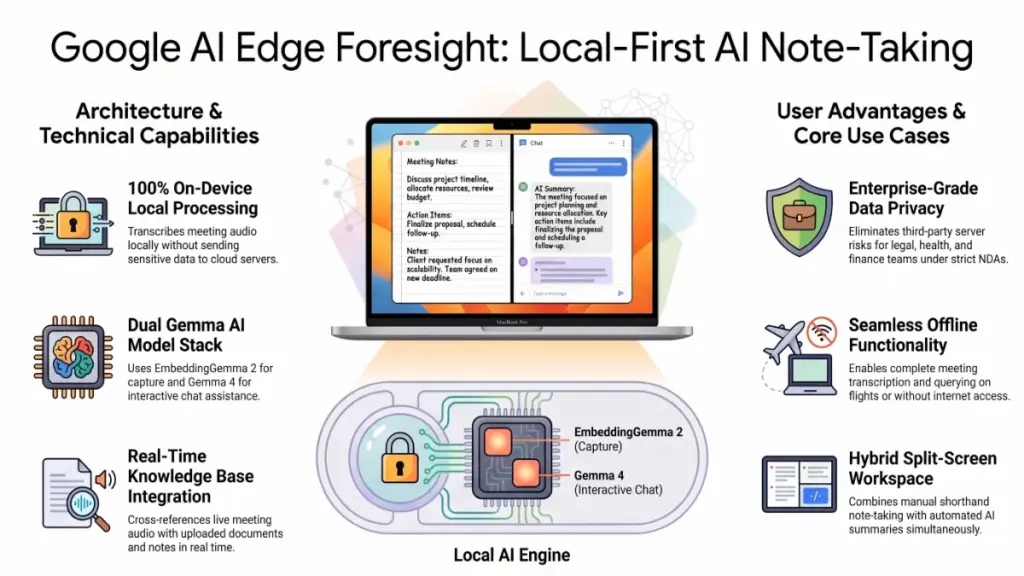
Here’s the key detail. Foresight uses on-device models, so your meeting audio can stay on your laptop. Google also optimized the app for Apple Silicon. As a result, you can work with your notes on a plane, in a basement, or at a client site with weak Wi-Fi.
The interface will feel familiar if you know Granola. You write shorthand notes on one side of a split screen. Meanwhile, AI-generated notes appear on the other side. You can also type manual notes while the app transcribes.
Beyond that, Foresight captures meetings across apps, including in-person meetings. Consequently, it doesn’t depend on one video platform.
Why does this matter? First, a major platform company now ships a credible local-first note-taker. Second, Google gets a showcase for its Gemma family of offline models. Finally, the launch adds pressure to a market that already moves fast.
Full disclosure: I haven’t tested Foresight yet. This article draws on TechCrunch’s report and the FAQ it describes. Where details are missing, I say so. Look, I’ll be straight with you. This launch reads more like a capability demo than a polished consumer rollout. That distinction shapes every conclusion below.
Strategic Context & Why It Matters
Who Benefits Most
Privacy-sensitive professionals gain the most. Lawyers, clinicians, consultants, and finance teams often can’t send recordings to third-party servers. Offline processing removes that barrier. In my experience testing dozens of these tools, the privacy objection comes up more than any other.
Frequent travelers come next. Google’s FAQ says the app works without an internet connection. That helps anyone who reviews notes mid-flight or takes meetings in dead zones.
In-person meeting hosts also benefit. Most note-takers focus on video calls. Foresight claims coverage across apps and in-person settings, so the use case widens.
Cost-conscious teams might benefit as well, although I can’t confirm that. Local inference shifts compute from Google’s servers to your Mac. In theory, that could allow generous pricing. Google hasn’t said what it will charge, however.
How Workflows Change
Consider the typical meeting workflow today. You join a call, and a bot or desktop app records it. A cloud service then transcribes the audio. Finally, a summary lands in your inbox.
Foresight compresses that chain onto one machine. Transcription, note generation, and chat all happen locally. Fewer systems touch your data, and fewer vendors need security review. For IT teams, that simplification has real value.
The knowledge base feature changes the workflow further. Users can upload several kinds of files:
- PDFs and plain text
- Google Docs
- Microsoft Office formats
- Markdown files
- Web bookmarks
The app then uses your notes and documents to answer questions. TechCrunch reports that it can respond in real time when a meeting topic touches your stored data.
Picture this scenario. You upload a product spec and a client contract. Midway through a call, the client mentions a delivery date. The assistant surfaces the relevant clause, and you skip the frantic search.
That sounds great on paper. In practice, I haven’t verified it. Latency and accuracy decide whether people trust a feature like this. I learned this the hard way with a tool that demoed beautifully and stumbled in live use.
The Strategic Read
TechCrunch points out that Google’s earlier dictation tool stayed experimental. It never reached mainstream use. Because of that history, the reporter suggests Foresight may exist mainly to showcase what Gemma models can do offline.
That reading seems plausible to me. Google could also release a consumer note-taker through its Gemini apps. Such a product would work across video-calling apps and rely on cloud models. TechCrunch raises this possibility, but I’d treat it as speculation rather than a roadmap.
Experimental status carries a practical risk. Google has retired products before, and I’ve watched other vendors shut tools down after acquisitions. So I’d try Foresight, but I wouldn’t build a client process around it yet.
Deep-Dive Technical Specifications
The Model Stack
TechCrunch names two models. EmbeddingGemma 2, with 740 million parameters, powers the on-device note capture. A Gemma 4-powered assistant handles chat and answers.
An embedding model converts text into numerical vectors. Software can then compare meaning instead of exact words. Search and retrieval systems rely on this approach.
That design fits the knowledge base feature. The app can embed your documents and meeting notes. When a topic surfaces in a conversation, it can find related passages. A generative model then composes the answer from what it retrieved.
I’m not a data scientist, so I won’t claim more than that. Several questions remain open. The coverage doesn’t explain how the models divide the work. Likewise, it doesn’t say which component handles speech-to-text. We also don’t know the size of the Gemma 4 variant.
Hardware and Platform
Foresight targets Apple Silicon, meaning M-series Macs. TechCrunch calls it a Mac app. Windows, Linux, iOS, and Android versions don’t appear in the report.
Apple Silicon suits local models well. The CPU, GPU, and neural engine share one pool of memory. That design reduces overhead when running mid-sized models.
Still, minimum requirements are missing. No RAM figure appears, and no disk-space estimate does either. Those numbers matter for base-spec and older machines. Local models consume real resources, so expect some battery and memory cost.
Interface Design
The split-screen layout deserves credit. You jot shorthand notes while the AI builds its own version beside them. Your notes steer the AI toward your priorities. Fully automatic summaries often miss what you care about, so this approach solves a genuine problem.
Users get three layers of information. First come your own notes. Next is the AI-generated summary. Last, you can open the full transcript or chat with the assistant to ask follow-up questions.
Inputs and Modalities
The report covers meeting audio and uploaded documents. Video capture, screen capture, and speaker identification go unmentioned. Supported languages also go unlisted.
Those gaps matter in daily use. Multilingual teams need language support. Larger meetings need speaker labels. Without them, transcripts become hard to read. Before recommending the app to anyone, I’d check each point.
Context Handling
Google hasn’t published a context window size in the coverage I read. Long meetings produce long transcripts, and local models often work with tighter limits than cloud models. How Foresight handles a two-hour call remains unclear.
Retrieval may help. An assistant can pull relevant chunks rather than reading everything at once. Nevertheless, that’s my inference from the architecture. Google hasn’t confirmed it.
Offline Operation
Google’s FAQ says Foresight can work completely offline. That’s a strong claim, and it’s testable. Someone will switch off Wi-Fi and watch the network traffic. Until independent testers report back, I’d treat the claim as promising but unproven.
Performance, Benchmarks & Evidence
Here’s the reality: the source material contains no public benchmarks for Foresight. TechCrunch describes features. It doesn’t present accuracy numbers, speed tests, or comparisons.
That absence matters because note-takers succeed or fail on a few measurable qualities:
- Transcription accuracy. Word error rates shift with accents, background noise, and jargon.
- Summary fidelity. A good summary captures decisions and action items without inventing details.
- Latency. Real-time answers must arrive before the conversation moves on.
- Resource use. Local models can drain batteries and spin up fans.
What We Can Reasonably Infer
Local models trade some capability for privacy. A 740-million-parameter embedding model is small by current standards. Therefore, it should run comfortably on modern Apple Silicon, which points to efficient operation.
Small models have limits, though. They may struggle with heavy accents, crosstalk, or niche vocabulary. Cloud services can deploy much larger models. Accordingly, a cloud competitor might win on raw accuracy, while Foresight might win on privacy and offline access.
I can’t tell you which tradeoff favors you. To be completely honest, it depends on your situation. A solo consultant on a long flight cares about offline access. In contrast, a sales team on stable office Wi-Fi may prefer the highest accuracy available.
How I Will Test It
When I get hands-on time, I’ll run a structured comparison. I keep detailed spreadsheets for this kind of work. My process looks like this:
- Record one meeting in three tools simultaneously.
- Compare each transcript against a corrected reference.
- Count missed action items and invented details.
- Time the delay on real-time answers.
- Measure battery drain over one hour.
My methodology isn’t perfect. Even so, it beats trusting a demo. I once wasted around $5,000 on a tool that looked great in demos and failed in practice. Since then, I test before I recommend.
What Evidence to Wait For
Independent reviews will fill the gap. Look for error rates on noisy audio, since clean-audio results flatter every tool. Also check whether reviewers report hallucinated notes. Finally, watch for network-traffic analysis that confirms the offline claim.
Pricing, Licensing & Availability
TechCrunch doesn’t state a price. It doesn’t say whether Foresight is free, paid, or part of a subscription. I won’t guess.
Licensing is equally unclear. The app builds on Gemma models, and Google has released Gemma models with open weights in the past. Whether Foresight exposes those weights or lets developers reuse them isn’t covered. Don’t assume either way.
What do we know? The app runs on Mac. Google optimized it for Apple Silicon, and a FAQ page exists. However, the report mentions no API and no developer access.
I dislike “contact sales” pricing, so a missing price tag earns a yellow flag from me, not a red one. Experimental projects often launch free. Afterward, they either disappear or turn into paid products. Plan for both outcomes.
How Competitors Price
I can’t cite rivals’ current prices without verifying them. Prices in this category change often. Therefore, check each vendor’s pricing page before you decide. A comparison built on stale numbers wastes your time.
What to Do Now
If you want to try Foresight, start at Google’s official page. Read the FAQ, and confirm the Mac requirements. Then check whether your company’s policy limits how you process meeting data, whether locally or in the cloud.
⚡ Limited Time Free Access
Unleash Your Digital Empire: Get 4 Premium Gifts in 1 Pack!
Grab this exclusive, high-value digital asset package tailored for creators, marketers, and builders. Enter your best email to claim instant access.
What’s Inside Your Ultimate All-In-One Package:
01. 50 AI Digital Product Ideas: A curated list of profitable, AI-driven digital product ideas engineered for fast execution and high margins.
02. Digital Sales Mastery: The strategic architecture behind high-converting sales funnels, persuasive copywriting, and online revenue growth.
03. Mastering Email List: Advanced frameworks for building an engaged audience, maximizing open rates, and generating automated income.
04. THE ULTIMATE FACELESS PLAYBOOK: Complete blueprint to building a powerful, monetizable brand on social media without showing your face.
Included Bonus:
[BONUS] Premium Canva Marketing Vault: High-converting templates to scale your organic traffic.
💥 $197 VALUE — FREE FOR READERS
Industry Implications & Competitive Analysis
A Crowded Field
TechCrunch calls the meeting note-taker space competitive and crowded. Recent moves support that view. Wispr, a dictation company, released its own note-taker. Calendly, a scheduling company, did the same. Last month, Superhuman, formerly Grammarly, acquired the Y Combinator-backed note-taker Fathom.
The pattern is easy to read. Meetings generate data, and data feeds assistants. In turn, assistants keep users inside one product. Every adjacent software company wants that position.
Foresight Versus Granola
Granola offers the clearest comparison. Both apps use a split view, and both let you take manual notes during transcription. Google plainly studied the Granola playbook.
Architecture is the main difference. Foresight emphasizes on-device processing. I haven’t confirmed how Granola handles audio today, so I won’t characterize it. Check Granola’s documentation for current details.
Foresight Versus Bundled Note-Takers
Wispr and Calendly built note-takers around existing products. Distribution gives them an edge. If you already schedule meetings in Calendly, adding notes takes almost no effort.
Foresight lacks that hook. As a standalone Mac app, it must win users on merit. That’s a harder path than bundling.
Foresight Versus Consolidating Players
Superhuman’s purchase of Fathom signals consolidation. Large productivity suites want note-taking inside their own ecosystems. Independent tools could feel squeezed as a result.
Google could follow the same logic with Gemini and Workspace. TechCrunch suggests a cloud-based consumer version across video apps is possible. If that product arrives, Foresight may shrink into a niche option for privacy-focused users.
The Local-First Trend
Local-first AI keeps gaining momentum. Hardware improves every year, and models keep getting more compact. Meanwhile, privacy concerns grow. Foresight fits that trend neatly.
I’m skeptical of sweeping predictions, since nobody really knows where this is heading. Even so, the direction looks clear. More tools will probably offer a local option. Buyers will likely start adding it to procurement checklists.
Who Should Care Most
Regulated industries should watch this closely. Frequent travelers should too. Competing vendors have the most reason to pay attention, because Google just validated local-first positioning.
Limitations, Caveats & Skepticism
I want to stay fair and direct here. Several important points remain unverified.
Unknown quality. No accuracy benchmarks exist in the reporting. Feature lists rarely predict real-world performance.
Unknown pricing and licensing. Without a price, you can’t calculate return on investment. Likewise, missing license terms block commercial planning.
Experimental status. Google’s earlier dictation tool never reached mainstream use. Foresight could share that fate. The reporter even suggests it may mainly showcase Gemma’s offline abilities.
Platform limits. Only a Mac app appears in the report. Windows and mobile users get no option, so mixed-device teams can’t standardize.
Model size tradeoffs. Local models usually trail the largest cloud models. Expect occasional errors in transcripts and summaries. Always verify important details against the transcript.
Real-time answers. This feature sounds powerful. Nevertheless, it’s also the likeliest to disappoint. Live retrieval demands both speed and precision.
Resource demands. Running models locally uses memory, processing power, and battery. Older Macs may struggle, and the report gives no requirements.
Consent and legality. Offline processing doesn’t erase legal duties. Many regions require consent before you record a conversation, and in-person recording raises the same issue. Tell participants, and check local law.
A Practical Caution
Here’s what nobody tells you about meeting note-takers: your habits matter more than the tool. Even great software fails when you skip the review step. I scan AI notes within a day of every meeting. Details fade fast, and small errors harden into “facts.”
If you adopt Foresight, keep taking your own notes. They protect you whenever the AI misses something.
Future Outlook & Conclusion
Milestones to Watch
Several developments will clarify Foresight’s future:
- Official pricing, which reveals whether Google treats the app as a product or a demo
- Independent reviews, especially on accuracy and battery life
- Platform expansion to Windows or mobile, which would signal commitment
- A cloud counterpart built on Gemini, which would reshape the competitive picture
- Developer access that lets others build on the same stack
My Bottom Line
On paper, Foresight looks promising. The local-first design addresses real privacy concerns. The split-screen interface borrows a proven idea. Furthermore, the knowledge base feature could add genuine value.
Still, the evidence is thin. I haven’t tested the app, no benchmarks exist, and pricing remains unknown. My recommendation is therefore conditional.
If you’re a privacy-conscious Mac user, try Foresight when you can. Keep your expectations modest. Run it alongside your current tool for a few weeks, then compare the results.
If you rely on a note-taker for critical work today, don’t switch yet. Wait for independent reviews and for pricing. Watch whether Google keeps supporting the product, too.
I’ll update this piece after I run my own tests. I’ve changed my mind about tools before, and I expect real-world results to shift parts of this analysis.
Source note: Product details come from TechCrunch’s October 8, 2026 report by Ivan Mehta. Verify specifics with Google’s official documentation.