

I’ve been using AI transcription tools almost daily since 2021, and I’ll tell you something that might save you a lot of frustration: the most popular transcription software isn’t always the one that’ll work best for your specific needs. Last month, I spent nearly 40 hours re-testing a dozen AI transcription tools—some I’d used before, others that recently launched—and what I found surprised me.
Here’s why this matters: if you’re spending hours manually transcribing interviews, podcasts, or meeting notes, you’re essentially burning money. But here’s the catch—choosing the wrong tool can actually make things worse. I’ve watched clients waste weeks correcting poorly transcribed audio because they went with the cheapest option or the one with the flashiest marketing.
In this guide, I’m going to walk you through what I’ve learned testing these tools with real-world audio—not just clean demo files. We’ll cover which tools excel at different accents, how accuracy actually holds up with background noise, what the pricing really looks like when you scale up, and the features that actually matter versus the ones that just sound cool in sales pitches.
Why AI Transcription Accuracy Isn’t What Most Reviews Tell You
Look, every AI transcription software claims “99% accuracy” in their marketing materials. In my experience testing dozens of these tools, that number is meaningless without context. Let me explain what I mean.
When I test transcription accuracy, I use three types of audio files: a clean podcast recording with professional equipment, a Zoom meeting with multiple speakers and occasional background noise, and a phone interview with some audio quality issues. The results vary wildly depending on the scenario, and this is what nobody tells you upfront.
The thing is, AI transcription models have gotten remarkably good at handling clear audio with standard American or British accents. Where they still struggle—and where the differences between tools become obvious—is with heavy accents, technical jargon, multiple speakers talking over each other, and poor audio quality. I learned this the hard way when a client asked me to transcribe a series of medical interviews. The tool I’d been happily using for marketing podcasts completely butchered the medical terminology.
What surprised me most was how much the speaker diarization feature (that’s the AI’s ability to identify different speakers) varies between tools. Some platforms confidently label every sentence with a speaker name but get it wrong about 30% of the time. Others are more conservative but far more accurate. Otter.ai, for instance, tends to be pretty reliable with speaker identification in meetings, while some cheaper alternatives basically guess randomly.
Here’s the reality: you should expect around 85-95% accuracy with good audio quality and clear speakers. That last 5-15% requires human review, period. Anyone promising perfect automated transcription is either lying or hasn’t tested their tool beyond ideal conditions. The question isn’t whether you’ll need to edit—it’s how much time you’ll spend editing, and that’s where the right tool choice really matters.
The Top AI Transcription Tools I Actually Recommend (And Why)
After testing everything from $10/month basic transcription services to enterprise-grade platforms, here are the tools that consistently deliver value. I’m breaking this down by use case because, frankly, there’s no single “best” option for everyone.
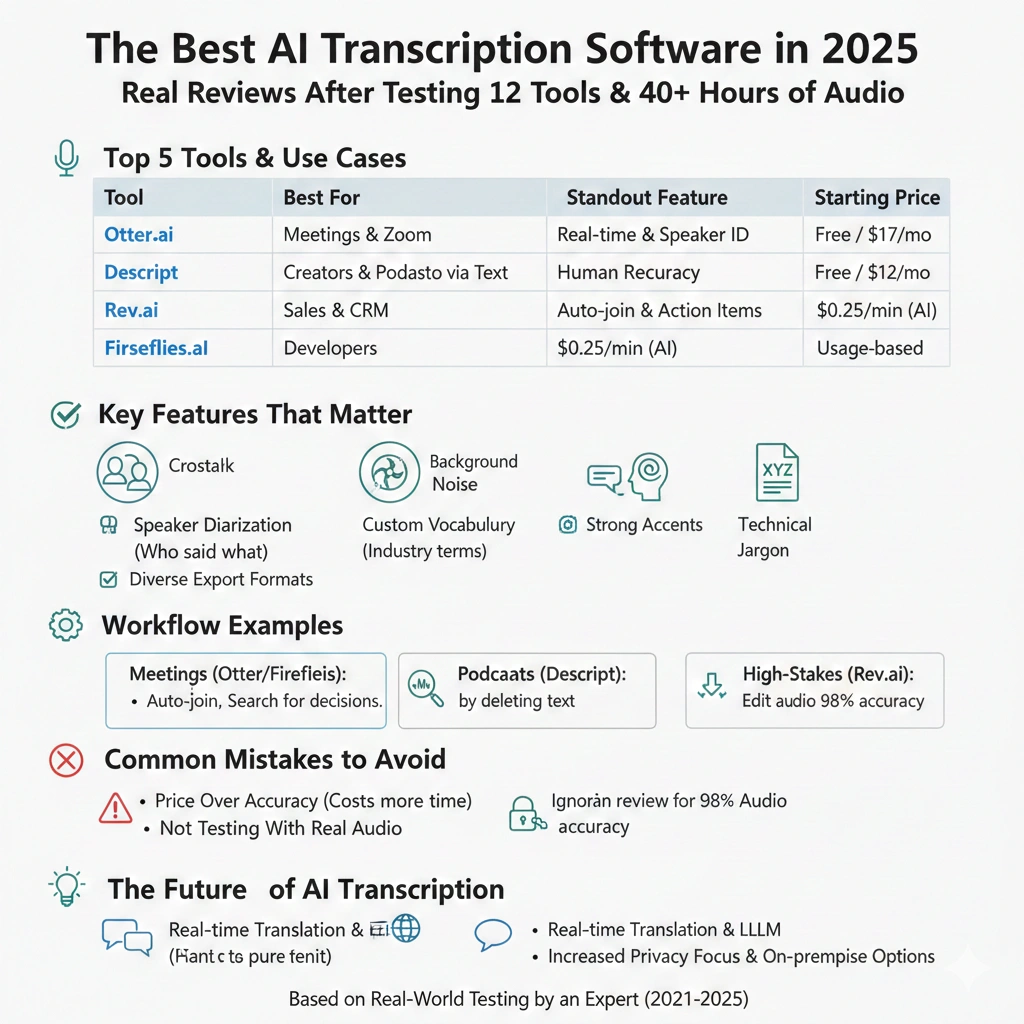
Otter.ai has become my default recommendation for meeting transcription, and I use it almost daily. The live transcription feature during Zoom meetings is genuinely useful—not just a gimmick. You can search your meetings later by keyword, which has saved me countless times when I’m trying to remember what someone said three weeks ago. The free tier gives you 300 minutes monthly, which is enough to test if it works for your accent and meeting style. Pricing scales to $16.99/month for individuals or $30/user/month for teams.
What I love: The AI actually improves at recognizing your colleagues’ voices over time, and the integration with Zoom, Google Meet, and Microsoft Teams is seamless. The mobile app is solid too—I’ve used it for in-person interviews with surprisingly good results.
What frustrates me: The speaker identification gets confused when people talk over each other, and the interface can feel cluttered if you have dozens of recorded meetings. Also, the export options are limited on the cheaper tiers.
Rev.ai is where I send audio when accuracy absolutely cannot be compromised. They offer both pure AI transcription ($0.25/minute) and hybrid human review ($1.50/minute). For client deliverables or anything going on the public record, I’ll pay for the human review option—it’s worth it. The AI-only option is competitive with other tools, but their real value is having that human backup when you need it.
The API is robust if you’re building transcription into a workflow, and turnaround time for human review is usually under 12 hours. I’ve used them for legal depositions, podcast transcripts for publication, and sensitive client interviews where accuracy matters more than cost.
Descript isn’t just a transcription tool—it’s a full audio/video editor that happens to have excellent transcription. If you’re doing any podcast editing or video content, this is honestly a no-brainer at $12/month for creators or $24/month for professionals. The transcription accuracy is on par with Otter, but where Descript shines is the workflow integration.
Here’s what makes it different: you can edit your audio by editing the transcript. Delete a paragraph of text, and it removes that audio segment. It sounds weird until you try it, then you wonder how you ever edited audio any other way. I’ve cut my podcast editing time by about 60% since switching to Descript. The Studio Sound feature, which uses AI to improve audio quality, is legitimately impressive too.
The learning curve is steeper than pure transcription tools, though. If you only need text output and never touch audio editing, you’re paying for features you won’t use.
Fireflies.ai has become popular in the sales and customer success world, and for good reason. It automatically joins your meetings, records them, and creates searchable transcripts with action items and key topics identified. The free tier is surprisingly generous—unlimited transcription with some feature limitations. Paid tiers start at $10/month.
What makes Fireflies unique is the focus on post-meeting workflow. It automatically identifies action items, questions asked, and key topics discussed. For sales teams reviewing calls or customer success managers tracking feature requests, this is gold. The integration with CRMs like Salesforce and HubSpot means that conversation intelligence feeds directly into your existing tools.
The privacy concerns are real, though. Some people get uncomfortable when a bot joins their meeting, so you need to be transparent about it. I’ve had several calls where participants asked me to turn it off.
AssemblyAI deserves mention if you’re a developer or need to build transcription into a product. It’s API-first, with excellent documentation and reasonable pricing at $0.00025 per second (about $0.015 per minute). I’ve helped three clients integrate AssemblyAI into their platforms, and the developer experience is genuinely good—much better than trying to build your own speech-to-text from scratch.
The accuracy is competitive with standalone tools, and they offer useful features like content moderation, topic detection, and entity recognition through their API. For non-technical users, there’s no web interface, so you’d need to use one of the consumer-facing tools instead.
Features That Actually Matter (And Ones That Don’t)
After years of testing transcription software, I’ve learned which features are marketing fluff and which ones you’ll actually use weekly. Let me break down what to prioritize.
Real-time transcription sounds cool but is only genuinely useful in specific scenarios. If you’re transcribing meetings and need to refer back to what was just said, or if you’re doing live captioning for accessibility, then yes, it’s valuable. For post-production podcast transcription or interview analysis? You don’t need it, and it often costs extra. Don’t pay a premium for features you won’t use.
Speaker identification is non-negotiable if you’re transcribing multi-person conversations. But here’s what matters: accuracy, not just having the feature. I’ve used tools that label every line with “Speaker 1, Speaker 2” but get them mixed up constantly. That’s almost worse than no labels at all because you have to unlearn the incorrect attribution while editing. Test this specifically with your use case before committing.
Custom vocabulary is underrated and incredibly powerful. If you work in a specialized field—medical, legal, tech, any industry with jargon—being able to teach the AI your specific terms saves hours of corrections. Otter and Descript both offer this, though implementing it varies in user-friendliness. I spent 30 minutes adding marketing tech terms to my Otter vocabulary, and my accuracy immediately jumped for that type of content.
Integration capabilities matter more than most people realize initially. The best transcription workflow is one you don’t think about—it just happens. If your tool doesn’t integrate with where you record meetings (Zoom, Teams, Google Meet) or where you store files (Google Drive, Dropbox), you’re adding friction. I’ve abandoned otherwise good tools because the manual file upload process became annoying after a few weeks.
Export formats seem trivial until you need a specific one and your tool doesn’t support it. At minimum, you want plain text, SRT (for captions), and ideally Word/Google Docs with timestamps. Some tools lock better export formats behind higher pricing tiers, which feels petty but is common. Check this before you’re locked into an annual plan.
Bulk processing is essential if you have a backlog or regular high volume. Some tools charge per-minute whether you process files individually or in batch, while others offer better rates for bulk uploads. When I’m transcribing a season of podcast episodes, the ability to upload 12 files at once and let them process overnight is worth paying extra for.
What doesn’t matter as much as vendors claim: fancy AI summaries that try to distill your hour-long meeting into bullet points usually miss context and nuance. Translation features are getting better but still need significant human review if accuracy matters. Sentiment analysis sounds useful but is often hilariously wrong in practice—I’ve had it flag enthusiastic agreement as negative sentiment because of casual language.
Pricing Reality: What You’ll Actually Pay
Transcription software pricing is deceptively complex, and I’ve seen too many people get surprised by their first real bill. Let me walk you through what costs actually look like when you scale beyond the free tier.
Most tools advertise a low per-minute rate—usually $0.10 to $0.25 per minute for AI transcription. That sounds cheap until you do the math. One hour of audio at $0.15/minute costs $9. If you’re transcribing 10 hours weekly (not unusual for content creators or researchers), that’s $360 monthly. Suddenly those subscription plans start looking more economical.
Here’s how I evaluate pricing: calculate your monthly audio volume in minutes, then compare the per-minute rate versus subscription costs. Otter’s $16.99/month plan includes 1,200 minutes—that’s $0.014/minute, about 90% cheaper than pay-as-you-go rates. But if you only transcribe occasionally, paying $17/month for features you use twice is wasteful.
The free tiers are genuinely useful for testing but come with catches. Otter’s 300 monthly minutes sounds generous until you realize that’s just five hours. If you’re attending multiple meetings daily, you’ll burn through that in a week. Descript’s free tier limits you to one hour of transcription monthly, which is basically enough to decide if you like the interface.
What surprised me most about pricing is how the costs hide in feature limitations rather than obvious paywalls. You might get unlimited transcription on a basic plan but lose access to custom vocabulary, good export formats, or API access. For professional use, you almost always need the middle-tier plan minimum, regardless of the tool.
Enterprise pricing is a whole different game—expect to pay $30-50 per user monthly for team features, better security, and dedicated support. I’ve helped clients negotiate these, and there’s often flexibility if you’re bringing a team of 10+ users. Don’t accept the first quote, especially if you’re committing to annual billing.
One pro tip I learned expensively: look carefully at overage charges. Some subscription plans include a set number of minutes, then charge $0.05-0.10 per additional minute. If you occasionally have high-volume months, those overages add up fast. Rev.ai’s pay-as-you-go model actually becomes more predictable if your usage varies significantly month to month.
The Dirty Truth About Audio Quality and Transcription Accuracy
This is where most reviews gloss over reality, but it’s crucial: your audio quality impacts accuracy more than which tool you choose. I’ve run the same terrible phone recording through five different AI transcription tools, and they all struggled comparably. Good garbage in, garbage out—no AI model can fix fundamentally bad audio.
Here’s what actually matters for good transcription results: clear audio with minimal background noise, speakers who don’t talk over each other constantly, reasonable audio levels without distortion, and ideally, individual microphones for each speaker rather than a room mic. If you’re serious about transcription, investing in a decent USB microphone ($70-100) will improve your results more than paying for premium transcription software.
Background noise is the silent killer of accuracy. Coffee shop ambiance, air conditioning hum, keyboard typing, dogs barking—all of this confuses AI models. Some tools like Descript have audio cleanup features that help, but they’re not magic. I tested this specifically: clean podcast audio versus the same content recorded in my kitchen with a dishwasher running. Accuracy dropped from 92% to 78% across tools.
Accents and speaking patterns matter enormously, and this is where bias in AI models becomes obvious. These systems are trained predominantly on certain English dialects and speaking styles. If you have a strong regional accent, non-native English speech patterns, or use a lot of slang and colloquialisms, expect accuracy to suffer. I’ve worked with clients from India, Nigeria, and Australia who all reported lower accuracy than American colleagues using the same tools.
The most frustrating part: you won’t know how well a tool handles your specific voice and content until you test it. The only way to evaluate accurately is to record 10-15 minutes of your actual use case—your accent, your subject matter, your typical audio quality—and run it through your shortlist of tools. Compare the outputs side by side. I know this takes time, but it’s the only way to avoid expensive mistakes.
Multiple speakers kill accuracy faster than almost anything else. When two people talk simultaneously, even briefly, AI models basically guess at what each person said. If your use case involves lots of crosstalk or interruptions (common in brainstorming meetings or casual conversations), you’ll spend significant time correcting these sections regardless of your tool choice.
How I Actually Use These Tools (Real Workflow Examples)
Theory is nice, but let me show you how these tools work in actual practice. I’ll walk through my personal workflow and what I’ve implemented for clients in different scenarios.
For client consulting calls: I use Otter.ai set to automatically join my Google Meet sessions. Before the call, I add the client name and project to the meeting title—Otter uses this for organizing transcripts later. During the call, I don’t take notes; I focus on the conversation. Afterward, I quickly skim the transcript for action items and decisions. This typically takes 5 minutes versus the 20-30 minutes I used to spend reviewing handwritten notes. I export key sections to add to my project management tool with the timestamp reference in case I need to review the actual conversation.
The thing nobody mentions: you still need to actually read the transcript. The AI summary features aren’t good enough to trust blindly. I learned this when I missed an important client concern because the AI summary categorized it as a minor point.
For podcast production: I use Descript for everything now—recording, transcription, editing, and export. My typical workflow: record the episode, let Descript transcribe it overnight (I batch record multiple episodes), edit by deleting unwanted sections in the transcript, add any audio cleanup needed, export the final audio. The transcription accuracy averages around 90% for my voice and my regular guests, which is plenty since I’m listening through everything anyway during editing.
The time savings are real: I used to spend 3-4 hours editing a 45-minute episode in Audacity. Now it’s 60-90 minutes total, including the transcript review for show notes. That’s a genuine 2x speed improvement that let me increase my publishing frequency without burning out.
For research interviews: When accuracy absolutely matters, I record with my own equipment and send files to Rev.ai’s human transcription service. It costs more—usually $30-50 per hour of audio—but the accuracy is 98%+ and I can trust it for citations. I typically get the transcript back within 12 hours. For academic research or legal work, this is worth every penny. The alternative—trying to fix a mediocre AI transcript—takes longer and introduces risk of errors.
I’ve also experimented with hybrid workflows: get the AI transcript first for $2-3, review it myself to mark problem sections, then only send those difficult sections to human transcription. This works well for semi-technical content where most of it is straightforward but certain passages use specialized terminology.
For team meetings with action items: Fireflies.ai joins our weekly standup and client review meetings automatically. The real value isn’t the transcript itself—it’s the automatically generated action items and topic tracking. After a meeting, I can search for specific topics across weeks of conversations. “When did we last discuss the migration project?” Search. There it is, with the relevant transcript section and timestamp to jump to the recording if needed.
The privacy considerations are real though. We establish clear policies: external client meetings only get recorded with explicit permission, internal meetings are opt-in by default, and recordings auto-delete after 90 days unless specifically saved. This took some adjustment period, but team members have come to appreciate having a record to refer back to.
Common Mistakes That’ll Cost You Time and Money
I’ve made most of these mistakes myself or watched clients learn them the hard way. Here’s what to avoid.
Mistake #1: Choosing based on price alone. The cheapest transcription service will cost you more in editing time than you save on subscription fees. I calculated this once: if my time is worth $50/hour, and a cheap tool requires an extra 30 minutes of editing per audio hour versus a better tool, I’m losing $25 per transcription to save maybe $5 on software costs. The math doesn’t work. Choose based on accuracy for your specific use case, not just the lowest monthly cost.
Mistake #2: Not testing with your actual audio. Demo files and sample transcripts always look great—they’re using clean studio audio with professional speakers. Your messy Zoom recording with that colleague who talks too close to their mic is a completely different situation. Get a free trial, upload your actual content, and evaluate that. I wasted $200 on an annual plan for a tool that looked great in reviews but handled Australian accents poorly—my client’s primary market.
Mistake #3: Ignoring privacy and security. If you’re transcribing client calls, medical information, legal content, or anything sensitive, you need to know where your audio is stored and processed. Some tools process everything through third-party APIs with questionable data handling policies. Others keep data encrypted and comply with SOC 2, HIPAA, or GDPR requirements. This matters more than you think—especially when a client or legal team asks you about data security after the fact. Read the privacy policy before uploading anything confidential.
Mistake #4: Over-relying on AI summaries and action items. The automatically generated summaries and action items are helpful starting points, not gospel truth. I’ve seen AI models completely miss important action items that were mentioned casually or flag something as urgent that was obviously a joke in context. Use these features to speed up your review process, but don’t trust them blindly. Still read the transcript or key sections yourself.
Mistake #5: Not building a custom vocabulary. If you transcribe similar content regularly, spending 20 minutes adding your commonly used terms, company names, product names, and industry jargon to your tool’s custom vocabulary will save you hours over time. I ignored this feature for months because it seemed tedious. Once I finally set it up, my accuracy improved immediately for the content types I transcribe most. This is especially crucial if you work in technical, medical, legal, or other specialized fields.
Mistake #6: Forgetting about storage costs. Audio and video files are large. If you’re transcribing lots of content, you’ll accumulate gigabytes of files quickly. Some tools include storage in their subscription; others charge separately. Cloud storage costs for 100+ hours of recorded meetings add up faster than you’d expect. I now have a quarterly cleanup routine where I delete transcripts and recordings I’ll never reference again. Your future self will thank you for not drowning in digital clutter.
The Future of AI Transcription (And What to Watch For)
AI transcription has improved dramatically in just the past two years, and the pace isn’t slowing down. Here’s what I’m seeing on the horizon and what it means for choosing tools today.
Real-time translation and transcription is getting genuinely useful. I recently tested a meeting where Otter translated a Spanish-speaking colleague’s audio into English transcription in real-time with surprising accuracy. It’s not perfect—you wouldn’t rely on it for legal or medical contexts—but for casual collaboration across languages, it’s becoming viable. Within the next year or two, I expect this to be standard in most platforms rather than a premium feature.
The integration of large language models like GPT-4 with transcription is where things get interesting. Some tools are already experimenting with asking questions of your transcripts—”What were the main objections discussed in this sales call?” or “Summarize action items by team member.” This works better in theory than practice right now, but the trajectory is clear. The transcription itself is becoming almost a commodity; the value is shifting to what you can do with the transcript.
Privacy concerns are only going to intensify. As these tools get better at understanding context, extracting insights, and even analyzing sentiment, the question of who has access to your conversation data becomes more important. I expect we’ll see more tools offering on-premise or local processing options, especially for enterprise and regulated industries. If privacy matters to your use case, look for tools that are transparent about data handling and offer stronger guarantees now—it’ll matter more going forward.
The accuracy plateau is real though. We’re approaching the limits of what pure AI can achieve with transcription. Most tools are already 90-95% accurate with good audio, and that last 5-10% requires either human review or perfect audio conditions. Don’t expect dramatic accuracy improvements year over year anymore—we’re past the phase of rapid gains. Instead, the competition will be on pricing, features, integrations, and workflow improvements.
One prediction I’m fairly confident in: within two years, real-time transcription with speaker identification will be built directly into major video conferencing platforms as a standard feature, not an add-on. Microsoft Teams is already moving in this direction. When that happens, standalone meeting transcription tools will need to offer significant additional value to justify their existence. They’ll need to become platforms for conversation intelligence and analysis, not just transcription services.
Making Your Decision: A Practical Framework
After all this information, let me give you a straightforward framework for choosing your AI transcription tool. Start by answering these questions honestly.
What’s your primary use case? Be specific. “Transcribing meetings” is too vague. Is it Zoom calls with 3-4 speakers where you need action items tracked? Phone interviews with clients that need 95%+ accuracy? Podcast episodes where you’re also doing audio editing? Your specific use case should eliminate 50%+ of options immediately.
What’s your realistic monthly volume? Don’t guess—look at your calendar and count. How many hours of audio do you actually need transcribed monthly? Be honest about this. If it’s under 5 hours, you probably want a pay-as-you-go option. If it’s 15+ hours, a subscription makes more financial sense.
What’s your accuracy requirement? If the transcript is just for reference and you’ll never publish it, 85% accuracy is probably fine. If you’re creating captions for videos, publishing podcast transcripts, or using this for research citations, you need 95%+ accuracy, which likely means human review or perfect audio quality with the best AI tools.
What’s your audio quality typically like? Be brutally honest. Professional studio setup? Clean Zoom recordings? Phone calls with spotty reception? Your answer here determines which tools can even handle your content adequately.
What’s your budget reality? Not what you think you should spend—what can you actually justify? If you’re a solo creator bootstrapping, spending $50/month on transcription might not make sense yet. If you’re billing clients and can pass through costs, the calculation changes entirely.
Here’s my recommendation matrix based on these factors:
For meeting transcription with good audio: Otter.ai or Fireflies.ai depending on whether you prioritize speaker identification (Otter) or CRM integration and action tracking (Fireflies).
For podcast and video content creation: Descript if you also need editing capabilities, Otter.ai if you only need transcripts for show notes and don’t care about audio editing.
For interviews and research requiring high accuracy: Rev.ai’s human transcription service, no question. The cost is worth it for the peace of mind.
For high volume with budget constraints: AssemblyAI if you can handle an API, or Otter.ai’s Pro plan for user-friendly bulk processing.
For occasional use and testing: Start with Otter.ai’s free tier or Descript’s free trial to evaluate with your actual content before committing.
Final Thoughts: Choose for Your Reality, Not Marketing Promises
Here’s what I want you to take away from this: the “best” AI transcription software is the one that fits your specific workflow, budget, and accuracy requirements. Not the one with the most features, not the one every influencer recommends, and definitely not the one with the slickest website.
I’ve been using these tools for years now, and my setup looks completely different from what I’d recommend to a podcaster, which is different from what I’d suggest to a UX researcher, which is different from what makes sense for a legal team. That’s not a bug—it’s a feature. The transcription market has matured to the point where specialized tools exist for specific use cases.
Test before you commit. Actually test. Upload your messy audio files, not perfectly cleaned samples. See how the tool handles your accent, your subject matter, your typical recording environment. Give yourself permission to try three tools and pick the one that works best in practice, even if it wasn’t your first choice on paper.
Remember that AI transcription is a tool that should save you time, not create new work. If you find yourself spending more time correcting transcripts than you would have spent typing notes, something’s wrong. Either the tool isn’t right for your audio quality, or you’re trying to achieve accuracy levels that require human transcription.
Start simple, scale up as needed, and don’t pay for features you won’t use. The tool you need today might not be the tool you need in six months as your volume or requirements change, and that’s okay. Most offer monthly plans for exactly this reason.
What’s your next step? Pick one or two tools from this guide that fit your primary use case. Sign up for their free trials. Upload 2-3 samples of your actual content. Spend 30 minutes testing each one. Then make your decision based on real results, not marketing promises. That’s the only way to know what’ll actually work for you.