

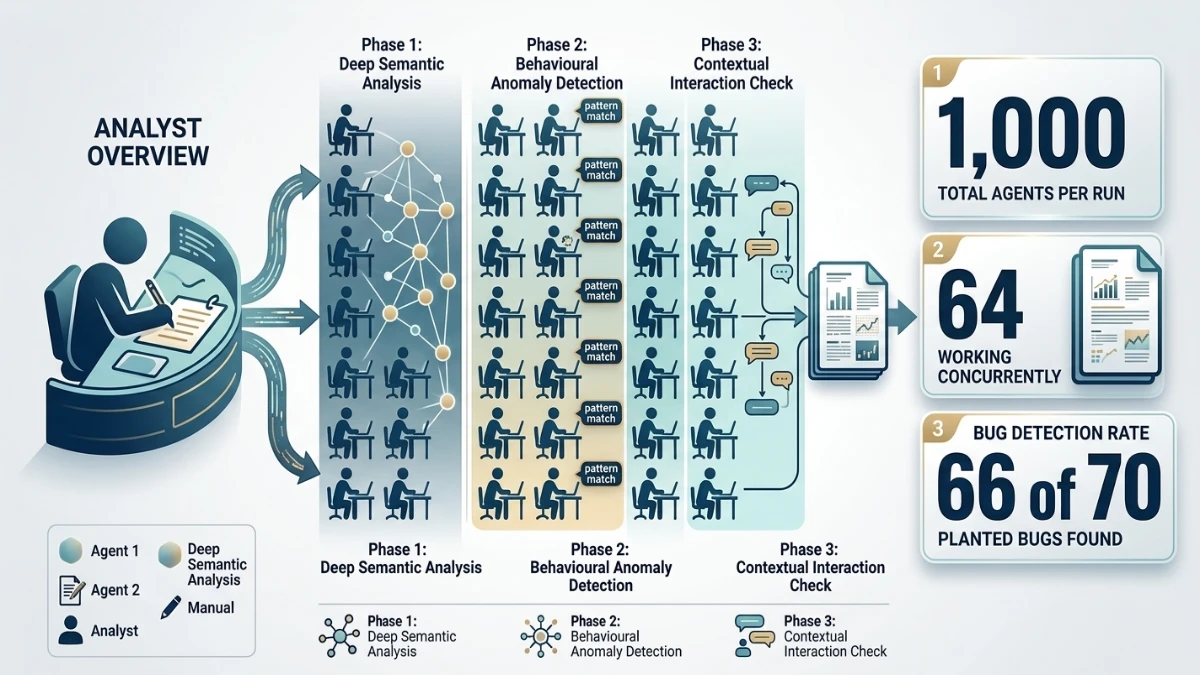
Anthropic’s Claude Dynamic Workflows lets one agent coordinate up to 1,000 agents over a run’s lifetime, with up to 64 working concurrently. In Anthropic’s reported test, workflows found 66 of 70 planted bugs, outperforming a single agent. However, the evidence comes from just three internal runs, and costs, false positives, and limited control remain concerns. The feature entered public beta on October 9, 2026, according to the article’s secondary source.
Lead and Significance
What Anthropic Released
Anthropic released dynamic workflows for Claude Managed Agents in public beta on October 9, 2026. The feature changes who writes the orchestration logic. Previously, developers scripted multi-agent pipelines by hand. Now an agent writes the program itself.
A workflow is a program that runs many agents in phases and combines their results. Anthropic’s server runs it in the background. Meanwhile, the lead agent stays free to talk with the user.
The Headline Limits
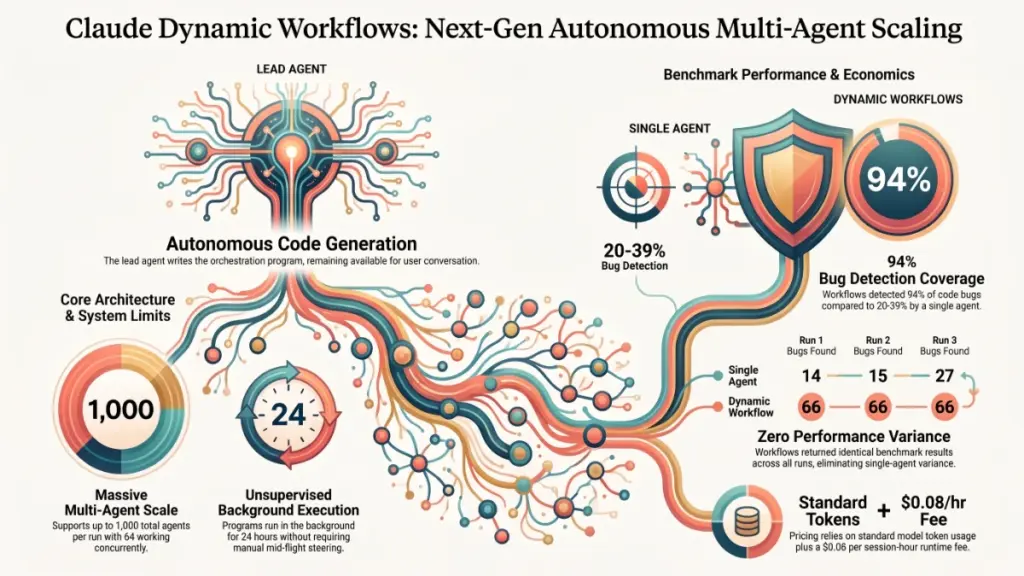
The limits are large. One run can start up to 1,000 agents over its life. In addition, up to 64 agents can work at once. A run lasts 24 hours by default. Likewise, a session can hold 10 open runs by default.
Anthropic’s Bug Test
Anthropic also published a test. The company planted 70 bugs in a 116,000-line codebase. A single agent found 14, 15 and 27 bugs across three runs. By contrast, a workflow found 66 bugs in each of its three runs.
That result comes from one internal test. Even so, it shows the direction. Anthropic is moving from “one agent that delegates” to “one agent that designs a team and sends it off.”
Who Feels the Impact First
The immediate impact lands on three groups:
- Engineering teams with large review or refactoring jobs.
- Research teams that must process hundreds of documents.
- Platform builders who currently maintain their own orchestration code.
Each group now has a managed option. However, each also faces a new cost and control question. This article covers what the feature does, what it costs, what the evidence shows, and what remains unproven.
Strategic Context and Why It Matters
From Delegation to Programs
Managed Agents already supported delegation. One agent could hand tasks to subagents and read their reports. Moreover, it could send follow-up messages to those subagents. That mode keeps the lead agent in the loop at every step.
Dynamic workflows add a second mode. Anthropic’s orchestration guide describes it this way: Claude writes a program that orchestrates agents without Claude’s direct involvement. As a result, results pass from one agent to the next inside the program. The lead agent does not relay them.
Three Reasons This Matters
This shift matters for three reasons.
First, it removes a bottleneck. A lead agent that relays every result consumes its own context window. Therefore, it becomes the slowest part of the system. A program, on the other hand, can fan work out to dozens of agents and merge the answers. No model has to read every intermediate message.
Second, it changes who builds the pipeline. Teams that wanted large multi-agent runs had to write the orchestration code. For example, they handled retries, phases and result merging themselves. Anthropic now lets the agent generate that code from a plain description of the job.
Third, it separates the conversation from the work. The main thread stays available while the run proceeds. Consequently, a user can ask questions, change priorities or start another run. The workload no longer blocks the chat.
Who Benefits Most
Large, decomposable jobs benefit most. Code review across a big repository fits well. Similarly, bulk document analysis, large test-generation passes and broad research sweeps fit. Each job splits into many independent pieces. Each piece then produces a result that a later phase can combine.
Small, sequential jobs benefit little. A task that needs tight back-and-forth with a human gains nothing from fan-out. Likewise, a task whose steps depend heavily on each other gains little.
How the Developer Workflow Changes
The developer’s workflow shifts in four ways:
- You describe the job instead of scripting the pipeline.
- The agent decides whether to start a run. You guide that choice in the system prompt or your message.
- You monitor progress through events on the session stream, not through direct calls.
- You accept less control once a run begins.
The last point deserves attention. Anthropic’s docs say the agent cannot send follow-up messages to a run’s threads. In addition, the server archives each thread by the end of its run. You can plan the job carefully up front. However, you cannot steer it mid-flight the way you steer a subagent.
That trade-off defines the feature. You gain scale and independence. In exchange, you give up fine-grained supervision.
Deep-Dive Technical Specifications
Anthropic has not published model-level specifications for dynamic workflows. The reason is simple. The feature is an orchestration layer, not a new model. Context windows and parameter counts therefore depend on whichever model each agent uses. This section covers what Anthropic has documented about the orchestration layer itself.
How a Run Works
The agent writes a program. The program divides the run into named phases. Agents inside a phase can work at the same time. After that, later phases consume the results of earlier ones. The server executes the program and tracks the run.
You do not start a run through a dedicated API call. Instead, the agent starts it based on your instructions. Anthropic advises developers to shape that decision in the system prompt. A clear instruction tells the agent when a job deserves a workflow.
How to Enable the Feature
Developers enable workflows through the agent’s configuration. First, set the multiagent type to multiagent_20261001. Next, send the managed-agents-2026-04-01 beta header. With that type, workflows are on by default.
Run Limits
| Limit | Value |
|---|---|
| Agents started over a run’s life | 1,000 |
| Agents working at once in one run | 64, not guaranteed |
| Run lifetime | 24 hours by default, shorter if the agent sets it |
| Open runs per session | 10 by default |
| Predefined agents a workflow can list | Up to 20 |
The 1,000 cap counts agents started, not threads. For instance, the server can rerun a failed agent on a new thread. A run can therefore end up with more than 1,000 threads. A run that exceeds the cap ends with a thread limit error.
The 64-agent concurrency figure carries a caveat. Anthropic says it is not guaranteed and may change. Teams that plan capacity around that number should treat it as a ceiling, not a promise.
Models and Agent Types
Inline agents use the model of the agent running the session. Developers who want different models for different roles can create those agents ahead of time. Then they list them as predefined agents in the workflow, up to 20.
This design allows a mixed-model strategy. A team could use a stronger model for planning and review. Meanwhile, it could use a cheaper model for bulk extraction. Anthropic’s docs describe the mechanism but do not prescribe a strategy.
Observability and Failure Handling
The server emits workflow_run.* events on the session stream. Developers follow a run by watching those events. The events show phase progress and run state. However, they do not give the lead agent a way to message the workers.
The server also reruns failed agents on new threads. This behavior improves resilience. Nevertheless, it complicates cost estimates, because a retry consumes tokens on top of what the failed attempt already spent. Developers should expect some overhead from retries on long runs.
Modalities
Anthropic’s launch material, as reported, focuses on text and code tasks. It does not detail modality limits for workflows. Developers who need image or document inputs should therefore check the current docs.
Performance, Benchmarks and Evidence
The Test Setup
Anthropic offers one test. The launch thread from @ClaudeDevs states the setup: 70 planted bugs in a 116,000-line codebase. Anthropic ran a single agent three times and a workflow three times.
| Configuration | Run 1 | Run 2 | Run 3 |
|---|---|---|---|
| Single agent | 14 | 15 | 27 |
| Workflow | 66 | 66 | 66 |
What the Numbers Show
The workflow found about 94% of the planted bugs in every run. In contrast, the single agent found between 20% and 39%. The gap is large.
Consistency stands out as much as the top score. The single agent’s best run found nearly twice as many bugs as its worst. The workflow, however, returned the same count three times. Predictability matters in production. After all, a tool that sometimes finds 14 bugs and sometimes finds 27 is hard to build a process around.
Why the Gap Might Exist
Anthropic’s report does not explain the mechanism. This section therefore offers reasoning, not fact. A single agent reading 116,000 lines must manage a limited context window. It cannot hold the whole codebase at once. As a result, it may skim, lose track or stop early.
A workflow, on the other hand, can split the codebase into sections. Each agent reviews a small slice in depth. A later phase then merges the findings and removes duplicates. That structure plausibly improves coverage and reduces variance. Still, Anthropic has not confirmed that this is the reason.
What the Evidence Does Not Show
The test has clear limits:
- It is Anthropic’s own test. The company chose the codebase, the bugs and the scoring.
- Planted bugs differ from real bugs. Real defects are subtler, and they cluster in odd places.
- No cost figure accompanies the result. A workflow that uses far more tokens may win on coverage and still lose on cost efficiency.
- No false-positive data appears in the report. Finding 66 true bugs matters less if the run also reports hundreds of false ones.
- Three runs make a small sample. The consistency claim needs more runs to hold up.
Independent replication is the missing piece. A second team could run the same kind of test and report cost and false-positive data. That result would carry more weight than the launch thread.
Related Precedents
Two earlier projects used the same fan-out shape without a managed feature. One refactoring effort reportedly used 1,393 subagents to shrink a million-line repository. Separately, another team put ten Claude agents on a shared message board to work on a formal proof in Lean. Both built their coordination by hand. Anthropic now offers the pattern as a platform feature.
Pricing, Licensing and Availability
Where the Costs Come From
Anthropic does not charge a separate fee for a run. The docs say a run has no price of its own. Instead, costs come from two sources.
Token costs. Each agent’s tokens bill at the rates of its model. A run with 500 agents bills the tokens of 500 agents. Because rates vary by model, a mixed-model workflow produces a blended cost.
Session runtime. Managed Agents adds $0.08 per session-hour. The meter counts only while the session is running. For example, a 10-hour run adds about $0.80 in runtime. That figure is small next to token costs on a large run.
Budget Controls
A session budget acts as the brake. When the session’s list cost reaches the budget, every open run pauses. Each working agent then finishes the request it already started. A run can therefore pass the budget by one request per agent. Raising or removing the budget resumes the runs.
With 64 agents working at once, the overshoot could reach 64 requests. For this reason, teams should set budgets with some margin below their true spending limit.
Anthropic’s Own Caution
Anthropic warns that workflows can use a lot of tokens. The company suggests starting with a scoped task. Follow that advice. Run a small job first. Then measure the token use. Only after that should you scale up.
Availability and Licensing
The feature is in public beta as of October 9, 2026. It sits behind the managed-agents-2026-04-01 beta header. General availability terms have not been announced. Limits and pricing could therefore change before then. Finally, Claude Managed Agents is an API product. This is not an open-weight release, and it carries no open-source license.
⚡ Limited Time Free Access
Unleash Your Digital Empire: Get 4 Premium Gifts in 1 Pack!
Grab this exclusive, high-value digital asset package tailored for creators, marketers and builders. Enter your best email to claim instant access.
What’s Inside Your Ultimate All-In-One Package:
01. 50 AI Digital Product Ideas: A curated list of profitable, AI-driven digital product ideas engineered for fast execution and high margins.
02. Digital Sales Mastery: The strategic architecture behind high-converting sales funnels, persuasive copywriting and online revenue growth.
03. Mastering Email List: Advanced frameworks for building an engaged audience, maximizing open rates and generating automated income.
04. THE ULTIMATE FACELESS PLAYBOOK: Complete blueprint to building a powerful, monetizable brand on social media without showing your face.
Included Bonus: Premium Canva Marketing Vault: High-converting templates to scale your organic traffic.
💥 $197 VALUE — FREE FOR READERS
Enter your best email for instant lifetime access:
[Email Input Field] [Claim Free Access Button]
🛡️ Secure Processing • Your privacy is 100% protected.
Industry Implications and Competitive Analysis
Dynamic workflows put Anthropic into a crowded field. Several approaches to multi-agent work already exist. Their differences matter for buyers.
Hand-Built Orchestration
Frameworks and custom code let developers script multi-agent pipelines. This route gives full control. You choose the phases, the retries and the merge logic. However, it also demands engineering time and ongoing maintenance. Anthropic’s feature targets teams that want to skip that work.
The trade-off is control. A hand-built pipeline can include checkpoints and human approvals at any point. A dynamic workflow, by comparison, runs without the lead agent’s direct involvement. Teams with strict review requirements may therefore prefer to keep their own code.
Subagent Delegation
Managed Agents already offered subagents. That mode lets the lead agent send follow-ups and adjust course. It suits tasks that need judgment calls along the way. On the downside, it scales less well, because the lead agent handles every exchange.
Workflows suit the opposite case. The job is large, well-defined and tolerant of unsupervised execution.
Persistent Agent Platforms
Some vendors build agents that persist as long-term roles. These agents keep memory, maintain task boards and wake for new work. That model solves a different problem from a workflow. A workflow finishes one large job and archives its threads. A persistent agent, in contrast, owns an ongoing responsibility.
The two approaches could complement each other. For instance, a persistent agent could trigger a workflow when a large task appears. Nobody has shown that pairing at scale yet.
Who Gains and Who Loses
Anthropic’s customers gain a managed path to large runs. Tool vendors who sell orchestration layers, however, face pressure. The model provider now offers the capability natively. Smaller orchestration frameworks will need to compete on control, transparency or multi-vendor support.
The lock-in question also deserves attention. A workflow that depends on Anthropic’s server, event stream and beta header ties a team to one provider. Teams that value portability should weigh that dependency.
Cost Competition
Multi-agent runs multiply token spending. In turn, providers earn more when customers run more agents. Customers should therefore watch their own spending closely. Anthropic’s budget feature helps. Nevertheless, the overshoot behavior means it works as a soft limit.
Limitations, Caveats and Skepticism
Several issues call for caution.
Thin Evidence and Limited Control
The evidence is thin. One internal test supports the headline claim. Planted bugs do not equal production defects. Moreover, cost and false-positive data are missing. Wait for independent results before you commit a large budget.
Control is limited by design. The agent cannot message a run’s threads after the run starts. The server also archives each thread when the run ends. If a run heads in the wrong direction, you can pause it through the budget or end it. Even so, you cannot correct individual agents on the fly.
Cost and Concurrency Risks
Costs can climb fast. A run can start 1,000 agents. Each agent consumes tokens, and retries add more. Anthropic itself warns about token use. Consequently, a poorly scoped job could burn through a budget in hours.
Budget enforcement is soft. Working agents finish their current request after a pause. A run can pass the budget by one request per agent. Set a margin.
Concurrency is not guaranteed. The 64-agent figure can change. A job that assumes 64 parallel agents may run slower than planned. Time estimates should therefore include slack.
Quality and Trust Risks
Beta status carries risk. Limits, pricing and behavior may change before general availability. For that reason, production systems should not depend on beta terms without a fallback.
Quality control still falls on you. A workflow combines results, but it does not guarantee that those results are correct. A merged report built from hundreds of agent outputs needs review. In addition, errors can compound across phases. A bad early phase can pollute every later one.
Agent-written programs introduce a new failure mode. A human engineer would review a pipeline before running it. Here, the agent writes the program and the server runs it. Teams should decide how much they trust that process for high-stakes work. Starting with low-risk jobs lets you build that trust.
A Note on Sources
The source is secondary. This article draws on one report of Anthropic’s materials. Details may be incomplete or may have changed. Read the primary docs before you design anything around these numbers.
Future Outlook and Conclusion
What Comes Next
Dynamic workflows signal where agent platforms are heading. Agents will design their own teams. They will run large jobs in the background. In turn, developers will describe outcomes instead of scripting steps.
The beta leaves several questions open. Developers should watch four things:
- Independent results. A second team’s numbers on cost and quality, compared against a single agent, would test Anthropic’s claim.
- General availability terms. The beta header and limits will likely change. Pricing could change too.
- The concurrency guarantee. A published commitment on parallel agents would help teams plan.
- Control features. Developers may push for ways to steer or inspect a run in progress.
Practical Advice
For now, the practical advice is simple. First, pick a scoped, decomposable task. Second, set a conservative session budget. Third, measure the token use and the quality of the output. Then compare the result against a single-agent run on the same job. Scale up only if the numbers justify it.
In short, Anthropic has built a powerful tool, and the first public evidence looks promising. However, the independent evidence has not arrived yet. Treat the feature as a strong candidate for large batch jobs, and verify it before you rely on it.