


TL;DR: Open source AI in March 2026 offers genuine alternatives to proprietary tools. Meta’s Llama 4 features a 10M token context window, CrewAI v1.10 supports MCP/A2A protocols, and Qwen3.5 beats GPT-5-mini at Apache 2.0 licensing. Best picks: Ollama for local LLMs, CrewAI for agents, LangGraph for complex workflows. Calculate total cost of ownership—”free” software requires GPU compute ($200-800/month) and engineering time (10-30 hours setup).
Why Open Source AI Software Reviews Matter More Than Ever in 2026
Open source AI software reviews have become essential reading for anyone serious about artificial intelligence in 2026. The landscape has shifted dramatically — new models drop weekly, frameworks evolve monthly, and GitHub repos hit 10,000 stars overnight. After nine years of testing AI tools professionally, I’ve never seen the ecosystem move this fast.
The gap between open source and proprietary AI has narrowed to the point where many businesses are making the switch. Meta’s Llama 4 now offers a 10-million-token context window, Qwen3.5 beats GPT-5-mini in most benchmarks, and CrewAI has crossed 44,600 GitHub stars with native MCP and A2A protocol support. But with this rapid evolution comes confusion: Which tools are production-ready? Which licenses allow commercial use? What are the real costs?
This guide cuts through the hype. You’ll get real assessments of the most important open source AI categories, a practical comparison framework, and the honest truth about where free software excels — and where it falls short. No affiliate deals. No sponsored placements. Just what I’ve found after putting these tools through real workloads.
What Makes an Open Source AI Tool Worth Reviewing?
Before diving into specific tools, here’s how I evaluate them — because the criteria matter enormously. A tool that looks impressive in a demo can be an absolute disaster in production.
The Five Pillars of a Legitimate Open Source AI Review
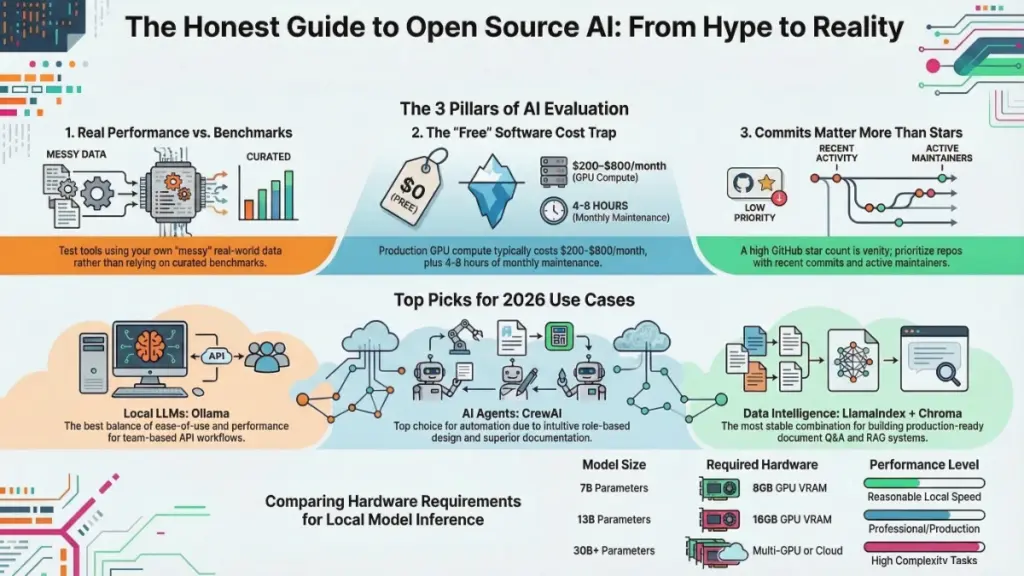
- Real-World Performance vs. Benchmarks — Does it perform on your actual data, or only on curated test sets? I always bring my own messy, real-world datasets to every evaluation.
- Ease of Deployment — Can a capable developer get it running in under an hour? If setup requires a PhD thesis to decipher, that’s a legitimate limitation.
- Community Health — When was the last commit? How fast do maintainers respond to issues? A dead GitHub repo is a liability, not an asset.
- Hidden Costs — “Free” software isn’t free if it requires $800/month in GPU compute or 40 hours of developer time to maintain.
- Licensing Clarity — Apache 2.0, MIT, and GPL have very different implications. Many open source AI tools use licenses with commercial restrictions that most people don’t notice until it’s too late.
Most tools excel on one or two pillars and quietly fail on others. An honest review maps the full picture.
Open Source Large Language Models: The Real Landscape in March 2026
The open source LLM space has matured dramatically. In March 2026, the gap between open source models and proprietary giants has effectively closed for many professional tasks.
The New Champions: Llama 4, Qwen3.5, and Hunter Alpha
Meta’s Llama 4 launched in two variants: Scout (109B parameters, 10M context window) and Maverick (400B parameters for maximum quality)
. Both use Mixture-of-Experts architecture with only 17B active parameters per query. The 10-million-token context window is the largest of any open-source model — perfect for analyzing entire codebases or lengthy legal documents.
Qwen3.5 from Alibaba is currently the strongest open-source MoE model with 122B parameters (10B active). It runs on a MacBook with 64GB RAM and beats GPT-5-mini in most benchmarks. Best of all, it’s Apache 2.0 licensed — true open source without commercial restrictions.
Hunter Alpha appeared mysteriously on OpenRouter in March 2026 — likely a stealth test of DeepSeek V4. With 1 trillion parameters (32B active) and a 1M token context window, it’s the largest AI model ever made available for free. However, all prompts are logged and may be used for training, making it unsuitable for sensitive data.
The Hardware Reality Check
Running a 70B parameter model locally at useful speeds requires hardware costing $3,000–$8,000 minimum. For most small businesses, cloud API alternatives are genuinely cheaper when you factor in total cost of ownership. Open source LLMs make the most sense for:
- Privacy-sensitive workloads
- High-volume inference where API costs compound
- Teams with existing GPU infrastructure
The LLM Runner Ecosystem: Ollama, LM Studio, and llama.cpp
The model itself is only half the story. You need a runtime environment, and this ecosystem has matured significantly.
| Tool | Best For | Setup Difficulty | GPU Support | Latest Update |
|---|---|---|---|---|
| Ollama | API workflows, teams | Easy | Single GPU (native) | March 2026 |
| LM Studio | Non-developers, GUI | Very Easy | CPU + GPU | February 2026 |
| llama.cpp | Max performance | Hard | Multi-GPU capable | Active |
| Jan.ai | Offline desktop use | Easy | Limited | January 2026 |
Ollama remains the easiest local LLM setup. One command to install, one to pull a model, one to run. The REST API is clean, and it plays nicely with Docker for team deployments. The main limitation is lack of multi-GPU support for non-technical users.
LM Studio offers the best GUI experience. The model discovery and download interface is genuinely well-designed, though performance lags slightly behind Ollama for API-based workflows.
llama.cpp is the performance king with GGUF quantization options for granular quality-vs-speed control. Use it in production, but only if you have solid C++ comfort or strong Linux command-line skills.
AI Agent Frameworks: The 2026 Battleground
If local LLMs are the Wild West, agent frameworks are the frontier towns — exciting, full of potential, and occasionally dangerous. By March 2026, six production-grade frameworks are competing for your codebase.
CrewAI v1.10.1: The Role-Based Champion
CrewAI has emerged as my current go-to for client automation projects. With 44,600+ GitHub stars and 12M+ monthly PyPI downloads, it’s the most popular framework in this category.
What’s New in March 2026:
- Native MCP (Model Context Protocol) support through
crewai-tools[mcp] - A2A protocol support for agent-to-agent communication
- The Flows API for event-driven orchestration
- First-class human-in-the-loop functionality
The role-based agent design is intuitive — you define agents with roles, goals, and backstories, then organize them into crews. I’ve successfully used CrewAI to build research synthesis pipelines and social content repurposing workflows. Debugging failed tasks can be opaque, but the developer experience is the best I’ve encountered.
LangGraph v1.0.10: Complex Workflows Done Right
LangGraph reached 1.0 GA in October 2025 and has climbed to v1.0.10. It owns complex, stateful orchestration with the strongest persistence and checkpointing story. If your workflow has loops, parallel branches, and approval gates, LangGraph is the right tool.
Key strengths include:
- Built-in checkpointing with time travel debugging
- Per-node token streaming
- Graph visualization for auditable execution flows
- LangSmith observability integration
The learning curve is steeper (1-2 weeks), but for production systems that will run for years, LangGraph’s graph-based checkpointing is hard to beat.
OpenAI Agents SDK v0.10.2: Lightweight and Practical
The OpenAI Agents SDK (formerly Swarm) strips agent building down to four primitives: Agents, Handoffs, Guardrails, and Tools. Despite the name, it now supports 100+ non-OpenAI models through the Chat Completions API.
New in v0.10:
- WebSocket transport
- Sessions for maintaining working context
- Python 3.14 compatibility
- Handoff history packaged into single assistant messages
It’s the fastest path from zero to working agent — ideal for prototyping and delegation-style workflows.
Google ADK v1.26.0: The Multimodal Specialist
Google’s Agent Development Kit is optimized for the Gemini ecosystem but model-agnostic by design. Standout features include native multimodal support (text, image, video, audio), built-in A2A Protocol integration, and a built-in dev UI at localhost:4200.
Microsoft Agent Framework: The Enterprise Choice
Microsoft merged AutoGen and Semantic Kernel into the Microsoft Agent Framework, which reached Release Candidate in February 2026. It brings graph-based workflows, A2A and MCP protocol support, streaming, checkpointing, and human-in-the-loop patterns. GA is expected by end of March 2026.
Claude Agent SDK: Safety-First Development
Anthropic’s SDK takes a tool-use-first approach with extended thinking (chain-of-thought reasoning visible in API responses), computer use capabilities, and native MCP support. It’s ideal for safety-critical applications but locks you to Claude models.
Open Source AI for Content Generation: March 2026 Update
Content generation is where most marketers first encounter open source AI. Here’s what works now.
Where Open Source Content AI Excels in 2026
- Repetitive structured content — Product descriptions, templated reports, metadata generation
- Privacy-sensitive workflows — Data never leaves your infrastructure
- High-volume generation — Per-token API costs become prohibitive at scale
- Custom voice fine-tuning — Train on your specific brand voice using Axolotl with QLoRA
Where It Still Struggles
- Nuanced long-form writing requiring world knowledge
- Real-time information — Knowledge cutoffs without native web access
- Multimodal workflows — Image understanding requires significant compute
- Reliability at scale — Self-hosted infrastructure needs operational overhead
My Current Stack: A fine-tuned Mistral model handles first drafts; GPT-4 is reserved for final polish and deep research. This hybrid approach cuts API costs by ~60% without meaningful quality degradation.
Open Source AI for Data & Analytics: The Hidden Gem
This category delivers the most compelling business value right now. Tools like Pandas AI, OpenBB, and custom RAG pipelines built on Chroma or Qdrant have transformed data workflows.
One client — a mid-size e-commerce operation — replaced a $2,400/month BI subscription with an open source stack: Ollama (model server) + LlamaIndex (RAG orchestration) + Chroma (vector DB) + Streamlit (UI). Their analysts now query data in plain English, get instant visualizations, and drill into anomalies without writing SQL.
Setup took three weeks of engineering time. For teams doing serious data work, the ROI calculation often favors open source decisively.
The True Cost of “Free”: Calculating Open Source AI ROI
“Free” software isn’t free. Here’s what every honest review must address:
Infrastructure Costs
- GPU compute (cloud or on-premise): $200–$800/month typical for production workloads
- A 7B model needs 8GB VRAM (RTX 3080); 13B needs 16GB; 30B+ requires multi-GPU setups
Engineering Time
- Initial deployment: 10–30 hours for well-documented tools
- Ongoing maintenance: 4–8 hours per month
- At $100/hour developer rate, that’s $1,000–$3,000 initial + $400–$800 monthly
Upgrade and Migration Costs
The open source AI ecosystem moves fast. A model deployed today may require significant rework in 12 months. Build this into cost projections.
Security and Compliance
Self-hosting means you own security responsibility. For regulated industries, this requires additional controls and potentially audits.
When Open Source Makes Sense:
- Very high-volume inference
- Privacy requirements
- Custom fine-tuning needs
- Existing GPU infrastructure
When Proprietary APIs Win:
- Occasional use cases
- Small teams without technical resources
- Need for latest models without maintenance overhead
My Top Open Source AI Picks by Use Case (March 2026)
Based on hands-on testing, here are my current recommendations:
| Use Case | Tool | Why |
|---|---|---|
| Running LLMs locally | Ollama | Best balance of ease-of-use and performance |
| AI agent workflows | CrewAI v1.10.1 | Best docs, fastest dev cycle, MCP + A2A support |
| Complex stateful workflows | LangGraph v1.0.10 | Best checkpointing and observability |
| RAG and document intelligence | LlamaIndex + Chroma | Most stable for production document Q&A |
| Fine-tuning models | Axolotl | Straightforward config, QLoRA support |
| Computer vision | Ultralytics YOLO, SAM | Production-ready, well-maintained |
| AI-assisted coding | Continue.dev + Ollama | Daily driver for 6+ months |
| Data analytics | Pandas AI + OpenBB | Transformed BI workflows for clients |
| Multimodal agents | Google ADK | Native image/video/audio support |
| High-performance runtime | Agno | 50x lower memory, microsecond instantiation |
Final Thoughts: How to Approach Open Source AI Reviews Smartly
After everything I’ve shared, here are four principles to guide your decisions:
- Don’t evaluate tools in isolation. Your specific data, workflow, and team’s technical capacity matter enormously. Always prototype before committing.
- Read the license first. Apache 2.0 and MIT are your friends. Meta’s Llama License has commercial restrictions above 700M MAU . Read everything carefully.
- Community activity is a leading indicator. Recent commits, responsive maintainers, and active discussion matter more than star counts. Stars are vanity; commits are reality.
- Calculate total cost of ownership. Factor in compute, engineering time, and maintenance before deciding open source is right for you.
The open source AI ecosystem in March 2026 is more capable than ever. Llama 4 offers unprecedented context windows. CrewAI has become a legitimate enterprise framework. Qwen3.5 delivers GPT-5-mini performance at true open source licensing. But these tools reward thoughtful, skeptical evaluation — exactly what they deserve.
Frequently Asked Questions
Are open source AI tools as good as paid alternatives in 2026? For high-volume inference, privacy-sensitive workloads, and custom fine-tuning — yes, highly competitive. For general-purpose use or small teams without technical resources, proprietary APIs often provide better total cost of ownership.
What’s the easiest open source AI tool to start with?Ollama remains the consistent recommendation. Install in under five minutes, pull any major model with one command, and you have a local AI API running.
Can I use open source AI tools for commercial projects? MIT and Apache 2.0 licensed tools generally allow commercial use. Meta’s Llama License has restrictions. Always verify license terms before deploying in revenue-generating contexts.
How often do open source AI tools need updates? Expect meaningful updates monthly for active projects. Plan 4–8 hours quarterly maintenance for any production stack. Build version pinning and rollback capabilities from day one.
What hardware do I need to run open source AI models?
- 7B model: 8GB GPU VRAM (RTX 3080)
- 13B model: 16GB VRAM
- 30B+: Multi-GPU setups or cloud instances
- CPU-only: 5–20x slower speeds depending on quantization
Which agent framework should I choose in 2026?
- CrewAI for multi-agent collaboration and rapid prototyping
- LangGraph for complex, stateful workflows requiring checkpointing
- OpenAI Agents SDK for fastest path to working agents
- Google ADK for multimodal applications
- Microsoft Agent Framework for Azure/enterprise environments