


Quick Summary: After testing over 40 generative AI platforms since 2021, I’ve found that Claude excels at analytical content, ChatGPT offers the best versatility and value, Jasper leads for marketing teams, and Midjourney remains unmatched for image generation. The right choice depends entirely on your specific use case, budget, and skill level—there’s no universal “best” tool.
I’ve been testing generative AI tools since I got access to the GPT-3 beta back in 2021, and I’ll tell you something that might surprise you: the tool with the biggest marketing budget isn’t always the best one for your specific needs. Last month, I had three different clients ask me the exact same question—”Which AI tool should we invest in?”—and I gave each of them a completely different answer. Here’s why: the landscape of generative AI tools has exploded so dramatically in the past two years that there’s no longer a one-size-fits-all solution. What works brilliantly for a solo content creator will frustrate the hell out of an enterprise marketing team, and vice versa.
After personally testing over 40 generative AI platforms and spending countless late nights comparing features, pricing, and real-world performance, I’ve learned that rankings need context. In this guide, I’m going to break down how these tools actually stack up across different use cases, what the review sites won’t tell you, and—most importantly—how to figure out which tool deserves a spot in your workflow and which ones are just expensive distractions.
Table of Contents
- Understanding the Generative AI Tool Landscape
- My Real-World Testing Methodology
- Top-Tier Tools Worth Your Investment
- Strong Mid-Tier Options
- Specialized Tools for Specific Needs
- Tools That Disappointed Me
- Making the Right Choice
- Final Recommendations by Use Case
Understanding the Generative AI Tool Landscape (It’s More Complex Than You Think)
The generative AI space has evolved way beyond simple text generation. When I started testing these tools in 2021, we had maybe five legitimate options. Now? I’ve counted over 200 distinct platforms claiming to offer AI-powered content generation, and honestly, about 80% of them are just wrappers around the same underlying models with slightly different interfaces.
Here’s what I’ve learned about how these tools actually break down:
Foundation model tools like ChatGPT, Claude, and Google Gemini give you direct access to the most powerful AI models. These are your Swiss Army knives—incredibly versatile but requiring more skill to use effectively. I use Claude daily for complex analysis and ChatGPT for rapid brainstorming, and the quality difference between these and specialized tools has narrowed significantly.
Specialized content tools like Jasper, Copy.ai, and Writesonic wrap AI capabilities in marketing-focused interfaces. They’re built specifically for marketers who need templates, brand voice consistency, and team collaboration. I’ve found these work best for agencies managing multiple client brands—the workflow features alone can save hours every week.
Vertical-specific platforms target particular industries or use cases. Tools like Descript for video editing with AI, Midjourney for image generation, or Runway for video creation. These often deliver better results in their niche than general-purpose tools, but you’re paying premium prices for that specialization.
What surprises most people is that the underlying AI models powering many of these tools are often the same. OpenAI’s GPT-4, Anthropic’s Claude, or open-source models like Llama form the backbone of dozens of different platforms. The real differentiator isn’t always the AI itself—it’s the user interface, workflow integration, and additional features wrapped around it.
In my experience, about 60% of businesses end up using a combination of tools rather than relying on just one. I personally maintain subscriptions to three different AI platforms because each excels at specific tasks. That might sound excessive, but when you calculate the time saved versus the subscription costs, the ROI is undeniable.
How I Actually Test and Rank These Tools (My Real-World Methodology)
Look, I’ll be straight with you—most AI tool rankings you’ll find online are either paid placements disguised as reviews or surface-level tests that don’t reflect actual daily use. I learned this the hard way when I bought into the hype around a tool that looked amazing in demo videos but was practically unusable for real projects.
Here’s my testing framework, developed after making some expensive mistakes:
Real project testing is non-negotiable. I don’t just try the examples from the marketing site. I run actual client work through these tools. Last quarter, I used the same content brief across eight different AI writing platforms to create blog posts for a SaaS client. The differences were striking—not just in output quality, but in how much editing time each required afterward.
Time-to-value measurement matters more than features lists. I track how long it takes from opening the tool to getting usable output. Some platforms with impressive feature counts require 30 minutes of setup and prompt refinement to get decent results. Others nail it on the first try. For a tool I’ll use daily, those minutes compound into hours every month.
Cost analysis goes beyond sticker price. I calculate the actual cost per useful output. A $20/month tool that gives me perfect content on the first try beats a $99/month platform that requires three revision rounds every time. I keep detailed spreadsheets tracking words generated, editing time required, and quality scores. Yes, I’m that person—but this data has saved my clients thousands of dollars.
Integration testing in real workflows reveals the truth about daily usability. Does it play nice with Google Docs? Can I export in the formats I actually need? How’s the API if I want to build custom workflows? I spent two weeks last year trying to integrate an AI tool into a client’s content management system only to discover their API was essentially non-functional. The sales team had assured us it would work seamlessly.
Long-term consistency checks catch the tools that start strong but degrade over time. I’ve seen platforms that delivered brilliant results in month one but became frustratingly inconsistent by month three, likely due to model updates or server load issues. I maintain test prompts that I run monthly across all tools I’m evaluating.
The thing nobody tells you about AI tool testing is that your results will vary based on your prompting skills. I’ve seen the same tool produce garbage output for a beginner and brilliant content for someone who understands how to structure prompts effectively. That’s why my rankings include a “learning curve” factor—how quickly can a new user get good results?
The Top-Tier Generative AI Tools (And Why They’re Actually Worth It)
After thousands of hours testing and real-world use, here are the tools that consistently deliver exceptional value. I’m ranking these based on overall performance across multiple factors, but remember—your specific needs might push different tools higher on your personal list.
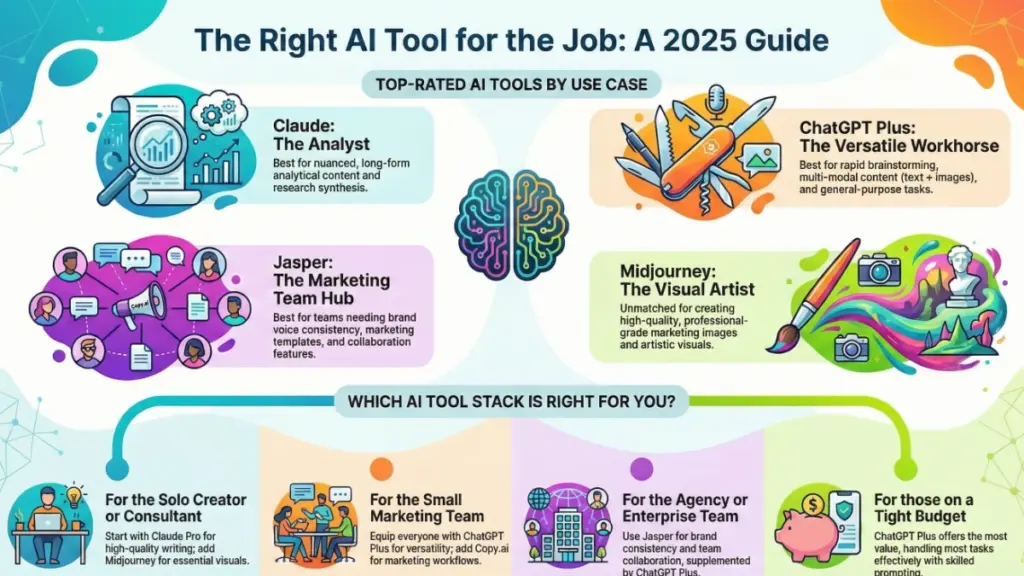
Claude (Anthropic) – My Current Daily Driver
I switched to Claude as my primary AI tool about eight months ago, and honestly, I haven’t looked back. Here’s why it’s earned the top spot in my workflow: the output quality for analytical and nuanced content is simply better than anything else I’ve tested. When I need to break down complex marketing strategies or write thought leadership pieces, Claude understands context and maintains consistency in ways that still surprise me.
The 200K token context window is a game-changer for long-form content. I can feed it entire competitor blog posts, brand guidelines, and previous articles, then ask it to write something new that matches the style and avoids repeating points. Last week, I used this to help a client create a comprehensive whitepaper—dumped in 50 pages of research, and Claude synthesized it into coherent, well-structured content in minutes.
Downsides? The web interface occasionally has rate limits during peak hours, and there’s no built-in SEO optimization features like some marketing-focused tools offer. Also, the artifacts feature can be quirky—sometimes it works brilliantly, sometimes you’re better off just using the chat. Pricing sits at $20/month for Pro, which is competitive but not cheap.
Best for: Long-form content, analytical writing, technical documentation, and anyone who values nuance and context understanding over speed.
ChatGPT Plus (OpenAI) – The Versatile Workhorse
ChatGPT remains my second-most-used tool for good reason. The $20/month Plus subscription gives you access to GPT-4, DALL-E 3 for image generation, Advanced Data Analysis, and now web browsing. That’s a ridiculous amount of capability for the price point.
What I love about ChatGPT is its versatility and speed. When I need to rapidly brainstorm 20 headline variations, create social media captions, or analyze a dataset, ChatGPT delivers faster than any alternative. The custom GPTs feature lets me create specialized assistants for specific tasks—I’ve built ones for SEO optimization, email writing, and competitive analysis that save me hours every week.
The image generation integration is genuinely useful. I create blog header images, social graphics, and presentation visuals without leaving the interface. It’s not as sophisticated as Midjourney, but for marketing content, it’s more than adequate.
Where it falls short: Output can be generic without careful prompting, and it tends toward verbosity. I often need to ask for more concise versions. The mobile app experience is clunky compared to the web interface, which frustrates me when I’m trying to work on the go.
Best for: Rapid content generation, multi-modal needs (text + images), quick analysis, and anyone wanting maximum versatility in a single subscription.
Jasper AI – The Marketing Team’s Choice
Here’s the truth about Jasper: it’s expensive at $49-$125/month depending on your plan, but for marketing teams managing multiple brands, it can absolutely justify the cost. I’ve implemented Jasper for three different agency clients, and each time, the team collaboration features and brand voice consistency tools delivered immediate ROI.
The platform includes 50+ templates specifically designed for marketing use cases—Facebook ads, landing pages, email sequences, product descriptions. These templates incorporate marketing best practices and reduce the thinking required to get started. For junior marketers or busy founders, this structure is invaluable.
The Brand Voice feature actually works. You can train it on existing content, and it will maintain that tone across outputs. I tested this extensively with a financial services client who had strict compliance requirements around messaging—Jasper maintained the appropriate tone far more consistently than general-purpose tools.
Boss Mode (their advanced plan) includes a document editor with AI commands similar to Notion AI, SEO mode for optimized content, and the ability to write long-form content in a single flow rather than piecing together chat responses.
The downsides are real though. For solo users or small teams, the pricing is steep compared to ChatGPT or Claude. The output quality isn’t noticeably better than GPT-4—you’re paying for the marketing-focused interface and team features. And honestly, if you’re skilled with prompt engineering, you can replicate most of Jasper’s functionality in ChatGPT for a fraction of the cost.
Best for: Marketing agencies, content teams managing multiple brands, anyone who values marketing-specific templates and team collaboration over cutting-edge AI models.
Midjourney – Still the Image Generation King
For pure image quality and artistic capability, Midjourney remains unmatched. I use it for all high-stakes visual content—client presentations, hero images for important blog posts, social media campaigns where visual impact matters.
The learning curve is steeper than alternatives because it runs through Discord rather than a traditional web interface. But once you master the prompt structure and parameters, you can generate stunning visuals that consistently outclass DALL-E 3 or other alternatives. The community aspect is actually helpful—seeing other users’ prompts and results accelerates learning.
Version 6 brought significant improvements to text rendering and photorealism. I can now create mockups with actual readable text, which was impossible in earlier versions. The style reference and character consistency features let me maintain visual branding across multiple images.
Pricing starts at $10/month for basic, but I recommend the $30/month Standard plan for commercial use rights and faster generation. The $60/month Pro plan adds stealth mode, which matters if you don’t want your prompts and images visible to the entire community.
The main frustration is the Discord interface—it feels clunky compared to web-based tools, and managing your image library requires external organization. Also, you can’t generate images of real public figures due to their policies, which limits some marketing use cases.
Best for: High-quality marketing visuals, social media content, anyone who needs professional-grade images and is willing to invest time learning the platform.
The Strong Mid-Tier Options (Great Value for Specific Use Cases)
Not everyone needs top-tier tools, and honestly, these mid-tier options deliver exceptional value for their price points. I regularly recommend these to clients depending on their specific situations.
Copy.ai – The Budget-Friendly Marketing Option
Copy.ai sits in an interesting sweet spot—it’s more affordable than Jasper ($36-$49/month) but more marketing-focused than ChatGPT. I’ve recommended it to at least a dozen small business owners who need marketing copy generation without the enterprise features and pricing of Jasper.
The workflow feature is genuinely useful—you can chain multiple AI operations together. For example, automatically generate a blog post from a topic, then create social media posts from that blog, then draft an email promoting those social posts. It’s not as sophisticated as custom API workflows, but for non-technical users, it’s powerful.
The tool includes 90+ templates covering everything from blog introductions to product descriptions to ad copy. The quality is solid—not quite at GPT-4 level, but more than adequate for most marketing content. The brand voice feature works reasonably well, though not as refined as Jasper’s.
Where it disappoints: The long-form editor feels clunky compared to alternatives, and you’ll hit the word limits faster than expected if you’re doing high-volume content creation. Customer support response times can be slow. And despite the name, it’s not particularly better at copywriting than general-purpose tools when you know how to prompt effectively.
Best for: Small marketing teams, solopreneurs, anyone who needs marketing templates and workflows but can’t justify Jasper’s pricing.
Notion AI – The Productivity Integration Play
If you already use Notion for project management and documentation (and honestly, you probably should), the $10/month Notion AI add-on is borderline essential. It’s not the most powerful AI tool I’ve tested, but the tight integration with Notion’s workspace makes it uniquely valuable.
I use it primarily for cleaning up meeting notes, summarizing project documentation, and drafting initial content directly within my workflow. The ability to highlight text in any Notion page and ask AI to improve it, summarize it, or translate it eliminates the context-switching that slows down work in other tools.
The AI won’t blow you away with creative content—it’s clearly optimized for clarity and conciseness over flair. But for internal documentation, process documentation, and workspace organization, that’s exactly what you want. I’ve helped three companies implement it specifically for knowledge base creation and maintenance.
The $10/month per user pricing is reasonable, but it adds up for larger teams. And if you don’t already use Notion, the learning curve of adopting both Notion and its AI features simultaneously might be too steep.
Best for: Existing Notion users, teams focused on documentation and internal content, anyone prioritizing workflow integration over cutting-edge AI capabilities.
The Specialized Tools Worth Considering (If They Match Your Niche)
These tools won’t make sense for everyone, but if you’re in their target niche, they can be absolutely worth the investment.
Descript – Video Editing Revolutionized
Descript isn’t primarily marketed as an AI tool, but its AI capabilities have transformed how I approach video content. The text-based editing alone is revolutionary—you edit video by editing the transcript. Delete words, rearrange sentences, and the video adjusts automatically.
The AI features include automatic transcription (which is scarily accurate), filler word removal with one click, Studio Sound that makes mediocre audio sound professionally recorded, and Overdub that lets you type new words in your voice. I’ve used Overdub to fix mistakes in recorded videos without re-recording—it’s not perfect, but it’s saved me hours of reshoots.
For podcasters and video content creators, the workflow efficiency is dramatic. I helped a client reduce their video editing time from 6 hours per episode to about 90 minutes using Descript. The $24/month Creator plan is all most people need.
Limitations: The rendering can be slow for long videos, and advanced video editors might find it lacks sophisticated effects options. It’s best for talking-head content and podcasts rather than highly produced marketing videos.
Best for: Podcasters, YouTube creators, anyone creating talking-head video content, marketing teams producing video content at scale.
Writesonic – The SEO-Focused Alternative
Writesonic has positioned itself as the SEO-optimized AI writing platform, and for content creators focused on search rankings, it delivers some genuinely useful features. The $16/month Unlimited plan (despite the name, it’s not truly unlimited but offers generous limits) makes it one of the more affordable specialized options.
The Article Writer 5.0 generates content with built-in SEO optimization—keyword density tracking, semantic keyword suggestions, and content structure recommendations based on analyzing top-ranking pages. I’ve tested this against manually optimized content, and it consistently produces articles that rank respectably with less manual SEO work required.
The Chatsonic feature (their ChatGPT competitor) includes real-time Google Search integration and image generation, making it a versatile tool beyond just SEO content. The Chrome extension lets you access AI writing across any web interface.
The downsides are similar to other specialized tools—the underlying AI quality doesn’t exceed GPT-4, so you’re paying for the SEO-specific interface and features. The unlimited plan has quality limits that aren’t clearly disclosed until you hit them. And the interface feels cluttered with features compared to cleaner alternatives.
Best for: SEO-focused content creators, bloggers building organic traffic, affiliate marketers, anyone who values SEO optimization over general writing quality.
The Tools That Disappointed Me (And Why You Should Probably Skip Them)
Not every AI tool lives up to its marketing. Here are the platforms I genuinely cannot recommend based on extensive testing, even though they have plenty of positive reviews online.
Rytr – Too Limited for the Limitations
Rytr positions itself as an affordable AI writing assistant at $9-$29/month, and while the pricing is attractive, I’ve found the limitations too restrictive for serious use. The character limits on even the unlimited plan mean you’ll hit walls faster than expected if you’re creating substantial content.
The output quality feels dated—it’s clearly using older or smaller models compared to current GPT-4 or Claude-based tools. The writing tends toward generic marketing speak that requires heavy editing. I tested it for two months trying to make it work for a budget-conscious client and ultimately recommended they switch to ChatGPT Plus instead.
The use case I could see working: Very occasional AI writing needs where $9/month feels justified, but honestly, the free tier of ChatGPT provides better quality for zero cost.
Anyword – Overpromised, Underdelivered
Anyword’s marketing emphasizes its predictive performance scoring—it claims to predict how well your copy will perform before you publish it. After testing it extensively for three months, I found the performance predictions to be essentially random. Content it scored highly underperformed, while content it ranked mediocre sometimes did quite well.
The $49+ pricing puts it in competition with Jasper, but the features and output quality don’t justify the cost. The interface feels clunky, and the AI generations often require significant editing. I wanted to love this tool—the concept is appealing—but the execution hasn’t delivered.
Making the Right Choice for Your Specific Situation
Here’s the framework I use when consulting with clients on AI tool selection. These questions will guide you to the right tool faster than any ranking list:
What’s your primary use case? If you’re writing long-form analytical content, Claude is hard to beat. Creating high-volume marketing copy? ChatGPT Plus offers the best value. Managing a marketing team? Jasper’s collaboration features justify the premium. Need SEO-optimized blog posts? Writesonic’s specialized features might save time.
What’s your skill level with AI prompting? Beginners benefit from template-heavy platforms like Copy.ai or Jasper that provide structure. If you’re comfortable with prompt engineering, general-purpose tools like ChatGPT or Claude offer more flexibility and better value.
What’s your budget realistically? For most solo users, starting with ChatGPT Plus or Claude Pro at $20/month makes sense. You can always add specialized tools later. Marketing teams can justify $100+ monthly spend across multiple tools if the time savings are real.
How important is integration with your existing workflow? If you live in Notion, their AI add-on is worth it. If you’re building custom workflows, API access becomes crucial. If you want simple standalone tools, web interfaces like Claude or ChatGPT work fine.
Are you creating content for a team or personal brand? Solo creators can get away with simpler setups. Teams need collaboration features, brand voice consistency, and approval workflows that specialized marketing tools provide.
I typically recommend starting with a general-purpose tool like ChatGPT Plus or Claude Pro for 30 days. Learn how to use it effectively, identify your specific bottlenecks and needs, then add specialized tools only if they clearly solve problems you’re actually experiencing.
The Future of Generative AI Tools (What’s Coming That Actually Matters)
Having watched this space evolve since 2021, I can tell you that most predictions about AI advancement are either overhyped or completely wrong. But there are trends I’m confident about because I’m seeing early versions already:
Multi-modal integration is becoming standard. The ability to work seamlessly with text, images, audio, and video in a single workflow is already emerging in tools like ChatGPT and Google Gemini. Within the next year, I expect most major platforms will offer this. For content creators, this means fewer tools needed in your stack.
Specialized agents for specific workflows are replacing general chatbots. Instead of telling an AI to write a blog post, you’ll have an agent that understands your entire content process—research, drafting, SEO optimization, image creation, social promotion—and handles it end-to-end. I’m already building early versions of this for clients using API workflows.
Real-time collaboration between AI and humans is getting sophisticated. Rather than AI generating content and humans editing it, we’re moving toward real-time co-creation where AI offers suggestions, alternatives, and improvements as you work. Google’s AI-powered docs features hint at this future.
What I’m NOT betting on: AI completely replacing human content creators anytime soon. After testing these tools for years, I’m more convinced than ever that the value lies in human-AI collaboration. The tools are force multipliers for skilled creators, not replacements.
The tools that will win in 2025 and beyond are those that focus on genuine productivity gains rather than flashy demonstrations. I’m watching for platforms that reduce editing time, improve consistency, and integrate smoothly into real workflows—not those that simply generate more words faster.
Final Recommendations: The AI Tools That Actually Deserve Your Money
After everything I’ve tested and all the money I’ve spent (and wasted), here’s my honest recommendation for different situations:
If you’re a solo content creator or consultant: Start with Claude Pro ($20/month). The output quality and context window make it ideal for thoughtful content creation. Add Midjourney Standard ($30/month) if visual content is important to your brand.
If you’re a small marketing team (2-5 people): ChatGPT Plus for everyone ($20/month per person) covers most needs versatilely. Add Copy.ai ($36/month) if you want marketing templates and workflows without Jasper’s premium pricing.
If you’re a marketing agency or enterprise team: Jasper Team plan ($125/month) for brand voice consistency and collaboration, plus ChatGPT Plus subscriptions for versatility. Budget for specialized tools like Descript if you’re creating video content.
If you’re on a tight budget: ChatGPT Plus ($20/month) offers the best bang for buck. You can accomplish nearly everything more expensive tools do with better prompting skills. Supplement with free tools like the basic ChatGPT tier and Canva’s AI features.
If you’re focused primarily on SEO content: Writesonic Unlimited ($16/month) for SEO-optimized articles, plus ChatGPT Plus for versatility. The combination costs less than most specialized tools while covering both needs.
The most important thing I’ve learned testing these tools is that more isn’t better. I see too many people subscribing to five different AI platforms, using none of them effectively. Master one general-purpose tool thoroughly, then add specialized tools only when you’ve identified specific gaps in your workflow.
These rankings will evolve as tools improve and new platforms emerge. I update my testing quarterly and genuinely change my recommendations when tools significantly improve or decline. The AI landscape moves faster than any industry I’ve worked in—what’s true today might be outdated in six months.
What matters most isn’t finding the highest-ranked tool on some list. It’s finding the tool that fits naturally into your workflow, solves real problems you’re actually experiencing, and delivers value that exceeds its cost. For some people, that’s a $20/month ChatGPT subscription. For others, it’s a $125/month Jasper setup. Both can be the right answer.
Start with one tool, use it intensively for at least a month, learn its strengths and limitations, and then make informed decisions about what else you might need. That’s the approach that’s worked for me and the dozens of clients I’ve advised. The AI tool that ranks #1 on paper might rank #5 for your specific situation—and that’s perfectly fine.