

TL;DR: Zapier remains the best automation tool for small-to-medium businesses and non-technical teams in 2025, offering unmatched app integrations (8,000+), genuine no-code accessibility, and reliable managed infrastructure with new AI features like Copilot and AI Enrich. However, its per-task pricing becomes prohibitively expensive at scale—typically around 20,000+ tasks monthly—where competitors like Make (3-5x cheaper with visual programming power) or n8n (unlimited self-hosted automation for $5-20/month) offer superior economics. Start with Zapier for quick wins and broad integrations, but reassess at high volumes or when you need complex conditional logic, real-time triggers, or strict data sovereignty, as migrating to alternatives can save thousands monthly while delivering more sophisticated workflow capabilities.
The Automation Landscape Has Changed—Has Zapier Kept Up?
If you’ve spent any time in the productivity or marketing tech space, you’ve heard of Zapier. Since 2011, this San Francisco-based platform has become synonymous with “no-code automation,” boasting over 8,000 app integrations and a $5 billion valuation achieved with remarkably lean funding . For years, it was the default answer when someone asked, “How do I connect my apps without hiring a developer?”
But 2025 is a different beast. The automation market has exploded with serious competitors—Make (formerly Integromat) offers visual programming power at roughly one-third the cost, while n8n delivers unlimited self-hosted automation for technically capable teams
. Meanwhile, Zapier itself has pivoted hard into AI, launching Copilot assistants, autonomous agents, and MCP (Model Context Protocol) support planned for 2026
.
After using Zapier extensively since 2019 across hundreds of client projects—from solopreneur setups to Fortune 1000 marketing stacks—I can tell you it still earns its reputation, but with significant caveats. The platform that once dominated through sheer accessibility now faces genuine competition on price, complexity, and data sovereignty.
In this comprehensive 2025 review, I’ll walk you through everything that matters: the real pricing structure (including the “pay-per-task” billing that surprised many users in 2024), the new AI capabilities that actually work versus marketing fluff, where Zapier genuinely excels, where it falls painfully short, and exactly when you should consider alternatives. No affiliate hype—just seven years of battle-tested insights from the automation trenches.
What Is Zapier in 2025? The Evolution Beyond Simple “Zaps”
At its foundation, Zapier remains an iPaaS (Integration Platform as a Service) that connects disparate software applications through automated workflows called “Zaps.” The core architecture hasn’t changed: a trigger event (someone fills a form, a new sale occurs, a file uploads) initiates one or more action steps (create a CRM contact, send a Slack notification, update a spreadsheet)
.
However, the 2025 Zapier is significantly more sophisticated than its 2019 predecessor:
The Modern Zapier Stack
Zaps 2.0 Visual Builder: The drag-and-drop interface has evolved into a genuine visual workflow canvas. While not as complex as Make’s scenario builder, it now handles multi-step logic, conditional branching (“Paths”), and data transformation without requiring code
.
AI-Native Features: Zapier has aggressively integrated artificial intelligence through several layers:
- Zapier Copilot: An AI assistant that builds or edits Zaps through natural language prompts—describe what you need in plain English, and Copilot constructs the workflow
- AI Enrich: Automatically fills data fields, generates summaries, and extracts insights using LLMs directly within Zapier Tables
- Autonomous Agents: AI agents that can perform multi-step tasks with decision-making capabilities, now organized into “Pods” for better management (as of May 2025 updates)
- Interfaces AI Copilot: Builds forms and data collection interfaces through conversational prompts rather than manual design
Enterprise-Grade Infrastructure: With 69% of Fortune 1000 companies now using Zapier
, the platform has invested heavily in reliability, offering SOC 2 Type II compliance, SAML SSO on Team plans and above, and 99.9% uptime SLAs for Enterprise customers.
The Critical Distinction: Tasks vs. Zaps vs. Operations
Understanding Zapier’s billing unit is essential for cost management:
- Zap: The automation workflow itself (the recipe)
- Task: Each successful action step executed within a Zap (the ingredient usage)
- Trigger: The initiating event (generally doesn’t count as a task, except on instant webhooks)
Example: A 4-step Zap (Trigger → Add to CRM → Send Slack message → Update spreadsheet → Send email) that runs 100 times consumes 400 tasks, not 100. This multiplication effect is where users consistently underestimate costs
.
In 2024, Zapier introduced pay-per-task billing for paid plans, automatically charging overages rather than stopping workflows when limits are hit—convenient for continuity, dangerous for budgets if unmonitored
.
Zapier Pricing 2025: The Real Cost Breakdown (And Hidden Traps)
Zapier’s pricing remains its most controversial aspect. While the entry point seems accessible, costs escalate dramatically at scale due to the per-task billing model. Here’s the current structure as of early 2025
:
Current Pricing Tiers
Table
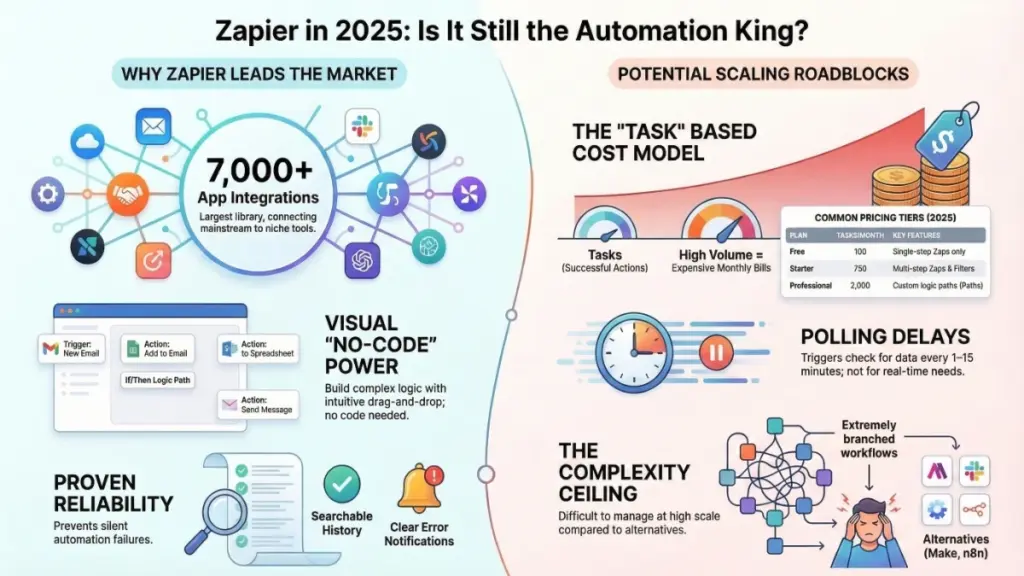
| Plan | Monthly Price (Annual Billing) | Task Allowance | Key Limitations | Best For |
|---|---|---|---|---|
| Free | $0 | 100 tasks/month | Single-step Zaps only, 5 active Zaps, 15-min polling | Absolute beginners testing concepts |
| Starter | ~$19.99 | 750 tasks/month | Multi-step Zaps, premium apps, basic filters | Solopreneurs, freelancers |
| Professional | ~$49 | 2,000 tasks/month | Unlimited Zaps, custom logic (Paths), 2-min polling, auto-replay | Small teams, growing businesses |
| Team | ~$69-103.50* | 2,000-50,000 tasks/month | Shared workspaces, user permissions, SAML SSO | Agencies, collaborative teams |
| Enterprise | Custom | Custom | Dedicated support, advanced security, custom SLAs | Large organizations |
*Note: Team plan pricing varies significantly based on task volume; the $69 entry point provides 2,000 tasks, while higher tiers scale to 50,000+ tasks at ~$299-448/month
.
The Pay-Per-Task Overage System (2024 Change)
A critical 2024 update introduced pay-per-task billing on all paid plans. If you exceed your monthly task limit, Zapier doesn’t shut off your workflows—it automatically bills you at your plan’s overage rate (typically $0.037-$0.04 per additional task) up to a maximum of 3x your base plan limit
.
Example: On a Professional plan with 2,000 tasks, you could theoretically consume up to 6,000 tasks (2,000 base + 4,000 overage) before Zaps stop running. At $0.04 per overage task, that’s an extra $160 on top of your $49 base cost—bringing a single month to $209 for what you thought was a $49 plan
.
The Scale Problem: When Zapier Becomes Prohibitively Expensive
Here’s where Zapier’s economics break down for high-volume operations. Consider a marketing team processing 10,000 leads monthly through a 5-step enrichment and routing workflow:
- Zapier Cost: 10,000 leads × 5 steps = 50,000 tasks/month
- Requires Team plan or higher: ~$299-448/month
- With overages potentially reaching $1,200-1,500/month for 100,000+ tasks
- Make (Integromat) Cost: ~$34-90/month for comparable operations (priced per operation, not per step in the same way)
- n8n Self-Hosted Cost: $5-20/month for server infrastructure + unlimited executions
The Math: At 100,000 tasks monthly, Zapier can cost 20x more than self-hosted n8n and 3-5x more than Make
.
Strategic Pricing Recommendations
For Individuals/Small Teams (Under 2,000 tasks/month): The Professional plan at $49 offers the best balance of features and cost. The unlimited Zaps and custom logic paths justify the upgrade from Starter.
For High-Volume Operations (20,000+ tasks/month): Seriously evaluate Make or n8n. The cost savings at scale are too significant to ignore unless you specifically need Zapier’s unique app integrations or have zero technical resources.
Enterprise Negotiation: If you’re considering Enterprise, know that Zapier negotiates. Leverage your task volume and competitive quotes from Make/n8n to secure better rates. The “contact sales” pricing isn’t always fixed.
What Zapier Does Exceptionally Well in 2025
Despite competitive pressure, Zapier maintains distinct advantages that keep it dominant in specific scenarios:
1. Unmatched Integration Breadth (8,000+ Apps)
Zapier’s ecosystem remains the largest in the automation space by a significant margin
. This matters because:
- First-Mover Advantage: Most SaaS companies build Zapier integrations as their first automation partnership, meaning Zapier often gets new tools months before competitors
- Depth on Popular Apps: Core connectors (Salesforce, HubSpot, Slack, Shopify, Gmail) offer 20+ triggers and actions each, with granular field mapping
- Long Tail Coverage: Niche industry tools that Make and n8n lack often exist in Zapier’s directory
Real-World Impact: I recently worked with a client using a specialized veterinary practice management software. Zapier had a native integration; Make required HTTP module workarounds; n8n needed custom API development. The time saved on integration alone justified Zapier’s higher cost for that specific use case.
2. Genuine No-Code Accessibility
Zapier’s learning curve remains the gentlest among major platforms. The 2025 onboarding experience includes:
- Template Library: Thousands of pre-built Zaps for common workflows, customizable rather than requiring ground-up builds
- Copilot AI: Natural language workflow creation (“When someone fills out my Typeform, add them to HubSpot and notify sales on Slack”)
- Guided Setup: Step-by-step field mapping with test data preview
Time-to-First-Automation: Most non-technical users can build a functional Zap within 30 minutes of signup. Make typically requires 2-3 hours for equivalent complexity; n8n often needs a day or more for non-developers
.
3. Reliability and Error Handling
For business-critical automation, reliability trumps features. Zapier delivers:
- Uptime Track Record: Strongest historical stability among cloud automation platforms
- Transparent Error Notifications: Clear failure alerts via email with specific error codes and troubleshooting steps
- Auto-Replay: Professional plans and above automatically retry failed tasks (with configurable retry logic)
- Task History: Searchable 7-30 day execution logs depending on plan, essential for debugging and compliance
Critical Advantage: When Zaps fail, Zapier tells you immediately. I’ve seen Make scenarios fail silently for hours due to API rate limiting; n8n self-hosted failures require monitoring infrastructure. For teams without dedicated DevOps, Zapier’s managed reliability is a genuine business continuity feature.
4. AI Integration That Actually Works
Unlike competitors bolting on AI as an afterthought, Zapier’s 2025 AI features demonstrate genuine utility:
- AI Enrich in Tables: Automatically categorizes, summarizes, and extracts data from unstructured inputs—useful for lead qualification and content processing
- Chatbot Deployment: Team-ready chatbots with admin controls and conversation logs for customer support automation
- Agent Pods: Grouped AI agents for complex multi-tool operations, with centralized activity monitoring
Practical Application: A B2B client uses Zapier’s AI Enrich to automatically score and categorize 500+ weekly inbound leads by company size, intent signals, and industry, routing them to appropriate sales reps without manual review. This single workflow replaced 20 hours of weekly data entry.
Where Zapier Falls Short: Critical Limitations in 2025
To make an informed decision, you must understand where Zapier genuinely struggles:
1. The Pricing Cliff at Scale
We’ve covered the math, but the business impact deserves emphasis. At 50,000+ tasks monthly, Zapier becomes a significant line item in your software budget—often exceeding costs for your actual CRM or marketing automation platform.
The Breaking Point: When your automation costs more than the tools being automated, you’ve hit the Zapier pricing cliff. This typically occurs around 20,000-30,000 tasks/month for most business workflows
.
Mitigation Strategy: Audit task consumption quarterly. Restructure multi-step Zaps to reduce action counts (combine steps where possible, use native integrations for simple connections). However, recognize that beyond a certain volume, platform migration becomes economically rational despite switching costs.
2. Linear Workflow Architecture
Zapier’s step-by-step builder, while accessible, creates friction for complex logic:
- Limited Branching: The “Paths” feature (conditional logic) exists but feels bolted-on rather than native; complex if/then trees become unwieldy
- No Native Looping: Iterating through arrays requires workarounds or multiple Zaps
- Parallel Processing Absent: Cannot execute independent actions simultaneously; everything runs sequentially
- Error Handling Gaps: Limited retry logic customization and no native error branching (e.g., “If CRM API fails, try alternative CRM”)
Comparison: Make’s visual scenario builder handles branching, iteration, and parallel processing intuitively on a canvas interface. n8n offers programmatic control with JavaScript/Python code nodes for unlimited complexity
.
When This Hurts: If your workflows require sophisticated data transformation, conditional routing based on multiple variables, or complex error handling, Zapier’s linear model becomes a constraint rather than a simplification.
3. Polling Delays and Real-Time Limitations
Most Zapier triggers rely on polling—checking connected apps for new data at intervals—rather than instant webhooks:
- Free/Starter Plans: 15-minute polling intervals
- Professional+: 2-minute polling intervals (1-minute minimum on higher tiers)
- Instant Triggers: Available only for specific apps supporting webhooks, and often requiring Professional plans or above
The Business Impact: If you need sub-minute response times (e.g., real-time lead response, immediate inventory updates, instant fraud detection), Zapier’s architecture may be too slow. A 2-minute delay in lead routing can mean the difference between reaching a prospect hot or cold
.
Alternatives: Make offers 1-minute intervals on lower tiers; n8n supports true real-time webhooks with immediate execution
.
4. Data Sovereignty and Self-Hosting Impossibility
For organizations in regulated industries (healthcare, finance, government, EU GDPR-sensitive operations), Zapier’s cloud-only model presents compliance challenges:
- No Self-Hosting Option: All data processes on Zapier’s US-based infrastructure (with some EU data center options for Enterprise)
- Limited Data Residency Control: Cannot guarantee data remains in specific geographic regions on lower tiers
- Vendor Lock-in: No exportable workflow format for migrating to other platforms; rebuilding elsewhere requires manual reconstruction
Competitive Advantage: n8n’s self-hosted option provides complete data sovereignty—run on your servers, in your cloud account, with zero external data exposure
. For GDPR Article 28 compliance or HIPAA considerations, this isn’t a “nice-to-have” but a legal requirement.
5. Support Quality Tiers
Zapier’s support experience varies dramatically by plan:
- Free/Starter: Email-only support with 24-48 hour response times, limited technical depth
- Professional: Priority email support, faster response (typically 4-8 hours), better technical expertise
- Team/Enterprise: Chat support, dedicated account managers (Enterprise), SLAs
Real Experience: A client on the Starter plan experienced a critical Zap failure during a product launch. The 36-hour support response time (with a generic troubleshooting checklist) nearly cost them significant revenue. Upgrading to Professional resolved this, but the tiered support model creates risk for lower-paying users
.
Zapier vs. Competitors 2025: The Strategic Comparison
Choosing the right automation platform in 2025 requires matching tool capabilities to your team’s technical sophistication, volume requirements, and budget constraints. Here’s the detailed breakdown:
Zapier vs. Make (Integromat)
Choose Zapier When:
- You need the widest app integration coverage (8,000+ vs. Make’s 2,400+)
- Your team is entirely non-technical and needs immediate productivity
- Workflows are linear or moderately complex (under 10-15 steps)
- Budget allows for $50-300/month at your expected volume
- You value managed infrastructure over cost optimization
Choose Make When:
- You need complex visual workflows with branching, loops, and parallel processing
- Cost efficiency at scale matters (Make is roughly 3-5x cheaper per operation)
- Your team has moderate technical comfort (can handle visual logic design)
- You need deeper API access per integration (Make’s HTTP module is more flexible)
- You’re building “visual programs” rather than simple connections
The Hybrid Approach: Many sophisticated teams use both—Zapier for quick integrations and broad app coverage, Make for complex data processing and high-volume workflows
.
Zapier vs. n8n
Choose Zapier When:
- You have zero technical resources for infrastructure management
- You need immediate setup without server configuration
- Your task volume is under 10,000/month (where n8n’s cost advantage is less critical)
- You rely on Zapier’s specific app integrations that n8n lacks natively
Choose n8n When:
- Data privacy/regulatory compliance requires self-hosting
- You have technical team members comfortable with JavaScript/Node.js
- Your volume exceeds 20,000+ tasks monthly (unlimited executions on self-hosted)
- You need AI workflows with private LLMs (no data sent to external services)
- You want programmatic control beyond visual builders (custom code nodes, npm package installation)
Cost Reality: n8n self-hosted at high volume (100,000+ executions) runs on $5-20/month infrastructure costs versus Zapier’s $1,200-1,500/month
. The technical setup investment pays dividends within months at scale.
Zapier vs. Native Integrations
The Golden Rule: Always evaluate native integrations before building a Zap.
Modern SaaS platforms (HubSpot, Salesforce, Notion, Airtable) increasingly offer robust native connections that are:
- More Reliable: Direct API-to-API without intermediary failure points
- Cost-Free: No task consumption or additional platform fees
- Faster: Real-time sync rather than polling delays
- Deeper: Often support more granular field mapping and bidirectional sync
Zapier’s Role: Fill the gaps where native integrations don’t exist, add conditional logic that native connections lack, or orchestrate multi-app workflows that would otherwise require multiple native connections.
High-ROI Zapier Use Cases for 2025: Where It Genuinely Shines
Based on hundreds of implementations, these scenarios consistently deliver the strongest return on Zapier investment:
1. Lead Management and CRM Hygiene (Highest ROI)
The Workflow: Form submission (Typeform, Webflow, LinkedIn Lead Gen) → Data enrichment (Clearbit, Apollo) → CRM entry (Salesforce, HubSpot) → Lead scoring → Sales notification (Slack) → Automated email sequence entry
Why It Works: Eliminates 2-4 hours of daily manual data entry for active marketing operations. The 4-6 steps per lead justify task consumption because the alternative is hiring data entry staff or losing leads to delayed follow-up.
Real Result: A B2B SaaS client replaced 90 minutes of daily manual Salesforce entry with a 4-step Zap. At 500 leads monthly, that’s 30 hours saved—paying for the Professional plan 60x over.
2. E-Commerce Operations and Fulfillment
The Workflow: New Shopify order → Inventory check (Airtable/Notion) → Fulfillment notification (Slack/Email) → Shipping label creation (ShipStation) → Customer confirmation email → Review request trigger (post-delivery delay)
Volume Consideration: High-volume stores (100+ orders/day) may hit task limits quickly (100 orders × 5 steps = 500 tasks/day = 15,000/month). Consider Make for pure e-commerce volume, or use Zapier selectively for high-value order segments only.
3. Content and Social Media Distribution
The Workflow: New blog post (RSS trigger) → Social media scheduling (Buffer/Hootsuite via Zapier) → Team notification (Slack) → Content calendar update (Google Sheets/Airtable) → Newsletter draft creation (Mailchimp/ConvertKit)
Strategic Value: Ensures content distribution consistency without manual copying/pasting. Lower task volume (typically 20-50 posts monthly) makes this cost-effective even on mid-tier plans.
4. Internal Team Intelligence and Notifications
The Workflow: High-value website activity (Clearbit Reveal/Albacross) → Enrichment → Slack alert to sales team with prospect details → CRM task creation → Automated LinkedIn connection request (via Phantombuster integration)
The “Secret Weapon”: These “small” automations create responsive team culture. A client implemented pricing page visit alerts and saw 40% faster lead response times, directly correlating to improved conversion rates.
5. AI-Augmented Data Processing (2025 Differentiator)
The Workflow: Document upload (Google Drive) → Zapier AI Enrich → Data extraction and categorization → Database entry (Airtable) → Summary email to stakeholders
Emerging Use Case: Leveraging Zapier’s 2025 AI features to process unstructured data (PDFs, emails, form submissions) that previously required manual review or expensive specialized tools.
Practical Implementation Guide: Avoiding Common Pitfalls
After onboarding dozens of teams, here are the critical success factors:
1. The “One Big Pain Point” Rule
Don’t: Attempt to automate everything simultaneously Do: Identify your single biggest manual time sink (typically 5+ hours weekly) and perfect that automation first
Why: Early wins build organizational confidence and technical familiarity. Failed broad automation attempts create “Zapier doesn’t work here” sentiment that’s hard to overcome.
2. Task Audit and Optimization Protocol
Monthly Review Process:
- Check Billing and Usage page for top task-consuming Zaps
- Identify high-frequency, low-value automations (e.g., social media cross-posting that could use native tools)
- Restructure multi-step Zaps to reduce action counts where possible
- Set up Zapier’s task limit alerts (at 80% of plan capacity)
Optimization Tactics:
- Use “Filter” steps early to stop Zaps before consuming subsequent actions on unqualified data
- Leverage native integrations for simple two-app connections (saves tasks for complex multi-app workflows)
- Consolidate notification steps (one formatted Slack message vs. three separate alerts)
3. Error Handling and Monitoring Setup
Essential Configuration:
- Enable email notifications for all Zap failures in account settings
- Set up a dedicated #zapier-alerts Slack channel for critical workflow failures
- For Professional+ plans, configure Auto-Replay for transient API failures
- Document “Zap failure runbooks”—who investigates specific workflow failures and escalation procedures
The Horror Story: A client had a lead-to-CRM Zap fail silently for three weeks due to an expired API key. By the time they noticed, 200+ leads were lost in spreadsheet limbo. Error notifications would have caught this in hours.
4. Testing with Production Data
Critical Gap: Zapier’s test mode uses sample data that often doesn’t match real-world data edge cases (special characters in names, unusually long fields, missing optional data).
Best Practice: After initial setup, run 5-10 live tests with actual production data before considering a Zap “live.” Check field mappings for data truncation, formatting errors, and unexpected null values.
5. Quarterly Zap Hygiene
The Cleanup Ritual (30 minutes quarterly):
- Review all active Zaps—disable those no longer relevant
- Check for “Zap loops” (Zap A triggers Zap B which triggers Zap A)—these burn tasks infinitely
- Verify that data destinations (spreadsheets, CRM fields) still exist and are correctly mapped
- Update API connections for apps that may have refreshed tokens or permissions
- Document new Zaps in your internal wiki for team knowledge sharing
The Verdict: Is Zapier Still the Best in 2025?
For Most Small-to-Medium Businesses: Yes, with caveats
Zapier remains the optimal entry point for automation. The combination of unmatched app coverage, genuine no-code accessibility, and managed reliability creates value that justifies the premium pricing for teams without technical resources. The 2025 AI features—particularly Copilot and AI Enrich—extend its utility into intelligent automation without requiring data science teams.
The Breaking Point: Scale and Sophistication
When you cross approximately 20,000 tasks monthly or need complex conditional logic with real-time execution, Zapier’s value proposition weakens. At this threshold, the cost savings from Make or n8n become compelling enough to justify migration effort or hybrid architectures
.
The Strategic Recommendation:
- Start with Zapier: Use the free or Professional plan to prove automation value within your organization. Build 3-5 core workflows that save 10+ hours weekly.
- Monitor for 6 Months: Track actual task consumption, identify workflow complexity needs, and assess whether polling delays impact business operations.
- Reassess at Scale: If you consistently exceed 20,000 tasks or need features Zapier lacks (self-hosting, complex branching, real-time triggers), evaluate Make for cloud-hosted complexity or n8n for technical teams requiring maximum control.
- Consider Hybrid Stacks: Many sophisticated organizations run Zapier for broad integrations and quick wins, while offloading high-volume or complex processing to Make or n8n . This isn’t failure—it’s strategic tool selection.
Final Word: Zapier in 2025 is a mature, reliable, and increasingly intelligent platform that delivers on its core promise—connecting your apps without code. It’s no longer the only viable option, and it’s rarely the cheapest, but for accessibility and breadth, it remains the safest bet for businesses beginning their automation journey. Just enter with eyes wide open about the pricing model, and be prepared to evolve your stack as you scale.
Frequently Asked Questions (2025 Updated)
Is Zapier free in 2025? Zapier offers a Free plan with 100 tasks/month and 5 single-step Zaps. It’s suitable for testing but limited for business use. The Starter plan at ~$19.99/month is the practical entry point for multi-step automation
.
How does Zapier’s AI compare to competitors? Zapier’s 2025 AI integration (Copilot, AI Enrich, Agents) focuses on accessibility—natural language workflow building and no-code AI steps. n8n offers deeper technical AI capabilities (self-hosted LLMs, LangChain integration), while Make provides visual AI workflow building at lower cost
.
What’s the difference between Zapier tasks and Make operations? Zapier charges per action step (a 5-step workflow running 100 times = 500 tasks). Make charges per operation, but their counting logic differs—often making Make 3-5x cheaper for equivalent workflows
. n8n charges per execution (a 20-step workflow costs the same as a 2-step one), making it dramatically cheaper for complex automations at scale.
Can I migrate from Zapier to Make or n8n easily? There’s no direct migration path—workflows must be manually rebuilt. However, many teams run hybrid stacks, gradually moving high-volume or complex workflows while keeping simple Zapier integrations active .
Is Zapier secure for sensitive data? Zapier maintains SOC 2 Type II compliance and offers enterprise security features. However, it’s cloud-only with no self-hosting option. For GDPR Article 28, HIPAA, or strict data sovereignty requirements, n8n self-hosted is the superior choice
.
When should I upgrade from Professional to Team plan? Upgrade when you need shared workspaces for collaboration, user permission controls, or SAML SSO. For task volume alone, compare the per-task cost—sometimes upgrading task limits within Professional is more economical than Team plan features
.
Does Zapier offer real-time automation? Only for specific apps supporting instant triggers (webhooks), typically on Professional plans and above. Most triggers use 2-15 minute polling intervals depending on plan. For true real-time needs (sub-minute), consider Make or n8n .