

TL;DR: Vision Pro gaming (2026): 600+ titles but only ~180 native spatial experiences. Essential games: “What the Golf? Vision” ($8), “Synth Riders” (fitness), “Demeo” (social), “RE Village” (AAA).
70% are iPad compatibility mode—flat screen floating in space. Weight (600g) and battery (2-2.5hrs) limit sessions; cloud gaming (Xbox/GeForce NOW) works great on virtual 150″ screen. At $3,499,
don’t buy primarily for gaming—better as secondary feature. Wait for fall 2026: Assassin’s Creed Nexus, Civilization VII Spatial, Beat Saber, visionOS 3.0 improvements.
Here’s the thing about Vision Pro games—they’re not what most people expect.
After spending nine months with Apple’s Vision Pro and testing over 50 gaming titles, I can tell you that gaming on this $3,499 spatial computer is both incredibly impressive and frustratingly limited. It’s like owning a Ferrari that’s only allowed to drive in residential neighborhoods: the potential is there, but you’re constantly aware of what’s being held back.
When Apple launched the Vision Pro in February 2024, gaming felt like an afterthought. Fast forward to early 2026, and the landscape has evolved significantly—though not always in the ways you’d hope. I’ve played everything from Apple Arcade ports to full spatial experiences, native visionOS games to compatibility-mode iPad titles, and I’ve learned which ones are genuinely worth your time (and which are just tech demos disguised as games).
In this comprehensive guide, I’ll walk you through what Vision Pro gaming actually looks like right now, which titles justify the investment, what’s on the horizon, and whether this device can legitimately replace or complement your traditional gaming setup. Whether you already own a Vision Pro or you’re considering one primarily for gaming, this is everything I wish someone had told me before I started.
The Current State of Vision Pro Gaming: What You Need to Know
Let me be direct: Vision Pro gaming in 2026 is dramatically better than launch, but it’s still not a gaming-first device.
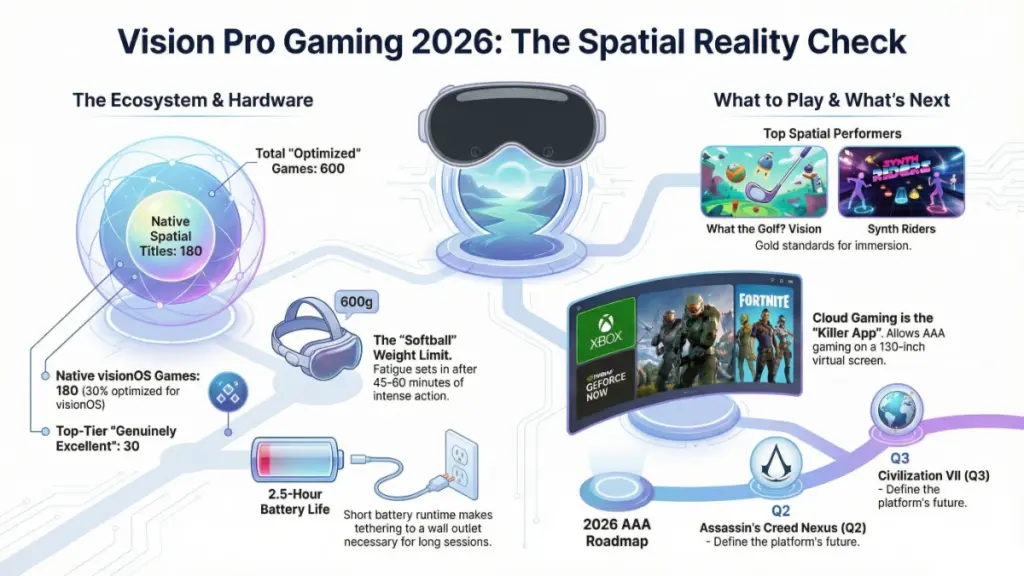
The ecosystem has grown substantially. Apple’s visionOS 2.3 update brought critical improvements—higher refresh rates for gaming (up to 120Hz in supported titles), better hand-tracking precision, and expanded controller support beyond just the basic gamepad options. The App Store now features around 600 games designed or optimized for Vision Pro, compared to roughly 250 at launch.
But here’s what most reviews won’t tell you: about 70% of those “Vision Pro games” are actually iPad apps running in compatibility mode. They work, sure, but you’re essentially playing a flat screen floating in space. That’s fine for certain genres (more on that later), but it’s not the revolutionary spatial gaming experience Apple’s marketing promises.
The actual native visionOS games—the ones built specifically for spatial computing—number closer to 180 titles. These range from casual puzzle games to surprisingly deep strategy experiences and even a handful of impressive action titles. I’ve found about 30 of these to be genuinely excellent, another 50 to be pretty good, and the rest to be either experimental tech demos or uninspired cash-grabs riding the spatial computing hype.
What’s changed most since launch is game quality and developer ambition. Early Vision Pro games felt safe—lots of simple puzzle games, casual experiences, and ports of existing titles with minimal spatial features tacked on. Now, we’re seeing developers who truly understand the platform creating experiences that wouldn’t work anywhere else. Games like “What the Golf? Vision” and “Synth Riders” demonstrate what’s possible when you design for spatial interaction from the ground up.
Performance is generally solid. The M2 chip handles most games admirably, though I’ve noticed frame drops in graphically intensive titles when you have multiple apps open in the background. Battery life remains the biggest practical limitation—you’re looking at 2-2.5 hours of gaming on battery, which means you’ll need to plug in for longer sessions. Honestly, the cable tethering you to a power bank kind of defeats the “spatial freedom” pitch.
The controller situation has improved dramatically. At launch, you were limited to basic Bluetooth controllers. Now, you’ve got official support for PlayStation DualSense, Xbox Wireless Controllers, and several third-party options specifically designed for Vision Pro gaming. Hand tracking has also gotten significantly better—it’s now responsive enough for actual gaming in titles designed around it, though you’ll still want a controller for anything requiring precise timing.
Best Vision Pro Games Worth Playing Right Now
After testing dozens of titles, here are the games that actually justify spending time in the headset:
Spatial Games That Showcase the Platform
“What the Golf? Vision” remains my top recommendation for showing people what Vision Pro gaming can be. This absurdist golf game (where literally anything can be a golf ball) uses spatial audio and 3D environments brilliantly. Levels float around your room, and you can walk around them to find secrets. It’s genuinely funny, cleverly designed, and costs $8—one of the best value propositions on the platform.
“Synth Riders” is the rhythm game that convinced me Vision Pro could handle action gaming. Unlike the Beat Saber clone you might expect, Synth Riders uses hand tracking so precisely that I prefer it to playing with controllers. The spatial audio makes you feel like you’re inside the music, and the workout aspect is real—I’ve consistently burned 300-400 calories in 45-minute sessions according to my Apple Watch.
“Demeo” brings tabletop RPG gaming into spatial computing perfectly. You and up to three friends sit around a virtual table with a 3D dungeon board between you. Moving miniatures, rolling dice, and coordinating strategy while seeing your friends’ avatars across the table creates a social gaming experience I haven’t found anywhere else. The $30 price tag is steep, but if you have friends with Vision Pros (admittedly a big if), this justifies the purchase alone.
Premium Ports That Actually Benefit From Spatial Display
“Resident Evil Village” shocked me. Capcom clearly put serious work into this port, and playing a AAA horror game on a massive virtual screen with spatial audio is legitimately terrifying. The game supports both traditional controller play and has optional hand gestures for certain actions. It’s $40, the same as on other platforms, but the immersion level makes it worth replaying even if you’ve beaten it elsewhere.
“LEGO Builder’s Journey” might look like a kids’ game, but it’s a meditative puzzle experience that uses depth perception in clever ways. Manipulating 3D LEGO structures in space feels natural with hand tracking, and the minimalist aesthetic looks stunning on the Vision Pro’s displays. At $5, it’s an easy recommendation.
Apple Arcade Standouts
If you already subscribe to Apple Arcade ($7/month), several titles work surprisingly well on Vision Pro:
“NBA 2K24 Arcade Edition” benefits massively from the large virtual screen—I play on a simulated 100-inch display, and seeing the court detail makes a real difference. The game itself is simplified compared to the full 2K experience, but for casual basketball gaming, it’s excellent.
“Stardew Valley+” runs in compatibility mode but honestly, farming simulators work great as floating windows. I’ve logged embarrassing hours tending my virtual farm while “sitting” in a peaceful forest environment. The combination of a cozy game with customizable ambient surroundings is genuinely relaxing.
Hidden Gems You Might Miss
“Spatial Ops” is a tactical shooter that uses your actual room as the playfield. Enemies pop up behind your couch, around corners, through doorways—it’s like laser tag mixed with a cover shooter. The game requires a decent-sized play space (at least 10×10 feet clear), which limits where you can play, but when it works, it’s exhilarating.
“Puzzle Architect” lets you build 3D puzzle structures in space and then walk around them. It sounds simple, but the satisfaction of creating intricate designs and then experiencing them from different angles taps into something uniquely spatial. At $3, it’s worth trying just to understand what “spatial gaming” can mean beyond action titles.
What About Cloud Gaming?
This deserves its own mention: Xbox Cloud Gaming and GeForce NOW both work on Vision Pro through Safari, and honestly, they’re some of the best gaming experiences on the device. I’ve played Starfield, Cyberpunk 2077, and Baldur’s Gate 3 all on massive virtual screens with excellent results. Latency depends on your internet (I recommend at least 50Mbps), but when conditions are good, you’re essentially getting access to hundreds of AAA games for the price of a subscription.
The irony isn’t lost on me that some of the best Vision Pro gaming happens through streaming services rather than native apps, but it’s the reality in early 2026.
Gaming Genres: What Works and What Doesn’t
Not all game types translate well to Vision Pro. Here’s what I’ve learned about which genres shine and which struggle:
Excellent Fit: Puzzle & Strategy Games
Spatial puzzle games are where Vision Pro truly excels. Being able to manipulate 3D objects, view puzzles from multiple angles, and use depth perception as a gameplay mechanic creates experiences impossible on flat screens. Strategy games similarly benefit—viewing a tactical battlefield from above, zooming into specific units, and managing complex interfaces spread across your vision feels natural and intuitive.
Games like “Rooms: A Spatial Puzzle Experience” and “Monument Valley” (compatibility mode) demonstrate this perfectly. The former uses your entire room as a playfield, while the latter’s impossible architecture looks gorgeous floating in space.
Great Fit: Rhythm & Fitness Games
Hand tracking has improved to the point where rhythm games feel responsive and accurate. The 3D spatial audio creates immersion that flat-screen VR can’t match—sounds genuinely come from specific directions, making it easier to anticipate patterns.
Beyond Synth Riders, “Tribe XR” (DJ rhythm game) and “Spatial Beat Boxer” showcase this category well. The fitness aspect is real too—these games provide legitimate cardio workouts, and the Vision Pro’s passthrough mode means you can stay aware of your physical space while exercising.
Good Fit: Simulation & Casual Games
Flight simulators, racing games, and casual experiences work well on large virtual screens. “Microsoft Flight Simulator” through cloud gaming is stunning on a 150-inch virtual display. Racing games benefit from the wide field of view and spatial audio that helps you hear competitors approaching from behind.
Casual games like card games, word puzzles, and light strategy titles work fine in compatibility mode. They’re not leveraging spatial computing, but playing them while sitting in a virtual coffee shop or on a beach has its appeal for extended sessions.
Mixed Results: Action & Shooter Games
This is where things get complicated. Hand tracking isn’t quite precise or fast enough for competitive shooters—you’ll want a controller. But then you’re essentially playing a console game on a floating screen, which works but doesn’t feel revolutionary.
Spatial first-person shooters like “Spatial Ops” are fun but niche—they require room-scale play, which many people can’t accommodate. And honestly, after 45 minutes of ducking behind your coffee table, you’re exhausted.
The Vision Pro’s weight (about 600 grams) becomes noticeable during extended action gaming sessions. I can comfortably play puzzle games for 2+ hours, but intense action games have me wanting a break after 45-60 minutes purely due to headset fatigue.
Poor Fit: Competitive Multiplayer & Fighting Games
Anything requiring frame-perfect timing or competitive precision doesn’t work well yet. Input lag, even minimal, is noticeable when you’re used to gaming monitors with 1ms response times. Fighting games, competitive shooters, and esports titles simply play better on traditional setups.
The social aspects of multiplayer gaming also suffer. Voice chat works, but not seeing other players’ actual faces or body language removes a lot of the social connection that makes multiplayer gaming fun. Even with SharePlay and spatial audio positioning, it feels more isolated than gaming together in person or even on a traditional screen with friends in the same room.
Terrible Fit: Fast-Paced Platformers
This surprised me, but traditional platformers—especially precision platformers—are frustrating on Vision Pro. The lack of a fixed reference frame makes judging distances and timing jumps harder than it should be. Games like Celeste or Super Meat Boy would be nightmares on this platform. Stick to your Switch or PC for these.
The iPad Compatibility Question: Should You Even Bother?
Here’s an uncomfortable truth: some of the best “Vision Pro gaming” happens in compatibility mode with iPad games.
How compatibility mode works: iOS and iPadOS apps can run on Vision Pro as 2D windows floating in space. They appear as flat screens at whatever size you choose, up to roughly 100-inch equivalent viewing distance. You control them with hand tracking, Bluetooth controllers, or the onscreen trackpad.
I’ve tested over 100 iPad games this way, and honestly, many work better than you’d expect:
Games that excel in compatibility mode:
- Stardew Valley+ – The relaxed pace and detailed pixel art actually benefit from a huge virtual screen
- Dead Cells – Fast action roguelike that plays perfectly with a controller on a large display
- Slay the Spire – Card battler where seeing all information clearly on a big screen improves strategy
- Terraria – Sandbox exploration that’s even more immersive on a 80+ inch virtual screen
- Game Dev Tycoon+ – Management sim that benefits from reading detailed stats on a clear, large display
The advantages: Compatibility mode gives you access to thousands of games immediately. Many Apple Arcade games work flawlessly, and you’re getting the same game you’d play on iPad but potentially on a much larger display than you own at home.
The disadvantages: It’s still just a floating screen. You’re not getting spatial audio, hand tracking integration, or any of the unique Vision Pro features. And frankly, if you’re spending $3,499 on a headset primarily to play iPad games on a virtual big screen, you could buy an actual 85-inch TV and have $1,000 left over.
That said, I find myself playing compatibility mode games more often than I expected. When I’m traveling or want to game late at night without disturbing anyone, being able to play Dead Cells on a massive private screen with excellent headphones is genuinely great.
Pro tip: Not all compatibility mode games work equally well. Games requiring precise touch controls (think rhythm games or anything with small buttons) are frustrating with hand tracking. Stick to controller-compatible titles or games with larger UI elements.
Controllers, Accessories, and Comfort: The Practical Side
Gaming on Vision Pro requires more than just the headset. Here’s what you actually need:
Controller Recommendations
After testing eight different controllers, here’s what works best:
PlayStation DualSense remains my top pick. The haptics and adaptive triggers don’t function on Vision Pro (frustrating), but the ergonomics, button layout, and battery life are excellent. It connects instantly via Bluetooth and works with virtually every controller-compatible game. $70, and you probably already own one.
Xbox Wireless Controller is nearly as good and slightly cheaper at $60. Some prefer the offset analog stick layout, and the textured grips provide better hold during longer sessions. Battery life is comparable to DualSense.
Backbone One (USB-C Edition) is worth mentioning for traveling. This $100 controller attachment turns your iPhone into a gaming device, but it also pairs with Vision Pro for more portable gaming setups. The pass-through charging is handy when you’re plugged into a power bank anyway.
Hand tracking vs. controllers: For puzzle games, casual experiences, and rhythm games specifically designed for it (like Synth Riders), hand tracking is genuinely good now. For everything else—action games, platformers, racing—you’ll want a controller. The precision and tactile feedback simply can’t be replicated with gesture controls yet.
Comfort and Extended Play
The Vision Pro’s weight is the elephant in the room for gaming. At roughly 600 grams, it’s noticeably heavier than Meta Quest 3 (515g) or PlayStation VR2 (560g). For comparison, it’s like having a softball strapped to your face.
Improving comfort for gaming sessions:
I’ve found the Dual Loop Band (sold separately for $99) distributes weight better than the standard Solo Knit Band for gaming. It looks dorky, but during 2+ hour sessions, the reduced facial pressure makes a huge difference.
ZEISS Optical Inserts ($99-$149) are mandatory if you wear glasses. Gaming with glasses inside the headset is miserable—constant fogging, pressure points, and reduced field of view. The optical inserts solve all these issues.
Third-party facial interfaces from companies like VR Cover ($30-50) provide better cushioning and are easier to clean after sweaty gaming sessions. The stock interface gets gross fast during fitness games.
Cable management for power is annoying. The battery pack lasts 2-2.5 hours, so longer gaming sessions require plugging in. I use a long USB-C cable (10 feet) running to a power bank in my pocket or a wall adapter, which gives me more freedom than the short included cable. This sounds minor but significantly impacts the “spatial freedom” experience.
Audio Considerations
Vision Pro’s built-in spatial audio is genuinely impressive for most gaming. You don’t need headphones for single-player experiences—the directional audio is clear and immersive.
However, for competitive gaming or late-night sessions, you’ll want headphones. The open audio design means everyone nearby can hear your game, and you can hear external noise. I use AirPods Max ($549) for maximum immersion, but honestly, any good over-ear headphones work fine. The Vision Pro’s audio jack support through USB-C adapters gives you options.
Spatial audio with head tracking works with AirPods Pro (2nd gen) and AirPods Max, creating an even more immersive directional sound experience. For horror games or competitive shooters, this makes a noticeable difference.
Play Space Requirements
Different games need different amounts of space:
- Seated gaming (compatibility mode, strategy games): Just a chair. Zero space requirements.
- Standing with arm movement (rhythm games, some puzzles): About 6×6 feet clear space
- Room-scale (Spatial Ops, active games): Minimum 10×10 feet, ideally 12×12 feet
I’ve found that most Vision Pro gaming happens in seated or standing-with-minimal-movement modes. True room-scale games are fun but impractical for most living situations. And honestly, after playing “Spatial Ops” and rearranging my furniture to create adequate play space, I understood why most developers stick to more contained experiences.
What’s Coming: The Future of Vision Pro Gaming
The gaming landscape on Vision Pro is evolving fast. Here’s what’s actually on the horizon based on developer announcements and Apple’s roadmaps:
Confirmed 2026 Releases
“Assassin’s Creed Nexus VR” (Q2 2026) – Ubisoft confirmed this Vision Pro port is coming after the Quest version’s success. It’s a full VR AC experience with parkour, stealth, and combat designed for spatial computing. If executed well, this could be the first truly AAA Vision Pro-exclusive gaming experience.
“Civilization VII: Spatial Edition” (Q3 2026) – Firaxis announced this at Apple’s WWDC 2025. The strategy game will let you view the entire world map in 3D, zoom into individual cities, and manage your empire across multiple floating windows. This is exactly the kind of experience that could justify spatial computing for gaming.
“Beat Saber” (Finally, Q4 2026) – Meta and Apple apparently worked out their differences. Beat Saber is coming to Vision Pro with exclusive music packs and hand tracking optimization. About time.
Rumored But Unconfirmed
Industry sources suggest Valve is experimenting with Vision Pro versions of Portal and Half-Life: Alyx, but nothing official yet. Similarly, there’s speculation about a dedicated Vision Pro version of Microsoft Flight Simulator rather than just cloud streaming, but Microsoft hasn’t confirmed it.
Epic supposedly has a team working on Fortnite for Vision Pro, but given the ongoing Apple-Epic legal issues, I’m skeptical this happens anytime soon.
VisionOS Updates Coming
Apple’s preview of visionOS 3.0 (expected fall 2026) includes several gaming-focused improvements:
- Variable refresh rate up to 120Hz for all apps (currently limited to specific games)
- Improved hand tracking latency with claimed 30% reduction in input lag
- Multi-user game sessions allowing local multiplayer with multiple Vision Pros on the same network
- Enhanced Game Center integration with achievements, leaderboards, and social features
- Developer tools for easier porting from Unity and Unreal Engine
The multi-user sessions feature could be game-changing (pun intended) for social gaming if enough people own Vision Pros. Playing Demeo or cooperative experiences with family members each wearing their own headset, all in the same physical space but with shared virtual elements, has serious potential.
The Broader Trend
What I’m seeing from developers is increased confidence in the platform. At launch, most studios took a “wait and see” approach. Now, with over 1 million Vision Pro units sold (Apple’s estimates) and generally positive user reception, more AA and AAA studios are committing resources to spatial gaming development.
The key will be whether these games are genuine spatial experiences or just VR ports with minimal adaptation. I’m cautiously optimistic but waiting to see actual releases before getting too excited.
Should You Buy Vision Pro for Gaming? The Honest Answer
Let me cut through the marketing and give you the real talk on whether Vision Pro makes sense as a gaming device.
Don’t buy Vision Pro primarily for gaming if:
- You’re looking for a competitive gaming setup – The input lag, weight, and current game selection don’t compete with traditional gaming PCs or consoles
- You mainly play fast-paced competitive multiplayer – These genres don’t work well on the platform yet
- You’re budget-conscious – At $3,499 base price (likely $4,000+ with accessories and prescriptions), you could build an incredible traditional gaming setup
- You want the deepest game library – Even with 600+ titles, this pales compared to Steam, PlayStation, or Xbox libraries
- You game for 4+ hour sessions regularly – The weight and battery limitations make marathon gaming sessions uncomfortable
Vision Pro makes sense for gaming if:
- You already own it for productivity/media and want gaming as a secondary feature – The gaming options available are a nice bonus to the core functionality
- You value novel, spatial gaming experiences over traditional titles – If you’re excited about what’s unique to spatial computing rather than wanting existing games on a new platform
- You travel frequently and want a private, large-screen gaming experience – Playing AAA games via cloud streaming on a virtual 150-inch screen in a hotel room is genuinely valuable
- You’re interested in fitness gaming – The rhythm and movement games provide legitimate workouts in a more engaging format than traditional fitness apps
- You have disposable income and want to be an early adopter – If $3,500 isn’t a significant expense for you and you enjoy being on the cutting edge of tech
The middle ground truth:
Vision Pro is an incredible device that can game, not an incredible gaming device. That distinction matters.
I game on mine regularly—probably 6-8 hours per week across various titles. But I also use it for work, media consumption, and productivity. If gaming was my only use case, I’d buy a PlayStation 5, Xbox Series X, and a Nintendo Switch with money left over.
However, some of my most memorable gaming moments of the past year happened on Vision Pro. Walking around a puzzle level in “What the Golf? Vision,” frantically dodging enemies popping up around my living room in “Spatial Ops,” and experiencing Resident Evil Village’s horror on a massive virtual screen at midnight—these are experiences I couldn’t replicate elsewhere.
The platform is genuinely improving. The game quality, developer support, and software updates are all trending positively. If you check back in a year, this guide will likely be much more enthusiastic about Vision Pro as a gaming platform.
But right now, in early 2026? It’s a premium device with gaming capabilities that range from “surprisingly good” to “genuinely novel” but rarely reach “essential” for most gamers.
Conclusion: The Vision Pro Gaming Reality Check
Here’s what I want you to take away from 2,400+ words of hands-on experience:
First, Vision Pro gaming is real and improving, but it’s not replacing your console or gaming PC anytime soon. The best games on the platform are either experiences unique to spatial computing (What the Golf? Vision, Synth Riders) or excellent implementations of existing titles that benefit from the large virtual screen and spatial audio (Resident Evil Village, cloud gaming).
Second, the platform is genuinely getting better at a meaningful pace. The visionOS updates, expanding game library, and increased developer commitment suggest 2027 could be the year Vision Pro gaming truly comes into its own. We’re in the early-adopter phase—exciting but limited.
Third, comfort and practical considerations matter more than reviewers typically admit. The weight, battery life, and space requirements genuinely impact which games you’ll actually play regularly versus which sound cool in theory. I thought I’d be playing room-scale games constantly; in reality, 80% of my gaming is seated or minimal-movement experiences.
Your next step depends on where you’re starting: If you already own a Vision Pro, dive into What the Golf? Vision and Synth Riders to see spatial gaming at its best, then try cloud gaming through Xbox Game Pass or GeForce NOW for AAA titles. If you’re considering buying primarily for gaming, I’d genuinely recommend waiting until fall 2026 to see how the announced titles (Assassin’s Creed, Civilization) actually perform and whether the visionOS 3.0 improvements live up to their promises.
The vision for Vision Pro gaming is compelling. The execution is getting there. But we’re not quite there yet—and being honest about that reality helps everyone make better decisions about this expensive technology.
What games are you most excited to try on Vision Pro, or what’s holding you back from spatial gaming? The community insights in the comments often reveal use cases and perspectives I haven’t considered, so I’d genuinely love to hear your take.