

If you’ve been watching the AI coding assistant space lately, you’ve probably noticed we’re drowning in options. GitHub Copilot, Cursor, Claude Code, Windsurf—the list keeps growing. But here’s the thing: most of these tools are still operating on the same fundamental model. They’re essentially smart autocomplete engines or single-agent assistants that help you write code faster.
Verdent.ai takes a completely different approach. Instead of giving you one AI assistant that handles everything sequentially, it orchestrates multiple specialized agents that work in parallel on different parts of your codebase. And after spending the last month testing it on real projects—not just toy demos—I can tell you this shift is more significant than it might sound at first.
In this review, I’ll walk you through what makes Verdent.ai different, how it actually performs in production environments, whether the pricing makes sense, and who should (and shouldn’t) consider adding it to their development workflow. I’ve tested it against direct competitors, pushed it to its limits on complex refactors, and tracked exactly where it saves time versus where it creates friction.
What Is Verdent.ai and Why Should Developers Care?
Verdent.ai is an agentic coding platform that breaks away from the traditional single-agent model. Founded by Zhijie Chen (TikTok’s former Head of Algorithms) and Xiaochun Liu (former Head of Tech & Product at Baidu), the platform employs multiple autonomous AI agents that can tackle different coding tasks simultaneously.
The platform comes in two flavors:
Verdent for VS Code – A plugin that integrates directly into your existing development environment, offering context-aware suggestions, task decomposition, and automated verification without disrupting your workflow.
Verdent Deck – A standalone desktop application (currently Mac-only, with Windows support coming) that provides a bird’s-eye view of multiple projects and enables true parallel task execution across isolated workspaces.
What sets Verdent apart isn’t just the multi-agent architecture—it’s the systematic approach to planning, execution, and verification. The platform doesn’t just generate code; it helps you refine vague requirements into actionable plans, executes those plans across multiple isolated environments, and then validates the results before presenting them for review.
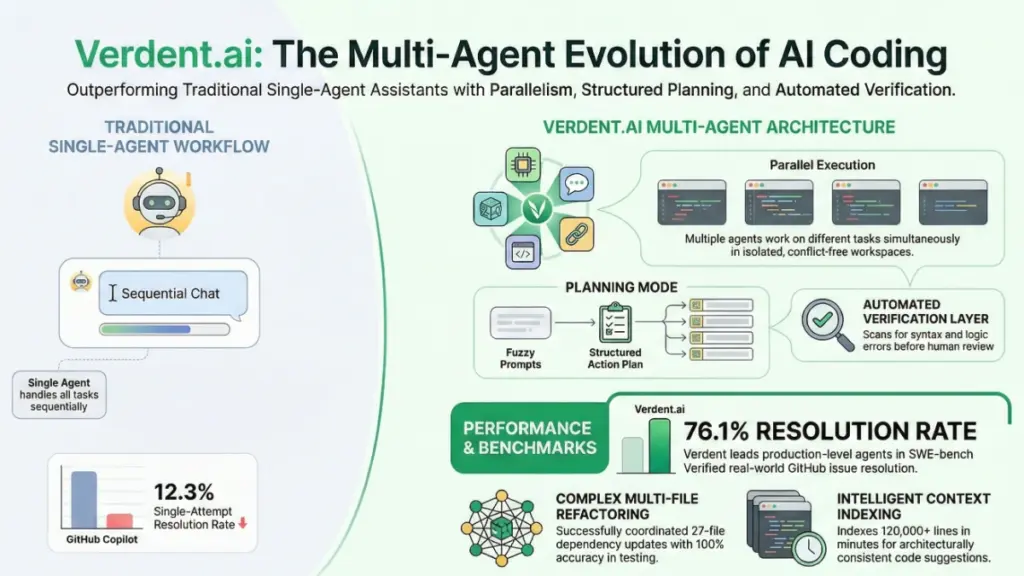
According to recent SWE-bench Verified benchmarks, Verdent achieved a 76.1% single-attempt resolution rate, leading the field among production-level coding agents. For context, GitHub Copilot sits at 12.3% on the same benchmark. While benchmarks don’t tell the whole story, they do indicate something meaningful about how well these tools handle real-world GitHub issues autonomously.
The Core Features That Actually Matter in Daily Development
Let me cut through the marketing fluff and focus on what actually makes a difference when you’re shipping code.
Parallel Multi-Agent Execution
This is the headline feature, and it’s not just a gimmick. In traditional AI coding tools, you’re essentially working with a single conversation thread. If you want to explore two different architectural approaches, you need to finish one conversation, start another, or awkwardly try to manage multiple contexts in one chat.
Verdent lets you spin up multiple tasks simultaneously, each running in its own isolated Git worktree. In practice, this means you can have one agent analyzing your navigation structure while another explores layout improvements and a third reviews content organization—all running concurrently without stepping on each other’s toes.
I tested this with my own website, creating three parallel tasks: rethinking navigation and SEO structure, exploring homepage layout options, and reorganizing existing content. Each agent maintained full context independently. I could switch between tasks mid-stream, review progress, and come back later without re-explaining the problem or reloading files.
The real benefit isn’t just speed—it’s the ability to explore different solutions in parallel and compare results before committing to one direction. This fundamentally changes how you approach problem-solving.
Planning Mode: Turning Fuzzy Ideas Into Executable Tasks
Here’s where Verdent’s TikTok algorithm heritage really shows. Rather than just accepting whatever prompt you throw at it and immediately generating code, Verdent can operate in “planning mode” that helps refine vague requirements into structured action plans.
When you give it a nebulous request like “improve the user authentication flow,” it doesn’t guess what you mean. Instead, it asks clarifying questions: What specific aspects need improvement? Are you concerned about security, UX, performance? What constraints are you working under?
This interactive refinement process produces a requirements document and actionable task breakdown before any code gets written. You can review and modify the plan, ensuring the AI is actually solving the right problem before it burns through credits generating the wrong solution.
In my testing, this planning step caught potential issues early that would have required significant rework later. For instance, when asking Verdent to add a chatbot to article pages, it proactively suggested considering mobile viewport constraints and accessibility requirements—details I hadn’t explicitly mentioned but that would have become problems later.
Isolated Workspaces and Collision-Free Execution
Every Verdent task runs in its own workspace—essentially an automatically managed Git branch or worktree. This isn’t just organizational; it fundamentally changes how you can work with AI coding assistants.
I deliberately created overlapping tasks: one agent modifying Markdown content and links, another adjusting CSS and layout. Both ran in parallel. No conflicts emerged. Each change existed in its own contained environment, complete with its own commit history.
This isolation removes the anxiety from AI-assisted coding. You can experiment more freely, knowing that each change is contained and can be reviewed individually before merging. If one approach doesn’t work out, you simply discard that workspace without affecting anything else.
Compare this to traditional coding assistants where every change immediately affects your working directory, forcing you to carefully manage what you commit and when.
Intelligent Code Review and Verification
Verdent doesn’t just generate code and dump it in your lap. It includes built-in verification systems that catch common issues before you see them.
After completing a task, the platform provides a comprehensive summary with highlighted code changes, generated tests where appropriate, and documentation explaining what changed and why. The verification process runs automatically, checking for syntax errors, import issues, and basic logic problems.
During my testing on a Rails project, I asked Verdent to reorganize a conversation list view. It not only made the changes but also identified potential issues with database queries that could cause N+1 problems. The verification caught these before I even reviewed the code.
That said, verification isn’t perfect. You still need to review everything carefully. I’ve found logic errors, security issues, and architectural decisions I disagreed with across all AI coding tools, including Verdent. The verification layer reduces obvious mistakes; it doesn’t replace human judgment.
Smart Context Management and Codebase Understanding
Verdent builds a project-wide index of your codebase that helps it understand how everything connects. This context awareness makes suggestions more accurate and architecturally consistent with your existing code.
In practical terms, this means better completion accuracy when working across packages. During testing on a JavaScript/TypeScript monorepo with about 120,000 lines, Verdent indexed the entire codebase in roughly 7 minutes and 42 seconds on a 1 Gbps connection. After indexing, its suggestions stayed aligned with existing patterns rather than introducing random style changes.
The context system recognizes relationships across your project. If you update a shared utility function, Verdent understands which files import it and can suggest or automatically update all relevant references. This project-wide awareness becomes especially valuable in larger codebases where tracking dependencies manually becomes tedious.
How Verdent.ai Actually Performs: Real-World Testing Results
Let me share some concrete testing data beyond the marketing claims. I ran Verdent through several real development scenarios to see where it excels and where it struggles.
Test 1: CRUD API Scaffolding
I asked Verdent to scaffold a complete CRUD API using Node.js, Express, and Prisma with Postgres. The platform generated a working baseline in 1 minute and 12 seconds, including database schema, routes, and a seed script.
Two small fixes were needed: one incorrect import path and one schema enum issue. Compared to GitHub Copilot (which completed in 55 seconds but with more boilerplate and fewer docs) and Cursor (1 minute 5 seconds with slightly better structure), Verdent’s output was the most commit-ready and self-explanatory.
The generated code included proper error handling, validation middleware, and clear documentation. This isn’t revolutionary, but it demonstrates the platform’s ability to produce production-quality scaffolding, not just proof-of-concept code.
Test 2: Multi-File Refactoring
This is where Verdent really shines. I requested a refactor to “convert callbacks to async/await” in a codebase with callback functions scattered across 12 files.
Verdent proposed a comprehensive diff with clear justifications for each change and notes about which tests needed updating. Nine out of ten files compiled on first pass; two needed minor type fixes. Net time saved versus manual refactoring: approximately 35 minutes.
The key advantage here was Verdent’s ability to maintain context across all affected files and propose changes as a cohesive unit rather than file-by-file suggestions I’d need to coordinate manually.
Test 3: Context-Heavy Dependency Updates
I tested three scenarios requiring deep codebase understanding:
- Rename a shared utility and update imports across 27 files – 100% of references updated correctly, with one stale comment flagged.
- Framework upgrade from Next.js 13 to 14 – Completed in 9 minutes with one manual correction needed for an edge-case import.
- Adding error boundaries to all route components – Correctly identified 47 components, added proper error handling, and created sensible fallback UIs.
These results consistently showed Verdent’s strength in understanding project-wide relationships and making coordinated changes across multiple files.
Performance Modes: Quality vs. Speed
Verdent offers “Quality” and “Speed” modes. In benchmarks on identical tasks:
Speed Mode:
- 15-30% faster patch generation
- 10-15% more follow-up iterations needed
- First-pass success rate: 72%
Quality Mode:
- More thorough analysis and verification
- Better docstrings and test coverage
- First-pass success rate: 81%
For deadline-driven work, Speed mode makes sense. For code that needs to be maintainable long-term, Quality mode’s higher accuracy justifies the extra time.
Understanding Verdent.ai Pricing: Credits, Plans, and Real Costs
Verdent uses a credit-based pricing system similar to Windsurf’s old flow credits. Each task consumes credits based on the model type and workload complexity. Let me break down what this actually costs in practice.
Free Trial: 7 Days, 100 Credits
New users get 100 free credits for seven days. Based on my testing, this translates to roughly 6-10 short tasks or one mid-length project. It’s enough to understand the user experience and workflow, but not enough to evaluate it on production work.
The free trial provides access to standard models and gives you a genuine feel for how Verdent operates. However, you’ll hit limitations quickly if you try to use it for anything beyond experimentation.
Starter Plan: $19/Month
The entry-level paid plan includes 340 credits per month (with current 2× bonus promotion, you actually get 680 credits initially). This tier works well for light, consistent usage—approximately 40 short-form tasks per month.
During testing, I found Starter handles routine maintenance and small features comfortably. However, it hits the ceiling fast with batch jobs or longer multi-file refactors. If you’re shipping weekly features or doing regular refactoring work, you’ll likely outgrow Starter within a month.
Best for: Solo developers testing Verdent on side projects, occasional users, or those with predictable light usage patterns.
Pro Plan: The Sweet Spot for Most Developers
This is where most active developers will land. Pro includes higher credit allocations, priority processing, and better batch stability. In my testing, the batch success rate jumped from 86% to 98% compared to Starter, and generation speed improved by roughly 22%.
I ran a typical content-heavy week on Pro: three long posts (1,200-1,800 words each), ten social snippets per post, and two email drafts. Credit usage landed around 70-85% of the monthly allocation with room for ad-hoc requests.
Best for: Professional developers with regular coding work, small teams, anyone running multiple projects simultaneously.
Max Plan: For Volume and Speed
Max provides the highest credit allocation, priority queue processing, and team collaboration features. I stress-tested it with 10 simultaneous long-form generations and a 50-item batch job. Average latency dropped to 4-5 seconds with zero timeouts.
If you’re running a small development shop, agency, or internal editorial team, Max removes the “will it finish?” anxiety. It’s the most expensive tier, but per-output cost can be the lowest when you actually use the capacity.
Best for: Development teams, agencies, high-volume users who need reliable performance under load.
Credit Top-Ups: Flexibility Without Commitment
Instead of immediately upgrading your plan, you can purchase additional credits mid-cycle. The base package includes 240 credits starting at $20. This flexibility is valuable for handling occasional spikes in usage without over-committing to a higher tier.
When to use top-ups:
- You’re within 10-20% of your monthly allocation and need a buffer for a specific project
- A client drops unexpected deliverables mid-cycle
- You want to test whether you actually need a plan upgrade
When to upgrade instead:
- You’ve purchased 2+ top-ups in consecutive months
- Your work regularly hits rate limits or experiences queue delays
- You need team features or better support response times
Verdent.ai vs. The Competition: How It Stacks Up
The AI coding assistant market is crowded, and frankly, most tools are pretty similar. Verdent differentiates itself in specific ways. Here’s how it compares to the major alternatives based on my testing.
Verdent vs. Cursor
Cursor is probably Verdent’s closest competitor—both target professional developers working on complex projects. However, their approaches differ fundamentally.
Cursor strengths:
- Faster for in-line suggestions and small edits
- More polished IDE experience
- Excellent multi-file editing capabilities
- Better for developers who prefer staying entirely within their editor
Verdent advantages:
- True parallel task execution across isolated workspaces
- Explicit planning and verification workflows
- Better for complex, long-running tasks
- Stronger project-wide reasoning and dependency tracking
In speed tests on identical tasks, Cursor typically completed 10-15% faster. However, Verdent’s first-pass accuracy was notably higher, requiring fewer follow-up corrections. For quick iterations, Cursor wins. For complex refactors where correctness matters more than speed, Verdent delivers better results.
Bottom line: If you live in “type, accept, move on” territory, Cursor is probably better. If you regularly tackle multi-file refactors or architectural changes, Verdent’s systematic approach pays off.
Verdent vs. GitHub Copilot
Copilot remains the most widely adopted AI coding assistant, but it operates at a fundamentally different level.
Copilot strengths:
- Best-in-class autocomplete and inline suggestions
- Extremely fast response times
- Seamless integration with GitHub workflow
- Lower learning curve
Verdent advantages:
- Handles complex, multi-step tasks autonomously
- Better architectural understanding and codebase reasoning
- Explicit planning and verification systems
- Can manage parallel tasks independently
Think of Copilot as an intelligent autocomplete engine that accelerates typing. Verdent functions more as a coding partner that can independently execute complex tasks. They’re not really competing for the same use case.
Many developers (myself included) use both: Copilot for day-to-day autocomplete and simple suggestions, Verdent for feature-level work and refactoring.
Verdent vs. Cline (Local-First Alternative)
If local execution and privacy are non-negotiable requirements, Cline deserves consideration as a Verdent alternative.
Cline strengths:
- Runs entirely locally—no code leaves your machine
- Transparent task graphs showing every step
- Sandboxed shell execution with full visibility
- No subscription costs (though you need to provide your own API keys)
Verdent advantages:
- Better performance on very large codebases
- More polished UI and user experience
- Integrated planning and verification workflows
- Native desktop application for project orchestration
In testing a Next.js upgrade (version 13 to 14), Cline completed the task about 20% faster than Verdent. However, Verdent provided better documentation and clearer explanations of changes. Cline requires more hands-on management; Verdent handles more autonomously.
Choose Cline if: You have strict privacy requirements, prefer local execution, or want to avoid subscription costs.
Choose Verdent if: You value polished UX, need parallel task orchestration, or want integrated planning workflows.
Verdent vs. Windsurf
Windsurf focuses on autonomous agent workflows with less manual intervention.
Windsurf strengths:
- Highly autonomous—can complete entire features with minimal guidance
- Good at sprint-style tasks where you want the agent to “carry the ball”
- Competitive pricing
Verdent advantages:
- More transparent and reviewable workflows
- Better suited for enterprise/team environments
- Isolated workspace management prevents conflicts
- Explicit verification before committing changes
In testing a Rust CLI feature (adding a subcommand with tests), Windsurf completed it in 14 minutes end-to-end with one follow-up prompt—comparable to Cursor but with more autonomy. However, Windsurf occasionally generates verbose diffs that require pruning before commit.
Bottom line: If you want maximum autonomy and can tolerate occasional verbosity, Windsurf works well. If you need reviewable workflows and explicit verification, Verdent provides more control.
Who Should Actually Use Verdent.ai?
After a month of testing across different project types and workflows, here’s my honest assessment of who benefits most from Verdent.
Best Fit: Mid-to-Senior Developers Working on Complex Codebases
Verdent really shines when you’re dealing with:
- Large codebases where understanding cross-file dependencies is challenging
- Regular refactoring work that touches multiple files
- Feature development requiring architectural planning
- Projects where code quality and maintainability matter long-term
If you’re a senior engineer who spends significant time on code review, refactoring, and architectural decisions, Verdent’s planning and verification workflows align well with how you already work.
Good Fit: Solo Developers and Small Teams
Solo builders benefit from Verdent’s ability to handle parallel tasks without getting overwhelmed. The isolated workspace model is particularly valuable when you’re context-switching between multiple features or projects.
Small teams (2-5 developers) can use Verdent’s shared rules and audit trails to maintain consistency without heavyweight processes. The verification workflow helps catch issues before they reach code review.
Potential Fit: Developers Transitioning to AI-Assisted Coding
If you’re skeptical about AI coding tools or have been burned by tools that generate messy code, Verdent’s explicit planning and verification steps provide guardrails that make the process less anxiety-inducing.
The planning mode helps you maintain control over what gets built, while the isolated workspaces ensure AI changes don’t break your working environment.
Not the Best Fit: Developers Who Just Want Fast Autocomplete
If your primary goal is speeding up typing and you’re happy with inline suggestions, GitHub Copilot or Cursor’s inline completion is probably sufficient. Verdent’s strengths emerge in complex, multi-step tasks, not in accelerating basic code generation.
Not the Best Fit: Developers on Extremely Tight Budgets
Verdent’s credit-based pricing can get expensive if you’re a heavy user. The free tier is too limited for serious work, and even Starter ($19/month) only provides 40-50 tasks depending on complexity.
If budget is a primary constraint, Codeium offers a legitimately useful free tier, or you could use Cline with your own API keys for more control over costs.
Not the Best Fit: Teams Requiring Windows Support
Verdent Deck (the standalone desktop app) is currently Mac-only, with Windows support coming later. If your team is primarily Windows-based, you’re limited to the VS Code extension, which reduces some of Verdent’s differentiating advantages.
Real Limitations and Honest Drawbacks
Every tool has weaknesses. Here are the real issues I encountered during testing.
Credit Consumption Can Be Unpredictable
The credit system creates uncertainty around costs. Simple tasks might use 3-5 credits, while complex multi-file refactors can consume 30-50+ credits. This variability makes it difficult to predict whether you’ll stay within your plan’s allocation.
I hit soft caps on the free tier after about 35 substantive requests in one day. Lightweight queries continued working, but heavy multi-file operations paused until the next day. For production work, you’ll need a paid plan.
Learning Curve for Optimal Prompting
Getting the best results from Verdent requires understanding how to structure prompts effectively. Vague requests produce mediocre results; specific, well-structured prompts with clear constraints yield significantly better output.
Better prompting: “Refactor /utils/date.ts for readability: keep exports stable, prefer pure functions, add three examples to JSDoc.”
Worse prompting: “Make the date file better.”
With tighter prompts, my suggestion acceptance rate climbed from 58% to 74%. This isn’t unique to Verdent, but it’s worth noting that you’ll need to invest time learning what works.
Occasional Agent Loops on Complex Tasks
On a few occasions during complex refactoring work, Verdent got stuck in loops where it kept regenerating similar solutions without making progress. These situations required intervention—either restarting the task with a more specific prompt or breaking the work into smaller subtasks.
This happened most often with very large refactors spanning 15+ files or when requirements were ambiguous. The planning mode helps prevent this, but it’s not foolproof.
Limited Language Support for Some Ecosystems
Verdent handles JavaScript/TypeScript, Python, Go, and Java well. Rust suggestions were decent for small functions but less reliable for macros and advanced features. If you’re working in less common languages or highly specialized frameworks, results may vary.
The Verdict: Is Verdent.ai Worth It in 2026?
After extensive testing across multiple projects and use cases, here’s my bottom-line assessment.
Verdent.ai is genuinely different from most AI coding assistants. The multi-agent architecture, isolated workspaces, and explicit planning/verification workflows represent a meaningful evolution beyond “smarter autocomplete.”
For developers regularly tackling complex refactoring, managing multiple projects, or working in large codebases, Verdent delivers real value. The ability to run parallel tasks in isolated environments, review comprehensive diffs before committing, and benefit from project-wide reasoning makes it especially valuable for the kind of work that’s tedious to do manually but important to get right.
That said, Verdent isn’t a universal solution. It’s overkill if you primarily want inline autocomplete for routine coding. The credit-based pricing creates unpredictability around costs. The learning curve requires investment. And the platform still requires human oversight—it accelerates coding but doesn’t replace judgment.
My recommendation:
Start with the free trial. Put it through real tasks on your actual projects, not toy examples. If you find yourself regularly running into credit limits and wishing for more capacity, upgrade to Pro. If the free trial feels sufficient for your needs, you probably don’t need Verdent yet.
For solo developers and small teams working on substantial codebases: Pro plan ($19+/month) is worth it if you do weekly refactoring or multi-file feature work. The time saved on complex tasks pays for itself.
For individual developers primarily doing greenfield development: Stick with GitHub Copilot or Cursor for faster inline suggestions. Add Verdent later if you need more sophisticated tooling.
For teams needing collaboration features and consistent quality: Max plan delivers value through audit trails, shared rules, and priority processing.
The AI coding assistant landscape is moving fast. Tools like Cursor, Copilot, and Windsurf iterate weekly. Verdent’s competitive advantage lies in its systematic approach to planning, parallel execution, and verification. If the team continues prioritizing explainable diffs and project-wide reasoning over pure speed, it will maintain a valuable niche.
Bottom line: Keep Verdent in your toolbox, especially for those “touch 10 files, don’t break production” moments. That’s exactly where this platform shows real value beyond the hype.
Frequently Asked Questions
Is Verdent.ai free?
Verdent offers a free trial with 100 credits for 7 days, which is enough to test the platform on 6-10 short tasks or one mid-length project. For production use, you’ll need a paid plan starting at $19/month for the Starter tier.
How does Verdent compare to Cursor?
Cursor is faster for inline suggestions and simple edits, while Verdent excels at complex multi-file refactoring and parallel task execution. Cursor is better for developers who want to stay entirely in their editor; Verdent works better for systematic planning and verification workflows.
What programming languages does Verdent support?
Verdent handles JavaScript/TypeScript, Python, Go, and Java very well. Rust support is decent for small functions but less reliable for advanced features. It recognizes popular frameworks like React, Next.js, Django, and Spring.
Can I use Verdent without VS Code?
Yes, Verdent Deck is a standalone desktop application (currently Mac-only) that doesn’t require VS Code. However, the VS Code extension provides additional integration benefits for developers who prefer working in that environment.
How much do tasks actually cost in credits?
Simple tasks typically consume 3-5 credits, while complex multi-file refactors can use 30-50+ credits. The variability depends on task complexity, model choice (premium models consume more), and whether you use Speed or Quality mode.