


I’ve been working with generative AI tools since the GPT-3 API days, and here’s something that surprised me: the tool everyone’s talking about isn’t always the one that’ll actually make your work easier.
Last month, a client asked me which AI writing assistant they should invest in for their content team. My answer? “It depends on what you’re actually trying to accomplish.” After spending hundreds of hours testing ChatGPT, Claude, Gemini, and about a dozen other AI tools across real client projects—not just playing around with demos—I’ve learned that each has distinct strengths and frustrating limitations.
In this guide, I’m sharing what I’ve discovered through actual use: which tool handles long-form content best, which one’s worth paying for, and honestly, which ones disappointed me. Whether you’re a content creator trying to speed up your workflow, a developer looking for coding help, or a marketer exploring AI automation, you’ll know exactly which tool fits your needs by the end of this.
Understanding the Big Three: ChatGPT, Claude, and Gemini
Before we dive into comparisons, let me give you the landscape as it exists right now.
ChatGPT (by OpenAI) is the household name—and for good reason. It launched the current AI boom in November 2022, and OpenAI has continued iterating with GPT-4, GPT-4 Turbo, and now GPT-4o. The free version still runs on GPT-3.5, which honestly feels pretty dated at this point. ChatGPT Plus ($20/month) gets you access to the latest models, faster responses, and features like DALL-E image generation and web browsing.
Claude (by Anthropic) is the thoughtful alternative that’s gained serious traction with writers and researchers. I started using Claude 2 in mid-2023, and the current Claude 3.5 Sonnet model is, frankly, impressive for nuanced writing tasks. What sets Claude apart is its longer context window—it can handle up to 200,000 tokens, which means you can feed it entire documents or books. The free tier is surprisingly generous, and Claude Pro ($20/month) gives you higher usage limits and priority access.
Gemini (by Google) is the newest major player, launching as Bard before rebranding. It’s evolved significantly since its rocky start. Gemini integrates directly with Google’s ecosystem—Gmail, Docs, Drive—which is either incredibly convenient or feels invasive, depending on your perspective. Google offers a free tier and Gemini Advanced ($20/month) through Google One AI Premium, which also includes 2TB of storage.
Here’s what nobody tells you upfront: these tools are converging in capability, but their personalities and use cases remain distinct. After working with all three daily, I’ve found myself reaching for different tools for different tasks, which probably tells you something right there.
Deep Dive: Content Creation and Writing Quality
This is where things get interesting, because writing quality is subjective—but also measurable when you’re producing content at scale.
ChatGPT’s writing style tends toward confident and informative, but it can sound… corporate. You know that slightly generic, “professional blog post” tone? That’s ChatGPT’s default. For straightforward informational content, product descriptions, or social media posts, it’s actually quite good. I use it regularly for first drafts of email campaigns and ad copy because it’s fast and understands marketing frameworks well.
However, I’ve noticed ChatGPT sometimes makes up facts with disturbing confidence—what the AI community calls “hallucinations.” Just last week, it confidently cited a study that didn’t exist when I was researching email marketing statistics. Always fact-check anything that includes specific data or citations.
Claude’s writing style is noticeably more nuanced and, frankly, more human-sounding. When I’m working on long-form content, thought leadership pieces, or anything requiring careful reasoning, I reach for Claude first. It’s better at understanding context, maintaining consistent tone across long pieces, and actually following complex instructions.
Here’s a specific example: I asked both ChatGPT and Claude to write a sensitive email declining a partnership opportunity. ChatGPT gave me a perfectly fine but somewhat stiff response. Claude crafted something that felt genuinely empathetic and relationship-preserving. For anything requiring emotional intelligence or sophisticated argumentation, Claude consistently outperforms.
The longer context window matters more than you’d think. I regularly paste entire client brand guides (15-20 pages) into Claude, and it actually remembers and applies those guidelines throughout our conversation. With ChatGPT, I’m constantly re-establishing context.
Gemini’s writing style sits somewhere between the two, though it’s improved dramatically in recent months. What I appreciate about Gemini is its integration with Google Search—it can pull in real-time information more reliably than ChatGPT’s web browsing feature, which honestly feels bolted on and unreliable.
Where Gemini shines is research-heavy content. If I’m writing about current events, market trends, or anything requiring up-to-date information, Gemini’s ability to search and synthesize current web content is legitimately useful. It’ll often include links to sources, which saves me fact-checking time.
For content creators, my honest recommendation: Claude Pro for long-form content and anything requiring sophisticated reasoning. ChatGPT Plus for high-volume, straightforward content production. Gemini Advanced when you need current information and don’t mind the Google ecosystem integration.

Coding Assistance: Which AI Actually Helps Developers?
I’m not a software engineer, but I work with development teams regularly, and I’ve used these tools extensively for marketing automation scripts, basic web development, and data analysis.
ChatGPT has been the go-to for developers, and it’s genuinely capable across multiple programming languages. It’s particularly strong with Python, JavaScript, and SQL. I’ve used it to debug Google Apps Scripts, write data processing functions, and even build simple web applications. The code it generates usually works—though you’ll definitely need to review and test it.
One thing I learned the hard way: ChatGPT sometimes suggests deprecated methods or outdated libraries. It was trained on data through early 2022, so newer frameworks or updated best practices aren’t in its knowledge base unless you’re using the web browsing feature.
Claude has quietly become my favorite for coding tasks, especially complex ones. Here’s why: it’s more careful about explaining its code. When Claude generates a function, it typically includes clear comments and explanations of what each section does. For someone like me who codes occasionally but isn’t an expert, that educational aspect is invaluable.
Claude also seems better at understanding the broader context of what you’re trying to build. If I describe a workflow automation I need, Claude asks clarifying questions and suggests architectural approaches before diving into code. With ChatGPT, I often get immediate code that solves the literal question but misses the bigger picture.
Gemini is… fine for coding. It integrates with Google Colab, which is convenient if you’re already working in that environment. But honestly, for pure coding assistance, it’s my third choice. The code quality is decent but not exceptional, and I haven’t found compelling reasons to use it over the other two for development work.
Developer verdict: Claude for complex projects requiring thoughtful architecture. ChatGPT for quick scripts and broad language support. Gemini if you’re deeply embedded in Google’s ecosystem and working with Colab notebooks.
Research, Analysis, and Information Synthesis
This is where these tools really differentiate themselves, and where I’ve seen the most dramatic productivity improvements in my own work.
ChatGPT can summarize information and answer questions based on its training data, but it’s fundamentally limited by its knowledge cutoff. The web browsing feature in Plus theoretically solves this, but in practice, it’s unreliable. Sometimes it works beautifully; other times it fails to access sites or provides incomplete information. I’ve also found it occasionally “hallucinates” web search results—claiming to have found information it didn’t actually access.
For analyzing documents or research papers you provide, ChatGPT works well, though the context window limits how much you can feed it at once. I regularly hit those limits when trying to analyze comprehensive reports or multiple documents simultaneously.
Claude excels at deep research tasks involving documents you provide. That 200,000 token context window? It’s a game-changer. I’ve uploaded entire marketing audits, competitive analysis reports, and research papers, then asked Claude to identify patterns, extract key insights, and synthesize recommendations. The quality of analysis is consistently impressive.
Here’s a real example: I uploaded three different market research reports (totaling about 80 pages) on AI adoption in marketing. Claude identified contradictory findings between the reports, explained possible reasons for discrepancies, and provided a nuanced synthesis that accounted for different methodologies. That’s exactly the kind of analytical work that would take hours manually.
The limitation? Claude doesn’t browse the web in real-time. So while it’s phenomenal at analyzing information you provide, it can’t pull in current data independently.
Gemini is the clear winner for research requiring current information. Its integration with Google Search is seamless, and it actually provides source links you can verify. When I’m researching recent industry trends, checking current pricing for competitor products, or gathering up-to-date statistics, Gemini consistently delivers reliable results with verifiable sources.
I recently used Gemini to research emerging AI tools launched in the past three months—something completely outside ChatGPT and Claude’s training data. Gemini found relevant articles, summarized key features, and even pulled pricing information from company websites. For time-sensitive research, it’s genuinely valuable.
Research recommendation: Claude for deep analysis of documents and complex synthesis. Gemini for current information and web research. ChatGPT when you need quick answers based on general knowledge.
Conversational Ability and User Experience
Let’s talk about what it’s actually like to use these tools day-to-day, because user experience matters more than features lists suggest.
ChatGPT’s interface is clean and straightforward. Conversations flow naturally, it remembers context throughout a chat session, and responses are consistently fast. The ability to create custom GPTs—specialized versions trained on specific instructions—is legitimately useful for recurring tasks. I’ve created custom GPTs for email writing, social media content, and SEO optimization that save me from repeating instructions constantly.
However, ChatGPT can be… persistent about staying in character, even when you want a different approach. Sometimes it feels like you’re fighting the system prompt rather than having a natural conversation.
Claude’s conversational ability feels more natural to me. It’s better at understanding nuance, catching onto subtle shifts in what you’re asking for, and adjusting its approach mid-conversation. There’s less feeling of talking to a machine following rigid rules.
What I particularly appreciate: Claude is more willing to express uncertainty or ask for clarification when your request is ambiguous. ChatGPT tends to make assumptions and run with them, which sometimes leads you down unproductive paths before you realize it misunderstood your intent.
The Claude interface is also clean and responsive, though it lacks some of ChatGPT’s features like custom assistants. Claude’s free tier is more generous than ChatGPT’s—you get access to the latest models, just with usage limits.
Gemini’s interface integrates directly into the Google ecosystem, which is either convenient or invasive depending on your perspective. You can access Gemini directly from Gmail, Docs, and other Google services, which streamlines certain workflows.
The conversational ability has improved significantly since the Bard days, but it still occasionally gives overly cautious responses—clearly trying hard not to offend or make mistakes. This manifests as longer, sometimes unnecessarily hedged responses when you just want a straight answer.
User experience verdict: ChatGPT for customization and ecosystem features. Claude for natural conversation and nuanced understanding. Gemini for Google Workspace integration.
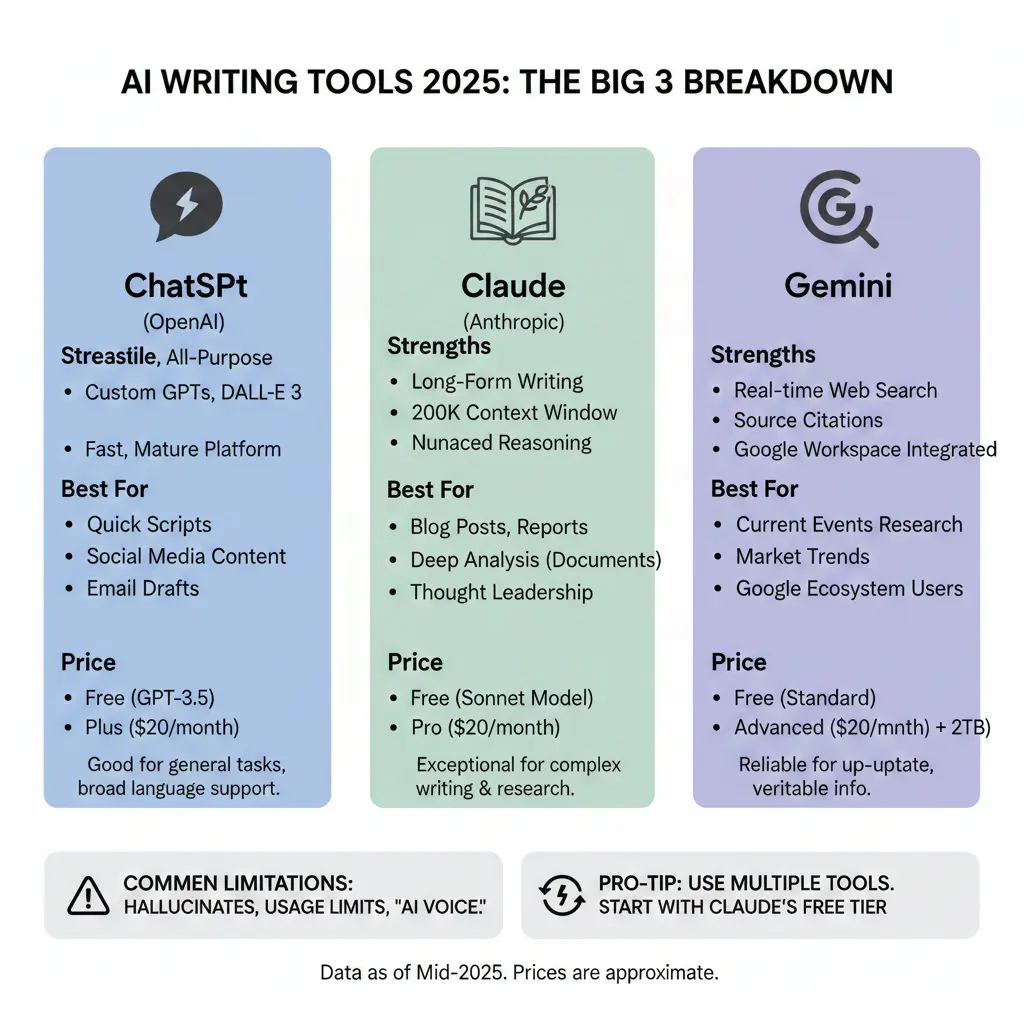
Pricing, Value, and Free Tier Comparison
Here’s the financial reality, because these costs add up if you’re using AI tools professionally.
ChatGPT offers a free tier with GPT-3.5, which honestly feels quite limited compared to current alternatives. GPT-3.5 is noticeably less capable, slower, and produces lower-quality output than GPT-4. ChatGPT Plus ($20/month) gets you:
- Access to GPT-4, GPT-4 Turbo, and GPT-4o
- Faster response times, even during peak hours
- DALL-E 3 image generation (up to 40 images/day)
- Web browsing and file upload capabilities
- Custom GPT creation
Is it worth $20/month? If you’re using it daily for professional work, absolutely. The quality difference between GPT-3.5 and GPT-4 is substantial. However, the usage limits can be frustrating—even on the paid tier, you’re capped at 40 messages every 3 hours with GPT-4o during high-traffic times.
Claude provides impressive value in its free tier. You get access to Claude 3.5 Sonnet (their best model) with reasonable usage limits. When you hit the limit, you’re typically locked out for a few hours rather than downgraded to an inferior model. This makes the free tier genuinely useful for occasional professional use.
Claude Pro ($20/month) offers:
- 5x higher usage limits
- Priority access during high-traffic periods
- Early access to new features
The value proposition here is straightforward: if you’re regularly hitting usage limits, upgrade. If not, the free tier is remarkably capable. I subscribed because I was hitting limits daily, and the productivity boost justified the cost immediately.
Gemini takes a different approach. The basic Gemini is free and includes access to the standard model, which is decent for everyday tasks. Gemini Advanced ($20/month) comes bundled with Google One AI Premium, which includes:
- Access to Gemini Advanced (their most capable model)
- 2TB Google storage
- Gemini integration in Gmail, Docs, Sheets, etc.
- Google Photos AI features
The bundling is clever—if you were already paying for Google storage, adding Gemini Advanced becomes more attractive. For someone not already in Google’s ecosystem, the value proposition is less clear, especially since the core Gemini experience doesn’t justify $20/month on its own.
Value analysis:
- Best free option: Claude, hands down. You get their best model with reasonable limits.
- Best paid value: Depends on your ecosystem. ChatGPT Plus for standalone AI capability. Gemini Advanced if you need Google storage anyway.
- Professional recommendation: I maintain both ChatGPT Plus and Claude Pro subscriptions ($40/month total) because they serve different purposes in my workflow. Gemini I use free.
Real-World Use Cases: Which Tool for Which Task?
After 18 months of daily use, here’s my actual workflow and which tool I reach for when:
Long-form content creation (blog posts, articles, reports): Claude Pro is my primary tool. The longer context window, nuanced writing style, and ability to maintain consistency across thousands of words makes it superior for this use case. I’ll paste in content briefs, brand guidelines, and previous articles, then work iteratively with Claude to develop comprehensive pieces.
Quick social media content: ChatGPT. I’ve created custom GPTs for different platforms (LinkedIn, Twitter, Instagram) that understand the format, tone, and constraints of each. For high-volume, straightforward content, ChatGPT’s speed and consistency win.
Email campaigns and sequences: ChatGPT for first drafts, then Claude for refinement if the messaging needs to be particularly thoughtful or persuasive. ChatGPT understands marketing frameworks well (AIDA, PAS, etc.) and generates solid email copy quickly.
Current market research: Gemini. When I need to understand recent industry developments, gather current statistics, or research recently launched products, Gemini’s web integration provides reliable, sourced information.
Analyzing client documents: Claude, without question. Whether it’s competitive analysis, customer research, or strategic planning documents, Claude’s ability to process large documents and provide sophisticated analysis is unmatched.
Coding and automation scripts: Claude for anything complex requiring architectural thinking. ChatGPT for quick scripts and broad language support. I rarely use Gemini for coding.
Brainstorming and ideation: Honestly, all three work well, but I slightly prefer ChatGPT for its rapid-fire idea generation. Claude tends to be more thoughtful but slower. Gemini falls somewhere in between.
Fact-checking and verification: Gemini, because it provides sources I can verify. I never trust any AI tool’s factual claims without verification, but Gemini at least makes that verification easier.
Common Frustrations and Limitations
Let me be straight about the things that frustrate me across all these platforms, because perfect tools don’t exist.
All of them hallucinate. ChatGPT, Claude, and Gemini will occasionally present false information with complete confidence. Claude seems slightly less prone to this, but it happens with all of them. Never trust citations, statistics, or specific factual claims without verification. I learned this after a client nearly published an article citing a completely fabricated study ChatGPT had “referenced.”
Usage limits are real and annoying. Even on paid tiers, you’ll hit rate limits during heavy use. This is particularly frustrating when you’re in a productive flow state and suddenly get locked out. ChatGPT’s 40 messages/3 hours limit on GPT-4o during peak times has interrupted my work multiple times.
None of them truly understand you. Despite sophisticated language models, these tools don’t build genuine understanding of your business, brand, or preferences across conversations. Every chat is essentially starting fresh (unless you’re using custom GPTs or carefully managing context). This means repetitive instruction-giving, which gets tedious.
The “AI voice” is still detectable. All three have tells—certain phrases, structural patterns, and tonal characteristics that mark content as AI-generated. If you’re using these for content creation, expect to spend time editing to inject genuine personality and voice.
Web browsing and real-time information is unreliable. ChatGPT’s web browsing feature fails regularly. Claude doesn’t browse the web at all. Gemini does this best, but even then, it’s not perfect—sometimes it misses obvious sources or provides incomplete information.
Image generation is hit-or-miss. ChatGPT Plus includes DALL-E 3, which is decent but has frustrating content policies that block legitimate requests. Neither Claude nor Gemini includes image generation in their base offerings, though Gemini can generate images through integration with Google’s Imagen.
The Honest Comparison: Strengths and Weaknesses
Let me break this down clearly:
ChatGPT Strengths:
- Broad capability across diverse tasks
- Custom GPT creation for specialized workflows
- Fast, reliable performance
- Strong developer community and plugin ecosystem
- Good at following structured formats and frameworks
Weaknesses:
- Writing can feel generic or corporate
- Web browsing feature is unreliable
- Usage limits on paid tier during peak hours
- Free tier (GPT-3.5) is significantly inferior
- Occasionally stubborn about following instructions
Claude Strengths:
- Exceptional long-form writing quality
- Massive context window (200,000 tokens)
- Nuanced understanding and reasoning
- More natural conversational ability
- Generous free tier with best model
- Better at expressing uncertainty
Weaknesses:
- No web browsing capability
- Fewer integrations and ecosystem features
- No image generation
- Can be slower during peak times
- Less “fun” features compared to ChatGPT
Gemini Strengths:
- Real-time web search integration
- Sources provided for verification
- Deep Google Workspace integration
- Bundled storage value in paid tier
- Good at current events and recent information
Weaknesses:
- Overly cautious responses sometimes
- Writing quality below Claude and ChatGPT-4
- Heavy Google ecosystem lock-in
- Standalone value proposition unclear
- Less mature feature set overall
Making Your Decision: Which Tool Should You Choose?
Here’s my practical recommendation framework:
Choose ChatGPT Plus if:
- You need a versatile, all-purpose AI assistant
- You value ecosystem features and customization (custom GPTs)
- You want image generation included
- You work across diverse tasks daily
- You prefer a mature, well-supported platform
Choose Claude Pro if:
- You create long-form content regularly
- Writing quality and nuance matter for your work
- You need to analyze large documents frequently
- You value sophisticated reasoning over speed
- You want generous free tier access before committing
Choose Gemini Advanced if:
- You’re deeply embedded in Google Workspace
- You need current, real-time information regularly
- You want the bundled storage value
- You prioritize source verification
- Google ecosystem integration is valuable to you
The honest truth: If you’re serious about using AI professionally, you’ll probably end up with multiple subscriptions. I know that’s not what you wanted to hear, but these tools are complementary rather than redundant. My own setup ($40/month for ChatGPT Plus and Claude Pro) has paid for itself many times over in productivity gains.
For beginners or budget-conscious users, start with Claude’s free tier. It’s the most capable free option and will help you understand whether AI tools actually benefit your workflow before spending money.
Beyond the Big Three: Other Tools Worth Mentioning
While ChatGPT, Claude, and Gemini dominate conversations, other specialized tools deserve consideration:
Jasper and Copy.ai are marketing-focused AI writing tools with templates and workflows specifically for content marketers. They’re built on GPT models but add specialized features. Honestly? I’ve mostly stopped using them since Claude and ChatGPT have caught up in capability while offering more flexibility. The premium pricing ($40-80+/month) is harder to justify now.
Perplexity AI deserves special mention for research. It’s essentially a search engine powered by AI that provides sourced answers with citations. For research-heavy work, Perplexity ($20/month for Pro) is genuinely useful and complements the big three nicely. I use it when I need comprehensive, cited research on specific topics.
GitHub Copilot ($10/month) remains the best tool specifically for coding assistance if you’re a developer. It’s integrated directly into your IDE, which makes the workflow smoother than switching to a chat interface.
Notion AI and Otter.ai provide AI capabilities within specific applications (note-taking and transcription, respectively) that might be valuable if you use those platforms regularly.
Looking Ahead: The AI Tools Landscape in 2025
Here’s what I’m watching for in the coming months:
Model improvements are accelerating. OpenAI, Anthropic, and Google are releasing major updates every few months. By mid-2025, today’s capabilities will likely seem limited. Stay flexible and be willing to reassess your toolchain regularly.
Specialized tools are emerging constantly. New AI writing tools launch weekly, each claiming unique capabilities. Most won’t survive, but some genuinely innovative approaches are appearing. Stay curious but skeptical.
Pricing and access models are evolving. We’re seeing experimentation with usage-based pricing, tiered access, and bundled offerings. The $20/month standard may not hold long-term.
Regulatory changes could impact availability. AI regulation is coming in various jurisdictions, which may affect features, pricing, or availability of these tools. The EU’s AI Act is already influencing product decisions.
Integration depth will increase. Expect these tools to become embedded in existing software you use daily—word processors, email clients, project management tools, and more. The standalone chat interface may become less central over time.
Key Takeaways and Next Steps
After thousands of hours using these tools, here’s what you need to remember:
- No single “best” tool exists—they excel at different tasks. ChatGPT for versatility, Claude for writing and analysis, Gemini for current information.
- Start with free tiers before committing to paid subscriptions. Claude’s free tier is especially generous and will help you evaluate whether AI tools actually improve your workflow.
- Always verify factual information—all these tools hallucinate occasionally. Never publish AI-generated statistics, citations, or specific claims without verification.
- Expect to invest time learning—effective prompt engineering and workflow design take practice. Your results will improve significantly as you learn each tool’s strengths and quirks.
- Budget for multiple subscriptions if you’re serious—professional users will benefit from having complementary tools available. It’s an investment in productivity, not an expense.
Your next step? Pick one tool based on your primary use case and commit to using it daily for two weeks. Track your time savings and output quality improvements. If it’s working, expand your toolkit from there.
What’s your biggest challenge with AI writing tools? Are you struggling with prompt engineering, finding the right use cases, or justifying the cost? I’d genuinely love to hear what’s holding you back—drop a comment below and I’ll do my best to provide specific guidance based on my experience.
Remember: these tools are powerful, but they’re assistants, not replacements for human judgment, creativity, and expertise. Use them to amplify your capabilities, not substitute for developing your own skills.