

I’ll be honest with you—when I first started experimenting with AI image generators back in 2022, I thought the free versions would be garbage. You know, the typical freemium trap where you get maybe three decent images before hitting a paywall. But after testing over 30 different platforms in the past three years (yes, I actually counted), I’ve found some legitimately powerful free tools that have completely changed how I create visual content for clients.
Here’s what surprised me most: some free AI image generators are now producing results that rival premium tools that cost $50+ per month. The catch? You need to know which ones are worth your time and which are just collecting your email for their marketing list. In this review, I’m going to walk you through the free AI image generators that I personally use in my work, what makes each one different, and—most importantly—which limitations you’ll actually run into. By the end, you’ll know exactly which tool fits your specific needs without wasting hours testing duds.
What I’ve Learned Testing Free AI Image Generators for Three Years
Let me start with some context. I’m not just casually playing around with these tools—I’m using them to create social media graphics, blog headers, presentation slides, and marketing materials for real client projects. That means I’ve hit every limitation, discovered every hidden restriction, and learned which “free” plans are actually usable versus which are basically extended demos.
The AI image generation space has exploded since DALL-E 2 opened to the public in late 2022. What used to be a field dominated by a few players now has dozens of options, and honestly, it’s overwhelming. The quality gap between the best and worst tools is massive, and the pricing models are all over the place.
Here’s what I look for when evaluating a free AI image generator:
- Actual daily/monthly limits (not just “unlimited with restrictions”)
- Image resolution and quality (many free plans give you tiny, watermarked images)
- Prompt flexibility (can you describe what you want, or is it multiple-choice?)
- Commercial usage rights (super important if you’re creating anything professional)
- Speed and reliability (some tools have 10-minute queue times during peak hours)
- Interface usability (I’ve abandoned tools simply because they were frustrating to use)
What I’ve found is that “free” means different things to different platforms. Some give you 25 high-quality images per month. Others give you “unlimited” generations but at such low resolution they’re basically unusable for anything except thumbnails. The devil is always in the details.
The Free AI Image Generators I Actually Recommend (Ranked by Use Case)
After burning through countless generations and wasting more time than I care to admit on mediocre tools, here are the ones I keep coming back to. I’ve organized these by what they’re actually good for, because the “best” tool really depends on what you’re trying to create.
1. Microsoft Bing Image Creator (Best for Quick, High-Quality Results)
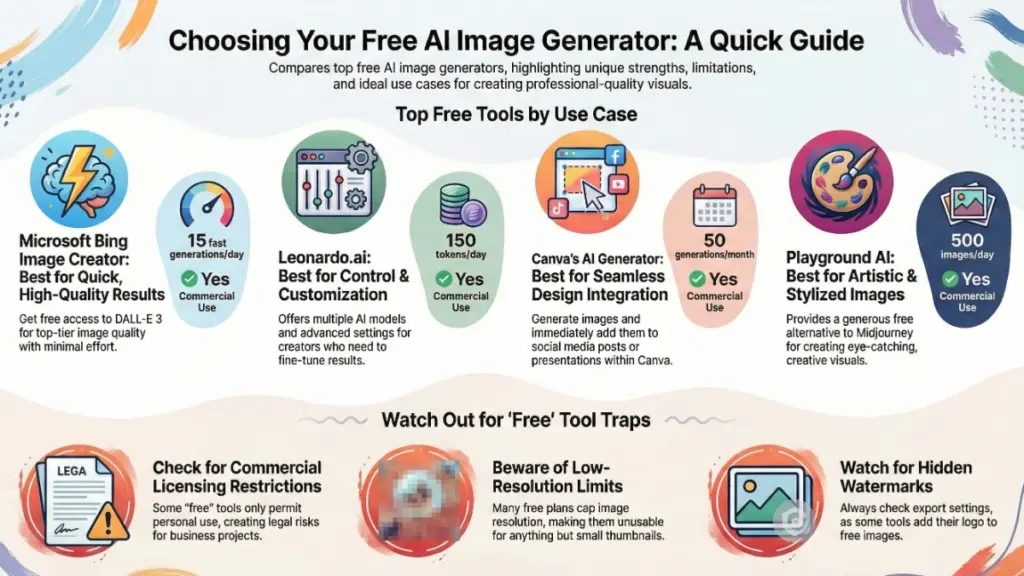
This one shocked me when I first tried it. Microsoft essentially gives you access to DALL-E 3—the same technology that powers ChatGPT Plus’s image generation—completely free through Bing. No credit card required. No trials that expire. Just genuinely free access to one of the best AI image models available.
What you get:
- 15 “boosts” per day for fast generation (resets daily)
- Unlimited slower generations after boosts run out
- Full commercial usage rights
- 1024×1024 resolution images
- Access to DALL-E 3’s advanced understanding of prompts
The reality of using it: I use Bing Image Creator at least three times a week for client work. The prompt understanding is genuinely impressive—you can describe complex scenes with multiple elements, and it usually gets the composition right on the first or second try. Last week, I generated a “minimalist workspace with a laptop showing analytics dashboards, coffee cup, and succulent plant on a white desk, soft natural lighting” and it nailed it immediately.
The “boosts” system is actually pretty generous. Fifteen fast generations per day is more than enough for most people unless you’re running a high-volume content operation. When you run out of boosts, the generations just take 2-3 minutes instead of 10-15 seconds. Still totally usable.
Where it falls short: The interface is… well, it’s Bing. It’s not as polished as some dedicated platforms. You can’t easily iterate on images or make small adjustments—you’re essentially starting from scratch with each generation. Also, because it’s built into Microsoft’s ecosystem, you need a Microsoft account, which some people find annoying.
The content filtering can be overly aggressive. I’ve had perfectly innocent prompts rejected because the AI thought I was trying to generate something inappropriate. It’s frustrating, but it happens with most free tools that need to protect themselves from misuse.
Best for: Anyone who needs high-quality images occasionally and doesn’t want to manage credits or subscriptions. Freelancers, small business owners, content creators who need professional-looking visuals without paying monthly fees.
2. Leonardo.ai (Best for Control and Customization)
This is where I spend most of my time when I need more control over the final image. Leonardo.ai is built specifically for creators who want to fine-tune their results, and their free tier is surprisingly robust. I discovered it about a year ago when a designer friend recommended it, and it’s become my go-to for anything that requires multiple iterations.
What you get:
- 150 tokens per day (each generation costs between 1-8 tokens depending on settings)
- Multiple AI models to choose from (photorealistic, artistic, 3D, anime, etc.)
- Control over dimensions, guidance scale, and other technical parameters
- Access to community models and styles
- Upscaling and editing features
The reality of using it: The learning curve here is steeper than Bing, but the payoff is worth it. You can choose different models for different styles—I use PhotoReal for product mockups and DreamShaper for more artistic social media graphics. The token system sounds limiting, but 150 tokens usually gives me 20-30 solid generations per day, which is plenty.
What I love most is the iteration capability. You can generate four variations at once, pick your favorite, then create variations of that one. It’s way more efficient than regenerating from scratch every time. Last month, I was creating header images for a blog redesign, and being able to iterate on a specific composition saved me hours compared to using other tools.
Where it falls short: The interface can feel overwhelming at first. There are a lot of sliders, options, and technical terms that might confuse beginners. I spent my first week pretty confused about what “CFG Scale” meant and why it mattered (it controls how closely the AI follows your prompt—higher numbers stick closer to your description).
Also, the token system can be frustrating if you’re experimenting heavily. Some days I burn through my 150 tokens in an hour just testing different approaches. You can earn more by participating in the community, but that requires extra effort most people don’t want to invest.
Best for: Designers, content creators, and anyone who wants serious control over their images and doesn’t mind a learning curve. If you’re creating visual content regularly and need consistency in style, this is your tool.
3. Canva’s Free AI Image Generator (Best for Design Integration)
I was skeptical when Canva added AI image generation to their platform. It felt like feature bloat. But after using it for a few months, I’ve realized it’s actually brilliant for a specific workflow: when you need to generate an image AND immediately incorporate it into a design.
What you get:
- 50 AI image generations per month (resets monthly)
- Direct integration with Canva’s design tools
- Multiple style options (photo, art, 3D, drawing, etc.)
- Automatic sizing for different social media formats
- Basic editing and enhancement tools
The reality of using it: The killer feature here isn’t the AI model itself (which is solid but not groundbreaking)—it’s the workflow integration. I can generate an Instagram post image, immediately place it in a template, add text overlays, adjust colors, and export the final design without leaving Canva. For social media content creation, this saves me at least 20 minutes per post compared to generating in one tool and designing in another.
The quality is consistent and reliable. It’s not going to blow your mind with artistic brilliance, but it produces clean, professional-looking images that work well for business content. I use it most for blog thumbnails, presentation backgrounds, and social media posts where I need something specific but not necessarily award-winning.
Where it falls short: Fifty generations per month sounds good until you realize how quickly you can burn through them. If you’re creating daily social content, you’ll hit that limit fast. Also, the prompt understanding isn’t as sophisticated as DALL-E 3 or Midjourney. Complex prompts with multiple specific elements often produce mixed results.
The image resolution is capped at what works for Canva designs, which is fine for digital content but limiting if you need high-res prints. And honestly, if you’re already paying for Canva Pro, the AI features there are significantly better—but we’re focusing on free options here.
Best for: Social media managers, small business owners, and content creators who already use Canva for design work. If your workflow involves creating finished designs rather than just standalone images, this integration is incredibly valuable.
4. Craiyon (Formerly DALL-E Mini) – Best for Unrestricted Experimentation
Craiyon doesn’t produce the highest quality images, but hear me out—it has a specific superpower that makes it valuable: truly unlimited generations with zero restrictions. When I need to brainstorm visual concepts or test out dozens of ideas quickly, this is where I start.
What you get:
- Unlimited generations (seriously, no daily limits)
- No account required for basic use
- Very permissive content policy
- Fast generation times
- Simple, straightforward interface
The reality of using it: The image quality is noticeably lower than the other tools I’ve mentioned. Images have a somewhat blurry, painting-like quality that won’t work for professional marketing materials. But for mood boarding, concept exploration, or just playing around with ideas, it’s perfect.
I used Craiyon extensively when working on a rebrand project last quarter. I needed to explore about 50 different logo concept directions before narrowing down to finalists. Instead of burning through credits on premium tools, I generated dozens of rough concepts in Craiyon, identified the three strongest directions, then recreated those in higher quality using Bing Image Creator. That workflow probably saved me $100 in credits.
The lack of restrictions also means you can test prompts that might get flagged on other platforms. This isn’t about generating inappropriate content—it’s about having freedom to explore creative directions without an overly cautious AI filter blocking you at every turn.
Where it falls short: Again, the quality. These images are fine for brainstorming but not for final deliverables. The resolution is lower, details can be mushy, and text generation in images is basically useless (a problem across most AI image tools, but especially noticeable here).
There are ads on the free version, which can be annoying. You’ll see them between generations. It’s the trade-off for truly unlimited access, but it breaks the creative flow sometimes.
Best for: Anyone in the early ideation phase who needs to test lots of concepts quickly. Students, hobbyists, or professionals doing exploratory work before committing to final designs.
5. Playground AI (Best Free Alternative to Midjourney)
If you’ve been jealous of Midjourney’s artistic capabilities but don’t want to pay their subscription or deal with Discord, Playground AI offers a surprisingly close experience for free. I discovered this about eight months ago and it’s become my secret weapon for creating eye-catching social media graphics.
What you get:
- 500 images per day (yes, you read that right)
- Multiple models including SDXL (Stable Diffusion XL)
- Advanced editing features like outpainting and inpainting
- Canvas workspace for combining and editing images
- Commercial usage rights on the free tier
The reality of using it: The 500 images per day limit is so generous that I’ve never hit it, even on days where I’m generating heavily for multiple projects. The image quality, especially with the SDXL model, rivals what you’d get from paid tools. The artistic styles available are particularly impressive—I use it whenever I need something more stylized or creative than photorealistic.
The canvas feature is genuinely useful. You can generate an image, then “outpaint” to extend it in any direction, or “inpaint” to modify specific sections. Last week I generated a landscape background, then used inpainting to add a specific product placement in the foreground. It worked better than I expected.
Where it falls short: The interface has a lot going on. Between different models, filters, and editing tools, new users can feel overwhelmed. I recommend sticking with the defaults until you understand what each setting does—I made the mistake of tweaking everything at once initially and got terrible results.
Speed can be inconsistent during peak times. I’ve experienced queue times of 5+ minutes during US evening hours. If you’re on a deadline, this can be frustrating. Early mornings or weekends tend to be faster.
Best for: Content creators who want artistic, eye-catching images for social media, marketing materials, or personal projects. Anyone who wants Midjourney-quality aesthetics without the monthly cost.
The Hidden Costs of “Free” AI Image Generators You Need to Know
Here’s something nobody talks about enough: free doesn’t always mean free. After using these tools extensively, I’ve learned to watch out for several sneaky limitations that aren’t obvious from the marketing pages.
Watermarks and branding: Some tools stamp their logo on free-tier images. This might be fine for personal projects, but it’s unprofessional for client work. Always check the export settings before assuming you’ll get clean images.
Resolution restrictions: A tool might offer “unlimited generations” but cap resolution at 512×512 pixels, which is basically unusable for anything except tiny thumbnails. I’ve wasted time generating perfect images only to discover they export too small to use.
Commercial licensing confusion: This is crucial. Some free plans allow personal use only, meaning legally you can’t use those images for business purposes, social media marketing, or anything commercial. I always verify licensing before using images for client projects. The last thing you need is a cease-and-desist letter over a blog header.
Queue times during peak hours: Free users often get lower priority in the generation queue. During busy times, a 10-second generation can become a 10-minute wait. If you’re working against deadlines, this limitation can make free tools impractical.
Content restrictions: Free tiers usually have stricter content moderation. I’ve had perfectly innocent prompts rejected because the AI flagged potential violations. It’s annoying but understandable from a legal liability perspective.
The point is: factor these limitations into your decision. A truly free tool that works for your needs is better than a “free trial” that becomes unusable after three days.
How I Actually Use Free AI Image Generators in My Workflow
Let me give you a realistic picture of how these tools fit into actual professional work. I’m not generating art for fun (though I do that too)—I’m creating deliverables for clients who expect professional quality.
My typical workflow:
- Brainstorm in Craiyon: When starting a new project, I generate 20-30 quick concepts to explore different visual directions. No account needed, no limits, just rapid ideation.
- Refine in Leonardo.ai or Playground AI: Once I identify 3-4 strong concepts, I recreate them with higher quality and more control. I use the iteration features to fine-tune composition, lighting, and style.
- Final polish in Bing Image Creator: For the absolute final version, especially if I need photorealistic quality, I’ll craft a detailed prompt in Bing Image Creator using DALL-E 3. The prompt understanding is sophisticated enough that I can get very specific.
- Design integration in Canva: If the image needs to be part of a larger design (social media post, presentation slide, etc.), I’ll sometimes generate directly in Canva to streamline the workflow.
This layered approach lets me maximize the strengths of each tool while minimizing their weaknesses. It also means I’m rarely paying for premium features since I can accomplish most tasks using strategic combinations of free tools.
Time investment reality check: Using free tools does require more time than paying for a premium all-in-one solution. I probably spend an extra 15-30 minutes per project managing different platforms, accounts, and limitations. For me, that trade-off is worth the money saved. For a busy agency handling 50+ projects monthly, paying for premium tools would probably be more cost-effective.
Common Mistakes I See People Make (And How to Avoid Them)
After helping dozens of clients and colleagues get started with AI image generation, I’ve noticed the same mistakes come up repeatedly. Let me save you some frustration.
Mistake 1: Expecting perfection on the first try AI image generation is iterative. Your first prompt will rarely produce exactly what you want. I usually go through 3-5 variations before landing on something I’m happy with. Build iteration time into your workflow.
Mistake 2: Using vague prompts “A nice office” will give you generic stock-photo-looking results. “A modern minimalist office with floor-to-ceiling windows, natural wood desk, ergonomic black chair, and a single green plant, photographed during golden hour with soft shadows” gives the AI something concrete to work with. Specificity matters enormously.
Mistake 3: Ignoring aspect ratio and resolution Generating a square image when you need a banner is inefficient. Most tools let you specify dimensions—use them. I’ve wasted countless generations before realizing I should have set the correct aspect ratio from the start.
Mistake 4: Not saving prompt history When you generate something great, save the exact prompt. You’ll want to recreate that style later, and trying to remember “what did I type?” is frustrating. I keep a simple Google Doc with my best-performing prompts.
Mistake 5: Assuming “free” means “no commercial restrictions” Always, always check the terms of service for commercial usage rights. I’ve seen people create entire marketing campaigns using images from tools that explicitly forbid commercial use on free tiers. That’s a legal liability waiting to happen.
Mistake 6: Giving up on a tool after one bad experience Every AI model has off days or particular blind spots. If Leonardo.ai gives you weird results for faces, try the PhotoReal model instead of the base model. If Bing rejects your prompt, rephrase it slightly. Small adjustments can produce dramatically different results.
Should You Actually Upgrade to Paid Plans? (My Honest Take)
This is the question I get asked most: “When does it make sense to pay for AI image generation?”
Based on my experience, here’s when upgrading makes sense:
Upgrade if:
- You’re generating 50+ images per month consistently
- You need higher resolution than free tiers provide (for print, large displays, etc.)
- Time is more valuable than money (paid tiers usually have faster generation and no queue times)
- You need specific advanced features like consistent character generation or style transfer
- You’re running a business where professional quality is non-negotiable
Stick with free if:
- You generate images occasionally (less than 20-30 per month)
- Your use cases work fine with standard resolutions
- You’re willing to use multiple tools to maximize free limits
- You have time to iterate and work around limitations
- You’re still experimenting and learning
Personally, I still use free tools for about 70% of my image generation needs. I have a paid Midjourney subscription that I use maybe once a week for specific high-end projects, but the free tools handle most of my daily work. The quality gap between free and paid has narrowed significantly in the past year.
That said, if you’re a full-time content creator or running an agency, the time saved with paid tools probably justifies the $10-30 per month cost. It’s a math equation: is the time you save worth more than the subscription cost? For me, usually yes. For someone generating images as a side activity, probably not.
The Future I’m Seeing (And What It Means for Free Tools)
The AI image generation landscape is evolving faster than almost any technology I’ve tracked. Here’s where I think things are heading based on what I’m seeing:
Free tiers will remain competitive: Companies are using free tiers as customer acquisition funnels. As long as that business model works, we’ll continue seeing generous free offerings. Competition between platforms keeps pushing limits higher.
Quality will continue improving across the board: The difference between a 2022 AI-generated image and a 2025 one is staggering. This trend will continue. We’re approaching the point where AI images are indistinguishable from professional photography for many use cases.
Specialization will increase: Instead of one tool doing everything, we’ll see more specialized tools for specific use cases—product photography, character illustration, architectural visualization, etc. Some of these specialists will offer free tiers to capture niche markets.
Regulation may impact availability: As governments figure out AI policies, we might see changes to what free tools can offer, especially around commercial usage rights and content restrictions. I’m watching this space closely.
The bottom line: free AI image generation tools are not going away, and they’re only getting better. If you’re not using them yet, you’re missing out on a legitimate competitive advantage.
My Final Recommendations: Which Tool Should You Start With?
If you’ve made it this far, you’re probably wondering: “James, just tell me which one to use.”
Fair enough. Here’s my straight answer:
If you just want quick, high-quality images with minimal learning curve: Start with Bing Image Creator. Fifteen DALL-E 3 generations per day is generous, the quality is excellent, and there’s basically no learning curve. This is what I recommend to non-technical friends and family.
If you’re serious about content creation and want control: Go with Leonardo.ai. Yes, there’s a learning curve, but the payoff in terms of quality and customization is worth it. The 150 daily tokens will serve you well once you understand the system.
If you’re already using Canva for design: Use their built-in AI image generator. The workflow integration alone makes it worth the fifty-generation monthly limit. You’re probably already paying for Canva anyway (or should be), so maximize its value.
If you’re just exploring and experimenting: Craiyon is perfect for consequence-free experimentation. Unlimited generations mean you can play around without worrying about wasting credits or hitting limits.
If you want artistic, stylized images: Playground AI offers the best balance of quality and generous limits for creative work.
The truth is, you don’t have to pick just one. I use different tools for different purposes, and that flexibility is one of the advantages of the free-tier ecosystem. Start with one, get comfortable, then expand to others as your needs evolve.
What I Wish Someone Had Told Me When I Started
Looking back at my three-year journey with AI image generators, here’s the advice I wish I’d received on day one:
Save everything. Good results, bad results, the prompts you used—save it all. You’ll want to reference it later. I lost dozens of great images early on because I didn’t bother saving them or recording the prompts.
Learn basic prompt engineering. The difference between “a dog” and “a golden retriever puppy sitting in grass, soft focus background, golden hour lighting, shot with 85mm lens” is massive. Investing a few hours learning prompt techniques will improve your results more than switching between tools.
Don’t stress about perfect results. AI image generation is probabilistic. Sometimes you’ll get magic on the first try. Sometimes you’ll generate 20 versions and none of them work. That’s normal. Accept the randomness and build buffer time into your projects.
The community is incredibly helpful. There are Discord servers, Reddit communities, and forums where people share prompts, techniques, and workflows. Don’t try to figure everything out alone. I’ve learned more from community discussions than from official documentation.
Commercial licensing matters more than you think. Future-proof your work by only using images you have clear rights to use commercially. Tracking down licensing info after the fact is a nightmare.
Quick FAQ Before You Go
Can I really use these free tools for commercial projects? Most of them, yes—but always verify the specific terms of service. Bing Image Creator, Leonardo.ai free tier, and Playground AI all allow commercial use. Canva’s free tier allows commercial use of generated images. Always double-check before using images for client work or business purposes.
Which free tool has the best image quality? Bing Image Creator (DALL-E 3) produces the most consistently high-quality, photorealistic images. For artistic styles, Playground AI rivals premium tools. Leonardo.ai offers the best quality-to-control ratio.
Do I need to credit the AI tool when using generated images? Generally no, but check each tool’s terms. Most don’t require attribution, but some appreciate it. I personally don’t add AI credits to client deliverables unless specifically asked.
Can AI-generated images get me in copyright trouble? The legal landscape is still evolving, but here’s what I do: I only use images from reputable platforms with clear commercial licensing, I never try to replicate specific copyrighted characters or artworks, and I always check that my prompts don’t reference trademarked or copyrighted material. So far, this approach has kept me safe.
What happens when I hit the free tier limits? It depends on the tool. Some let you upgrade mid-month. Some make you wait until the next reset period. Some offer ways to earn extra credits. This is why I recommend using multiple tools—when you hit limits on one, switch to another.
Look, I’ve spent three years and countless hours testing these tools so you don’t have to. The AI image generation space can be overwhelming, but starting with any of the tools I’ve recommended here will put you miles ahead of where I was when I started. Pick one, generate your first image, and see where it takes you. The technology is only getting better, and being comfortable with these tools now will serve you well as they continue to evolve.
And hey—if you try one of these and discover something I missed, or if you have a question about a specific use case, I’m genuinely curious. The best thing about this space is how quickly it changes, which means there’s always something new to learn.