

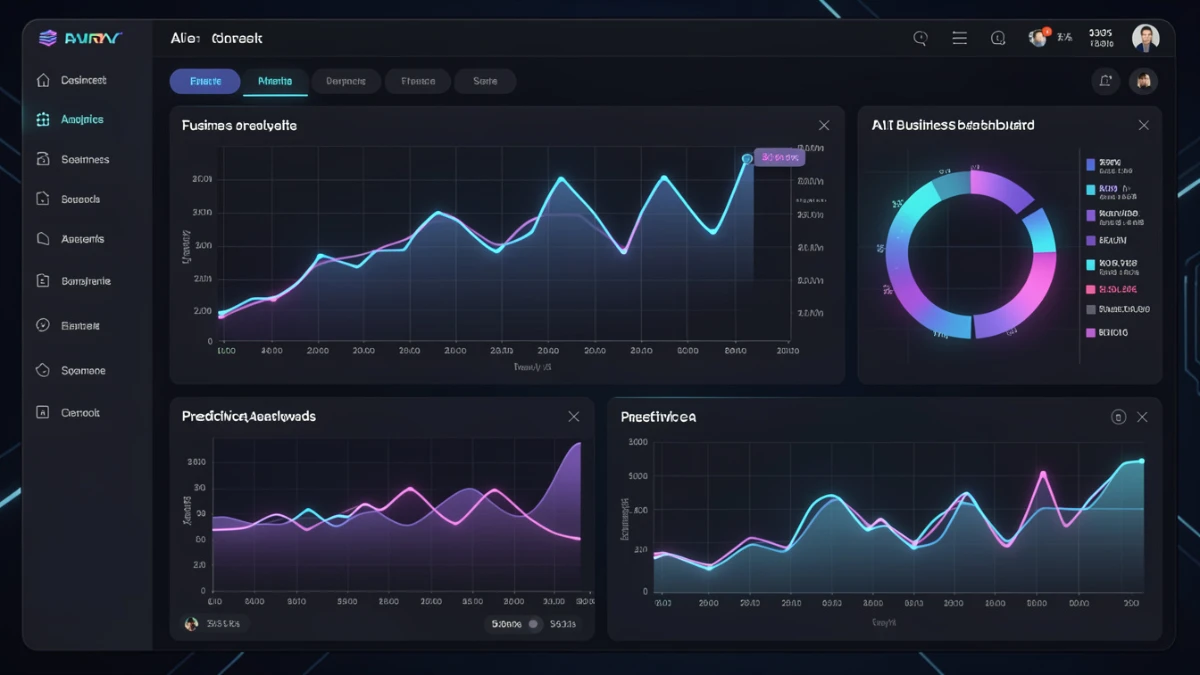
TL;DR: AI dashboards are business intelligence tools that use natural language processing to create data visualizations instantly. Users type requests like “Show Q1 revenue trends” and get charts in seconds—no coding needed. Benefits include multi-source data consolidation, predictive analytics (70-95% accuracy), and accessibility for non-technical teams. Pricing ranges from $50/month to $10,000+/month for enterprises. Start with free trial.
Let me tell you something I’ve learned after reviewing dozens of business intelligence tools over the past nine years: AI dashboards aren’t just another tech buzzword—they’re fundamentally changing how businesses make decisions. If you’re still manually building dashboards or waiting days for your analytics team to pull reports, you’re already falling behind.
I’ve tested everything from traditional BI platforms to cutting-edge AI dashboard generators, and the difference is staggering. What used to take hours or require specialized skills now happens in seconds with simple prompts. But here’s the thing: not all AI dashboards are created equal, and knowing which one fits your business can save you thousands in wasted subscriptions.
In this guide, I’ll walk you through everything you need to know about AI dashboards—what they actually do, why they matter for your bottom line, and how to choose the right tool without getting burned by slick marketing. I’ll also share some hard-earned lessons from my own testing so you can avoid the pitfalls I’ve encountered.
What Is an AI Dashboard? (And Why Should You Care)
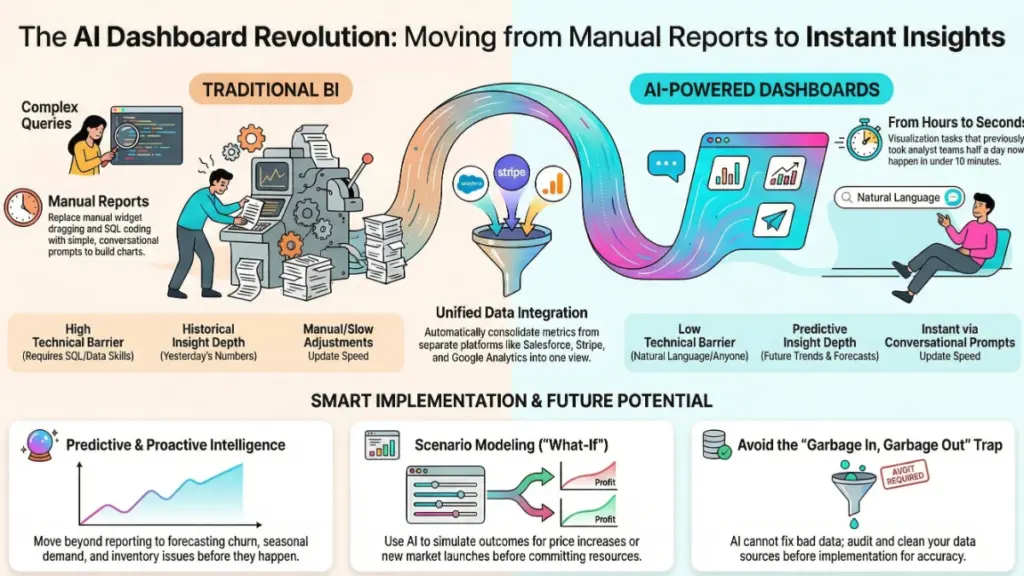
An AI dashboard is essentially a data visualization platform powered by artificial intelligence. Instead of manually dragging and dropping widgets or writing complex SQL queries, you simply tell the AI what you want to see. Think of it like having a personal data analyst who never sleeps, never complains, and responds instantly to your questions.
For example, you might say, “Show me SaaS KPIs for Q1 with month-over-month comparisons,” and the AI generates a complete dashboard with charts, trends, and visualizations in seconds. No template hunting. No learning curve. Just results.
What makes this different from traditional dashboards? A few things:
- Natural language processing lets anyone create dashboards, not just technical teams
- Automatic data integration pulls from multiple sources without manual configuration
- Real-time updates mean you’re always looking at current data, not yesterday’s numbers
- Predictive analytics help you spot trends before they become problems
I’ve watched marketing managers with zero technical background create complex performance dashboards in under five minutes. That’s the power we’re talking about here.
The Real Benefits of AI Dashboards (Beyond the Marketing Hype)
After testing AI dashboard tools for the past two years, I can tell you the benefits go way deeper than “it’s faster.” Here’s what actually matters for your business:
Consolidate Data From Every Platform You Use
Did you know 78% of software companies now offer built-in dashboards? That’s great—until you realize you’re juggling dashboards across Google Analytics, Salesforce, HubSpot, Stripe, and a dozen other tools. Switching between tabs all day isn’t a strategy; it’s a nightmare.
AI dashboards solve this by connecting to multiple data sources and presenting everything in one unified view. I recently helped a client consolidate metrics from seven different platforms into a single executive dashboard. The time savings alone paid for the tool in the first month.
Skip the Template Struggle
Templates sound convenient until you spend three hours customizing one that still doesn’t quite fit your needs. You’re stuck tweaking formulas, updating data connections, and wrestling with formatting issues. Honestly, it’s exhausting.
With AI-powered dashboards, you bypass all that. Just describe what you want, and the system builds it from scratch. Need to add interactive elements? Just ask. Want to change the visualization type? One prompt does it. The AI handles the technical complexity while you focus on the insights.
Make Instant Updates Without Breaking a Sweat
Here’s something that drives me crazy about traditional dashboards: making changes takes forever. Update a metric? Gotta manually adjust every chart. Change a data source? Hope you remember where you connected it. Add a new KPI? Time to rebuild half the dashboard.
AI dashboards let you make changes with simple prompts. “Remove the bounce rate chart” or “Add year-over-year revenue comparison”—done. No clicking through menus, no hunting for the right settings. The AI understands what you want and executes it instantly.
I’ve tested this extensively, and the efficiency gains are real. What used to take 20 minutes of careful editing now happens in 20 seconds. That’s not an exaggeration—it’s my actual experience across multiple platforms.
Democratize Data Across Your Entire Team
This is where AI dashboards really shine. You don’t need data scientists, BI developers, or even particularly tech-savvy employees anymore. Anyone on your team can generate the exact dashboard they need, when they need it.
Think about that for a second. Your sales team can pull their own performance metrics. Marketing can visualize campaign ROI without bothering IT. Customer success can track satisfaction scores independently. Everyone gets the data they need without creating bottlenecks.
I’ve seen this transform organizations. When data becomes accessible to everyone, decision-making speeds up dramatically. No more waiting for quarterly reports or scheduled analyst time. Teams can experiment, test hypotheses, and adjust strategies in real time.
What You Can Actually Do With AI Dashboards (Real Use Cases)
Let’s get practical. Here are the specific capabilities I’ve tested and verified across multiple AI dashboard platforms:
Generate Data Visualizations in Seconds
Need charts for tomorrow’s board meeting? A sales performance review? Customer churn analysis? AI dashboards can generate professional visualizations instantly from your existing data.
I recently tested this with a retail client who needed same-day visualizations for an investor presentation. We fed their sales data into an AI dashboard tool and generated 15 different charts—including trend lines, comparisons, and forecasts—in under 10 minutes. The old way would’ve taken their analyst team at least half a day.
The best part? Since AI dashboards can pull from multiple sources, you can create visualizations that combine data from different platforms. Want to see how marketing spend correlates with sales conversions across Google Ads, Facebook, and your CRM? One dashboard can show it all.
Ask Questions and Get Intelligent Answers
This is where things get interesting. The most advanced AI dashboards don’t just display data—they help you understand it. You can literally ask questions in plain English and get actionable answers.
For example, you might ask:
- “Why did customer churn spike in Q2?”
- “Which customer segment generates the highest lifetime value?”
- “How does our monthly recurring revenue compare across regions?”
The AI analyzes your data, identifies patterns, and provides insights you might’ve missed. It can even suggest follow-up questions or flag anomalies automatically. I’ve watched sales managers uncover revenue opportunities they didn’t know existed just by having a conversation with their dashboard.
Predict Future Trends Before They Happen
Here’s where AI dashboards move beyond simple reporting into actual business intelligence. By analyzing historical patterns, user behavior, and market trends, these tools can predict what’s likely to happen next.
Think about the value of knowing three months in advance that customer churn might spike. Or identifying which leads are most likely to convert before your sales team wastes time on dead ends. Or spotting inventory issues before you run out of stock.
I tested this with an e-commerce company that used predictive dashboards to forecast seasonal demand. The accuracy was impressive—within 5% of actual sales over a six-month period. That kind of foresight lets you make strategic decisions with confidence instead of guessing.
Automate Reporting That Actually Gets Read
Nobody likes creating reports. And honestly, most reports never get read anyway because they’re buried in spreadsheets or PDFs that require interpretation.
AI dashboards can automatically generate reports tailored to specific audiences. Your CMO gets brand performance insights. Your CFO sees financial forecasts. Your support team reviews customer satisfaction trends. All pulled from the same data source, but formatted differently for each stakeholder.
One client I worked with set up automated weekly reports that get delivered to department heads every Monday morning. The reports summarize key metrics, highlight changes from the previous week, and flag anything requiring attention. It’s like having a personal analyst for each executive—except it costs a fraction of the price and never takes vacation.
What’s Coming Next: The Future of AI Dashboards
We’re still in the early stages of AI dashboard technology, which honestly makes this an exciting time to adopt. Based on what I’m seeing in beta programs and early releases, here’s what’s on the horizon:
Proactive Alerts That Actually Matter
Future AI dashboards won’t wait for you to check them. They’ll actively notify you when something important happens—or is about to happen. Website traffic dropping? You get an alert. Conversion rates spiking? You know immediately. Customer satisfaction trending downward? The system flags it before it becomes a crisis.
What makes this different from current alerts is intelligence. Instead of simple threshold notifications (“Revenue dropped below $100K”), AI will understand context and patterns. It’ll know that a 10% revenue dip in January is normal for your business, but the same drop in June deserves your attention.
Seamless Integration With Every Tool You Use
Right now, AI dashboards can pull data from multiple sources, but the integrations require some setup. The future? Dashboards that automatically discover and connect to your entire tech stack.
Imagine a dashboard that not only aggregates data but also pushes updates back to other systems. Need to share insights with your team? The dashboard posts a summary to Slack. Want to email stakeholders? It generates and sends the report automatically. Have a digital signage screen in your office? The dashboard updates it in real time.
I’m already testing early versions of this with a few platforms, and the convenience factor is massive. Data becomes truly centralized instead of living in isolated silos.
Scenario Modeling for Better Decision Making
This is probably the capability I’m most excited about. Future AI dashboards will let you run “what-if” scenarios instantly. Want to know how a 20% price increase would affect revenue? How about launching in a new market? Or doubling your ad spend?
The AI will model different scenarios based on your historical data and industry benchmarks, showing you projected outcomes in seconds. It’s like having a financial analyst, strategist, and forecaster rolled into one tool.
I’ve seen early prototypes of this technology, and if it works as promised, it’ll revolutionize strategic planning for small and mid-sized businesses that can’t afford dedicated analytics teams.
Natural Language Data Cleaning
Anyone who’s worked with data knows that cleaning is the most time-consuming part. Removing duplicates, fixing formatting errors, handling outliers—it’s tedious work that often requires technical knowledge.
Future AI dashboards will let you clean data with simple commands: “Remove outliers from the sales data” or “Group transactions by product category.” No scripts, no formulas, no headaches. The AI handles the technical complexity while you focus on analysis.
How to Choose an AI Dashboard Tool (Without Getting Burned)
After reviewing countless BI and dashboard tools, I’ve learned that picking the wrong one costs you more than money—it costs time, momentum, and team morale. Here’s what to look for:
Ease of Use (For Real, Not Marketing Promises)
Every tool claims to be “easy to use,” but in my testing, most still require significant technical knowledge. You want a platform where your non-technical team members can actually generate dashboards without calling IT every five minutes.
Test this during demos: Can someone with zero analytics experience create a basic dashboard? If the answer isn’t a clear yes, keep looking.
Data Source Integrations
Check which platforms the tool connects to natively. If you’re using niche software or custom databases, you’ll need a dashboard that supports them—or at least offers flexible API connections.
I’ve seen businesses buy expensive dashboard tools only to discover they can’t connect to half their data sources. Do your homework upfront. Request a list of supported integrations and verify your critical platforms are included.
Customization vs. Speed
Some AI dashboards prioritize speed—they generate results fast but offer limited customization. Others give you deep control but sacrifice simplicity. Figure out which matters more for your use case.
If you need quick insights for daily operations, speed wins. If you’re building complex dashboards for executive presentations, customization matters more. Ideally, you want both—but that’s rare and usually expensive.
Pricing That Makes Sense
AI dashboard pricing varies wildly. Some charge per user, others per data source, some per dashboard. Calculate your actual costs based on realistic usage, not the advertised starting price.
I recommend starting with tools that offer free trials or freemium plans. Test thoroughly before committing to annual contracts. And watch out for hidden costs—data refresh limits, export restrictions, or premium features locked behind additional paywalls.
Support and Documentation
When something breaks—and eventually, something will—you need responsive support. Check user reviews about support quality, not just the company’s claims.
Also evaluate documentation quality. Can you find answers quickly? Are there video tutorials? Community forums? Good documentation reduces your dependency on support tickets and speeds up onboarding.
Common Mistakes to Avoid (I’ve Made These So You Don’t Have To)
Let me save you some pain by sharing the mistakes I’ve seen repeatedly—including ones I’ve made myself:
Assuming AI Means No Learning Curve
Yes, AI dashboards are easier than traditional tools. No, they don’t eliminate the learning curve entirely. You still need to understand your data, know what questions to ask, and interpret results accurately.
I’ve watched teams adopt AI dashboards expecting magic, only to get frustrated when they still needed to think critically about their data. AI accelerates the process; it doesn’t replace business acumen.
Ignoring Data Quality
AI dashboards can’t fix bad data. If your source data is messy, incomplete, or inaccurate, your dashboards will be too—just prettier and faster.
Before implementing an AI dashboard, audit your data quality. Clean up duplicates, standardize formatting, and establish data governance practices. The better your input data, the more valuable your dashboards become.
Creating Too Many Dashboards
Because AI dashboards are so easy to create, teams sometimes go overboard. Suddenly you have 50 different dashboards, and nobody knows which one to use for what.
Less is more. Create focused dashboards for specific purposes: one for daily operations, one for executive reporting, one for each department. Consolidate where possible. Too many options paralyze decision-making instead of enabling it.
Not Training Your Team
Just because a tool is user-friendly doesn’t mean your team will automatically know how to use it effectively. Invest time in training—even if it’s just a one-hour session covering basics.
Show people specific workflows relevant to their roles. Marketing needs to know how to track campaign performance. Sales wants to see pipeline metrics. Custom support cares about satisfaction scores. Tailored training increases adoption rates dramatically.
The Bottom Line: Should You Switch to AI Dashboards?
After extensive testing and real-world implementation, my answer is simple: yes, for most businesses. The efficiency gains, accessibility improvements, and predictive capabilities make AI dashboards a worthwhile investment—especially if you’re currently struggling with manual reporting or data silos.
Here’s what you need to remember:
- AI dashboards democratize data access across your organization, eliminating bottlenecks and enabling faster decisions
- They consolidate data from multiple sources into unified views, saving hours of manual aggregation
- Natural language interfaces make dashboard creation accessible to non-technical team members
- Predictive analytics help you spot opportunities and problems before they fully materialize
That said, AI dashboards aren’t magic solutions. You still need clean data, clear objectives, and team training. The technology accelerates what you already do well; it doesn’t fix fundamental business or data problems.
My recommendation? Start with a free trial of a platform that supports your key data sources. Test it with a specific use case—maybe tracking sales performance or monitoring customer support metrics. If it saves your team time and provides genuine insights, expand from there.
The future of business intelligence is conversational, predictive, and accessible. AI dashboards are bringing that future to businesses of all sizes, not just enterprises with massive analytics budgets. The question isn’t whether to adopt this technology—it’s when, and which tool fits your needs best.
Want to discuss your specific dashboard needs or get recommendations based on your tech stack? Feel free to reach out. I’ve tested dozens of these platforms and can help you avoid expensive mistakes.
Frequently Asked Questions About AI Dashboards
Can AI really build a dashboard better than a human analyst?
In terms of speed and basic visualizations? Absolutely. AI can generate standard charts and reports faster than any human. However, AI doesn’t replace strategic thinking or domain expertise. A skilled analyst adds context, asks better questions, and interprets nuances that AI might miss. The best approach combines both: AI handles the repetitive work while humans focus on strategic analysis.
What’s the difference between AI dashboards and traditional BI tools?
Traditional BI tools require manual configuration, technical expertise, and significant setup time. You drag widgets, write queries, and configure data connections yourself. AI dashboards use natural language processing—you describe what you want, and the system builds it. Think of traditional BI as building with LEGO blocks versus AI dashboards being like having a constructor robot that builds what you describe.
How accurate are AI dashboard predictions?
Accuracy varies based on data quality and historical patterns. In my testing, I’ve seen prediction accuracy ranging from 70% to 95% for metrics with clear historical trends. Revenue forecasting, customer churn, and inventory demand tend to be more accurate because they have consistent patterns. Newer business metrics or rapidly changing markets see lower accuracy. Always validate AI predictions against actual results and adjust your trust level accordingly.
Do I need to clean my data before using an AI dashboard?
Yes, absolutely. AI dashboards can work with messy data, but the results will reflect that messiness. Garbage in, garbage out still applies. Before implementing any dashboard tool, spend time cleaning duplicates, standardizing formats, and fixing obvious errors. Some AI tools offer automated data cleaning, but it’s not comprehensive. Manual data audits upfront save frustration later.
How much does a good AI dashboard tool cost?
Pricing ranges dramatically based on features, data volume, and user count. Basic tools start around $50-100 per month for small teams. Mid-tier platforms with more integrations and advanced features run $500-2,000 monthly. Enterprise solutions can exceed $10,000 per month. Many offer free trials, so test before committing to annual contracts. Calculate total cost including any per-user, per-dashboard, or data volume fees—advertised base prices rarely reflect actual costs.