


AI in software development is now essential, with 84% of developers using AI tools daily to code 55% faster and complete 126% more projects. Top tools include GitHub Copilot, Cursor, Testim, and Harness for coding, testing, and DevOps. However, AI-generated code requires strict security review—48% contains vulnerabilities—and human oversight remains critical for business logic and architecture decisions.
Why AI in Software Development Is Non-Negotiable in 2025
AI in software development has transitioned from experimental technology to mission-critical infrastructure. If you’re still coding the traditional way in 2025, you’re already falling behind. The data is undeniable: 84% of developers now use or plan to use AI tools in their development process, with 51% of professional developers using AI daily.
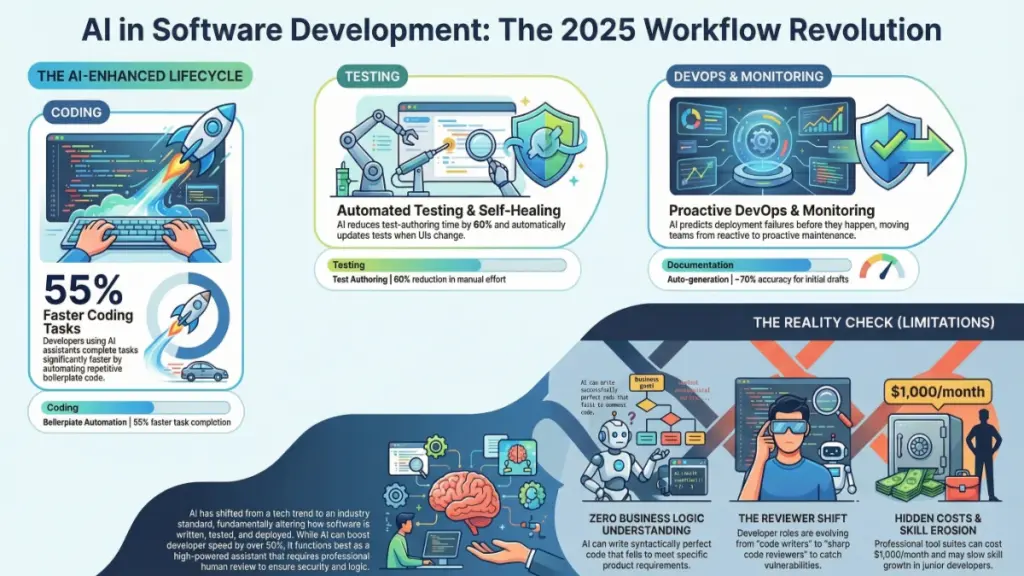
The AI code assistant market has exploded to $3.9 billion in 2025 and is projected to reach $6.6 billion by 2035, growing at a 5.3% CAGR. But this isn’t just about market size—it’s about survival. Developers using AI coding assistants are completing tasks up to 55% faster than their traditional counterparts, and GitHub Copilot users specifically complete 126% more projects per week than manual coders.
After nine years of hands-on testing with dozens of AI-powered development platforms, I’ve witnessed this transformation firsthand. This isn’t hype—it’s a fundamental restructuring of how software gets built. In this comprehensive guide, I’ll break down exactly how AI is reshaping every phase of the development lifecycle, from initial code generation to production deployment and monitoring.
Whether you’re a solo developer, a startup founder, or an enterprise engineering leader, this guide will give you actionable strategies to implement AI tools effectively while avoiding the pitfalls that trap less-informed teams.
The State of AI in Software Development: 2025 Market Landscape
Before diving into specific applications, let’s establish the current reality. According to the latest 2025 data:
- 41% of all code written globally is now AI-generated or AI-assisted
- 22% of merged code in enterprise environments is AI-authored
- Developers save an average of 3.6 hours per week using AI coding tools
- 91% AI adoption across sampled developer organizations indicates near-universal integration
- The AI code generation market, valued at $4.91 billion in 2024, is projected to hit $30.1 billion by 2032 with a 27.1% CAGR
These numbers represent more than adoption—they signal a permanent shift in developer expectations and capabilities.
Regional Adoption Leaders
AI adoption varies significantly by region, with China leading at 7.2% CAGR, followed by India (6.6%), Germany (6.1%), and Brazil (5.6%). The United States maintains steady growth at 5.0%, focusing on cloud integration and enterprise security features.
How AI Is Transforming the Coding Process: From Autocomplete to Architecture
The Evolution of AI Coding Assistants
AI coding assistants like GitHub Copilot, Cursor, Amazon CodeWhisperer, and emerging players like Augment Code and Windsurf have evolved far beyond simple autocomplete functionality. As of April 2025, GitHub Copilot has surpassed 20 million all-time users and introduced significant updates including auto-model selection for Copilot Chat and enhanced file edit confirmations for security.
The September 2025 VS Code update (v1.104) brought auto-model selection, eliminating the need for developers to manually choose AI models—VS Code now automatically selects the optimal model for each query. This represents a shift toward invisible AI integration that anticipates developer needs rather than requiring explicit configuration.
Real Productivity Gains: The Numbers Behind the Hype
The productivity impact is measurable and substantial:
| Metric | AI-Assisted Developers | Traditional Developers |
|---|---|---|
| Tasks Completed | 55% faster | Baseline |
| Weekly Projects | 126% more (Copilot users) | Baseline |
| Time Saved Weekly | 3.6 hours | 0 hours |
| Code Output | 12-15% more code written | Baseline |
| Productivity Increase | 21% reported improvement | Baseline |
Practical Workflow Transformation
Consider a real-world example: writing boilerplate code for a REST API endpoint previously required 20-30 minutes of syntax lookups, pattern matching from legacy projects, and manual edge case handling. With modern AI assistants, this now takes under five minutes. The critical shift isn’t that AI writes perfect code—it’s that it eliminates mechanical typing and pattern repetition, allowing developers to focus on architectural decisions and complex problem-solving.
However, this efficiency comes with caveats. AI-coauthored pull requests show approximately 1.7× more issues than human-only PRs. This statistic underscores a crucial reality: AI accelerates output but requires enhanced review discipline.
Best Practices for AI Code Generation in 2025
To maximize AI coding assistant effectiveness while maintaining quality:
- Craft precise, contextual prompts. Vague instructions yield vague results. Include business context, constraints, and expected behaviors.
- Decompose complex tasks. AI excels at focused, well-defined problems rather than ambiguous, multi-step requirements.
- Implement mandatory review protocols. Never deploy AI-generated code without line-by-line examination.
- Use AI for drafting, not finalization. Treat AI output as a junior developer’s first draft requiring mentorship and refinement.
- Validate security implications.48% of AI-generated code contains potential security vulnerabilities, making security scanning non-negotiable.
AI-Powered Code Review and Quality Assurance: Catching What Humans Miss
The Limitations of Traditional Code Review
Traditional code review depends entirely on human attention—making it only as reliable as your team’s availability and focus. Fatigue, time pressure, and cognitive biases create gaps where bugs and security vulnerabilities slip through.
AI Review Tools: The New Standard
AI-powered code review platforms like DeepCode (Snyk), SonarQube with AI enhancements, and CodeClimate now scan entire codebases in minutes, identifying issues that exhausted human reviewers might overlook.
In practical testing, SonarQube surfaced 14 medium-to-high severity security issues in a mid-sized SaaS codebase that had passed three rounds of manual review. These included SQL injection risks, insecure API calls, and improper input validation—precisely the vulnerabilities that AI-generated code often introduces.
Advanced Capabilities of Modern AI Review Systems
Contemporary AI review tools offer:
- Contextual explanation generation. Beyond flagging issues, they explain why something is problematic and how to fix it—accelerating junior developer education.
- Pattern recognition across languages. Identify anti-patterns and security flaws across polyglot codebases.
- Integration with CI/CD pipelines. Automated scanning on every pull request with configurable quality gates.
- Historical learning. Tools that adapt to your codebase’s specific patterns and conventions over time.
Implementing AI Code Review: A Layered Approach
For optimal results, implement this workflow:
- Automated AI scanning on every PR. Make it a CI/CD gate that must pass before human review.
- Pre-review triage. Address AI-flagged issues before requesting colleague review to respect reviewer time.
- Educational leverage. Use AI explanations as onboarding and training resources.
- Human oversight for architecture. Reserve human reviewers for system design, business logic validation, and contextual decision-making.
This layered approach catches more bugs earlier, reduces reviewer fatigue, and consistently ships cleaner code—translating directly to cost savings and reduced technical debt.
AI in Software Testing: Comprehensive Coverage Without the Bottleneck
The Testing Crisis in Modern Development
Testing remains one of the most time-consuming yet frequently neglected aspects of software development. Teams under delivery pressure often sacrifice test coverage for speed, accumulating technical debt that manifests as production incidents.
AI-Powered Testing: Self-Healing and Intelligent Generation
AI testing platforms like Testim, Mabl, and Applitools are fundamentally changing this equation through:
- Automated test case generation. AI analyzes source code to generate test cases, including edge cases humans commonly overlook.
- Self-healing test automation. Tests automatically update when UI elements change—eliminating the maintenance nightmare that traditionally plagues test suites.
- Visual regression detection. Pixel-level UI change identification that catches unintended visual modifications.
Testim’s AI-driven test authoring reduces end-to-end test creation time by up to 60%, while its self-healing capabilities prevent test breakage when developers modify button labels or reposition form fields [original article]. For teams running two-week sprints, this translates to several recovered engineering hours per iteration.
Where AI Testing Delivers Maximum Value
| Testing Domain | AI Capability | Business Impact |
|---|---|---|
| Regression Testing | Broad, rapid suite execution | Fewer production incidents |
| Visual Testing | Pixel-level UI regression detection | Consistent user experience |
| Edge Case Generation | Unusual input proposal | Enhanced robustness |
| Test Maintenance | Self-healing updates | Reduced maintenance burden |
| Security Testing | Vulnerability pattern recognition | Proactive risk mitigation |
Implementation Strategy for AI Testing
To successfully integrate AI testing:
- Start with high-value, high-maintenance test suites. Target areas where traditional testing creates bottlenecks.
- Ensure application stability. AI testing requires consistent UI patterns and stable application architecture to perform optimally.
- Combine AI-generated and human-designed tests. Use AI for coverage breadth and humans for complex business logic validation.
- Monitor false positive rates. Tune AI sensitivity to balance thoroughness with practical maintainability.
The ultimate goal is comprehensive coverage without coverage paralysis—enabling faster release cycles with confidence.
AI for Documentation and Developer Experience: The Underrated Revolution
Documentation: The Developer Chore Nobody Wants
Documentation consistently ranks as developers’ most disliked task—yet its absence creates onboarding friction, knowledge silos, and institutional risk. AI is finally addressing this chronic pain point.
AI Documentation Generation and Synchronization
Tools like Mintlify, Swimm, and GitHub Copilot’s documentation features now generate documentation directly from codebases and—critically—maintain synchronization as code evolves. This solves the perennial problem of documentation that’s outdated the moment it’s published.
In practical testing, Mintlify generated clear, readable documentation for every public function in a small open-source project within 20 minutes. Only 30% of output required editing—representing massive time savings for solo developers and small teams.
Beyond Documentation: Comprehensive Developer Productivity
AI enhances developer productivity across multiple dimensions:
- Automated commit message generation. AI analyzes code diffs to produce descriptive, conventional commit messages.
- Intelligent code search. AI-powered semantic search finds relevant code snippets across large codebases faster than text search.
- Onboarding acceleration. New developers query AI tools to explain unfamiliar codebase sections in plain language.
- Project management integration. AI tools connected to Jira and Linear automatically summarize sprint progress and flag blockers.
The Compound Productivity Effect
The cumulative impact is substantial. A developer leveraging AI across their entire workflow can recover 5-10 hours weekly previously spent on low-value mechanical tasks. This time redirects to feature development, architectural refinement, and creative problem-solving—activities that directly drive business value.
AI in DevOps and Site Reliability: From Reactive to Predictive Operations
The DevOps Intelligence Revolution
AI’s impact extends beyond coding into deployment and operations. AI-powered DevOps tools like Harness, Dynatrace, and PagerDuty with AI enhancements predict deployment failures, accelerate incident root cause analysis, and auto-remediate common issues.
Predictive Deployment Intelligence
Harness exemplifies this shift: it analyzes historical deployment data to flag releases exhibiting risk patterns similar to previous failures. Instead of discovering production breaks at 2 AM, teams receive pre-deployment warnings enabling proactive mitigation.
Intelligent Monitoring and Alerting
AI-driven monitoring distinguishes between normal system noise and genuine anomalies, dramatically reducing alert fatigue while improving response times to real incidents. This directly improves Mean Time To Recovery (MTTR), a critical engineering reliability metric.
Current AI DevOps Capabilities
| Capability | Description | Operational Impact |
|---|---|---|
| Predictive Deployment Analysis | Risk pattern recognition before release | Prevented outages |
| Intelligent Alerting | Context-aware, noise-filtered notifications | Reduced alert fatigue |
| Root Cause Analysis | Automated incident investigation | Faster resolution times |
| Auto-Remediation | Self-healing for routine failures | Reduced on-call burden |
Implementation Considerations
AI DevOps tools require 2-4 weeks of baseline data collection before automated alerting becomes reliable [original article]. This learning period is essential for the AI to establish normal behavior patterns and avoid false positives.
Security in the AI Development Era: New Risks Require New Vigilance
The Security Paradox of AI Coding
While AI accelerates development, it introduces specific security risks requiring deliberate mitigation strategies. Studies indicate 48% of AI-generated code contains potential security vulnerabilities, particularly around authentication, input handling, and data exposure.
Common AI-Generated Security Vulnerabilities
| Vulnerability Category | Description | Prevention Strategy |
|---|---|---|
| Injection Flaws | SQL, NoSQL, command injection | Mandatory parameterized query patterns |
| Authentication Weaknesses | Improper session management | Security review of all auth-related AI output |
| Data Exposure | Sensitive data in logs/responses | Automated secrets scanning |
| Input Validation Gaps | Insufficient sanitization | Strict input validation requirements |
Security-First AI Development Practices
- Mandatory security scanning. Integrate Snyk, SonarQube, or similar tools into every AI-assisted workflow.
- Security-focused code review. Train reviewers to specifically scrutinize AI-generated code for common vulnerability patterns.
- Least privilege enforcement. Ensure AI-generated code adheres to principle of least privilege for data access.
- Regular penetration testing. Supplement AI development with periodic professional security assessments.
The Honest Limitations: What AI Can’t Do in Software Development
Responsible AI adoption requires understanding its boundaries:
Business Logic Understanding
AI tools excel at syntax and pattern recognition but cannot reason about specific business requirements. AI-generated code may be syntactically perfect while fundamentally misaligned with product goals. Human oversight remains essential for requirement validation.
Skill Development Concerns
Over-reliance on AI may impede junior developer growth. Developers learning primarily through AI suggestions without understanding underlying mechanisms build fragile foundations. AI should accelerate learning, not replace it—requiring intentional mentorship and educational investment.
Economic Considerations
Professional AI development tools carry real costs:Table
| Tool Category | Representative Cost | Team Size Impact |
|---|---|---|
| Individual Assistants (Copilot Pro) | $10-19/month per developer | Linear scaling |
| Enterprise Platforms (Snyk, Harness) | $500-1,000+/month per team | Moderate scaling |
| Comprehensive Stack | $500-2,000/month | Significant at scale |
ROI analysis is essential before commitment. Calculate based on hours saved, incidents avoided, and velocity improvements.
The 1.7× Issue Multiplier Reality
The statistic that AI-coauthored PRs contain 1.7× more issues than human-only PRs
isn’t a condemnation of AI—it’s a reminder that AI accelerates output without guaranteeing quality. Enhanced review processes must accompany AI adoption.
Strategic Implementation Roadmap: From Adoption to Optimization
Phase 1: Foundation (Weeks 1-4)
- Select one high-impact category. Choose coding, testing, or review based on your team’s biggest friction point.
- Pilot with volunteer developers. Identify early adopters to champion the tool and surface integration challenges.
- Establish baseline metrics. Measure current velocity, defect rates, and review times for comparison.
Phase 2: Integration (Weeks 5-12)
- Expand to full team. Roll out based on pilot learnings with customized training.
- Integrate with existing workflows. Ensure AI tools complement rather than disrupt current processes.
- Implement quality gates. Add automated scanning and review requirements for AI-generated output.
Phase 3: Optimization (Months 4-12)
- Measure and adjust. Track productivity, quality, and developer satisfaction metrics.
- Expand to adjacent categories. Add testing, documentation, or DevOps AI tools based on initial success.
- Develop internal best practices. Document prompt engineering, review standards, and security protocols specific to your context.
Frequently Asked Questions About AI in Software Development
Is AI going to replace software developers?
No. AI tools are powerful assistants but cannot reason about business logic, make architectural decisions, or understand product goals. Developers who effectively leverage AI will be more productive and valuable than those who don’t—augmentation, not replacement, is the reality.
What is the best AI tool for software development in 2025?
The optimal choice depends on your workflow:
- Code Generation: GitHub Copilot (20M+ users, enterprise-grade) or Cursor (advanced context understanding)
- Testing: Testim (self-healing) or Mabl (end-to-end automation)
- Security/Review: Snyk or SonarQube with AI enhancements
- DevOps: Harness (predictive deployment) or Dynatrace (intelligent monitoring)
Start with your highest-friction category and expand from there.
How does AI affect code quality?
AI improves quality by catching bugs earlier and increasing test coverage, but can reduce quality if developers accept suggestions without review. The tool is only as good as the judgment of the person using it.
Is AI-generated code safe for production?
With proper review, yes. Without review, absolutely not. AI-generated code must pass identical security scanning and code review processes as human-written code before production deployment.
What are the real costs of AI development tools?
Costs vary significantly:
- Individual tools: $10-19/month per developer
- Enterprise suites: $500-1,000+/month per team
- Comprehensive adoption: $500-2,000/month for small teams, scaling significantly for enterprises
Always evaluate ROI based on measurable productivity gains and risk reduction.
The Competitive Imperative of AI Adoption
AI in software development is fundamentally transforming the industry—not through developer replacement, but through elimination of repetitive, low-value tasks that consume developer time and creativity. The data is unambiguous: 84% developer adoption, 55% task completion speed improvement, 126% project output increase for AI-assisted teams.
The strategic imperatives are clear:
- AI coding assistants deliver measurable productivity gains when paired with rigorous review practices.
- AI code review tools catch vulnerabilities and bugs that manual processes miss.
- AI testing platforms enable comprehensive coverage without maintenance overhead.
- AI DevOps tools shift operations from reactive firefighting to proactive prevention.
Your immediate action: select one area from this guide and implement one AI tool this week. Measure results, iterate, and expand. The teams that thoughtfully integrate AI into their development workflows—neither resisting blindly nor depending uncritically—will dominate the next decade of software innovation.
The question is no longer whether to adopt AI in your development process. It’s how quickly you can do it intelligently, securely, and sustainably.