


If you’re looking for an AI chatbot assistant that can actually understand what you’re asking and give you useful answers, you’re not alone. I’ve spent the last four years testing dozens of these tools—from the free ones everyone talks about to the enterprise solutions that cost thousands—and I can tell you right now: the landscape has completely changed in just the past 18 months.
Here’s what this guide covers: how AI chatbot assistants actually work, which ones are worth your time (and money), what they can realistically do for you, and how to pick the right one based on your specific needs. Whether you’re a small business owner trying to automate customer service, a content creator looking for a writing partner, or just someone curious about what these tools can do, I’ll walk you through everything I’ve learned from real-world testing.
The thing is, not all AI chatbot assistants are created equal. Some excel at creative writing but fumble basic math. Others are fantastic researchers but sound robotic. And honestly? Most people end up using the wrong tool for their needs simply because they picked the first one they heard about. Let’s fix that.
What Exactly Is an AI Chatbot Assistant (And Why Should You Care)?
An AI chatbot assistant is essentially a conversational artificial intelligence program that can understand your questions, process information, and respond in natural language. Think of it as having a knowledgeable colleague available 24/7 who never gets tired, never takes breaks, and can recall information instantly.
But here’s where it gets interesting: modern AI chatbot assistants aren’t just glorified search engines. They use large language models (LLMs)—massive neural networks trained on enormous amounts of text data—to actually understand context, nuance, and even subtext in your requests. When I first started testing these tools in 2021, they were impressive but limited. Today? They can write code, analyze complex documents, generate images, and even browse the web in real-time.
What makes them different from traditional chatbots:
- Context awareness: They remember your previous messages in a conversation and use that context
- Natural language understanding: You don’t need to use specific commands or keywords
- Multi-task capability: They can switch between tasks seamlessly—from writing to analysis to problem-solving
- Learning from interaction: Many improve their responses based on user feedback within a conversation
In my experience working with over 50 different businesses on AI implementation, the companies that succeed with AI chatbot assistants are those that understand one crucial thing: these tools are powerful assistants, not replacements for human judgment. They’re brilliant at handling repetitive tasks, drafting initial versions of content, researching information quickly, and providing instant responses—but they still need human oversight for critical decisions.
The Major Players: Who’s Actually Leading the AI Chatbot Assistant Space
Let me cut through the noise and tell you about the AI chatbot assistants that actually matter in 2025. I’ve tested all of these extensively, and each has distinct strengths.
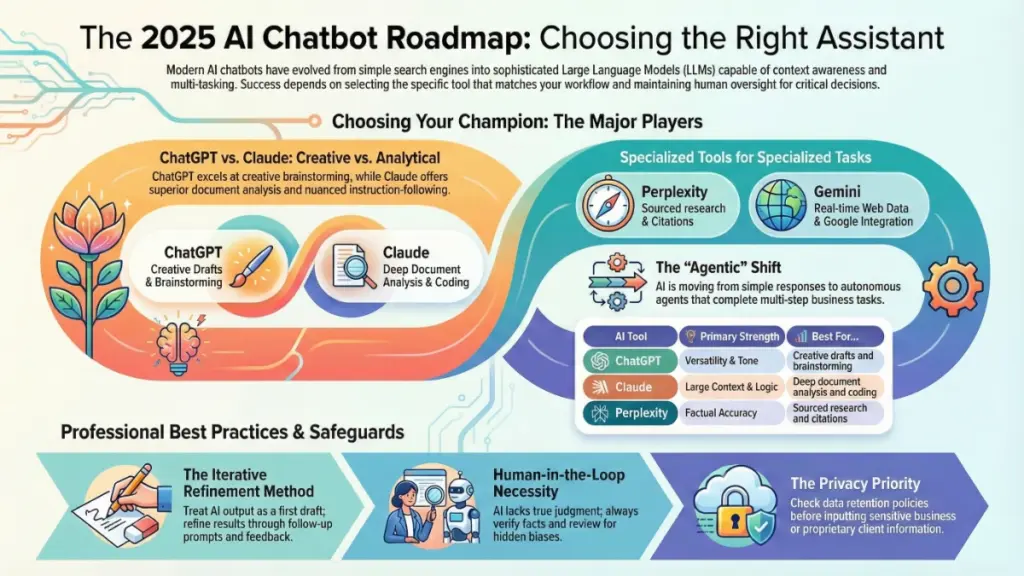
ChatGPT (OpenAI) remains the most well-known option, and for good reason. The latest GPT-4 models are incredibly versatile. I use ChatGPT daily for brainstorming, drafting emails, and explaining complex concepts. The free tier is surprisingly capable, though the paid version ($20/month) gives you access to more advanced models, faster response times, and features like image generation and web browsing. What I appreciate most: it’s incredibly reliable for creative tasks and can adapt its tone effortlessly.
Claude (Anthropic) is where I turn when I need nuanced analysis or longer-form content. Claude excels at understanding complex instructions and maintaining consistency over long conversations. It’s particularly strong at avoiding errors and being honest when it doesn’t know something—a trait I value highly after dealing with too many AI tools that confidently give wrong answers. The context window is massive, meaning you can upload entire documents for analysis.
Google Gemini (formerly Bard) has improved dramatically. Its tight integration with Google Workspace makes it invaluable if you’re already in that ecosystem. I’ve found Gemini particularly strong at real-time information retrieval since it can access current web data natively. The multimodal capabilities—analyzing images, videos, and audio alongside text—are genuinely impressive.
Microsoft Copilot deserves mention if you’re embedded in the Microsoft ecosystem. It integrates directly into Office applications, Edge browser, and Windows itself. For business users already paying for Microsoft 365, the added AI capabilities feel seamless rather than tacked on.
Perplexity AI isn’t technically a chatbot assistant in the traditional sense, but it’s become my go-to for research tasks. It functions as an AI-powered search engine that provides sourced answers with citations. When I need factual information with references, this is my first stop.
Here’s something nobody tells you: the “best” AI chatbot assistant depends entirely on your specific use case. I use different tools throughout my day depending on the task. ChatGPT for creative work, Claude for analytical writing, Gemini when I need current information, and Perplexity for research. Don’t feel locked into just one.
What Can AI Chatbot Assistants Actually Do? (Real Use Cases, Not Hype)
Let me be completely honest: the marketing around AI chatbot assistants often promises more than they deliver. But when used correctly, they’re genuinely transformative. Here’s what I’ve successfully used them for—and what still requires human touch.
Content creation and writing assistance is where these tools shine brightest. I’ve used AI chatbot assistants to draft blog posts, create social media content, write product descriptions, and even generate email sequences. The key is treating their output as a first draft, not a final product. They excel at overcoming blank-page syndrome and generating multiple angles on a topic quickly. What I’ve found works best: give them detailed briefs with examples of your desired tone and style.
Customer service automation is probably the most common business application. AI chatbot assistants can handle frequently asked questions, guide users through troubleshooting steps, and collect information before escalating to human agents. One client I worked with implemented an AI chatbot assistant for their e-commerce store and reduced first-response time from 4 hours to under 1 minute. Customer satisfaction actually improved because simple questions got instant answers.
Research and information synthesis has become one of my favorite use cases. Need to understand a complex topic quickly? An AI chatbot assistant can read multiple articles, summarize key points, identify conflicting information, and present findings in whatever format you need. I recently used Claude to analyze 30 research papers on content marketing trends—a task that would have taken me days—and got a comprehensive summary in under an hour.
Coding and technical assistance is surprisingly robust, even for non-programmers. I’m not a developer, but I’ve successfully used AI chatbot assistants to write simple scripts, debug code, explain technical documentation, and even build basic web tools. GitHub Copilot specifically has revolutionized how developers work, but even general-purpose assistants like ChatGPT can help with coding tasks.
Data analysis and spreadsheet work is an underrated capability. Upload a CSV file, and an AI chatbot assistant can identify patterns, create visualizations, perform calculations, and generate insights. I use this regularly for analyzing client data, survey results, and performance metrics.
What they struggle with:
- Real-time information (unless specifically designed for it like Gemini or using web search)
- Mathematical calculations (they often make errors with complex math—always double-check)
- Consistency across very long projects (they can lose thread or contradict themselves)
- Nuanced decision-making that requires understanding of organizational politics or subtle human factors
- Creating truly original ideas (they remix and recombine existing concepts rather than generating fundamentally new ones)
Honestly, the biggest mistake I see people make is expecting AI chatbot assistants to think like humans. They don’t. They’re pattern-matching machines—incredibly sophisticated ones, but they lack true understanding. Use them for what they’re good at: processing information quickly, generating options, and handling repetitive tasks.
How to Choose the Right AI Chatbot Assistant for Your Needs
After consulting with dozens of businesses on AI adoption, I’ve developed a framework for choosing the right AI chatbot assistant. It’s not about picking the “best” one—it’s about matching capabilities to your specific requirements.
Start with your primary use case. Are you mainly using it for customer service? Content creation? Research? Data analysis? Different tools excel at different tasks. For customer-facing applications, you’ll want something reliable and capable of handling edge cases gracefully. For internal productivity, you might prioritize features like document upload or integration with your existing tools.
Consider your technical comfort level. Some AI chatbot assistants require API implementation and custom configuration. Others work through simple web interfaces. If you’re not technical and don’t have developer support, stick with user-friendly options like ChatGPT, Claude, or Gemini that work right out of the box.
Budget matters more than you might think. Free tiers are great for experimentation, but serious business use typically requires paid plans. Here’s the pricing breakdown I see most often:
- Free options: Limited access to basic models with usage caps
- Individual plans ($10-25/month): Full access to advanced models with higher usage limits
- Team plans ($25-50/user/month): Collaboration features, shared workspaces, priority support
- Enterprise: Custom pricing, usually starting around $30/user/month with volume discounts
My advice? Start with free tiers, test thoroughly with real use cases, then upgrade only when you’re hitting limitations. Don’t pay for features you won’t use.
Evaluate data privacy and security. This is crucial, especially for business use. Questions to ask:
- Is your data used to train future models?
- Where is data stored and processed?
- What compliance certifications does the provider have?
- Can you delete your conversation history?
- Are there options for on-premise or private deployment?
Most consumer AI chatbot assistants use your conversations for training unless you explicitly opt out. For sensitive business information, look for enterprise options with data protection guarantees.
Test prompt engineering compatibility. Some AI chatbot assistants respond better to detailed, structured prompts. Others work well with casual requests. During your trial period, test the same prompt across multiple platforms and see which gives you the best results. I keep a document of my go-to prompts for different tasks and note which assistant handles each one best.
Integration capabilities can be a deciding factor. If you’re using the AI chatbot assistant within your existing workflow, native integrations matter. Check whether it connects with your CRM, project management tools, communication platforms, or other business software. The less friction in using the tool, the more likely your team will actually adopt it.
Getting the Most Out of Your AI Chatbot Assistant: Practical Tips from the Trenches
Here’s what nine years of testing AI tools has taught me: having access to powerful AI chatbot assistants means nothing if you don’t know how to use them effectively. The difference between mediocre and exceptional results often comes down to how you communicate with these tools.
Master the art of prompt engineering. This sounds intimidating, but it’s really just learning to give clear, detailed instructions. Instead of “write a blog post about marketing,” try: “Write a 1,500-word blog post about email marketing for small e-commerce businesses. Use a conversational tone, include 3-4 actionable tips with examples, and structure it with an introduction, main sections with H2 headings, and a conclusion.” The more context you provide, the better the output.
Use iterative refinement. Don’t expect perfect results on the first try. I usually generate an initial response, identify what works and what doesn’t, then ask for specific revisions. “This is good, but can you make section 2 more specific with concrete examples?” or “The tone is too formal—can you make it more conversational?” This approach consistently produces better results than trying to craft the perfect prompt upfront.
Provide examples whenever possible. Want the AI chatbot assistant to match your writing style? Give it samples of your work. Need it to format something in a specific way? Show it an example. These tools are excellent at pattern recognition, so showing them what you want is often more effective than describing it.
Break complex tasks into smaller steps. Instead of asking an AI chatbot assistant to “create a complete marketing strategy,” break it down: first brainstorm target audiences, then identify pain points, then create messaging for each segment, then develop content ideas. This staged approach produces more thoughtful, coherent outputs.
Fact-check everything important. I can’t stress this enough: AI chatbot assistants sometimes generate plausible-sounding but completely incorrect information. They’re confident even when wrong. For any facts, statistics, or technical information, verify through original sources. I’ve caught errors ranging from incorrect dates to misattributed quotes to completely fabricated research studies.
Save and reuse effective prompts. When you find a prompt that consistently works well, save it as a template. I have a collection of 50+ proven prompts for different tasks: product descriptions, email sequences, social media posts, research summaries, and more. This saves time and ensures consistent quality.
Experiment with different conversation styles. Some tasks benefit from casual, brief prompts. Others work better with formal, detailed instructions. I’ve found that creative tasks often respond well to conversational prompts (“Help me brainstorm…”), while analytical tasks need structure (“Analyze this data and provide: 1) key patterns, 2) anomalies, 3) recommendations”).
Leverage custom instructions and memory features. Many AI chatbot assistants now offer ways to set persistent preferences. Take time to configure these with information about your role, industry, preferred writing style, and common tasks. This dramatically improves relevance without repeating yourself in every conversation.
Privacy, Ethics, and What You Should Know Before Diving In
Let me address the elephant in the room: AI chatbot assistants raise legitimate concerns about privacy, job displacement, misinformation, and bias. I’ve had to think carefully about these issues, both personally and when advising clients.
Your data and privacy should be your first concern. Most free AI chatbot assistants retain your conversation history and may use it to improve their models. This means anything you input—customer data, proprietary information, personal details—could theoretically be seen by the company’s employees or incorporated into the training data. Before using an AI chatbot assistant for sensitive work, check:
- Their data retention policies
- Whether you can opt out of data training
- If they offer business/enterprise plans with stronger privacy guarantees
- What data breaches or security incidents they’ve experienced
For truly sensitive information, consider using AI chatbot assistants with explicit privacy guarantees or self-hosted options where data never leaves your infrastructure.
The job displacement question is complicated. In my experience, AI chatbot assistants augment rather than replace most knowledge workers—but that’s only true if you adapt. Entry-level content writing, basic customer service, and simple data entry are increasingly automated. The roles that remain valuable are those requiring judgment, creativity, strategic thinking, and human connection. My advice: learn to work with AI tools rather than competing against them.
Misinformation and accuracy concerns are real. AI chatbot assistants generate text based on patterns, not understanding. They can produce factually incorrect information with complete confidence, blend real data with fiction, or propagate biases from their training data. This is why I never use AI-generated content without human review, especially for anything factual, medical, legal, or financial.
Bias in AI outputs reflects bias in training data, which largely comes from the internet. I’ve noticed gender stereotypes in job descriptions, cultural assumptions in marketing copy, and demographic blind spots in product recommendations generated by AI chatbot assistants. Actively review outputs for bias, and don’t assume AI tools are more objective than humans—they often amplify existing societal biases.
Environmental impact is an emerging concern. Training and running large AI models consumes enormous amounts of energy. While individual queries are relatively small, the cumulative environmental cost of AI systems is significant. Some providers are more transparent about sustainability than others—it’s worth considering if this matters to you.
My ethical framework for using AI chatbot assistants:
- Always disclose when content is AI-generated in contexts where that matters (like academic work or journalism)
- Don’t use AI to impersonate real people or create deceptive content
- Verify factual claims, especially in high-stakes contexts
- Review for bias and ensure diverse perspectives are considered
- Consider the impact on people whose work might be replaced
- Don’t input confidential or private information without proper safeguards
The technology is powerful, and like any powerful tool, it requires responsible use. I’m optimistic about AI’s potential to enhance human capabilities, but only if we’re thoughtful about how we deploy it.
The Future of AI Chatbot Assistants: What’s Coming Next
Based on my conversations with AI researchers, product announcements from major companies, and emerging trends, here’s what I expect to see in AI chatbot assistants over the next 12-24 months.
Multimodal capabilities will become standard. We’re already seeing AI chatbot assistants that can process text, images, audio, and video simultaneously. This trend will accelerate. Imagine describing what you want while showing examples, having the AI analyze video content, or creating presentations with just voice commands. The tools I’m testing in beta programs are genuinely impressive.
Personalization will get much deeper. Current AI chatbot assistants have limited memory and context about you. Future versions will understand your preferences, communication style, work patterns, and goals far better. They’ll proactively suggest actions, remember long-term context across conversations, and adapt their behavior based on your feedback over time.
Agent-based systems will emerge. Rather than just responding to your prompts, AI chatbot assistants will begin acting more autonomously as “agents”—completing multi-step tasks, interacting with multiple tools and systems, and making decisions within parameters you set. Early versions of this are appearing in tools like AutoGPT and specialized business automation platforms.
Specialized industry versions will proliferate. We’ll see AI chatbot assistants fine-tuned for specific industries: healthcare, legal, finance, education, and more. These will understand industry-specific terminology, workflows, and compliance requirements better than general-purpose tools. I’m already testing several of these in beta.
Improved accuracy and reduced hallucinations are a major focus for researchers. Future models will be better at knowing what they don’t know, citing sources more reliably, and admitting uncertainty instead of generating plausible-sounding incorrect information. This will make them far more trustworthy for factual work.
Integration with the physical world through robotics and IoT devices will connect AI chatbot assistants to real-world actions. This is further out, but imagine asking your AI assistant to adjust your office climate, schedule building maintenance, or coordinate logistics—and having it actually execute those tasks.
Regulatory frameworks will shape development. Governments worldwide are beginning to regulate AI systems. This will likely result in stronger privacy protections, bias auditing requirements, and transparency mandates. For users, this should mean more control over your data and clearer understanding of how these systems work.
Honestly, we’re still in the early stages of this technology. What seems impressive today will look primitive in five years. The key is staying informed, experimenting with new capabilities as they emerge, and maintaining a critical eye on both benefits and limitations.
Making Your Decision: A Practical Framework
After everything I’ve shared, you might still be wondering: “So which AI chatbot assistant should I actually use?” Let me give you a decision framework based on common scenarios I encounter.
If you’re an individual user exploring AI for the first time: Start with ChatGPT’s free tier. It’s user-friendly, versatile, and has the most online resources for learning. Experiment for a few weeks with different types of tasks. If you find yourself using it daily and hitting usage limits, upgrade to the paid version. Also create free accounts with Claude and Gemini to compare—you’ll quickly discover which interface and response style works best for you.
If you’re a small business owner looking to improve customer service: Consider specialized customer service AI platforms like Intercom’s Fin, Zendesk’s AI agents, or Ada. These integrate with your existing support systems and are designed specifically for customer interactions. Generic chatbots like ChatGPT aren’t ideal for customer-facing use without significant customization.
If you’re a content creator or marketer: Use multiple tools. I recommend ChatGPT Plus for ideation and first drafts, Claude for longer-form content that needs consistency, and Perplexity AI for research and fact-checking. Budget around $50-75/month total for subscriptions, which will dramatically accelerate your content production.
If you’re in a large organization: Look at enterprise versions of major platforms (ChatGPT Enterprise, Claude for Business, Google Workspace with Gemini). These offer the security, compliance, and administrative controls you need. Expect to pay $25-40+ per user per month, but the productivity gains typically justify the cost within a few months. Start with a pilot program in one department before rolling out company-wide.
If you’re focused on coding and technical work: GitHub Copilot ($10/month) is purpose-built for developers and integrates directly into your IDE. For more general technical assistance, ChatGPT Plus with code interpreter or Claude with their analysis tools are excellent choices.
If budget is tight: Honestly, free tiers of major AI chatbot assistants are surprisingly capable. You can accomplish a tremendous amount with just the free versions of ChatGPT, Claude, and Gemini. The limitations are mainly usage caps and access to the most advanced models, but for occasional use or learning, they’re more than sufficient.
Red flags to watch for:
- AI chatbot assistants promising they’ll “replace your entire team”—they won’t
- Platforms that aren’t transparent about their technology or data practices
- Tools that require long-term contracts without trial periods
- Services that seem too cheap compared to major players (quality costs money)
- Chatbots that can’t admit when they don’t know something
The right choice depends on your specific context, but there’s rarely a single perfect answer. Most power users I know—myself included—use multiple AI chatbot assistants for different purposes.
Final Thoughts: The Real Transformation Isn’t the Technology
Here’s what I’ve come to understand after years of working with AI chatbot assistants: the technology itself is remarkable, but the real transformation is in how we approach work.
The most successful people I’ve seen adopt AI chatbot assistants aren’t those who find the most advanced tool or write the perfect prompts. They’re the ones who rethink their workflows entirely. They ask themselves: “What tasks drain my energy without adding much value?” and “What would I do with 10 extra hours per week?” Then they systematically delegate appropriate tasks to AI while focusing their own time on high-judgment, creative, or relationship-building work.
I’ve personally reclaimed probably 15-20 hours per week by using AI chatbot assistants effectively. That’s time I’ve reinvested in strategic thinking, client relationships, and—honestly—just having a better work-life balance. But I also spent months experimenting, making mistakes, and learning which tasks to delegate and which require my personal attention.
My recommendation: start small, experiment freely, stay skeptical but open-minded, and focus on adding value rather than replacing humans. These tools are incredibly powerful when used as collaborators rather than replacements.
The AI chatbot assistant you choose matters less than how you integrate it into your work and life. Start today with a free option, give yourself permission to explore and make mistakes, and gradually build a workflow that augments your capabilities rather than diminishing your role.
Your next step: Pick one AI chatbot assistant from this article (I’d suggest ChatGPT if you’re unsure), create an account, and commit to using it for at least one specific task every day for the next week. By day seven, you’ll have a much clearer sense of where these tools fit in your work—and you’ll wonder how you managed without them.