

Kimi K2.5 isn’t just another incremental AI update—it’s a fundamental shift in how we think about artificial intelligence handling complex, multi-step workflows. After spending nine years testing automation platforms and watching the evolution from simple chatbots to sophisticated agents, I can tell you that what Moonshot AI has built here genuinely caught my attention. And honestly? That’s becoming harder to do in an industry that loves to hype “revolutionary” features that turn out to be incremental at best.
If you’ve been frustrated by AI tools that promise to handle your coding projects, research tasks, or document workflows but end up getting stuck in endless loops or hitting context limits, you’re not alone. I’ve watched countless entrepreneurs and development teams burn through API credits waiting for single-agent systems to sequentially stumble through tasks that should take minutes, not hours. Kimi K2.5 enters the market with a bold proposition: what if one AI could direct a swarm of up to 100 specialized sub-agents working in parallel, completing complex workflows up to 4.5 times faster than traditional approaches?
In this deep dive, I’ll break down what makes Kimi K2.5 different from the GPT-5.2s and Claude Opus 4.5s of the world, analyze whether the “Agent Swarm” paradigm is actually useful for real-world business applications, and help you determine if this tool deserves a place in your productivity stack. We’ll look at the visual coding capabilities, the office productivity features, and—crucially—where this platform might still fall short of the marketing promises.
What Exactly Is Kimi K2.5? Breaking Down the Basics
Before we get lost in the technical weeds of parallel-agent reinforcement learning (yes, that’s a real thing we’ll discuss), let’s establish what Kimi K2.5 actually is and how you can access it. Launched by Moonshot AI as the successor to their K2 model, Kimi K2.5 is a native multimodal AI system built on approximately 15 trillion mixed visual and text tokens. What does that mean in practical terms? Essentially, this isn’t a text model with vision capabilities bolted on as an afterthought—it was designed from the ground up to process and reason over both images and text simultaneously.
Here’s where it gets interesting for users: Kimi K2.5 is available through multiple touchpoints depending on your use case. You can access it via the standard Kimi.com web interface or mobile app, which now supports four distinct modes: K2.5 Instant for quick responses, K2.5 Thinking for complex reasoning tasks, K2.5 Agent for tool-augmented workflows, and K2.5 Agent Swarm (currently in beta) for the parallel processing features that have everyone talking. For developers and serious automation workflows, there’s the API and a new dedicated product called Kimi Code that integrates with VSCode, Cursor, Zed, and other IDEs.
Now, I’ve tested a lot of AI releases that claim to be “multimodal,” and frankly, most still treat vision as a secondary feature. What I’ve found is that Kimi K2.5’s approach feels different because of how it handles visual reasoning—not just as image recognition, but as a core part of the decision-making process. The model can look at a website screenshot, a complex spreadsheet, or even a video and reason through what it’s seeing to generate code, debug issues, or create structured data.
But here’s the thing: availability varies by feature tier. While the standard modes are widely available, that Agent Swarm capability—the one promising 100 sub-agents working in parallel—is currently limited to beta access with free credits only for high-tier paid users. If you’re thinking about adopting this for enterprise workflows immediately, you’ll need to factor in that limitation.
The Agent Swarm Revolution: Parallel Processing That Actually Works
Let’s talk about the headline feature that makes Kimi K2.5 stand out in a crowded market: the Agent Swarm capability. In my experience testing automation tools, the biggest bottleneck in AI workflows has always been sequential processing. Traditional AI agents work like a single employee who can only do one thing at a time—research this, then code that, then review the results. Even with chain-of-thought reasoning, you’re still waiting for step A to finish before step B begins.
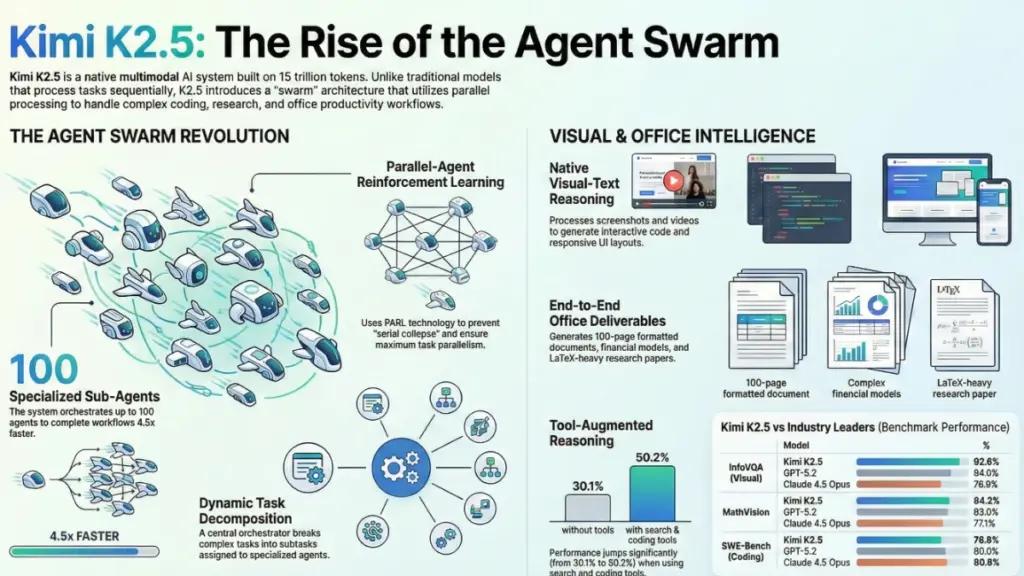
Kimi K2.5 changes this paradigm through what Moonshot calls Parallel-Agent Reinforcement Learning (PARL). Instead of a single agent trying to juggle everything, K2.5 acts as an orchestrator that can dynamically spawn up to 100 specialized sub-agents, each handling different aspects of a complex task simultaneously. Think of it like the difference between hiring one generalist to build your house sequentially versus bringing in a coordinated team of specialists who pour the foundation, frame the walls, and install electrical systems concurrently.
The technical implementation is fascinating. The orchestrator doesn’t just blindly create sub-agents; it uses a trainable system to decompose tasks into parallelizable subtasks, assigns them to dynamically instantiated sub-agents, and coordinates their execution. The training process uses something called “staged reward shaping” to prevent what they term “serial collapse”—a common failure mode where an AI defaults to single-agent execution even when parallel options exist. Essentially, they had to train the model to embrace parallelism by rewarding it for spawning multiple sub-agents early in training, then gradually shifting focus toward successful task completion.
What does this mean for your actual workflow? In my analysis of the benchmark data, Kimi K2.5 Agent Swarm reduced execution time by up to 4.5x compared to single-agent setups on complex tasks. For example, in a wide search scenario where the AI needed to identify top YouTube creators across 100 niche domains, the system created 100 parallel sub-agents—one for each domain—gathering 300 creator profiles and aggregating them into a structured spreadsheet. Doing this sequentially would have taken hours; the swarm approach handles it in minutes.
However, I need to be transparent about limitations here. The beta status means this isn’t production-ready for critical business processes yet. Additionally, while the “Critical Steps” metric they use (focusing on the longest path through parallel tasks) sounds good in theory, real-world latency depends heavily on API rate limits and the slowest sub-agent in your swarm. If one of those 100 agents gets stuck on a complex domain, you’re still waiting.
Coding with Vision: When AI Actually Understands What It Sees
If you’re a developer or work with development teams, the “Coding with Vision” capabilities of Kimi K2.5 deserve your attention. I’ve reviewed dozens of “image-to-code” tools over the years, and most fall into the trap of pattern matching—they see a button, they generate button code, but they miss the context, the interactions, and the aesthetic nuances that make frontend development actually work.
Kimi K2.5 takes a different approach through what Moonshot calls “massive-scale vision-text joint pre-training.” The claim is that at sufficient scale, the trade-off between vision and text capabilities disappears—they improve in unison. In practical testing scenarios, this manifests as the ability to take a screenshot of a website or even a video of an interface and reconstruct functional, interactive code that captures not just the layout but the animations, scroll-triggered effects, and responsive behaviors.
Here’s a concrete example that impressed me: the system can take a video of a complex website with parallax scrolling, hover effects, and dynamic content loading, then generate the HTML, CSS, and JavaScript necessary to recreate that experience. This isn’t just static pixel-matching; it’s understanding the temporal nature of the interface (how things move and change over time) and translating that into code logic.
The visual debugging capabilities are equally intriguing. Instead of pasting error messages into a chat window, you can screenshot your IDE with the error highlighted, and K2.5 can reason over both the visual context (where the error appears in your file structure) and the text content to suggest fixes. For frontend developers, this means showing the AI a rendering bug visually and getting targeted fixes rather than trying to describe alignment issues in text.
Kimi Code, the dedicated terminal tool, extends this by supporting images and videos as direct inputs alongside your codebase. It can automatically discover and migrate existing skills and MCPs (Model Context Protocols) into your working environment, which suggests Moonshot is thinking seriously about developer workflow integration rather than just providing a chat interface.
But let’s be realistic about limitations. While the benchmark numbers look strong—particularly on SWE-Bench Verified where it scored 76.8% compared to GPT-5.2’s 80.0% and Claude Opus 4.5’s 80.9%—these are controlled test environments. In my experience, real-world software engineering involves messy legacy code, undocumented dependencies, and business logic that doesn’t translate well to benchmark tasks. The visual capabilities are impressive for greenfield projects and UI prototyping, but I’d hesitate to rely on any AI, including K2.5, for deep refactoring of critical production systems without human oversight.
Office Productivity: From Chat to Deliverables
One area where I’ve seen businesses struggle with AI adoption is the “last mile” problem—getting from a conversation with an AI to an actual deliverable like a formatted Word document, a functional Excel model, or a presentation-ready slide deck. Most AI tools excel at generating text but falter when you need structured outputs with proper formatting, citations, or complex data visualizations.
Kimi K2.5 addresses this through what they call “end-to-end office productivity.” The system can handle high-density, large-scale document work, reasoning over extensive inputs and coordinating multi-step tool use to generate expert-level documents, spreadsheets, PDFs, and slide decks directly through conversation. The benchmark data here is compelling: on internal testing, K2.5 showed 59.3% improvement over K2 Thinking on the AI Office Benchmark and 24.3% improvement on the General Agent Benchmark.
What does this look like in practice? The examples provided include generating 10,000-word research papers, creating 100-page documents with proper formatting, constructing financial models with Pivot Tables in Excel, writing LaTeX equations in PDFs, and even adding annotations in Word documents. The system can also handle creative tasks like generating 100-shot storyboards within spreadsheets, complete with images.
For knowledge workers, this represents a potential shift from AI as a writing assistant to AI as a document automation specialist. Imagine feeding the system raw data from multiple sources and receiving a formatted financial report with pivot tables and visualizations, or providing research notes and getting back a properly structured academic paper with citations and LaTeX formatting for equations.
However, I need to temper expectations here. While the capability is impressive, the quality of these long-form outputs depends heavily on the quality of your inputs and the specificity of your instructions. In my experience with document automation tools, the “garbage in, garbage out” principle applies strongly. Additionally, while K2.5 can generate LaTeX and complex Excel formulas, you’ll still need domain expertise to verify the accuracy of financial models or technical documentation. The 59.3% improvement over previous versions is significant, but it also implies there’s still room for error—don’t blindly trust AI-generated financial projections for critical business decisions.
Benchmark Reality Check: How Kimi K2.5 Stacks Up Against the Competition
Let’s get into the numbers, because in my line of work, marketing claims mean nothing without verified performance data. Moonshot AI provided extensive benchmark comparisons pitting Kimi K2.5 against heavyweights like GPT-5.2 (xhigh reasoning), Claude 4.5 Opus (Extended Thinking), Gemini 3 Pro (High Thinking Level), and DeepSeek V3.2. The results paint an interesting picture of where this model excels and where it still lags.
In reasoning and knowledge tasks, Kimi K2.5 holds its own but isn’t dominating. On HLE-Full (Humanity’s Last Exam), it scored 30.1% without tools compared to GPT-5.2’s 34.5% and Gemini 3 Pro’s 37.5%. However, when equipped with tools (search, code interpreter, web browsing), K2.5 jumps to 50.2%, surpassing GPT-5.2’s 45.5% and Claude’s 43.2%. This suggests the model’s strength isn’t just raw reasoning—it’s the ability to effectively use tools to augment that reasoning.
On coding benchmarks, the results are mixed but promising. SWE-Bench Verified scores show K2.5 at 76.8%, slightly behind GPT-5.2 (80.0%) and Claude Opus 4.5 (80.9%), but ahead of DeepSeek V3.2 (73.1%). Where it gets interesting is the multilingual coding capabilities—K2.5 scored 73.0% on SWE-Bench Multilingual compared to Claude’s 77.5% and GPT-5.2’s 72.0%, showing competitive performance across languages.
The vision benchmarks are where Kimi K2.5 really shines. On MMMU-Pro (multimodal understanding), it scored 78.5%, just shy of GPT-5.2’s 79.5% but well ahead of Claude’s 74.0%. It dominates on MathVision (84.2% vs GPT-5.2’s 83.0% and Claude’s 77.1%) and InfoVQA (92.6% vs GPT-5.2’s 84.0% and Claude’s 76.9%). If your workflow involves analyzing charts, diagrams, or visual data, these numbers suggest K2.5 should be on your shortlist.
For agentic search tasks, the results are impressive. On BrowseComp, K2.5 scored 60.6% compared to Claude’s 37.0% and Gemini’s 37.8%. With context management, it hits 74.9%, and in Agent Swarm mode, it reaches 78.4%. Similarly, on WideSearch (item-f1), K2.5 scores 72.7% alone and 79.0% with Agent Swarm, significantly outperforming competitors.
But here’s my critical take: benchmarks are controlled environments. That 96.1% score on AIME 2025 is impressive, but most businesses aren’t asking their AI to solve competition math problems. They’re asking it to extract data from messy PDFs, maintain context across long documents, or generate code that integrates with legacy systems. The benchmarks suggest K2.5 is competitive, particularly in multimodal and agentic tasks, but don’t treat these numbers as guarantees for your specific use case.
The Practical Reality: Limitations, Pricing, and ROI Considerations
After nearly a decade of reviewing AI tools, I’ve learned that the gap between “technically impressive” and “practically valuable” can be vast. Kimi K2.5 packs remarkable capabilities, but let’s talk about the limitations and practical considerations you need to weigh before integrating it into your workflow.
First, the Agent Swarm feature—arguably the most revolutionary aspect—is currently in beta with limited availability. Free credits are only available to high-tier paid users, which means if you’re a small business or individual developer looking to experiment with 100-agent parallel processing, you may face access restrictions or significant costs. The infrastructure to support 1,500 coordinated tool calls across 100 sub-agents isn’t cheap, and Moonshot hasn’t published detailed pricing for swarm usage at scale yet. If you’re budgeting for AI automation, factor in potential premium pricing for parallel agent capabilities.
Second, while the model supports 256k context windows (which is substantial), the “Critical Steps” metric used to measure swarm efficiency assumes optimal parallelization. In reality, not all tasks parallelize perfectly. Research tasks with clear domain separations (like the 100 niche YouTube creators example) work brilliantly, but complex coding tasks with interdependent components may still require sequential reasoning. Don’t expect 4.5x speedup on every workflow—realistically, you’ll see 2-3x improvements on well-structured parallelizable tasks.
Third, the ecosystem maturity matters. GPT models have massive plugin ecosystems, Claude has Anthropic’s enterprise partnerships, and Gemini integrates deeply with Google’s workspace tools. Kimi K2.5 is newer to the global market, and while the Kimi Code IDE integration is promising, you’ll find fewer third-party integrations and community resources compared to more established players. If your workflow depends on specific plugins or integrations, verify compatibility before committing.
From an ROI perspective, Kimi K2.5 makes the most sense for:
- Development teams building frontend interfaces or handling visual debugging (the vision+coding capabilities offer genuine time savings)
- Research teams conducting wide-scale information gathering across multiple domains (the swarm approach here is legitimately cost-effective)
- Content creators and analysts generating long-form documents with complex formatting (the office productivity features reduce manual formatting time)
It makes less sense for:
- Simple chatbot replacements (you’re paying for capabilities you won’t use)
- Highly regulated industries requiring explainable AI (the swarm orchestration is complex and somewhat opaque)
- Teams without technical oversight (the power of the tool requires sophisticated prompt engineering to wield effectively)
Conclusion: Is Kimi K2.5 Worth Your Attention?
After analyzing the technical specifications, benchmark data, and real-world application potential, here’s what I’ve found: Kimi K2.5 represents a meaningful evolution in AI agent capabilities, particularly for knowledge workers tired of sequential bottlenecks. The Agent Swarm paradigm isn’t just marketing fluff—it’s a genuine architectural shift that could redefine how we approach complex, multi-domain tasks.
The key takeaways you should remember:
- Visual reasoning meets coding in a way that actually reduces the friction between design and development, potentially saving hours on frontend prototyping.
- Parallel agent processing delivers measurable speed improvements (up to 4.5x) on well-structured tasks, though beta access limitations mean most users can’t fully leverage this yet.
- Multimodal performance is competitive with or superior to GPT-5.2 and Claude Opus on vision-heavy tasks, making it ideal for document analysis and visual debugging.
- Real-world constraints like beta availability, ecosystem maturity, and pricing uncertainty mean you should approach adoption strategically rather than rushing to replace existing workflows.
If you’re currently hitting limits with single-agent AI systems—waiting too long for complex research tasks, struggling with visual-to-code workflows, or drowning in document formatting—Kimi K2.5 deserves a spot in your evaluation pipeline. Start with the standard K2.5 Agent mode to test the waters, then experiment with Agent Swarm as access expands.
My recommendation? Give the Kimi Code integration a trial run with a real frontend project or use the web interface for a complex document automation task you’ve been putting off. See if the vision capabilities actually save you time on your specific workflows. In the rapidly evolving AI landscape, Kimi K2.5 has earned its place in the conversation—not as a GPT-killer, but as a specialized tool that solves specific friction points in knowledge work better than generalist alternatives.
What’s your experience with AI agent workflows? Have you hit the sequential processing bottleneck that Kimi K2.5 aims to solve? I’d love to hear about your use cases in the comments below.
FAQ
Q: Is Kimi K2.5 completely open source?
A: While Moonshot AI describes Kimi K2.5 as “the most powerful open-source model to date,” the Agent Swarm capabilities and some advanced features are currently only available through their API and beta programs. The base model weights may be available, but the full agentic infrastructure requires their platform.
Q: How does Kimi K2.5 compare to ChatGPT for coding tasks?
A: For general coding, GPT-5.2 slightly edges out K2.5 on some benchmarks (80.0% vs 76.8% on SWE-Bench Verified). However, for tasks involving visual elements—like converting website screenshots to code or debugging visual rendering issues—K2.5’s native multimodal design often provides better results.
Q: Can I use Kimi K2.5 for free?
A: Basic access is available through Kimi.com and the mobile app, but Agent Swarm features require high-tier paid status during the beta period. API usage follows standard token-based pricing, with swarm capabilities likely incurring premium costs due to the computational resources required.
Q: What makes Agent Swarm different from just running multiple AI instances?
A: Unlike manually running separate AI instances, K2.5’s Agent Swarm uses a trained orchestrator that dynamically decomposes tasks, assigns sub-agents based on the specific requirements, and coordinates their parallel execution. The sub-agents can share context and results through the orchestrator, creating a coordinated workflow rather than isolated parallel processes.