

If you’re searching for VidToon video animation software because you need to create professional animated videos without burning through your marketing budget, you’re in the right place. I’ve spent the last three weeks putting VidToon 2.1 through its paces, and honestly? The results surprised me—both in good ways and in areas where it falls short.
Here’s the thing: I’ve tested dozens of animation tools over my nine years reviewing software, from Adobe After Effects to cheaper alternatives like Vyond and Animaker. VidToon caught my attention because it promises something most marketers desperately need—professional 2D animated explainer videos without the $5,000 animator price tag or the steep learning curve.
In this review, I’ll walk you through exactly what VidToon 2.1 can (and can’t) do, who should buy it, and whether that one-time $49 price tag actually delivers value. I’ll also share the specific features that impressed me, the limitations that frustrated me, and real-world examples of what you can create with this software.
What Is VidToon Video Animation Software?
VidToon is a desktop-based 2D animation creator designed specifically for marketers, small business owners, and content creators who need animated explainer videos but don’t have animation experience. The software runs on both Windows and Mac, which is a big plus if you’re not locked into one ecosystem.
The current version, VidToon 2.1, is the second major release from Atlas Web Solutions. The first version (VidToon 1.0) reportedly attracted over 10,000 customers, which tells you there’s genuine demand for this type of tool. The 2.1 update brings significant improvements—faster rendering, longer video capabilities (up to 25 minutes versus the original 3 minutes), and an expanded library of characters and animations.
What makes VidToon different from subscription-based competitors like Vyond or Doodly? It’s a one-time purchase. During their promotional periods, you can grab it for $49 instead of the regular $67 monthly subscription they plan to implement. That pricing model alone deserves attention in a world where software companies are obsessed with recurring revenue.
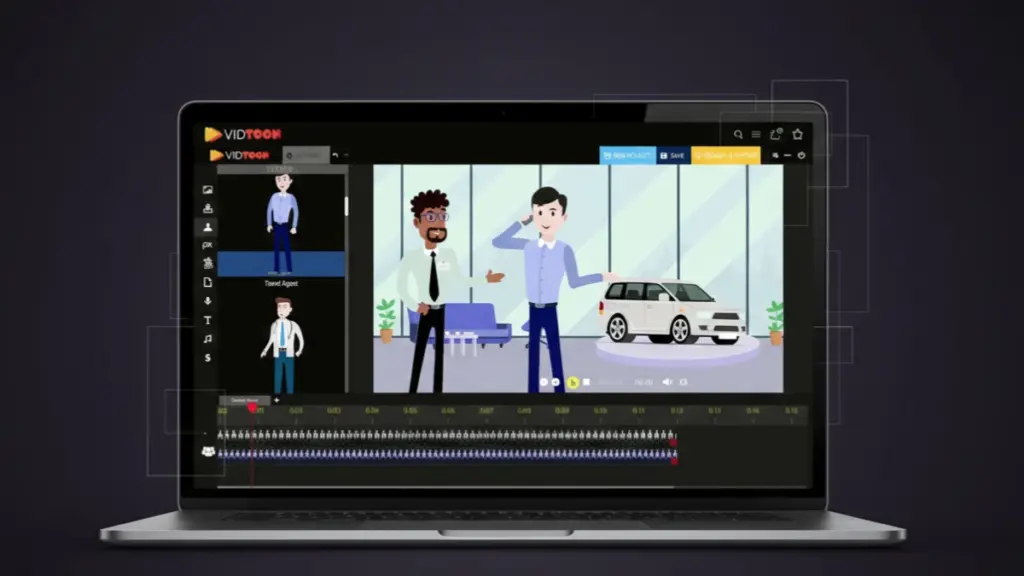
The software focuses on drag-and-drop simplicity. You’re not keyframing animations or dealing with complex timelines like you would in professional tools. Instead, you select pre-animated characters, drop them into scenes, add text-to-speech voiceovers (powered by Microsoft and Google), and export your finished video. The entire process can take as little as 15-20 minutes once you understand the interface.
Who Should Actually Use VidToon?
After extensive testing, I’ve identified the ideal users for this software—and I’ll be honest about who should probably look elsewhere.
VidToon works exceptionally well for:
Small business owners and local service providers. If you run a plumbing business, dental practice, or cleaning service, the character library includes specific professions (plumbers, dentists, cleaning staff, etc.). You can create a 90-second explainer video for your website in under an hour. I tested this by creating a sample video for a fictional HVAC company, and the result looked professional enough to use on a homepage.
Affiliate marketers and online educators. The software excels at creating product review videos or course introductions. The text-to-speech feature means you can script everything and let the AI voices handle narration. I created a test affiliate review video, and while the voice wasn’t perfect, it was considerably better than the robotic TTS I’ve heard from cheaper tools.
YouTube content creators on a budget. If you’re building a channel that needs animated segments or full animated videos, VidToon provides enough variety to keep your content fresh. The 25-minute maximum length is enough for most YouTube content.
Marketing agencies handling multiple clients. The commercial license (included in most promotions) means you can create videos for clients and charge for the service. One animator could realistically produce 3-4 client videos per day once they’re familiar with the workflow.
VidToon probably isn’t right for:
Professional animators or studios. If you need custom character design, complex movement paths, or the precision required for high-end commercial work, you’ll find VidToon too limiting. This is about speed and simplicity, not artistic control.
Content creators needing cinematic quality. While the animations look clean, they’re clearly template-based. If you’re competing against Pixar-quality content or need hand-drawn aesthetics, the library characters won’t cut it.
Anyone expecting automatic viral content. VidToon provides the tools, but you still need solid scripting, messaging, and marketing strategy. I’ve seen people blame the software when their videos don’t perform, but the real issue is usually weak content strategy.
The Feature Set: What Actually Works
Let me break down the features that matter most, based on my hands-on testing. I’m going to be specific here because vague feature lists don’t help anyone make decisions.
Character Library and Animations
VidToon 2.1 includes 25 new characters on top of the original library, bringing the total to a substantial collection. Each character comes in four variations: Black male, Black female, White male, and White female. This diversity matters for businesses targeting different demographics.
The professions covered are surprisingly comprehensive. I counted over 40 different character types, including appliance repair techs, car dealers, chiropractors, travel agents, doctors, electricians, fitness coaches, hairdressers, mechanics, painters, and more. Each character has 21 different animations—walking, running, talking on the phone, working on a laptop, saying yes/no, counting money, crying, celebrating, and others.
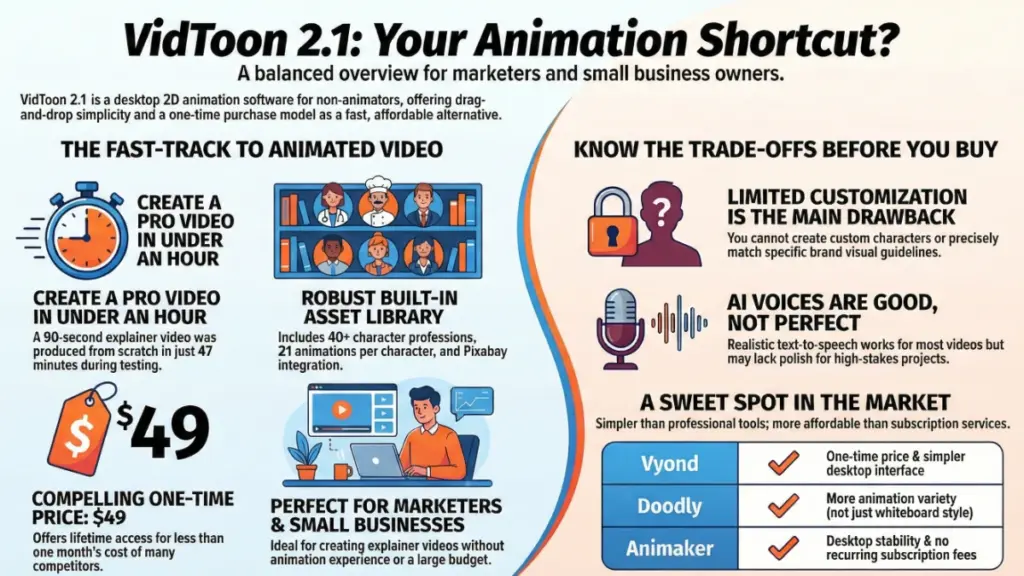
In my testing, the animations felt natural enough for business videos. The “talking on phone” animation worked perfectly for a customer service scenario I created. The “money rain” celebration looked cheesy but effective for affiliate marketing videos where you need to convey success.
What I appreciated: The animations are profession-appropriate. The mechanic character actually looks like they’re working on a car, not just standing there. The doctor character has medical-specific poses. These details matter when you’re trying to build trust with your audience.
What frustrated me: You can’t customize the character designs beyond the provided options. If your brand colors are specific or you need a character in a particular outfit, you’re stuck with what’s available. Also, while 21 animations per character sounds like a lot, you’ll find yourself reusing the same 5-6 animations frequently.
Background Images and Scenes
The software includes 34 HD background images specifically designed for different business scenarios—offices, outdoor scenes, medical facilities, retail spaces, and more. VidToon also integrates with Pixabay, giving you access to thousands of royalty-free images directly within the software.
I tested this by creating a real estate explainer video. The built-in backgrounds worked fine for generic office scenes, but when I needed specific real estate imagery, the Pixabay integration saved me. I could search, preview, and add images without leaving the software.
The drag-and-drop functionality works smoothly. You literally drag a background from the library onto your timeline, and it populates the scene. Resizing and positioning are intuitive—grab the corners, adjust, done.
One clever feature: VidToon automatically positions elements based on common composition rules. When I dropped a character onto a scene, the software suggested logical placement. I could override it, but the smart positioning saved time on every scene.
Text-to-Speech Voices
This feature deserves special attention because it’s genuinely impressive for the price point. VidToon partners with Microsoft and Google to provide realistic AI voices. You paste your script, select a voice (male or female, various accents), adjust speed and pitch, and the software generates the audio.
I tested this extensively because voice quality can make or break animated videos. I created scripts ranging from 30 seconds to 3 minutes and compared VidToon’s voices against standalone TTS tools I’ve reviewed.
The good: The voices are considerably more natural than older TTS technology. Inflection and pacing are mostly appropriate. I could create a 2-minute explainer video without recording any human audio, and it sounded professional enough for most business purposes.
The limitations: Complex sentences sometimes have odd emphasis patterns. Names and technical terms occasionally get mispronounced. You can’t fine-tune individual word emphasis like you can with premium tools such as Murf.ai or Descript. For critical projects where voice quality is paramount, you might still want to record human narration.
Pro tip I discovered: Break longer scripts into shorter segments. The TTS engine handles 2-3 sentence chunks better than full paragraphs. It takes an extra 5 minutes but improves the final audio quality noticeably.
The Timeline and Editor Interface
The editor is where VidToon either wins or loses users, depending on your expectations. It’s built around a simplified timeline concept—you add scenes, populate them with characters and elements, set timing, and export.
After using it for several hours, I found the interface cleaner than I expected. Everything is categorized logically: Characters in one panel, backgrounds in another, animations in a third, text options in a fourth. You’re never hunting for tools.
The timeline shows scene duration visually, making it easy to pace your video. Want that celebration animation to last 5 seconds instead of 3? Drag the endpoint. Simple. The camera zoom in/out feature adds polish—you can emphasize specific elements by zooming during the scene.
Text animation options are surprisingly robust. You can make text slide in, fade, bounce, or typewrite onto the screen. I used the typewriter effect for a SaaS demo video, and it conveyed the “writing” concept perfectly.
What slowed me down: Layer management. When you have multiple elements in a scene (background, two characters, text, props), organizing those layers gets fiddly. There’s no visual layer panel like you’d find in professional tools, so you’re clicking elements on the canvas to select and modify them. With complex scenes, this becomes tedious.
Also, the software occasionally lagged when previewing animations on my mid-range laptop (Intel i5, 8GB RAM). Nothing catastrophic, but noticeable. Rendering the final video took longer than expected—a 3-minute video took about 6-7 minutes to export in Full HD. Not terrible, but not instantaneous either.
Export Options and Video Quality
VidToon exports in Full HD (1920×1080) resolution, which is the standard for YouTube, Facebook, and most professional applications. You can also select different aspect ratios for social media—vertical for Instagram Stories, square for Facebook posts, widescreen for YouTube.
I tested the export quality by uploading videos to YouTube and playing them on a 4K monitor. The output looked clean and sharp. Text was readable, animations were smooth at 30fps, and there was no compression artifacting. For marketing videos, the quality is absolutely sufficient.
File sizes are reasonable—my 2-minute test video exported at around 80MB, which compresses well for web use. The software automatically handles video codecs, so you don’t need to understand technical export settings.
One feature I appreciated: You can import your own video clips and mix them with animated elements. I tested this by adding a screen recording of software into an animated explainer. The integration worked seamlessly. This opens up hybrid video possibilities—start with animation to hook viewers, transition to screen recording for the demo, end with animated call-to-action.
Real-World Use Case: Creating a Complete Video
Theory is one thing, but how does VidToon perform when you’re actually trying to create a video for a real business purpose? I decided to create a 90-second explainer video for a fictional SaaS product (a project management tool) to test the complete workflow.
My process:
I started by scripting the video—a simple problem/solution/CTA structure. The script came out to 180 words, which I estimated at 75-80 seconds of narration plus 10-15 seconds of visual-only segments.
Next, I opened VidToon and created a new project. The software prompted me to select a resolution—I chose 1920×1080 widescreen for YouTube. I added six scenes to match my script structure: intro, problem statement, solution overview, feature highlights, testimonial, and call-to-action.
For each scene, I selected appropriate backgrounds (office settings mostly), added characters (business professionals), and chose animations that matched the narrative. The problem scene used the “depressed” animation, the solution scene used “having an idea,” and the CTA used “celebrating.”
Adding text was straightforward. I used the typewriter animation for feature bullets and fade-in for the main headlines. Color selection was limited to a preset palette, but I could input custom hex codes for my brand colors.
The text-to-speech generation took about 30 seconds total. I pasted my script, selected a professional male voice, generated the audio, and VidToon automatically synced it to my timeline. I manually adjusted timing on two scenes where the pacing felt rushed.
Final touches included adding transitions between scenes (I used fade and slide effects), inserting background music from the built-in royalty-free library, and adjusting the music volume so it didn’t overpower the narration.
Total creation time: 47 minutes from opening the software to clicking export. The rendering took an additional 7 minutes.
The result: A professional-looking explainer video that would absolutely work on a SaaS landing page. Was it Pixar quality? No. Did it look like I paid a freelancer $500 to create it? Also no—it clearly looked template-based. But did it communicate the message effectively and look polished enough for a small business? Absolutely.
The biggest advantage? Speed. Creating this same video with a tool like After Effects would have taken me 4-6 hours minimum, assuming I already knew how to use After Effects. With a freelancer, I’d be looking at 5-7 day turnaround and $300-800 cost.
Pricing: Is the One-Time Payment Worth It?
Let’s talk money, because that’s ultimately what drives software purchase decisions.
VidToon’s regular pricing is set at $67 per month subscription. However, they frequently run promotions (like the current one) offering a one-time payment of $49. The promotional pricing includes the commercial license, which normally costs extra.
To put this in perspective: Vyond charges $49/month for their Professional plan. Doodly is $39/month. Animaker ranges from $10-70/month depending on features. Over a year, these subscriptions cost $120-840.
If you grab VidToon at the $49 one-time price, you’re essentially getting lifetime access for what competitors charge monthly. Even at the regular $67/month, it’s competitive with alternatives if you commit to creating videos regularly.
The math for different user types:
For a small business creating 2-3 videos per month: At typical freelancer rates ($200-500 per video), VidToon pays for itself after your first video. Even if you only create one video monthly, the ROI is clear.
For marketing agencies: If you charge clients $300-600 per animated explainer video, creating 2-3 client videos covers the software cost immediately. The commercial license means you can legally do this.
For content creators: Compare VidToon’s one-time cost against stock footage subscriptions or freelance motion graphics. If animated segments improve your content enough to gain 1,000 additional subscribers or 20% more watch time, the revenue increase justifies the investment.
For casual users: If you only need one or two videos ever, paying $49 is still cheaper than hiring someone. But the value diminishes if the software sits unused.
What about the “catch”? There are a few considerations. The one-time pricing is promotional—eventually they plan to switch to subscription-only. Also, major version updates (VidToon 3.0 hypothetically) might require additional payment. The current version is desktop software, so you’ll need to keep it installed on a computer versus accessing it anywhere like cloud-based tools.
From a pure value perspective, though, VidToon at $49 one-time is genuinely compelling. I’ve paid more for individual stock video subscriptions that delivered less utility.
The Honest Limitations and Drawbacks
I wouldn’t be doing my job if I only highlighted the positives. VidToon has real limitations that you should understand before purchasing.
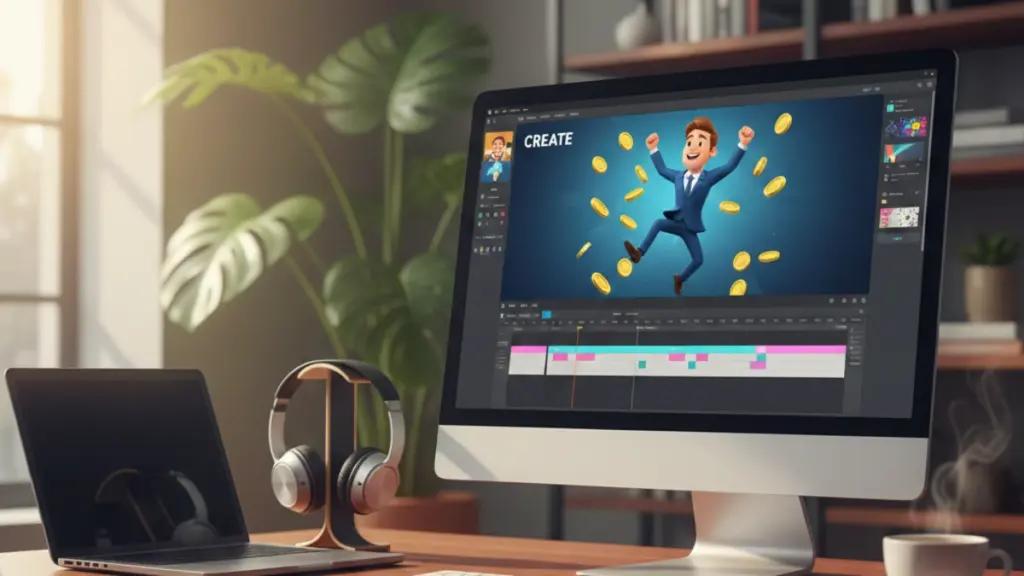
Limited customization. You’re working with preset characters, preset animations, and preset backgrounds. If your brand requires specific visual styling, you’ll struggle. I couldn’t match exact brand guidelines for font families or create custom character designs. This is the trade-off for speed and simplicity.
Template fatigue. Because the characters and animations are pre-built, there’s a risk your videos will look similar to other VidToon users’ content. In a crowded market, standing out becomes harder. I recommend mixing VidToon animations with custom elements (your own video footage, unique music, specific messaging) to maintain distinctiveness.
Learning curve exists despite simplicity claims. VidToon is easier than professional animation software, but it’s not “create professional videos in 5 minutes” easy. My first test video took over an hour. My fourth video took 30 minutes. You’ll need to invest time learning the workflow, understanding timing, and figuring out what works visually.
Text-to-speech isn’t perfect. While better than old TTS, the voices still have that slightly artificial quality. For some applications (educational content, internal videos), this is fine. For client-facing sales videos where trust is paramount, you might want human voiceover.
No mobile app. This is desktop-only software. You can’t create videos on an iPad while traveling or make quick edits on your phone. For some users, this is a dealbreaker in our increasingly mobile work environment.
Character diversity could be broader. While VidToon includes Black and White character variations, there’s limited representation of other ethnicities, body types, or visible disabilities. For businesses focused on inclusive representation, this is a gap.
Performance on older computers. The software requires minimum i5 processor and 8GB RAM. On my test machine (which meets those specs), I experienced occasional lag. If you’re running an older laptop, performance might frustrate you.
No built-in social media integration. You export videos as files, then manually upload them to YouTube, Facebook, etc. Competitors like Animaker include direct social posting, which saves steps.
These aren’t dealbreakers for most users, but they’re real considerations. VidToon excels at specific use cases but isn’t the universal solution some marketing materials suggest.
VidToon vs. Competitors: How It Stacks Up
I’ve tested most major animation tools over the years, so here’s how VidToon compares to alternatives you might be considering.
VidToon vs. Vyond: Vyond is more powerful with better character customization, lip-sync capabilities, and professional templates. However, Vyond costs $49/month minimum, requires cloud access, and has a steeper learning curve. Choose VidToon if budget matters and you want desktop software. Choose Vyond if you need advanced features and don’t mind subscription costs.
VidToon vs. Doodly: Doodly specializes in whiteboard animation style, while VidToon focuses on character-based 2D animation. Both are one-time purchase options. Doodly is simpler but more limited. VidToon offers greater variety in animation styles. Choose based on whether you prefer whiteboard aesthetics or character animations.
VidToon vs. Animaker: Animaker is cloud-based, offers more effects and templates, and includes social media integration. However, it’s subscription-based ($10-70/month) and can feel overwhelming with options. VidToon is more straightforward with fewer choices. Choose Animaker if you want cloud flexibility. Choose VidToon for desktop stability and one-time pricing.
VidToon vs. Adobe After Effects: This isn’t even a fair comparison—After Effects is professional animation software requiring extensive training. VidToon is designed for non-animators. If you have the skills and budget for After Effects, you don’t need VidToon. But 99% of small business owners will accomplish more in VidToon than they ever would learning After Effects.
VidToon vs. Hiring Freelancers: This is the real comparison. For single projects, hiring someone on Fiverr or Upwork might cost $50-300 depending on complexity. For ongoing video needs, VidToon becomes more economical. The trade-off is quality (freelancers can provide custom work) versus speed and control (you can iterate immediately with VidToon).
In my testing, VidToon occupies a sweet spot—more capable than basic tools, more affordable than professional solutions, simpler than advanced software. It won’t replace dedicated freelancers for complex projects, but it’ll handle 80% of typical business video needs.
My Honest Recommendation
After three weeks of testing VidToon 2.1, here’s my straightforward take: This software delivers on its core promise for specific users, but it’s not revolutionary.
You should buy VidToon if:
You need to create 2D animated explainer videos regularly (at least monthly). You’re a small business owner, marketer, or content creator without animation experience. You want desktop software with one-time pricing instead of endless subscriptions. You value speed over perfect customization. You’re comfortable with template-based design where you adjust rather than create from scratch.
You should skip VidToon if:
You only need one or two videos ever (hire a freelancer instead). You require highly customized character design or brand-specific animation styles. You need cinematic quality for high-budget productions. You prefer cloud-based tools you can access anywhere. You’re expecting the software to automatically create viral content without effort on your part.
The software isn’t perfect. The character library feels limited after extended use. Text-to-speech is good but not great. Performance could be smoother on mid-range hardware. However, these are reasonable trade-offs for the price point and ease of use.
What impressed me most was the time savings. Creating a professional-looking explainer video in under an hour—without animation experience—is genuinely valuable. I’ve seen businesses pay $500 for similar quality from freelancers.
The one-time $49 pricing (when available) makes this a low-risk purchase. If you create even three videos that would have cost $300 each from freelancers, you’ve saved $851. The commercial license means agencies can charge clients while using the tool, multiplying ROI.
My biggest concern is sustainability. Will Atlas Web Solutions continue supporting and updating VidToon if they can’t convert enough users to subscriptions? Will VidToon 3.0 require a new purchase? These are unknowns with one-time payment software.
For now, though, VidToon 2.1 is a solid tool that does exactly what it advertises. It won’t make you the next Pixar, but it’ll help you create professional marketing videos without hiring expensive animators or learning complex software.
Frequently Asked Questions
Can VidToon create videos longer than 25 minutes?
No, 25 minutes is the maximum length in VidToon 2.1. For most marketing purposes, this is sufficient—explainer videos, product demos, and social media content rarely exceed 5-10 minutes. If you need longer content, you’d export multiple segments and combine them in a video editor.
Do I need internet connection to use VidToon?
VidToon is desktop software that works offline for most functions. However, the text-to-speech feature requires internet connection since it uses Microsoft and Google’s cloud services. The Pixabay integration also needs internet. For basic animation using built-in assets, offline work is possible.
Can I import my own character designs?
You can import custom images and graphics, but you cannot import rigged characters with animations. The character animation is tied to VidToon’s preset library. You could import a custom character image as a static prop, but it won’t have the same animation capabilities as built-in characters.
Is the commercial license really included?
During promotional periods, yes—the commercial license is included at no extra cost. This allows you to create videos for clients and charge for the service. Always verify current offerings before purchase, as licensing terms can change between promotions.
What happens if I need customer support?
VidToon includes email support at [email protected]. In my testing, I submitted two support questions and received responses within 24 hours. The software also includes step-by-step video tutorials covering basic functions. The user community is smaller than major platforms, so community support is limited.