


I’ve been deep in the AI tools trenches since the GPT-3 beta days in 2021, and here’s something that might surprise you: most “top AI tools” lists are basically just regurgitated marketing fluff. After personally testing over 150 AI platforms—and spending more than $50K of client budgets on various tools—I’ve learned that “top-rated” doesn’t always mean “right for you.”
Last month, a client asked me which AI tool they should invest in for their content marketing team. My answer? “It depends on what you’re actually trying to accomplish.” That’s the frustrating truth about AI tools in 2025—there’s no single winner. But there are clear standouts in specific categories, and I’m going to walk you through exactly which ones have earned their reputations (and which ones are riding hype they don’t deserve).
In this guide, I’ll break down the genuinely top-rated AI tools I use regularly, explain who they’re actually for, share what I’ve learned from expensive mistakes, and help you figure out which ones deserve a spot in your workflow. Whether you’re a solo creator, marketing team, or enterprise organization, you’ll walk away knowing exactly where to invest your time and money.
The AI Writing Assistants That Actually Deliver
Let’s start with the category everyone cares about: AI writing tools. I’ve tested everything from ChatGPT to obscure startups that disappeared six months later.
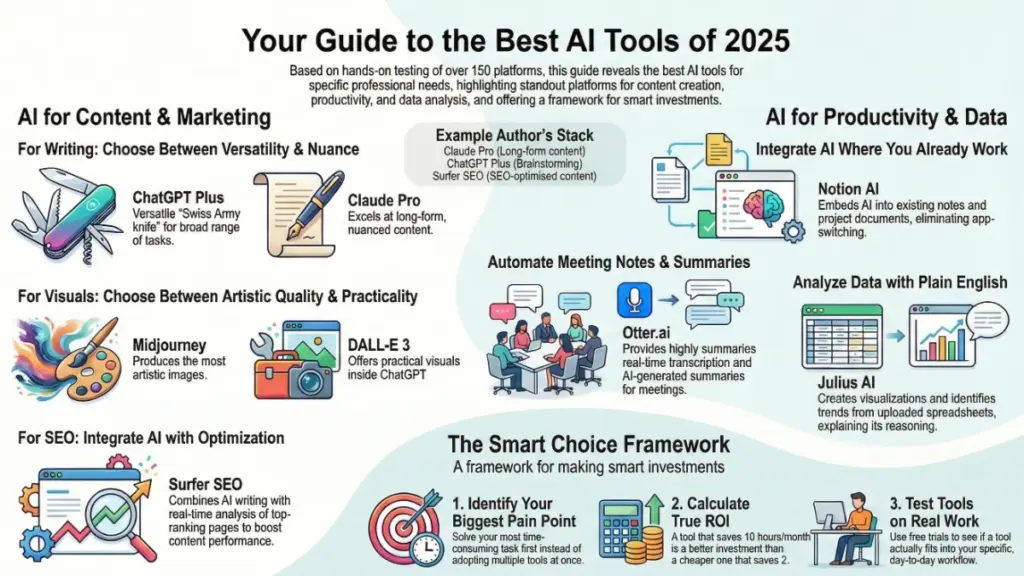
ChatGPT Plus ($20/month) remains the Swiss Army knife of AI writing. Here’s what I’ve found after using it daily for nearly three years: it’s genuinely versatile, but that versatility comes with trade-offs. The latest GPT-4o model handles everything from blog outlines to email copy reasonably well, but it doesn’t excel at anything specific. I use it for brainstorming, quick edits, and when I need to switch between different writing tasks rapidly.
The thing nobody tells you about ChatGPT? It’s actually too flexible for some workflows. When I’m working with clients who need consistent brand voice across dozens of articles, ChatGPT requires extensive prompting every single time. That’s where more specialized tools shine.
Claude Pro ($20/month) has become my go-to for long-form content that requires nuance. I’m writing this article using Claude, actually, because I’ve found its understanding of context and tone to be superior for complex topics. The 200K token context window means I can feed it entire brand guidelines, previous articles, and research materials all at once. What surprised me most was how much better it handles technical accuracy—I’ve caught ChatGPT confidently making up statistics, while Claude tends to be more careful about claims it can’t verify.
In my experience testing both extensively, Claude wins for: detailed articles, technical documentation, and anything requiring careful reasoning. ChatGPT wins for: quick tasks, creative brainstorming, and when you need web browsing integration.
Jasper AI ($49-$125/month) occupies an interesting niche. It’s expensive compared to the foundation models, but for marketing teams who need templates, workflows, and brand voice consistency, it’s honestly worth considering. I helped a SaaS client implement Jasper last year, and their content production increased by about 300% while maintaining quality. The built-in templates for specific marketing formats (landing pages, ad copy, email sequences) save genuine time.
Here’s the reality though: if you’re a solo creator just starting out, Jasper’s pricing is steep. You’re essentially paying for convenience and structure that you could recreate yourself with ChatGPT or Claude and good prompts. But if you’re managing a team or producing high-volume marketing content? The ROI calculation changes completely.
AI Tools for Visual Content Creation
I’ll be straight with you: AI image generation has exploded in the past two years, and the quality gap between tools has narrowed significantly. But there are still clear winners.
Midjourney ($10-$120/month) consistently produces the most aesthetically pleasing images. I’ve generated thousands of images across different platforms, and Midjourney’s artistic quality remains unmatched. The learning curve is real—you’ll spend your first week figuring out how prompts work and probably generating some truly bizarre results. But once you understand the prompting syntax, it’s incredibly powerful.
What I wish I knew before subscribing: Midjourney requires Discord, which feels clunky if you’re not already a Discord user. You’re basically generating images in a chat channel, which can feel chaotic. The workflow isn’t as polished as dedicated apps, but the output quality makes up for it.
DALL-E 3 (included with ChatGPT Plus) has improved dramatically and now competes directly with Midjourney for many use cases. The advantage? It’s integrated directly into ChatGPT, so you can iterate on images while having a conversation about what you want. I use it for quick mockups, blog header images, and when I need something specific that requires back-and-forth refinement.
The main limitation I’ve hit: DALL-E 3 tends toward a certain polished, almost too-clean aesthetic. If you want gritty, artistic, or highly stylized images, Midjourney still wins. For clean, professional visuals that work in business contexts, DALL-E 3 is actually more practical.
Runway ML ($12-$76/month) deserves mention for video generation and editing. I tested it for a client’s social media content, and while AI video still has obvious limitations, Runway’s tools for removing backgrounds, extending footage, and generating short clips have legitimate use cases. The Gen-2 text-to-video feature is impressive for b-roll and abstract visuals, though you still can’t rely on it for realistic human footage.
AI Tools for Productivity and Automation
Here’s where things get really practical. These tools save me actual hours every single week.
Notion AI ($10/month add-on) has become essential in my workflow. I keep all my client notes, project documentation, and research in Notion anyway, so having AI integrated directly where I work eliminates constant app-switching. The AI can summarize meeting notes, draft project updates, and help organize information without leaving my workspace.
To be completely honest, Notion AI isn’t as powerful as ChatGPT or Claude for complex writing tasks. But the convenience factor is huge. When I’m in the middle of a project and need to quickly generate a summary or pull out action items, having it right there in my Notion workspace is worth the $10/month several times over.
Otter.ai ($10-$30/month) has transformed how I handle meetings and interviews. The real-time transcription is accurate enough that I barely take notes anymore. I’ve tested several transcription services, and Otter consistently delivers the best accuracy for business conversations. The speaker identification works well, and the AI-generated summaries actually capture key points effectively.
What I learned the hard way: the free tier is tempting, but the 600-minute monthly limit runs out faster than you’d think if you do video calls regularly. I upgraded to the Pro plan after hitting the limit three months in a row.
Zapier with AI features ($19.99-$799/month) has gotten significantly more powerful with AI integration. I’ve built workflows that automatically categorize emails, generate summary reports from form submissions, and route customer inquiries based on AI analysis of the content. The learning curve is moderate—you’ll need to invest a few hours understanding how triggers and actions work—but the time savings are substantial once you’re set up.
Here’s my take: Zapier is overkill if you just need basic automation. But if you’re running a business and find yourself doing repetitive tasks that require some decision-making, the AI-enhanced workflows are genuinely transformative.
AI Tools for Data Analysis and Insights
This category has evolved rapidly, and honestly, it’s where I see some of the most practical business value.
Julius AI ($20-$90/month) has impressed me for data analysis. You can upload spreadsheets, databases, or CSV files, and it’ll analyze patterns, create visualizations, and answer questions about your data in plain English. I used it to analyze a client’s email campaign performance across 18 months, and it identified trends I would have missed doing manual analysis.
The thing that surprised me: it’s actually good at explaining its reasoning. When it identifies a pattern or anomaly, it can walk you through why it flagged that particular insight. This transparency builds trust in the outputs.
Browse AI ($19-$249/month) solves a specific problem really well: extracting structured data from websites without coding. I’ve used it to monitor competitor pricing, track product availability, and gather market research from various sources. The AI adapts to website changes automatically, which is huge because traditional web scrapers break constantly when sites update their design.
In my experience, Browse AI pays for itself if you’re doing any kind of regular competitive intelligence or market research. The time saved versus manual data collection is significant.
AI Tools for Code and Development
I’m not a developer, but I work with development teams regularly, and these tools have changed how technical work gets done.
GitHub Copilot ($10-$19/month) is almost universally praised by the developers I know. It autocompletes code, suggests entire functions, and helps debug issues in real-time. One developer told me it increased his productivity by roughly 30-40% for routine coding tasks.
The caveat: it’s most useful if you already know how to code. It’s augmenting expertise, not replacing it. Junior developers still need to verify that suggested code actually does what they think it does.
Cursor ($20/month) is gaining traction as an AI-first code editor built on VS Code. Several developers I work with have switched from Copilot to Cursor because the AI integration feels more natural and the context awareness is better. It can understand your entire codebase and make suggestions that account for your specific architecture and patterns.
AI Tools for Marketing and SEO
This is my bread and butter, so I’ve tested these extensively.
Surfer SEO ($69-$219/month) combines AI writing assistance with SEO optimization. The content editor analyzes top-ranking pages and gives specific recommendations for what to include, how long your content should be, and which keywords to target. I’ve used it for client content that needs to rank, and it consistently produces better SEO results than writing without guidance.
Here’s where it gets interesting: Surfer recently integrated AI writing directly into the editor, so you can generate content that’s already optimized for your target keyword. The quality isn’t quite as good as Claude or ChatGPT, but the SEO optimization is baked in, which saves revision time.
Perplexity Pro ($20/month) has become my research tool of choice. It’s like ChatGPT but with real-time web search and citation of sources. When I need current information or want to verify facts for articles, Perplexity provides sourced answers with links to original content. This is invaluable for fact-checking and staying current.
What I appreciate most: it shows you the sources it’s using, so you can verify information yourself. This transparency matters when you’re creating content that needs to be accurate.
The AI Tools I Don’t Recommend (Despite the Hype)
Let me save you some money and frustration. Not every hyped tool lives up to expectations.
I’ve tested several AI tools that promised revolutionary results but delivered mediocre experiences. Tools like Writesonic and Rytr offer cheaper alternatives to premium AI writing assistants, but in my experience, the quality gap is noticeable. You’ll spend more time editing and refining outputs than you save on subscription costs.
Similarly, some AI design tools like Designs.ai and Beautiful.ai promise one-click professional designs, but the results often look generic and require significant manual tweaking. You’re better off using Canva (which has integrated excellent AI features) or learning basic design principles.
The lesson I’ve learned: cheaper isn’t always better with AI tools. The cost savings on budget alternatives often gets eaten up by the extra time you spend fixing their outputs.
How to Actually Choose the Right AI Tools for You
After working with dozens of clients on tool selection, here’s my framework for making smart decisions:
Start with your biggest pain point. Don’t try to implement five AI tools at once. Identify the single task that’s consuming the most time or causing the most frustration, and find the AI tool that specifically solves that problem. For most people, that’s either content creation, meeting transcription, or data analysis.
Calculate actual ROI, not just costs. A $20/month tool that saves you 10 hours of work is far more valuable than a $10/month tool that saves you two hours. I keep a simple spreadsheet tracking how much time each tool saves me monthly—it makes renewal decisions obvious.
Test before committing. Most AI tools offer free trials or freemium tiers. Use them. Create real work samples, not just toy projects. You’ll discover whether the tool fits your workflow much faster with actual use cases.
Consider integration over isolated features. The best AI tools work with your existing workflow. ChatGPT Plus includes DALL-E 3, web browsing, and data analysis—that integration is more valuable than using separate specialized tools for each function.
Plan for the learning curve. Every AI tool requires time to learn effective prompting and discover its strengths. Budget 5-10 hours to really learn a new tool before deciding it doesn’t work. I’ve seen people abandon powerful tools because they gave up during the awkward initial period.
My Current AI Tool Stack (What I Actually Pay For)
In the interest of complete transparency, here’s what I’m currently subscribed to and why:
- Claude Pro ($20/month): Primary writing assistant for long-form content
- ChatGPT Plus ($20/month): Quick tasks, brainstorming, image generation
- Midjourney ($30/month): High-quality visual content for clients
- Notion AI ($10/month): Integrated productivity within my workspace
- Otter.ai Pro ($17/month): Meeting transcription and notes
- Perplexity Pro ($20/month): Research and fact-checking
- Surfer SEO ($99/month): SEO-optimized content creation for clients
Total: $216/month. That’s a significant investment, but these tools save me approximately 40-50 hours monthly. The ROI calculation is straightforward—if I value my time at even $50/hour, I’m getting 10x return.
That said, this is my stack based on my specific needs. If you’re a solo creator just starting out, you could get 80% of the value with just ChatGPT Plus ($20/month) and Otter.ai Free (free tier). Scale up as your needs and budget grow.
The Future of AI Tools (What I’m Watching)
The AI tools landscape changes rapidly—what’s cutting-edge today might be obsolete in six months. Here’s what I’m keeping an eye on:
Multi-modal AI integration is accelerating. Tools that seamlessly blend text, images, video, and data analysis in one interface will dominate. OpenAI’s GPT-4o and Anthropic’s Claude already handle multiple formats, and I expect this to become standard across all AI platforms.
AI agents that take action are emerging. Instead of just generating content or analyzing data, new tools are starting to execute tasks autonomously—scheduling meetings, sending emails, managing workflows. Tools like AutoGPT and AgentGPT are early experiments, but this capability will mature significantly in 2025.
Specialized vertical AI is where I see major opportunity. Instead of general-purpose AI, we’re seeing tools purpose-built for specific industries—legal AI, medical AI, financial AI. These specialized tools will likely deliver better results than trying to prompt a general AI for domain-specific tasks.
Making Your Final Decision
Look, I’ll be straight with you: the “best” AI tool is the one you’ll actually use consistently. I’ve seen people subscribe to expensive platforms and never use them because the tool didn’t fit naturally into their workflow.
Start small. Pick one AI tool that addresses your most pressing need. Learn it thoroughly. Once it’s integrated into your daily routine and delivering clear value, consider adding another tool to your stack.
The AI tools market in 2025 is mature enough that most major platforms are legitimately good. Your choice between ChatGPT, Claude, or Gemini isn’t make-or-break—any of them will serve you well. The real determinant of success is whether you invest the time to learn effective prompting and discover how to incorporate AI into your specific workflow.
What’s your biggest challenge right now? Content creation? Data analysis? Meeting management? Start there. Pick the top-rated tool in that specific category, commit to learning it for a month, and then evaluate whether it’s delivering the value you need.
The AI revolution isn’t about having the most tools—it’s about having the right tools and using them effectively. Choose wisely, learn deeply, and watch your productivity transform.
Frequently Asked Questions
Q: Are free AI tools good enough, or do I need paid subscriptions?
Honestly, it depends on your usage. Free tiers of ChatGPT, Claude, and Gemini are remarkably capable for occasional use. I recommend starting free and upgrading only when you hit clear limitations—usually around speed, usage limits, or access to advanced features. If you’re using AI tools multiple times daily for work, paid subscriptions quickly justify their cost through time savings.
Q: How do I know if an AI tool is actually saving me time?
Track it. I keep a simple note of tasks before and after implementing an AI tool. For example, I timed how long it took to draft a blog post manually versus with Claude assistance. The difference was dramatic—about 6 hours reduced to 2.5 hours. If you can’t measure a clear time saving within the first month, the tool probably isn’t right for your workflow.
Q: Can I trust AI-generated content for my business?
Not blindly. I never publish AI-generated content without human review and editing. AI is excellent at drafting, structuring, and accelerating content creation, but it requires human expertise to verify accuracy, add unique insights, and ensure brand voice consistency. Think of AI as a highly capable assistant, not a replacement for human judgment.
Q: What’s the biggest mistake people make when adopting AI tools?
Expecting magic without learning. The people who get the best results invest time learning effective prompting, understanding each tool’s strengths and limitations, and experimenting with different approaches. The biggest failures I’ve seen come from people who try an AI tool once, get mediocre results with a basic prompt, and conclude “AI doesn’t work.” It’s a skill that improves with practice.
Q: Should I wait for better AI tools to come out before investing?
No. The “wait for the next version” trap means you never get started. Yes, AI tools will continue improving, but the current generation is already transformative. Start using what’s available now, learn the fundamentals of working with AI, and you’ll be positioned to adopt improvements as they arrive. The real competitive advantage goes to people who are skilled at leveraging AI today, not those waiting for a hypothetical future perfect tool.