


I’ve been working with machine learning software since 2021, back when getting access to GPT-3 felt like winning the lottery. Fast forward to today, and I’m regularly helping businesses navigate what’s become an absolutely overwhelming landscape of ML tools. Here’s what nobody tells you upfront: the “best” machine learning software isn’t about which one has the most impressive demo or the biggest AI model. It’s about finding the tool that actually fits how you work and what you’re trying to accomplish.
In this guide, I’m going to walk you through everything I’ve learned from testing over 150+ tools and implementing ML solutions for everyone from solo creators to Fortune 500 companies. We’ll cover what machine learning software actually does, how to choose the right platform for your needs, and—most importantly—how to avoid the expensive mistakes I made early on (we’re talking thousands of dollars in wasted subscriptions). Whether you’re just getting started with ML or looking to upgrade your current stack, I’ll give you the straight talk you need to make a smart decision.
What Machine Learning Software Actually Does (Beyond the Hype)
Let me cut through the marketing speak for a second. Machine learning software is essentially a platform that helps you build, train, and deploy models that can learn from data and make predictions or decisions without being explicitly programmed for every scenario. Think of it like teaching a really smart assistant to recognize patterns and make decisions based on those patterns.
In my experience working with clients across different industries, ML software typically handles a few core functions. First, there’s data preparation and processing—this is the unglamorous part that takes up about 70% of your time in real ML projects. The software helps you clean, organize, and format your data so it’s actually usable. I learned this the hard way when I spent three weeks on a project only to realize our data was too messy for the model to learn anything meaningful.
Then there’s model building and training, which is what most people think of when they hear “machine learning.” This is where you select algorithms, configure parameters, and let the software learn from your data. Modern ML platforms have made this dramatically easier with AutoML features that handle a lot of the technical complexity automatically. Honestly, the automation has gotten so good that you don’t need a PhD in data science anymore—though understanding the fundamentals still helps you avoid rookie mistakes.
The third piece is deployment and monitoring. This is where your trained model actually goes to work in the real world, making predictions or classifications on new data. What surprised me most when I started deploying models was how much maintenance they need. Data changes over time, and your model needs updates to stay accurate. Good ML software makes this ongoing management process significantly easier.
Here’s the reality though: different ML software excels at different things. Some platforms are built for computer vision tasks like image recognition. Others specialize in natural language processing (NLP) for text analysis. Some focus on time-series forecasting for business analytics. And increasingly, we’re seeing all-in-one platforms that try to do everything—with mixed results.
The Machine Learning Software Landscape: What’s Available in 2026
The ML software market has absolutely exploded over the past few years. When I started tracking these tools in 2021, there were maybe 30-40 serious players. Today? I’ve personally tested over 150, and new ones launch every month. Let me break down the main categories so you can figure out where to start looking.
Enterprise ML Platforms are the big guns—think Amazon SageMaker, Google Cloud AI Platform, Microsoft Azure Machine Learning, and IBM Watson Studio. These platforms offer comprehensive capabilities from data prep through deployment. I’ve implemented Azure ML for several enterprise clients, and here’s what I’ve found: they’re incredibly powerful but have steep learning curves. The pricing is also complex—you pay for compute resources, storage, and various services, which can get expensive fast if you’re not careful. One client of mine racked up a $3,000 bill in a single month during testing because they forgot to shut down their training instances. That said, if you’re building mission-critical ML applications at scale, these platforms offer the reliability and features you need.
AutoML Platforms like DataRobot, H2O.ai, and Google’s AutoML suite are designed to automate the technical complexity of building ML models. I’m a big fan of these for businesses that want ML capabilities but don’t have a team of data scientists. Last month, I helped a mid-sized e-commerce company implement DataRobot for customer churn prediction, and they had a working model in about two weeks—something that would’ve taken months with traditional approaches. The trade-off is that you get less control over the model details, and the pricing can be steep (DataRobot starts around $50K annually for enterprise).
Open-Source Frameworks like TensorFlow, PyTorch, and scikit-learn technically aren’t “software platforms” in the traditional sense, but they’re the foundation of most ML work. If you’ve got technical chops and want maximum flexibility, these are your best bet. They’re free (which is great), but you need to handle everything from infrastructure to deployment yourself. I use PyTorch for custom projects where I need precise control, but I’ll be straight with you—the learning curve is steep, and you’ll spend a lot of time on infrastructure rather than solving business problems.
Specialized ML Tools focus on specific use cases. For natural language processing, platforms like OpenAI’s API, Anthropic’s Claude API, and Cohere have made it incredibly easy to add sophisticated text understanding to your applications. For computer vision, tools like Roboflow and Clarifai simplify image classification and object detection. I used Roboflow recently to build a quality control system for a manufacturing client—we went from concept to working prototype in about three weeks. These specialized tools often give you the best results for their specific domain because they’ve already solved the hard problems.
No-Code ML Platforms like Obviously AI, Teachable Machine, and Akkio are the newest category, designed for business users with zero coding experience. I’m genuinely impressed by what these can do. A marketing director I work with used Obviously AI to build a lead-scoring model without writing a single line of code. The limitations? They work great for standard use cases but struggle with anything custom or complex. And once your needs grow beyond their templates, you’ll hit a wall.
The thing nobody tells you about choosing between these categories is that you’ll probably end up using multiple tools. In my own workflow, I use Claude’s API for content-related tasks, scikit-learn for custom modeling, and occasionally leverage Azure ML when clients need enterprise-grade deployment. The key is starting with the category that best matches your current needs and technical capabilities.
How to Choose Machine Learning Software That Actually Fits Your Needs
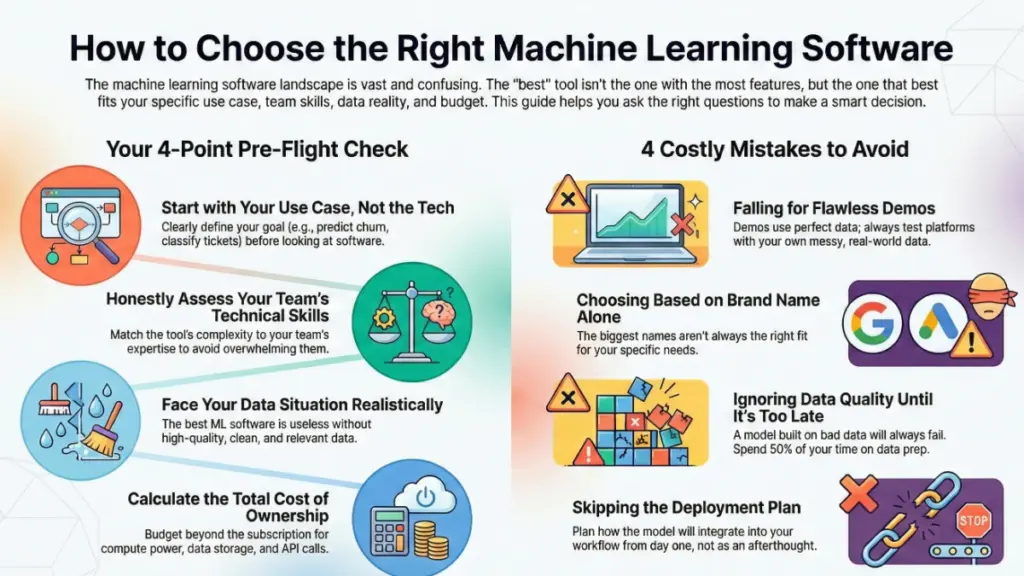
This is where most people get tripped up, and it’s exactly where I made my costliest mistakes early on. About three years ago, I convinced a client to invest in a premium ML platform that looked amazing in demos. We spent $15K on licenses and another month on implementation—only to discover it was way too complex for what they actually needed. That experience taught me to ask the right questions before committing to any ML software.
Start with your use case, not the technology. I know this sounds obvious, but you’d be surprised how many people do this backward. Are you trying to predict customer churn? Classify support tickets? Detect fraud? Personalize recommendations? Each use case has different requirements. For example, fraud detection needs real-time inference with low latency, while customer churn prediction can run on batch processing overnight. Last week, I talked someone out of buying an expensive real-time ML platform because their use case was perfectly fine with daily batch processing—we saved them about $30K annually.
Honestly assess your team’s technical capabilities. This is crucial and where people often lie to themselves. If your team doesn’t have data science or ML engineering experience, starting with TensorFlow or PyTorch is like trying to learn to fly by jumping into a fighter jet. I’ve seen this go wrong so many times. Instead, consider AutoML platforms or no-code tools that abstract away the complexity. You can always level up to more advanced tools as your team’s skills grow. One of my clients started with Obviously AI, learned the fundamentals, and six months later successfully transitioned to Azure ML when their needs became more complex.
Look at your data situation realistically. Machine learning is hungry for data—good, clean, labeled data. If you’re sitting on messy, unlabeled data, you need ML software with strong data preparation capabilities. I typically recommend platforms like Alteryx or even just starting with good old Python and pandas for data cleaning before you touch any ML tools. Here’s a hard truth: if you don’t have quality data, the fanciest ML software in the world won’t help you. I learned this when a retail client wanted to predict inventory needs but had three years of inconsistent, poorly tracked sales data. We spent six weeks just cleaning data before we could even think about building models.
Consider your budget—all of it. ML software costs go way beyond subscription fees. You’ve got compute costs for training models, storage for datasets, API calls for inference, and potentially licensing fees that scale with usage. Enterprise platforms can easily run $50K-$200K+ annually when you factor in everything. I keep detailed spreadsheets tracking total cost of ownership because the sticker price rarely tells the full story. For instance, AWS SageMaker might look affordable at first, but if you’re training large models frequently, those compute costs add up fast. I had one client whose monthly AWS bill went from $500 to $4,000 once they started seriously using SageMaker.
Think about integration and workflow fit. The best ML software in the world is useless if it doesn’t integrate with your existing systems. Does it connect to your data warehouse? Can it export to your BI tools? Does it fit into your development workflow? I recently helped a company choose between two ML platforms—they went with the slightly less powerful option because it had native Salesforce integration, which was critical for their sales team to actually use the predictions. The technically superior platform would’ve required custom API work that would’ve taken months.
Evaluate the deployment story early. This is something I wish I’d paid more attention to in my early days. Building a model is one thing; putting it into production where it can actually create value is entirely different. Some platforms make deployment dead simple with one-click options. Others require significant engineering work. Ask yourself: Do you need real-time predictions or batch processing? Will the model run in the cloud or on-premises? How will you monitor model performance over time? These questions should influence your choice from day one, not become surprises later.
The Top Machine Learning Software Platforms Worth Considering
I’ve spent thousands of hours with these platforms, and here’s my honest take on the ones that consistently deliver value. I’m going to be upfront about both strengths and weaknesses because that’s what I wish someone had told me when I was starting out.
Google Cloud AI Platform is my go-to recommendation for teams that already live in the Google ecosystem. The integration with BigQuery is seamless, and AutoML features are genuinely impressive—I’ve built production-quality image classification models in less than a day. The Vertex AI unified platform has made everything more cohesive since Google consolidated their ML services. Pricing is reasonable if you’re careful about resource management, typically starting around $300-500/month for small projects and scaling based on usage. The downside? The interface can feel overwhelming with so many options, and the documentation, while comprehensive, isn’t always beginner-friendly.
Amazon SageMaker is the most mature enterprise ML platform I’ve used. It’s got everything: notebooks, built-in algorithms, AutoML with Autopilot, model deployment, monitoring—the works. I’ve deployed mission-critical models here for Fortune 500 clients, and the reliability is top-notch. What I appreciate most is the flexibility; you can go as hands-on or automated as you want. The learning curve is significant though, and costs can spiral if you’re not monitoring usage closely. I typically budget $1,000-3,000/month for medium-sized projects, but I’ve seen enterprise deployments running $20K+ monthly.
Microsoft Azure Machine Learning has come a long way in the past two years. If you’re a Microsoft shop using Office 365, Azure, and Power BI, this is probably your best bet because everything talks to everything else. The AutoML capabilities are solid, and the visual designer makes it easier for less technical users to build pipelines. I used it last quarter to build a predictive maintenance system for a manufacturing client, and the integration with their existing Azure infrastructure was painless. Pricing is comparable to AWS—expect $500-2,000/month for typical projects.
DataRobot is my favorite AutoML platform for businesses serious about ML but lacking deep data science resources. It automates about 80% of the model-building process while still giving you enough control to make intelligent decisions. I’ve seen marketing teams and business analysts build legitimately good models with minimal training. The platform provides excellent explanations of what it’s doing, which helps teams learn and build trust in the models. The catch? It’s expensive—starting around $50K annually for enterprise licenses. But for the right use case, that ROI comes back quickly.
H2O.ai offers both open-source (H2O-3) and commercial (Driverless AI) options, which gives you flexibility as you scale. The open-source version is legitimately powerful and free, which is great for learning or smaller projects. Driverless AI is their AutoML platform, and while it’s less polished than DataRobot, it’s also more affordable (typically 30-40% less). I’ve used it for several financial services clients who needed sophisticated modeling but had budget constraints. The automatic feature engineering is particularly impressive.
Obviously AI and Akkio represent the no-code ML movement, and honestly, they’re game-changers for the right users. Obviously AI is incredibly intuitive—I’ve watched non-technical business users build working models in under an hour. Akkio is similar but leans harder into business intelligence use cases. Both start around $75-165/month, making them accessible for small businesses and startups. The limitation is that you’re working within their templates and frameworks—custom or complex use cases will hit walls. But for standard prediction, classification, and forecasting tasks with structured data, they’re surprisingly capable.
For specialized needs, I often recommend domain-specific tools. OpenAI’s API and Anthropic’s Claude API are my top picks for NLP tasks—they’re powerful, relatively easy to implement, and pricing is based on usage (starting around a few cents per 1,000 tokens). Roboflow dominates the computer vision space for object detection and image classification, especially if you need to label training data (plans start at $0 for small projects, scaling to $250-500/month for production use). Hugging Face provides access to thousands of pre-trained models and is fantastic for NLP work if you have some technical capability.
Common Mistakes to Avoid (From Someone Who’s Made Them)
I’ve wasted probably $10K and countless hours on ML software mistakes over the years. Let me save you the pain by sharing what I wish I’d known earlier.
Mistake #1: Falling for impressive demos. ML software companies are masters at showing cherry-picked examples that make everything look easy. I once signed a year-long contract with a platform after seeing an incredible demo, only to find that their demo dataset was perfectly clean and their real-world performance was maybe 60% of what they showed. Now, I always ask to test with my own data before committing. Most legitimate platforms offer trials or proof-of-concept periods—use them extensively.
Mistake #2: Not accounting for the total cost. The subscription fee is just the start. When I implemented my first enterprise ML project, I budgeted for the $2,000/month platform cost but completely forgot about compute resources, data storage, and API calls. Our actual monthly spend ended up around $6,000. Now I create detailed cost models before starting any project, including: platform fees, compute/training costs, storage, inference costs, data labeling services, and potential overage charges. Always build in a 30-40% buffer for unexpected costs.
Mistake #3: Ignoring data quality until it’s too late. This is the mistake that’s bitten me the hardest. You cannot build good ML models on bad data, period. I’ve seen teams spend months building sophisticated models only to discover their training data was biased, incomplete, or inconsistent. The rule I follow now: spend at least 50% of your project timeline on data quality before you even open the ML software. It’s boring work, but it’s the difference between a model that works and one that doesn’t.
Mistake #4: Choosing tools based on brand name rather than fit. Just because Amazon, Google, or Microsoft make it doesn’t mean it’s right for your use case. I had a startup client who insisted on using SageMaker because “it’s Amazon” when a simpler tool like Obviously AI would’ve been perfect for their needs and a tenth of the cost. Match the tool to your actual requirements, not to the impressive logo.
Mistake #5: Skipping the deployment planning. This might be the most common mistake I see. Teams get excited about building models and completely forget to plan how they’ll actually use them in production. How will the model integrate with existing systems? Who will maintain it? How will you monitor performance? What happens when it needs retraining? I now make deployment planning part of the initial software selection process, not an afterthought.
Mistake #6: Underestimating the learning curve. Every ML platform requires time to learn effectively, even the “no-code” ones. I made the error of committing to a tight deadline without accounting for learning time, and we ended up delivering a subpar solution because we didn’t fully understand the platform’s capabilities. Now I build in at least 2-4 weeks of learning and experimentation time before any production deadlines.
Getting Started: Your Practical Next Steps
After reading this far, you might feel overwhelmed by options. That’s normal—I felt the same way three years ago. Here’s exactly how I’d approach choosing and implementing ML software if I were starting today.
Step 1: Define your first project clearly. Don’t try to solve all your ML needs at once. Pick one specific, valuable use case to start with. Make it something that’s genuinely useful but not mission-critical—you want room to learn without catastrophic risks. For example, “predict which customers are likely to churn in the next 90 days” is specific and valuable. “Use AI to improve our business” is too vague to be useful.
Step 2: Assess your resources honestly. Write down: your team’s technical skills, available budget (including hidden costs), timeline expectations, and data situation. This assessment will quickly narrow your options. If you’re a small team with limited technical skills and a $500/month budget, enterprise platforms are off the table immediately. That’s fine—there are excellent alternatives.
Step 3: Start with trials or freemium versions. Most ML platforms offer free trials or freemium tiers. I recommend testing 2-3 options simultaneously with the same use case. This gives you real comparative data about ease of use, performance, and fit. I typically spend 1-2 weeks in trial mode before making any purchasing decisions. Load your actual data, not demo datasets, and try to build something real.
Step 4: Consider starting with specialized tools. If your use case is text analysis, computer vision, or another well-defined domain, starting with a specialized tool often beats general-purpose platforms. They’re typically easier to use, faster to implement, and more affordable. You can always expand to more comprehensive platforms later as your needs grow.
Step 5: Plan for iteration and learning. Your first ML project probably won’t be perfect, and that’s okay. Build in time for experimentation, learning, and improvement. I typically recommend planning in 2-week sprints with regular check-ins to assess what’s working and what isn’t. The goal of your first project is as much about learning as it is about business value.
Step 6: Document everything. This sounds boring, but trust me—document your experiments, what works, what doesn’t, and why you made specific decisions. When you’re six months in and trying to remember why you chose specific model parameters or configurations, you’ll thank yourself. I use simple Google Docs to track my ML project decisions, and it’s saved me countless hours.
One more piece of advice: don’t let perfect be the enemy of good. The ML software landscape changes rapidly, and there will always be a newer, shinier tool launching. Start with something that fits your needs today and be prepared to evolve as you learn and grow. I’ve changed my ML stack three times in the past four years, and that’s normal. The key is making progress, not finding the perfect tool that you’ll use forever.
Wrapping Up: The Right ML Software Is Out There
Look, I’ve spent the last several years in the ML software trenches, testing tools, making mistakes, and figuring out what actually works in the real world. Here’s what I want you to remember: the best machine learning software isn’t the one with the most features, the biggest AI models, or the most impressive marketing. It’s the one that fits your specific needs, your team’s capabilities, and your budget—and actually helps you solve real problems.
Start with a clear, specific use case. Be brutally honest about your technical capabilities and data situation. Test multiple options with your actual data before committing. And remember that ML software is a tool, not magic—it requires good data, thoughtful implementation, and ongoing maintenance to deliver value.
The ML landscape will keep evolving rapidly. New tools will launch, existing platforms will add features, and prices will change. But the fundamental questions I’ve walked you through here—what are you trying to accomplish, who’s using it, and what’s your real budget—those remain constant. Answer those questions first, and the right software choice becomes much clearer.
If you’re feeling stuck or unsure where to start, that’s completely normal. I was there once too. My advice? Pick one tool from the appropriate category based on your needs, commit to a 30-day trial or proof of concept, and actually build something. You’ll learn more from hands-on experience than from reading another dozen comparison articles.
What’s your biggest challenge with choosing ML software? Drop a comment below—I read every one and often reply with specific advice. And if you found this guide helpful, consider sharing it with someone else trying to navigate this complex landscape. We’re all figuring this out together.