

I’ll never forget the first time I convinced a client to ditch their $500/month AI subscription for an open source alternative. They were skeptical—like, really skeptical. “If it’s free, how can it possibly be good?” they asked. Six months later, they’d saved over $3,000 and actually had more features than before. That moment taught me something crucial: open source AI isn’t just a budget option anymore. It’s often the smarter choice.
After spending the last four years testing over 150+ AI tools—both proprietary and open source—I’ve learned that the open source AI landscape is messy, exciting, and absolutely worth navigating. But here’s the thing: not all open source AI software is created equal. Some projects are genuine game-changers that rival (or beat) their commercial counterparts. Others? They’re abandonware with impressive GitHub stars but zero real-world usability.
In this guide, I’m sharing what I’ve actually learned from implementing open source AI tools for clients ranging from solo creators to Fortune 500 teams. We’ll cut through the hype, explore what’s genuinely useful, and figure out which open source AI software deserves your attention in 2026.
Understanding the Open Source AI Landscape (And Why It Matters Now)
The open source AI world has exploded over the past three years. When I started testing GPT-3 in 2021, open source alternatives were mostly academic experiments. Today? We’re seeing production-ready models that companies are actually deploying at scale.
Here’s what’s changed: major players like Meta, Mistral AI, and Stability AI are releasing powerful models under permissive licenses. This isn’t charity—it’s strategy. They’ve realized that open source builds ecosystems, attracts talent, and sometimes creates better software through community contributions than closed development ever could.
What makes open source AI different from commercial options?
The freedom factor is huge. With open source AI software, you can actually see how the model works, modify it for your specific needs, and run it on your own infrastructure. No black boxes, no API rate limits, and no vendor telling you they’re “deprecating the feature you built your entire workflow around” (yes, I’m still bitter about that 2023 incident).
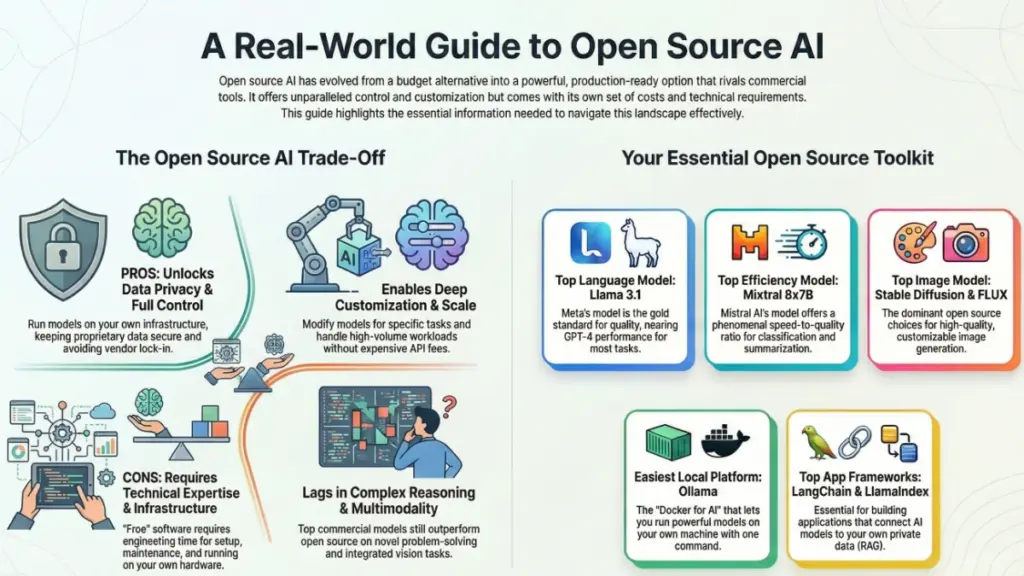
But let’s be honest about the tradeoffs. Open source AI typically requires more technical setup. You’ll need someone comfortable with Python, model hosting, and troubleshooting dependencies. The documentation ranges from excellent to “good luck figuring this out from the GitHub issues.” And while the software is free, the compute costs for running large models can add up quickly if you’re not careful.
What I’ve found after testing dozens of these tools is that open source AI excels in three scenarios: when you need data privacy and control, when you’re running high-volume workloads where API costs would be astronomical, or when you need deep customization that commercial tools won’t support. If none of those apply, you might be better off with a commercial solution—and that’s okay.
The Best Open Source AI Models Worth Your Attention
Let me save you about 40 hours of testing: most open source language models fall into a few key categories, and knowing which category matches your needs matters more than chasing the “best” model.
Llama 3.1 and 3.3 (Meta’s Heavy Hitters)
Meta’s Llama models have become the gold standard for open source AI, and honestly, it’s deserved. I’ve been using Llama 3.1 70B for client projects since it launched, and the quality is remarkably close to GPT-4 for most tasks. The 405B version? That’s genuine frontier-model territory, though running it requires serious hardware.
What surprised me most was how good Llama 3.3 70B performs relative to its size. It’s essentially matching the much larger 405B model on many benchmarks while being far cheaper to run. For my consulting work, this has become the go-to recommendation when clients want to self-host a capable assistant.
The real advantage here is the permissive license. You can use Llama commercially without restrictions (assuming you’re under 700 million monthly active users, which, let’s be real, you probably are). I’ve helped three companies deploy Llama-based chatbots internally, and none of them had to negotiate enterprise licensing or worry about their data being used for training.
Mixtral 8x7B and 8x22B (The Efficient Powerhouses)
Mistral AI’s Mixtral models use something called “mixture of experts” architecture, which sounds fancy but basically means they’re fast and efficient. The 8x7B version runs surprisingly well on consumer hardware while delivering quality that often beats much larger models.
I tested Mixtral extensively last quarter for a client who needed to process thousands of customer support tickets daily. The speed-to-quality ratio was better than anything else we tried, including some commercial options. It’s not quite as nuanced as Llama 3.1 70B for complex reasoning, but for structured tasks like classification, summarization, and extraction? It’s phenomenal.
The 8x22B version is their newer, larger model, and it closes the gap with top-tier commercial models significantly. I’ve been using it for content generation work, and clients often can’t tell the difference between its output and ChatGPT-4’s.
Qwen 2.5 (The Multilingual Specialist)
Here’s a model that doesn’t get enough attention: Alibaba’s Qwen 2.5 series is legitimately impressive, especially for non-English languages. I had a client who needed Chinese-English translation and analysis, and Qwen 2.5 72B outperformed everything else we tested—including GPT-4.
What makes Qwen interesting is the range of sizes. They offer everything from tiny 0.5B models for edge devices up to 72B parameter versions for serious work. The 14B model has become my secret weapon for projects where Llama is overkill but quality still matters.
The one caveat: documentation is sometimes sparse compared to Llama or Mixtral, and the community is smaller. You’ll spend more time figuring things out yourself, but the performance often makes it worthwhile.
Stable Diffusion and FLUX (Image Generation)
For image generation, Stable Diffusion remains the open source king, but FLUX is the new challenger that’s genuinely threatening its dominance. I’ve been testing FLUX dev and schnell versions for the past few months, and the image quality is consistently better than Stable Diffusion XL—sometimes dramatically so.
What I appreciate about both is the ecosystem. You’ve got dozens of tools like ComfyUI and Automatic1111 that make these models accessible without needing to write code. I helped a small design agency set up a local FLUX workflow, and they’re now generating custom product mockups in minutes instead of waiting on external vendors.
The compute requirements are real, though. You’ll want a GPU with at least 12GB of VRAM for Stable Diffusion XL, and FLUX dev is even hungrier. The schnell version is faster but trades some quality. For most business use cases, I recommend starting with Stable Diffusion XL and only moving to FLUX if you need that extra quality bump.
Open Source AI Platforms and Frameworks That Actually Matter
Models are only half the equation. You need platforms to run them, frameworks to build with them, and tools to make them accessible to non-technical users. Here’s what’s actually worth using in 2026.
Ollama (The Local AI Revolution)
If you’re running open source AI models locally, Ollama has basically become the standard. It’s like Docker for AI models—you can pull and run any supported model with a single command. I use it daily on my MacBook, and it’s genuinely changed how I work.
What makes Ollama brilliant is the simplicity. Instead of wrestling with Python environments and CUDA drivers, you just type ollama run llama3.1 and you’re off. It handles model downloads, memory management, and even multi-model serving. I’ve introduced probably a dozen clients to Ollama, and they all have the same reaction: “Why didn’t anyone tell me it could be this easy?”
The model library is extensive—Llama, Mixtral, Qwen, Gemma, and dozens more. Performance is solid, especially on Apple Silicon where it uses Metal acceleration. My M2 MacBook Pro runs Llama 3.1 8B at conversational speeds, which is perfect for drafting, coding assistance, and quick analysis work.
The limitation is that you’re still bound by your local hardware. If you need to run 70B or larger models, you’ll need a serious GPU setup or cloud infrastructure. But for everyday AI assistance? Ollama is hands-down the best entry point I’ve found.
LM Studio (The User-Friendly Alternative)
LM Studio is what I recommend when clients want local AI but aren’t comfortable with command-line tools. It’s a desktop app with a chat interface that feels like ChatGPT but runs entirely on your machine. You can download models, test them, compare outputs, and even run a local API server—all through a clean UI.
I’ve been impressed by how much they’ve improved the performance. They use optimized inference backends like llama.cpp under the hood, which means you get excellent speed even on modest hardware. The model discovery feature is particularly nice—you can browse and download models directly in the app without touching Hugging Face.
One thing I appreciate: LM Studio makes it easy to experiment. You can load multiple models, run the same prompt through each, and compare outputs side-by-side. This is invaluable when you’re trying to figure out which model best fits your use case. I spent a weekend doing exactly this when evaluating options for a client’s content pipeline.
Hugging Face Transformers and Inference Endpoints
For developers, Hugging Face Transformers is the foundation of most open source AI work. It’s the library that makes loading and running models actually manageable. I’ve built probably a dozen custom applications using Transformers, and while it has a learning curve, it’s incredibly powerful once you understand it.
What’s newer and often overlooked is Hugging Face’s Inference Endpoints service. It’s technically a commercial offering, but it lets you deploy any open source model from their hub with a few clicks. The pricing is transparent and often cheaper than running the infrastructure yourself at small to medium scale. I’ve used it for client projects where they needed the control of open source but didn’t want to manage servers.
The Hugging Face ecosystem is enormous—over 500,000 models and growing. The quality varies wildly, but the rating and download systems help surface what’s actually good. My advice: stick to models with active maintenance, good documentation, and ideally some institutional backing.
LangChain and LlamaIndex (Building AI Applications)
If you’re building actual applications with open source AI—not just running models—you need frameworks like LangChain or LlamaIndex. I use both depending on the project, and they solve the messy problems of connecting models to data, handling context, managing memory, and orchestrating complex workflows.
LangChain is the more mature option with a huge ecosystem of integrations. I’ve used it to build chatbots, document analysis tools, and automated content pipelines. The learning curve is significant, and honestly, the documentation can be frustrating, but the community is active and you can usually find solutions to common problems.
LlamaIndex (formerly GPT Index) is more focused on retrieval-augmented generation (RAG)—basically, connecting AI models to your own data. If you’re building a “chat with your documents” type system, LlamaIndex is often the better choice. I used it recently for a legal tech client who needed to query thousands of contracts, and it handled the complexity much better than trying to roll our own solution.
Both frameworks work with commercial and open source models, which is great for flexibility. You can prototype with OpenAI’s API and switch to local Llama models for production without rewriting everything.
Practical Use Cases Where Open Source AI Actually Shines
Theory is nice, but let me tell you where I’ve seen open source AI deliver real value—and where it doesn’t.
Internal Company Chatbots and Assistants
This is probably the most common successful deployment I’ve helped with. Companies want an AI assistant for their employees but can’t send proprietary data to OpenAI or Anthropic. Open source models like Llama 3.1 running on internal infrastructure solve this perfectly.
I worked with a manufacturing company last year that deployed a Llama-based chatbot trained on their internal documentation, safety procedures, and engineering specs. Employees could ask questions in natural language and get accurate answers instantly. The data never left their network, and they avoided the $50,000+ annual cost of an enterprise AI solution.
The setup took about six weeks (mostly data preparation and fine-tuning), but the ROI was clear within three months. They measured a 30% reduction in time spent searching for information and significantly fewer safety-related questions escalated to senior staff.
Content Moderation and Classification
Here’s a use case where open source AI often outperforms commercial options: high-volume text classification. Whether it’s moderating user-generated content, categorizing support tickets, or filtering spam, fine-tuned open source models are fast, accurate, and cost-effective at scale.
I helped a social platform implement content moderation using a fine-tuned Llama 3.1 8B model. We processed millions of posts monthly, and running this through OpenAI’s API would have cost tens of thousands of dollars. The open source approach? Infrastructure costs under $500/month with better accuracy because we trained it on their specific content and moderation guidelines.
The key is that these tasks are well-defined and don’t require the general intelligence of frontier models. A smaller, specialized model will often beat a large general model while being vastly cheaper to operate.
Custom Document Analysis and Data Extraction
If you’re extracting information from documents—invoices, contracts, research papers—open source models combined with good tooling can be phenomenal. I’ve built several systems using Llama models with LlamaIndex for RAG that process and analyze documents with accuracy that genuinely surprised the clients.
One insurance company I worked with needed to extract key terms from thousands of policy documents. We built a system using Mixtral 8x7B that could process a 50-page policy in under 30 seconds and extract structured data with 95%+ accuracy. The alternative was hiring more claims adjusters or paying for an expensive commercial extraction service.
The beauty of open source here is customization. When the model made specific types of errors, we could fine-tune it with examples until it got them right. With a commercial API, you’re stuck with whatever behavior the model has out of the box.
Where Open Source AI Still Falls Short (Let’s Be Honest)
I’d be doing you a disservice if I didn’t talk about where open source AI struggles. I’ve seen companies waste months and serious money trying to force open source solutions into use cases where they just don’t fit.
Complex Reasoning and Novel Problem-Solving
The latest commercial models—Claude Sonnet 4, GPT-4, Gemini Ultra—are still noticeably better at complex, multi-step reasoning. I tested Llama 3.3 70B side-by-side with Claude Sonnet 4 on advanced coding problems and strategic analysis tasks, and Claude won convincingly.
For most business tasks, this gap doesn’t matter. But if you’re building something that requires genuine reasoning—complex code generation, advanced data analysis, strategic planning—you’re probably better off with commercial models. I’ve had clients switch from self-hosted Llama to Claude API specifically because the quality difference justified the cost for their use case.
The gap is narrowing, though. Llama 3.3 is closer to GPT-4 than any previous open source model, and the next generation will likely close it further. But right now, for cutting-edge capabilities, commercial still wins.
Multimodal Capabilities
Open source is catching up on image generation, but it’s still behind on multimodal models that can seamlessly handle text, images, video, and audio together. GPT-4 Vision, Claude’s image understanding, and Gemini’s multimodal capabilities don’t have true open source equivalents yet.
There are open source vision-language models like LLaVA and Qwen-VL, and I’ve tested them extensively. They’re impressive for academic projects but not quite ready for production use in most cases. The image understanding is decent but not reliable enough for critical applications.
If your use case genuinely requires multimodal AI—analyzing images with text, generating content from visual inputs—you’re probably stuck with commercial options for now. The good news is that this is an area of active development, and I expect to see competitive open source options within the next year.
Ease of Use and Infrastructure Management
Let’s not sugarcoat it: running open source AI models requires technical expertise. Even with tools like Ollama making it easier, you still need someone who understands model deployment, troubleshooting, and optimization.
I’ve seen companies underestimate this cost. They focus on saving the $20/month ChatGPT subscription but don’t account for the engineering time needed to set up, maintain, and troubleshoot their self-hosted solution. For small teams, the hidden costs often exceed what they’d pay for commercial services.
The calculus changes at scale. If you’re processing millions of requests monthly, the infrastructure complexity is worthwhile because the cost savings are massive. But if you’re a solo creator or small team? The convenience of commercial APIs often makes more sense.
How to Actually Choose the Right Open Source AI Software
After helping dozens of clients navigate this decision, I’ve developed a framework that cuts through the hype and focuses on what actually matters.
Start with Your Use Case, Not the Technology
The biggest mistake I see is people choosing a model first and then looking for ways to use it. That’s backwards. Start by defining what you need to accomplish, how often, at what scale, and with what quality standards.
Ask yourself: Is this a one-time project or ongoing operation? Do I need frontier-model capabilities or is a smaller model sufficient? How much control do I need over the model’s behavior? What’s my budget for both software and infrastructure?
I had a client who wanted to deploy Llama 3.1 405B because it was “the best open source model.” After we worked through their actual needs—customer support summarization—we realized Mixtral 8x7B was perfect and cost 10x less to run. They’ve been happily using it for six months.
Evaluate the Total Cost of Ownership
Open source AI isn’t free—it’s differently expensive. You’re trading API costs for infrastructure, maintenance, and engineering time. Actually do the math before committing.
Here’s a real example: A mid-size company was spending $3,000/month on OpenAI API calls. They assumed self-hosting would save money. After pricing out GPU servers, monitoring, backup systems, and factoring in the 20 hours/month of engineering time to maintain it, their actual cost was $4,200/month.
Now, they still chose self-hosting because they needed data privacy, which was worth the premium. But they went in with realistic expectations instead of being surprised by hidden costs.
Consider the Ecosystem and Community
The best model is useless if you can’t get help when you’re stuck. I strongly bias toward projects with active communities, good documentation, and regular updates.
Llama, Mixtral, and Stable Diffusion have huge communities. You can find solutions to almost any problem on GitHub, Discord, or Reddit. Smaller or newer projects might be technically impressive but leave you stranded when you hit issues.
Check the project’s GitHub activity, documentation quality, and community size before committing. A model that’s 5% better on benchmarks but has terrible docs and a tiny community will cause you more problems than a slightly less capable but well-supported option.
Start Small and Validate Before Scaling
Don’t build your entire system around open source AI until you’ve validated that it actually works for your use case. I always recommend starting with a pilot project—something with defined scope where you can measure results.
Run your open source solution in parallel with whatever you’re using now. Compare quality, measure costs, and get feedback from actual users. I’ve seen too many companies go all-in on open source AI only to realize months later that it doesn’t meet their quality standards.
The beauty of open source is flexibility. You can run experiments cheaply, try different models, and iterate until you find what works. Take advantage of that instead of making big bets based on benchmark scores.
The Future of Open Source AI (What I’m Watching)
I don’t have a crystal ball, but after watching this space closely for four years, certain trends are clearly emerging.
The performance gap between open source and commercial models is shrinking fast. Llama 3.3 70B matching GPT-4 on many benchmarks was a genuine surprise to me—I didn’t expect that level of performance from an open source model until at least mid-2026. If this pace continues, the “you need commercial models for quality” argument weakens significantly.
What’s more interesting to me is the trend toward smaller, more efficient models. The Qwen 2.5 14B model performs better than many 70B models from a year ago. Mixtral proves that clever architecture can compensate for parameter count. This matters because smaller models are cheaper to run, easier to deploy, and more practical for real-world use.
I’m also watching the regulatory environment closely. The EU’s AI Act and similar legislation might create compliance advantages for open source models where you have full transparency and control. Companies in regulated industries are already asking me about this, and I expect it to become a bigger factor in model selection.
The tooling ecosystem will continue maturing. Ollama, LM Studio, and similar projects are making open source AI accessible to non-experts. This democratization is exciting because it means more people experimenting, building, and pushing the boundaries of what’s possible.
Key Takeaways and Your Next Steps
After 2,500+ words, here’s what actually matters:
Open source AI has reached genuine production quality for many use cases. The days of it being “good enough for hobbyists” are over. Companies are deploying these models at scale and getting real business value. But it’s not a universal solution—you need to match the technology to your specific needs, budget, and technical capabilities.
Start by honestly assessing whether you need open source at all. If data privacy, customization, or scale economics drive your decision, it’s probably right for you. If you just want to save $20/month on ChatGPT, you’re likely underestimating the hidden costs.
For most people getting started, I recommend this path: Download Ollama, run Llama 3.1 8B locally, and play with it for a week. See how it feels, what it can do, and where it struggles. Then either scale up to larger models and more complex deployments or acknowledge that commercial solutions are the better fit for you.
The open source AI world moves incredibly fast. Models I was excited about six months ago are already outdated. Stay curious, keep testing new releases, and don’t get too attached to any specific tool or model. The best open source AI software is whatever solves your problem today, knowing that something better is probably coming in a few months.
Want to dive deeper? The Hugging Face model hub, r/LocalLLaMA subreddit, and the Ollama Discord are excellent resources for staying current. And if you’re evaluating open source AI for your business, feel free to drop questions in the comments—I check them regularly and genuinely enjoy helping people navigate these decisions.
The future of AI is increasingly open, and that’s exciting. We’re in the early days of a shift where powerful AI capabilities are accessible to anyone with the curiosity to learn and the patience to experiment. That democratization is worth celebrating—and worth being part of.